

Organizations waste up to 35% of their SaaS budget on unused licenses. With the July 2026 price increases pushing Microsoft 365 E5 costs to $60 per user, this inefficiency is a direct hit to your bottom line. If your IT team spends hours every week on manual seat assignments, you're likely overlooking "ghost" licenses that drain resources. Effective microsoft 365 license management automation is no longer optional; it's the only way to maintain a lean, secure digital environment.
You probably recognize the sting of discovering inactive users still tied to expensive premium plans months after offboarding. Managing a complex mix of licenses across various departments often feels like a losing battle against organizational disorder. This guide promises to transform that chaos into a precise, zero-waste system by combining native Microsoft tools with intelligent governance workflows. We'll show you how to reclaim your budget and establish a set-it-and-forget-it onboarding process that ensures total operational transparency and financial health.
Key Takeaways
- Eliminate security risks and financial leaks by transitioning from manual license assignment to a structured, rule-based provisioning system.
- Leverage Entra ID group-based licensing to ensure new hires receive the correct tools on day one without administrative intervention.
- Avoid the "automation trap" where native tools provision seats but fail to reclaim them, leading to unchecked microsoft 365 license management automation sprawl.
- Implement a closed-loop lifecycle that monitors actual feature usage to automatically right-size users from expensive E5 plans to more cost-effective alternatives.
- Use a License Health Score to maintain continuous oversight and identify exactly where your SaaS budget is being recovered in real time.
The ROI of Microsoft 365 License Management Automation
Manual vs. Automated Provisioning: The Cost Gap
Manual seat provisioning drains significant IT productivity for every new hire. Administrators often spend hours each month on repetitive tagging tasks that are prone to human error. These errors frequently lead to over-licensing, where an employee receives an expensive E5 seat when a Business Standard license would suffice. This lack of precision breaks the microsoft 365 license management lifecycle, creating a gap where security risks and wasted spend thrive. Automated workflows replace these manual touchpoints with precision, ensuring that the right user has the right license at the right time. By removing the human element from routine assignments, you reduce the risk of orphaned accounts and unauthorized access.
The 2026 Landscape: Why Automation is Non-Negotiable
The Microsoft ecosystem is more expensive and complex than ever before. Following the July 2026 price increases, Microsoft 365 E5 costs have reached $60 per user, while Copilot add-ons require an additional $30 per month. Manual oversight cannot keep pace with these rising costs or the rapid scaling required by modern organizations. Using Microsoft Entra ID for group-based rules is a foundational step, but it is only the beginning. True microsoft 365 license management automation provides the oversight needed to ensure every dollar spent correlates with a used feature. It transforms license management from a reactive administrative burden into a proactive financial strategy that supports rapid growth and remote work flexibility. This level of transparency is the only way to defend your IT budget against license sprawl and underutilization.
As organizations adopt these AI-enhanced tools, they must also safeguard the integrity of their output. For professionals wrongly accused of using AI on writing while using native Microsoft assistance, specialized integrity tools are becoming as essential as license management.
Implementing Native Group-Based Licensing in Entra ID
Native microsoft 365 license management automation begins with group-based licensing. This feature shifts the administrative burden from individual user accounts to security groups, ensuring that permissions and software access are inherited automatically. To build a resilient system, visibility is paramount; without it, automation can quickly lead to over-provisioning. Industry experts often highlight that managing M365 for enterprises requires a clear understanding of how these automated assignments impact the broader financial health of the organization.
Implementing this technical baseline requires a structured approach to avoid configuration errors:
- Step 1: Verify Requirements. Confirm your tenant has Entra ID P1 or P2 licenses. These are mandatory for group-based assignment functionality.
- Step 2: Define Security Groups. Create groups based on department, job role, or geographical location to mirror your organizational structure.
- Step 3: Map Licenses. Assign specific M365 SKUs to the group level within the Entra portal.
- Step 4: Trigger Inheritance. Add users to their respective groups. The system will automatically provision the assigned seats.
- Step 5: Monitor Assignment States. Regularly check for "Assignment Errors" in the portal, which occur when license pools are empty or service plan conflicts arise.
PowerShell vs. Entra ID Admin Center
The Entra ID Admin Center provides a reliable graphical interface for department-level management. It's accessible for business managers and offers immediate visual feedback. Conversely, PowerShell remains the standard for bulk assignments and complex migrations. However, custom scripts can become a maintenance nightmare if they aren't documented or updated as microsoft 365 license types evolve. For most organizations, the graphical interface combined with dynamic groups offers the best balance of speed and stability.
Common Pitfalls in Group-Based Automation
Automation is not a complete "set-and-forget" solution. Conflict management is a frequent hurdle; when a user belongs to multiple groups with different license levels, the system may struggle to resolve which service plan takes priority. Even more critical is the "License Exhaustion" problem. If your automation rules attempt to assign more seats than you have purchased, the process stalls without warning. This creates onboarding delays and security gaps. To maintain total oversight of these automated assignments, a governance platform provides the real-time visibility that native Microsoft tools often lack.
The Automation Trap: Why Native Tools Often Increase SaaS Spend
Native tools excel at provisioning but fail at reclamation. This creates the "Set and Forget" syndrome. While group-based rules handle the initial push, they lack the intelligence to pull licenses back when they are no longer needed. This one-way street is a primary driver of license sprawl. Without usage-based logic, your microsoft 365 license management automation becomes a mechanism for guaranteed overspending. It ignores the reality of "Ghost Users", employees who are provisioned by a rule but never actually consume the service. These accounts sit active on your bill, draining resources without providing any operational value.
Simple assignment is not governance. True oversight requires a system that monitors activity and intervenes when a license sits idle. Organizations must move beyond static rules to reduce m365 subscription costs effectively. Relying solely on native tools often results in a bloated tenant where the cost of unused seats compounds every month. A vigilant system doesn't just ask if a user can have a license; it asks if they need it based on their last 30 days of activity. This distinction is the difference between a growing budget and a lean, optimized operation.
The Hidden Cost of Inactive Users
Organizations waste up to 35% of their SaaS budget on unused or redundant seats. Native Microsoft reports provide a retrospective view, but they are often too late to prevent monthly bill shock. By the time you identify an inactive user in the admin center, you've already paid for months of wasted access. Proactive microsoft 365 license optimization requires a real-time audit of feature usage. If a user holds an E5 license but only accesses web-based Outlook, the system should flag them for a downgrade immediately. This level of precision prevents ghost overhead from eroding your IT budget.
The Entra ID Premium Tax
Native automation isn't free. As discussed, group-based licensing requires Entra ID P1 or P2. For many SMBs, the monthly cost of these premium identity licenses can outweigh the savings generated by simple automation. It's a premium tax for basic functionality. Third-party platforms like the LicenseIQ Platform offer a more efficient alternative. They provide advanced microsoft 365 license management automation and automated governance workflows without requiring the most expensive Microsoft identity tiers. This ensures your savings aren't immediately consumed by higher subscription fees. You gain total clarity and spend recovery without the mandatory overhead of premium Microsoft SKUs.
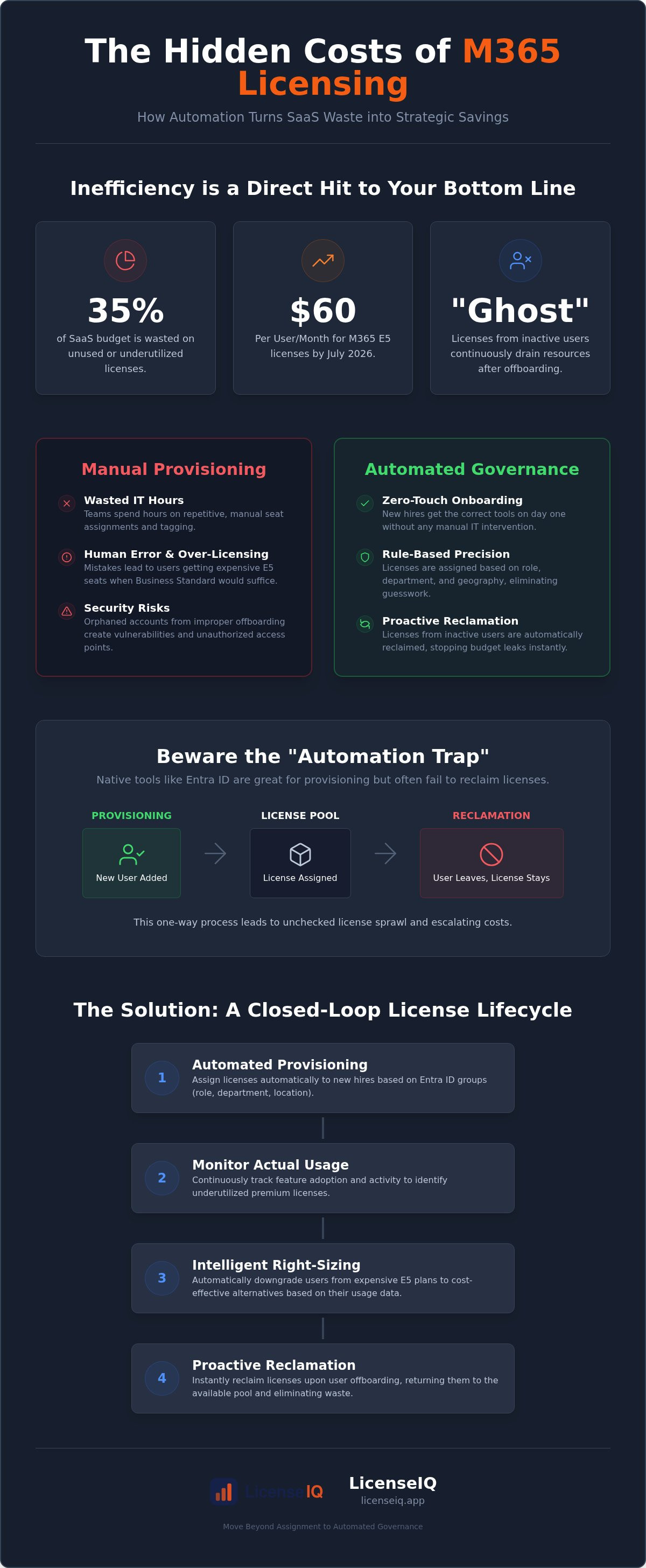
Designing a Closed-Loop Lifecycle: From Provisioning to Reclamation
A linear workflow is a financial liability. True efficiency requires a circular model where every provisioned seat has a clear path back to the available pool. Integrating microsoft 365 license management automation into the entire user lifecycle ensures that your tenant remains lean and secure. It starts with dynamic groups for onboarding but must extend into mid-cycle usage monitoring and terminal reclamation. This closed-loop approach prevents the accumulation of "zombie" licenses that typically inflate enterprise budgets by 30% or more.
Onboarding should be instantaneous. Dynamic groups based on user attributes allow for zero-touch provisioning, ensuring new hires have the tools they need on Day 1. However, the lifecycle doesn't end at assignment. Mid-cycle right-sizing is the most overlooked phase of governance. If a user holds an expensive E5 seat but fails to utilize premium security or analytics features, the system should trigger an automated downgrade to E3. This proactive adjustment aligns your monthly spend with actual operational requirements without impacting productivity.
Automated reclamation is the final safeguard against waste. Setting triggers for users who have been inactive for 30 days or more allows the system to return licenses to the pool without manual intervention. This ensures that you aren't paying for seats that aren't being used. By closing the loop, you maintain a "just-in-time" licensing model that scales naturally with your headcount.
Automating Offboarding for Security and Savings
Offboarding is a critical security event. An orphaned account with an active license is a prime target for unauthorized access. By automating the reclamation process, you ensure that licenses are revoked the moment a user leaves the organization. This immediate action protects corporate data while simultaneously stopping the billing clock. Implementing a comprehensive office 365 offboarding checklist serves as the technical foundation for these automated workflows. It transforms a manual administrative task into a predictable, secure process that guarantees no license is left active longer than necessary.
Usage-Based Automation Triggers
Precision governance relies on data-driven triggers. You can set rules that monitor specific activity levels across the suite. For instance, if a user hasn't opened Outlook or Teams in 45 days, the system can automatically remove the license and notify IT. This level of microsoft 365 license management automation also aids in Shadow IT discovery. By scanning for active licenses that aren't tied to known business processes, you can uncover and consolidate redundant third-party applications. This visibility is the cornerstone of a healthy, optimized digital environment.
To see how these workflows look in practice, explore our Automated Governance Workflows.
LicenseIQ: Moving Beyond Assignment to Automated Governance
Native tools provide the plumbing for microsoft 365 license management automation, but they lack the intelligence to manage the financial health of your tenant. LicenseIQ is the AI-native layer that sits on top of your Microsoft infrastructure. It transforms static provisioning into a proactive governance system. Connection takes minutes. You don't need complex PowerShell scripts or dedicated IT staff to maintain it. Once connected, the platform acts as a vigilant digital auditor, uncovering the obscured details of your SaaS spend that native portals often hide.
The core of this oversight is the License Health Score. This real-time metric provides immediate clarity on your automation performance. It measures how effectively your licenses are utilized across the organization. A low score identifies specific risks, such as inactive users holding premium seats or redundant license assignments. A high score confirms that your resources are being monitored by a precise and efficient system. This transparency is the cornerstone of modern digital management.
Visibility translates directly into financial recovery through the Spend Recovery Dashboard. This interface provides the visual proof of your automation success. It quantifies the exact dollar value saved through your automated workflows. You no longer have to guess if your right-sizing efforts are working. The dashboard displays the results in a structured, logical manner, allowing for quick scanning and rapid comprehension by both technical leadership and business managers.
AI-Driven Governance Workflows
LicenseIQ moves beyond the limitations of group-based licensing by using the Model Context Protocol to identify optimization opportunities automatically. Static rules can only assign licenses based on predefined attributes. Intelligence governs based on actual behavior. The platform analyzes usage patterns to determine if a user truly requires their current tier. It identifies the gap between assigned permissions and real-world application. This transition from static rules to active intelligence ensures that your microsoft 365 license management automation is always one step ahead of waste. You can verify your own tenant efficiency today with a free health check on the LicenseIQ Homepage.
SMB-Specific FinOps
Most enterprise tools require massive budgets and specialized teams to operate. LicenseIQ is built for the SMB environment where efficiency is a survival trait. It provides high-level oversight without the technical complexity of traditional FinOps platforms. This results-first approach allows smaller organizations to achieve enterprise-grade savings. One organization successfully implemented microsoft 365 cost optimization and reduced their monthly bill by 30% within the first quarter. They achieved this by automating the reclamation of inactive seats and right-sizing their E5 subscriptions. They didn't add headcount; they added clarity.
Secure Your Financial Future with Intelligent Governance
Manual spreadsheets and static provisioning rules are relics of a slower era. To survive the 2026 price landscape, you must deploy a closed-loop system that manages the entire user lifecycle. True efficiency means ensuring every assigned license is actively driving productivity. It's about moving from simple assignment to proactive oversight. When you bridge the gap between native tools and intelligent reclamation, you protect your organization from unchecked license sprawl.
Implementing a robust strategy for microsoft 365 license management automation is no longer a luxury for IT leaders; it's a fiscal mandate. By combining native Microsoft tools with an intelligent governance layer, you eliminate the "set-and-forget" waste that drains corporate resources. You gain total transparency into your software environment and ensure that your budget aligns with actual usage patterns.
You can uncover obscured details and reclaim your budget today. Get Your Free License Health Score in 5 Minutes. Our AI-native platform identifies up to 35% in wasted spend and requires no IT degree for setup. Take control of your digital environment and build a leaner, more secure organization.
Frequently Asked Questions
Does Microsoft 365 offer native license assignment automation?
Yes, Microsoft provides native automation primarily through group-based licensing in Entra ID. This feature allows administrators to assign licenses to security groups rather than individual users. New members inherit the assigned licenses immediately upon joining the group. While effective for provisioning, native tools often lack the built-in logic required for automated reclamation and usage-based right-sizing.
What is group-based licensing in Microsoft Entra ID?
Group-based licensing is a configuration that ties specific Microsoft 365 service plans to security groups. It is the foundational technical method for microsoft 365 license management automation. When a user is added to a group, the system provisions their seat automatically. This eliminates the repetitive manual task of assigning licenses to every new hire in the admin center.
Do I need an Entra ID P1 license for automated license assignment?
Yes, Microsoft requires an Entra ID P1 or P2 license to use group-based licensing features. This requirement applies to both the administrators setting up the rules and the users receiving the licenses. Organizations on lower tiers must either perform manual assignments or use third-party governance platforms to automate their workflows without the additional cost of premium Microsoft identity licenses.
How can I automatically reclaim licenses from inactive users?
Native Microsoft tools do not provide an out-of-the-box feature to reclaim licenses based on inactivity. You must deploy custom PowerShell scripts or use an intelligent governance platform to monitor last-login data. These systems detect when a user has not accessed services for 30 days or more. They then trigger a workflow to remove the license and return it to the available pool.
Is PowerShell better than group-based licensing for automation?
PowerShell offers superior granularity for complex logic but demands high technical maintenance. It is useful for bulk migrations or intricate cross-tenant changes. However, group-based licensing is more reliable for standard onboarding tasks. Most organizations find that custom scripts create unnecessary technical debt. A graphical interface combined with automated governance is typically more efficient for long-term management.
What happens to user data when a license is automatically removed?
Microsoft enters a 30-day grace period once a license is removed. During this window, user data remains accessible to administrators. After 30 days, the system begins the permanent deletion of mailbox and OneDrive content. Your automation workflows should always include a step to convert mailboxes to shared status or back up critical files before the reclamation process completes.
How does LicenseIQ differ from native Microsoft 365 automation tools?
LicenseIQ provides the intelligent oversight that native tools lack. While Microsoft focuses on the initial seat assignment, LicenseIQ manages the entire lifecycle. It uses microsoft 365 license management automation to monitor actual feature usage and identify over-licensing. The platform provides a Spend Recovery Dashboard and a Health Score to quantify the financial success of your governance efforts in real time.
Can I automate license assignment for different departments separately?
Yes, you can create distinct security groups for every department to ensure tailored provisioning. For example, the Engineering group can automatically receive E5 licenses for advanced security tools while the Marketing group receives Business Standard. This structure prevents license sprawl by ensuring employees only receive the specific service plans required for their roles. It maintains a lean and organized tenant.


