

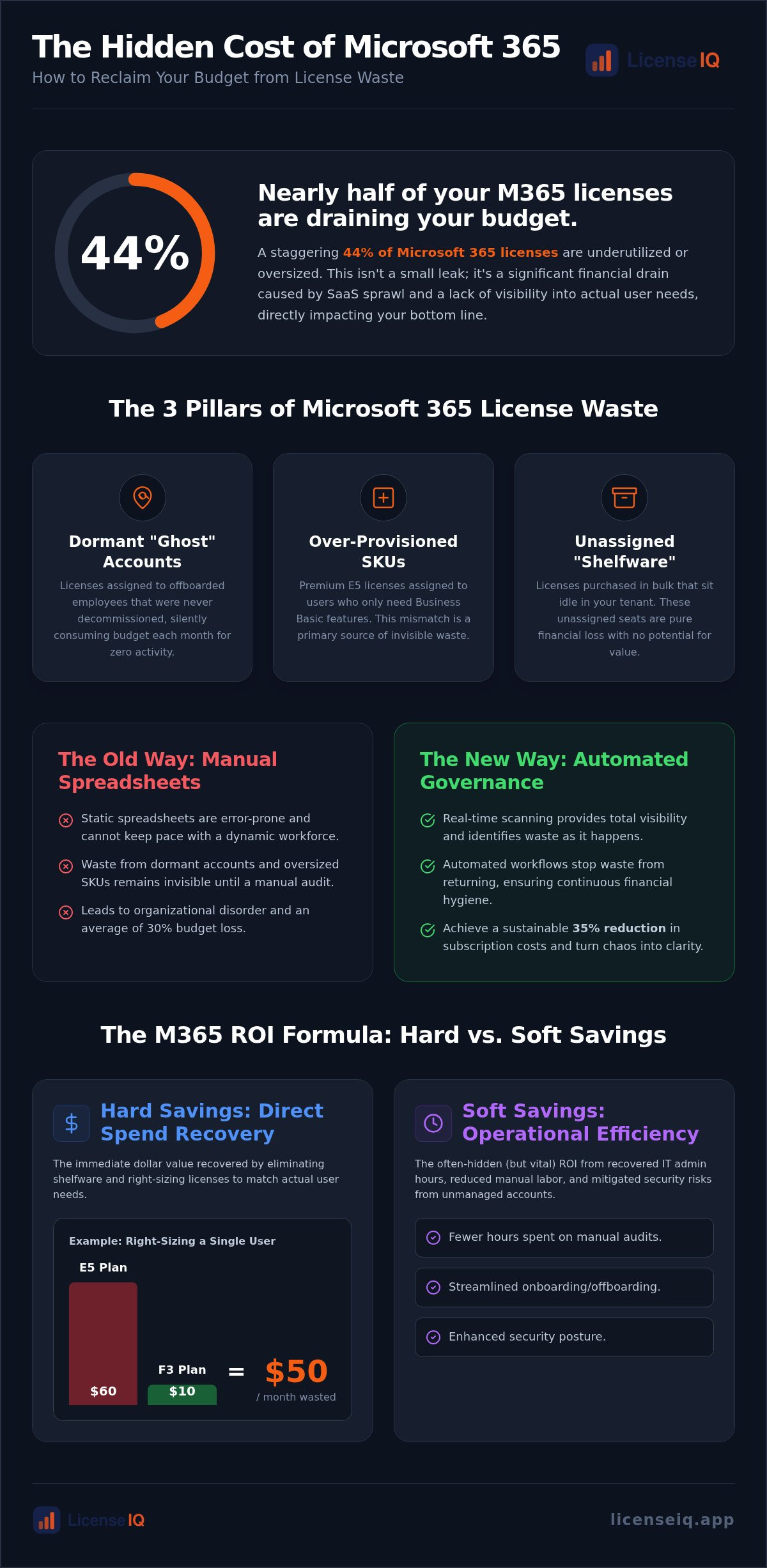
Nearly 44% of Microsoft 365 licenses are currently underutilized or oversized, draining IT budgets without returning a single cent of value. If you manage hundreds of seats, this isn't a minor oversight. It's a massive financial leak. You likely struggle with SaaS sprawl and a total lack of visibility into actual user activity. Relying on manual spreadsheets to track complex SKU structures only leads to errors and invisible waste.
You deserve a clear view of your financial health. This 2026 guide shows you how to use a microsoft 365 license roi calculator to identify the exact dollar value of your wasted spend. We'll outline a framework for right-sizing your environment and show you how to automate a 35% reduction in subscription costs. You'll learn to deploy automated workflows that stop waste from returning, ensuring your resources remain under the watch of a vigilant, precise system. We'll move from organizational disorder to total clarity, turning your M365 environment into a lean, high-performance asset.
Key Takeaways
- Learn how to use a microsoft 365 license roi calculator to quantify direct hard savings and recovered IT hours.
- Identify the core pillars of license waste, specifically dormant "ghost" accounts and over-provisioned redundant SKUs.
- Establish a baseline License Health Score to monitor your environment’s financial health with total transparency.
- Transition from manual spreadsheets to Automated Governance Workflows that stop license waste from returning.
- Leverage the Spend Recovery Dashboard for immediate, dollar-value recommendations to right-size your subscription costs.
Why Every SMB Needs a Microsoft 365 License ROI Calculator in 2026
In 2026, the standard definition of Return on Investment (ROI) has shifted for specialized leadership. It's no longer enough to measure productivity gains from AI tools like Copilot. True financial health requires a relentless focus on spend recovery. Every unassigned seat and dormant account represents capital that could be reinvested in growth. A microsoft 365 license roi calculator provides the immediate clarity needed to stop this drain. It moves beyond passive visibility, offering actionable intelligence through a Spend Recovery Dashboard.
The 2026 SaaS landscape is more volatile than ever. With Microsoft 365 prices increasing, Business Basic now costs $7 per user and E3 has reached $39 per user. Every seat counts. A Spend Recovery Dashboard serves as the modern ROI interface, transforming raw data into a clear dollar-value report of waste. It's not just a tool; it's an active participant in your company's fiscal discipline. Precision is the only way to navigate these rising costs without sacrificing operational capacity.
The Hidden Cost of 'Good Enough' Licensing
Accepting "good enough" in your licensing strategy is an expensive mistake. Research shows that nearly 44% of Microsoft 365 licenses are underutilized or oversized. This SaaS sprawl creates a silent tax on your operations. When you pay for E5 features for users who only require Business Basic, you're effectively subsidizing waste. Organizations frequently lose 30% of their M365 budget to these obscured details. Meticulous oversight is the only way to uncover these costs. Common sources of waste include:
- Unassigned "shelfware" sitting idle in the tenant.
- Premium SKUs assigned to users who only need mobile access.
- Dormant accounts from offboarded employees that were never decommissioned.
From Spreadsheets to Automated Governance
Manual tracking is an obsolete strategy. The annual audit model fails because your workforce is dynamic. Users join, leave, or change roles every week. Static spreadsheets are riddled with errors and cannot keep pace with complex SKU structures, even when utilizing professional Excel resources from Biz Infographs. You need real-time scanning to maintain financial hygiene. A microsoft 365 license roi calculator acts as an organized digital auditor. It identifies "shelfware" and dormant accounts, which account for over 14% of total waste, before they impact your quarterly reports.
This proactive approach is essential for Mastering the Microsoft 365 License Management Lifecycle in 2026. Automation ensures that your path to a 35% reduction in costs is both achievable and sustainable. By replacing organizational disorder with a structured, data-driven framework, you secure your corporate resources and ensure total transparency across your digital estate.
The ROI Formula: Calculating Hard vs. Soft Savings
Calculating the true return on your Microsoft investment requires more than a simple seat count. A robust microsoft 365 license roi calculator must account for both tangible cost recovery and the intangible efficiency gains that result from streamlined administration. While basic tools focus only on the monthly bill, a meticulous digital auditor looks at the total impact on your organization's financial health. Precision is mandatory. You can't manage what you don't measure, and you can't optimize what you can't see.
The formula for M365 ROI combines direct spend recovery with operational savings and risk mitigation. We use the License Health Score as the primary KPI to benchmark this progress. This score provides a snapshot of your environment's efficiency, moving you from a state of organizational disorder to total clarity. By monitoring this score, leadership can ensure that every dollar allocated to SaaS subscriptions is actively contributing to the bottom line.
Direct Spend Recovery: The Low-Hanging Fruit
Hard savings represent the most immediate win for any SMB. These are the direct dollar amounts recovered by eliminating "shelfware" and right-sizing underutilized accounts. Right-sizing is the precise alignment of license cost to actual user requirements. For example, the delta between an E5 license at $60 per month and an F3 license at $10 per month is significant. If a frontline worker only needs mobile access to Teams and email, keeping them on an E5 plan wastes $50 every single month. A microsoft 365 license roi calculator identifies these discrepancies instantly, allowing you to reclaim capital that is currently being billed for zero utility.
Operational Efficiency: The Hidden ROI
Soft savings are often obscured but remain vital for long-term growth. IT departments frequently waste dozens of hours monthly on manual license reclamation and spreadsheet management. This manual labor is a hidden cost that drains your most valuable technical resources. By deploying Automated Governance Workflows, you reclaim this time for high-value strategic projects. The "Minutes to Insight" advantage is a key differentiator; the LicenseIQ Platform performs a rapid tenant scan that provides more detail in five minutes than a manual audit provides in five days. You can learn more about these strategies in our 2026 Spend Recovery Playbook.
Finally, consider the "Risk Multiplier." Orphan accounts from former employees are more than just a financial leak; they're a security liability. The GAO report Federal Software Licenses: Better Management Needed highlights how poor management leads to unnecessary risks and costs across large-scale environments. Automating the removal of these accounts secures your perimeter while simultaneously boosting your ROI. If you're ready to see your own numbers, you can calculate your potential recovery today.
Identifying the 3 Pillars of Microsoft 365 License Waste
Most basic tools only look at unassigned licenses. They miss the nuanced waste hidden deep within your tenant. To achieve total transparency, a microsoft 365 license roi calculator must scan for three specific pillars of waste: inactive users, redundant SKUs, and zombie licenses. Our AI-native software intelligence platform automates this oversight. It connects to your tenant in minutes to uncover obscured details that manual audits consistently overlook. By moving from organizational disorder to a structured data-driven approach, you secure your resources and stop the financial leak.
AI-native intelligence doesn't just report numbers. It provides a License Health Score that reflects the actual utility of your subscriptions. This system acts as a vigilant digital auditor, identifying 14.7% of expenditure typically lost to dormant licenses. It's an active participant in your growth, ensuring that every SKU is justified by real-time activity data rather than outdated spreadsheets.
Inactive Users and the 30-Day Rule
Tracking the "last login" date is an insufficient metric for modern technical operations. A user might log in but never open a single application in the suite. You need app-level engagement data to see if users are actually utilizing the tools you pay for. 30 days of inactivity is the industry benchmark for potential spend recovery. If a seat hasn't seen app-level activity for a month, it's a prime candidate for reclamation. This proactive monitoring allows you to set automated thresholds, ensuring that "ghost" accounts don't drain your budget for months on end.
The Offboarding Security-Cost Nexus
Zombie licenses are the "shelfware" that persists after an employee leaves. They represent 5.83% of total Microsoft 365 waste on average. This offboarding gap creates a dangerous nexus between financial waste and data exposure. An active license for a former employee is an open door for unauthorized access. Automating the reclamation process ensures 100% financial accuracy and closes security loopholes immediately. You can find a structured framework for this in our Office 365 Offboarding Checklist 2026: Secure Data and Reclaim Spend.
Redundant SKUs occur when you over-provision for basic tasks. Many organizations assign premium E5 licenses to users who only require the essential features of Business Basic or F3. This oversizing is a silent tax on your growth. A microsoft 365 license roi calculator identifies these redundancies by comparing feature usage against plan costs. It provides the immediate clarity needed to right-size your environment, ensuring you only pay for the capabilities your team actually uses.
Beyond the Spreadsheet: Implementing Automated Governance for Continuous ROI
Achieving a high return on investment isn't a one-time event. It's a continuous cycle of oversight and adjustment. Competitors often treat a microsoft 365 license roi calculator as a simple lead magnet, but visibility without action is useless. To maintain a 35% reduction in subscription costs, you must implement a structured governance framework. This process transforms your tenant from a source of organizational disorder into a lean, efficient asset. It ensures that your path to spend recovery is both automated and sustainable.
The implementation process follows five precise steps to ensure total transparency:
- Step 1: Connect your tenant to the LicenseIQ Platform. This setup takes less than five minutes and establishes immediate visibility.
- Step 2: Establish your baseline License Health Score to identify the current depth of your financial waste.
- Step 3: Deploy Automated Governance Workflows to handle the routine reclamation of dormant or unassigned seats.
- Step 4: Monitor the Spend Recovery Dashboard daily for real-time financial hygiene.
- Step 5: Review SKU right-sizing recommendations quarterly to stay aligned with evolving user requirements.
The Role of AI in Software Intelligence
Modern license management requires more than just raw data. Our AI-native platform utilizes the Model Context Protocol to automate complex license mapping across your entire environment. This technology bridges the gap between static reports and actionable recommendations. While traditional tools tell you what happened, AI tells you exactly what to do. For SMBs, "set-and-forget" governance is the only way to stay competitive without bloating IT headcount. It ensures your resources are monitored by a vigilant system that identifies waste as it happens.
Maintaining a High License Health Score
A healthy M365 tenant is one where every assigned license is actively utilized and correctly sized. Continuous monitoring is the only defense against "SaaS creep," where unused licenses slowly accumulate after an initial cleanup. By maintaining a high License Health Score, you ensure your organization remains in a state of total clarity. You'll find more details on this process in our 2026 Guide to Automated Spend Recovery. If you're ready to stop the financial leak, connect your tenant to LicenseIQ and start your recovery today.
Turning Insights into Action: Recovering Spend with LicenseIQ
Stop guessing about your software budget. A microsoft 365 license roi calculator identifies the scope of your problem, but the LicenseIQ Platform provides the engine for recovery. Connecting your tenant delivers an immediate impact, transforming raw activity data into specific dollar-value recommendations. You'll see exactly where your capital is trapped in $39 E3 licenses for users who only require $10 F3 plans. Our tiered subscription model is engineered so the platform pays for itself in weeks, not years. By recovering up to 35% of your wasted spend, you turn a necessary expense into a strategic advantage.
The 5-Minute Audit Challenge
Specialized leadership requires efficiency. You don't need a specialized IT degree to secure your tenant. The connection process is designed for SMB administrators who demand results without technical complexity. You can generate your first License Health Score report in less than five minutes. This "minutes to insight" metric is the ultimate measure of ROI for busy leaders. It replaces the organizational disorder of manual audits with a vigilant, automated system that works one step ahead of your needs.
Your Roadmap to a 35% Reduction in M365 Costs
Transitioning from calculation to recovery requires a structured framework. Monthly governance is far superior to the outdated annual audit model because it prevents "SaaS creep" from returning. Follow this checklist to maintain your financial hygiene:
- Connect your tenant to LicenseIQ for a comprehensive real-time scan.
- Identify and reclaim "shelfware" using the Spend Recovery Dashboard.
- Deploy Automated Governance Workflows to handle employee offboarding and inactive accounts.
- Review SKU right-sizing recommendations to align costs with actual user behavior.
Total transparency is the cornerstone of corporate resource protection. Don't let unmanaged licenses act as a silent tax on your growth. Secure your environment and start recovering your IT budget today. Visit the LicenseIQ Homepage to get your free health check and see your microsoft 365 license roi calculator results in action.
Secure Your Budget and Automate Your Recovery
Your Microsoft 365 environment should be a source of productivity, not a financial drain. Moving beyond the initial insights of a microsoft 365 license roi calculator requires a commitment to continuous oversight. By identifying inactive accounts and right-sizing redundant SKUs, you reclaim capital currently lost to organizational disorder. AI-native Automated Governance Workflows ensure these savings remain permanent, protecting your bottom line from the silent tax of SaaS sprawl.
Efficiency is the only path to sustainable growth in 2026. Transitioning to a vigilant digital auditor replaces manual errors with data-driven precision. You can recover up to 35% of your wasted spend while securing your tenant against the risks of orphan accounts. It's time to demand total transparency from your digital estate and turn obscured details into actionable capital.
Discover your M365 Health Score and start recovering spend with LicenseIQ. You'll receive a comprehensive report in under 5 minutes, giving you the immediate clarity needed to optimize your resources. Take control of your financial health today.
Frequently Asked Questions
How do I calculate the ROI of Microsoft 365 license optimization?
ROI is calculated by dividing your net savings by the total cost of the optimization platform. You must aggregate hard savings from reclaimed licenses and soft savings from recovered IT labor hours. Utilizing a microsoft 365 license roi calculator provides the baseline data needed for this equation. This approach ensures your technical operations remain financially lean while maximizing the utility of every purchased SKU.
What is a good License Health Score for an SMB?
A License Health Score of 90% or higher represents an optimized environment with minimal waste. Scores below 80% typically indicate a lack of oversight, often resulting from unassigned shelfware or dormant accounts. Maintaining a high score ensures your resources are monitored by a vigilant system. It serves as a primary KPI for specialized leadership aiming for total operational transparency and fiscal discipline.
Can I really save 35% on my Microsoft 365 subscription?
You can achieve a 35% reduction in subscription costs by identifying underutilized or oversized licenses. 2026 industry data shows that nearly 44% of Microsoft 365 licenses are either inactive or assigned to the wrong SKU. Connecting to an AI-native platform uncovers these obscured details in minutes. This recovery target is a realistic benchmark for SMBs transitioning from manual spreadsheets to automated governance.
How often should I run a Microsoft 365 license audit?
You should monitor your environment continuously to prevent SaaS creep and audit decay. While manual audits are often conducted quarterly, they fail to capture the dynamic nature of a modern workforce where users join and leave weekly. Automated systems provide real-time hygiene by scanning for waste daily. This proactive approach ensures your License Health Score remains high without requiring constant manual intervention from your IT team.
What are the most common causes of M365 license waste?
License waste stems from three main areas: dormant accounts, unassigned shelfware, and oversized SKUs. Dormant licenses for former employees account for approximately 14.7% of total expenditure. Unassigned licenses that remain on the bill without being allocated to users add another 5.83% in waste. Assigning premium E5 plans to users who only require Business Basic features creates a significant, silent tax on your organizational growth.
Is an automated license governance tool worth the cost for a small business?
Automated tools are vital for SMBs because they eliminate the need for bloated IT headcounts dedicated to manual administration. These platforms often pay for themselves within weeks by identifying immediate, high-value recovery opportunities. A microsoft 365 license roi calculator helps justify this investment by showing the delta between current waste and potential savings. It transforms license management from a passive expense into an active participant in your growth.
How does LicenseIQ identify inactive users differently than the Microsoft Admin Center?
LicenseIQ analyzes app-level engagement data rather than simple login timestamps. The Microsoft Admin Center may show a user as active because they logged into the portal, even if they haven't opened a single application in 30 days. Our platform identifies these ghost accounts by looking at actual utility across Teams, Outlook, and SharePoint. This deeper level of insight ensures your spend recovery is based on real-world behavior rather than surface-level data.
What is the difference between an unassigned license and an inactive user?
An unassigned license is a seat you pay for that isn't linked to any user account. An inactive user has a license assigned to them but hasn't demonstrated app-level activity for 30 days or more. Both represent a total loss of capital. Distinguishing between the two allows you to deploy specific Automated Governance Workflows to either de-provision the account or return the seat to your available pool for immediate reuse.


