
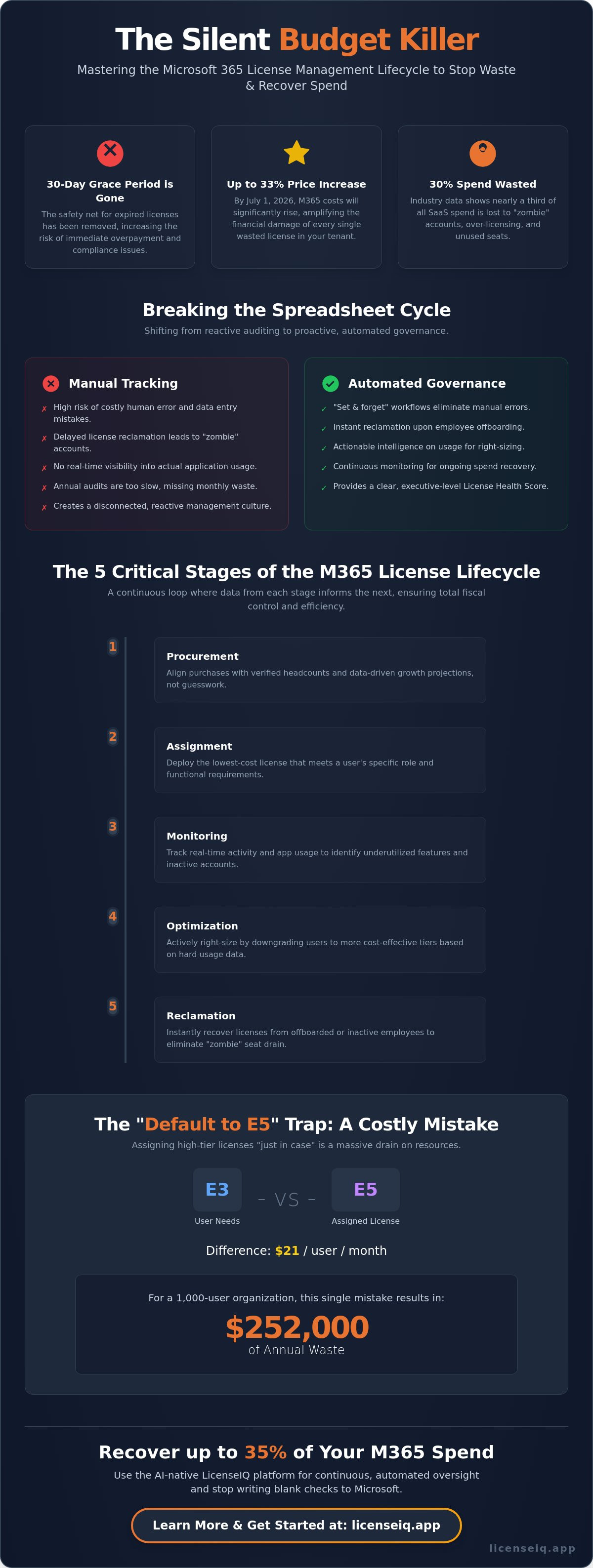
The 30-day grace period for expired licenses is officially gone. With Microsoft 365 prices increasing by up to 33% on July 1, 2026, relying on manual spreadsheets to track your seats is no longer just a nuisance; it's a direct threat to your bottom line. You've likely noticed that SaaS sprawl and paying for inactive users are ballooning your costs, yet gaining clear visibility into actual app usage remains a constant struggle. The financial impact of over-licensing has never been more severe, especially with the introduction of premium tiers like the $99 E7 license and Agent 365 add-ons.
It's time to shift from reactive auditing to a proactive microsoft 365 license management lifecycle. This article reveals how to automate your governance to eliminate waste and recover up to 35% of your total subscription spend. You'll learn how to implement a "set and forget" system that delivers immediate 20-30% cost savings. We will also show you how to leverage a Spend Recovery Dashboard and a License Health Score to provide the precise oversight your leadership demands in this high-stakes operational environment.
Key Takeaways
- Identify the hidden "budget killers" in your tenant where 30% of spend is typically lost to unused or redundant seats.
- Navigate the five stages of the microsoft 365 license management lifecycle to align procurement and assignment with real-time operational demand.
- Eliminate the financial risks of human error by shifting from manual tracking to automated governance workflows.
- Establish a clear License Health Score to provide executive-level transparency into your organization’s subscription efficiency.
- Discover how to recover up to 35% of your M365 spend using the AI-native LicenseIQ platform for continuous oversight.
The Microsoft 365 License Management Lifecycle: Why It Is Your Silent Budget Killer
Most organizations treat licensing as a static line item. It's actually a dynamic loop. The microsoft 365 license management lifecycle encompasses three critical phases: procurement, assignment, and reclamation. If you aren't managing all three with precision, you're losing money every month. Industry data indicates that approximately 30% of SaaS spend is wasted on unused or underutilized licenses. This isn't just a minor oversight. It's a systemic failure in financial oversight that drains corporate resources without providing any operational value.
Manual tracking creates "license leaks." When you hire fifty people, licenses are assigned instantly to ensure productivity. However, when ten people leave, those licenses often remain active for months because the reclamation process is disconnected from HR workflows. This lack of agility turns your budget into a sieve. Automated governance is the only way to maintain a perfect License Health Score and ensure every dollar spent translates to actual usage.
The High Cost of Static Management
Annual audits are obsolete in 2026. Business moves too fast for a once a year checkup. Static management leads to "zombie" licenses, which are accounts tied to former employees that continue to drain resources. This problem is compounded by what is SaaS sprawl, where redundant applications overlap with existing M365 features. Effective management requires a modern approach to Software Asset Management (SAM) that prioritizes real-time data over historical reports. Relying on spreadsheets in a high-speed environment is a recipe for fiscal disorder.
Visibility vs. Actionable Intelligence
Visibility isn't the end goal; actionable intelligence is. Seeing a list of 500 E5 licenses tells you nothing about efficiency. You need to know which users haven't opened Outlook, Teams, or specialized apps in thirty days. True intelligence provides dollar-value recommendations for every license tier. It tells you exactly when to downgrade a user from E5 to E3 or reclaim a seat entirely. We don't just look for data. We look for waste. The microsoft 365 license management lifecycle is, at its core, a vital financial hygiene protocol for the modern enterprise. It ensures your digital infrastructure is lean, secure, and fully optimized.
The 5 Critical Stages of the M365 License Lifecycle
Effective M365 management isn't a list of disconnected tasks. It's a unified, continuous flow. Most IT teams fail because they view procurement and reclamation as separate events. In reality, the microsoft 365 license management lifecycle functions as a closed loop where data from the monitoring stage directly informs your next purchase. To maintain total fiscal control, you must master these five stages:
- Procurement: Aligning your initial purchase with verified headcounts and growth projections.
- Assignment: Deploying the lowest-cost license that meets a user's specific functional requirements.
- Monitoring: Tracking real-time activity to identify which features are actually being used.
- Optimization: Actively right-sizing users by moving them to more cost-effective tiers based on usage data.
- Reclamation: Instantly recovering licenses from offboarded or inactive employees to stop the "zombie" seat drain.
Managing these stages manually is no longer viable. With the July 1, 2026 price increases taking effect, the cost of a single unassigned E5 seat has risen to $60 per month. Without a system that bridges these five stages, your organization is essentially writing a blank check to Microsoft every renewal cycle.
Stage 1 & 2: Smart Procurement and Assignment
Stop falling into the "default to E5" trap. Many organizations assign high-tier licenses to every employee "just in case." This is a massive waste of resources. An E5 license costs $21 more per month than an E3 license. For a 1,000-user organization, over-assigning E5 licenses to users who only need basic productivity tools results in $252,000 of annual waste. You should use Microsoft 365 budget forecasting to map specific features to user roles before you sign your next agreement. Automated workflows can then trigger the correct assignment based on department or job title, ensuring you never pay for features a user won't touch.
Stage 4 & 5: Right-Sizing and Automated Reclamation
Right-sizing is the process of aligning license costs with actual feature usage. If a user has an E3 license but hasn't opened a desktop app in 90 days, they belong on an F3 or Business Basic plan. This proactive optimization is the engine behind significant spend recovery. Equally critical is automated reclamation. When an employee leaves, the license must be recovered immediately. The elimination of the 30-day grace period in 2026 makes this urgent. You can follow this office 365 offboarding checklist to ensure you recover seats without losing critical corporate data. To see how your current assignment strategy compares to industry benchmarks, you can check your License Health Score today.
Manual Tracking vs. Automated Governance: Breaking the Spreadsheet Cycle
The spreadsheet cycle is a trap that keeps IT leadership buried in administrative debt. While Excel doesn't carry a direct cost, the financial and security risks it introduces are staggering. A manual audit for a 500-user organization often takes days to complete. By the time the report is finished, the data is already wrong. This lag is a primary driver of waste in the microsoft 365 license management lifecycle. Manual tracking simply cannot keep pace with the speed of modern business operations.
Human error in manual data entry leads to "license drift," where licenses are assigned but never reclaimed. This isn't just a budget issue; it's a security vulnerability. If an employee is terminated but their license remains active because of a manual offboarding delay, your corporate data remains exposed. Automated systems close these gaps instantly. They identify redundant licenses that spreadsheets miss, such as duplicate assignments across different business units or overlapping service tiers that provide no additional benefit.
Why Spreadsheets Fail in 2026
Spreadsheets are static documents in a dynamic cloud ecosystem. They cannot track "shadow" assignments or identify when a user has been granted overlapping tiers. For example, a spreadsheet won't flag a user who has an E5 license but also a standalone Defender add-on they no longer need. This lack of granular insight is why manual management is a silent budget killer. For a detailed breakdown of these hidden costs, review our comparison of licenseiq vs manual tracking to see how much your manual process is truly costing you.
The Power of Automated Governance Workflows
Automated governance workflows replace human intervention with algorithmic precision. These tools connect to your tenant in minutes, scanning every user and every permission level. This isn't a passive report; it's a proactive digital auditor. By implementing self-healing workflows, you ensure that licenses are reclaimed the moment a user becomes inactive or leaves the company. This continuous oversight produces a real-time License Health Score. This metric gives specialized leadership immediate clarity on their financial standing, ensuring that every seat is accounted for and every dollar is optimized without the need for manual data manipulation.
Implementing a Continuous Spend Recovery Strategy
Spend recovery is the active phase of the microsoft 365 license management lifecycle. It is where visibility transforms into tangible financial gain. While earlier sections established the theory of lifecycle management, this strategy focuses on execution. To stop external waste and recover capital, you need a repeatable process that prioritizes financial hygiene over administrative busywork.
Execution begins with these five steps:
- Step 1: Connect your tenant to an AI-native intelligence platform. Discovery should take minutes, not weeks.
- Step 2: Establish a baseline License Health Score. You can't manage what you don't measure. This score serves as your primary benchmark for success.
- Step 3: Apply Automated Governance Workflows. Let the system handle inactive user reclamation through pre-defined triggers.
- Step 4: Right-size licenses based on dollar-value recommendations. Moving a user from E5 to E3 based on actual usage provides immediate ROI.
- Step 5: Schedule monthly reports. Hygiene requires consistent oversight to prevent the return of license sprawl.
Identifying Inactive and Redundant Licenses
Identifying waste starts with the low-hanging fruit. You should generate a microsoft 365 inactive user report to pinpoint accounts untouched for 90 days. These accounts represent immediate spend recovery opportunities. Beyond simple inactivity, look for redundant licenses where users are assigned overlapping service plans. This often occurs when standalone add-ons are purchased alongside comprehensive bundles, creating double-billing for the same feature. Spend recovery is ultimately a byproduct of good governance. When you enforce strict rules on assignment and reclamation, the savings follow naturally.
Maintaining Cloud Cost Hygiene
Maintaining these gains requires a shift in perspective. You must understand the difference between cloud cost optimization vs management. Management is the act of watching costs; optimization is the act of actively reducing them through data-driven decisions. Establish KPIs like the "Percentage of Unassigned Licenses" to ensure your inventory remains lean. A high percentage of unassigned seats is essentially capital sitting idle. Review your microsoft 365 cost management checklist every month to ensure no new waste has crept into the tenant during hiring cycles. Maintaining a lean microsoft 365 license management lifecycle ensures that your IT budget remains resilient against price hikes. To begin identifying your immediate recovery opportunities, connect your tenant to the Spend Recovery Dashboard today.
LicenseIQ: The AI-Native Engine for M365 Governance
Modern operations require more than just visibility. They demand action. LicenseIQ functions as a proactive digital auditor, transforming the complex microsoft 365 license management lifecycle into a streamlined, automated process. Setup takes exactly five minutes. Once connected, the platform delivers immediate spend recovery insights that identify exactly where your budget is being drained. You don't need a background in technical operations to recover your capital. The system provides specific dollar-value recommendations that allow any business manager to make informed financial decisions instantly.
For SMBs, LicenseIQ serves as a vital guardian of corporate resources. It eliminates the need for expensive, dedicated license administrators by providing a self-healing governance system. This platform doesn't just show you the data; it enforces the fiscal discipline required to stay lean in a high-cost environment. By automating the most tedious aspects of oversight, it ensures your organization remains one step ahead of renewal cycles and price adjustments.
Automated Workflows for Specialized Leadership
LicenseIQ simplifies the mundane tasks of license reclamation through Automated Governance Workflows. These workflows trigger the moment a user becomes inactive or leaves the organization, ensuring no seat remains a "zombie" expense. For Finance departments, the Spend Recovery Dashboard acts as the single source of truth. It provides total transparency into subscription efficiency and tracks every dollar recovered in real time. Beyond the financial gains, meticulous management of the microsoft 365 license management lifecycle strengthens your security posture. By instantly reclaiming licenses from offboarded employees, you close potential access gaps that manual processes often overlook.
Ready to Stop the Waste?
The days of guessing your license needs are over. In a 2026 environment defined by rising costs and the elimination of grace periods, inaction is an expensive choice. Organizations using LicenseIQ regularly recover up to 35% of their total M365 subscription spend by eliminating redundant seats and right-sizing underutilized tiers. You can discover your exact optimization potential by establishing your baseline today. It's time to replace organizational disorder with total clarity and precision. Get your free M365 License Health Score in minutes and take full command of your digital resources.
Secure Your Budget with Automated Governance
Relying on manual spreadsheets in 2026 is a costly administrative burden you can't afford. Recent price increases and the elimination of grace periods have turned unmanaged seats into a significant financial liability. Shifting to a proactive microsoft 365 license management lifecycle ensures that your organization remains lean, optimized, and fully secure. By focusing on real-time data instead of static reports, you transform your licensing from a silent budget killer into a strategic asset.
You don't need to spend hours auditing your tenant to see results. LicenseIQ uses AI-native automated workflows to provide immediate clarity on your subscription efficiency. You can identify up to 35% waste in just five minutes and establish a real-time License Health Score for executive reporting. This level of oversight ensures that your resources are always monitored by a vigilant and precise system. It's time to stop the drain and reclaim your capital for more critical initiatives.
Scan your tenant and recover wasted M365 spend now. Take the first step toward total operational transparency and financial security today.
Frequently Asked Questions
What is the Microsoft 365 license management lifecycle?
The microsoft 365 license management lifecycle is a continuous governance loop consisting of procurement, assignment, monitoring, optimization, and reclamation. It ensures that every license in your tenant is actively utilized and financially justified. Instead of a one-time audit, this lifecycle functions as a permanent operational protocol. It aligns your software spend with actual headcount and real-time usage patterns to prevent waste and redundancy.
How much can I save by managing the M365 license lifecycle?
Most organizations recover up to 35% of their total subscription spend by implementing a rigorous management strategy. This saving comes from identifying inactive users, reclaiming licenses from offboarded employees, and right-sizing users to lower-cost tiers. With the July 1, 2026 price increases, these savings are even more impactful. Every unassigned or underutilized E5 seat reclaimed represents immediate capital returned to your bottom line.
Can I manage M365 licenses manually in the Admin Center?
You can manage licenses manually through the Microsoft 365 Admin Center, but the process is highly inefficient for growing organizations. Manual management relies on point-in-time exports that become obsolete the moment they're generated. It lacks the proactive triggers needed to reclaim licenses instantly when employees leave. This delay leads to license drift, where you continue paying for seats that are no longer required for operations.
What is the difference between license optimization and license management?
License management is the act of overseeing assignments and ensuring users have access to the tools they need. License optimization is the strategic process of reducing costs by aligning those assignments with actual feature usage. While management ensures availability, optimization ensures financial efficiency. Optimization involves moving users to the lowest-cost tier possible, such as downgrading an E5 user to an F3 plan based on their activity data.
How does AI improve the M365 license management lifecycle?
AI enhances the microsoft 365 license management lifecycle by automating the discovery of obscured waste and providing actionable dollar-value recommendations. AI-native tools scan usage patterns across thousands of users in minutes, identifying redundancies that human auditors often miss. It replaces manual guesswork with data-driven precision, ensuring your License Health Score remains high without requiring constant manual intervention from your IT or finance teams.
What happens to user data when a license is reclaimed?
Reclaiming a license doesn't immediately delete user data if you follow a structured offboarding protocol. Microsoft typically retains data for a specific period, but organizations should use automated workflows to archive mailboxes or move OneDrive files to a secure location before the seat is unassigned. This ensures you recover the license cost immediately while maintaining full compliance and data availability for legal or operational requirements.
How often should I conduct a Microsoft 365 license audit?
Periodic audits are no longer sufficient in a dynamic cloud environment. You should move toward a continuous auditing model where your tenant is monitored 24/7 by an automated system. This ensures that zombie licenses are identified and reclaimed the moment they become inactive. Waiting for a quarterly or annual review allows months of wasted spend to accumulate, which is a direct threat to your organization's financial health.
Is automated license governance secure for SMBs?
Automated governance is significantly more secure than manual tracking because it eliminates the risk of human oversight during offboarding. By using an AI-native platform like LicenseIQ, SMBs ensure that access is revoked and licenses are reclaimed instantly when a user's status changes. This meticulous oversight prevents unauthorized access to corporate data from former employees, providing a layer of security that spreadsheets simply can't replicate.


