

35% of your Microsoft 365 budget is likely evaporating into thin air right now due to outdated administrative habits. When evaluating LicenseIQ vs manual tracking, the gap isn't just a matter of convenience; it's a significant financial leak. You likely recognize the frustration of spending eight hours every month updating "dead" spreadsheets, only to realize the data is obsolete before you even finish. This reactive cycle leaves your organization vulnerable to failed audits and forces you to ignore visible waste because you simply lack the time to fix it manually.
You deserve a system that acts as a proactive guardian of your resources. We'll show you how AI-native automation identifies and recovers 20-35% of wasted software spend in under ten minutes. This guide explores how to eliminate shadow IT, achieve a 100% accurate Health Score, and transform your license management from a monthly burden into a streamlined engine for growth. We're comparing the high cost of the status quo against the precision of modern automation in 2026.
Key Takeaways
- Stop the "Data Decay" cycle that turns manual spreadsheets into financial liabilities and gain total visibility into your M365 environment.
- Compare the efficiency of licenseiq vs manual tracking to see how AI-native automation replaces days of labor with 100% accurate insights.
- Quantify and recover the 35% of M365 spend typically lost to unmanaged licenses and redundant manual auditing costs.
- Move from chaotic record-keeping to a 5-minute automated audit that provides immediate spend recovery recommendations.
- Future-proof your organization’s FinOps strategy with proactive intelligence that ensures total transparency and 100% audit readiness.
The Spreadsheet Trap: Why Manual M365 License Tracking Fails SMBs
Manual tracking is a static, human-dependent process. It relies on point-in-time snapshots that fail to capture the fluid nature of modern cloud environments. When IT leaders weigh licenseiq vs manual tracking, they often find that spreadsheets create a "Data Decay" problem. Information becomes obsolete the moment a user saves the file. This reactive approach forces teams to perform post-mortem audits rather than proactive optimization. While manual methods feel familiar, they lack the precision of AI-native monitoring.
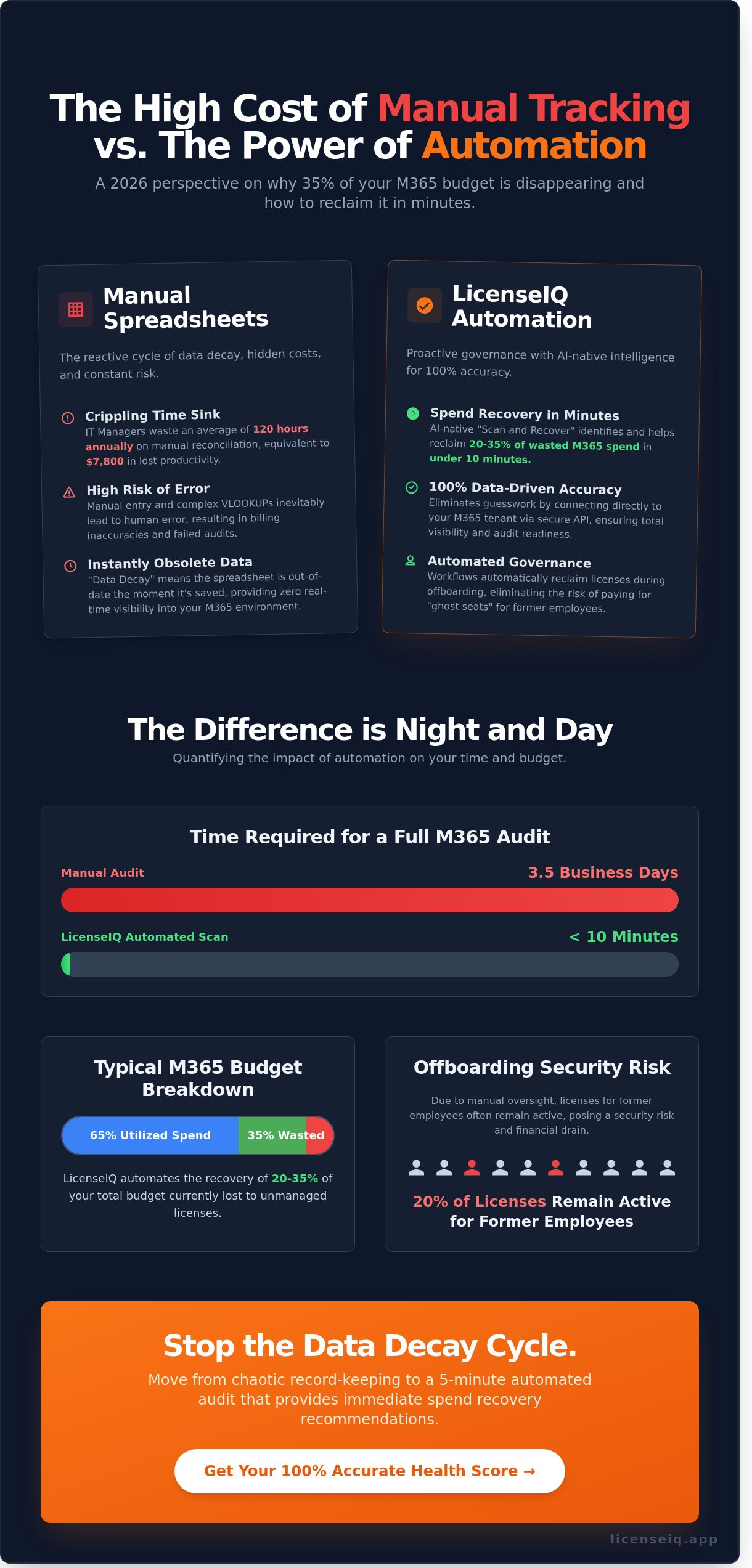
The biggest objection to automated tools is the perceived cost. Many SMBs believe spreadsheets are free. This is a financial fallacy. Manual tracking costs thousands in hidden labor and license waste. Industry data shows IT managers spend approximately 120 hours annually on manual reconciliation. For a specialist earning $65 per hour, that's $7,800 in wasted productivity. Implementing professional Software asset management (SAM) practices is the only way to stop this drain on corporate resources.
The Anatomy of a Failing Manual Workflow
The manual cycle begins with a data dump from the M365 Admin Center. This raw CSV file requires hours of cleaning. You must manually verify user status against payroll records using complex VLOOKUPs. Human error is inevitable in this stage. A single misplaced decimal or an outdated formula leads to significant billing errors. Manual tracking also fails to detect Shadow IT. If an employee adds a standalone subscription without notifying IT, the spreadsheet remains blind to that spend. It simply cannot track unassigned licenses in real-time.
Data Latency: The Hidden Enemy of FinOps
Stale data is a direct threat to your bottom line. A 30-day lag in identifying inactive users means you're paying for "ghost" seats. This is particularly costly when managing the jump between M365 E3 and E5 licenses. Manual tracking rarely accounts for feature utilization. You might pay for E5 security features that your staff never activates. SaaS sprawl is the result of unmonitored manual tracking where software volume exceeds your ability to document it. Transitioning to LicenseIQ turns this darkness into total visibility, ensuring every dollar spent on M365 is justified by actual usage.
LicenseIQ vs. Manual Tracking: A Feature-by-Feature Comparison
Manual spreadsheets are where data goes to die. They represent a static snapshot of a dynamic environment. In contrast, LicenseIQ provides a live feed of your financial health. When evaluating licenseiq vs manual tracking, the difference isn't just about convenience; it's about the financial integrity of your IT budget.
AI-Native Discovery vs. Manual Entry
Manual audits are notoriously slow. A typical mid-sized organization spends an average of 3.5 business days gathering data for a single M365 audit. LicenseIQ connects to your tenant via a secure API in under 10 minutes. It replaces "best guess" entries with 100% data-driven insights. The system uses a specialized "Scan and Recover" mechanism. This tool identifies inactive accounts and unassigned licenses that manual trackers consistently miss. This rapid visibility is the cornerstone of Microsoft 365 license optimization. It turns a week-long project into a coffee break task.
Governance Workflows: Automation vs. To-Do Lists
Manual offboarding is a high-risk activity. It relies on a human following a "to-do" list. Research indicates that 20% of licenses remain active for former employees due to manual oversight. LicenseIQ eliminates this risk with Automated Governance Workflows. When a user leaves, the system triggers an immediate sequence to reclaim the seat. You can compare this to the manual complexity found in a standard Office 365 offboarding checklist. Automation ensures no steps are forgotten. It moves you from a reactive state to a proactive posture.
Operational accuracy is the primary driver of ROI. Manual tracking often results in over-provisioning because IT managers fear service interruptions. By adopting automated cloud cost optimization strategies, you align your actual usage with your business value. LicenseIQ provides the precision needed to cut waste without risking user productivity.
The License Health Score: Your Ultimate Benchmark
The licenseiq vs manual tracking debate ends with the License Health Score. Spreadsheets require you to interpret rows of raw data. LicenseIQ distills thousands of data points into a single metric from 0 to 100. This score acts as the definitive benchmark for your M365 hygiene. It measures:
- Utilization rates: Are your users actually opening the apps you pay for?
- License surplus: How much capital is tied up in unassigned seats?
- Cost efficiency: Are you using the most economical SKU for every user profile?
This score provides immediate clarity for finance leaders. It transforms complex technical debt into an actionable business metric. If you want to see where your organization stands, you can check your health score to begin reclaiming your budget today.
The Hidden ROI: Quantifying Labor and Wasted Spend Recovery
Manual license management is a drain on your most expensive resource: time. While a spreadsheet might look free, the labor required to maintain it is a significant, recurring cost. Comparing licenseiq vs manual tracking reveals that the latter relies on human memory and periodic audits, both of which are prone to error. Automated systems eliminate this burden, transforming license management from a monthly chore into a continuous, background process.
Labor Costs: The "Invisible" Expense
The true cost of manual tracking is often buried in the IT budget. Consider an IT manager earning an average of $60 per hour. If they spend just four hours every month auditing licenses, reconciling invoices, and chasing department heads for usage data, the company loses $2,880 annually in productivity alone. This calculation doesn't account for the opportunity cost of the projects they aren't completing while tethered to a spreadsheet.
- Manual Audit: 48 hours per year spent on data entry and verification.
- LicenseIQ: Zero hours spent on data entry via the "set and forget" Spend Recovery Dashboard.
- Strategic Value: Automation replaces low-value administrative tasks with high-impact work like security hardening and infrastructure scaling.
LicenseIQ provides immediate clarity by syncing directly with your tenant. You don't have to wonder if the data is current; the system ensures it is. This shift allows your team to focus on growth rather than maintenance.
Spend Recovery: Finding the $3,000+ in Your Tenant
Waste is a quiet profit killer. Industry data suggests that unmanaged M365 tenants carry a 35% waste factor due to over-provisioning and forgotten accounts. For a typical SMB with 100 users spending roughly $3,000 per month on licenses, this represents over $10,000 in annual losses. Manual tracking almost always misses these savings because spreadsheets can't track real-time login activity or feature utilization.
LicenseIQ identifies redundant licenses by flagging users who haven't logged in for 30, 60, or 90 days. It uncovers "shadow" licenses that were assigned for short-term projects but never revoked. This level of detail is the core difference between cloud cost optimization vs management. Optimization isn't just about watching the bill; it's about active, data-driven recovery.
When you use licenseiq vs manual tracking, the software effectively pays for itself. By identifying just three or four unused E5 licenses, the system generates enough savings to cover its own cost. It's a self-funding investment that secures your tenant and protects your bottom line simultaneously.
Transitioning to Automated Governance: From Chaos to a 5-Minute Audit
Moving from a static spreadsheet to an automated platform transforms how IT departments function. The shift isn't just about better data; it's about regaining time. When comparing licenseiq vs manual tracking, the most immediate difference is the speed of insight. Manual audits often take 15 to 20 hours of data consolidation. LicenseIQ reduces this to a 5-minute review. The transition follows a structured five-step path to total visibility.
- Step 1: Connect your M365 tenant. Use secure OAuth 2.0 protocols to link your environment in under 60 seconds.
- Step 2: Review your Health Score. The dashboard instantly generates a score based on current utilization and identifies immediate spend recovery opportunities.
- Step 3: Execute automated workflows. Reclaim licenses from users who haven't logged in for 90 days or more with a single click.
- Step 4: Set up continuous monitoring. Establish threshold alerts that trigger when unassigned licenses exceed a specific count.
- Step 5: Replace spreadsheets with executive reports. Export real-time data that shows exact cost savings and compliance status for finance leaders.
The gap between licenseiq vs manual tracking is most evident during the first 30 days. While a spreadsheet begins to decay the moment it's saved, an automated system grows more accurate as it gathers usage trends. This eliminates the "audit panic" that occurs before true-up dates.
Ensuring Security During the Transition
Security is the primary concern for any IT leader. LicenseIQ addresses this by utilizing read-only API access. The system doesn't have permission to change your tenant configuration or access sensitive email content. We use the Model Context Protocol (MCP) to ensure secure, standardized data handling between the platform and your M365 environment. This creates a transparent layer of oversight without introducing new vulnerabilities. You maintain 100% control over the connection at all times.
Establishing a New FinOps Rhythm
Modern license management requires a proactive FinOps rhythm. Instead of waiting for an annual audit, your team can use real-time alerts to stop license waste before the next monthly billing cycle. This shifts the internal culture from "reactive cleanup" to "continuous optimization." You'll identify shadow IT and underutilized E5 licenses as they happen, not six months later. It's time to stop guessing and start governing with precision. You can get started at licenseiq.app to see your first Health Score today.
Future-Proofing FinOps with AI-Native Intelligence
Manual tracking isn't just a slow process; it's a financial liability. In a high-inflation environment where SaaS costs rose by an average of 12% in 2023, relying on static spreadsheets is dangerous. These documents are outdated the moment you hit save. They hide shadow IT and leave your organization vulnerable to budget leakage. LicenseIQ eliminates this risk. It replaces the uncertainty of licenseiq vs manual tracking with precise, automated data that lives in real-time.
Modern financial hygiene requires moving beyond the "visibility gap" inherent in manual systems. When you automate your M365 management, you secure three critical pillars of operational excellence:
- 35% Average Savings: Reclaim capital by identifying unassigned licenses and optimizing E3/E5 tiers based on actual usage behavior.
- Zero Manual Labor: Eliminate the hundreds of hours spent every year on data entry and cross-referencing CSV files.
- 100% Audit Readiness: Maintain a continuous, verifiable log of license utilization that satisfies even the strictest compliance requirements instantly.
LicenseIQ functions as a vigilant digital auditor. It doesn't just record data; it interprets it. This proactive approach ensures that your software spend remains lean. Your resources stay focused on growth rather than administrative maintenance. It's the essential tool for any SMB that values precision over guesswork.
The Evolution of SaaS Intelligence
Legacy ITAM tools are failing. They were designed for hardware and on-premise software, not the fluid nature of cloud subscriptions. AI-native platforms are replacing these outdated systems by providing specialized M365 intelligence. Generic trackers miss the nuances of Microsoft's complex licensing rules. LicenseIQ analyzes specific user behavior to ensure you never overpay for features your team doesn't use. Stop guessing. Start recovering.
Why SMBs Choose LicenseIQ Over Spreadsheets
Speed is the ultimate advantage. LicenseIQ offers a "Minutes to Value" proposition that spreadsheets can't match. You don't need a technical background to drive significant results. Finance managers use the dashboard to identify waste in seconds without waiting for IT to pull reports. When comparing licenseiq vs manual tracking, the choice comes down to organizational maturity. One is a reactive chore; the other is a proactive financial strategy. It's time to secure your budget. Check your M365 Health Score today to see exactly how much you can save.
Eliminate M365 Waste and Secure Your 2026 Budget
The gap between licenseiq vs manual tracking represents more than just a tool preference. It's the difference between financial waste and operational precision. Relying on static spreadsheets in 2026 leaves your organization vulnerable to shadow IT and ballooning costs. Organizations save up to 35% on M365 subscriptions by moving away from manual oversight. Our AI-native Spend Recovery Dashboard uncovers hidden expenses that human auditors miss. Automated governance workflows ensure your license count stays lean and compliant.
Your team shouldn't spend weeks on manual reconciliation when a 5-minute audit provides total visibility. Transitioning to an automated system turns chaotic software stacks into structured assets. This proactive approach to FinOps protects your bottom line. It frees your IT leaders to focus on strategic growth instead of administrative data entry. You can reclaim your budget and eliminate the guesswork today.
Start your 5-minute M365 audit with LicenseIQ
Take control of your software ecosystem and build a more efficient future for your business.
Frequently Asked Questions
Is LicenseIQ safer than tracking licenses in a shared Excel file?
Yes, LicenseIQ is significantly more secure because it eliminates the version control risks and unauthorized access inherent in shared files. A 2023 report from IBM indicates that data breaches involving compromised credentials cost an average of $4.62 million. Spreadsheets lack the audit trails and granular permissions required to protect sensitive financial data. LicenseIQ provides a secure environment with encrypted data flows and role-based access controls to prevent leaks.
How much time can I actually save by switching from manual tracking?
Users typically save 15 to 20 hours per month by automating the data collection process. Manual tracking requires constant manual entry and cross-referencing across multiple portals. LicenseIQ replaces this labor-intensive workflow with automated API integrations. This shift allows IT managers to refocus 25% of their weekly schedule on strategic optimization rather than administrative data entry, resulting in immediate operational efficiency.
Does manual tracking provide enough data for a Microsoft audit?
Manual spreadsheets often fail Microsoft audits because they lack real-time utilization logs and historical proof of assignment. In a licenseiq vs manual tracking comparison, spreadsheets are static and prone to human error. Audit readiness requires 100% accuracy in license allocation data. LicenseIQ maintains a continuous record of usage, ensuring your organization remains compliant and avoids the 200% penalty fees often associated with unlicensed software.
Can LicenseIQ track specialized licenses like Windows 365 or F-series?
Yes, LicenseIQ tracks the entire M365 catalog, including Windows 365, F1, and F3 frontline worker licenses. It identifies exactly which users have assigned seats and whether they've logged in during the last 30 days. This level of granularity prevents license camping where specialized seats remain active but unused. You gain total visibility into every SKU, ensuring no hidden costs drain your budget or inflate your annual spend.
What happens to my data if I stop using manual spreadsheets?
Your historical data transitions into a centralized, searchable database within LicenseIQ. You don't lose your records; you enhance them with real-time telemetry from your M365 tenant. Moving away from manual spreadsheets eliminates the risk of file corruption or accidental deletion. All existing data is ingested and then continuously updated, providing a permanent and reliable source of truth for your M365 environment that remains accessible 24/7.
Can a spreadsheet calculate a real-time License Health Score?
No, a spreadsheet cannot calculate a real-time License Health Score because it lacks live data feeds from the Microsoft Graph API. Static files only reflect the moment they were last edited. LicenseIQ monitors 12 distinct health metrics to generate an instantaneous score. This provides 100% visibility into your optimization status, something a manual file updated every 30 days simply cannot achieve for a growing organization.
Is LicenseIQ intended for IT teams or Finance departments?
LicenseIQ serves both IT and Finance by bridging the gap between technical utilization and financial spend. IT teams use it to manage user access and technical compliance. Finance departments rely on the platform to track ROI and eliminate waste. By centralizing this data, LicenseIQ helps organizations reduce their SaaS spend by up to 30% through better cross-departmental transparency and the elimination of shadow IT.
How much does it cost to move from manual tracking to LicenseIQ?
The transition costs vary based on your organization's seat count and the complexity of your current M365 environment. While we don't list specific pricing here, the primary investment is the time required for the initial API connection, which usually takes less than 15 minutes. Comparing licenseiq vs manual tracking shows that the cost of the software is often offset within the first 90 days by identifying unused licenses.


