

Industry data confirms that 38% of enterprise SaaS licenses sit unused or underutilized, representing a massive drain on corporate resources. This lack of visibility into microsoft 365 license types creates a financial black hole for IT and finance departments. You're likely aware that your current stack contains redundant features and overlapping tiers that inflate your monthly invoice. It's a common frustration for leaders who value operational transparency but feel trapped by opaque structures and unmanaged shadow IT.
We're here to provide total clarity. This 2026 reference guide delivers the precise framework you need to reclaim control over your software spend and eliminate waste. You'll learn how to identify inactive seats, consolidate features, and improve your overall license health score through data-driven decisions. We'll examine the specific utilization metrics that drive efficiency, ensuring your organization only pays for the tools your team actually uses to drive growth. We'll break down each tier to ensure your software spend aligns perfectly with your actual user requirements.
Key Takeaways
- Shift your procurement strategy from device-based legacy models to a user-centric productivity cloud designed for the 2026 workplace.
- Analyze the financial delta between Enterprise E3 and E5 tiers to determine where premium security features deliver a genuine ROI for your organization.
- Navigate the 300-user ceiling and compare various microsoft 365 license types to align your SMB software spend with actual operational utility.
- Eliminate over-provisioning by implementing "right-sizing" strategies that match license costs to real-time user engagement and activity levels.
- Gain total visibility into your software stack and eliminate licensing chaos using automated, AI-driven audit tools that scan for waste in minutes.
Understanding the Microsoft 365 Licensing Landscape in 2026
Microsoft 365 isn't just a collection of desktop apps. It's a unified productivity cloud. By 2026, the shift from device-based to user-based models is total. This architecture relies on Entra ID and AI-native workflows to drive organizational efficiency. Many IT departments face a visibility crisis in multi-tenant environments. Without precise data, license waste typically reaches 30% of the annual contract value. This Microsoft 365 overview highlights the platform's journey toward a security-first ecosystem. Tracking various microsoft 365 license types is no longer optional. It's a financial necessity for modern leaders. Using a specialist platform like LicenseIQ helps eliminate shadow IT and uncovers hidden costs in real time.
Microsoft 365 vs. Office 365: What is the Difference?
The primary distinction lies in the inclusion of Windows 11 Enterprise and advanced security layers. Microsoft 365 provides a holistic "Seat-as-a-Service" model that simplifies procurement. While legacy Office 365 (O365) plans still exist, they're mostly utilized by 12% of the market with specialized on-premises or data residency needs. Naming conventions shifted in April 2020 to reduce confusion, yet many teams still struggle with the overlap. M365 is the comprehensive package; O365 is the legacy productivity core. Procurement teams must identify these differences to avoid paying for redundant security software already included in higher M365 tiers.
The Three Main Pillars: Business, Enterprise, and Frontline
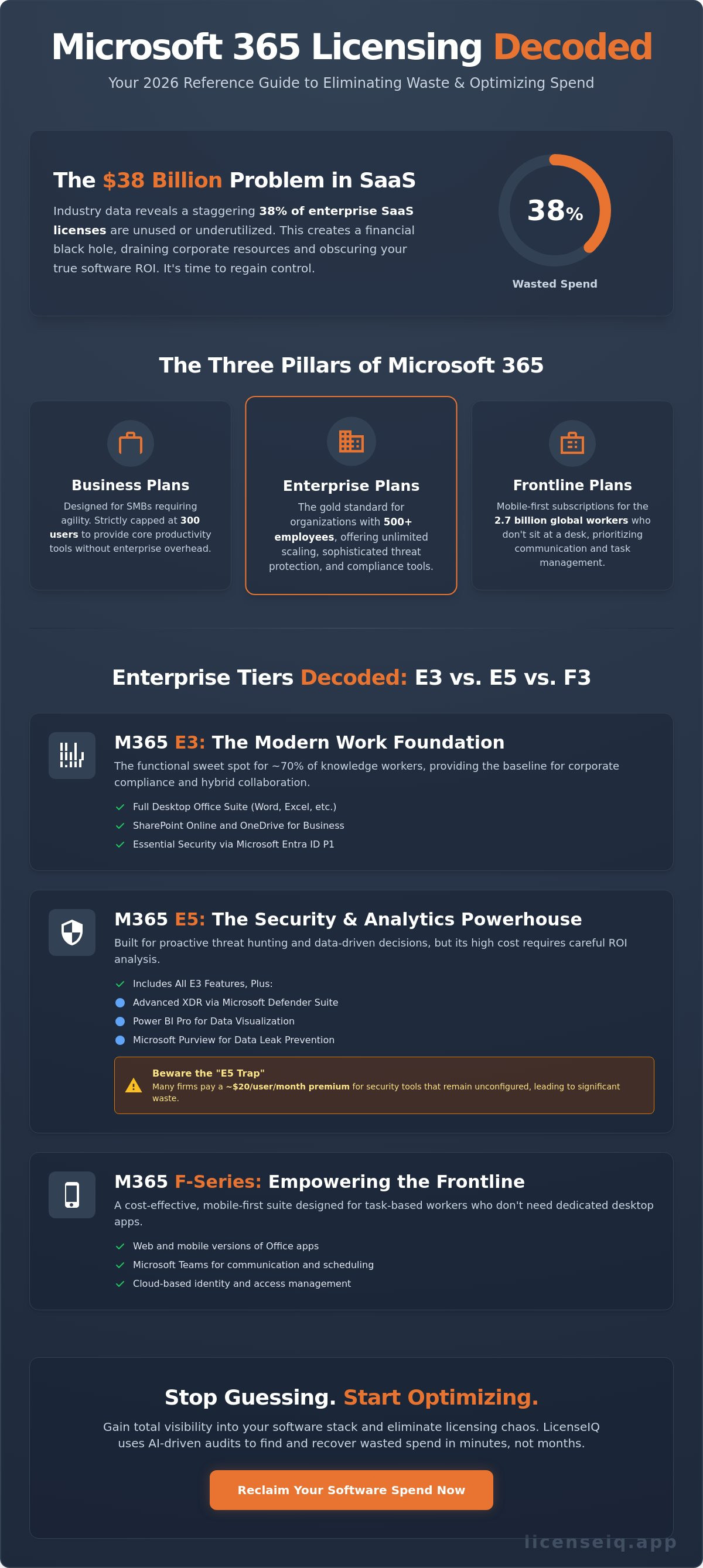
Microsoft categorizes its offerings into three distinct pillars to address specific operational needs. Business plans are strictly capped at 300 users. They're designed for SMBs that require agility without the overhead of enterprise-grade compliance. Enterprise plans allow for unlimited scaling and include sophisticated threat protection. These are the gold standard for organizations with more than 500 employees. Frontline plans serve the 2.7 billion workers globally who don't sit at a desk. These mobile-first subscriptions prioritize communication and task management. Choosing between these microsoft 365 license types requires a deep dive into actual user behavior rather than broad assumptions.
Enterprise Tiers Decoded: M365 E3 vs. E5 vs. F3
Large organizations require scalable security and collaboration, but choosing between enterprise microsoft 365 license types requires a sharp eye on utilization. The "E" series represents the high-water mark for Microsoft's cloud ecosystem. While E3 provides the standard toolkit for the modern professional, E5 introduces a massive cost jump, often exceeding $20 per user each month. This investment is only justified if your team actively uses the advanced XDR and analytical tools included in the package. By 2026, Microsoft 365 Copilot has solidified its place as a $30 per user monthly add-on across these tiers, making base license optimization more critical than ever to protect your bottom line.
Microsoft 365 E3: The Modern Work Foundation
Microsoft 365 E3 is the functional sweet spot for approximately 70% of knowledge workers. It includes the full desktop suite of Office apps, SharePoint, and OneDrive, alongside essential security through Microsoft Entra ID P1. This tier provides the necessary infrastructure for hybrid teams to collaborate without the premium price tag of high-end analytics. E3 serves as the mandatory baseline for corporate compliance and identity management.
Microsoft 365 E5: The Security and Analytics Powerhouse
E5 is built for organizations that prioritize proactive threat hunting and data-driven decision-making. It integrates Power BI Pro for real-time data visualization and a comprehensive Extended Detection and Response (XDR) suite. Microsoft Purview prevents data leaks by automatically labeling sensitive files, while Defender for Endpoint isolates compromised devices in seconds. Many firms fall into the "E5 trap," where they pay for premium security tools that remain unconfigured in the tenant. This lack of oversight leads to significant waste. You can recover this capital by following our guide on Microsoft 365 License Optimization.
Microsoft 365 F-Series: Empowering the Frontline
The F-series supports the mobile workforce that doesn't require a dedicated desk. F1 and F3 offer distinct advantages compared to the standard official Microsoft 365 plan options. F3 includes mobile and web-based apps but carries a strict 2GB mailbox limit, which effectively blocks heavy email usage. It's a precise tool for task-oriented efficiency rather than content creation. For a detailed breakdown of these constraints, review our Microsoft 365 F3 License Guide.
Visibility into your software stack is the first step toward genuine savings. Auditing your utilization ensures you aren't over-licensing for microsoft 365 license types that your team doesn't actually use.
Microsoft 365 Business Plans for SMBs
The Microsoft 365 Business suite serves organizations with fewer than 300 users. This 300-seat ceiling represents a hard limit that requires precise management. Hitting this cap forces a transition to Enterprise tiers, which can increase licensing costs by 15% to 40% depending on the chosen path. Organizations that fail to monitor their seat count often face "licensing cliffs" where sudden growth triggers unplanned budget adjustments. Maintaining total visibility into your microsoft 365 license types ensures you scale without financial friction.
Underpowered plans frequently drive shadow IT within SMBs. When teams find Business Basic too restrictive, they often turn to unauthorized third-party apps to complete tasks. This creates security gaps and fragments your data. Choosing the right plan is about more than just cost; it's about providing the tools your team needs to stay within your managed ecosystem. Transitioning from Business to Enterprise is technically seamless and requires no downtime. You simply reassign licenses in the Microsoft 365 admin center, though this change should always be guided by utilization data from LicenseIQ to avoid over-provisioning.
Business Premium: The Best Value for Growing Teams
Business Premium is the most robust option for organizations prioritizing security. It includes Microsoft Intune and Azure Information Protection, features typically found in more expensive Enterprise plans. This makes it a security first strategy for startups. It's often more cost-effective and secure than a fragmented mix of E1 and E3 licenses. You gain advanced threat protection and device management in a single, manageable package that scales with your headcount.
Basic vs. Standard: When is Web-Only Enough?
Business Basic limits users to web and mobile versions of Office apps. This is ideal for seasonal staff or employees who only need to check email and view documents. However, heavy users often experience a 15% drop in productivity when restricted to web interfaces. Use this checklist to decide:
- Do users work offline? If yes, choose Standard.
- Is the role temporary or seasonal? Basic is sufficient.
- Are advanced Excel functions required? Standard is mandatory.
Selecting the wrong microsoft 365 license types can lead to hidden costs through lost efficiency. Monitoring active usage helps you identify which users can be safely downgraded to Basic to optimize spend without impacting operations.
License Optimization: Mixing, Matching, and Right-Sizing
Stop treating IT procurement as a "set it and forget it" task. Many organizations fall into the trap of purchasing a single license tier for their entire workforce. This "one size fits all" mentality is a primary driver of waste. Right-sizing is the strategic alternative. It involves aligning the cost of your microsoft 365 license types with actual user behavior and departmental needs.
Data shows that roughly 20% of assigned licenses in mid-market companies remain underutilized or entirely inactive. When you pay for premium features that employees never touch, you aren't just overspending; you're eroding your IT budget's ROI. A "Mix and Match" strategy allows you to layer different plans across your organization. By assigning E5 licenses only to power users and shifting others to Business Premium or F-series plans, you can reduce annual spend by up to 35%.
Identifying Underutilized and Redundant Licenses
Efficiency starts with your License Health Score. This metric tracks the gap between provisioned features and actual usage. It's common to find users on E5 plans who only use web-based email and basic document editing. These users are prime candidates for a downgrade to less expensive microsoft 365 license types. Reclaiming spend also requires a rigorous exit process. Use this Office 365 Offboarding Checklist to ensure you aren't paying for seats assigned to former employees.
The Risks of Manual License Tracking
Excel spreadsheets are where visibility goes to die. They're static, prone to human error, and fail to capture real-time utilization data. For a 500-user company, manual license audits consume an average of 40 labor hours every quarter. This is a massive drain on high-value IT talent. Beyond the cost, manual tracking creates security blind spots.
- Zombie Accounts: These are active licenses tied to offboarded employees. They're a favorite target for attackers.
- Shadow IT: Without automated tracking, you can't see when departments purchase their own standalone licenses outside of central procurement.
- Compliance Gaps: Manual logs rarely hold up during a formal Microsoft audit, leading to unexpected true-up costs.
Relying on manual updates means you're always looking at the past. You need a proactive system that highlights waste the moment it occurs. Precision in license management isn't just about saving pennies; it's about maintaining a lean, secure, and agile digital infrastructure.
Stop guessing and start saving. Audit your Microsoft 365 spend with LicenseIQ to uncover hidden savings today.
Automating M365 Governance with LicenseIQ
Managing a diverse array of microsoft 365 license types across a global workforce often leads to expensive, unmanaged chaos. LicenseIQ serves as the AI-native antidote to this complexity. It transforms fragmented software stacks into streamlined, high-performance assets. Industry data indicates that 38% of SaaS licenses go unused or underutilized in a typical enterprise. LicenseIQ eliminates this waste through a 5-minute connection process that scans your entire tenant for immediate inefficiencies. It provides instant clarity for IT and finance leaders who need results rather than technical jargon. The Spend Recovery Dashboard delivers precise dollar-value recommendations, turning passive monitoring into a system of continuous financial hygiene. Your software spend remains lean, purposeful, and fully visible at all times. This vigilant system ensures your organization never pays for more than it actually needs.
Discovering Wasted Spend in Minutes
The Health Score simplifies license optimization by providing a single, authoritative metric for your current efficiency. LicenseIQ identifies redundant licenses across different departments with surgical precision. It uncovers shadow IT and abandoned seats that drain corporate resources without adding value. You can visit LicenseIQ to start a 5-minute audit and reveal these hidden costs immediately. In a typical 500-user environment, this initial scan frequently identifies over $8,000 in monthly savings. This level of transparency acts as the cornerstone of modern resource management. It brings light to the unknown corners of your software spend, ensuring no dollar remains unaccounted for in your budget.
Automated Workflows for IT and Finance Leaders
Manual governance can't keep pace with the speed of modern business. Automated workflows now maintain compliance and financial security without the risk of human error. AI-driven insights replace the need for specialized licensing experts who often struggle with the shifting landscape of microsoft 365 license types. LicenseIQ acts as an organized digital auditor that remains one step ahead of renewal deadlines and usage fluctuations. It doesn't just report data; it drives action through a results-first approach to messaging. This proactive stance ensures total operational transparency and empowers data-driven decision-making. The software provides immediate clarity in the often-convoluted world of SaaS management. Start your journey toward a 35% reduction in SaaS spend today and reclaim control over your digital ecosystem.
Take Control of Your 2026 Microsoft Strategy
Navigating the complexity of microsoft 365 license types requires more than a spreadsheet. The 2026 landscape demands a surgical approach to seat allocation where E5 security features and F3 frontline access are balanced for maximum ROI. Most organizations currently overlook significant savings by failing to right-size their tiers or mix plans effectively. It's time to replace manual audits with a proactive system that ensures every dollar spent translates into active utilization.
Visibility is the only cure for unmanaged SaaS spend. LicenseIQ provides an AI-native automated governance solution that reveals exactly where your budget is leaking. Our platform connects to your tenant in minutes; this allows you to identify up to 35% wasted spend through precise data analysis. You'll gain the clarity needed to eliminate shadow IT and maintain a lean, compliant environment without the administrative burden.
Stop wasting money on M365; get your License Health Score in 5 minutes with LicenseIQ. Secure your organization's financial health and start optimizing your digital workspace today.
Frequently Asked Questions
What is the main difference between Microsoft 365 E3 and E5?
Microsoft 365 E5 provides advanced security, analytical tools, and voice capabilities that aren't available in the E3 tier. While E3 includes core productivity apps and standard security, E5 adds Power BI Pro and Microsoft Defender for Endpoint. This upgrade is essential for organizations requiring automated threat protection and sophisticated data visualization. Choosing the right microsoft 365 license types depends on your need for these high-end compliance and security features.
Can I mix and match different Microsoft 365 license types in one tenant?
You can absolutely combine different license tiers within a single Microsoft 365 tenant to optimize your budget. Most enterprises assign E5 licenses to power users while deploying F3 or Business Basic to workers with simpler requirements. This strategy eliminates waste by ensuring you don't overpay for features your staff won't use. It's a standard practice for maintaining financial health across your software stack and ensuring every seat is utilized.
What happens if I exceed the 300-user limit on a Business plan?
You must transition to Enterprise plans once your organization grows beyond 300 employees. Microsoft enforces a strict 300-seat limit on all Business-class licenses, including Business Premium and Business Standard. If you hire your 301st employee, you must transition that user, or your entire fleet, to E3 or E5 tiers. This transition ensures your infrastructure scales alongside your headcount without service interruptions or compliance issues during an audit.
Is there a free version of Microsoft 365 for businesses?
Microsoft doesn't provide a free perpetual license for commercial use, though they offer a 30-day trial for up to 25 users. Businesses can access a free version of Microsoft Teams, but it lacks the full desktop application suite and advanced admin controls. For full functionality, you'll need to invest in paid microsoft 365 license types. Trial periods provide a risk-free window to audit specific feature sets before you commit any capital.
How do I identify unassigned Microsoft 365 licenses?
Navigate to the Microsoft 365 Admin Center and check the Billing section to view your current license utilization. You can also run a PowerShell script to generate a detailed report of every user and their assigned seat. Industry data shows that 25% of enterprise software licenses often go unused. Identifying these ghost licenses is the first step toward total visibility and eliminating the unnecessary monthly expenditures that drain your IT budget.
What is a Microsoft 365 F3 license best used for?
The F3 license is specifically engineered for frontline workers who don't require a dedicated desk or full desktop apps. It provides web and mobile access to essential tools like Teams, SharePoint, and a 2GB Outlook mailbox. It's the most cost-effective option for employees in retail, manufacturing, or healthcare. By using F3 for these roles, you avoid the high costs of full Enterprise seats for staff with limited-use scenarios.
How much can I save by right-sizing my Microsoft 365 licenses?
Organizations typically achieve a 30% reduction in annual software costs by right-sizing their license allocations. This process involves auditing actual tool usage and downgrading users who don't utilize premium features. For an organization with 1,000 seats, this optimization reclaims a third of the allocated budget by eliminating unused features. It's an aggressive approach to SaaS management that turns hidden costs into visible capital for other strategic projects.
Does a Microsoft 365 license include Windows 11?
Microsoft 365 E3, E5, and Business Premium include upgrade rights to Windows 11 Enterprise or Pro. This entitlement allows each licensed user to install the operating system on up to 5 separate devices. It simplifies your hardware refreshes and ensures your entire fleet stays compliant with the latest security patches. This bundled approach provides a seamless path for maintaining a modern, secure digital workspace across your entire organization without extra OS costs.


