

Recent 2024 utilization reports indicate that 38% of enterprise software licenses are currently underutilized or entirely wasted. This inefficiency often stems from assigning high-tier E3 seats to frontline workers who only require the mobile functionality found in a microsoft 365 f3 license. You likely suspect your organization is leaking capital, but the complexity of the Microsoft ecosystem makes optimization feel impossible. Managing a high-turnover workforce shouldn't mean paying for features your staff never touches. It's time to bring total visibility to your SaaS stack and eliminate the shadow costs of over-provisioning.
This guide clarifies the F3 tier so you can stop the waste and start saving. You'll discover how to empower your frontline staff with essential cloud services while slashing your enterprise software spend by right-sizing your seat distribution. We provide a direct comparison between F1, F3, and E3 tiers and a step-by-step strategy to lower your monthly Microsoft bill through precise utilization mapping. We'll turn your convoluted license management into a streamlined, cost-effective engine for growth.
Key Takeaways
- Modernize your frontline operations with 2026-ready AI tools designed for maximum efficiency and security.
- Understand the critical storage and access limits to prevent workflow bottlenecks for your mobile staff.
- Apply our right-sizing framework to the microsoft 365 f3 license to capture immediate savings over premium E3 or E5 seats.
- Automate license assignment and strengthen security using Entra ID best practices for high-turnover frontline teams.
- Gain total visibility into your tenant to identify and reclaim underutilized software spend before it impacts your bottom line.
What is the Microsoft 365 F3 License?
Efficiency drives the design of the F3 plan. It delivers full cloud-based productivity at a fraction of the cost of E3 or E5 licenses. For IT and finance leaders, this represents a massive opportunity for cost optimization. Just as Ommni enables retailers to manage enterprise-scale operations with precision, right-sizing your Microsoft licenses ensures your team has exactly what they need. You stop paying for heavy desktop applications that field staff never open. Instead, you provide a tailored suite that mirrors the way frontline staff actually work. This creates immediate clarity in software spend and eliminates the waste associated with over-provisioning.
Just as optimizing your license distribution saves capital, ensuring your business is correctly registered and compliant in new markets like India is vital; krystal7.com provides the consultancy needed to navigate these legal requirements. For individuals who must maintain their own legal compliance through mandated educational paths, Courses Court Ordered offers a range of accessible, court-approved online options.
The Role of Frontline Workers in 2026
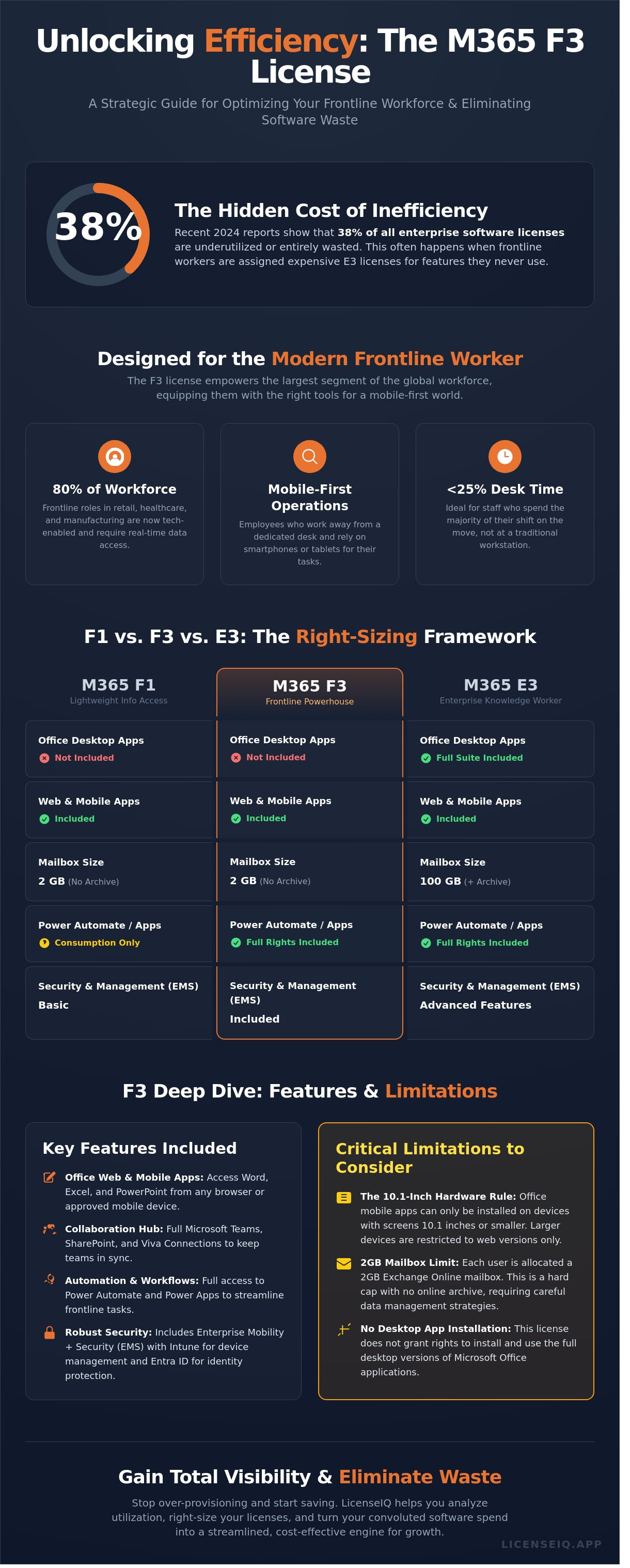
Frontline workers represent approximately 80% of the global workforce. In 2026, these roles have evolved beyond simple manual labor into tech-enabled positions. Retail staff, healthcare professionals, and field technicians now require real-time data to perform their duties. Within the Australian care sector, Im with you utilizes these mobile-first technologies to maintain their reputation for high-standard NDIS support. For medical teams who need to stay agile, services like ClicFone Télésecrétariat provide essential phone management support. To ensure inclusive communication for all patients and staff, you can explore British Sign Language (BSL) Interpreting as part of your accessibility toolkit. In high-pressure roles like these, maintaining physical well-being is as important as digital efficiency, often supported by preventive resources like a Health Screen Test. For those working in sensitive care environments, digital legacy services like Picture-Yourself-Remembered™ can also provide a meaningful way to preserve personal video messages for loved ones. To streamline these specialized tasks, you can discover Repair-CRM for mobile-first field service management. Traditional desk-based licenses are overkill for these environments because they prioritize local storage and complex desktop software. The F3 plan shifts the focus to mobile-first apps and web-based interfaces. A frontline worker is a mobile-first employee who requires secure access to communication and task management tools while spending less than 25% of their shift at a dedicated workstation.
F3 vs. The Legacy Office 365 F3
The transition from the old Office 365 F3 to the modern microsoft 365 f3 license was a fundamental shift in security and management. The "M" in M365 signifies the inclusion of Windows 11 Enterprise and Enterprise Mobility + Security (EMS). These components are vital for maintaining organizational compliance in the field. While the legacy plan focused on basic Microsoft 365 service plans for email, the current iteration provides deep visibility into device health and identity protection.
- Windows 11 Enterprise: Provides secure, cloud-managed endpoints for shared devices.
- EMS (Enterprise Mobility + Security): Offers Intune for device management and Azure Active Directory for secure sign-ons.
- AI Integration: Includes lightweight Copilot features to streamline shift handovers and task reporting.
Choosing the M365 F3 tier allows IT auditors to eliminate shadow IT. It brings every mobile device under the corporate umbrella, ensuring that data stays protected even on the shop floor or in a patient's room. For clinical environments where monitoring is constant, teams can explore Reusable SpO2 Sensors to ensure their hardware keeps pace with their digital workflows. You can monitor utilization and adjust your stack with precision at LicenseIQ, ensuring your frontline remains an asset rather than a security vulnerability.
Technical Specs: Understanding F3 Features and Limitations
The microsoft 365 f3 license serves as a strategic asset for organizations seeking to equip frontline workers without overspending on unused features. It prioritizes cloud-based productivity over local processing. This license provides access to web and mobile versions of the Office suite, ensuring that employees on the move stay connected to the corporate ecosystem. It includes robust security components like Microsoft Intune and Microsoft Entra ID. These tools provide IT leaders with the visibility needed to manage device compliance and identity security across a distributed workforce.
Frontline engagement is driven by integrated collaboration tools. Teams, SharePoint, and Viva Engage are central to the F3 experience. Unlike the more limited F1 plan, the microsoft 365 f3 license includes full access to Power Automate and Power Apps. This allows staff to execute and interact with custom business workflows directly from their mobile devices. For instance, quality assurance teams can explore Pre-Shipment Inspection protocols and log results directly into their mobile apps while on-site at a factory. It transforms a simple communication tool into a functional workstation for the field.
The 10.1-Inch Hardware Rule
Microsoft enforces a specific hardware constraint that dictates how users interact with Office apps. Local installation of mobile apps is only permitted on devices with a diagonal screen size of 10.1 inches or less. This makes the F3 plan ideal for smartphone users and those with compact tablets. If an employee uses a 12-inch tablet or a standard laptop, they must use the web-based versions of Word and Excel. IT managers should audit device specifications across the fleet before finalizing a rollout. Accurate hardware data prevents user frustration and ensures that the chosen license matches the physical tools in use.
Email and Storage: Navigating the 2GB Limit
Effective management of the 2GB mailbox cap is essential for operational continuity. This limit is significantly lower than the 50GB or 100GB allocations found in enterprise-tier plans. When users exceed this threshold, they lose the ability to send or receive messages, creating immediate communication gaps. Organizations should implement these strategies to maintain efficiency:
- Direct all internal team discussions to Microsoft Teams to minimize email volume.
- Configure SharePoint libraries for document storage to keep the 2GB OneDrive for Business lean.
- Set up automated alerts for when a mailbox reaches 80% capacity.
If a user consistently struggles with the 2GB ceiling, it often indicates their role has evolved beyond frontline tasks. In these cases, a transition to an E3 plan is necessary to avoid productivity loss. You can optimize your license allocation by monitoring these storage trends in real time to eliminate waste and maintain compliance.
F1 vs. F3 vs. E3: The Right-Sizing Framework
Effective SaaS management hinges on a clear distinction between content consumption and content creation. The F1 license serves the "Read-Only" user. It provides access to communication tools like Teams and SharePoint but restricts document editing. The microsoft 365 f3 license serves as the bridge for workers who need to create and edit documents using web-based Office applications. Organizations often overlook this distinction, leading to significant financial waste.
Many enterprises harbor "License Squatters." These are employees assigned a high-tier E3 license who never utilize the local desktop applications or advanced security features included in that price point. They are essentially using an E3 to do F3-level work. The financial impact of this misalignment is massive. Transitioning 100 users from an E3 to an F3 can save approximately $2,800 per month based on current standard market rates. This shift recovers $33,600 in annual spend for every 100 users optimized. Just as Integrity Estates Realty provides clarity on complex financial decisions like choosing between FHA and conventional loans for the 2026 market, right-sizing your software ensures every dollar is working effectively. You can identify these waste patterns immediately by checking your license Health Score.
When to Choose F1 Over F3
Select the F1 license for employees who function solely as communication endpoints. These users check company announcements on SharePoint, participate in Teams chats, and view shifts. They don't need to edit spreadsheets or draft reports. In a typical mixed-tenant environment, roughly 30 to 40 percent of the frontline workforce often falls into this category. Assigning an F1 to these users minimizes the cost per seat while maintaining full compliance and connectivity. Precise user profiling ensures you aren't paying for creation capabilities that your staff never uses.
The E3 to F3 Downgrade Opportunity
The most aggressive cost recovery happens when moving users from E3 to a microsoft 365 f3 license. Candidates for this downgrade include employees who work exclusively on mobile devices or those who only access web versions of applications. To execute this transition without disruption, IT leaders must audit mailbox sizes. The F3 license carries a 2GB mailbox limit, whereas the E3 offers 100GB. Users must archive data or move to shared mailboxes before the downgrade occurs. Implementing this Microsoft 365 license optimization strategy allows finance teams to reclaim budget while ensuring IT remains lean and agile. It turns a static expense into a dynamic, optimized resource.
Implementation Strategy: Deploying F3 for Maximum ROI
Deploying the microsoft 365 f3 license requires more than a simple purchase. It demands a structured framework to ensure every dollar spent translates into operational efficiency. Start by automating license assignment through Entra ID group-based rules. Manually assigning seats to hundreds of retail or factory employees is a recipe for administrative bloat. Use dynamic attributes like department codes or job titles to trigger instant provisioning. This ensures new hires—including field teams at a professional service like Move&Haul, emergency roadside support providers like Ibrahim Road Rescue LLC, mobile automotive experts at Prestige Mobile Locksmith, or specialized service teams like those you'll see when you visit JPK9 Academy—gain access on day one without IT intervention. For organizations managing these types of mobile-intensive operations, particularly those operating in Florida, it is just as important to explore Auto Insurance through SI Insurance to safeguard your vehicles and staff as it is to optimize your software licenses.
Security and Compliance for Frontline Workers
Mobile-first environments introduce specific risks that require vigilant oversight. For organizations prioritizing comprehensive safety, integrating physical security solutions like öryggismyndavélar from Öryggisdeildin alongside digital protocols provides a holistic approach to asset protection; furthermore, professional development through Insight Security Training ensures that frontline teams are accredited and prepared for complex field operations. Implement Conditional Access policies to restrict data access based on location or device health. Multi-factor authentication (MFA) is non-negotiable for the microsoft 365 f3 license tier. According to the 2023 Microsoft Digital Defense Report, MFA reduces the risk of compromise by 99.2%. Use Microsoft Intune to manage "Bring Your Own Device" (BYOD) scenarios; this allows you to wipe corporate data without touching personal photos or files. To keep those personal records and family documents organized and safe, mysafekeep.com provides a secure hub for your digital legacy. Finally, a secure employee offboarding process is vital. It ensures access is revoked the moment a contract ends, preventing shadow IT and securing sensitive company data.
Maximizing Frontline Engagement with Teams
Monitoring utilization is the final step to prevent license creep. Audit your environment every 30 days to identify inactive accounts. If an F3 user hasn't logged in for a month, reclaim that seat immediately. This proactive approach eliminates waste and keeps your software stack lean and transparent.
Optimize your SaaS environment and reduce wasted software spend today.
Optimizing Your F3 Investment with LicenseIQ
Manual license tracking is a liability for high-turnover frontline teams. Retail and manufacturing sectors—where organizations might rely on Container Authority for bulk industrial storage, Pik Pak Logistics for streamlined eCommerce fulfillment, or visit Merchant Solutions Corp for high-risk merchant accounts—often experience annual turnover rates exceeding 50 percent. To address the root causes of this churn, organizations can use Benchmarcx to measure and benchmark the talent experience in real-time. In these technical environments, maintaining digital continuity is key; for instance, SOCWeld helps teams automate and manage welding documentation to keep operations running smoothly during staff transitions. Static spreadsheets can't keep pace with these personnel shifts. This lag creates a surplus of assigned but unused seats, draining your IT budget every month. LicenseIQ eliminates this waste by providing total visibility into your Microsoft ecosystem.
Our platform scans your tenant to pinpoint every microsoft 365 f3 license currently in use. More importantly, it identifies over-licensed users. We find employees holding expensive E3 or E5 seats who only utilize basic mobile or web features. Converting these users to a microsoft 365 f3 license can reduce individual seat costs by a significant margin immediately. The Spend Recovery Dashboard visualizes these savings, turning raw data into a clear financial roadmap for your leadership team.
Real-Time Governance for Frontline Licenses
Automated governance stops license bloat before it starts. LicenseIQ allows you to set up custom workflows that reclaim licenses from inactive users after 30 days of zero login activity. This proactive approach maintains a high License Health Score and ensures your organization stays lean. We also uncover Shadow IT risks. By monitoring app usage, we identify where frontline workers use unauthorized third-party tools instead of their provisioned Microsoft apps. This visibility protects your data and justifies your software investment.
- Automate license reclamation for seasonal staff.
- Eliminate "zombie" accounts from former employees.
- Bridge the gap between HR data and IT provisioning.
Getting Started with a 5-Minute Audit
Efficiency is our priority. You can connect LicenseIQ to your Microsoft 365 tenant in less than five minutes through a secure connection. Our system immediately analyzes your utilization patterns without requiring complex manual inputs. Once the scan completes, you'll receive your first Spend Recovery report. This document highlights exactly where you're overspending and provides actionable steps to optimize your stack. Take the first step toward automated license governance today to secure your digital resources and reclaim your budget.
Master Your Frontline Strategy for 2026
The 2026 digital landscape requires a lean, high-visibility approach to resource allocation. Deploying the microsoft 365 f3 license serves as a strategic bridge, providing frontline workers with essential productivity tools without the bloated costs of enterprise-tier subscriptions. By right-sizing your environment, you'll eliminate the financial waste associated with over-provisioning while maintaining strict security standards. Precision in license management is no longer optional for IT leaders who value operational transparency. To complement these technical efficiencies with strong organizational growth, you can discover Symphony 100 and their specialized leadership development for high-performance teams.
LicenseIQ acts as your proactive digital auditor to uncover hidden costs in minutes. Our AI-native governance connects directly to your tenant, providing an Automated Spend Recovery Dashboard that highlights immediate efficiency gains. Data shows that organizations save up to 35% on their Microsoft 365 spend by optimizing their license distribution. Don't guess about your utilization when you can make data-driven decisions that impact your bottom line.
Scan your tenant for free and identify F3 saving opportunities with LicenseIQ
You're ready to transform your software stack into a streamlined engine for growth. Take the first step toward total visibility and secure your organization's financial health today.
Frequently Asked Questions
Can Microsoft 365 F3 users install Office apps on a PC?
No, Microsoft 365 F3 users don't have rights to install desktop versions of Office applications on a PC or Mac. This license restricts access to web-based versions and mobile apps on devices with screens smaller than 10.1 inches. It's a strategic choice for frontline workers who perform tasks via mobile devices or shared kiosks rather than dedicated workstations.
What is the difference between Microsoft 365 F1 and F3?
The primary difference lies in content creation rights and mailbox availability. While the microsoft 365 f3 license allows users to create and edit documents, F1 is designed primarily for content consumption. Additionally, F3 includes a 2GB Exchange mailbox, whereas F1 provides no mailbox, requiring users to rely on Teams for communication.
Is Microsoft Teams included in the F3 license?
Yes, Microsoft Teams is fully integrated into the F3 license. Frontline workers gain access to chat, video meetings, and specialized tools like Shifts for schedule management. For managers who need a clear view of staff availability, teamsdashboard.com provides a real-time status overview of all employees. This inclusion ensures that 100 percent of your workforce remains connected to the corporate hub without the overhead of premium enterprise features.
Does the F3 license include Windows 11?
Yes, the F3 license includes Windows 11 Enterprise E3 edition. This provides your organization with essential security features and management capabilities for frontline hardware. IT leaders can deploy these operating system rights to ensure compliance and data protection across all mobile and shared devices in the field.
Can I mix F3 licenses with E3 or E5 licenses in the same tenant?
Yes, you can mix F3 licenses with E3 or E5 licenses within a single Microsoft 365 tenant. This hybrid approach is a key strategy for license optimization. It allows you to assign the microsoft 365 f3 license to mobile staff while reserving high-cost E5 seats for power users who require advanced analytics and security.
What happens if an F3 user exceeds the 2GB mailbox limit?
If an F3 user exceeds the 2GB storage limit, they'll stop receiving incoming emails and lose the ability to send new messages. Admins must proactively monitor utilization to avoid service gaps. To resolve this, you must either delete old items to free up space or upgrade the user to an E3 license that offers 100GB of storage.
Is Microsoft 365 Copilot available for F3 users in 2026?
Microsoft expanded Copilot eligibility to F3 and F1 licenses in early 2024. By 2026, frontline workers can use AI as a paid add-on to summarize long chat threads and automate routine data entry. This integration provides visibility into operational data and helps bridge the digital gap between the field and the office. For those looking to enter these tech-driven environments, you can discover QuickApply to see how AI-powered platforms are also streamlining the job application process for tech professionals and students.
How do I downgrade a user from E3 to F3 without losing data?
You must verify that the user's mailbox is under 2GB and their OneDrive storage is below 2GB before switching licenses. Since E3 provides 100GB of mail and 1TB of storage, any data exceeding the F3 limits will be permanently lost during the transition. Back up all critical files to a secure location before reassigning the license.


