

What if a Teams Premium license shows who has access, but not whether its features are becoming part of their work? That gap is why tracking teams premium feature adoption requires more than checking assignments. Microsoft’s Teams Premium feature usage report provides aggregated activity signals, but a single interaction isn’t the same as sustained, value-driven use. And since April 1, 2026, several advanced event features have moved into Teams Enterprise, making it even more important to assess what users need from the add-on today.
You need evidence before changing access or license assignments, not assumptions based on a seat count. This guide shows you how to identify useful feature-level signals, distinguish one-time usage from adoption, and build a consistent review process that pairs report data with user feedback.
You’ll also learn how to connect those findings to broader Microsoft 365 license governance. LicenseIQ supports that wider oversight with tenant-wide license and user insights, a License Health Score, and recommendations. Keep feature analytics and license governance separate, then use both to make measured, low-disruption decisions.
Key Takeaways
- Tracking teams premium feature adoption means measuring repeated, workflow-relevant use, not just counting assigned licenses.
- Choose a small set of feature-specific signals across reach, activation, repeat use, and operational outcomes.
- Combine Microsoft reporting with user feedback and license records, while accounting for each source’s coverage and limitations.
- Set a baseline and cohort before comparing usage, then record review findings and decisions consistently.
- Use verified adoption evidence to inform license governance. Keep feature telemetry separate from broader Microsoft 365 license insights.
Why tracking Teams Premium feature adoption takes more than checking assigned licenses
A license assignment shows that a user is entitled to Teams Premium features. It doesn’t show whether the user knows those features exist, has tried them, or relies on them in daily work. That distinction matters for governance: removing a license based on an assignment list alone can overlook real use, while retaining every assignment can obscure unused access.
In 2026, feature eligibility also needs context. Microsoft moved several capabilities, including advanced webinar and town hall features, into Teams Enterprise on April 1. A Teams Premium seat count alone may not tell you which features a user can access or which add-on capabilities matter to their role. First map each feature to its intended audience, then assess behavior. Microsoft Teams is a collaboration service within Microsoft 365, but feature availability and use need to be assessed at a more specific level.
What counts as Teams Premium feature adoption?
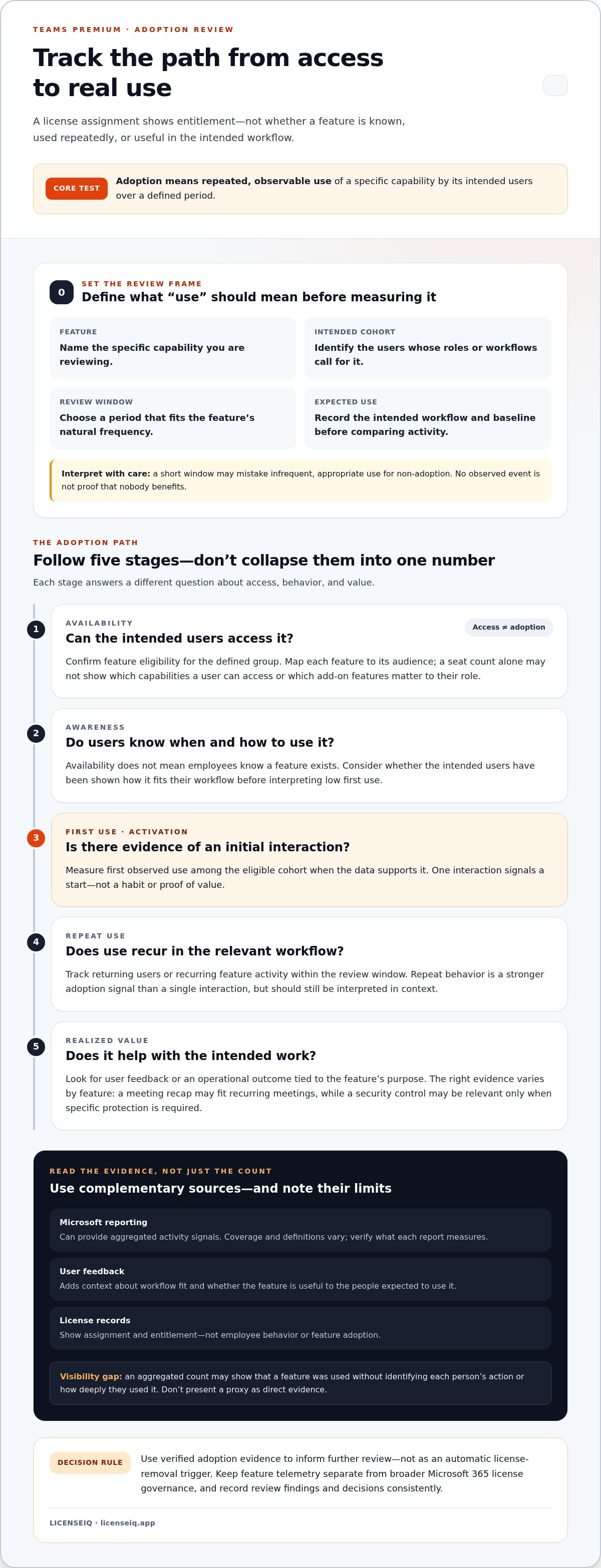
Feature adoption is repeated, observable use of a specific capability by its intended users over a defined period; license assignment records entitlement, not adoption. This gives administrators a practical test: name the feature, identify the relevant user group, and look for actions that indicate the feature is being used in its intended workflow.
Separate the stages. A feature may be available but unknown to employees; awareness may lead to a first use, but one interaction doesn’t establish a habit. Repeat use is a stronger adoption signal, while realized value requires evidence that the feature helps users complete a task or meet a business need. Evidence varies by feature. A meeting recap may be relevant to recurring meetings, while a security control may be used only for meetings with specific protection requirements.
Why license assignment alone gives an incomplete picture
An assigned license identifies access, not employee behavior. Someone may have a license but never use a particular capability. Another team may use a feature regularly because it fits a recurring workflow. Those patterns can coexist, so a tenant-wide seat count can hide both potential waste and pockets of meaningful use.
Choose a review window that fits the feature’s natural frequency. A capability used in routine meetings may produce repeat signals sooner than one reserved for occasional events. A short window could mistake infrequent, appropriate use for non-adoption. Record the period, cohort, and expected use before interpreting activity, and distinguish a lack of observed events from proof that nobody benefits.
For a disciplined review, track the adoption path rather than collapsing it into one number:
- Availability: Can the intended users access the feature?
- Awareness: Have they been shown when and how to use it?
- First use: Is there evidence of an initial interaction?
- Repeat use: Does use recur in the relevant workflow?
- Realized value: Do users or operational outcomes indicate the feature is useful?
These stages help teams identify where adoption stalls. Low first use may point to an awareness or workflow-fit issue; repeat use without clear value may call for user feedback. Tracking teams premium feature adoption this way makes the review an evidence-gathering exercise, not an automatic license-removal trigger. Use the findings to guide further review before changing access.
Which Teams Premium adoption signals should you measure?
Useful adoption reporting separates four questions: who could use a feature, who tried it, who returned to it, and whether it supported the intended work. Pick signals that answer those questions for a defined feature and user group. Don’t collect every available number by default. More metrics can create noise without improving a decision.
No single metric proves adoption or value; usage counts show activity, while repeat behavior and workflow evidence help explain whether that activity matters. Report coverage varies by feature and Microsoft’s reporting tools. Verify each metric’s current definition, availability, and limitations against Microsoft documentation before using it in a governance review.
Separate reach, activation, and repeat use
Start with the denominator. Define eligible users based on role, workflow, and access, rather than comparing activity with every licensed employee. Then measure reach among that cohort, first observed use as activation, and recurring use separately wherever the data supports it. Keep the measurement period consistent so changes are comparable.
Be explicit about what the data cannot show. An aggregated meeting count, for example, may indicate that a feature was used without identifying each person’s action or how deeply they used it. If a report doesn’t expose a feature-level event, record that as a visibility gap. Don’t present a proxy as direct evidence.
- Reach: Eligible users with access, compared with the defined target group.
- Activation: Users with a first observed feature interaction.
- Repeat use: Returning users or recurring feature activity within the review window.
- Operational outcomes: A workflow measure or user feedback tied to the feature’s intended purpose.
Connect feature activity to a business outcome
Choose an outcome before reviewing the usage trend. For a meeting feature, ask whether participants find follow-up clearer or whether a team’s process for capturing actions has changed. For a protection feature, examine whether it’s being used in the situations where the organization expects added safeguards. These are evaluation questions, not guaranteed results.
Pair telemetry with a focused survey, interviews, or an existing process measure. Ask users what task they used the feature for, what helped, and what got in the way. If activity rises, don’t claim the feature caused an improvement without supporting evidence. Other changes, such as training or a shift in meeting volume, may explain the trend.
For tracking teams premium feature adoption, keep the metric definitions, cohort, review window, and known data gaps together. That record makes comparisons more defensible and gives license reviewers useful context. Broader Microsoft 365 license insights, such as those available through LicenseIQ’s license oversight platform, can help connect verified review findings to license governance while keeping feature analytics distinct.
Compare Microsoft reporting, user feedback, and license data
Each source answers a different question. Microsoft reporting can show observed activity, feedback can explain why users do or don’t use a feature, and license records show who has access. Combining them creates a stronger review than treating any one source as a complete adoption measure.
What Microsoft reporting can show, and what it may not
The Teams admin center’s Teams Premium feature usage report provides aggregated measures, including users attending meetings with premium features and the count of meetings using them. The report supports 7-, 30-, 90-, and 180-day views, and data typically has a 24-to-48-hour delay. Aggregated totals can indicate patterns, but they don’t necessarily establish which individual performed a feature-specific action.
Microsoft 365 usage reports and other administrative views may add tenant-level context. Before relying on any report, verify its current fields, feature coverage, permissions, retention, export options, and refresh timing in Microsoft documentation. Don’t assume that a general Teams activity measure confirms use of a particular Teams Premium feature.
| Evidence source | What it can help establish | Limit to record |
|---|---|---|
| Teams Premium feature usage report | Aggregated activity for the premium features represented in the report | Confirm current feature coverage and whether detail is aggregated or user-level |
| Microsoft 365 usage and admin reports | Broader service activity and administrative context | General activity may not map to a specific premium feature |
| User or manager feedback | Reasons behind use, non-use, or perceived workflow benefit | Responses reflect a sample and may be subjective |
| License records | Who is assigned an eligible license | Assignment shows entitlement, not feature behavior |
How feedback and license records complete the picture
Use targeted questions to investigate gaps in the telemetry. If a group has access but little observed activity, ask whether users know the feature exists, whether it fits their workflow, and what prevents use. Manager input can help distinguish low demand from an expected use pattern that occurs only in specific situations. Record who provided feedback and when, so opinions aren’t mistaken for measured activity.
Match observations to license records for the same cohort and review period, but keep the datasets conceptually separate. A licensed user with no recorded event may indicate non-use, an infrequent workflow, or a reporting blind spot. The evidence should prompt investigation, not an automatic change to access.
Use adoption findings as one input to Microsoft 365 license optimization, alongside role and business context. A recurring review can follow the Microsoft 365 license management lifecycle without treating usage telemetry as a license-optimization tool. This separation makes tracking teams premium feature adoption more defensible: Microsoft reports show activity, people explain context, and license data supports governance decisions.
How to track Teams Premium feature adoption in a repeatable workflow
A consistent review turns scattered signals into decisions you can explain and revisit. Use the same sequence each cycle, but tailor the metrics and review window to the feature’s intended use. This keeps comparisons grounded and helps prevent a weak or incomplete signal from triggering an unnecessary access change.
- Define the feature and use case. Identify the specific Teams Premium capability, the workflow it should support, the intended user group, and an accountable business owner. Be precise about the expected behavior. “Use meeting recap for recurring project meetings” is more useful than “increase Premium use.”
- Set the cohort and baseline. List eligible users using consistent criteria, such as role or workflow. Record the baseline period and starting measures before rollout, training, or policy changes. Keep the denominator stable between reviews, or document changes to the cohort so a shift in user population isn’t mistaken for an adoption trend.
- Choose a suitable review window. Match the observation period to how often the feature should reasonably be used. A feature tied to routine work may need a different window from one reserved for occasional scenarios. Set the next review date in advance and use comparable periods when assessing change.
- Verify current reporting capabilities. Before building the measure, check Microsoft’s current documentation and the reports available in your tenant. Confirm which feature events are covered, whether results are aggregated or user-level, and what permissions, refresh timing, retention, and export limits apply. If the report cannot show a needed action, mark the gap and avoid presenting a proxy as direct feature use.
- Validate the evidence. Check that the data covers the chosen cohort and full review window. Compare observed activity with focused feedback from users or managers and the workflow context. Note possible explanations for low or uneven activity, including awareness, access, frequency of need, or reporting limitations.
- Record a proportionate decision. Document the finding, confidence level, data gaps, follow-up owner, and next review date. Investigate low adoption before considering training, workflow adjustments, or license changes. Discuss any proposed access change with the relevant business owner and administrator, and consider its user impact before acting.
This process makes tracking teams premium feature adoption repeatable without turning a usage signal into an automatic license decision. Recurring reviews should connect feature evidence to a broader governance cycle, such as the Microsoft 365 license management lifecycle. Keep feature telemetry distinct from license insights. To connect documented review findings with broader Microsoft 365 license oversight, explore LicenseIQ’s license governance capabilities.
Connect Teams Premium adoption reviews to Microsoft 365 license governance
Feature activity can make a license review more informed, but it shouldn’t make the decision on its own. A usage report won’t explain every role requirement, business commitment, or reporting gap. Treat adoption evidence as one input alongside assigned licenses, job responsibilities, and the business owner’s view of how the feature supports work.
Use adoption evidence as one input to license review
Bring the relevant evidence together for the same user group and review period: feature activity, license assignment, expected role needs, and business context. If signals are incomplete or ambiguous, pause for human validation. Low observed use could reflect an infrequent workflow or a measurement gap, not a lack of need.
Before changing assignments, discuss the evidence with the business owner and relevant administrators. Record the rationale, approval, affected users, and follow-up date. After an approved change, monitor for operational impact, such as a disrupted workflow or an unmet user need. This creates an accountable review trail instead of a decision based on a single metric.
Make license oversight continuous instead of episodic
Recurring governance reviews help keep license records and business needs under review rather than relying on disconnected, one-off checks. Set a regular review cadence and document open questions, decisions, and follow-up actions. Apply the same process across relevant user groups so changes remain explainable and financial oversight stays grounded in current evidence.
LicenseIQ supports broader Microsoft 365 oversight by scanning licenses and users and providing a License Health Score, spend recommendations, and automated governance workflows. These capabilities inform license optimization; keep them distinct from Teams Premium feature telemetry in your records, then bring the findings together during review. Adoption data can prompt a governance question, while license and user insights support the broader assessment.
- Feature telemetry: What activity was observed, for which users, and over what period?
- License insights: Which users have assigned licenses, and what optimization recommendations apply?
- Business validation: Does the feature still support a role, process, or documented need?
- Governance record: What action was approved, by whom, and when will its impact be reviewed?
That separation makes tracking teams premium feature adoption useful beyond reporting. Verified signals can inform wider license governance without turning activity counts into automatic removal rules. Use Explore Microsoft 365 license governance with LicenseIQ to connect license insights and recommendations with a repeatable oversight process.
Make your next review a governance checkpoint
Turn the next Teams Premium review into a decision point, not just another report export. Assign an owner to resolve data gaps, confirm business needs, and document any approved changes. Over time, that discipline makes tracking teams premium feature adoption part of a wider, more accountable approach to Microsoft 365 oversight.
LicenseIQ supports that broader governance work. It scans Microsoft 365 licenses and users, while its License Health Score and spend recommendations help inform optimization. Automated governance workflows help operationalize decisions and support ongoing financial accuracy. These capabilities complement feature-level usage evidence.
Explore Microsoft 365 license governance with LicenseIQ and build a clearer path from review findings to responsible oversight. Each measured decision strengthens your process and helps keep license governance aligned with how your organization works.
Frequently Asked Questions
How do you track Teams Premium feature adoption?
Track it by pairing relevant Teams usage evidence with a defined user cohort and a review period. For example, if a department is piloting meeting recaps, compare activity for that group before and after enablement, then ask participants whether the feature fits their meeting process. Save the report date and cohort definition with each review so future comparisons use the same basis. This makes tracking teams premium feature adoption more consistent and useful for follow-up.
Can Microsoft Teams usage reports show which Teams Premium features employees use?
Microsoft’s Teams Premium feature usage report provides aggregated indicators, including users who attended meetings with premium features and the number of meetings using them. It isn’t necessarily a user-by-user record of every feature action, and coverage can vary. Check current Microsoft documentation and the report in your tenant to confirm exactly which features and fields it includes before treating a metric as evidence of a specific employee’s behavior.
Which metrics should you use to measure Teams Premium adoption?
Choose metrics that fit the feature. For meeting recaps, you might monitor eligible users with observed recap activity and whether use recurs in later review periods. For a protection capability, track its use in the meeting scenarios where it’s intended. Pair activity with a relevant process measure or a short user question. Avoid combining unlike features into one adoption score, since their audiences and expected use patterns may differ.
How often should you review Teams Premium feature usage?
Set the review cadence according to how often the feature should be needed. A feature used in routine meetings may warrant more frequent checks than one reserved for occasional scenarios. The Teams Premium feature usage report offers 7-, 30-, 90-, and 180-day filters, and reported data typically has a 24-to-48-hour delay. Allow for that latency, then use consistent periods to compare trends rather than reacting to a single day.
Does assigning a Teams Premium license mean an employee adopted its features?
No. Assignment shows that the employee has access, not that they know about or use a feature. A person may need a capability only for a specific project, while another user may rely on it regularly. For example, a quiet usage period during a team’s meeting pause doesn’t establish that the license has no value. Check role requirements and workflow timing before drawing conclusions from an assignment list.
Can adoption data alone justify removing a Teams Premium license?
No. Low or absent activity is a reason to investigate, not sufficient evidence for automatic removal. Confirm that the data covers the relevant users and period, then check with the business owner about upcoming work, infrequent needs, or operational dependencies. If a change is approved, document who authorized it and monitor for access issues. This gives the organization a clear record and a chance to correct an unintended impact.
How can Teams Premium usage data inform Microsoft 365 license optimization?
Use feature activity as one signal in a wider review that also considers assigned licenses, user roles, and business needs. LicenseIQ supports that broader work by scanning Microsoft 365 licenses and users and providing a License Health Score and spend recommendations. Bring verified usage evidence into the review separately, then use license insights to inform optimization and governance decisions.


