

Windows 365 Cloud PC license optimization works best when assignments reflect current roles and employee needs, not when teams simply cut license counts. Reviewing those needs can be difficult when license records, usage signals, and offboarding workflows sit in different places. Removing access based on an assignment list alone can also disrupt people who still rely on their Cloud PC.
A safer approach is to build an evidence-led review. This guide explains how to spot potentially unused, redundant, or mismatched assignments, validate each one against business needs, and prioritize changes before acting. You’ll also learn how to make reviews repeatable, with clear ownership and regular checkpoints, rather than relying on occasional audits. The goal is practical: uncover avoidable spend while protecting the access users need, then keep assignments aligned as your organization changes.
Key Takeaways
- Effective windows 365 cloud pc license optimization starts by validating each assignment against current user needs and policy, not by treating every assignment as waste.
- Review subscription charges separately from underlying infrastructure costs to see which spending decisions each team can influence.
- Choose whether to retain, investigate, reassign, or remove an assignment based on evidence, user impact, reversibility, and approval requirements.
- Use a consistent review workflow to connect license records with user and lifecycle information before making changes.
- Assign clear owners, set review checkpoints and exception expiry dates, and build governance around hiring, role changes, offboarding, and renewals.
Why Windows 365 Cloud PC license optimization starts with assignment visibility
Windows 365 cloud pc license optimization means validating every paid assignment against a user’s current need and your organization’s access policy. The aim isn’t to reduce a number on a dashboard. It’s to identify where an assignment may no longer fit, gather evidence, and decide what to do without interrupting approved work.
An assignment count alone can’t prove waste. It won’t tell you whether a person is on leave, supporting a temporary project, or working a schedule that produces intermittent activity. Nor does an apparently inactive Cloud PC establish that its user has no business need. Treat counts and usage signals as prompts for review, not instructions to remove access.
Separate the financial questions, too. A Windows 365 subscription charge and any related Azure consumption are different review categories. Depending on configuration, Azure networking or data transfer may create costs outside the subscription. Cloud PC sizing is another decision: changing resource capacity addresses fit and performance, while reviewing an assignment addresses whether a user needs that Cloud PC. Keep these findings distinct so a change in one category doesn’t obscure the other.
Stale assignments, unclear ownership, and unvalidated changes create operational risk. A former employee’s assignment may point to an incomplete lifecycle process, while a current employee’s low activity may have a valid explanation. Record the evidence, the business owner, and the approval before changing access. For context on the broader cloud-services family, see this overview of Microsoft 365. When reviewing Cloud PC spend, assess Windows 365 entitlements and Cloud PC records specifically.
What counts as a potential Cloud PC licensing opportunity?
Look for signals that justify investigation: a role change, departure, duplicate access, a shift in work patterns, or an assignment with no clear owner. In Microsoft’s terminology, an available, unassigned license is different from a license assigned to a user; the associated Cloud PC also has a provisioning status. Check both records rather than treating an unassigned entitlement and an assigned Cloud PC as the same condition.
Why does license visibility need user and lifecycle context?
Match assignment records to employee status, accountable ownership, and approved business use. Leave, seasonal work, and temporary projects can make activity look unusual without removing the need for access. Before acting, document the signal, confirm its meaning with the user’s manager or designated business owner, and name an accountable reviewer. If evidence is incomplete or disputed, hold the assignment for review rather than making an irreversible change.
How Windows 365 licensing, Cloud PC assignments, and costs relate
A Windows 365 subscription is a license entitlement assigned to a user. That entitlement is associated with a Cloud PC provisioned for the user under the relevant plan and organizational settings. For an audit, connect the subscription record to the assigned identity and the Cloud PC record, but keep each record’s status clear. A license, its assignment, and a provisioned Cloud PC are related, not interchangeable.
Cost review needs the same separation. Subscription charges are one category. Azure infrastructure consumption, such as applicable network data transfer charges, is another. Cloud PC configuration is a third consideration: a resource-sizing change may address performance or capacity, but it doesn’t by itself establish whether the user still needs an assigned license. Track each category separately so you can attribute findings and decisions correctly.
An assignment merits review when its current entitlement, user need, Cloud PC configuration, or billing context no longer aligns with documented business requirements. That’s a review threshold, not an automatic removal rule.
Which license and assignment details should an audit capture?
Build a record that connects entitlement to user and cost without merging distinct details. Capture the current SKU or plan, assignment status, assigned identity, and renewal or billing context. Record Cloud PC configuration separately, including the information your organization uses to assess capacity and suitability. This gives finance, IT, and business owners a shared view while preserving the difference between subscription terms and the resources assigned to a user.
- License record: plan or SKU, assignment status, and billing or renewal context.
- User record: identity, employment status, business owner, and approved use.
- Cloud PC record: provisioned status and configuration details.
- Decision trail: evidence reviewed, decision owner, approval, and next review date.
Plan names, availability, eligibility, assignment behavior, and billing terms can change. Review current Microsoft Product Terms and official Windows 365 documentation before acting on plan-specific assumptions, including what happens when an assignment changes or ends.
How is license optimization different from Cloud PC right-sizing?
License optimization asks whether a user should retain the entitlement under current business requirements. Right-sizing asks whether the Cloud PC’s configuration remains suitable for that user’s workload. The workstreams can inform each other, but they need separate evidence and decision owners. A manager or business owner can validate need; IT or endpoint administration can assess configuration and technical impact.
Keep financial reporting equally precise. Attribute subscription charges to the licensing review, and assess Azure consumption through the relevant infrastructure and billing records. For broader Microsoft 365 license visibility, LicenseIQ’s software intelligence platform scans licenses and users and provides a License Health Score with dollar-value recommendations. Use those insights alongside Windows 365-specific records when reviewing Cloud PC spend.
Compare Windows 365 Cloud PC optimization actions by risk and evidence
A review signal isn’t a decision. For windows 365 cloud pc license optimization, choose an action only after weighing the strength of the evidence, the effect on the user, and the approvals required. Removing an assignment carries more risk than flagging it for investigation because it can interrupt access and may have consequences under current billing or plan terms.
Use this action matrix to make decisions consistent. Apply your organization’s policies and validate user impact before changing an assignment.
- Retain: Evidence includes a confirmed business need, an accountable owner, or approved use. User impact is low because access stays in place. This is readily reversible, and routine retention can follow established policy, with exceptions documented.
- Investigate: Evidence is incomplete or conflicting, such as low activity alongside an active employee record. No access change is made while the owner or user need is clarified. The step is fully reversible because it changes review status, not access. Assign a reviewer and set a follow-up date.
- Reassign: Evidence shows the current user no longer needs the Cloud PC, while another person has a validated need. The first user may lose access, and the new user’s access depends on the approved reassignment process. Confirm both users’ requirements, technical implications, and required approvals before proceeding.
- Remove: Evidence confirms the user’s need has ended, such as a completed departure process, and policy supports removal. User impact can be high if records are wrong. Reversal may require a new assignment or restoration steps. Obtain the required business and IT approvals, and check applicable billing and plan terms before acting.
Keep license decisions separate from Cloud PC resizing and Azure consumption actions. A change to configuration or infrastructure spend doesn’t, by itself, establish that an assignment should be removed. Route those findings through their own technical and financial reviews.
When should a Cloud PC assignment be investigated rather than changed?
Investigate when activity data conflicts with employee records, the listed owner has changed, or a manager can’t confirm the purpose. A quiet period may reflect leave, seasonal duties, or a temporary project rather than lack of need. If telemetry can’t establish whether access remains necessary, name a business owner to validate it. Record the conflicting signals and pause access changes until the discrepancy is resolved.
How should teams prioritize candidate savings safely?
Sort candidates by evidence confidence, potential spend impact, and disruption risk. Handle routine, verified lifecycle cases separately from exceptions that need manager or business-owner review. This keeps clear cases moving without allowing uncertain records to become automatic removals.
Prioritize verified, low-risk changes before uncertain, high-impact removals. Log the evidence, decision, approver, and outcome for each action. That creates a defensible trail and helps teams learn which signals reliably identify assignments for action.
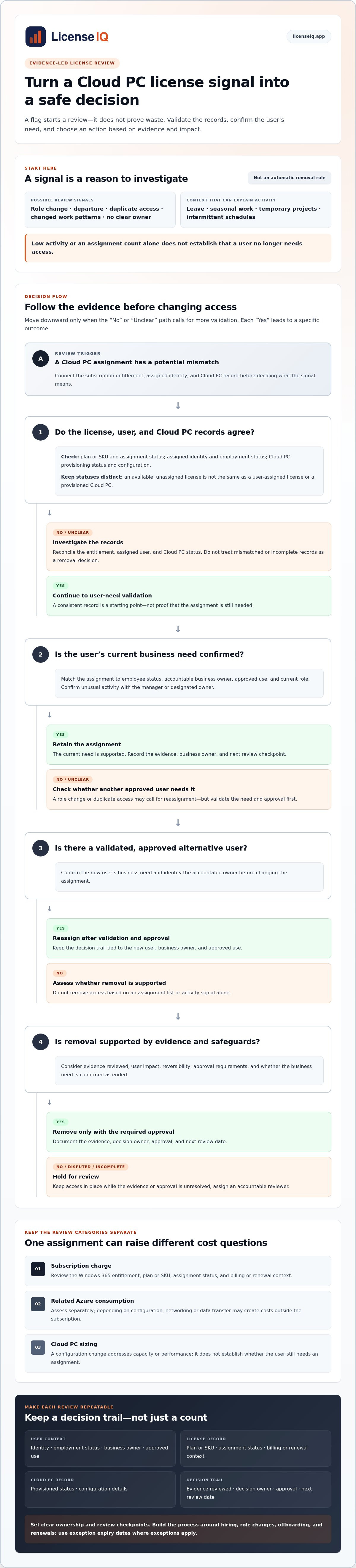
How to run a Windows 365 Cloud PC license optimization review
A repeatable review turns scattered records into controlled decisions. Use the same sequence each cycle, document who owns each step, and require approval before any change that could affect user access. This keeps windows 365 cloud pc license optimization focused on evidence and measurable outcomes, not assumptions.
- Establish scope. Set the review period, user groups, Cloud PC records, and cost categories. Decide whether the review covers subscription assignments, Azure consumption, or both, and keep findings distinct.
- Gather records. Bring together assignment details, user lifecycle status, business ownership, approved exceptions, billing context, and relevant activity signals.
- Identify candidates. Flag records for review when ownership is missing, employee status conflicts, or assignment information appears outdated. A signal starts an investigation, not an access change.
- Validate need. Ask the user’s manager or designated business owner to confirm the approved use and likely impact. Record unresolved questions and route exceptions for review.
- Approve and act. Obtain required business and IT approval before an access-affecting change. Apply approved actions through the organization’s established Microsoft administration process.
- Recheck and record. Confirm user access and Cloud PC status after each action. Log the decision, evidence, approver, action date, and observed outcome.
Assign clear roles before work begins. IT coordinates the review and technical impact checks. Finance reconciles billing context and distinguishes confirmed changes from estimates. Managers validate business need. Identity or endpoint administrators verify user status and carry out approved changes through established processes.
What data should the review bring together?
Use a consistent record that links the assignment to a person, business owner, lifecycle status, and any approved exception. Include usage or activity signals only when their measurement window and limitations are clear. A quiet period can have several explanations, so don’t interpret it in isolation. Reconcile mismatched records across systems, and mark missing information as unresolved rather than treating it as proof that access is unnecessary.
For broader Microsoft license governance, the Microsoft 365 license optimization guide explains how systematic visibility and review can support spend recovery. Keep Windows 365 assignment validation grounded in the relevant Cloud PC and user records.
How can teams apply changes and verify outcomes?
After approval, make one change at a time where practical, then check that the intended user impact and Cloud PC status match the decision. Record any access issue or unexpected result and assign an owner to resolve it. Separate realized spend changes, confirmed in billing records, from projected savings or theoretical opportunities. This distinction gives finance and IT an accurate view of review outcomes.
For repeatable license oversight, LicenseIQ’s software intelligence platform scans Microsoft 365 licenses and users and provides a License Health Score with dollar-value recommendations.
Build continuous Windows 365 license governance with clear ownership
A one-time audit can surface mismatches, but governance keeps them from accumulating again. Set a recurring review cadence for assigned Cloud PCs, then add checks at key lifecycle events: hiring, offboarding, role changes, and subscription renewals. A monthly exception review with a broader quarterly assessment is one workable model; adjust the timing to your organization’s change volume and approval process. Consistency matters more than choosing a universal schedule.
Give each decision a clear owner. IT coordinates the review, finance validates billing outcomes, managers confirm business need, and identity or endpoint administrators maintain accurate user and device records. Define who approves access changes and where disputed assignments escalate. For exceptions, record the business reason, owner, approval date, and expiry date. An exception without an expiry can quietly become permanent.
Track the full decision trail, not just the number of licenses. Record assigned licenses, candidates reviewed, approved actions, realized savings, and access incidents. This makes windows 365 cloud pc license optimization a governed process, with financial oversight balanced against user continuity.
Which governance metrics show whether the process works?
Use measures that show coverage, speed, decision quality, and operational impact. Set a baseline, then compare results across review cycles. A rising candidate count may reflect better visibility, not worsening control, so interpret metrics with context.
- Review coverage: the share of in-scope assignments reviewed during the cycle.
- Resolution time: how long candidates remain open before a documented decision.
- Decision quality: the share of reviewed cases with recorded evidence, an owner, and an outcome.
- Operational impact: access incidents and exception volume, including overdue exceptions.
- Financial outcome: realized savings separated from identified opportunities and avoided future spend.
Count savings only when billing records show an actual change. Keep projected opportunities and costs avoided through timely action in separate categories. This gives finance a defensible view of results and helps teams spot process gaps without overstating impact.
How can LicenseIQ support a more consistent review cycle?
LicenseIQ connects to a tenant, scans Microsoft 365 licenses and users, and provides a License Health Score with dollar-value recommendations. Use these insights for broader license visibility and financial oversight alongside Windows 365-specific records and approval workflows. For broader spend-recovery practices, see the Microsoft 365 cost optimization strategy.
LicenseIQ’s automated governance workflows support recurring oversight, while teams validate Cloud PC needs and approve access changes. Explore the LicenseIQ platform to bring Microsoft 365 license intelligence into your governance process.
Make license oversight part of your operating rhythm
Make review outcomes useful beyond a single audit. Feed recurring findings into ownership rules, exception handling, and lifecycle processes so teams can act earlier as needs change. That turns windows 365 cloud pc license optimization into a durable governance practice, not a periodic cost-cutting exercise.
For broader Microsoft 365 license intelligence, LicenseIQ scans tenant licenses and users, provides a License Health Score, and surfaces dollar-value recommendations. Automated governance workflows can support ongoing financial oversight. Use that visibility alongside your Windows 365-specific assignment review, keeping product capabilities and decisions clearly scoped.
Explore LicenseIQ for clearer Microsoft 365 license visibility and build a more informed foundation for your next review. With clear ownership and evidence-led decisions, your team can protect user access while improving control over software spend.
Frequently Asked Questions
Can Windows 365 Cloud PC licenses be reassigned to another user?
Reassignment may be possible, depending on the current Windows 365 plan, Microsoft terms, and your organization’s administration process. Before moving an assignment, check whether the original user still needs access or data, confirm the receiving user is eligible, and understand any provisioning implications. After the change, verify that the intended user can access the Cloud PC. Document the approval and outcome, and consult current Microsoft documentation because plan conditions can change.
How do I identify an unused Windows 365 Cloud PC license?
Start by matching assignment records with user lifecycle information and reliable usage data. For example, if a record shows little activity but the employee is on an approved leave, treat the assignment as unresolved rather than unused. In windows 365 cloud pc license optimization, missing ownership is also a reason to investigate. Ask the accountable business owner to confirm the need, check exceptions, and record the decision before changing access.
Does Windows 365 license optimization also reduce Azure costs?
Not automatically. A change to a Windows 365 license assignment may not change Azure infrastructure charges, so track each recommendation against the cost category it affects. For example, if an organization reviews both subscription records and Azure billing, record findings separately and verify actual charges after an approved action. Don’t count an estimated reduction as realized savings. Review the relevant billing context before attributing a change to license optimization.
What is the difference between Windows 365 license optimization and Cloud PC right-sizing?
License optimization asks whether the user’s assigned entitlement remains justified; right-sizing asks whether the Cloud PC’s configuration suits the workload. For example, a user may still need a Cloud PC even if performance data suggests the configuration should be reviewed. Track that as a configuration decision, not a license removal. Separate records and approvals help teams avoid treating a technical adjustment as proof that the user no longer needs access.
Can I remove a Windows 365 license without affecting the user’s data?
Don’t assume that removing an assignment leaves access and data unaffected. The consequences may depend on the plan, Cloud PC state, retention settings, and administrative actions. Before proceeding, review current Microsoft guidance and your organization’s data-preservation and offboarding procedures. Confirm which data must remain available and who is responsible for it. After an approved change, verify the expected access and Cloud PC outcome, then retain the decision and approval record.
How often should an organization review Windows 365 Cloud PC licenses?
Choose a recurring schedule that fits your renewal cycle, governance capacity, and rate of workforce change. Don’t rely on scheduled reviews alone: use defined triggers for departures, role changes, or project completion so assignments can be assessed when circumstances change. Track which reviews are completed and which remain unresolved. If exceptions repeatedly miss review dates, clarify ownership or escalation rules before simply increasing the review frequency.
How should we measure the savings from Cloud PC license optimization?
Count savings as realized only after billing records confirm an actual reduction. Link the affected assignment to the decision date and billing period, then compare charges while accounting for applicable contract or billing changes. Keep identified opportunities and avoided future spend in separate categories. Also track access incidents and unresolved exceptions alongside the financial result. This gives decision-makers a clearer picture of whether the change reduced spend without creating an operational problem.


