

The higher tier isn’t automatically the higher bill. Microsoft Entra ID, formerly Azure AD, lists P1 at $6 and P2 at $9 per user per month, but the cost implications of azure ad premium p1 vs p2 depend on more than that $3 gap. If your Microsoft 365 plan already includes the features you need, buying a separate license could mean paying twice.
It’s reasonable to focus on P2’s added security capabilities. P2 includes P1 features plus tools such as Identity Protection and Privileged Identity Management. The key is assigning those capabilities to the users who need them, rather than upgrading everyone by default. P1 is included in Microsoft 365 Business Premium, E3, F1, and F3; P2 is included in E5.
This comparison breaks down the price difference by feature need, licensed user scope, and existing Microsoft 365 entitlements. You’ll see how to estimate P2’s incremental cost, identify which users may benefit from its advanced controls, and keep assignments aligned with changing needs. The result is a clearer licensing decision and less risk of overspending on access you already have.
Key Takeaways
- Assess the cost implications of azure ad premium p1 vs p2 by identifying which users need P2 capabilities, rather than upgrading everyone by default.
- Map access controls, identity-risk features, and privileged-access needs to specific user groups before estimating license spend.
- Check Microsoft 365 entitlements first to distinguish new costs from features already covered by existing plans.
- Compare standalone, bundled, and mixed-license scenarios to estimate incremental P2 spend.
- Review license assignments as roles and responsibilities change, using visibility and governance workflows to spot mismatches and potential waste.
Azure AD Premium P1 vs. P2: What the Cost Comparison Really Measures
Microsoft Entra ID P1 and P2 are paid identity and access management plans, formerly known as Azure Active Directory Premium P1 and P2. P1 supports capabilities such as Conditional Access and self-service identity features. P2 includes P1 capabilities plus additional identity-risk and privileged-access features, including Identity Protection and Privileged Identity Management (PIM). Those additions matter when an organization needs risk-based controls or closer oversight of administrator access. They don’t automatically make P2 the right assignment for every user.
The cost implications of azure ad premium p1 vs p2 depend on what the organization already licenses, which users need each capability, and the terms that apply to those licenses. Incremental license cost is the additional spend required after existing subscription entitlements are accounted for. That distinction keeps the comparison focused on new costs, not just the advertised price of a standalone plan.
Why Azure AD is now called Microsoft Entra ID
Microsoft renamed Azure Active Directory to Microsoft Entra ID in 2023. The name change did not alter an organization’s existing entitlements by itself. Older contracts, admin screens, and internal records may still say “Azure AD,” so match those references to current licensing terminology when reviewing assignments. For background on the service and its evolution, see Azure Active Directory on Wikipedia.
What the P1 and P2 price labels do, and do not, tell you
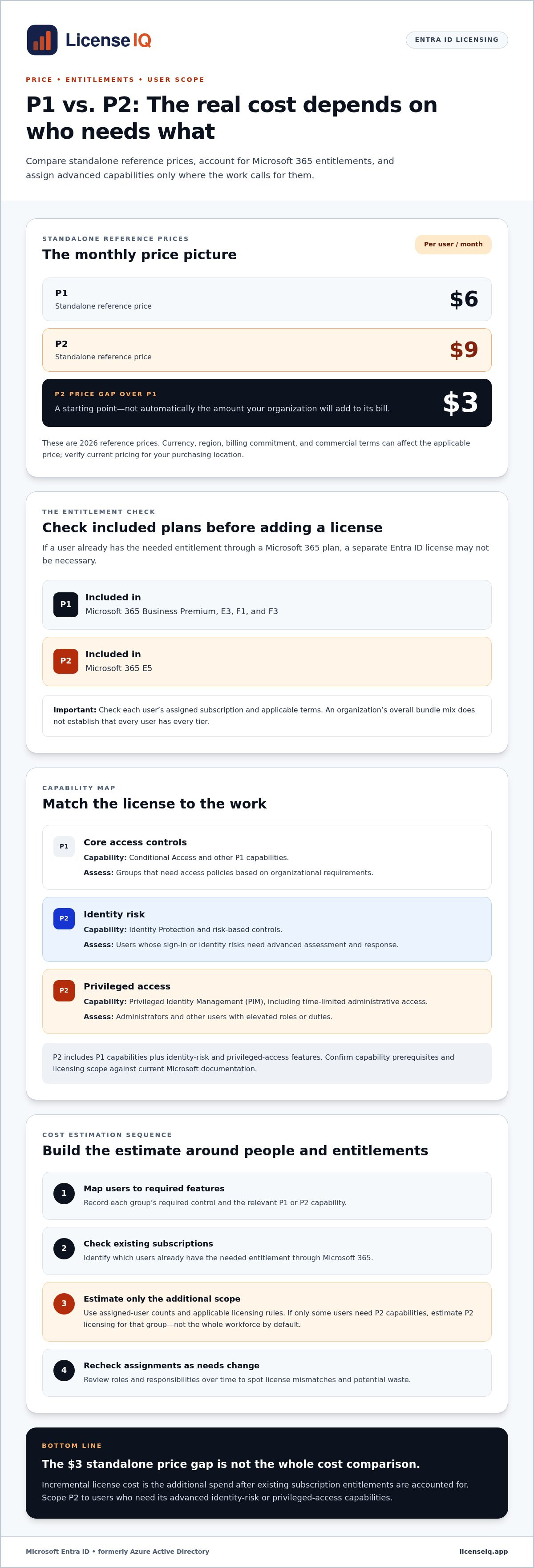
Current 2026 reference prices are $6 per user per month for P1 and $9 for P2. Treat these as standalone price points, not a complete estimate of your organization’s bill. Currency, region, billing commitment, and commercial terms can affect the applicable price, so verify them against Microsoft’s current pricing for your purchasing location before budgeting. A monthly price also doesn’t establish the billing commitment or payment schedule.
Existing Microsoft 365 subscriptions can change the calculation. P1 is included in Microsoft 365 Business Premium, E3, F1, and F3; P2 is included in E5. If a user’s subscription provides the needed entitlement, adding a separate Entra ID license may not be necessary. Bundle inclusion doesn’t mean every user has every tier, however. Check each user’s assigned subscription and applicable terms rather than relying on the organization’s overall bundle mix.
Use the price labels as a starting point, then build the comparison around people and entitlements. For example, if a team already has P1 through its Microsoft 365 plan and only some users need P2 capabilities, estimate the additional P2 licensing for that group instead of multiplying the price difference across the whole workforce. Assigned-user counts and Microsoft’s licensing rules determine the valid scope. Visibility into Microsoft 365 licenses and users can help reveal whether assignments still match people’s roles and needs.
P1 vs. P2 Features: Which Users Actually Need the Premium Capabilities?
The most useful comparison starts with the work each user performs, not the size of the organization. Conditional Access can address access-policy needs across defined groups. Identity Protection and Privileged Identity Management address more specialized identity-risk and administrative-access requirements. Match each capability to a workflow, then verify the applicable Microsoft licensing scope and prerequisites before assigning licenses.
Feature area | P1 | P2 | Users or workflows to assess
Core access controls | Conditional Access and other P1 capabilities | Includes P1 capabilities | Groups that need access policies based on organizational requirements
Identity risk | Does not include the P2 Identity Protection capabilities | Identity Protection and risk-based controls | Users whose sign-in or identity risks need advanced assessment and response
Privileged access | Does not include P2 Privileged Identity Management (PIM) | PIM for privileged-access governance | Administrators and other users with elevated roles or duties
This is a planning comparison, not a substitute for Microsoft’s licensing terms. Feature availability, prerequisites, and the users who must be licensed can depend on the specific capability and configuration. Use the Official Microsoft Entra Pricing page alongside current Microsoft licensing documentation to validate the details for your tenant.
When P1 capabilities may meet the requirement
P1 may fit teams that need to apply Conditional Access policies to defined user groups, such as employees or administrators. That doesn’t establish that P1 is sufficient for the organization’s security needs. First document the controls each workflow requires, then check whether P1 supports them and whether users already have the entitlement through an existing subscription.
When P2 capabilities may justify added spend
P2 deserves closer review when teams need Identity Protection for identity-risk investigation or PIM to govern privileged access, including time-limited administrative access. Potential users may include security staff who investigate risk and administrators who hold elevated roles. Before deployment, confirm prerequisites, licensing scope, and which users benefit from each feature using current Microsoft documentation.
For a practical scoping exercise, build a user-to-feature map. Record each group’s required control, the relevant P1 or P2 capability, and why the group needs it. Separate everyday users from privileged administrators, and distinguish users who investigate identity risk from those whose identities are being protected. This can expose broad assignments that don’t match actual duties while keeping necessary coverage visible.
License tier should follow the required feature and eligible-user scope, not a blanket assumption that every employee needs the highest plan. That principle keeps the cost implications of azure ad premium p1 vs p2 tied to real operational requirements. Ongoing visibility into Microsoft 365 users and assigned plans can help teams revisit their decisions as roles change; Microsoft 365 license visibility can support that review.
Calculate the Cost Implications of Azure AD Premium P1 vs. P2
Build the estimate from the users who need each tier, not from total headcount. Using the 2026 standalone reference prices of $6 per user per month for P1 and $9 for P2, the P2 premium over P1 is $3 per user per month. For a defined period, use: eligible P2 users × verified per-user price difference × billing months. For example, 20 eligible users over 12 months gives an illustrative P1-to-P2 difference of 20 × $3 × 12, or $720. This calculation is based on those assumptions, not a Microsoft quote.
Keep three scenarios separate in the model:
Standalone licenses: Count the users who need P1 or P2 and multiply each group by its applicable monthly rate and billing period. If comparing an all-P1 baseline with P2 for a subset, calculate only that subset’s price difference.
Existing bundles: Identify users whose subscriptions already include the needed entitlement. Don’t add a separate standalone license cost for an included capability without first validating the user’s actual assignment and licensing terms. Track the bundle’s subscription spend separately from any incremental add-on.
Mixed P1/P2 population: Calculate P1 users × P1 rate and P2 users × P2 rate, then add the results. For an incremental comparison, subtract the appropriate existing baseline rather than treating the entire mixed total as new spend.
Compare standalone pricing with existing Microsoft 365 entitlements
Microsoft 365 Business Premium, E3, F1, and F3 include Entra ID P1; Microsoft 365 E5 includes P2, based on the inclusion information used in this comparison. Validate bundle entitlements and eligible-user rules against current Microsoft licensing documentation before finalizing a budget. A Microsoft 365 subscription’s total price is not the same as the incremental cost of adding a standalone Entra ID plan. A Microsoft 365 license visibility review can help identify assigned plans and possible mismatches.
Model mixed license groups instead of upgrading everyone
Separate users by required features, administrative responsibilities, and licensing scope. Then apply the verified rate and actual billing period to each group. Check whether pricing varies by region, currency, agreement, taxes, or annual commitment. Document assumptions about assignment, minimums, and compliance, and verify them against the applicable agreement.
The result should show both total modeled spend and incremental spend. The cost implications of azure ad premium p1 vs p2 are clearer when existing entitlements, eligible users, and billing assumptions appear in separate fields. Review those inputs as roles change. License scans, usage signals, and spend-recovery insights can help flag Microsoft 365 license assignments that no longer align with user needs, supporting a more controlled estimate over time.
Choose P1 or P2 with a Cost-and-Requirement Decision Framework
The highest tier isn’t automatically the safest or most cost-effective choice. A plan delivers value when its capabilities meet a documented need and are assigned within the applicable licensing scope. Use this process to make the decision traceable, reviewable, and grounded in user requirements.
- Identify required controls. Document the access, identity-risk, and privileged-access controls your organization needs. Separate required capabilities from features that would be useful but have no defined use case.
- Map user groups. Connect each requirement to the people and workflows involved. Distinguish standard users, administrators, and security staff who investigate identity risk.
- Check entitlements. Review assigned subscriptions and Microsoft’s current licensing rules. Record which users already have the relevant capabilities through an existing subscription.
- Model group-level spend. Estimate the cost for each group using current rates, the applicable billing period, and verified user scope. Compare the result with existing subscription spend.
- Validate before assigning. Confirm feature prerequisites, licensing terms, and assumptions with current Microsoft documentation. Keep the rationale with the assignment decision.
This sequence makes the cost implications of azure ad premium p1 vs p2 easier to defend: every tier maps to a requirement, an eligible group, and a cost estimate.
Use the requirement and scope to guide the plan review
Requirement | User scope to assess | Plan to investigate
Defined access policies, such as Conditional Access | Groups covered by the policy | P1, or an existing subscription that includes P1
Identity-risk investigation and risk-based controls | Users and workflows requiring those capabilities | P2, subject to Microsoft’s current licensing rules
Governance of elevated access, including time-limited admin access | Administrators and other privileged users | P2, subject to prerequisites and eligible-user scope
Requirements span standard access and advanced controls | Separate user groups by required feature | A mixed P1/P2 assignment may be appropriate to evaluate
Treat this matrix as a scoping aid, not a licensing determination. Validate exact entitlements and user requirements before making assignments.
Control waste with regular review
Compare assigned plans with current responsibilities, documented access requirements, and available usage signals. A former administrator may no longer need the same access; a role change may create a new need for elevated controls. Don’t remove a license based on inactivity alone. Confirm whether the associated feature remains required and whether licensing rules still apply.
Run a sensitivity analysis before approving the budget. Model how spend changes if the eligible P2 population increases or decreases, using the verified price difference and billing period from your cost model. This reveals the financial effect of scope changes without assuming every user needs the same tier. For broader subscription optimization, review Microsoft 365 license visibility and spend insights to help identify assignments that may no longer match user needs.
Keep Entra ID License Spend Accurate as Needs Change
A license decision can be accurate today and outdated later. New employees need access provisioned, and departing employees need access removed. Role changes can shift a user’s requirements, while new administrative duties may create a need for privileged-access controls. Without ongoing review, assigned plans can drift from actual responsibilities, leaving gaps in coverage or spend on capabilities a user no longer needs.
Build a recurring review around users, assignments, and spend
Set a regular review cycle and trigger additional reviews when a user joins, moves roles, leaves, or gains or loses administrative duties. Compare assigned plans with current role requirements and documented feature needs. Track license counts by plan, along with relevant usage signals, so reviewers can distinguish an active requirement from an old assignment. Record the decision, its rationale, and any follow-up owner.
- Joiners: Match initial assignments to the person’s role and required access.
- Movers: Reassess access and license needs when responsibilities change, especially for privileged duties.
- Leavers: Include license removal in the established offboarding process.
- Review triggers: Revisit decisions when security requirements, user responsibilities, or subscription entitlements change.
Usage signals inform the review, but shouldn’t decide it alone. Low activity doesn’t prove that a control is unnecessary. Validate the business requirement and applicable licensing rules before changing an assignment, then keep an audit trail of the decision. This repeatable process helps keep access governance and the cost implications of azure ad premium p1 vs p2 aligned with current needs.
Turn license visibility into a repeatable cost-control process
LicenseIQ provides tenant-wide visibility into Microsoft 365 licenses and users, a License Health Score, and actionable spend-recovery recommendations. Use those insights to identify potential mismatches between assigned plans and user needs, then route each finding through a review process. A recommendation is a prompt to validate, not an automatic instruction to downgrade. Confirm the user’s requirements and entitlements before making changes.
That oversight can also support more accurate forecasting. Keep a record of plan counts, justified exceptions, and assignment changes so finance and IT can see what is driving spend. LicenseIQ states that organizations may save up to 35% on software subscriptions through optimization. That figure is a potential, not a guaranteed outcome; actual results depend on each organization’s licenses and optimization opportunities.
Centralizing visibility into assigned Microsoft 365 licenses and spend can make the next review easier. Explore LicenseIQ’s license visibility and spend insights to support a consistent review process as user needs change.
Make License Decisions an Ongoing Control
Turn your P1 and P2 decision into a repeatable governance practice. Set a review date, assign an owner, and record what would trigger a reassessment, such as a role change, new administrative duties, or a shift in security requirements. This gives IT and finance a shared reference point instead of leaving license choices to ad hoc requests.
A documented baseline also makes future budget reviews more useful. Compare current assignments with the requirements that justified them, then investigate exceptions before they become permanent. That discipline keeps the cost implications of azure ad premium p1 vs p2 visible as your workforce and needs evolve.
LicenseIQ brings tenant-level Microsoft 365 license visibility, a License Health Score, and actionable recommendations together to help identify potential waste. The company states that organizations may save up to 35% on software subscriptions through optimization; actual results vary and aren’t guaranteed.
Explore LicenseIQ’s Microsoft 365 license visibility and spend insights to make your next licensing review more informed, consistent, and manageable.
Frequently Asked Questions
Is Microsoft Entra ID P2 worth the extra cost over P1?
It’s worth evaluating P2 if your organization needs its additional identity-risk or privileged-access capabilities for specific users. For example, security staff who investigate identity risk or administrators who need governed privileged access may have requirements beyond P1. If those needs don’t apply, the higher tier may add cost without adding useful coverage. Assess the cost implications of azure ad premium p1 vs p2 against documented workflows, user scope, and existing entitlements.
What is the current price difference between Entra ID P1 and P2?
The 2026 reference rates are $6 per user per month for P1 and $9 for P2, a difference of $3 per user per month. These are standalone reference prices, not a guaranteed quote for every organization. Currency, region, billing commitment, and agreement terms can affect the payable amount. Check Microsoft’s current pricing for your market and contract before using the figures in a budget.
Does Microsoft 365 E3 include Entra ID P1?
Yes. Microsoft 365 E3 includes Microsoft Entra ID P1. Review the subscriptions assigned to individual users, not just the organization’s overall plan mix. That helps determine whether each user already has the relevant entitlement and whether an additional standalone license is needed. Verify applicable terms and current bundle inclusions before changing assignments or building a cost estimate.
Does Microsoft 365 E5 include Entra ID P2?
Yes. Microsoft 365 E5 includes Microsoft Entra ID P2. To apply that information accurately, identify which users are assigned E5 and which P2 capabilities their roles require. Don’t assume that every employee has E5 because the organization owns E5 subscriptions. Confirm assignments and licensing scope against current Microsoft documentation before treating a user’s P2 access as covered.
Can some users have P1 while others have P2?
Yes, organizations can assess a mixed population, assigning P1 or P2 according to user requirements and applicable licensing rules. For instance, standard users may need one set of capabilities while privileged administrators or identity-risk investigators need another. Keep a record of each group’s business requirement and assigned entitlement. Before implementing the split, verify the licensing scope for the specific features and users, since requirements can vary by capability.
How do I calculate the P2 upgrade cost for my organization?
Start with the number of eligible users who need P2 but don’t already have the entitlement. Multiply that count by the verified P2-to-P1 price difference and the number of billing months in your estimate. Then account for existing bundles, regional pricing, taxes, and agreement terms. Keep assumptions visible, and model separate user groups rather than applying the upgrade to your full headcount by default.
Is Azure AD Premium P1 still available under that name?
No. Microsoft renamed Azure Active Directory to Microsoft Entra ID in 2023, so the current plan name is Microsoft Entra ID P1. “Azure AD Premium P1” may still appear in older contracts, admin references, or internal records. Treat it as legacy terminology during a license review, then match the record to the current plan and verify the user’s entitlement before making a change.


