

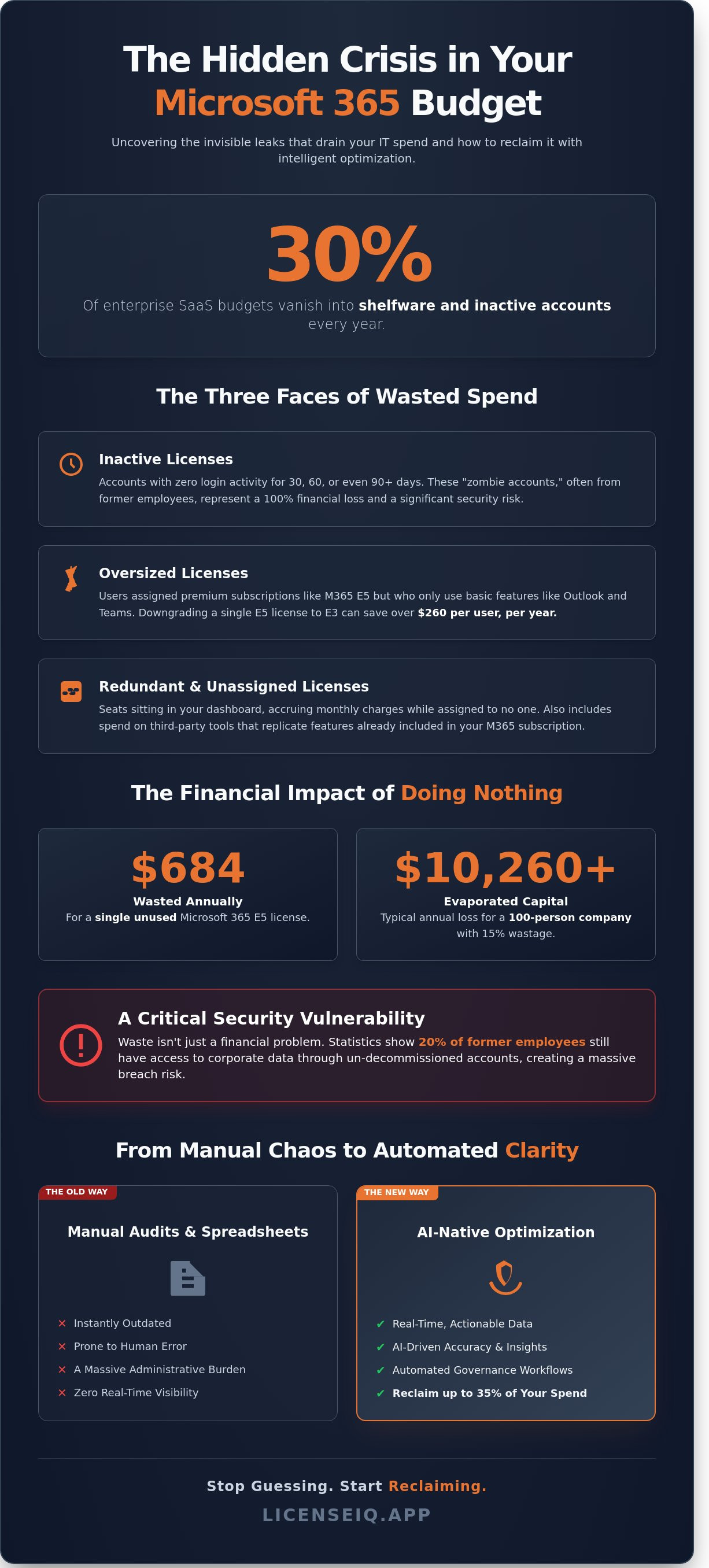
Recent industry audits reveal that 30% of enterprise SaaS budgets vanish into shelfware and inactive accounts every year. You likely already know that your manual spreadsheets are outdated the moment you hit save. Tracking thousands of seats manually is a losing game. Effective microsoft 365 license optimization requires more than just a monthly spot check; it demands total visibility into a landscape that changes every hour. Paying for premium E5 features that employees never open is a drain on your bottom line that shouldn't exist in 2026.
We'll show you how to move from reactive guessing to proactive spend recovery. You'll learn the exact framework to identify hidden waste from former employees and downgrade users who don't utilize their high-tier subscriptions. By implementing automated governance, your organization can reclaim up to 35% of its current Microsoft 365 spend. This guide provides a clear roadmap to achieving a perfect Health Score for your tenant and building a predictable, data-driven SaaS budget that satisfies both IT and finance leaders.
Key Takeaways
- Identify why 2026 is the critical tipping point for SaaS spend and how to stop license sprawl from draining your IT budget.
- Master microsoft 365 license optimization by categorizing waste into inactive, oversized, and redundant subscriptions for immediate recovery.
- Move beyond obsolete manual spreadsheets to eliminate the human cost of audits through AI-driven data accuracy.
- Apply a proven four-step framework to establish continuous governance and benchmark your tenant against the LicenseIQ Health Score.
- Deploy automated workflows that transform complex license data into actionable savings in minutes, securing up to 35% of your spend.
The Hidden Crisis of Microsoft 365 License Sprawl in 2026
Microsoft 365 license optimization is the strategic alignment of subscription costs with actual user behavior. It isn't just about cutting seats. It's about ensuring every dollar spent matches a specific, utilized feature. By 2026, this practice has become a survival requirement for IT departments. Microsoft’s aggressive integration of AI tools and Copilot features has inflated base subscription costs by as much as 20% over the last 24 months. Organizations that ignore their utilization data are now paying for "feature bloat" they don't actually need.
The "Invisible Leak" is draining corporate accounts at an alarming rate. Current market data shows that SMBs lose up to 35% of their monthly SaaS budget on unused or underutilized seats. Most leaders still rely on a "set-it-and-forget-it" approach. This fails in a modern economy. Workforce dynamics change weekly, but license counts often remain static for years. This disconnect creates a massive financial vacuum that hampers growth and innovation.
Why Traditional License Management Is Breaking
The rapid hiring and firing cycles of the remote work era have fueled the rise of "zombie" accounts. These are active subscriptions assigned to former employees or contractors who left the company months ago. Microsoft’s complex bundling strategies hide these costs effectively. It's difficult to see which users actually need an E5 seat versus a more affordable Business Premium option. Without a robust Software Asset Management (SAM) framework, IT teams lose track of unassigned license pools. Shadow IT complicates this further. Departments often purchase individual licenses outside of central procurement, leading to redundant spend and zero visibility.
The Financial Impact of Doing Nothing
The math is simple and brutal. A single unused Microsoft 365 E5 license costs approximately $57 per month. Over a 12-month period, that one orphaned seat wastes $684. In a 100-person organization, a typical 15% wastage rate results in $10,260 of evaporated capital annually. These aren't just numbers on a spreadsheet; they represent lost headcount or deferred infrastructure upgrades. Effective microsoft 365 license optimization reclaims this capital immediately. License sprawl is the silent killer of IT budgets in 2026.
- 35% of SMB SaaS budgets are wasted on unused seats or features.
- Zombie accounts from remote work churn inflate monthly bills by thousands.
- AI-driven price hikes make total visibility a financial necessity for 2026.
The Anatomy of Waste: Inactive, Oversized, and Redundant Licenses
Waste exists in the shadows of your tenant. Efficient microsoft 365 license optimization requires identifying three specific leakage points. First, inactive licenses represent accounts with zero login activity for 30, 60, or 90 days. A user who hasn't accessed the suite in 90 days is a 100% loss. Second, oversized licenses occur when users hold premium seats like E5 but only utilize Outlook and Teams. Third, redundant licenses often stem from overlapping third-party tools that replicate M365 features, creating a double-spend scenario.
Beyond the financial drain, these licenses create massive security vulnerabilities. An unmonitored, active license often signals a failure in the employee offboarding process. Statistics from 2023 show that 20% of former employees still have access to corporate data through lingering accounts. Identifying these gaps is a core component of Gartner on Cloud Financial Management strategies. You stop the spend and close the door on potential breaches simultaneously. Total visibility is the only way to secure the perimeter while protecting the budget.
Spotting the Obvious Waste: Unassigned Seats
Unassigned licenses are the lowest hanging fruit. These seats sit in your dashboard, accruing monthly charges while assigned to no one. Many IT teams maintain a 10% "buffer" for new hires, yet this inventory rarely clears. This practice creates a permanent, unnecessary overhead. Reclamation should be immediate. Automate the return of unassigned seats to the pool or cancel them to protect your bottom line. You can audit your current inventory to see exactly where these ghost costs live. Precision management replaces the need for expensive safety nets.
The Hidden Drain: Mismatched License Tiers
Most organizations over-provision because it's the path of least resistance. Moving a single user from M365 E5 to E3 saves approximately $22 per month. If that user doesn't require advanced eDiscovery or Power BI Pro, the E5 spend is unjustifiable. Frontline workers should use F-series licenses, which cost a fraction of enterprise tiers. This shift alone can reduce costs for specific user groups by 60% or more.
Implement a Downgrade Decision Matrix based on actual application telemetry to drive your microsoft 365 license optimization efforts. If telemetry shows a user hasn't opened a desktop app in 60 days, they're a candidate for a web-only or frontline license. Data-driven decisions eliminate the guesswork of tier selection. Stop paying for features your workforce ignores and reallocate those funds to initiatives that drive growth.
Manual Audits vs. AI-Native Optimization: Why Spreadsheets Fail
Static spreadsheets are the enemies of efficient microsoft 365 license optimization. Data exported from the Microsoft 365 Admin Center becomes obsolete within 24 hours. In a 1,000-seat environment, user status changes occur at a rate of 5% to 8% every month. Manual audits force high-salary IT architects to act as data entry clerks. This costs organizations an average of $3,200 in lost productivity per audit cycle. You're paying experts to move cells instead of securing your perimeter.
Gartner defines Software Asset Management as the practice of managing and optimizing the purchase, deployment, and disposal of software applications. Doing this manually in a dynamic cloud environment is impossible. 28% of software spend is wasted on unused or underutilized licenses because humans can't track usage at scale. You can't solve a real-time problem with a static document. The "Spreadsheet Fallacy" leads to over-provisioning and massive financial leakage.
The Limitations of Microsoft Native Reporting
The M365 Admin Center provides raw data but lacks financial context. It won't tell you that 16% of your E5 licenses are only using E3 features. It lists activity without calculating the cost of inactivity. You can't see your specific contract terms or custom discounts reflected in the usage charts. Native reports lack the automated workflows needed to execute changes. Identifying a waste of $5,000 is useless if you still have to manually revoke 200 seats one by one. It's visibility without the power to act.
The AI Advantage in Spend Recovery
AI acts as a vigilant digital auditor that never sleeps. It identifies underutilization patterns that human eyes miss during a manual review. Machine learning shifts your strategy from descriptive data to prescriptive action. It stops telling you what happened and starts telling you exactly what to do. LicenseIQ connects in minutes to provide immediate ROI. This transition creates total visibility, illuminating the dark corners of your SaaS stack where hidden costs thrive. It turns microsoft 365 license optimization from a quarterly chore into a continuous financial advantage. You gain the confidence that every dollar spent is tied to a used feature.
A 4-Step Framework for Continuous License Governance
Effective microsoft 365 license optimization isn't a one-time event; it's a repeatable cycle of financial discipline. Most IT teams lose 20% of their annual cloud budget to simple inertia. This framework replaces manual guesswork with a precision system designed to eliminate waste and maximize every dollar spent on your tenant. It's about moving from reactive cleanup to proactive management.
- Step 1: Discovery. Connect your tenant via secure API. LicenseIQ scans every user, group, and license type in under 10 minutes. This process illuminates "dark spend" that usually remains hidden deep within the Microsoft Admin Center.
- Step 2: Analysis. Benchmark your current usage against the LicenseIQ Health Score. This data-driven metric identifies exactly where your organization sits compared to industry standards for SaaS utilization.
- Step 3: Execution. Move from insight to action immediately. Implement automated workflows to reclaim licenses from inactive accounts. You can also downgrade users who don't utilize premium features, shifting them from E5 to E3 to save roughly $22 per user every month.
- Step 4: Monitoring. Establish a perimeter of continuous oversight. Set real-time alerts that trigger when a license remains unused for 14 days. This prevents waste from compounding and ensures your microsoft 365 license optimization efforts stick.
Establishing Your Baseline Health Score
The LicenseIQ Health Score provides a single, authoritative metric for operational hygiene. It transforms complex telemetry into a clear percentage that represents your financial efficiency. You can use this score to report SaaS ROI directly to your CFO or board of directors. While the average organization maintains a utilization rate of only 62%, top-performing firms use this benchmark to reach 95% efficiency. It's the fastest way to prove the value of your IT governance strategy and justify future technology investments.
Automating the Offboarding Workflow
Manual offboarding is slow, expensive, and creates security risks. It leaves licenses active long after employees depart, costing mid-market firms an average of $2,400 monthly in "zombie" accounts. By integrating license reclamation into your standard HR leaver process, you can set triggers to remove licenses automatically after 30 days of inactivity. This reduces your window of vulnerability and ensures that your software spend scales down as quickly as it scales up. Automation ensures that security and financial health happen simultaneously without manual intervention.
Reclaiming Your Budget with LicenseIQ’s Automated Workflows
SMBs don't need enterprise-scale complexity; they need results. Most traditional SAM tools require a dedicated team of five experts just to manage the interface. LicenseIQ is the logical solution for the 85% of organizations that require immediate clarity without the overhead. Our platform delivers a "Minutes to Insights" experience that transforms microsoft 365 license optimization from a manual chore into an automated profit center. It stops the drain on your capital by identifying waste in real-time.
The core of this efficiency is the Model Context Protocol (MCP). This technology automates governance workflows by bridging the gap between raw tenant data and executive decision-making. MCP doesn't just watch your data; it interprets it. It identifies dormant accounts, recognizes overlapping service plans, and flags unassigned licenses the moment they appear. This proactive stance ensures your software spend is always lean and targeted. You gain a vigilant digital auditor that works 24/7 to protect your margins.
Actionable Insights vs. Generic Reports
Generic reports provide data dumps that create more work for your IT team. LicenseIQ provides specific instructions. Instead of a 50-page PDF, you get clear directives like "Downgrade User X to Save $12/mo" or "Reclaim License Y from Terminated Employee Z." This granularity is why users see an immediate ROI. The Spend Recovery Dashboard offers a real-time view of capital put back into your budget. It turns hidden costs into visible savings. Learn more about our Automated Governance Workflows to see how we replace manual spreadsheets with precision automation.
- Granular Recommendations: Specific per-user actions that yield immediate dollar savings.
- Shadow IT Detection: Identify unauthorized SaaS spend before it scales.
- Utilization Tracking: See exactly which features your team actually uses.
Getting Started: The 5-Minute Audit
Connecting your M365 tenant takes exactly 300 seconds. There are no agents to install and no complex scripts to run. Within the first 24 hours, the platform completes a deep-dive analysis of your entire ecosystem. You'll receive a prioritized list of savings opportunities ranked by total dollar value. It's the fastest path to total visibility in the industry. Efficiency is our benchmark. We eliminate the fog of SaaS sprawl so you can focus on growth. Start your free M365 License Health Check today and stop overpaying for seats you don't use.
Stop the Spend Leak and Reclaim Your 2026 Budget
Relying on manual spreadsheets for your 2026 software strategy is a recipe for financial waste. The era of static audits has ended, replaced by the urgent need for real-time visibility and automated governance. You've learned that microsoft 365 license optimization requires a proactive approach to identify inactive users and oversized subscription tiers before they impact your bottom line. LicenseIQ transforms this complex task into a streamlined, automated workflow that protects your corporate margins.
Our platform connects to your tenant in under 3 minutes, providing immediate transparency into your software stack. With our AI-native Health Score insights, you'll see exactly where your resources are underutilized. Most enterprises discover they can save up to 35% on M365 subscriptions by eliminating redundant seats and rightsizing their plans. Don't let hidden costs compromise your operational efficiency or your growth potential in the coming year.
Take the first step toward a leaner, more secure digital environment today. Run a 5-Minute M365 Audit with LicenseIQ and turn your software spend into a strategic advantage. It's time to bring total clarity to your IT ecosystem.
Frequently Asked Questions
What is the most common cause of Microsoft 365 license waste?
Inactive accounts from former employees represent the primary cause of license waste. Gartner research indicates that up to 30% of software spend is wasted on unused or underutilized seats. Most organizations fail to de-provision licenses during the offboarding process, leaving paid subscriptions active for months. This oversight creates "zombie" accounts that drain your IT budget without providing any operational value.
How much can a typical company save through M365 license optimization?
Companies typically reduce their annual spend by 20% to 30% through rigorous microsoft 365 license optimization. For an organization with 1,000 users, this translates to savings of over $50,000 annually by eliminating redundant E5 features and reclaiming unused seats. These results are achievable within the first 90 days of implementation. You'll gain immediate ROI by aligning your subscription count with actual user activity.
Is it safe to automate license reclamation?
Automation is safe and highly effective when you implement threshold-based governance. LicenseIQ uses precise activity triggers, such as 30 days of zero login activity, to flag licenses for reclamation. You maintain control through approval workflows that prevent accidental de-provisioning of critical service accounts. Automated systems eliminate human error, ensuring your license count remains lean and compliant without constant manual intervention.
What is the difference between an unassigned and an inactive license?
Unassigned licenses are paid seats currently sitting in your inventory without an associated user profile. Inactive licenses are assigned to a specific user but haven't recorded login activity for a defined period, usually 30 to 60 days. Both scenarios represent wasted capital. While unassigned licenses are easy to spot in the admin portal, inactive licenses require deeper usage telemetry to identify and harvest effectively.
Can I optimize my licenses without a third-party tool?
You can perform optimization manually using PowerShell scripts and the Microsoft 365 Admin Center reports. However, manual audits often take 20 or more hours per month for mid-sized firms and only provide a static snapshot of data. This approach frequently misses granular usage patterns across the full suite. Specialized tools provide real-time visibility and actionable insights that manual spreadsheets can't replicate.
How often should I conduct a Microsoft 365 license audit?
You should conduct a microsoft 365 license optimization audit at least once per month to catch monthly billing cycles. Organizations with high employee turnover or more than 500 seats benefit from continuous, real-time monitoring. Waiting for a quarterly review often results in three months of avoidable overspending. Regular cadences ensure you don't pay for "shelfware" and keep your IT budget agile.
Does LicenseIQ support E3 to E5 upgrade/downgrade analysis?
LicenseIQ provides comprehensive analysis for E3 and E5 tiers by tracking specific feature utilization. If your E5 users aren't utilizing advanced security or Power BI features, the system flags them for a downgrade to E3. This granular visibility can save $12 per user every month. Our platform identifies these opportunities automatically, allowing you to right-size your environment based on actual data rather than guesswork.


