

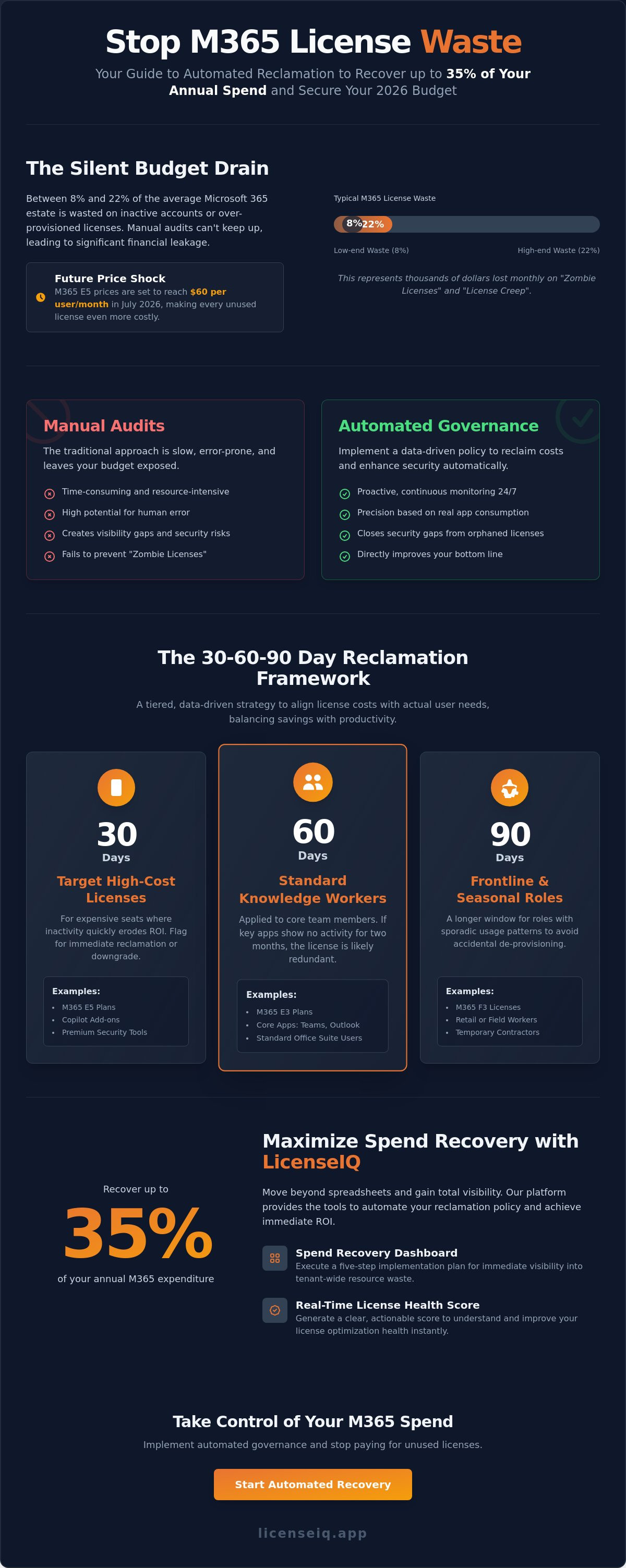
Did you know that between 8% and 22% of the average Microsoft 365 estate is wasted on inactive accounts or over-provisioned features? With Microsoft 365 E5 prices set to reach $60 per user in July 2026, every unused seat represents a direct hit to your bottom line. Establishing a data-driven microsoft 365 license reclamation policy is the only way to gain total visibility into your tenant. Manual audits are too slow and prone to error. You need a system that identifies orphaned licenses and downgrades underutilized E5 seats automatically.
We understand that tracking actual app usage across hundreds of users feels like a losing battle. It's exhausting to manage license sprawl while Microsoft eliminates grace periods for renewals. This guide shows you how to stop the bleed and recover up to 35% of your annual spend. You'll learn how to implement Automated Governance Workflows that replace manual oversight with precision. We will show you how tools like our Spend Recovery Dashboard and LicenseIQ Platform provide a clear License Health Score to secure your 2026 fiscal budget.
Key Takeaways
- Establish a robust microsoft 365 license reclamation policy to automatically identify and eliminate licenses from inactive or redundant accounts.
- Design a data-driven framework using 30, 60, and 90-day inactivity thresholds to align license costs with actual user roles and requirements.
- Replace inefficient manual audits with Automated Governance Workflows to close security gaps and eliminate costly "orphaned" licenses.
- Leverage the LicenseIQ Platform to generate a real-time License Health Score and gain immediate visibility into tenant-wide resource waste.
- Utilize the Spend Recovery Dashboard to execute a five-step implementation plan that recovers up to 35% of your annual M365 expenditure.
What is a Microsoft 365 License Reclamation Policy?
A microsoft 365 license reclamation policy is a structured set of governance rules that automatically identifies, flags, and removes licenses from inactive or redundant users. Most administrative tools focus on license assignment; they make it easy to grant access. However, real ROI lives in reclamation. While Microsoft’s native auto-claim policies prioritize license distribution, a reclamation policy acts as a financial safeguard. It ensures you only pay for active, necessary seats by reversing the flow of unutilized resources.
In 2026, static license management is no longer viable for SMB budgets. With price increases affecting E3 and E5 tiers, organizations cannot afford to let licenses sit idle. Effective Software Asset Management (SAM) requires moving beyond manual spreadsheets toward proactive oversight. A formal microsoft 365 license reclamation policy establishes clear inactivity thresholds, notification triggers, and automated de-provisioning steps to keep your tenant lean and secure.
Why Your Organization Needs a Formal Policy
Manual oversight creates visibility gaps that lead to "Zombie Licenses." These are active subscriptions assigned to former employees or service accounts that no longer require premium access. Without a formal policy, these costs compound monthly. You also face "License Creep," where users are assigned top-tier E5 licenses despite only using basic web applications. A structured policy enforces financial hygiene. It ensures every dollar spent aligns with actual operational needs, preventing the gradual erosion of your IT budget.
The Financial Impact of Unclaimed Licenses
The math is simple but staggering. In a 500-user tenant, a 10% waste rate represents 50 unused licenses. At 2026 rates for M365 E5, this results in thousands of dollars lost every month. Implementing automated reclamation directly improves your microsoft 365 license optimization health score. It shifts your IT team from reactive, time-consuming audits to a model of proactive governance. By recovering these resources, you secure your fiscal budget and eliminate the need for emergency mid-year adjustments.
Designing Your Reclamation Framework: 30, 60, and 90-Day Rules
A generic approach to license management creates friction and financial leakage. To build a successful microsoft 365 license reclamation policy, you must categorize users by role, cost, and usage patterns. In 2026, this framework must also account for high-value AI-native tools like Microsoft 365 Copilot, which carries a $30 per user monthly premium as of early 2026. Every day a Copilot seat remains inactive, your ROI diminishes. By integrating these rules into your Microsoft 365 license management lifecycle, you transform license recovery into a repeatable, low-risk operation.
Tiered Inactivity Thresholds
Precision is the cornerstone of an Effective Cloud Governance Policy. We recommend a tiered strategy to balance cost savings with user productivity:
- 30 Days: Target high-cost licenses such as M365 E5 and Copilot add-ons. If a user hasn't engaged with AI features or premium security tools in 30 days, the license should be flagged for immediate reclamation or downgrade.
- 60 Days: Apply this to standard knowledge workers on E3 plans. If core applications like Teams or Outlook show zero activity for two months, the license is likely redundant.
- 90 Days: Use this for frontline or seasonal workers on Microsoft 365 F3 licenses. These roles often have sporadic usage patterns, requiring a longer window to avoid accidental de-provisioning.
Defining 'Activity' in a Hybrid World
Modern governance requires distinguishing between "License Assigned" and "App Consumed." A simple mobile login to check an email shouldn't always justify the cost of a full enterprise seat. Your microsoft 365 license reclamation policy must define activity based on specific app consumption metrics. For instance, does the user actually open Excel, or are they just utilizing Entra ID for single sign-on? Automated alerts should notify managers seven days before a reclamation occurs. This "Safe Zone" allows for exceptions, such as employees on extended medical leave or legal hold, ensuring that permanent inactivity is the only trigger for removal. If you're unsure where your biggest leaks are, checking your License Health Score provides the necessary baseline for these decisions.
Manual Admin Center vs. Automated Governance Workflows
The Microsoft 365 Admin Center is designed to help you spend money, not save it. Its native interface prioritizes license assignment and "auto-claim" policies that grant access instantly. It lacks a native mechanism to de-provision licenses based on inactivity. Relying on manual oversight creates a microsoft 365 license reclamation policy that is reactive rather than proactive. You end up managing licenses through disconnected spreadsheets that quickly become obsolete. This leads to orphaned licenses and significant security gaps when former employees retain access to sensitive corporate data.
Manual auditing is a high-effort, low-reward task. IT managers often spend hours every month cross-referencing usage reports with billing statements. Even the most diligent teams face "Audit Lag," which is the period between a user becoming inactive and the license being reclaimed. If your audit cycle is monthly, you lose 30 days of subscription value for every inactive user. You can reduce M365 subscription costs significantly by removing these human-driven delays from your governance loop.
The Hidden Cost of Manual Audits
Manual processes are inherently slow. Identifying a single wasted license through the Admin Center requires navigating multiple usage reports and Entra ID logs. This time-to-recovery is expensive. Improper manual de-provisioning also risks data loss. If an admin removes a license without following a strict sequence, they might lose access to critical OneDrive files or mailbox data. Proactive governance eliminates this risk by standardizing the reclamation sequence.
The Benefits of Automated Workflows
Automated Governance Workflows transform your tenant from a cost center into an optimized asset. Instead of manual checks, these policies execute every 24 hours to ensure your environment remains lean. You gain real-time visibility through a License Health Score that tracks waste as it happens. This automation integrates directly with your Office 365 offboarding checklist. It ensures that when an employee leaves, their license is reclaimed instantly, not weeks later during a quarterly review.
How to Implement a Reclamation Policy in 5 Steps
Transitioning from manual oversight to an automated microsoft 365 license reclamation policy requires a structured approach. You can't manage what you can't see. By following these five steps, you transform your tenant from a bloated cost center into a lean, high-performance environment. This process ensures that every license assigned is delivering measurable value to your organization. It removes the guesswork from financial governance and replaces it with data-driven precision.
- Step 1: Scan your tenant. Connect your environment to establish a baseline License Health Score. This provides immediate clarity on current waste levels across all departments.
- Step 2: Identify inactive users. Use automated insights to find accounts with zero activity and unassigned licenses that are still incurring monthly costs.
- Step 3: Define reclamation triggers. Set specific rules, such as 45 days of zero usage, to flag licenses for removal. This window balances aggressive cost recovery with user operational needs.
- Step 4: Automate notifications. Send automated alerts to department heads or individual users before taking action. This eliminates the need for manual follow-up and reduces administrative friction.
- Step 5: Execute and downgrade. Automatically reclaim the license or move the user to a lower-tier plan if they only require basic web-based features.
Communicating the Change to Users
Transparency reduces internal friction. We recommend standardizing a "Use it or Lose it" notification email that explains the policy clearly. Users should understand that reclamation isn't a penalty; it's a resource optimization effort. Always provide a grace period for employees on extended leave or those with legitimate seasonal inactivity. By making the re-request process frictionless, you maintain productivity while still enforcing strict financial hygiene. A simple, automated request portal ensures that users can get back to work quickly if their requirements change.
Auditing the Auditor
Your policy must evolve alongside your business requirements. Regularly review reclamation logs to ensure accuracy and prevent false positives. This oversight allows you to adjust thresholds based on quarterly spend reports and actual usage trends. Ensure your policy covers all Microsoft 365 license types, including high-cost add-ons like Power BI or Defender. Vigilance is the only way to sustain long-term savings in a shifting technical landscape. If you're ready to stop the bleed, you can start your license recovery scan today to see exactly where your budget is going.
Maximizing Spend Recovery with LicenseIQ
Designing a microsoft 365 license reclamation policy is only half the battle. The real value is found in execution. LicenseIQ connects to your tenant in minutes to provide a real-time License Health Score. This score gives you immediate clarity on your operational efficiency. It eliminates the need for manual data mining and replaces it with a live view of your environment. You no longer have to guess which users are inactive; the platform identifies them with surgical precision.
The Spend Recovery Dashboard visualizes your financial leaks in high definition. It maps out exactly where your budget is being wasted on redundant licenses and unassigned seats. You move from complex policy design to 1-click execution. This speed is vital in a technical environment where license costs change and grace periods disappear. By automating the discovery of inactive users, you ensure that your organization remains lean without the administrative overhead of traditional auditing.
Achieving a 35% Savings Target
In 2026, SMBs are facing unprecedented pressure to optimize IT spend. Manual audits are insufficient because they often miss granular usage patterns. LicenseIQ uses AI-native intelligence to identify waste that standard reports ignore. It looks beyond simple login dates to see if high-tier features are actually being consumed. This deep insight allows organizations to reach a 35% savings target by downgrading users to the appropriate tiers. Moving to a tiered monthly subscription with LicenseIQ provides an immediate ROI that far outweighs the cost of the platform itself.
Continuous Monitoring vs. One-Time Audits
License hygiene is a daily task, not a yearly event. A one-time audit only provides a snapshot of a single moment; it's obsolete as soon as the next billing cycle begins. You need 24/7 protection to prevent license creep from returning. Setting up Automated Governance Workflows ensures your microsoft 365 license reclamation policy is always active. These workflows monitor your tenant around the clock, reclaiming resources the moment they meet your inactivity thresholds. This constant vigilance keeps your financial health secure and your operations transparent.
Don't let your budget disappear into unused subscriptions. You can Audit your M365 tenant for free with LicenseIQ to uncover your hidden savings today.
Secure Your 2026 Fiscal Budget Today
Manual audits are a relic of the past. They leave your organization vulnerable to orphaned licenses and unnecessary costs. By implementing a data-driven microsoft 365 license reclamation policy, you transform your tenant into a lean, optimized environment. You've learned how tiered inactivity thresholds and automated governance workflows eliminate the "Audit Lag" that drains IT budgets. Every day you wait is another day of unrecovered spend that impacts your bottom line.
The transition from policy design to execution shouldn't be complex. With the right tools, you can replace manual spreadsheets with real-time oversight. LicenseIQ uses AI-native software intelligence to identify waste that human auditors frequently miss. Our platform connects in minutes to provide total transparency across your entire estate. You can save up to 35% on your M365 subscriptions by reclaiming resources before the next billing cycle. This proactive approach ensures your resources always align with actual usage patterns.
Take control of your cloud spend and eliminate organizational disorder once and for all. It is time to turn your SaaS environment into a high-performance asset. Stop wasting money on M365-get your License Health Score now.
Frequently Asked Questions
What is the difference between an auto-claim policy and a reclamation policy?
An auto-claim policy focuses on the automated assignment of licenses to users when they first access an app. In contrast, a microsoft 365 license reclamation policy is a governance framework designed to identify and remove licenses from inactive users. While Microsoft's native tools prioritize giving licenses away, reclamation focuses on recovering costs and eliminating waste.
How do I identify inactive Microsoft 365 users without manual reports?
You can eliminate manual CSV exports by using the LicenseIQ Platform. Our system connects directly to the Microsoft Graph API to monitor real-time activity logs. It automatically flags accounts that haven't accessed core services, providing immediate visibility through the Spend Recovery Dashboard without requiring hours of administrative labor.
Can I automatically remove a license if a user hasn't logged in for 30 days?
Yes. You can configure Automated Governance Workflows to trigger de-provisioning once a user hits a specific inactivity threshold. This ensures your microsoft 365 license reclamation policy remains active 24/7. We recommend pairing this with automated notifications to allow for exceptions before the license is officially pulled.
Is there a risk of losing user data when a license is reclaimed?
Data loss is a potential risk if you remove licenses manually without following a strict sequence. Professional reclamation workflows prevent this by standardizing the offboarding process. These tools ensure that OneDrive files and mailboxes are preserved or converted to shared resources before the subscription is revoked.
What are the best inactivity thresholds for Microsoft 365 E5 licenses?
We recommend a strict 30-day threshold for high-cost E5 seats. Because these licenses represent a significant portion of your IT budget, identifying underutilization early is critical. Rapid reclamation of these premium tiers is the fastest way to improve your License Health Score and secure immediate ROI.
How does license reclamation impact my Microsoft 365 Health Score?
Reclamation directly increases your License Health Score by reducing the gap between assigned licenses and actual app consumption. A higher score indicates that your organization is operating with peak financial efficiency. This metric serves as a vital KPI for specialized leadership to track the success of cost-optimization efforts.
Do I need PowerShell to automate license reclamation in 2026?
No. While PowerShell remains an option for developers, it requires constant maintenance and technical oversight. Modern platforms like LicenseIQ provide no-code Automated Governance Workflows that achieve the same results with less risk. This allows business managers to maintain oversight without relying on specialized scripting knowledge.
Can LicenseIQ automate the offboarding of licenses for former employees?
Yes. LicenseIQ identifies orphaned licenses the moment an employee is disabled in Entra ID. The platform flags these accounts immediately, allowing you to execute reclamation with a single click. This prevents "Zombie Licenses" from remaining active for months after a staff member has departed.


