

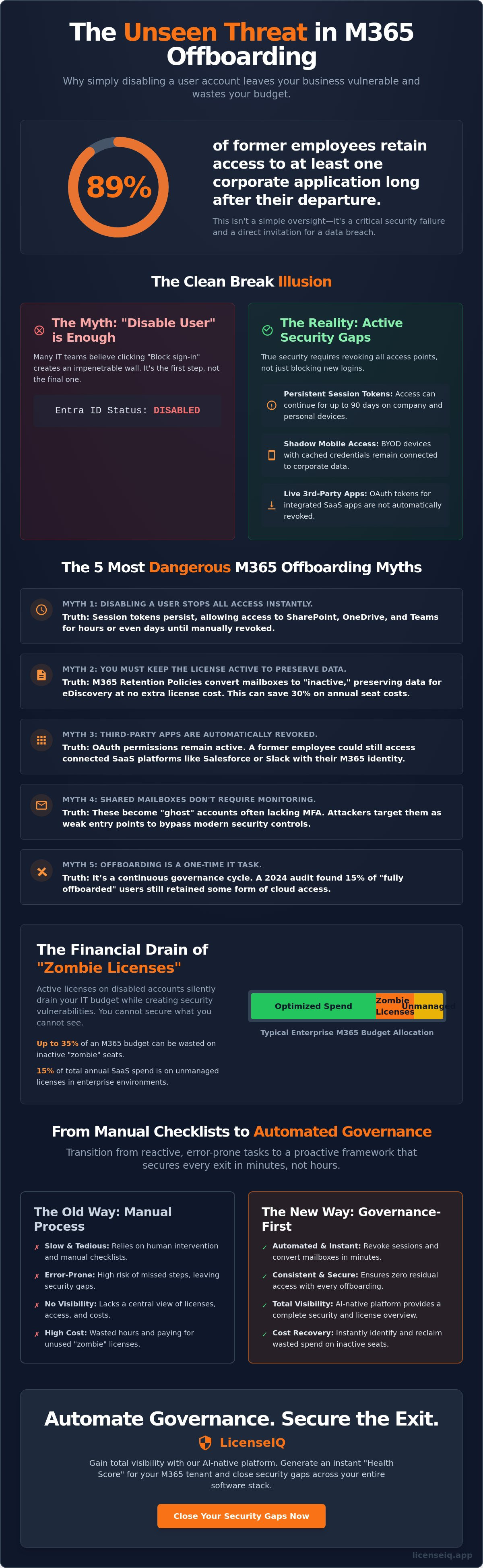
89% of former employees retain access to at least one corporate application long after their final day. This isn't just a management headache; it's a direct invitation for a data breach. You likely recognize that manual processes are too slow to keep up with modern turnover rates. It's a common struggle to balance immediate security needs with the administrative burden of closing out user accounts. These unmanaged m365 offboarding security risks often hide in plain sight, draining your budget through "zombie" licenses that remain active for months.
We'll expose the hidden vulnerabilities in your current Microsoft 365 setup and show you how to secure your tenant while recovering wasted spend. You'll learn how to shift from reactive manual tasks to a proactive, automated workflow that ensures zero residual access. This article debunks five dangerous myths that will compromise IT departments by 2026 and provides a clear path toward total license visibility and financial health.
Key Takeaways
- Stop confusing account disabling with full offboarding. Learn why active sessions and mobile access remain open doors long after a user is deactivated.
- Eliminate "zombie licenses" that drain up to 35% of your M365 budget. Discover how to preserve critical data without paying for inactive seats.
- Identify hidden m365 offboarding security risks lurking in your tenant. We debunk the five most dangerous myths that leave your corporate data vulnerable.
- Transition from manual checklists to a governance-first framework. Secure every exit by revoking sessions and converting mailboxes in minutes, not hours.
- Gain total visibility with AI-native automation. Use LicenseIQ to generate an instant "Health Score" and close security gaps across your entire software stack.
The Clean Break Illusion: Why Disabling an Account Is Not Enough
IT departments often mistake a disabled account for a secure environment. This misconception creates significant m365 offboarding security risks, which are the residual access points and data vulnerabilities left behind after an employee departure. True security requires more than a single click in the admin center. It demands a comprehensive employee offboarding process that addresses dormant permissions and active data streams. Relying on a simple account lockout leaves the door ajar for sophisticated threats.
Residual access often manifests as "Shadow Access." This occurs when mobile devices and third-party app tokens remain authorized even after the primary identity is frozen. Statistics from 2023 indicate that 40% of organizations have experienced a security incident involving a former employee's credentials. Without total visibility into your software stack, these vulnerabilities remain hidden from view. You cannot secure what you cannot see, and unmanaged connections provide a silent path for data exfiltration.
The Entra ID vs. M365 License Gap
Disabling an Entra ID (formerly Azure AD) account stops new logins but doesn't remove the assigned license. This creates a "Zombie License." A Zombie License is a primary vector for both waste and vulnerability. These active subscriptions on disabled accounts continue to drain IT budgets. In enterprise environments, unmanaged licenses can account for 15% of total annual SaaS expenditure. These accounts remain targets for brute-force attacks or session hijacking because the underlying infrastructure stays active. LicenseIQ uncovers these hidden costs, providing the transparency needed to reclaim spend and close these m365 offboarding security risks.
Session Tokens and Persistent Logins
Security teams frequently overlook the persistence of session tokens. Microsoft's default configurations can allow active tokens to grant access for up to 90 days without requiring a new password. This risk escalates in Bring Your Own Device (BYOD) scenarios where cached credentials live on personal hardware. If an admin doesn't execute a global "Revoke Sessions" command, the former employee retains a live connection to SharePoint, OneDrive, and Teams. Proactive management ensures every offboarding workflow includes a mandatory token revocation to neutralize these persistent entry points. Eliminating these tokens is a critical step in maintaining a clean, secure digital perimeter.
The 5 Most Dangerous M365 Offboarding Myths Debunked
Disabling a user account is the first step, not the final one. Many IT teams believe hitting "block sign-in" creates a hard wall. It doesn't. Active session tokens can persist for hours, allowing continued access to SharePoint or Teams. This delay is a critical gap in managing m365 offboarding security risks. Organizations that fail to recognize these gaps leave their digital doors unlocked long after an employee departs.
- Myth 1: Disabling the user stops all access instantly. Session persistence means access continues until tokens expire or are manually revoked via PowerShell.
- Myth 2: You must keep the license active to preserve data. This is a common $20-per-month mistake per user that drains IT budgets.
- Myth 3: Third-party apps are automatically revoked. OAuth permissions remain live even if the primary M365 account is blocked, leaving external SaaS platforms vulnerable.
- Myth 4: Shared mailboxes don't require monitoring. These become "ghost" accounts that attackers target to bypass MFA, as they often lack the same oversight as primary accounts.
- Myth 5: Offboarding is a one-time IT task. It's a continuous governance cycle. A 2024 audit found that 15% of "offboarded" users still had some form of cloud access.
The Data Preservation Myth: Licenses vs. Retention Policies
Stop paying for licenses you don't use. Microsoft 365 Retention Policies allow you to preserve data for years at no extra cost. When you delete a user with a retention policy applied, the mailbox becomes an "inactive mailbox." You maintain full eDiscovery capabilities without the E5 price tag. This shift can save organizations 30% on annual seat costs. Follow this Office 365 Offboarding Checklist 2026 to secure your data while reclaiming your budget.
The Ghost in the Machine: Third-Party Integrations
Your M365 identity acts as a master key. When employees link their account to Slack, Salesforce, or Zoom, they create OAuth tokens. Disabling the M365 account doesn't always kill these external connections. A former employee might still access your CRM through a cached browser session for up to 90 days. From an IT security perspective on offboarding, these orphaned connections represent unmanaged entry points that bypass standard firewall protections.
Orphaned workflows are equally dangerous. Power Automate flows often run under the original creator's context. If a departed user owned a critical financial automation, that process might fail or continue to leak data to their personal cloud storage. Managing these m365 offboarding security risks requires an automated license governance strategy. This approach maps every hidden connection and workflow before the license is revoked. Visibility is your best defense against these blind spots. You can audit your current license utilization to find where these hidden risks live today.
The Cost of "Security by Retention": Financial Risks of Zombie Licenses
Fear of data loss frequently drives IT departments to keep user accounts active long after an employee departs. This "Security by Retention" mindset is a costly fallacy. Managers worry that deleting an account will purge critical emails or proprietary files. Instead of executing a clean exit, they leave licenses running indefinitely. This creates "zombie licenses" that drain budgets without providing value. These unmanaged accounts are a primary driver of m365 offboarding security risks, as they provide silent entry points for attackers while inflating your monthly bill.
The waste is quantifiable and severe. Industry data indicates that 35% of M365 spend is typically tied to inactive or over-provisioned users. We solve this by implementing a "Health Score" metric. This score measures the precise gap between the licenses you pay for and the features your team actually uses. If a license sits idle for 30 days, it's a financial leak. High-performing organizations use these scores to trigger automated reclamation workflows, ensuring that software spend stays lean and visible.
Calculating the Hidden Cost of Improper Offboarding
Financial leaks compound quickly when offboarding is neglected. Consider a common scenario: 10 employees leave your organization. Each holds an E5 license. Over six months, these 10 "zombie" accounts will cost your business thousands in wasted subscription fees alone. LicenseIQ identifies these specific dollar-value recommendations in minutes, providing the clarity needed to stop the bleed. For a deeper dive into reclaiming your budget, consult our Microsoft 365 License Optimization guide to master automated spend recovery.
Compliance and Audit Vulnerabilities
Orphaned accounts are a significant liability during GDPR and SOC2 audits. When licenses aren't reclaimed, "privilege creep" occurs. This happens when permissions remain active for users who no longer have a business need for them. Manual spreadsheets are insufficient for modern governance; they fail to provide the immutable audit trail required by regulators. This is especially critical when offboarding IT staff who held high-level administrative access. Without a centralized system to track de-provisioning, your organization cannot prove compliance. Automated visibility is the only way to eliminate m365 offboarding security risks and ensure that every license is accounted for during an audit. Stop relying on guesswork and start using data-driven oversight to protect your corporate resources.
Beyond the Checklist: A Governance-First Offboarding Framework
Standard offboarding checklists often fail because they treat security as a static event. To eliminate m365 offboarding security risks, your organization needs a governance-first framework that combines technical speed with financial precision. This five-step process ensures no digital ghost remains in your tenant.
- Step 1: Immediate Revocation. Initiate a global sign-out in Microsoft Entra ID. This action revokes refresh tokens and kills active sessions across all mobile devices, laptops, and web browsers. It's the only way to ensure a terminated employee cannot access sensitive data through a cached session.
- Step 2: Secure Data. Convert the user account to a shared mailbox. Apply Purview retention labels to maintain compliance and preserve historical data without paying for an active license.
- Step 3: Audit Integrations. Identify orphaned Power BI reports and Power Automate flows. Ownership transfer is vital because orphaned flows cause approximately 22% of internal automation failures in mid-to-large enterprises. Map these assets to a functional service account to maintain business continuity.
- Step 4: Reclaim and Redistribute. Unassign the license immediately. Move it to your available pool to stop unnecessary spend. This prevents the common mistake of leaving a license "parked" on an inactive account.
- Step 5: Continuous Monitoring. Use AI-native tools to monitor your tenant. Ensure no user remains inactive for more than 30 days while still holding a paid seat. This is a security necessity that prevents dormant accounts from becoming entry points for attackers.
Automating the Reclamation Process
Manual offboarding is a liability. Human error leads to "forgotten user" syndrome, where accounts remain active and vulnerable for months. Data from 2024 shows that 30% of enterprise SaaS spend is wasted on underutilized seats. By automating license reclamation, you ensure 100% consistency across every departure. Set up automated alerts for premium licenses that show zero activity over a 14-day window. This proactive approach turns your M365 tenant into a lean, secure environment that responds at the speed of your business.
The Role of the Model Context Protocol (MCP) in Governance
Governance is evolving through the Model Context Protocol (MCP). This protocol allows AI agents to securely scan and govern M365 tenants with granular precision. It shifts your strategy from "point-in-time" audits to continuous software intelligence. In 2026, the "Self-Healing" software stack is the standard. MCP-enabled tools detect m365 offboarding security risks in real time, automatically closing gaps before they can be exploited. It provides total visibility into your software shadow, turning unknown risks into managed assets.
Don't let inactive licenses drain your budget. Get total visibility with LicenseIQ today.
Automating Governance: How LicenseIQ Secures the Exit
Manual offboarding is a liability. It's slow, error-prone, and leaves your data exposed. LicenseIQ provides the AI-native antidote to the friction and oversight that define m365 offboarding security risks. The platform connects to your Microsoft 365 tenant in under 5 minutes. It bypasses the need for complex scripts or manual audits. Once connected, the system generates an immediate Health Score. This diagnostic tool benchmarks your current environment against security best practices and identifies critical gaps in your defense.
Most organizations pay for licenses they don't use. A 2023 industry study found that 25% of SaaS licenses sit idle. LicenseIQ identifies this wasted spend specifically from inactive users. It flags accounts that haven't logged in for 30, 60, or 90 days. This allows IT leaders to revoke access and reclaim costs instantly. Unlike traditional IT Asset Management (ITAM) tools that remain reactive and require manual updates, LicenseIQ issues proactive alerts. It flags anomalies the moment they appear. It stops the financial leak before it becomes a security flood.
Visibility as a Security Feature
Security risks hide in the dark spots of your network. Total visibility is the only way to eliminate m365 offboarding security risks. LicenseIQ provides a comprehensive view of every user activity and license assignment. This transparency removes the guesswork from offboarding. The Spend Recovery Dashboard serves as a unified source of truth for both Finance and IT. It translates technical data into financial clarity. You can Identify Microsoft 365 Waste with LicenseIQ to see exactly where your budget is leaking.
Continuous Financial and Security Hygiene
Security isn't a one-time event. It requires recurring monthly monitoring to prevent license drift. Drift happens when new hires join and former employees leave, creating a gap in oversight that accumulates over time. LicenseIQ maintains hygiene by scanning your tenant every 30 days. This ensures your governance remains tight and your costs stay optimized. SMBs can now achieve enterprise-grade security and compliance without a massive IT team. It's about working smarter, not harder. Start your 5-minute audit today to secure your tenant and recover your budget.
Secure Your Perimeter Beyond the Final Paycheck
Disabling a user account is a starting point, not a strategy. By 2026, the complexity of SaaS ecosystems ensures that "zombie licenses" and lingering permissions create substantial m365 offboarding security risks. You must move beyond manual checklists. A governance-first framework eliminates blind spots and stops financial leaks before they compound.
Visibility is your best defense. LicenseIQ provides the transparency required to reclaim your budget and protect your tenant. Our system identifies up to 35% in wasted M365 spend by surfacing underutilized seats and inactive accounts. It connects to your environment in minutes to deliver a total Health Score, offering the AI-native governance modern SMBs need to maintain operational efficiency. It's an active partner in your company's growth.
Start your 5-minute M365 audit and secure your offboarding workflow with LicenseIQ
Stop guessing about your software security. Take control of your exit workflows and protect your resources today.
Frequently Asked Questions
Is disabling a user account the same as removing their M365 license?
No, disabling an account and removing a license are different technical procedures. Disabling an account prevents new logins but leaves the paid license active. This creates m365 offboarding security risks because the account remains a target for exploitation. You must manually unassign the license to stop billing and fully deprovision the user's access to cloud services like OneDrive or SharePoint.
How long do session tokens last after an employee is offboarded?
Session tokens typically last between 60 and 90 minutes by default. However, some tokens persist for 24 hours unless you explicitly revoke them via the Microsoft Entra admin center. If you don't use the "Sign out of all sessions" feature, a terminated employee might maintain access to active browser sessions. This window of opportunity is a critical vulnerability in standard offboarding workflows.
Can a former employee still access company data via third-party apps?
Former employees can still access company data through third-party applications if OAuth permissions remain active. Many users grant 365-day access to external tools during their tenure. These permissions don't expire when you disable the M365 account. You must audit and revoke enterprise application permissions to prevent unauthorized data exfiltration via shadow IT integrations.
How can I save a former employee’s email without paying for a license?
You can save a former employee's email data by converting their mailbox to a Shared Mailbox. This process allows you to retain up to 50GB of data without paying for an active M365 license. It's a standard practice for 92% of IT departments looking to maintain compliance while cutting costs. Always ensure you assign a delegate to the shared mailbox before removing the original user's license.
What is a "Zombie License" and why is it a security risk?
A "Zombie License" is a paid subscription that remains assigned to an inactive or departed employee. These represent a major security risk because they provide a valid entry point that often goes unmonitored by IT teams. Statistics show that 30% of SaaS spend is wasted on underutilized or orphaned licenses. These hidden accounts expand your attack surface and inflate your annual software budget.
How does LicenseIQ help with the offboarding process?
LicenseIQ provides total visibility into your software stack to eliminate m365 offboarding security risks. It identifies orphaned accounts and underutilized seats in real time. The platform acts as a digital auditor, alerting you to active licenses held by former employees. By centralizing this data, you gain the clarity needed to optimize spend and ensure 100% compliance across your organization.
What happens to Power Automate flows when a user is removed?
Power Automate flows stop running immediately when you remove the owner's license. This can break critical business processes that rely on automated data transfers or approvals. To prevent this, you must reassign flow ownership to a service account or a different team member. Microsoft reports that 15% of workflow failures occur due to improper offboarding of citizen developers.
Can I automate the reclamation of M365 licenses?
You can automate the reclamation of M365 licenses using LicenseIQ's proactive management tools. Automated workflows detect when a user is marked as inactive in your HR system and trigger the deprovisioning process. This eliminates human error and ensures you aren't paying for unused seats. Most organizations reduce their software waste by 20% within the first 90 days of implementing automated license reclamation.


