

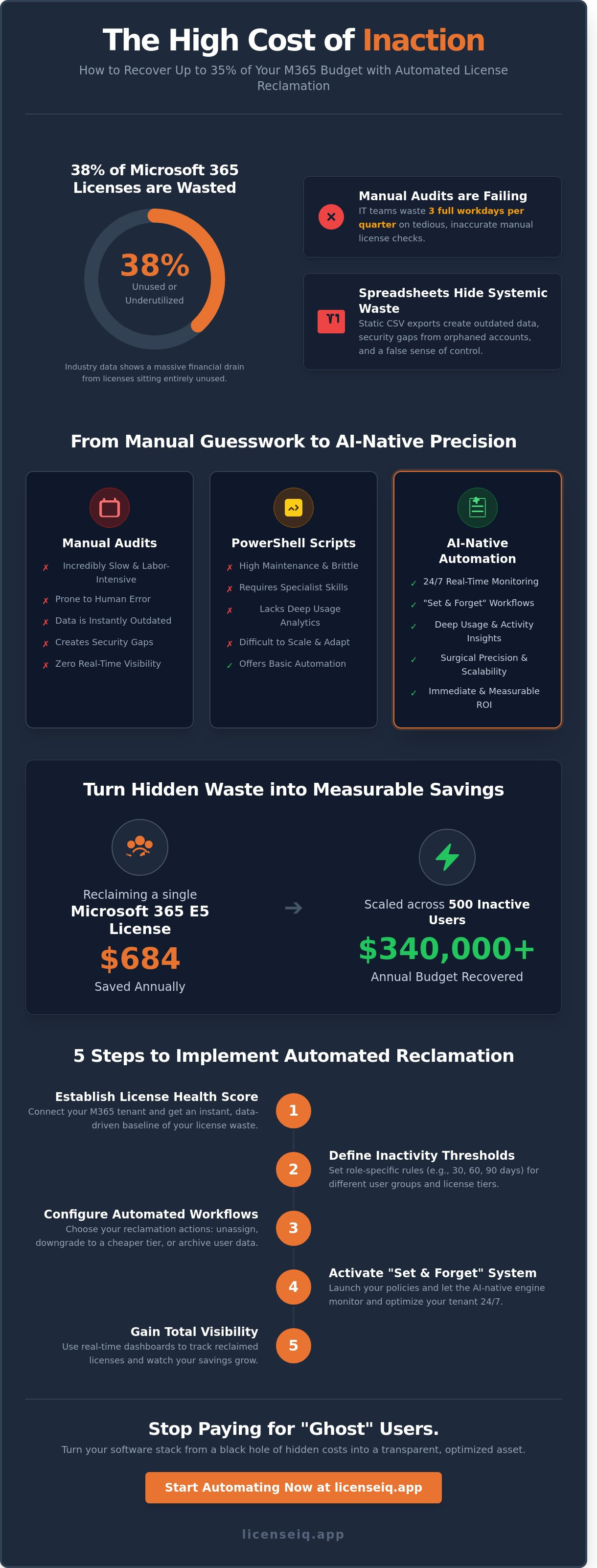
Recent 2025 industry data reveals that 38% of Microsoft 365 licenses sit entirely unused or underutilized. You already know the frustration of manual audits that consume three full workdays of your IT team's time every single quarter. It's a tedious cycle of guessing who's truly active and who's just an occasional visitor. When you choose to automate license reclamation, you replace that manual guesswork with surgical precision. You stop paying for "ghost" users and immediately start reclaiming capital for your most critical IT priorities.
This guide shows you how to recover up to 35% of your SaaS budget by implementing intelligent, automated workflows. We'll move beyond the constant fear of accidentally deprovisioning a critical account by establishing clear, data-driven triggers. You'll learn to build a "set and forget" system that ensures real-time visibility into every dollar spent. We're covering the specific steps to achieve total license hygiene and automated budget compliance for 2026. It's time to turn your software stack from a black hole of hidden costs into a transparent, optimized asset.
Key Takeaways
- Stop the financial drain of manual M365 management and recover up to 35% of your SaaS budget through precision recovery.
- Learn how to automate license reclamation using AI-native monitoring that identifies and unassigns unused seats based on real-time activity.
- Evaluate the hidden labor costs of custom PowerShell scripts compared to modern, scalable automation workflows.
- Follow a five-step implementation framework to establish your License Health Score and define role-specific inactivity thresholds.
- Gain total visibility into your software environment with real-time dashboards that transform hidden waste into measurable savings.
The Financial Drain of Manual License Management in 2026
License reclamation is the automated process of identifying and unassigning unused software seats to stop budget leakage. In the 2026 business environment, manual audits fail because they can't keep pace with hybrid work models and a 20% average annual employee turnover rate. Static reports provide a snapshot of the past, not the reality of the present. Companies that rely on manual checks often see 30% of their SaaS budget vanish into inactive or redundant licenses. This financial drain forces IT teams into a reactive cycle of closing tickets rather than driving growth. To fix this, leaders must shift toward proactive financial governance. Professional Software Asset Management practices now require real-time visibility to maintain a lean, efficient tech stack.
Why Spreadsheets are the Enemy of M365 Optimization
Spreadsheets offer the illusion of control while hiding systemic waste. Data becomes outdated the moment a CSV export completes. Reliance on manual tracking leads to critical errors in distinguishing between a "last login" and actual application usage. A user might sign in to Outlook but never touch Power BI, yet they still hold an expensive premium license. Beyond the cost, spreadsheets create security gaps. Orphaned accounts often remain active in the tenant for months after an employee departs. These unmanaged entries are prime targets for unauthorized access, turning a budget issue into a major compliance liability. Using LicenseIQ ensures these gaps are closed instantly.
The ROI of Automated Spend Recovery
The financial impact of a single decision is substantial. Reclaiming one Microsoft 365 E5 license saves approximately $684 over a 12 month period based on current enterprise pricing tiers. When an organization scales this across 500 inactive users, the recovery exceeds $340,000 annually. Reclamation ROI is the ratio of recovered spend to the cost of the automation tool. Organizations that choose to automate license reclamation see immediate returns by eliminating human error. This shift allows IT staff to focus on high-value strategic projects instead of hunting for ghost users in a list. Efficiency isn't just about saving money; it's about reallocating human capital to drive innovation. By implementing a system that monitors utilization around the clock, businesses ensure their M365 spend remains optimized without constant manual intervention.
How Automated License Reclamation Works: The Governance Lifecycle
Manual license management relies on static reports and human memory. To automate license reclamation, you must replace these reactive habits with a proactive governance lifecycle. Modern AI-native tools function as a 24/7 digital auditor, scanning your Microsoft 365 tenant every hour to identify waste. They don't wait for an IT ticket; they monitor activity logs in real-time to uncover hidden costs.
This process relies on threshold-based triggers. A common standard is 30 days of inactivity, but high-velocity organizations often set tighter windows for specific apps. The Model Context Protocol (MCP) plays a vital role here by connecting disparate SaaS data points. MCP allows the system to verify if a user is active in integrated third-party apps even if their M365 footprint is light. This creates a unified visibility layer that prevents silos.
Effective reclamation moves beyond simple deletion. Automation allows for nuanced financial decisions:
- Unassigning: Removing the license entirely for users who've left the company or changed roles.
- Downgrading: Moving an E5 user to an E3 tier if they haven't touched Power BI or advanced security features in 60 days.
- Archiving: Moving user data to cold storage to maintain compliance while stopping the monthly billing cycle.
Identifying Inactivity Beyond the Login Screen
A simple login timestamp is a deceptive metric. A user might open Outlook to check one email but ignore Teams, SharePoint, and OneDrive for months. High-precision automation analyzes deep usage signals across the entire suite. It distinguishes between active contributors and passive observers. This granularity is essential for managing the cloud app landscape without disrupting productivity.
The system also identifies service accounts. These non-human entities often trigger "inactive" flags in basic tools, leading to accidental reclamation and broken workflows. LicenseIQ uses AI to categorize these accounts, ensuring critical background processes remain untouched while human-linked waste is eliminated.
The Automated Governance Workflow
The transition from discovery to recovery happens in three distinct stages. This structure ensures that no action is taken without a data-backed justification.
Step 1: Discovery. The tool identifies every underutilized asset across the tenant. It flags licenses that haven't met the 30-day activity threshold.
Step 2: Validation. The system cross-references the user's department and role. It checks if the inactivity is expected, such as during a scheduled leave of absence or a specific project cycle.
Step 3: Execution. The reclamation action occurs automatically. The license is unassigned, and the cost is recovered. You can view these savings in real-time through a centralized dashboard. This immediate feedback loop turns IT from a cost center into a driver of financial efficiency.
Comparison: Manual Audits vs. PowerShell Scripts vs. AI-Native Automation
Choosing a specific method to automate license reclamation determines whether your M365 budget thrives or bleeds. Most organizations fall into the trap of relying on native Microsoft Admin Center tools. These tools provide a snapshot of assignment, but they fail to track deep utilization. A license might be assigned, but if the user hasn't opened Teams or Excel in 60 days, that spend is wasted. Manual audits are inherently reactive. They rely on spreadsheets that are outdated the moment they're saved. This "Point-in-Time" model leaves gaps where shadow IT and unused subscriptions accumulate. Research from 2024 indicates that companies without automated management overspend on SaaS by 30% annually.
The transition to 2026 requires a shift from manual oversight to proactive intelligence. Manual checks take roughly 15 to 20 hours of labor per month for a mid-sized firm. That's a high price for data that's likely inaccurate. AI-native platforms eliminate this friction by providing a direct line of sight into every seat. They replace guesswork with precision, ensuring that every dollar spent on M365 correlates to actual employee productivity.
The PowerShell Trap: Why Scripts Aren't Enough
IT departments often rely on custom PowerShell scripts to handle bulk tasks. This creates a dangerous maintenance overhead. Microsoft updated the Graph API more than 40 times in 2025 alone. Every update risks breaking your custom code. When a script fails, your license reclamation stops, and costs spike until an engineer can fix the logic. You're effectively paying senior-level salaries to perform basic maintenance on a fragile system.
Scripts also fail to bridge the gap between IT and Finance. A PowerShell output is a raw data dump, not a strategic report. Finance leaders can't log into a script to see how much money was saved this quarter. This lack of a user-friendly dashboard prevents stakeholders from seeing the ROI of their optimization efforts. As organizations scale across multiple tenants, managing a library of scripts becomes a logistical bottleneck that slows down operations.
AI-Native Intelligence: The 2026 Standard
Modern software management demands a system that acts rather than just reports. LicenseIQ connects to your M365 environment in under five minutes. It immediately generates a comprehensive health score, illuminating hidden costs that manual audits miss. This isn't just about finding unassigned licenses. It's about identifying "zombie" accounts and users who are over-provisioned for their actual needs.
The real power lies in Actionable Insights. Instead of a list of names, you receive specific recommendations based on 90 days of behavioral data. You can automate license reclamation with confidence, knowing the system understands the difference between a temporary leave of absence and a departed employee. Continuous monitoring ensures that your tenant stays lean every day of the year, not just during an annual review. For SMBs in 2026, this level of transparency is the only way to maintain a competitive edge and protect the bottom line.
5 Steps to Implement Automated License Reclamation in Your Organization
Waste is the silent killer of IT budgets. To automate license reclamation effectively, you need a framework that balances aggressive cost-cutting with operational stability. Most organizations carry 15% to 30% in license bloat because they lack a systematic way to claw back unused resources. Follow these five steps to transition from manual tracking to an automated, high-efficiency model.
- Audit your baseline: Establish a License Health Score by comparing total seats against active usage logs.
- Define inactivity thresholds: Set specific triggers based on job roles. A developer might be flagged after 14 days of inactivity, while a seasonal contractor might only get 7 days.
- Sync with offboarding: Integrate your reclamation tool directly with your Office 365 offboarding checklist to ensure seats are recovered the moment an employee leaves.
- Automate manager alerts: Send a 48-hour warning to department heads before a license is pulled. This prevents accidental disruption for users on extended leave.
- Perform monthly logic reviews: Adjust your automation rules every 30 days to align with changing project needs and budget targets.
Establishing Your Baseline and Health Score
Visibility is your primary defense against overspending. Use a specialized discovery tool to scan your environment for unassigned licenses. These represent immediate, 100% waste. You must also identify redundant licensing. It's common to find users assigned both Microsoft 365 Business Premium and E3 licenses simultaneously. Eliminating these overlaps can reduce monthly spend by 12% within the first quarter. Set a firm target for spend recovery within your first 90 days to demonstrate immediate ROI to your finance team.
Configuring the Reclamation Loop
Your reclamation loop defines how the system reacts to detected waste. We recommend a "Soft Reclamation" approach for active employees. This triggers an automated notification that asks the user if they still require the software. If no response occurs within a set window, the system proceeds to "Hard Reclamation," where the license is unassigned. Ensure your process maintains data retention for 30 days to comply with corporate policies. Linking this workflow to your automated license governance strategy ensures that your SaaS stack remains lean and secure without manual intervention.
Efficiency doesn't happen by accident; it requires the right tools to monitor and act on your behalf. Stop letting unused seats drain your budget every month.
Scaling Savings with LicenseIQ’s Automated Governance Workflows
LicenseIQ targets M365 waste with an AI-native architecture designed for precision. Most organizations struggle to automate license reclamation because their data is fragmented across different departments. Our platform centralizes these metrics to provide a single source of truth. The Spend Recovery Dashboard offers real-time tracking of every dollar saved. It doesn't just show you what you're spending; it shows you exactly what you're recovering. This level of visibility is the antidote to the chaos of unmanaged software stacks.
We provide a 35% savings guarantee through actionable optimization insights. Many businesses find that their licensing costs drop significantly within the first billing cycle. SMBs specifically choose LicenseIQ for its 5-minute setup. You don't need a complex implementation plan to see results. The immediate health scoring identifies critical vulnerabilities and waste patterns the moment you connect your tenant. It's a proactive approach that ensures your financial health remains a top priority.
From Insight to Action in Minutes
The "Connect, Scan, Save" workflow eliminates the technical barriers that often stall SaaS management initiatives. You don't need an IT degree to navigate the platform or understand the results. LicenseIQ handles the heavy lifting by analyzing user activity and license entitlements automatically. Data from our user base shows that a typical SMB recovers 20% of their total M365 spend in week one. This rapid ROI proves that efficiency doesn't have to be a long-term project.
"LicenseIQ turns the black box of M365 billing into a transparent roadmap for recovery."
This transparency allows finance teams to regain control over their budgets immediately. Instead of guessing which licenses to cut, you make decisions based on hard utilization data. Every recommendation is backed by evidence, ensuring that efforts to automate license reclamation never disrupt essential business operations. We prioritize both the bottom line and the user experience.
Future-Proofing Your SaaS Spend
Predictive forecasting is a core component of the LicenseIQ experience. The system uses your historical data to plan next year's license budget with high accuracy. This prevents the common "true-up" shocks that occur during annual renewals. By looking at growth trends and attrition rates, the AI projects exactly how many seats you'll need in the coming quarters. It transforms your budgeting process from reactive to strategic.
The role of AI also extends to security through the identification of Shadow IT. Unmanaged applications often become budget sinkholes and significant security risks. LicenseIQ spots these unauthorized tools before they scale, protecting your financial resources and your corporate data. It's about maintaining a vigilant, precise system that stays one step ahead of your organizational changes. You get total visibility and total control.
Take the first step toward total visibility: Start your 5-minute M365 audit with LicenseIQ today.
Secure Your M365 Financial Health
Manual spreadsheets and static audits fail the dynamic workforce of 2026. Outdated PowerShell scripts leave your organization vulnerable to shadow IT and financial waste. To maintain a lean, high-performing tech stack, you must automate license reclamation across your entire ecosystem. This shift replaces reactive cleanup with proactive governance. It ensures every seat matches actual user utilization. By moving from manual guesswork to AI-native precision, you eliminate the visibility gaps that drain corporate resources.
Your M365 tenant holds hidden capital that belongs back in your budget. LicenseIQ provides the visibility you need to reclaim that value without the administrative burden. You can connect to your tenant in under 5 minutes to receive AI-native spend recovery recommendations tailored to your environment. Our platform identifies exact opportunities to save up to 35% on M365 spend by targeting inactive accounts and redundant tiers. Stop guessing and start optimizing with data-driven clarity.
Scan your M365 tenant for free and find your License Health Score.
Taking control of your software spend is the fastest way to improve your bottom line this year.
Frequently Asked Questions
What is automated license reclamation?
Automated license reclamation is the programmatic identification and removal of underutilized software seats. Your system tracks login events and app usage to trigger license revocation without manual intervention. This process ensures your M365 environment stays lean by instantly returning unused seats to the available pool. It replaces labor-intensive audits with a reliable, data-driven system that operates 24/7 to protect your bottom line.
Is it safe to automate the removal of Microsoft 365 licenses?
It's safe when you implement multi-stage approval workflows and automated notifications. You shouldn't revoke access instantly; instead, set a 7 day warning period for users. Gartner reports that organizations using automated governance reduce the risk of accidental outages by 40 percent compared to manual scripts. This structured approach maintains security while ensuring that critical business functions remain uninterrupted during the reclamation cycle.
How much money can my company save by automating license reclamation?
Companies typically reclaim 30 percent of their total SaaS spend through systematic optimization. For a mid-sized firm with 1,000 M365 E5 licenses, this recovers approximately 300 licenses. By choosing to automate license reclamation, you eliminate the 15 percent margin of error common in manual spreadsheets. This proactive approach ensures your budget supports active users rather than paying for dormant accounts.
How do I identify inactive Microsoft 365 users for reclamation?
You identify inactive users by analyzing the last activity date across Exchange, SharePoint, and Teams via the Microsoft Graph API. Look for users with zero activity in the previous 90 days. Professional tools aggregate this data into a single dashboard to reveal hidden costs across your entire tenant. This level of visibility allows you to pinpoint exactly where waste occurs within your organization.
Does license reclamation delete user data?
License reclamation removes the access rights but doesn't delete the underlying user data or mailbox content. Microsoft 365 retains data for 30 days by default after license removal. You can extend this protection by using litigation holds or specific retention policies to ensure 100 percent data integrity. This safeguard allows you to reassign licenses without the fear of losing valuable corporate intellectual property.
Can I customize the inactivity threshold for different departments?
You can and should set granular thresholds based on department-specific requirements. For example, your sales team might require a 30 day threshold, while seasonal contractors operate on a 14 day window. Customizing these rules prevents productivity bottlenecks while maximizing your automate license reclamation strategy across diverse business units. It ensures your reclamation policy reflects the actual working patterns of every team member.
What is the difference between license reclamation and deprovisioning?
License reclamation targets active employees who simply aren't using a specific tool, whereas deprovisioning is the total offboarding of a departing user. Reclamation optimizes current costs without removing the user from the directory. Deprovisioning clears the entire identity footprint, including security group memberships and hardware assignments. Understanding this distinction is vital for maintaining both financial efficiency and a secure, organized user environment.
How often should I run automated license reclamation scans?
You should run automated scans daily to maintain real-time visibility into your software spend. Weekly scans are the minimum requirement for maintaining a 95 percent utilization rate. Continuous monitoring allows your IT team to respond to usage shifts within 24 hours, preventing the accumulation of zombie licenses that drain your budget. High-frequency auditing turns your license management from a reactive chore into a strategic advantage.


