

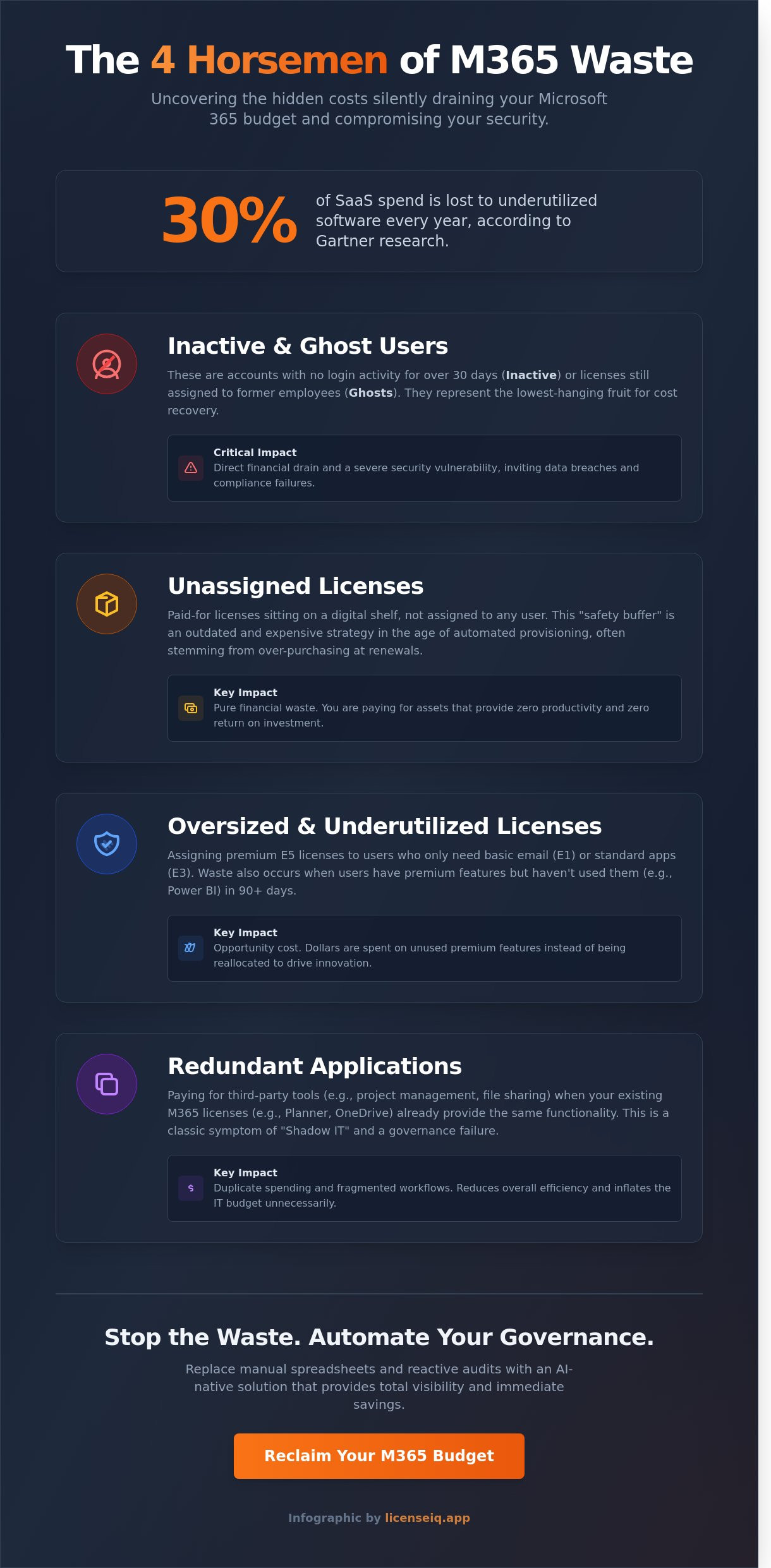
Gartner research confirms that 30% of SaaS spend is lost to underutilized software every year. For most IT leaders, this waste hides behind opaque Microsoft billing and manual spreadsheet audits that consume hours of valuable time. You likely suspect your tenant isn't optimized, but tracking employee offboarding and unused E5 features across thousands of seats feels like a moving target. Uncovering wasted microsoft 365 licenses is the fastest way to improve your organization's financial health and eliminate shadow IT costs in 2026.
We agree that manual license management is a recipe for error and unnecessary expense. It's time to stop the bleed. This article provides a professional audit checklist designed to help you reclaim up to 35% of your Microsoft 365 budget. You'll learn how to calculate a precise Health Score for your tenant and deploy automated workflows that replace reactive guesswork with proactive optimization. We're moving from the darkness of unknown spend into a future of total visibility and immediate dollar-value savings.
Key Takeaways
- Define the "silent leak" in your budget by identifying the gap between purchased subscriptions and actual employee utility.
- Categorize wasted microsoft 365 licenses into four distinct buckets to align IT and Finance on a unified reclamation strategy.
- Execute a high-velocity 5-minute audit to pinpoint high-impact, low-effort savings that yield immediate financial returns.
- Transform audit insights into recovered capital with a decisive strategy that addresses common data retention concerns.
- Automate your SaaS governance with an AI-native solution that provides total visibility and eliminates the manual audit headache.
The Silent Leak: Why Wasted Microsoft 365 Licenses Are Costing You More in 2026
License waste isn't just a minor accounting discrepancy. It's the measurable gap between the premium subscriptions you purchase and the actual utility your employees extract from the software. In 2026, SaaS sprawl has officially become the number one hidden cost for modern SMBs. Many organizations continue to pay for top-tier E5 licenses when their staff only requires basic email functionality. This mismatch creates wasted microsoft 365 licenses that silently drain capital every month. Relying on manual tracking via spreadsheets is the primary driver of this financial inaccuracy. These static documents fail to reflect real-time provisioning changes, leaving IT leaders with a distorted view of their actual needs.
To fix this, you need a way to quantify your environment's performance. Forward-thinking companies now utilize a License Health Score to measure tenant efficiency. This metric provides immediate clarity, moving beyond simple user counts to reveal the true ROI of your digital workplace. It turns the "unknown spend" into a visible, manageable asset.
The Financial Impact of M365 Inefficiency
Recent industry benchmarks indicate that enterprises lose between 14% and 35% of their software budget to pure waste. A major contributor is the "Safety Buffer" trap. For years, IT managers kept a 10% surplus of licenses on hand to handle new hires. In the 2026 economic climate, this is an outdated and expensive strategy. Automated provisioning has made the manual buffer obsolete. Additionally, the compounding cost of commitment errors shouldn't be ignored. Failing to align monthly and annual subscriptions with actual headcount trends can inflate your Microsoft bill by 20% or more annually. Precise Software Asset Management (SAM) is the only way to stop this capital flight.
Why Traditional IT Audits Fail
Standard Entra ID reports are built for security, not for financial optimization. They lack the granular financial context needed to determine if a license is actually delivering value. These reports won't tell you if a user has a premium license but hasn't opened a Power BI dashboard in 90 days. This visibility gap also hides "Shadow IT" and redundant applications that overlap with your existing M365 stack. You might pay for third-party project management tools while your Planner licenses sit idle. In such cases, procurement efficiency is key; for example, teams in Brazil can explore Licenças Clickup.com com nota fiscal brasileira to ensure their productivity suite aligns with local financial reporting. SaaS waste is a governance failure, not just a procurement error. Without a proactive system, wasted microsoft 365 licenses remain hidden in the dark corners of your tenant until the next renewal cycle forces a budget crisis.
The 4 Horsemen of Microsoft 365 Waste
Identifying wasted microsoft 365 licenses requires more than a cursory glance at your monthly invoice. Effective management demands that IT and Finance departments speak the same language. We categorize waste into four distinct buckets to provide that clarity. This classification is vital because your reclamation strategy depends entirely on the type of waste discovered. You cannot treat a security risk the same way you treat a simple billing error.
Modern automation platforms handle these categories with surgical precision. While one category might trigger an immediate license revocation, another might suggest a tier downgrade based on usage patterns. For a deeper look at these automated workflows, review our Microsoft 365 License Optimization Guide. Efficiency is not just about spending less. It is about ensuring every dollar supports a productive, active user.
Inactive and Ghost Users
Inactive users are the low-hanging fruit of spend recovery. These accounts show zero login activity over a 30, 60, or 90 day period. Ghost Users represent a more severe failure in the employee offboarding process. These are former employees who still have active, paid seats assigned to them. They represent a significant financial drain and a critical security vulnerability. Leaving these digital doors open invites data breaches and compliance failures. Your first action item is to generate an inactive office 365 users report to quantify this risk immediately.
Unassigned and Over-provisioned Licenses
Unassigned licenses are "shelfware" sitting in your tenant. You pay for them every month, but they are not assigned to any specific user account. This often results from over-purchasing during annual renewals or failing to return licenses to the pool after a department downsizes. Over-provisioning is a different, more subtle beast. It happens when a user has an expensive E5 license but only utilizes basic E1 features like web-based email and calendar. This mismatch is where most wasted microsoft 365 licenses hide in plain sight.
You can slash software licensing costs by implementing a "Right-Sizing" strategy. This process uses actual telemetry data to match users with the most cost-effective license tier. Industry data suggests that roughly 38% of SaaS spend is underutilized. By analyzing granular app usage, you can move users to lower tiers without impacting their daily workflow or productivity. If you want to stop the bleed, audit your environment with LicenseIQ to find these hidden savings today.
The 5-Minute M365 Audit Checklist: How to Spot Inefficiency
Stop treating your software audit as an annual chore. Inefficient license management is a silent budget killer that compounds every month. To maintain a lean environment, you need a high-velocity health check that focuses on immediate financial recovery. Manual spreadsheets are too slow and prone to error. Use automated tools to surface wasted microsoft 365 licenses in minutes rather than weeks. This checklist transforms complex tenant data into actionable savings.
Step 1: The Subscription vs. Assignment Scan
Open your M365 Admin Center and immediately compare total purchased licenses against total assigned users. Every unassigned license in your "Available" pool represents a 100% loss of capital. You should also audit for "Double Licensing" errors. This occurs when a user is assigned a comprehensive bundle, like an E3, but also carries an individual license for an app already included in that bundle or a high-cost add-on like Visio that they no longer use. Eliminating these redundancies can trim 5% to 10% off your monthly bill instantly.
Step 2: The 90-Day Activity Filter
Activity is the baseline for necessity. Filter your entire user list by the "Last Activity Date" column. Any account that hasn't accessed a cloud service in 90 days is a prime candidate for de-provisioning. Pay close attention to "Disabled" accounts in Active Directory. It's a common oversight to disable a user but leave their paid license attached. Cross-referencing your M365 tenant with HR offboarding records ensures that 100% of departed employees have had their seats recycled or cancelled. This step alone often identifies dozens of wasted microsoft 365 licenses in mid-sized organizations.
Step 3: The Feature Utilization Audit
High-tier licenses like E5 are only valuable if the staff utilizes the advanced components. Check your usage reports for Power BI Pro, Microsoft Defender for Endpoint, and Phone System features. If an E5 user only accesses Outlook and Teams, they are an ideal candidate for a downgrade to E3 or Business Premium. Feature usage is the only true metric for license value. Moving just 50 users from E5 to E3 can save your organization over $10,000 annually based on standard commercial pricing. For real-time visibility into these optimization opportunities, visit LicenseIQ to automate the discovery process.
Reclamation Strategy: Turning Insights into Spend Recovery
Identification is only the first step. True ROI comes from taking decisive administrative action to eliminate wasted microsoft 365 licenses. Most IT departments stop at the reporting phase, but spend recovery requires a shift from "finding" waste to "recovering" cash. You aren't just managing software; you're protecting the bottom line.
The most common objection to reclamation is the fear of data loss. IT managers often worry that de-provisioning a license means losing critical emails or documents. This is a misunderstanding of how the Microsoft ecosystem functions. By 2026, standard retention policies and legal hold features allow organizations to retain data for up to 10 years without an active, paid license assigned to a user. You can preserve the history while stopping the billing cycle immediately.
To execute this transition securely, follow this Office 365 Offboarding Checklist. It provides a structured path to convert user mailboxes into shared mailboxes and move files to cold storage. This ensures security remains high while your monthly spend drops. In mixed-tenant environments, where different departments have varying needs, segmentation is key. Sales may require E5 features for advanced analytics, while frontline staff only need F3 licenses. Don't apply a blanket policy; apply a surgical one.
Automating the Reclamation Lifecycle
Manual license tracking is a recipe for failure at scale. Modern IT leaders set up automated alerts for when unassigned licenses exceed a 5% threshold of the total pool. This prevents "license hoarding" where departments sit on unused seats "just in case."
- Just-in-Time Licensing: Move away from bulk purchasing based on headcount projections. Use automated provisioning to assign a license only when an HR trigger confirms a new hire's start date.
- Instant De-provisioning: Workflows should strip licenses the moment an employee's status changes in your HRIS. This kills "zombie licenses" before they can incur another month of costs.
Negotiating with Data, Not Guesses
Audit findings are your most powerful leverage during Microsoft renewals. Don't enter negotiations with "estimated" needs. Use a Spend Recovery Dashboard to show your CFO exactly how much was saved in the previous quarter through active management. This transparency builds trust and justifies your budget requests.
Establish a "License Health Score" as a primary KPI for your IT department. A score of 95% or higher indicates that your active utilization closely matches your total spend. By treating wasted microsoft 365 licenses as a financial leak rather than a technical oversight, you position IT as a profit center rather than a cost center.
Stop the Waste with LicenseIQ: AI-Native Governance
Manual audits are a drain on your IT team's time. They provide a static snapshot that's obsolete by the time the spreadsheet is saved. LicenseIQ replaces this friction with AI-native governance. You don't need a lengthy implementation or a three-month consulting project. You connect your environment in minutes. Once linked, the platform analyzes your tenant to identify wasted microsoft 365 licenses with surgical precision.
The system doesn't just flag inactive users. It provides a specific dollar-value recommendation for every single account. This level of detail turns vague theories into actionable financial recovery. By moving to a model of continuous accuracy, you ensure that every license assigned is a license utilized. It's the difference between guessing your spend and mastering your budget.
From Manual Spreadsheets to Automated Workflows
A manual audit is a moment in time; real-time monitoring is a permanent state of optimization. LicenseIQ leverages the Model Context Protocol (MCP) to automate complex governance tasks. This technology allows the system to analyze usage patterns and execute cleanup workflows without manual intervention. Organizations using LicenseIQ achieve an average of 35% savings on their subscription costs. You move away from the chaos of shadow IT and into a structured environment where visibility is the default setting. This automation eliminates the human error inherent in tracking thousands of seats across multiple departments.
Get Your License Health Score Today
Visibility is the only effective antidote to waste. A simple scan provides an immediate License Health Score for your entire organization. This score reveals exactly where your budget is leaking and identifies wasted microsoft 365 licenses that can be harvested or downgraded immediately. You shouldn't have to wait for an annual renewal to fix your margins. Start recovering your SaaS budget now by uncovering hidden costs that have been sitting in your tenant for months. Stop the guesswork and let data-driven insights protect your bottom line.
Take control of your software spend now.
Secure Your 2026 SaaS Budget with Total Visibility
The 2026 business landscape demands total visibility over your software stack. You've identified the signs of inefficiency and mapped out a strategy to reclaim lost capital. Managing wasted microsoft 365 licenses isn't just about cutting costs. It's about shifting from reactive cleanup to proactive, AI-native governance that protects your margins. Manual audits are obsolete and prone to human error. Gartner research indicates that organizations can reduce software spend by up to 30% through automated management. LicenseIQ takes this further by offering a system that connects in minutes, not days. We provide the transparency needed to eliminate shadow IT and optimize utilization across every single seat. You'll gain the power to save up to 35% on your total M365 spend while maintaining peak operational efficiency. Don't let hidden costs erode your bottom line. Transition to a model where every license serves a purpose and every dollar is accounted for. Your organization's financial health depends on the clarity you establish today.
Find your M365 Health Score and stop wasting money with LicenseIQ
Frequently Asked Questions
What counts as a "wasted" Microsoft 365 license?
Wasted microsoft 365 licenses include unassigned seats, accounts with zero activity for 30 days, or users assigned premium E5 tiers when E1 basic functionality suffices. Microsoft’s 2023 usage reports indicate that 20 percent of enterprise licenses remain underutilized. These dormant assets drain your IT budget without providing operational value. Identifying these gaps creates immediate financial visibility and stops capital leakage.
How often should I conduct a Microsoft 365 license audit?
You should conduct a comprehensive license audit at least once every 90 days to maintain peak financial health. Organizations that perform monthly reviews typically reduce their annual cloud spend by 15 percent compared to those doing annual checks. Rapid hiring or offboarding cycles make frequent monitoring essential. Regular audits ensure your subscription count reflects your actual headcount, preventing payment for ghost users or former employees.
Can I get a refund from Microsoft for unused licenses?
Microsoft doesn't offer direct refunds for unused months once a subscription term begins. Under the New Commerce Experience (NCE) rules, you have a 168-hour window after purchase to cancel or reduce seat counts for a full refund. Outside this period, you're committed until the annual or monthly term expires. Proactive management is the only way to avoid paying for surplus capacity you can't return.
Is it safe to automate license reclamation?
Automating license reclamation is safe when you implement specific 30-day or 60-day inactivity triggers. Automated systems eliminate human error and ensure that wasted microsoft 365 licenses are recovered the moment a user leaves the company. Precise workflows can reassign these licenses to new hires instantly. This proactive approach maintains security compliance by ensuring access is revoked as soon as it's no longer required.
Does removing a license delete the user’s data?
Removing a license doesn't delete data immediately, but it starts a 30-day countdown before Microsoft permanently purges the mailbox and OneDrive files. You must back up critical information or convert the mailbox to a shared mailbox before de-licensing to ensure 100 percent data retention. Using a shared mailbox allows you to preserve data without paying for an active subscription. This strategy balances data compliance with cost optimization.
How much can an SMB typically save by optimizing M365?
An SMB typically saves between 20 percent and 30 percent on their annual subscription costs through diligent optimization. Gartner reports that organizations without a formal SaaS management strategy overspend on their software stacks by an average of 25 percent. By eliminating redundant E5 features and reclaiming inactive seats, a 100-person firm can often recover thousands of dollars in lost capital within a single billing cycle.
What is the difference between an unassigned and an inactive license?
An unassigned license is a paid seat that isn't attached to any user profile, while an inactive license is assigned to a user who hasn't logged in for 30 days. Both represent 100 percent waste, but they require different remediation steps. Unassigned seats are visible in the billing portal and should be canceled. Inactive licenses require a usage audit to determine if the user still needs the software.


