

Paying for premium security features your team never activates is the fastest way to erode your 2026 IT budget. A 2024 Gartner report indicates that organizations waste approximately 30% of their SaaS spend on underutilized seats and redundant functionality. You already know that the microsoft 365 e3 vs e5 decision is a labyrinth of opaque tiers that often leads to expensive over-provisioning. The pressure to maintain high-level compliance while reducing total cost of ownership is a constant challenge for modern finance leaders.
This analysis settles the debate by quantifying the $216 annual price gap against actual operational utility. We'll identify the critical feature differences and provide a clear ROI calculation to determine if your team truly needs the E5 upgrade. You'll gain a specific strategy for mixing license types to protect your bottom line while securing your data. We are moving past the marketing jargon to give you total visibility and confidence in your 2026 budget forecast.
Key Takeaways
- Analyze the $216 annual price gap to determine if E5's advanced security and analytics justify the premium for your specific organizational needs.
- Identify and eliminate "shelfware" by uncovering the 35% of E5 spend typically lost to underutilized features like Power BI Pro and Teams Phone.
- Evaluate the technical pillars of microsoft 365 e3 vs e5 to pinpoint where advanced Defender plans and compliance tools provide actual risk reduction.
- Apply a proactive decision framework to audit your security stack and segment users, preventing expensive feature overlap with existing third-party tools.
- Move beyond manual spreadsheets to automated governance for total visibility and immediate recovery of wasted software spend.
The Microsoft 365 Enterprise Landscape: E3 vs. E5 in 2026
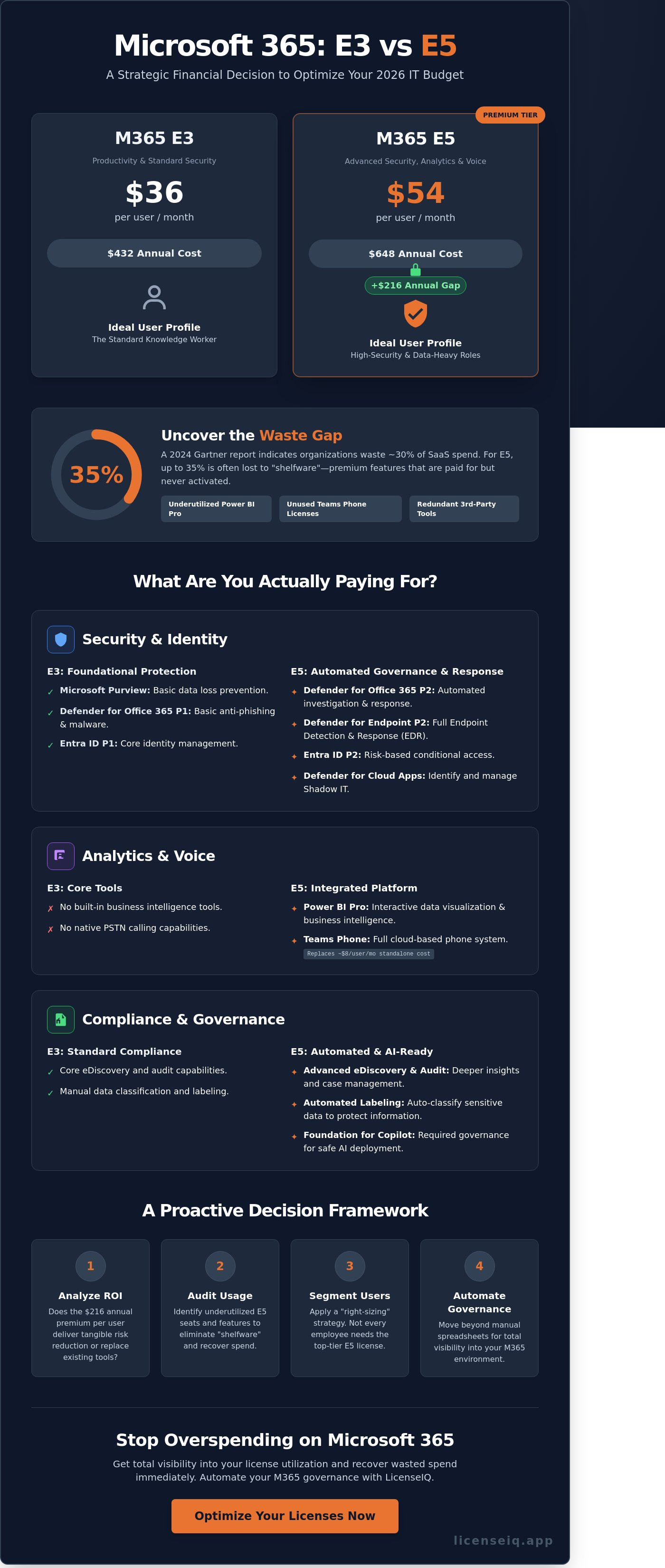
Organizations in 2026 face a critical decision when evaluating the microsoft 365 e3 vs e5 landscape. The Enterprise series serves as the operational backbone for modern business. It provides the necessary infrastructure for secure, scalable collaboration. However, the financial stakes have never been higher. In 2026, the price gap is significant. E3 is priced at $36 per user per month. E5 frequently exceeds $54. This $18 delta represents a 50% increase in per-user costs. For an organization with 500 users, that's an additional $108,000 in annual spend.
Many SMBs fall into the "all-or-nothing" trap. They assume every employee requires the top-tier license to remain secure. This legacy mindset is a costly mistake. IT leaders often overlook the flexibility inherent in the Microsoft 365 suite. Blanket upgrades lead to "shelfware" where expensive features go untouched. Visibility is the only cure for this waste. Before committing to a higher tier, smart leaders perform a SaaS license health check. This process identifies underutilized seats and can recover up to 35% of M365 spend by rightsizing existing licenses.
The E3 Value Proposition: Productivity and Standard Security
E3 remains the primary choice for the standard knowledge worker. It includes the core Office apps, 1TB of OneDrive storage, and Windows 11 Enterprise basics. Security is handled through Microsoft Purview and basic Entra ID. It's built for teams that need reliable collaboration tools without the heavy overhead of advanced telemetry. If your staff primarily uses Word, Excel, and Outlook, E3 provides everything they need to stay productive and compliant.
The E5 Value Proposition: Advanced Security, Analytics, and Voice
E5 is the premium tier designed for high-security environments and data-heavy roles. It's marketed as the "secure and data-driven" choice for the modern enterprise. Major inclusions feature Defender for Endpoint, Power BI Pro, and Teams Phone. These tools allow organizations to move away from fragmented third-party solutions. Essentially, E5 consolidates security and communication into a single SKU to eliminate vendor sprawl. It's the right fit for organizations prioritizing zero-trust architecture and real-time business intelligence.
Choosing between microsoft 365 e3 vs e5 isn't just a feature comparison. It's a financial strategy. You don't need to pay for E5's advanced analytics for a user who only checks email. Precision licensing is the only way to maintain a healthy bottom line in 2026.
Technical Comparison: What Are You Actually Paying For?
The transition from E3 to E5 represents a shift from foundational productivity to automated governance. When analyzing the microsoft 365 e3 vs e5 value proposition, you're paying for three distinct pillars: Security, Compliance, and Analytics. E5 isn't just an upgrade; it's a consolidation play. It allows you to retire expensive third-party point solutions. This reduces your total cost of ownership by bringing disparate tools under one management plane.
A primary differentiator is Defender for Office 365. While E3 includes Plan 1 for basic protection, E5 provides Plan 2. This adds post-breach investigation, hunting, and automated response. You move from simply detecting a threat to having a system that remediates it automatically. This shift saves your IT team hours of manual investigation every week. Organizations can gain total visibility into these security gaps by auditing their current license utilization.
The "Teams Phone" factor is the most immediate cost offset in the E5 bundle. Standalone Teams Phone licenses typically cost $8 per user monthly. For a 1,000-user organization, that is $96,000 in annual spend that E5 absorbs. Additionally, E5 provides the data governance foundation required for Microsoft 365 Copilot. Without the automated labeling found in E5, AI tools can inadvertently surface sensitive data to unauthorized employees, creating a massive internal security risk.
Advanced Security and Identity Protection
Entra ID P2 is a core E5 component that introduces Risk-based Conditional Access. It uses machine learning to block logins automatically if it detects leaked credentials or suspicious locations. Microsoft Defender for Endpoint P2 is often the primary driver for this upgrade. It provides full Endpoint Detection and Response (EDR) capabilities. You also gain Defender for Cloud Apps to identify Shadow IT. Most enterprises discover over 1,000 unauthorized apps in their environment after deploying this tool.
Compliance and Governance Differences
E5 simplifies legal workflows through Premium eDiscovery. It slashes the time required for data collection during litigation by using predictive coding and conversation reconstruction. Information Protection in E3 relies on manual labeling, which users often ignore. E5 automates this by scanning for PII or financial data and applying restrictions without human intervention. Insider Risk Management further protects the perimeter. It uses behavioral analytics to detect data exfiltration patterns before a departing employee can download your client list.
The Waste Gap: Why 35% of E5 Spend is Often Recoverable
The gap between what companies pay for and what they actually use is widening. Industry data reveals that 35% of E5 spend is often recoverable through better management. Most organizations fall into the "shelfware" trap. They pay for premium features like Power BI Pro or Teams Phone for users who never open the apps. This creates a massive financial leak. When evaluating microsoft 365 e3 vs e5, the decision often hinges on security. However, many firms already pay for third-party tools like Crowdstrike or Okta. Paying for E5 security features while maintaining these external contracts creates expensive redundancy.
Over-licensing carries a heavy price tag. The cost difference between E3 and E5 is approximately $18 per user, per month. This adds up to a $216 annual penalty for every user assigned to the wrong tier. Implementing microsoft 365 license optimization strategies allows IT leaders to identify these over-licensed profiles and downgrade them to save capital instantly. Visibility is the only cure for this type of waste.
Analyzing Feature Utilization Data
Data-driven decisions replace guesswork. You must track Power BI login frequency to justify the E5 analytics spend. If a user hasn't accessed a dashboard in 90 days, they don't need an E5 seat. The same logic applies to Teams Phone. Many employees rely on mobile devices or legacy PBX systems instead of the Microsoft dialer. LicenseIQ scans for specific feature activation and last-sign-in data to find these wasted dollars across your entire tenant. This level of precision ensures you only pay for the value your team actually extracts from the software.
The Cost of Inactive Users
Inactive licenses are a silent budget drain. Unassigned E5 seats often sit in the portal for months, accruing costs without providing value. These "Zombie" licenses also pose a significant security risk. Licenses still attached to former employees provide a potential entry point for attackers. Using a comprehensive office 365 offboarding checklist ensures your team reclaims high-value E5 seats the moment an employee leaves. This proactive approach secures your data and protects your bottom line simultaneously. Stop letting unassigned seats erode your IT budget.
- Identify redundant security layers to eliminate double-paying.
- Monitor app usage to downgrade inactive Power BI users.
- Reclaim licenses from former employees immediately.
Decision Framework: When to Upgrade vs. When to Right-Size
Choosing between Microsoft 365 E3 and E5 isn't a binary choice for the entire organization. It's a financial engineering challenge. To maximize your ROI, follow this four-step framework to determine where your capital creates the most value.
- Step 1: Audit your security stack. Map your current third-party tools against the E5 feature set. If you're paying for separate identity management, endpoint protection, and CASB solutions, you're likely suffering from "feature overlap." Eliminating redundant subscriptions can fund the upgrade.
- Step 2: Segment your workforce. Don't default to a company-wide rollout. Identify "Power Users" in finance, legal, and executive leadership who require advanced compliance and analytics. "Standard Users" in operational roles often find E3 more than sufficient.
- Step 3: Calculate the "A La Carte" tipping point. Adding individual E5 features to an E3 base is expensive. If a user needs more than two premium add-ons, such as Power BI and Phone System, the full E5 suite becomes the more cost-effective choice.
- Step 4: Implement a mixed-mode strategy. Deploy a hybrid licensing environment. Assign E5 to high-risk or high-utility departments while keeping the bulk of the organization on E3 to prevent license bloat.
The Case for Staying on E3
E3 remains the workhorse for many enterprises. If your organization relies on a mature, third-party security stack like SentinelOne or CrowdStrike, the Defender components of E5 offer diminishing returns. Budget constraints often dictate prioritization. Spending your limited IT budget on hardware refreshes or headcount frequently yields better results than moving to a premium SaaS tier you won't fully utilize. Small teams with low regulatory oversight don't need the heavy eDiscovery and auditing tools that drive the E5 price point.
The Case for Upgrading to E5
The upgrade to E5 is a strategic move to reduce complexity. Consolidating five or more security vendors into the Microsoft ecosystem simplifies your architecture and reduces management overhead. Organizations in finance or healthcare must prioritize E5 for its automated compliance features. These tools reduce the risk of human error in data handling. If your leadership team is pushing for data-driven decisions, the included Power BI Pro license justifies the microsoft 365 e3 vs e5 price gap for your analysts. High-growth firms use E5 to build a "zero-trust" foundation that scales without adding new vendors.
Stop guessing about your license utilization and start optimizing your spend with data-driven insights. Get total visibility into your Microsoft 365 stack with LicenseIQ today.
Automate Your M365 Governance with LicenseIQ
Managing your software stack via spreadsheets is a liability. By 2026, manual M365 audits will fail to keep pace with the velocity of SaaS updates and rapid headcount changes. Static data cannot track the nuances of user behavior or feature utilization. LicenseIQ replaces these error-prone methods with a real-time Health Score. This metric provides immediate clarity on your software environment, highlighting exactly where your budget is working and where it is being wasted. It delivers specific dollar-value recovery recommendations that you can act on today.
Connecting your tenant takes less than ten minutes. Once linked, the platform provides a granular view of every E3 and E5 license status across your entire organization. This isn't just about visibility; it's about establishing continuous financial accuracy. Automated governance workflows replace manual intervention, ensuring your microsoft 365 e3 vs e5 strategy remains optimized as your company scales. You'll stop reacting to overages and start proactively managing your resources with the authority of a specialist.
Immediate Visibility into License Waste
The LicenseIQ dashboard visualizes spend recovery opportunities with surgical precision. It targets "License Sprawl," a common issue where redundant E5 assignments are given to users who only require E3 functionality. You can set automated alerts to flag these inefficiencies the moment they occur. This prevents budget leakages from compounding over months or years. Transparency is the antidote to unmanaged software stacks. You can start a scan at LicenseIQ to uncover hidden costs and see exactly how much you can save within minutes of integration.
Continuous Spend Recovery
Platform automation simplifies the reclamation of licenses during employee offboarding. It ensures that seats are returned to the inventory pool instantly, preventing "zombie" subscriptions from draining your capital. Data-driven right-sizing allows organizations to achieve up to 35% savings on M365 costs by aligning licenses with actual usage patterns. This isn't a one-time fix. It's a continuous process that maintains a "Clean Tenant" for your next Microsoft EA negotiation.
Having precise utilization data gives you the upper hand when deciding on your microsoft 365 e3 vs e5 allocation. You'll move from guessing to knowing, backed by an audit-ready system that monitors your environment 24/7. This proactive approach turns software spend into a controlled, strategic asset rather than an unpredictable liability. By eliminating shadow IT and underutilized seats, you ensure every dollar spent contributes directly to your operational efficiency.
Future-Proof Your 2026 Microsoft Investment
The decision regarding microsoft 365 e3 vs e5 in 2026 hinges on measurable utilization rather than aspirational feature sets. While E5 offers advanced security and compliance tools, industry data shows that 35% of E5 spend is often recoverable due to underutilized features or redundant licensing. Right-sizing your tenant isn't a one-time event. It requires continuous visibility to prevent shadow IT and license bloat from eroding your IT budget. Modern IT leaders don't rely on guesswork to manage thousands of seats. You need a system that uncovers hidden costs and automates spend recovery across your entire Microsoft 365 environment. LicenseIQ provides an AI-native governance solution that connects to your tenant in minutes. It's time to replace manual audits with a proactive system that ensures every dollar spent translates to active value for your organization. You can secure your financial health by eliminating waste and optimizing your stack for the year ahead.
Stop wasting money on M365: Get your License Health Score now
Take control of your software ecosystem and build a more resilient, cost-effective digital workplace today.
Frequently Asked Questions
What is the main difference between Microsoft 365 E3 and E5?
The primary difference between microsoft 365 e3 vs e5 lies in advanced security, voice capabilities, and analytical tools. E5 provides Microsoft Defender for Endpoint Plan 2 and Power BI Pro, features absent in the E3 tier. Organizations typically choose E5 to consolidate security stacks and eliminate third-party telephony costs. This upgrade provides a comprehensive compliance and protection layer that E3 lacks.
Is Power BI Pro included in Microsoft 365 E3?
Power BI Pro isn't included in the Microsoft 365 E3 license. Users requiring full business intelligence capabilities for sharing and collaborating on reports must purchase a standalone license or upgrade to E5. This distinction often forces enterprises to manage separate $10 per user monthly subscriptions for data analysts who remain on E3 plans.
Can I have some users on E3 and others on E5?
You can mix E3 and E5 licenses within a single tenant to optimize your software spend. High-risk roles or executives might utilize E5 for advanced threat protection, while general staff remain on E3. This tiered approach prevents over-provisioning and ensures you only pay for the features each user actually utilizes. It's a standard strategy for organizations aiming to reduce waste.
Does Microsoft 365 E5 include Copilot?
Microsoft 365 E5 doesn't include Microsoft 365 Copilot as a standard feature. Copilot requires a separate $30 per user monthly add-on license regardless of your base subscription level. IT leaders must verify that users have an underlying E3 or E5 license before they can deploy this AI tool. This means Copilot is always an incremental cost on top of your existing enterprise agreement.
Is the E5 security suite better than third-party antivirus?
The E5 security suite often outperforms third-party antivirus by providing a unified XDR platform. Microsoft was named a Leader in the 2023 Gartner Magic Quadrant for Endpoint Protection Platforms for the 5th consecutive year. Consolidating these tools reduces the 20% to 30% management overhead typically associated with maintaining multi-vendor security environments. It replaces fragmented tools with a single, visibility-focused system.
How much can I save by downgrading from E5 to E3?
Downgrading from E5 to E3 can save an organization approximately $21 per user every month based on standard Microsoft list prices. For a firm with 500 users, this optimization strategy recaptures over $125,000 in annual software spend. This shift requires a precise audit of active feature utilization to ensure you aren't paying for security or analytics tools that your team doesn't use.
What happens to my data if I downgrade a user from E5 to E3?
Downgrading a user from E5 to E3 results in the immediate loss of access to advanced features like Power BI Pro and Customer Lockbox. While standard mailbox and OneDrive data remain intact, specialized data like advanced eDiscovery cases or automated retention labels may become inaccessible. Admins must export or reassign these assets within a 30-day window to prevent permanent loss of visibility into those records.
What is the "E5 Security" add-on for E3 licenses?
The Microsoft 365 E5 Security add-on provides E3 users with advanced protection without the total cost of the full E5 suite. It includes Defender for Endpoint, Defender for Office 365, and Azure AD Premium Plan 2. This targeted upgrade allows IT teams to harden security for specific departments while maintaining the lower E3 base cost for the rest of the organization.


