

Approximately 27% of assigned Microsoft 365 licenses in unmonitored tenants are currently draining corporate budgets without providing a single cent of value. It's a staggering waste that often hides behind the overwhelming raw data found in the Admin Center. Most leaders struggle to distinguish between a "licensed" user and an "active" one, a problem made worse since Microsoft retired the legacy Power BI Usage Analytics app in August 2026. Learning how to interpret microsoft 365 usage analytics is no longer just a technical chore; it's a critical financial strategy for the modern enterprise.
You shouldn't have to endure manual spreadsheet audits that are outdated the moment you finish them. We'll show you how to translate complex usage reports into actionable financial insights that eliminate wasted subscription spend immediately. This guide provides a clear roadmap to identify true activity versus "zombie" accounts, offering a path to reduce your M365 costs by up to 35%. You will gain a repeatable process for license governance that ensures your resources are always monitored, your environment remains transparent, and your budget stays secure.
Key Takeaways
- Distinguish between assigned licenses and actual engagement by prioritizing the "Last Activity Date" metric to uncover hidden waste.
- Identify double licensing and over-provisioned E5 seats to reclaim up to 35% of your annual subscription spend.
- Master how to interpret microsoft 365 usage analytics to bridge the gap between complex technical data and actionable financial recovery.
- Establish a standard operating procedure for license reclamation that transforms raw reports into a structured, repeatable monthly governance workflow.
- Replace manual, outdated spreadsheet audits with a License Health Score for real-time visibility into your organization's digital resource health.
What is Microsoft 365 Usage Analytics and Why It Matters in 2026
Microsoft 365 Usage Analytics acts as the essential bridge between technical activity and financial efficiency. In 2026, the definition of "usage" has evolved significantly. It's no longer enough to track simple logins or background syncs. True engagement metrics now measure specific, deliberate actions within applications like Teams, SharePoint, and Copilot. Without a clear strategy for how to interpret microsoft 365 usage analytics, organizations find themselves paying for "ghost licenses." These are assigned seats that incur recurring monthly fees despite showing zero meaningful activity for months at a time.
Raw data provided by the Microsoft 365 Admin Center is often just noise. It tells you that a user is "active," but it doesn't reveal the quality of that activity. Interpreted insights, however, provide the financial context you actually need to manage a budget. This process identifies the gap between what you've provisioned and what your team actually uses. In an environment where enterprise license costs continue to rise, failing to bridge this gap results in thousands of dollars in annual waste.
The High Cost of Misinterpreted Data
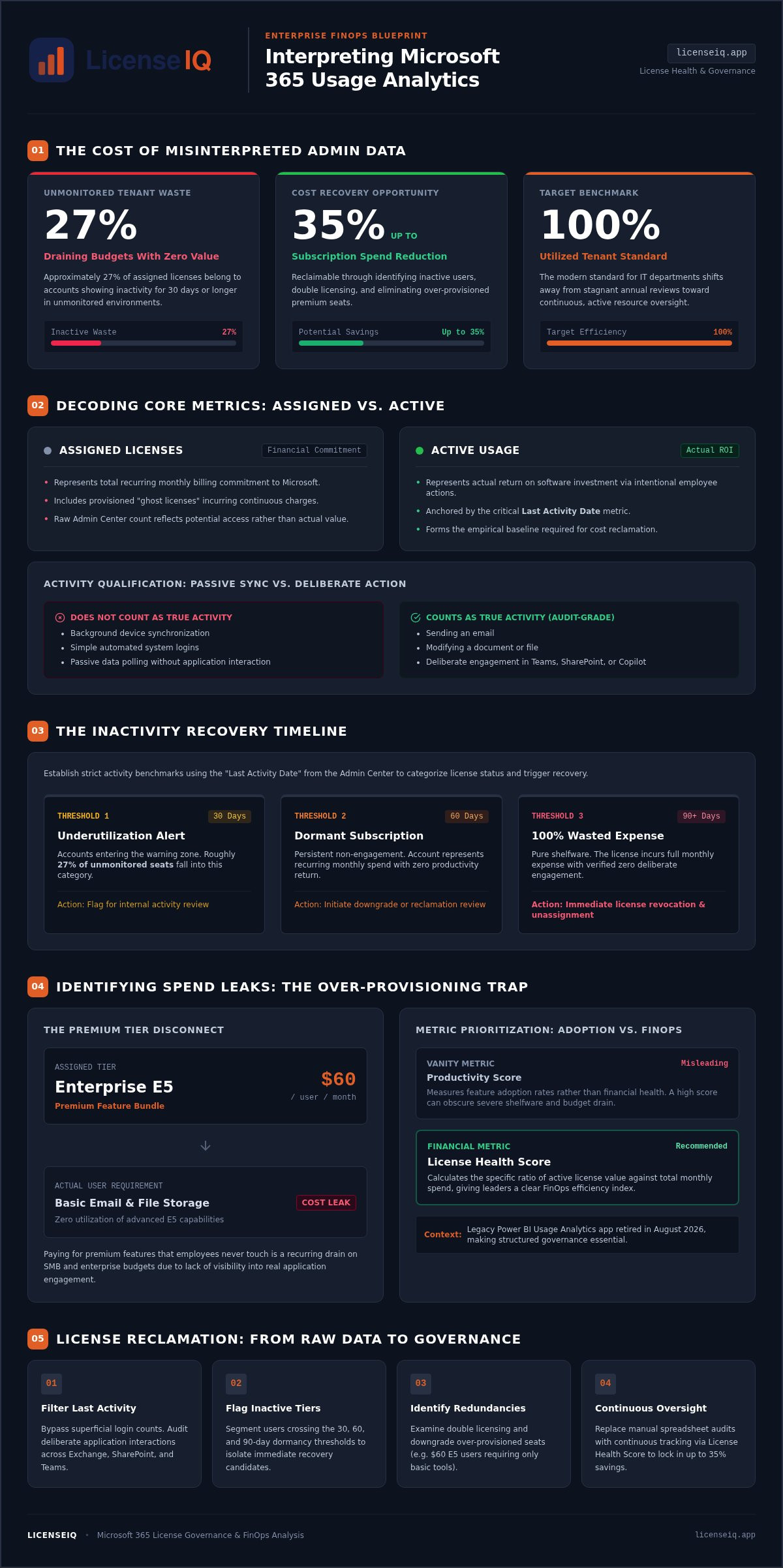
Paying for premium E5 features that employees never touch is a common drain on SMB budgets. Many users are assigned $60 monthly licenses when their actual job requirements only involve basic email and file storage. This "usage gap" occurs because administrators often lack the visibility to match license tiers with real-world application engagement. Adopting mature software asset management (SAM) practices is the only way to curb this unmonitored SaaS sprawl. Misinterpreting raw data leads to a false sense of security while capital exits the balance sheet every month. The financial impact of unmonitored SaaS sprawl can easily reach 35% of your total subscription spend if left unchecked.
The 2026 Benchmark for License Health
The modern gold standard for any IT department is a 100% utilized tenant. Achieving this requires a shift away from stagnant annual audits toward real-time monitoring. In 2026, you cannot afford to wait twelve months to review your seat count. Frequent price adjustments and the rapid rollout of AI add-ons make continuous oversight a necessity. You must treat the Microsoft 365 license management lifecycle as a living process rather than a static event. Mastering how to interpret microsoft 365 usage analytics allows you to pivot instantly when engagement drops. This agility ensures that every dollar in your IT budget correlates directly to employee productivity and organizational growth.
Decoding Core Metrics: Active Users vs. Assigned Licenses
Assigned licenses represent your total billing commitment, but active usage represents your actual return on investment. Understanding the discrepancy between these two figures is the foundation of effective cost recovery. A GAO report on software license management highlights that systematic tracking of these metrics is the only reliable way to eliminate underutilized accounts. When you master how to interpret microsoft 365 usage analytics, you stop paying for potential and start paying for performance. It's a shift from passive subscription management to active financial oversight.
The "Last Activity Date" is your most critical recovery lever. Verified data shows that roughly 27% of licenses in unmonitored tenants belong to users who have been inactive for 30 days or more. If a user hasn't engaged with a service in 90 days, that assigned license is a 100% wasted expense. You must distinguish between background syncs and deliberate actions like sending an email or modified a file. Only the latter counts as true activity in the eyes of a digital auditor.
Don't get distracted by the Productivity Score. It's often a vanity metric that measures feature adoption rather than financial health. Instead, prioritize a "Health Score" that calculates the specific ratio of active license value against your total monthly spend. This metric provides a clear, data-driven picture of your FinOps efficiency. It allows you to see exactly where your capital is being utilized and where it's being burned on shelfware.
Understanding the Inactive User Threshold
To reclaim costs effectively, you must establish strict 30, 60, and 90-day activity benchmarks. You can find the inactive users report within the Microsoft 365 Admin Center under the Reports section. Be aware that Microsoft defaults to pseudonymizing user data; you'll need to toggle off de-identification in Org Settings to link activity GUIDs back to actual employees for reclamation. A 30-day inactivity window is the ideal trigger to reclaim high-cost add-ons like Copilot or Power BI Pro. By the 90-day mark, any user without a recorded login should face immediate license revocation to stop the financial leak.
App-Level Usage vs. Suite-Level Licensing
Suite-level licensing often masks significant over-provisioning. If a user only interacts with Outlook and basic OneDrive storage, they don't require the full capabilities of an E5 suite. Analyzing granular engagement across Teams, SharePoint, and Viva reveals whether a standalone app license is more cost-effective. Learning how to interpret microsoft 365 usage analytics at this level is a core component of how to reduce M365 subscription costs. For those tired of manual cross-referencing, using a Spend Recovery Dashboard can automate these tier-down comparisons in minutes.
Identifying Spend Leaks: How to Spot Inactive and Redundant Users
Identifying spend leaks requires a meticulous eye for organizational disorder. Many organizations fall victim to the hidden costs of poor IT asset and license management, where obscure details in the Admin Center mask significant financial waste. To stop the bleed, you must look beyond surface-level totals. "Double Licensing" occurs when a user is assigned a comprehensive suite like M365 E5 alongside a standalone license for a tool already included in that suite, such as Power BI Pro. This redundancy is a direct result of manual provisioning errors that accumulate over time.
Another common leak is "Leaver Waste." Verified data indicates that approximately 12% of assigned paid licenses are allocated to disabled or former employee accounts that were never deprovisioned. These zombie accounts represent a pure loss. You can also spot "Shadow IT" indicators by monitoring usage spikes in specific workloads. When a department's usage of a particular app surges without a corresponding increase in licensed seats, it's a sign that unmanaged tools are likely entering your ecosystem. Understanding how to interpret microsoft 365 usage analytics at this granular level is the only way to maintain total clarity.
The Redundant License Audit
Conducting a redundant license audit starts with a side-by-side comparison of your "Licenses" tab and your "Usage" tab. The Licenses tab shows what you're paying for, while the Usage tab reveals what's actually happening. You'll often find discrepancies where users hold multiple overlapping license types. It's critical to cross-reference your HR payroll data with these M365 reports to ensure every active license corresponds to a current employee. This step eliminates the risk of paying for staff who left the company months ago.
Identifying Underutilized Premium Features
Premium licenses like Microsoft 365 E5 cost $60 per user monthly, yet up to 20% of these users never touch E5-exclusive features like Advanced Purview or Defender compliance. If these features show zero hits over a 90-day window, a downgrade to E3 or Business Premium is a viable cost-recovery tactic. Mastering how to interpret microsoft 365 usage analytics allows you to identify these over-provisioned seats with precision. For a more detailed walkthrough on streamlining this process, consult our M365 license optimization guide. By matching license tiers to actual engagement, you can reclaim significant portions of your IT budget without impacting user productivity.
From Insights to Action: Building a License Governance Workflow
Turning raw data into financial recovery requires a structured operational framework. It's not enough to simply know how to interpret microsoft 365 usage analytics; you must act on that knowledge through a repeatable governance workflow. Establishing a monthly "Analytics Review Day" brings IT and Finance teams together to reconcile technical activity with billing statements. This collaborative approach ensures that license counts align with actual headcount and engagement levels. It prevents the "set it and forget it" mentality that often leads to significant budget leaks.
A robust standard operating procedure (SOP) for license reclamation is your first line of defense. This process must be integrated into your office 365 offboarding checklist to ensure no seat remains active after an employee departs. Automated notification triggers are also essential. By alerting department heads when activity drops below a threshold, you verify if a license is still needed before pulling it back into the pool. This proactive step reduces friction and ensures that reclamation doesn't disrupt valid, albeit infrequent, business processes.
The Reclamation Communication Plan
Effective governance relies on transparency. When identifying underutilized resources, notify stakeholders with specific data points rather than vague requests. Set clear "grace periods" for departments with seasonal workflows, such as tax teams or project-based contractors. Building an internal "License Pool" allows you to rapidly re-assign reclaimed seats to new hires. This approach bypasses the need for immediate new purchases and keeps your overhead lean while maintaining operational agility.
Continuous Monitoring vs. Point-in-Time Audits
Quarterly audits are no longer sufficient for 2026 budgets. With Microsoft's July 2026 price increases, a single month of unmonitored waste carries a higher financial penalty than ever before. Real-time visibility is the only way to maintain a high License Health Score. You can achieve this by implementing Automated Governance Workflows that flag discrepancies the moment they occur. Relying on manual point-in-time audits leaves you vulnerable to 48-hour data lags and human error. To move beyond manual spreadsheets and secure your resources, connect your tenant to LicenseIQ and start recovering spend today.
Eliminating Manual Audits: Automated Interpretation with LicenseIQ
Manual data interpretation is the primary bottleneck in modern license governance. While the Admin Center provides the raw logs, it lacks the financial intelligence to tell you exactly how much capital you are losing. The LicenseIQ Platform solves this by turning raw M365 data into a prioritized dollar-value recovery plan. It bypasses the need for custom Graph API queries or complex Power BI templates. Instead, it provides immediate clarity by connecting directly to your tenant in minutes. This transition from manual tracking to automated oversight is the only way to sustain a 35% reduction in subscription costs over the long term.
The License Health Score serves as your single source of truth for FinOps. Unlike vanity metrics that focus on feature adoption, this score reflects the specific ratio of active value to total spend. It allows specialized leadership to see the financial health of their digital environment at a glance. By moving beyond the technical noise, you can focus on high-impact decisions rather than getting lost in the minutiae of individual user logs. Mastering how to interpret microsoft 365 usage analytics becomes effortless when a vigilant system handles the heavy lifting for you.
AI-Native Spend Recovery
AI-native auditing identifies waste patterns that manual filters frequently miss. For example, LicenseIQ can detect redundant app usage where a user utilizes a third-party PDF editor while holding a premium M365 license that includes the same functionality. Moving from manual tracking to LicenseIQ provides an immediate ROI by replacing weeks of spreadsheet work with five minutes of automated analysis. You receive actionable recommendations that tell you exactly which licenses to downgrade or reclaim. This eliminates the guesswork and ensures that every action you take is backed by precise, real-time data.
Ensuring Continuous Financial Accuracy
One-off audits fail because SaaS environments are dynamic. New users are onboarded, roles change, and "spend creep" inevitably returns without continuous oversight. Automated Governance Workflows prevent this by monitoring your tenant 24/7. They ensure your environment remains lean without requiring constant manual intervention from your IT team. You can maintain total transparency and operational efficiency with zero administrative overhead. To stop the bleed and secure your corporate resources, Start your 5-minute audit with LicenseIQ today.
Securing Your Corporate Resources Through Continuous Governance
Raw usage data remains a liability until it's translated into a clear financial strategy. You've learned that distinguishing between assigned licenses and true active engagement is the primary step toward reclaiming your budget. By establishing a monthly governance workflow and identifying underutilized premium features, you can stop the silent leak of capital. Mastering how to interpret microsoft 365 usage analytics isn't just about reading reports; it's about maintaining a vigilant oversight system that ensures every dollar spent contributes to your company's growth.
Manual audits are no longer sufficient to combat the 27% average license waste found in unmonitored tenants. To sustain long-term efficiency, you need a proactive digital auditor that works around the clock. LicenseIQ provides this transparency through AI-native automated governance and a clear License Health Score dashboard. These tools allow you to recover up to 35% of your subscription costs while eliminating the burden of manual spreadsheets. It's time to replace organizational disorder with total clarity and financial precision.
Discover your M365 Health Score and recover wasted spend in minutes with LicenseIQ.
Your journey toward a lean, optimized tenant starts with the right data interpretation. You now have the roadmap to secure your resources and drive operational efficiency.
Frequently Asked Questions
What is the difference between an active user and a licensed user in M365?
A licensed user is a recurring billing commitment, while an active user is someone performing deliberate actions like sending messages or modifying files. Background syncs don't count toward activity. Understanding this distinction is vital for cost recovery. It allows you to identify shelfware licenses that incur costs without providing value. You stop paying for potential access and start paying for actual employee engagement.
How often should I review my Microsoft 365 usage analytics?
Review your analytics at least once a month to maintain financial hygiene. Monthly reviews prevent spend creep from draining your budget between quarterly audits. With the 2026 price increases, waiting too long to reclaim licenses carries a higher financial penalty. Real-time monitoring is the modern standard. It ensures your tenant stays lean and your license counts always reflect your current workforce requirements.
Can I see specifically which features of an E5 license my team is using?
You can monitor engagement with specific E5 features like Advanced Purview, Defender, and Power BI Pro. Navigating to the workload-specific reports in the Admin Center reveals which premium capabilities your team actually utilizes. If these reports show zero hits over a 90-day window, the user doesn't require an E5 seat. Downgrading these over-provisioned users to E3 or Business Premium provides immediate, substantial monthly savings.
What happens to user data if I reclaim their license based on inactivity?
Reclaiming a license stops the recurring fee but doesn't instantly purge user data. Microsoft typically provides a 30-day grace period where data remains accessible for recovery or migration. To preserve information indefinitely without a paid license, consider converting the account to a shared mailbox or using a litigation hold. Always verify your organization's specific retention policies to ensure compliance and prevent accidental data loss during the deprovisioning process.
How much can an SMB typically save by interpreting usage analytics correctly?
SMBs often recover up to 35% of their M365 spend by optimizing their license environment. These savings come from reclaiming seats from inactive users and downgrading those who don't use premium E5 features. Since unmonitored tenants often carry a 27% inactive license overhead, the financial impact is immediate. Correctly interpreting your usage data transforms these technical logs into a clear roadmap for significant annual cost recovery.
Does Microsoft 365 Usage Analytics include Power BI reports?
The legacy Power BI Usage Analytics template app was officially retired on August 1, 2026. You must now rely on native Admin Center reports or build custom pipelines using the Microsoft Graph API. Because manual Power BI builds are time-consuming and difficult to maintain, many organizations prefer automated platforms. These tools provide the same visibility without the technical overhead of managing custom data connections.
How do I identify "ghost licenses" in the Microsoft 365 Admin Center?
To find ghost licenses, go to the Reports menu in the Admin Center and select Usage. Open the Active Users report and sort by the Last Activity Date column. Look for users who haven't logged in or performed an action in over 90 days. Comparing this list against your Licenses tab exposes the specific paid seats that are currently providing zero value to your organization.
Is there a way to automate the interpretation of these usage reports?
The LicenseIQ Platform automates how to interpret microsoft 365 usage analytics by connecting to your tenant via Microsoft Graph. It replaces manual spreadsheet audits with a real-time License Health Score and specific dollar-value recommendations. This system identifies redundant licenses and inactive users automatically. It ensures your governance is continuous, providing a vigilant oversight system that maintains a lean environment without requiring constant manual intervention from your IT staff.


