

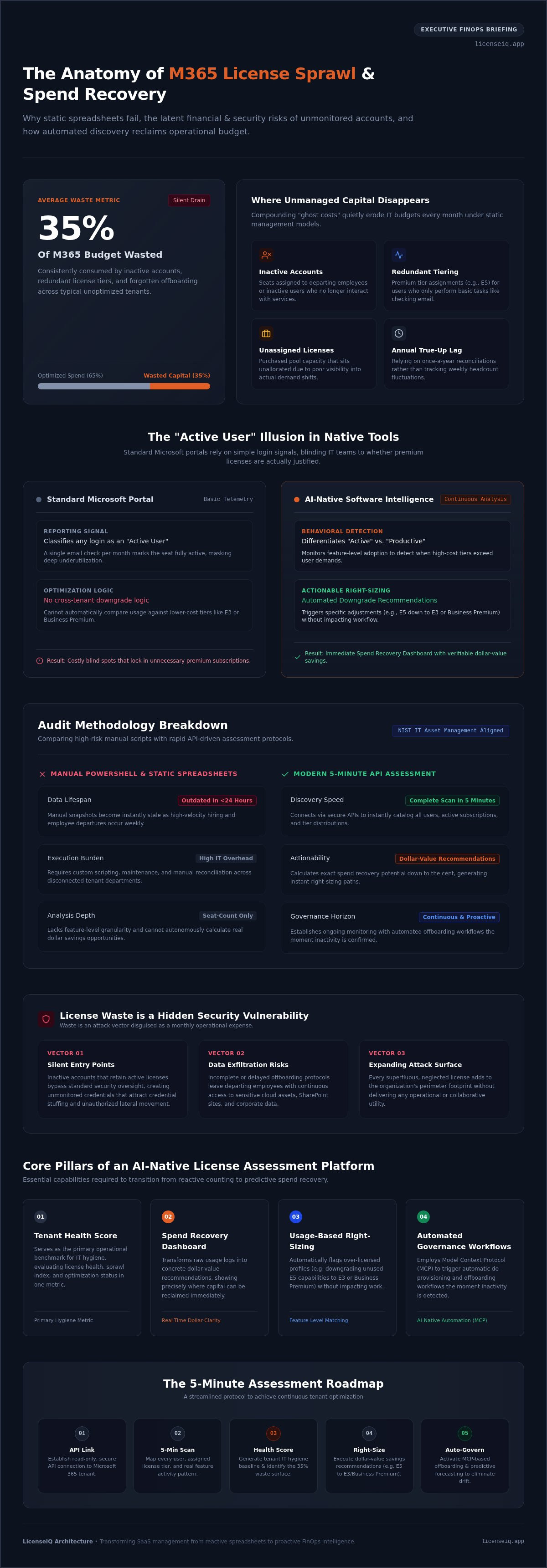
Thirty-five percent of the average organization's Microsoft 365 budget is wasted on inactive accounts and redundant features. This silent drain on capital persists because your current microsoft 365 license assessment tool is likely a static spreadsheet. These manual records are outdated the moment they're saved. You're likely dealing with opaque billing and the constant struggle to track user activity across sprawling departments. Managing these complexities through manual audits isn't just inefficient; it's a significant financial risk.
Selecting the right platform is the only way to move from simple visibility to active optimization. This guide promises to show you how to automate your audits and replace guesswork with a definitive Health Score for your tenant. You'll discover how to generate specific dollar-value savings recommendations and implement automated offboarding workflows that protect your bottom line. We'll explore the transition to AI-native platforms like LicenseIQ that provide the oversight necessary to eliminate waste.
By the end of this article, you'll have a clear roadmap to securing your digital infrastructure. We'll demonstrate how to ensure every license delivers maximum utility through continuous, vigilant monitoring and data-driven decision-making.
Key Takeaways
- Treat license management as a financial audit to identify and recover the typical 35% waste found in unoptimized tenants.
- Identify the core features of a modern microsoft 365 license assessment tool, focusing on real-time dollar-value recommendations over static reporting.
- Replace high-risk manual PowerShell audits with automated discovery to ensure your data remains accurate beyond the first 24 hours.
- Execute a complete tenant scan in five minutes through secure API connections to immediately surface redundant and inactive users.
- Establish a License Health Score as your primary metric for IT hygiene to maintain continuous oversight and operational transparency.
The Crisis of M365 License Sprawl in 2026
M365 license sprawl is a silent budget killer. Most organizations treat licensing as a "set and forget" task, but in 2026, licenses are volatile assets that require constant oversight. A professional microsoft 365 license assessment tool functions as a rigorous financial and security audit rather than a simple inventory check. It's the only way to identify the 35% of SaaS spend typically wasted on unused features. These "ghost costs" compound every month, draining capital that should fund innovation. Adhering to Software Asset Management (SAM) best practices is now a baseline requirement for leadership focused on operational transparency.
The transition from static licensing to dynamic, usage-based management is non-negotiable. Modern businesses fluctuate in size and needs weekly. Relying on annual true-ups is a legacy approach that ignores the reality of modern turnover. Without a precise system to monitor these shifts, your organization pays for capacity it never uses. These unassigned licenses create "ghost costs" that compound every month, quietly eroding your IT budget. This disorder obscures the financial health of your tenant and prevents data-driven decision-making.
Why Native Microsoft Tools Fall Short
The standard Microsoft portal provides raw data, but it lacks actionable insight. It reports "Active Users" based on basic login signals, failing to distinguish them from "Productive Users" who actually utilize high-tier features. If an employee only checks email but holds an expensive E5 license, native tools won't flag the discrepancy. They lack the cross-tenant optimization logic needed to suggest lower-cost alternatives. Manual reporting is a reactive process that cannot keep pace with high-velocity hiring and exits. By the time a spreadsheet is saved, the data is already outdated.
The Hidden Security Risks of License Waste
Waste is a security vulnerability disguised as a line item. Inactive accounts with active licenses provide silent entry points for malicious actors. These neglected credentials often bypass standard monitoring, making them ideal targets for breaches. Poor offboarding protocols lead directly to data exfiltration risks when departing employees retain access to cloud resources. Every unmanaged license expands your corporate attack surface. An automated microsoft 365 license assessment tool like LicenseIQ removes these risks by triggering governance workflows the moment a user becomes inactive. Total clarity is your strongest defense against organizational disorder.
Key Features of a Modern License Assessment Tool
A modern microsoft 365 license assessment tool must do more than count seats. It must provide immediate financial clarity. Automated discovery is the first requirement. The system should map every user and license tier across your tenant within minutes. This level of oversight aligns with NIST IT Asset Management guidelines, which emphasize that comprehensive visibility is essential for both security and cost control. Without this foundation, your organization remains blind to the specific areas where capital is being drained.
Real-time dollar-value recommendations are the hallmark of an advanced platform. Your tool shouldn't just show you a list of users; it should present a Spend Recovery Dashboard that calculates exactly how much you can save today. This includes usage-based right-sizing. For example, the system identifies when an E5 user only utilizes features available in an E3 or Business Premium tier. It flags these discrepancies automatically, allowing you to downgrade licenses without impacting productivity. AI-native platforms like LicenseIQ use the Model Context Protocol (MCP) to bridge the gap between data and action, enabling Automated Governance Workflows that handle these adjustments with minimal human intervention.
AI-Native Intelligence vs. Static Reporting
Static reports are historical and reactive. AI-native intelligence is predictive and proactive. AI identifies subtle patterns in user inactivity that standard PowerShell scripts miss entirely. It recognizes when a user’s behavior suggests they no longer require high-cost features, even if they technically log in once a month. This "Software Intelligence" is the backbone of modern FinOps. It allows for predictive forecasting, helping IT leaders anticipate license needs based on growth trends rather than guesses. It transforms IT from a cost center into a lean, data-driven operation. For teams looking to apply this level of automated insight to troubleshooting, ZANALYSE provides root cause analysis tools that turn complex logs into structured incident reports.
The License Health Score is your primary metric for IT hygiene. It distills complex tenant data into a single, authoritative number. You can use this score to benchmark your efficiency against 2026 industry standards. It serves as a powerful communication tool for executive leadership. Instead of explaining technical jargon, you present a clear metric of operational efficiency. Maintaining a high score ensures your organization remains lean and secure. Reviewing your License Health Score provides the immediate clarity needed to justify your IT budget to stakeholders.
Assessment Tools vs. Manual PowerShell Audits
Manual PowerShell audits are a legacy approach that creates a false sense of economy. While the scripts themselves are free, the labor required to execute them is expensive and inefficient. Relying on scripts requires specialized technical knowledge and hours of manual data entry to turn raw CSV files into actionable insights. A dedicated microsoft 365 license assessment tool eliminates this friction by providing immediate visibility without the need for complex coding or manual intervention.
Accuracy is the first casualty of manual auditing. A spreadsheet is a static snapshot of a dynamic environment. In a typical SMB, user status and license requirements change daily. A manual report is often outdated within 24 hours of its creation, leading to decisions based on obsolete data. Scalability presents another hurdle; auditing 50 users is tedious, but auditing 500 users manually is a multi-day project prone to catastrophic human error. Automation ensures your data remains precise regardless of your organization's size.
The Hidden Labor Cost of "Free" Audits
IT leaders often underestimate the opportunity cost of manual license management. A comprehensive audit can easily consume 10 to 15 hours of a senior administrator's time. This is time stolen from strategic projects and security initiatives. Human error during manual license reclamation can lead to accidental service interruptions for active employees, creating unnecessary downtime. Shifting toward Automated Governance Workflows allows your team to reclaim these hours while ensuring that license adjustments are executed with surgical precision.
Continuous Monitoring vs. Point-in-Time Checks
The annual audit model is a failure in the modern cloud ecosystem. Point-in-time checks allow costs to creep back up the moment the audit concludes. Continuous assessment is the only way to maintain a lean tenant. This proactive oversight identifies SaaS waste and dormant user accounts as they occur, rather than months after the fact. Integrating a microsoft 365 license assessment tool into your monthly financial hygiene routine ensures that your spend recovery remains a permanent fixture of your operations, not a one-time event. This continuous paper trail also ensures you are always audit-ready, providing a transparent history of every licensing decision made within the organization.
How to Perform a 5-Minute M365 License Audit
Efficiency is the core of a modern audit. You don't need days of manual configuration or complex scripting to find waste. A high-performance microsoft 365 license assessment tool streamlines discovery into five actionable steps that deliver immediate results. This process transforms a technical burden into a routine financial checkup.
- Step 1: Securely connect to your tenant using OAuth-based API links.
- Step 2: Initiate the automated scan to map user activity and license tiers.
- Step 3: Analyze the Spend Recovery Dashboard to identify immediate financial wins.
- Step 4: Execute automated offboarding or downgrading workflows to capture savings.
- Step 5: Establish automated alerts to catch new instances of license waste as they occur.
This structured approach replaces organizational disorder with total clarity. It ensures that your IT resources are monitored by a vigilant system that never sleeps. By following these steps, you move from a reactive posture to a proactive governance model that protects your bottom line. It allows specialized leadership to make informed decisions without wading through technical complexity.
Connecting with Confidence: Security Protocols
Security is paramount during the connection phase. Modern tools utilize OAuth 2.0 and secure API connections to ensure your credentials remain protected at all times. You should prioritize tools that offer Read-Only access for the initial discovery phase. This architectural choice ensures the system can't modify your tenant without explicit authorization, maintaining your security integrity. This level of oversight aligns with GDPR compliance and protects sensitive data privacy. It allows you to monitor resources with the confidence that your security posture remains uncompromised.
Calculating Your Potential Spend Recovery
Identifying "low-hanging fruit" is the fastest way to justify the audit process. Unassigned licenses are pure waste; they represent capital paid to Microsoft for zero utility. The system then performs a "Right-Sizing" calculation. It analyzes feature usage to determine if E5 users only require E3 or F3 functionality. These transitions often represent the largest portion of your recovered spend. You can Calculate the ROI of your M365 tools to see the long-term impact of these specific adjustments.
The difference between visibility and optimization is action. A static report tells you there's a problem; a proactive system solves it. By automating these workflows, you reduce the corporate attack surface and reclaim wasted budget simultaneously. Start your recovery process today by connecting to the LicenseIQ Platform to see your real-time Health Score.
LicenseIQ: Automating Governance and Spend Recovery
LicenseIQ is the definitive AI-native microsoft 365 license assessment tool designed specifically for the SMB market. It eliminates the friction of manual audits by providing immediate clarity in complex operational environments. While legacy methods rely on static data, LicenseIQ acts as a proactive participant in your company's growth. It connects to your tenant in minutes, delivering a comprehensive License Health Score that serves as your primary metric for IT hygiene. This isn't a passive reporting tool; it's a vigilant system that monitors your resources with precision.
The platform leverages the Model Context Protocol to drive Automated Governance Workflows. These workflows handle the heavy lifting of offboarding and license reclamation, ensuring that your security posture remains uncompromised. By automating these tasks, you remove the risk of human error and ensure that your digital infrastructure remains lean. LicenseIQ doesn't just surface data; it provides the oversight necessary to eliminate organizational disorder once and for all.
Actionable Insights, Not Just Data
Technical usage logs are meaningless without financial context. LicenseIQ translates raw data into specific dollar-value recommendations through the Spend Recovery Dashboard. This command center provides total transparency into your M365 spend, highlighting exactly where capital is being wasted. You can see the direct impact of right-sizing decisions before you execute them. This transition from raw data to actionable intelligence is why IT leaders are moving away from LicenseIQ vs. Manual Spreadsheets. Precision in financial management is the cornerstone of the LicenseIQ experience.
Continuous Accuracy for the Future
Operational efficiency requires continuous monitoring, not one-time checks. LicenseIQ remains one step ahead by identifying waste as it happens, preventing ghost costs from compounding over time. The platform offers flexible subscription options to fit your business needs, including tiered monthly plans or discounted annual fees for long-term stability. This ensures that your license management remains cost-effective as you scale. Secure your tenant and reclaim your budget by choosing a system built for the demands of 2026. Start your 5-minute M365 audit with LicenseIQ today and discover how total clarity transforms your bottom line.
Secure Your Tenant and Reclaim Your Budget
The era of manual license management is over. Relying on spreadsheets creates financial waste and security vulnerabilities that your organization cannot afford. A dedicated microsoft 365 license assessment tool provides the immediate clarity required to eliminate organizational disorder. You've seen how AI-native oversight replaces reactive scripts with proactive governance. Transitioning to a system that prioritizes a License Health Score ensures your resources are always optimized.
Total transparency is now a baseline requirement for specialized leadership. By implementing automated workflows, you protect your bottom line while reducing your corporate attack surface. It's time to move beyond guesswork and embrace data-driven precision. Your organization deserves a digital auditor that stays one step ahead of waste and security risks.
Get Your Free M365 Health Score Now. LicenseIQ connects in minutes to deliver immediate insights. Identify up to 35% in wasted software spend automatically. Use AI-native automation to maintain continuous governance. Start your journey toward total operational clarity today.
Frequently Asked Questions
What is a Microsoft 365 license assessment tool?
A microsoft 365 license assessment tool is an AI-native software intelligence platform designed to discover and recover wasted spend across your tenant. Unlike manual audits, these tools connect directly to your Microsoft environment to scan every user and license tier. They identify inactive accounts and redundant features; providing a clear dollar-value recommendation for optimization. This technology allows SMBs to move from organizational disorder to total financial clarity in minutes.
How much can I save with an M365 license audit?
Most organizations recover up to 35% of their wasted software spend through a comprehensive audit. These savings come from identifying unassigned licenses, removing dormant user accounts, and downgrading users to more appropriate tiers. For example; moving an E5 user who only uses basic features to an E3 or F3 license yields immediate monthly savings. By using a precise assessment system, you ensure that every dollar in your IT budget delivers maximum utility.
Is it safe to connect an assessment tool to my Microsoft tenant?
Yes, provided the tool utilizes secure OAuth 2.0 protocols and encrypted API connections. Modern platforms prioritize security by requesting read-only access during the initial discovery phase. This ensures the system can scan usage data without the ability to modify your tenant settings or access sensitive message content. Using these industry-standard security protocols protects your digital infrastructure while providing the oversight necessary to maintain a lean and secure environment.
What is a good License Health Score?
A high License Health Score, typically above 90%, indicates that your tenant is lean and efficiently managed. This metric reflects a high ratio of active users to paid licenses and a lack of redundant high-tier features. If your score is lower, it signals significant organizational disorder and financial waste. Monitoring this score as a primary metric for IT hygiene allows leadership to maintain continuous oversight and justify software spend to stakeholders.
Can I automate the removal of inactive M365 licenses?
You can automate the reclamation process using Automated Governance Workflows. These systems detect when a user has been inactive for a specific period and trigger a workflow to unassign the license or offboard the account. This proactive approach prevents ghost costs from compounding over time. By removing manual intervention from the process, your organization maintains a high level of operational efficiency and ensures that you only pay for resources that are actually in use.
How does an assessment tool handle E3 vs. E5 license comparisons?
The tool performs usage-based right-sizing by analyzing which specific features each user accesses. If an employee is assigned an E5 license but never utilizes its advanced security or analytics tools, the system flags them for a downgrade to an E3 or Business Premium tier. This granular analysis ensures that you aren't over-paying for capabilities your staff doesn't require. It transforms raw usage logs into actionable financial recommendations for your organization.
Does LicenseIQ help with employee offboarding?
LicenseIQ streamlines the offboarding process through its Automated Governance Workflows. When an employee leaves the company, the platform identifies their active licenses and triggers a reclamation sequence. This prevents departing staff from retaining access to corporate resources while simultaneously stopping the billing cycle for those seats. It serves as a vigilant guardian of your resources, ensuring that your offboarding protocols are both secure and financially responsible.
How long does a typical license assessment take to complete?
A professional microsoft 365 license assessment tool like LicenseIQ completes a full tenant scan in minutes. The initial connection and data discovery phase is designed for speed; providing you with a Health Score and spend recovery recommendations almost immediately. This is a significant improvement over manual PowerShell audits, which often require days of data collection and analysis. Rapid assessment allows your team to take immediate action and start recovering costs today.


