

Microsoft 365 prices are increasing by as much as 33% on July 1, 2026, a move projected to generate over $10 billion in new revenue for Microsoft. This shift makes microsoft 365 cost optimization a critical financial priority rather than a back-burner administrative task. You've likely struggled with opaque billing cycles and the friction of tracking inactive users during offboarding. It's frustrating to pay for premium E5 seats when users only require basic functionality or have already left the company. You aren't alone in feeling that your cloud spend has become a black box that is increasingly difficult to manage.
We'll show you how to regain total visibility and reduce your annual spend by up to 35% through precise Spend Recovery Dashboards. This guide outlines how to implement Automated Governance Workflows that reclaim licenses the moment they become underutilized. You'll learn how to generate a License Health Score to pinpoint waste and use the LicenseIQ Platform to secure immediate savings. We're moving beyond manual audits to a system of continuous, data-driven oversight that protects your bottom line and ensures every dollar spent translates into operational value.
Key Takeaways
- Prepare for the July 2026 price adjustments by eliminating SaaS sprawl and redundant licenses before contract renewals.
- Execute a rigorous microsoft 365 cost optimization strategy by auditing inactive accounts across 30, 60, and 90-day activity windows.
- Transition from manual, error-prone spreadsheets to Automated Governance Workflows that reclaim licenses in real-time.
- Quantify your tenant's operational efficiency using a License Health Score to identify hidden waste and immediate savings.
- Monitor your actual return on investment through a Spend Recovery Dashboard that provides total transparency into recovered capital.
The 2026 Microsoft 365 Landscape: Why Optimization is Urgent
Microsoft's upcoming pricing structure, effective July 1, 2026, transforms your IT budget from a predictable expense into a growing financial liability. These adjustments represent a fundamental shift in how organizations must approach microsoft 365 cost optimization. Passive oversight is no longer an option. As prices climb, the financial toll of unassigned licenses and redundant services compounds daily. Organizations that fail to adapt now will see their operational margins erode under the weight of ghost licenses and unmanaged SaaS sprawl. This is not a drill; it's a mandatory pivot toward fiscal transparency.
Traditional Software Asset Management (SAM) strategies often rely on static snapshots that fail to capture the reality of modern operations. In a hybrid work environment, these snapshots become obsolete within hours. Users transition between roles, offboarding processes lag, and license assignments remain static while headcount fluctuates. This creates a disconnect between what you pay for and what your team actually uses. Active spend recovery, powered by the LicenseIQ Platform, replaces the old model of simple cost management by hunting for waste and reclaiming capital in real-time. This approach moves beyond simple bookkeeping to become a vigilant guardian of your corporate resources.
Understanding the 2026 Price Hikes
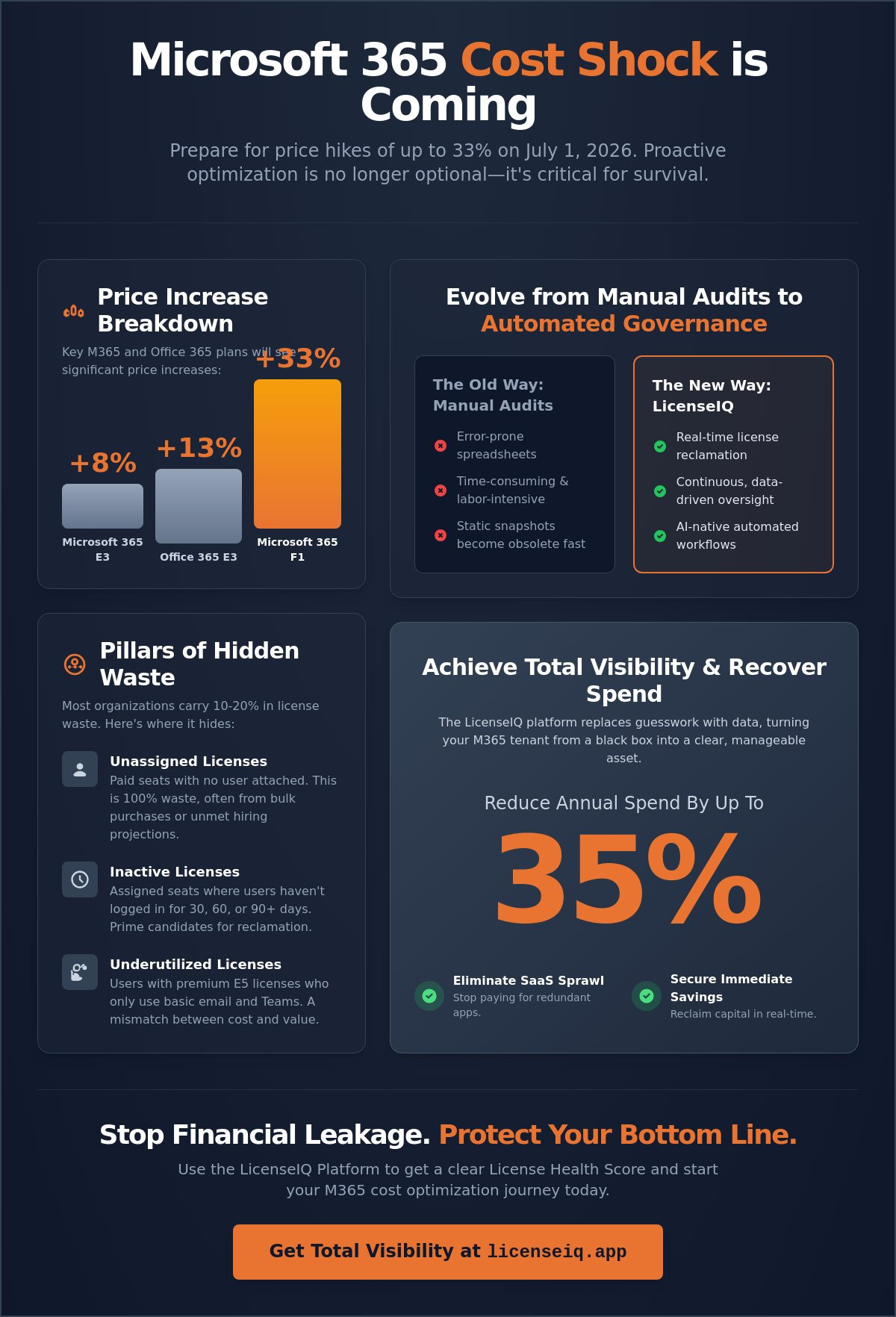
The July 2026 increases hit specific tiers with surgical precision. Microsoft 365 E3 plans will rise by 8%, while Office 365 E3 sees a 13% jump. The most drastic change occurs at the frontline, where Microsoft 365 F1 licenses spike by 33%. These percentages represent billions in additional revenue for Microsoft, but they represent a direct drain on your company resources. Aggressive microsoft 365 cost optimization is the only way to hedge against these compounding costs. Sticking to annual commitment traps without a clear visibility strategy means you're locked into higher rates for licenses that may sit idle. The goal is no longer just to manage these costs. You must aggressively optimize the tenant before the next renewal cycle begins to avoid paying for unused capacity.
The Hidden Cost of Inactivity
Inactive users are the primary drivers of budget leakage. When an employee leaves or changes roles, their high-tier license often remains active, silently billing your account month after month. This isn't just a financial drain; it's a security vulnerability. Unmanaged active accounts for former employees provide a backdoor into your corporate data. Redundant licenses also obscure your true IT budget, making it impossible to forecast accurately. SMBs are particularly susceptible to SaaS sprawl, where redundant third-party applications overlap with existing M365 features. By identifying users who haven't logged in for 30, 60, or 90 days, you can downgrade or reclaim those seats. Moving toward a lean, optimized tenant requires a proactive stance that treats every license as a valuable asset rather than a forgotten utility. Precise oversight ensures that your resources are monitored by a vigilant system, providing confidence and security in your financial health.
Identifying Hidden Waste in Your M365 Tenant
Identifying waste within a Microsoft 365 tenant requires more than a cursory glance at the admin center. Most organizations inadvertently carry 10% to 20% in license waste due to a lack of granular visibility. This isn't just a minor oversight. It's a direct drain on your operational budget. To achieve true microsoft 365 cost optimization, you must look beyond the surface level of active versus inactive users. You need to scrutinize unassigned seats, redundant add-ons, and "zombie" licenses that persist long after an employee has left the company. According to an authoritative industry perspective, proactive auditing is the only reliable way to stop this financial leakage before it compounds.
The Three Pillars of License Waste
License waste generally falls into three distinct categories. Each requires a specific strategy to uncover and remediate.
- Unassigned Licenses: These are paid seats sitting in your portal with no user attached. They often accumulate during bulk purchases or when projected hiring doesn't materialize. They represent 100% waste.
- Inactive Licenses: These are assigned seats where the user hasn't logged in within 30, 60, or 90 days. If an account hasn't been accessed in three months, that license should be reclaimed immediately.
- Overspecified Licenses: This is the "E5 trap." It occurs when users are assigned premium suites but only utilize basic features like Word or Outlook. They don't need the advanced security or analytics tools they're paying for.
Redundant Tooling and Overlapping SKUs
Double licensing is a frequent but invisible budget killer. It often happens when users have a comprehensive suite license plus standalone add-ons for applications like Visio or Project. You're effectively paying twice for the same access. Furthermore, many businesses pay for third-party applications like Slack or Zoom while already paying for Teams. Consolidating these disparate tools into unified business bundles is a fast track to spend recovery. We define License Right-Sizing as the process of matching user roles to the lowest cost SKU that meets their technical needs. This ensures you're never paying for more than what is strictly necessary for productivity.
Zombie licenses are another persistent issue, often stemming from incomplete offboarding workflows. When IT removes a user from the directory but fails to unassign their license, the billing continues indefinitely. Analyzing sub-product usage, such as identifying users with Power BI Pro who never open the app, reveals significant downgrade opportunities. You can use the LicenseIQ Platform to scan your tenant and expose these obscured details in minutes, providing a clear path to immediate savings.
Manual Audits vs. AI-Native Automated Governance
Relying on manual processes for microsoft 365 cost optimization is a strategy destined for failure in 2026. The complexity of modern cloud environments has outpaced the capabilities of PowerShell scripts and Excel spreadsheets. Traditional audits are reactive, occurring only after the bill has arrived and the capital has been spent. To protect your margins against upcoming price hikes, you need a proactive system that identifies waste as it happens. Shifting to an AI-native approach allows your organization to move from defensive accounting to aggressive spend recovery.
The technical shift involves moving away from static data toward dynamic oversight. Modern platforms utilize the Model Context Protocol (MCP) to create a seamless bridge between your tenant data and automated logic. This allows the system to understand the specific nuances of your licensing structure without manual mapping. When comparing time-to-value, the difference is stark. A manual audit can take weeks of cross-referencing CSV files, while an automated scan provides a complete financial breakdown in minutes. Reviewing Gartner Peer Insights confirms that the industry is rapidly consolidating around tools that offer this level of immediate, actionable transparency.
Why Spreadsheets Are Your Worst Enemy
Spreadsheets suffer from the "Snapshot Problem." The moment you export your user list, the data is obsolete. New hires, role changes, and departures happen daily, making your static report a historical document rather than a management tool. Human error also plays a significant role when calculating prorated costs across hundreds of users. Raw CSV exports from the Microsoft Admin Center lack the context required to make informed decisions. They tell you who has a license, but they don't tell you if that user actually needs the premium features they're paying for. This lack of insight makes it impossible to identify "ghost" licenses that haunt your budget.
The Power of Automated Spend Recovery
Automated Governance Workflows transform how licenses are managed during the employee lifecycle. Instead of waiting for an IT ticket to unassign a license, the system triggers reclamation the moment a user is marked as inactive or offboarded. This real-time monitoring ensures your license pool stays lean and responsive to actual usage spikes. LicenseIQ acts as a proactive digital auditor for SMBs, constantly scanning for over-provisioned accounts and redundant third-party apps. By maintaining a continuous state of optimization, you ensure that every dollar in your M365 budget is supporting active productivity rather than subsidizing unused software.
Implementing a Continuous Optimization Framework
Continuous oversight is the only way to maintain a lean tenant. You can't rely on annual cleanups to fix monthly waste. A robust framework for microsoft 365 cost optimization integrates license management directly into your operational DNA. It begins with a clear baseline and scales through automated triggers that respond to user activity in real-time. By linking these technical workflows to your annual budget forecasting, you transform IT from a cost center into a model of fiscal efficiency.
Establishing this framework requires moving away from reactive fixes toward a vigilant, proactive system. Meticulous monitoring ensures that your resources are always protected from the disorder of unmanaged growth. When you implement a structured cycle of deployment and measurement, you ensure a consistent return on investment despite shifting market prices.
Step 1: The 5-Minute Tenant Scan
Connecting your tenant to an intelligence platform provides immediate clarity. You don't have to wait for manual reports or complex data exports. Within minutes, you can generate a report that quantifies waste in actual dollar values. This initial health check reveals exactly where your budget is leaking. For a detailed breakdown of these procedures, refer to the Microsoft 365 License Audit guide. This step establishes the "before" state of your environment, allowing you to track spend recovery progress with precision.
Step 2: Automating Reclamation Workflows
Manual offboarding is a primary source of license bloat. When an employee leaves, their license should return to the available pool automatically. Standardizing your process ensures that no "zombie" accounts continue to bill your department. You should set triggers for "pool" management, where unassigned license thresholds alert you to stop new purchases. Review the Office 365 Offboarding Checklist to align your security protocols with financial recovery. This automation eliminates the lag time between a staff change and a cost reduction.
Monitoring sub-product usage data monthly allows for precise right-sizing. If a department's Power BI usage drops, their licenses should reflect that change immediately. This level of granularity prevents the "E5 trap" where users occupy premium tiers for basic tasks. Establishing automated alerts for unassigned license thresholds prevents you from paying for shelf-ware. You can start your tenant health check today with the LicenseIQ Platform to see these workflows in action. This proactive stance ensures your microsoft 365 cost optimization efforts are sustainable, data-driven, and transparent.
Linking optimization to your budget forecasting provides specialized leadership with a predictable financial roadmap. It removes the guesswork from IT spending. When you know your reclamation rate, you can project future costs with total confidence. This transparency builds trust across the organization, distinguishing your department as a vital guardian of corporate resources.
Recovering Spend with LicenseIQ’s Health Score
Sustainable microsoft 365 cost optimization requires a single source of truth. You need a metric that translates complex technical usage into immediate financial clarity. Without a centralized way to measure efficiency, your reclamation efforts will remain fragmented and inconsistent. The LicenseIQ Platform provides this oversight through a specialized scoring system that quantifies your optimization potential. By moving from reactive cleanup to data-driven management, you transform your IT department into a proactive driver of organizational efficiency.
This transition is vital for SMBs that lack the headcount for dedicated software asset management teams. AI-native intelligence fills this gap by acting as a vigilant digital auditor that never sleeps. It provides the same level of scrutiny as an enterprise consulting firm but delivers results in real-time. This automated oversight ensures that your resources are always monitored and protected from the disorder of unmanaged cloud growth.
What is a License Health Score?
The License Health Score is a comprehensive metric that evaluates the overall efficiency of your tenant. It aggregates data across three critical areas:
- Usage: How many assigned features are actually being utilized by your staff?
- Cost: Are your users on the lowest-cost SKU that meets their technical requirements?
- Compliance: Does your licensing structure align with your security and governance policies?
A high score correlates directly with lower SaaS management overhead and a leaner budget. When you present this score to your CFO, you move beyond technical jargon. You provide a clear, dollar-valued justification for your IT spend based on actual consumption data. It proves that your department is a vital guardian of corporate resources rather than a passive cost center.
Immediate Action: Connecting Your Tenant
The Spend Recovery Dashboard provides a real-time view of your return on investment. It tracks every reclaimed license and every right-sized account, showing you the exact dollar value of your optimization efforts. This transparency allows you to see the financial impact of your governance workflows as they happen. You no longer have to wait for the monthly invoice to understand your spend position.
Connecting your tenant is a secure, highly efficient process. The system uses read-only permissions to scan your environment without interrupting your operations. Within minutes, you'll receive your first Spend Recovery report, highlighting exactly where to cut waste before the 2026 price increases take effect. This report provides a prioritized roadmap for immediate savings, allowing you to secure your budget with total confidence. Get your free M365 Health Score and start recovering spend today.
Secure Your Budget Against the 2026 Price Surge
The July 1, 2026 price increases are a mathematical certainty that will impact every organization still relying on manual license tracking. Static spreadsheets can't keep pace with the dynamic nature of modern cloud environments. By implementing a continuous framework for microsoft 365 cost optimization, you eliminate the financial drain of "ghost" licenses and redundant third-party tools. You now have the strategy to transform your IT department from a cost center into a lean, data-driven efficiency driver.
Transparency is the cornerstone of effective resource management. You need immediate clarity to protect your operational margins before renewal cycles lock in higher rates. LicenseIQ identifies up to 35% in wasted software spend and connects to your tenant in minutes to provide an instant License Health Score. Our Automated Governance Workflows ensure continuous financial accuracy by reclaiming licenses the moment they become idle. Discover how much you are wasting on M365 licenses with LicenseIQ. Take control of your cloud spend today and ensure your corporate resources are working as hard as your team.
Frequently Asked Questions
How much can I realistically save on Microsoft 365 licenses?
Most organizations identify savings between 5% and 35% by implementing a rigorous optimization strategy. The exact figure depends on your current offboarding efficiency and how many users are over-provisioned for premium tiers. By using the LicenseIQ Platform to locate unassigned seats and inactive accounts, you can stop billing leakage immediately. These savings become even more vital as price increases of up to 33% take effect in July 2026.
What is the difference between an unassigned and an inactive license?
An unassigned license is a paid seat sitting in your portal with no user attached, representing immediate waste. An inactive license is assigned to a specific user who hasn't logged into the system within a set window, such as 30, 60, or 90 days. Both categories are primary targets for microsoft 365 cost optimization. Removing these "ghost" licenses ensures you aren't paying for shelf-ware that provides zero operational value.
Does Microsoft provide built-in tools for cost optimization?
Microsoft offers basic usage reports in the Admin Center, but these native tools lack proactive automation and financial context. They provide raw data on user activity without calculating the specific dollar value of potential spend recovery. To achieve total transparency, you need a system that generates a License Health Score and triggers automated workflows. Native tools tell you what is happening, but they don't fix the underlying waste for you.
How does the July 2026 price hike affect my current subscription?
The new pricing applies to all new subscriptions and renewals starting July 1, 2026. If you are currently on a multi-year commitment, your price is protected until the end of your term. However, any licenses you add to your tenant after the July deadline will reflect the higher rates. This includes the $3 per month increase for E3 and E5 plans, making it critical to optimize your seat count before your next renewal.
Is it safe to connect an AI tool like LicenseIQ to my M365 tenant?
Connecting the LicenseIQ Platform is a secure process that utilizes read-only permissions to scan your environment. The system acts as a meticulous digital auditor, uncovering obscured details without modifying your data or interrupting user workflows. You maintain total control over your security posture while gaining immediate clarity into your financial health. This connection provides the data-driven insights needed to justify IT spend to specialized leadership and the CFO.
What are the most common hidden costs in Microsoft 365?
Hidden costs usually stem from "zombie" licenses left behind after employee departures and redundant third-party applications. Many businesses pay for standalone tools like Slack or Zoom while already paying for the same capabilities within their M365 suite. Double licensing, where users have a full suite plus standalone add-ons for Visio or Project, also drains resources. Microsoft 365 cost optimization targets these overlaps to consolidate your spend into unified, efficient bundles.
How do I identify users who are over-licensed for their actual needs?
You must analyze sub-product usage data to compare assigned features against actual consumption. If a user has an E5 license but only accesses basic Outlook and Word features, they are a candidate for a lower-cost SKU. Right-sizing involves matching each user's role to the most affordable license that meets their technical requirements. This granular oversight prevents the "E5 trap" and ensures your budget supports active productivity rather than unused software.
Can I automate the process of reclaiming licenses from former employees?
You can use Automated Governance Workflows to trigger license reclamation the moment an employee is deactivated in your directory. This automation eliminates the lag time and human error associated with manual offboarding checklists. Instead of licenses sitting idle for months, they return to your available pool instantly. This proactive approach maintains a lean tenant and ensures you never purchase new licenses while unassigned seats are still available.


