

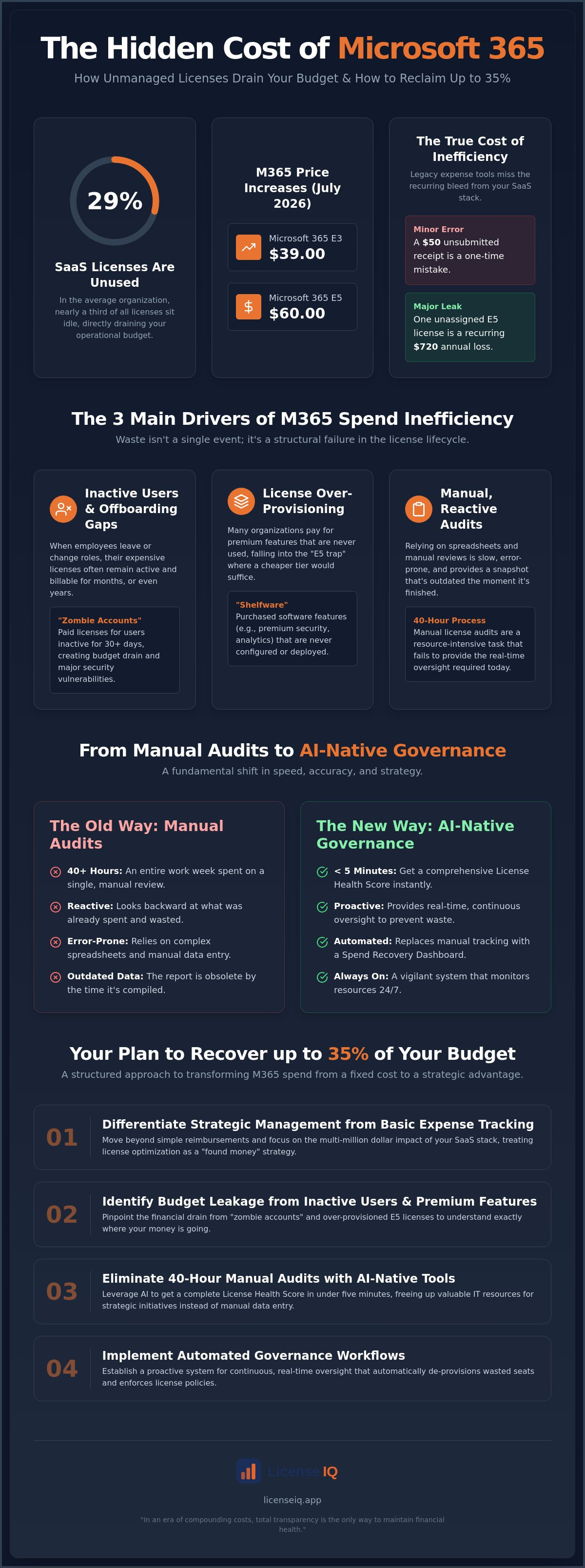
Did you know that 29% of SaaS licenses in the average organization are currently sitting unused or underutilized? With Microsoft 365 E3 prices rising to $39 and E5 reaching $60 as of July 2026, these shelfware costs are no longer just a rounding error. They're a direct drain on your operational efficiency. Effective microsoft 365 spend management has evolved into a high-stakes FinOps discipline rather than a simple administrative task. If you're still relying on manual spreadsheets to track seats, you're likely paying for premium E5 features your team doesn't touch or funding expensive licenses for employees who left the company months ago.
It's a common struggle to manage opaque billing while organizational SaaS spending climbs to an average of $55.7 million annually. You need total transparency and a proactive system that guards your corporate resources with precision. This guide will show you how to recover up to 35% of your budget by identifying hidden waste and automating governance through AI-native intelligence. We'll examine how the LicenseIQ Platform replaces manual tracking with a real-time Spend Recovery Dashboard to ensure you only pay for what you actually use.
Key Takeaways
- Differentiate between basic expense management and strategic microsoft 365 spend management to navigate the 2026 pricing landscape effectively.
- Identify the primary drivers of budget leakage, specifically focusing on the financial impact of inactive users and over-provisioned premium features.
- Eliminate 40-hour manual auditing processes by leveraging AI-native tools that provide a comprehensive License Health Score in under five minutes.
- Implement Automated Governance Workflows to ensure your SaaS budget remains optimized through continuous, real-time oversight.
- Execute a structured five-step plan to de-provision wasted seats and recover up to 35% of your monthly Microsoft 365 expenditure.
What is Microsoft 365 Spend Management in 2026?
In 2026, microsoft 365 spend management is the rigorous, strategic oversight of every dollar allocated to your organization's productivity suite. It's no longer a passive administrative task. It's a high-priority FinOps discipline. This process focuses on the granular alignment between purchased licenses and actual user activity. For years, many organizations viewed Microsoft 365 as a fixed, unchangeable cost. However, the July 1, 2026 price increases have shattered that assumption. With Microsoft 365 E3 now at $39.00 and E5 at $60.00, every wasted seat directly erodes your bottom line. Modern spend management uses AI-native intelligence to ensure procurement matches reality at all times.
License Spend vs. Employee Expenses
The 2026 FinOps Mandate for SaaS
The FinOps movement has reached a critical tipping point in 2026. CIOs no longer accept "set it and forget it" billing cycles as the status quo. This passive approach is the greatest threat to a modern IT budget. The removal of Enterprise Agreement volume discounts in late 2025 has led to effective cost increases of 15% to 23% for many large organizations. AI has fundamentally changed the speed of license auditing to meet this challenge. Manual reviews that once took 40 hours now happen in seconds through Automated Governance Workflows. These systems don't just report waste; they provide a proactive layer of security. Modern procurement requires a vigilant, precise system that monitors resources around the clock. In an era of compounding costs, total transparency is the only way to maintain financial health.
The 3 Main Drivers of Microsoft 365 Spend Inefficiency
Achieving total transparency in microsoft 365 spend management requires identifying the specific leaks in your budget. Waste isn't a single event; it's a structural failure in the license lifecycle. Most organizations struggle with three primary drivers of inefficiency that compound over time. These issues transform a predictable subscription into an uncontrolled financial drain. By mastering cloud cost management within your SaaS stack, you can halt this erosion immediately.
Inactive Users and Offboarding Gaps
Inactive users represent the largest source of wasted cloud spend. When an employee leaves or changes roles, their license often remains active and billable. This creates a "zombie account," which is an active, paid license assigned to a user who has not logged in for 30 or more days. These accounts pose a dual threat. They drain your budget and create massive security vulnerabilities. Stale credentials are prime targets for unauthorized access. Following a rigorous Office 365 Offboarding Checklist 2026 ensures you reclaim spend while securing company data. Without automated oversight, these accounts can persist for years undetected.
Redundant Licensing and Tier Mismatches
License over-provisioning is the silent killer of IT budgets. Many organizations fall into the "E5 trap," paying $60 per user for premium security and analytics features that remain unconfigured or unused. If your staff only requires standard productivity tools, an E3 or even an F3 license is more appropriate. This tier mismatch results in "shelfware," which are software features purchased but never deployed. You might also face redundant subscriptions that drain resources. Common overlaps include:
- Paying for standalone Visio or Project licenses when they're bundled in specialized suites.
- Maintaining E5 licenses for "Frontline" workers who only need F3 capabilities.
- Subscribing to third-party security tools that duplicate features already included in your Microsoft tier.
Precision matters. You can check your License Health Score to see exactly where your provisioning doesn't match actual usage.
The third driver is the accumulation of "Ghost Licenses." These are unassigned seats that sit in your tenant, disconnected from any user. Procurement teams often buy in bulk to prepare for growth but fail to de-provision seats when that growth slows. Managing this lifecycle manually is nearly impossible because Microsoft's portal doesn't always make these unassigned costs obvious. The complexity of the Microsoft 365 license management lifecycle means that without a vigilant digital auditor, your inventory will naturally expand. Continuous monitoring is the only way to ensure your inventory stays lean and cost-effective.
Manual Audits vs. AI-Native Governance: A Comparison
Manual cost-control efforts usually fail because they rely on stale data. A comprehensive manual audit of your tenant typically consumes 40 or more hours of high-value IT labor. This process involves exporting massive CSV files, cross-referencing HR records, and chasing departmental managers for usage confirmation. Conversely, AI-native microsoft 365 spend management delivers these same insights in under five minutes. This isn't just about speed. It's about the precision and frequency of your financial oversight.
The native Microsoft 365 Admin Center is an administrative tool, not a financial optimization platform. It provides raw data but lacks the specialized logic required to identify waste. It shows you who holds a license; it doesn't intuitively highlight "partially used" seats that drain your budget. A user might log in to Outlook daily but never touch the expensive security or compliance features included in their E5 tier. Manual reviewers rarely have the tools to uncover these granular discrepancies. This leads to a significant accuracy gap that favors the vendor, not your organization.
The Hidden Cost of Manual Tracking
Spreadsheets are static documents. They're functionally obsolete the moment you click "Save." This creates a cycle of "IT Fatigue" where license audits are perpetually relegated to the bottom of the priority list. IT teams are often too busy with active tickets to play digital detective with license counts. This delay is a financial liability. You can read more about mastering the microsoft 365 license management lifecycle in 2026 to understand why manual tracking is a losing strategy. Relying on outdated data ensures you'll always be one step behind your billing cycle.
How AI-Native Software Intelligence Works
Modern governance utilizes the Model Context Protocol to establish a secure, read-only connection to your tenant. This allows the system to analyze usage patterns across every application in the suite simultaneously. Machine learning algorithms identify subtle patterns of inactivity that human auditors simply miss. For instance, the system can flag a user who only accesses mobile apps and suggest a downgrade to a cheaper "Frontline" license. This shifts your posture from reactive auditing to proactive governance. Instead of finding waste months after it happens, you maintain a real-time Spend Recovery Dashboard. It acts as a vigilant guardian of your corporate resources, ensuring every seat is justified by actual activity.
5 Steps to Reclaim Your M365 Budget Immediately
Stopping budget leakage requires a systematic approach to microsoft 365 spend management. You cannot manage what you do not measure. By following a structured recovery plan, organizations can transition from financial disorder to total transparency. These steps focus on immediate cost recovery while building a foundation for long-term efficiency. Every step is designed to eliminate waste and ensure your procurement matches your actual operational needs.
- Step 1: Establish a Baseline. Connect your tenant to a specialized auditor to generate an immediate License Health Score. This provides a clear, data-driven starting point for your recovery efforts.
- Step 2: Purge Inactive Seats. Identify every user who hasn't logged in for 30 or more days. De-provisioning these licenses stops the immediate financial bleed.
- Step 3: Optimize Tier Alignment. Audit your E5 and E3 allocations. Move users who don't utilize premium security or analytics features to more cost-effective tiers.
- Step 4: Consolidate Standalone Apps. Review individual subscriptions for Visio, Project, or additional storage. Bundling these into comprehensive M365 suites often reduces the total cost per seat.
- Step 5: Deploy Continuous Oversight. Implement Automated Governance Workflows to prevent waste from re-accumulating. This ensures your budget remains protected as your headcount fluctuates.
Right-Sizing Your License Tiers
Precision in tier selection is a major lever for cost reduction. Many organizations over-provision E5 licenses at $60.00 per month when the $39.00 E3 tier provides everything the user actually requires. This single shift recovers $21.00 per user every month. For frontline staff, the F-series offers even greater savings. An F3 license at $10.00 per month provides essential mobile and web access for deskless workers without the overhead of a full desktop suite. Use this Microsoft 365 license types reference to match your specific user personas to the most efficient tier available.
Automating the Offboarding Process
Manual offboarding is a primary cause of ghost licenses. When an employee leaves, the license must be reclaimed instantly to avoid paying for a dead seat. Integrating your license management with HR systems allows for zero-touch governance. The moment a departure is logged in HR, the system triggers a workflow to harvest the license. This reduces friction between IT and Finance departments by ensuring billing always reflects the current active headcount. To start reclaiming your wasted seats today, connect your tenant to the LicenseIQ Platform for an immediate audit.
LicenseIQ: Automated Governance for Continuous Spend Recovery
Manual oversight is no longer a viable strategy for modernizing your microsoft 365 spend management. The LicenseIQ Platform replaces administrative fatigue with AI-native precision. It acts as an active participant in your company's growth by providing total transparency into your SaaS stack. While legacy tools focus on backward-looking receipts, this platform looks forward to eliminate waste before it compounds. It's designed specifically for specialized leadership who require immediate clarity without the burden of technical complexity.
The centerpiece of the platform is the "5-Minute Audit." By establishing a secure, read-only connection to your tenant, the system generates an immediate License Health Score. This score identifies exactly where your budget is leaking. It's common for organizations to discover they're wasting up to 35% of their monthly bill on inactive seats and tier mismatches. LicenseIQ is built for the SMB market; it provides enterprise-grade auditing power without the need for a dedicated FinOps team. It's a meticulous digital auditor that stays one step ahead of your next billing cycle.
Actionable Insights, Not Just Data
Data is noise without a directive. The Spend Recovery Dashboard translates complex usage patterns into specific, dollar-value recommendations. It doesn't just tell you a license is underutilized; it tells you exactly how much you'll save by downgrading it. Once you identify these opportunities, you can deploy Automated Governance Workflows to maintain financial hygiene. These workflows ensure your environment stays lean even as your headcount fluctuates. The system functions as a vigilant guardian of your corporate resources, uncovering obscured details that manual spreadsheets simply cannot track. This transition from organizational disorder to total clarity is the cornerstone of a healthy IT budget.
Achieving a healthy IT budget also involves staying informed about the wider software landscape. To help you identify better-value tools for your business, you can learn more about Alternative Radar to discover and compare alternatives to the popular apps and services your team currently utilizes.
Start Your Spend Recovery Today
Reclaiming your budget doesn't require a months-long consulting project. You can get a free License Health Score in minutes by connecting your Microsoft tenant admin to the platform. The process is straightforward, secure, and provides immediate results. There are no long, winding explanations; you get a direct view of your financial health and a clear path to recovery. Stop paying for shelfware and start optimizing your resources with a proactive, tech-savvy problem-solver. Discover your M365 Health Score with LicenseIQ and secure your SaaS budget today.
Take Control of Your SaaS Infrastructure
The transition from fragmented manual tracking to precise automated governance is no longer optional. With compounding price increases and the removal of legacy discounts; passive oversight has become a primary driver of budget leakage. You've seen how identifying inactive users and right-sizing license tiers can transform your financial health. Modern microsoft 365 spend management requires a system that is as proactive as the environment it monitors. By replacing static spreadsheets with real-time intelligence; you protect your resources and eliminate the "shelfware" draining your bottom line.
You can identify these hidden savings immediately without disrupting your operations. AI-native governance workflows ensure that your license inventory remains lean and secure around the clock. It's time to move from data-blindness to total transparency. Run a 5-minute M365 audit and recover your wasted spend with LicenseIQ to discover how much of your budget is waiting to be reclaimed. The path to a 35% reduction in SaaS spend starts with a single connection to your tenant. Take the first step toward a more efficient, secure, and cost-effective digital ecosystem today.
Frequently Asked Questions
What is the difference between M365 expense management and license management?
Expense management focuses on tracking employee reimbursements for travel, meals, and hardware receipts. License management is a strategic FinOps discipline that governs software subscription costs and seat utilization. While expense tools look backward at individual spending, license management provides real-time oversight of platform efficiency and license harvesting.
How much can a typical company save on Microsoft 365 licenses?
Organizations frequently recover up to 35% of their annual subscription budget by eliminating shelfware and correcting tier mismatches. These savings result from harvesting inactive seats and transitioning users from premium E5 plans to standard E3 or F3 tiers based on actual usage data. This process ensures you only pay for the features your team actively uses.
Is it safe to connect a third-party tool like LicenseIQ to my Microsoft tenant?
Yes, LicenseIQ uses a secure, read-only connection via the Microsoft Graph API. The platform analyzes metadata related to license assignments and application usage timestamps without ever accessing your sensitive emails, files, or chat content. This meticulous approach ensures total transparency while maintaining the highest level of corporate data security.
What are the most common signs of Microsoft 365 license waste?
The most frequent indicators include a high volume of unassigned licenses and "zombie accounts" belonging to former employees. If your monthly bill remains static while your headcount fluctuates, you're likely overpaying for unused capacity. Universal E5 provisioning for staff who only require basic email and document editing is another primary driver of budget leakage.
Can I downgrade M365 licenses without losing user data?
You can downgrade licenses without data loss as long as the target tier supports the required mailbox size and storage limits. Moving a user from E5 to E3 preserves their data, but you must verify they aren't utilizing specialized E5 security or compliance features that aren't available in lower tiers. Automated tools provide the clarity needed to make these transitions safely.
How often should I conduct a Microsoft 365 license audit?
You should perform a microsoft 365 spend management audit at least once per month to align with your billing cycle. Manual audits are often too slow to keep up with organizational changes. Implementing a continuous monitoring system allows you to identify and reclaim wasted spend in real-time, preventing financial erosion before it compounds.
What is a License Health Score?
A License Health Score is a proprietary metric that quantifies the efficiency of your current license allocation against actual user activity. It serves as the foundation for microsoft 365 spend management by providing an immediate baseline of your financial hygiene. This score highlights the specific dollar value of potential savings hidden within your tenant.
Does LicenseIQ help with Microsoft 365 E5 cost optimization?
LicenseIQ specializes in E5 optimization by identifying users who don't engage with premium security or analytics features. The platform provides direct recommendations to move these individuals to E3 or F3 tiers, which can recover significant capital every month. This proactive governance ensures your premium licenses are reserved for the power users who actually need them.


