

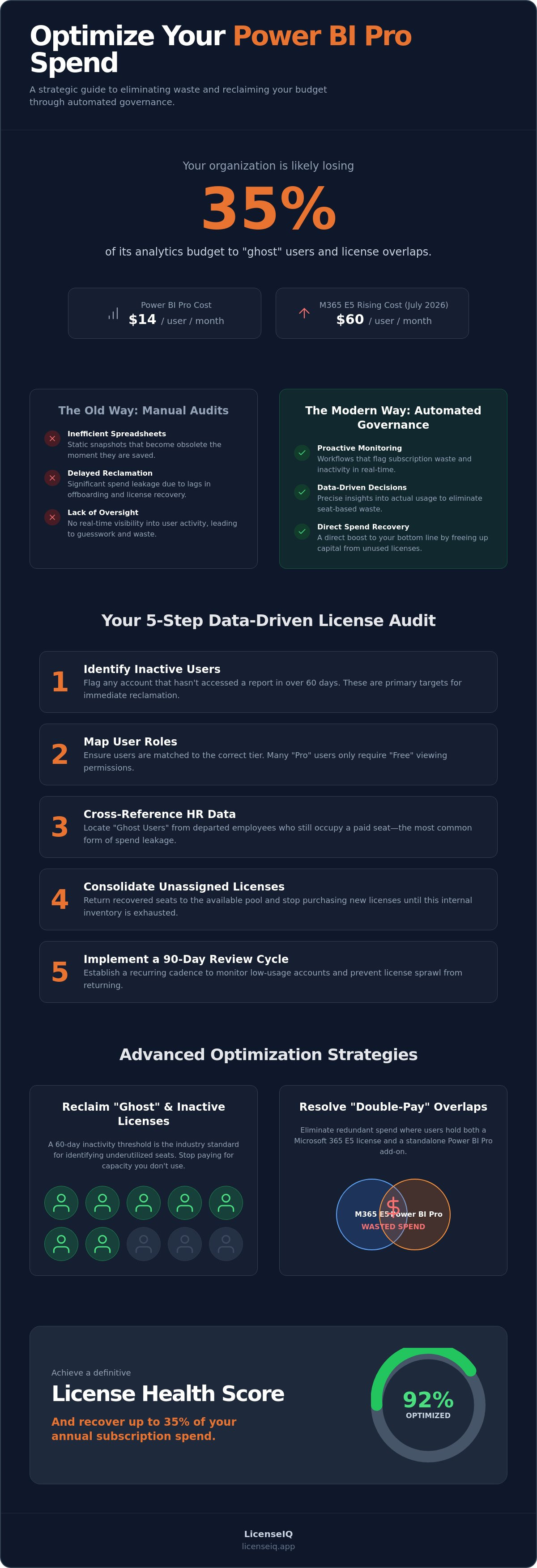
Your organization is likely losing 35% of its analytics budget to "ghost" users and licensing overlaps you can't see. With Power BI Pro prices at $14 per month and Microsoft 365 E5 costs rising to $60 as of July 2026, power bi pro license cost optimization is no longer optional. Manual spreadsheets are out of date before they're even saved, leaving you with a bloated subscription spend that lacks oversight.
It's frustrating to pay for premium access when users only check a report once a month. You need a system that monitors resources with precision rather than relying on guesswork. This guide provides a strategic blueprint to eliminate waste and secure your environment's financial health through automated governance. You'll learn how to reclaim your budget without the administrative overhead of manual audits.
We'll detail how to identify inactive users automatically, resolve costly overlaps between M365 E5 and standalone licenses, and calculate a clear License Health Score for your tenant. It's time to stop the leak and move toward a lean, data-driven budget that reflects actual usage.
Key Takeaways
- Identify and reclaim licenses for inactive users who have not accessed a report in over 60 days to eliminate immediate seat-based waste.
- Master power bi pro license cost optimization by resolving "double-pay" overlaps where users hold both a Microsoft 365 E5 license and a standalone Pro add-on.
- Determine when to transition from per-user licensing to Microsoft Fabric capacity based on the specific consumption needs of your high-intensity data teams.
- Shift from reactive, manual auditing to proactive governance using automated workflows that monitor and flag subscription waste in real-time.
- Utilize a Spend Recovery Dashboard to achieve a definitive License Health Score and recover up to 35% of your annual subscription spend.
The Hidden Cost of Power BI Pro Sprawl in 2026
Power BI Pro sprawl is a silent drain on corporate resources. It represents the unchecked accumulation of unused or underutilized licenses across your tenant. In 2026, operational budgets face unprecedented pressure. Microsoft 365 E5 costs reached $60 per user in July 2026, while Power BI Pro remains at $14 following its 40% price hike in 2025. Organizations often fall into the "viewer vs. creator" trap. They assign expensive Pro seats to casual users who only need to view reports occasionally. This seat-based waste is a primary target for power bi pro license cost optimization.
The financial impact of this disorder is measurable. Small and mid-sized businesses often overspend by 20% to 30% on BI licenses alone. This happens because Microsoft Power BI is frequently deployed without a strict governance framework. When every new employee receives a Pro license by default, the "zombie license" count grows every month. Without clear oversight, your organization pays for capacity that no one actually uses.
Why Manual Tracking Fails in Modern Environments
Spreadsheets are the enemy of efficiency. They cannot track real-time user activity or login frequency. A manual audit provides a static snapshot that becomes obsolete within 30 days. The delay between an employee offboarding and the actual reclamation of their license causes significant spend leakage. If your IT team relies on monthly manual checks, you're already behind. You need a system that identifies inactivity the moment it happens. Relying on human memory to manage cloud subscriptions is a high-risk strategy that invites financial waste.
The ROI of Active SaaS Spend Management
Active management transforms a sunk cost into a recovery opportunity. The cost of an automated intelligence tool is negligible compared to the thousands of dollars lost to unassigned or redundant licenses. Implementing automated license governance prevents spend leakage at the source. It ensures that licenses are revoked or downgraded as soon as usage patterns shift.
Spend recovery is a direct boost to your bottom line. By reclaiming 35% of your subscription spend, you free up capital for high-impact projects. This proactive approach moves your department from a state of organizational disorder to total clarity. You no longer guess where the money goes; you monitor every cent with a vigilant, precise system. This is the foundation of a modern, lean BI budget.
Conducting a Data-Driven Power BI Pro License Audit
A thorough audit reveals the gap between your contracted seats and actual engagement. Manual portal exports provide raw JSON or CSV data, but parsing these files is a poor use of technical talent. To achieve true power bi pro license cost optimization, you must move beyond static reports. You need a structured, five-step process to reclaim your budget.
- Step 1: Identify Inactive Users. Flag any account that hasn't accessed a report in 60 days. These are your primary targets for immediate reclamation.
- Step 2: Map User Roles. Consult the official Power BI licensing guide to ensure users are matched to the correct tier. Many "Pro" users only require "Free" viewing permissions.
- Step 3: Cross-reference HR Data. Locate "Ghost Users" who have departed the company but still occupy a paid seat. This is the most common form of spend leakage.
- Step 4: Consolidate Unassigned Licenses. Return recovered seats to the available pool. Stop purchasing new licenses until this internal inventory is exhausted.
- Step 5: Implement a 90-Day Review Cycle. Establish a recurring cadence to monitor low-usage accounts. Continuous oversight prevents sprawl from returning.
Identifying Inactive and Redundant Users
Inactivity is the clearest indicator of waste. In a BI context, a 60-day threshold is the industry standard for flagging underutilization. There's a critical difference between a user having a license and actually consuming data. Many employees keep a Pro seat "just in case" but never log in. We define your License Health Score as the ratio of active users to total assigned seats. A low score signals an immediate opportunity for spend recovery. You can quickly assess your organization's standing by viewing your License Health Score through an automated dashboard.
Right-Sizing: When to Move from Pro to Free
Right-sizing is about precision. The Power BI Free tier allows users to view content in workspaces backed by Premium or Fabric capacity. If your organization uses these capacities, your casual viewers don't need a Pro seat. A user only requires a Pro license when they need to share reports or collaborate in standard workspaces. The "Viewer" role is your primary target for downgrading. By moving these users to the Free tier, you eliminate the $14 monthly cost per head without impacting their ability to consume data. This shift ensures your Pro budget is reserved for creators and power users only. It's a simple, declarative way to enforce fiscal discipline in your tenant.
Advanced Optimization: M365 E5 Overlap and Fabric Capacity
Sophisticated power bi pro license cost optimization requires looking beyond simple inactivity. You must analyze how your licensing tiers interact within the broader Microsoft ecosystem. A frequent source of waste is the "double-pay" scenario. This occurs when a user is assigned a Microsoft 365 E5 license, which already includes Power BI Pro, while also maintaining a standalone Pro subscription. This redundancy is often buried in departmental billing, but it represents a direct drain on your Total Cost of Ownership. Reclaiming these redundant seats provides immediate spend recovery without impacting a single user's workflow.
For high-intensity data teams, the choice between Power BI Pro and Premium Per User (PPU) is critical. While Pro costs $14 per month, PPU sits at $24. If your team doesn't utilize advanced AI or large-model capabilities, those $10 increments per user add up quickly. A vigilant system monitors which users actually trigger PPU-exclusive features, allowing you to downgrade those who don't. This precision ensures your budget supports productivity rather than subsidizing unused features.
The E5 License Overlap Audit
Auditing overlaps is a high-priority task for 2026. Many administrators assign standalone licenses to ensure access, unaware that the E5 seat already covers the requirement. To reclaim these funds, follow this checklist:
- Identify every user currently assigned a Microsoft 365 E5 seat.
- Cross-reference this list against standalone Power BI Pro add-on assignments.
- Flag duplicates for immediate removal.
- Consult our comprehensive guide to M365 license types to verify tier inclusions.
Removing these duplicates streamlines your billing and provides total clarity on your actual seat requirements.
Fabric Capacity: The Tipping Point for Cost Savings
As your user base scales, per-user licensing eventually becomes a liability. Microsoft Fabric (F-SKUs) offers a capacity-based alternative that shifts the financial model from seats to compute. The break-even point for an F64 capacity usually occurs around 500 viewers. At this scale, individual Pro licenses become more expensive than a shared capacity. Fabric also introduces the "pause/resume" feature. You can stop the meter during non-business hours or weekends to save on compute costs. This flexibility allows for a lean, usage-based budget that per-user models can't match. Transitioning to Fabric capacity is a strategic move for organizations looking to scale their BI environment while maintaining strict fiscal oversight.
Building an Automated Governance Workflow for BI Spend
Manual audits are snapshots of the past. By the time you finish a spreadsheet, your tenant data has already changed. To achieve definitive power bi pro license cost optimization, you must transition from reactive auditing to proactive governance. Reactive methods allow waste to accumulate for months before discovery. Proactive systems use AI-native tools to scan your environment constantly, flagging underutilized seats the moment they deviate from established usage patterns. This shift ensures your budget remains lean without requiring constant manual intervention.
Precision is the hallmark of modern financial management. You should set up automated alerts that trigger when unassigned licenses exceed a specific dollar threshold. This prevents a silent buildup of "shelfware." Additionally, establishing a License Health Score as a monthly KPI for IT leadership provides immediate clarity. It moves the conversation from vague estimates to hard data, holding department heads accountable for the resources they request. This level of oversight turns your BI environment into a transparent, high-efficiency operation.
Automating the Offboarding Reclamation
Offboarding is often where spend recovery fails. Seats remain assigned to departed employees because the link between HR and IT is broken. You should integrate your license management directly with HR triggers to reclaim seats instantly. This automation eliminates the need for "buffer" licenses that companies typically keep for new hires. When your existing pool is managed with precision, you always have a seat ready without overpaying. You can find more details on this process in our 2026 strategy for spend recovery.
Establishing Continuous Monitoring
Effective monitoring requires clearly defined parameters. You must set the frequency and depth of your automated scans to ensure no detail remains obscured. AI-native platforms are superior here because they identify complex patterns, such as users who log in but never actually interact with data. These subtle nuances are invisible to standard exports but represent significant financial leakage. Continuous monitoring can recover up to 35% of wasted spend by acting as a vigilant, 24/7 auditor of your subscriptions. It's the only way to maintain a waste-free tenant in a fast-paced corporate environment. To start reclaiming your budget, implement our Automated Governance Workflows and gain total control over your BI spend.
Recovering Wasted Spend with LicenseIQ’s Software Intelligence
LicenseIQ is the AI-native solution built to solve the complexities of power bi pro license cost optimization. It doesn't just display data; it audits your environment with surgical precision. The connection process takes exactly five minutes using secure, read-only API access. Once linked, the system scans every license and user in your tenant to uncover obscured details that manual audits miss. It provides a level of oversight that is impossible to achieve through human effort alone. You gain total transparency into who is using your resources and who is merely occupying a paid seat.
The platform generates a definitive License Health Score. This metric isn't a vague percentage; it translates directly into specific dollar-value recommendations. It shows you exactly how much capital you can reclaim today. For SMBs, LicenseIQ acts as a vigilant guardian of corporate resources. It ensures that every dollar in the budget is tied to an active, productive user, protecting your bottom line from the rising costs of cloud subscriptions. By using precise technical language and data-driven insights, it builds a bridge between technical operations and financial management.
Actionable Insights vs. Generic Reports
Generic BI usage reports tell you who logged in, but they leave the hard work of decision-making to you. LicenseIQ provides actionable intelligence. Instead of scrolling through thousands of rows of activity logs, you receive direct, declarative advice like "Delete this license" or "Downgrade this user." This results-first approach eliminates cognitive load for IT managers and provides immediate clarity in complex operational environments.
The Spend Recovery Dashboard serves as a single pane of glass for power bi pro license cost optimization and overall financial hygiene. By centralizing oversight, you eliminate the disorder of disconnected spreadsheets and outdated reports. Automated governance workflows can then be configured to execute these changes, drastically reducing IT overhead. This system doesn't just find waste; it prevents it from returning, maintaining a lean environment as your company scales. It is an active participant in your company’s growth, characterized by a relentless focus on data-driven decision-making.
Getting Started with a Health Check
Stop guessing about your license efficiency. You can discover your real-time Health Score immediately and start the journey toward a waste-free tenant. We offer flexible options to maintain long-term hygiene, including monthly and annual subscriptions tailored to your specific organizational growth. Proactive management is the only way to stay ahead of rising Microsoft costs and complex licensing rules. Total clarity is just five minutes away. Audit your Power BI spend in minutes with LicenseIQ and secure your organization's financial health today.
Reclaim Your Analytics Budget Today
Effective governance transforms your BI environment from a source of financial leakage into a model of operational efficiency. You've learned how to identify inactive users and resolve the costly overlaps between M365 E5 and standalone subscriptions. Transitioning to capacity-based licensing at the right scale ensures your power bi pro license cost optimization strategy remains sustainable as your company scales. This proactive approach keeps you one step ahead of rising subscription costs.
Don't let manual audits and outdated spreadsheets compromise your organization's financial health. You can replace organizational disorder with total clarity using a system that monitors your resources with precision. Our automated governance workflows are designed specifically for SMBs to eliminate waste without increasing technical debt. This ensures your resources are always monitored by a vigilant and precise system.
You can identify up to 35% in wasted subscription spend and gain an AI-native License Health Score for real-time oversight. Stop overpaying for seats that no one uses. Start your 5-minute M365 license audit with LicenseIQ and move toward a lean, transparent budget. It's time to take control of your resources and secure your company's growth.
Frequently Asked Questions
Is Power BI Pro included in Microsoft 365 E5 licenses?
Yes, a Power BI Pro license is included in every Microsoft 365 E5 seat. Organizations often pay for standalone Pro licenses accidentally while already holding E5 seats for their employees. Auditing this specific overlap is a critical step in power bi pro license cost optimization. Removing these redundant add-ons provides immediate spend recovery without any loss of functionality for the user.
How can I tell if a Power BI Pro license is being used?
You can verify license usage by monitoring activity logs in the Power BI Admin portal or using automated dashboards. Look for "Last Accessed" dates to identify users who haven't opened a report in 60 days. Identifying these inactive seats allows you to reclaim spend without affecting active operations. This visibility is the first step toward total clarity in your analytics budget.
What is the difference between Power BI Pro and Premium Per User (PPU) in terms of cost?
Power BI Pro costs $14 per user, per month, while Premium Per User (PPU) is $24 per user, per month. The $10 difference per seat adds up quickly across large teams. You should only assign PPU licenses to users who require advanced AI capabilities or large-scale data modeling. Downgrading users who don't utilize these features is a fast way to reduce monthly overhead.
Can I mix and match Power BI Pro and Fabric capacity licenses?
Yes, you can mix per-user licenses with Microsoft Fabric capacity to balance costs. In this hybrid model, creators keep a Pro license to publish content, while casual viewers consume data through the shared capacity. This strategy is effective for power bi pro license cost optimization once your viewer count exceeds 500 users. It allows you to pay for compute rather than individual seats.
How do I reclaim a Power BI license from a deleted user?
Licenses are not always automatically reclaimed when a user is deleted from Entra ID. You must manually unassign the seat in the Microsoft 365 Admin Center or use an automated governance workflow to return it to the available pool. This prevents "ghost licenses" from draining your budget month after month. Prompt reclamation is essential for maintaining a waste-free tenant and accurate financial reporting.
What is a good "Health Score" for a Microsoft 365 tenant?
A License Health Score of 95% or higher indicates a lean, well-managed environment. Scores below 80% suggest significant waste from inactive users or redundant license assignments. Continuous monitoring ensures your score remains high by flagging underutilized resources the moment they appear. Achieving a high score demonstrates to leadership that IT resources are being utilized with maximum efficiency and precision.
Will removing a Power BI Pro license delete the user’s reports?
No, removing a license does not delete a user's reports or data. The content remains in the workspace, but the user loses the ability to access or share it until a new license is assigned. Always ensure you transfer ownership of critical reports to a service account or another user before reclaiming a license. This protects your data assets while you optimize your subscription spend.
How much can I realistically save by optimizing my Power BI licenses?
Most organizations realistically recover up to 35% of their total subscription spend through diligent optimization. By eliminating inactive users and resolving M365 E5 overlaps, you stop paying for resources that provide zero business value. These savings can be redirected into higher-impact data projects or compute capacity. Proactive monitoring ensures these recovered funds stay in your budget.


