

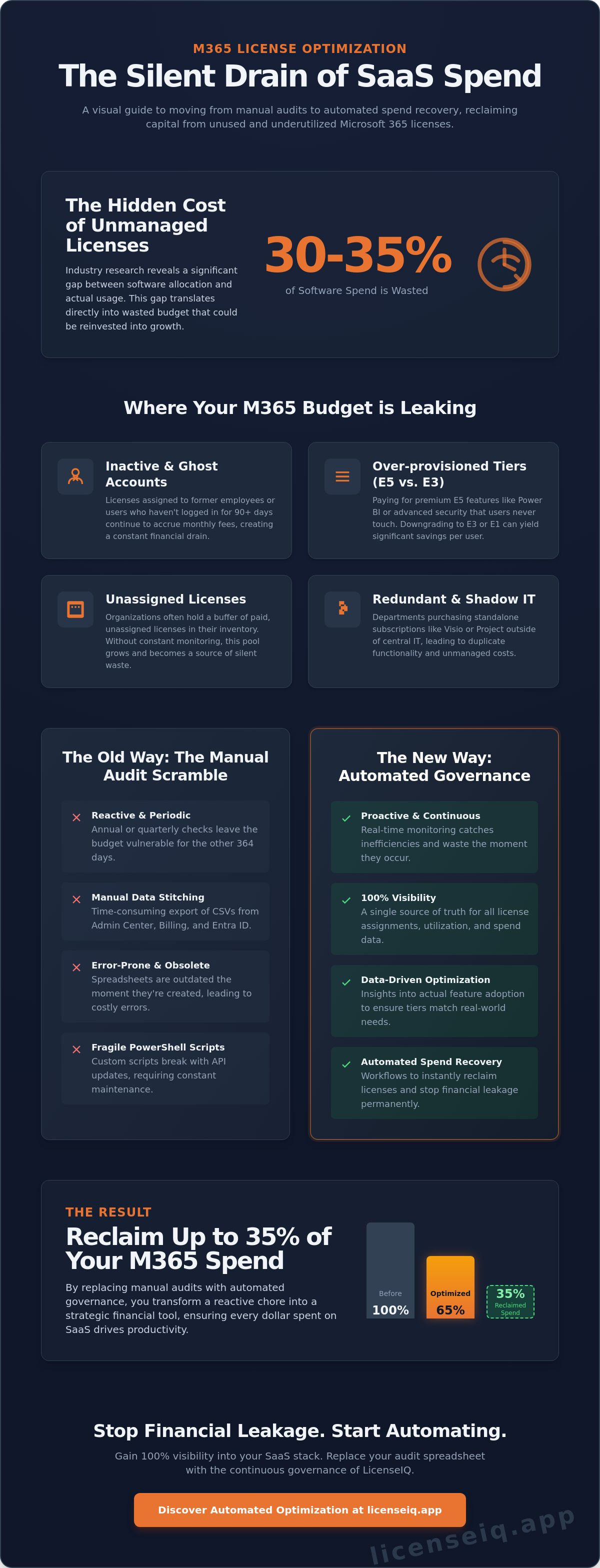
Gartner research indicates that organizations waste nearly 30% of their total software spend on unused or underutilized licenses. For many IT leaders, the reality of a microsoft 365 license audit is a frantic scramble through spreadsheets that were obsolete six months ago. You've likely felt the frustration of paying for premium E5 features that your team never touches while inactive accounts continue to accrue monthly fees. Visibility is your only defense against this silent capital leak.
We agree that managing a complex SaaS stack shouldn't feel like a guessing game. This guide provides a clear roadmap to transition from manual oversight to automated spend recovery. You'll learn how to identify specific areas of waste and reclaim up to 35% of your M365 expenditure through data-driven optimization. We're moving beyond basic compliance to establish a proactive governance framework that ensures your subscription fees reflect actual utilization, not just allocated seats.
Key Takeaways
- Master the mechanics of a modern microsoft 365 license audit to pinpoint unassigned seats and inactive accounts instantly.
- Move beyond basic login data to analyze actual feature utilization, ensuring your license tiers match real-world user needs.
- Implement a strategic spend recovery workflow to reclaim licenses from former staff and eliminate redundant software costs.
- Replace manual spreadsheets with automated governance to achieve 100% visibility into your SaaS stack and stop financial leakage.
- Discover the data-driven tactics required to recover up to 35% of your total M365 spend through automated optimization.
The Anatomy of a Microsoft 365 License Audit in 2026
A microsoft 365 license audit is a systematic investigation of your subscription landscape. It compares your active license assignments against actual user behavior and feature utilization. In 2026, this process has evolved from a simple headcount into a rigorous financial operation. The primary goal is to eliminate waste. Organizations must identify unassigned seats, reclaim licenses from inactive users, and strip away redundant feature sets that drive up monthly costs.
Modern auditing requires more than a basic spreadsheet. As companies scale, the gap between what you pay for and what your team uses grows. This audit is a core component of Software Asset Management (SAM), providing the data needed to align software spend with business reality. We're seeing a fundamental shift here. IT departments no longer audit just for security compliance. They now lead FinOps-driven initiatives to protect the company's margins. This transition ensures that every dollar spent on SaaS contributes directly to productivity rather than sitting idle in an unassigned pool.
The Financial Impact of Unmanaged Licenses
Unmanaged SaaS spend is a silent profit killer. Industry data reveals that SMBs often waste up to 35% on unoptimized seats. This happens through the "silent drain" of licenses. When an employee leaves, their license often stays active, quietly billing the company for months. Manual tracking is no longer viable. Dynamic team changes happen too fast for human oversight to catch every leak. If you aren't automating this visibility, you're losing capital every billing cycle. Every forgotten E5 license represents hundreds of dollars in annual leakage that could be reinvested into growth initiatives.
Audit vs. Continuous Governance
The "annual audit" mindset is obsolete. Relying on a once-a-year check leaves your budget vulnerable for the other 364 days. Continuous monitoring is the only way to ensure real-time financial accuracy. It transforms a reactive chore into a proactive strategy. By maintaining constant visibility, you catch inefficiencies the moment they occur. This keeps your environment lean and your CFO satisfied. For a deeper dive into these strategies, read our full analysis on Microsoft 365 License Optimization: The 2026 Guide. This approach ensures your microsoft 365 license audit isn't just a point-in-time event, but a pillar of your operational excellence. Total visibility is the only antidote to the chaos of unmanaged software stacks.
Step-by-Step: How to Conduct a Manual License Audit
Executing a manual license audit requires a meticulous approach to data extraction. You must start by exporting the active user list directly from the Microsoft 365 Admin Center. This CSV file serves as your baseline. You'll need to cross-reference this list against "Last Sign-In" dates to identify ghost accounts. These represent users who haven't accessed the system in over 90 days but still occupy paid seats. It's a common leak that drains budgets without providing any operational value.
The next phase involves the Billing tab. Here, you must identify unassigned licenses that your organization is paying for but not utilizing. You also need to look for evidence of Shadow IT. This happens when individual departments purchase standalone subscriptions, such as Project or Visio, outside the central IT procurement process. Finally, perform a feature usage analysis for E3 and E5 tiers. If a user on an E5 plan hasn't utilized Power BI or advanced security features in the last six months, they are a candidate for a downgrade. This single adjustment can recover significant monthly spend per user.
Data Collection from the Admin Center
Navigate to the Usage Reports section to extract granular app data. You should filter these reports by "Inactive" status, focusing on the 30, 60, and 90-day thresholds. This data provides a clear picture of which tools are actually being used. A major challenge during a microsoft 365 license audit is the data silo between Entra ID and the billing module. Entra ID manages identity and access, while the billing section handles the financial commitment. Manually syncing these two disparate datasets is time-consuming and often leads to visibility gaps that hide waste.
The Limitations of Manual PowerShell Scripts
Many IT teams attempt to bridge data gaps using custom PowerShell scripts. It's a fragile strategy because Microsoft frequently updates its Graph API. These changes mean your scripts require constant maintenance to remain functional. Human error also plays a role. When you merge CSV files from multiple tenants, a single formatting error can lead to incorrect deletions or double-billing. License sprawl is the accumulation of unmonitored subscriptions that occurs when growth outpaces oversight. To stop this cycle, you need a more automated approach to license visibility.
Performing a microsoft 365 license audit manually is a reactive process. It captures a single moment in time, but SaaS environments change daily. By the time you finish your manual spreadsheet, the data is likely already outdated. This lag creates a persistent state of financial risk and compliance uncertainty for the organization.
Beyond Assignments: Analyzing Utilization and Feature Adoption
Assigning a seat is only the first step. True cost recovery requires a deep dive into how employees actually interact with the software. A standard microsoft 365 license audit often reveals that "active" users are merely logging in to check email while ignoring the high-value tools included in their premium bundles. You aren't just looking for activity; you're looking for value generation. If a user has an E5 license but never opens Power BI or utilizes Advanced Threat Protection, you're subsidizing unused capability.
Effective enterprise license management demands a distinction between a simple login and meaningful adoption. Industry data indicates that roughly 30 percent of SaaS licenses in large organizations go underutilized. This waste often stems from "Zombie Licenses." These are full seats assigned to service accounts, automated scripts, or conference room systems that only require a fraction of the features provided by a standard user license. Identifying these anomalies turns a hidden drain into immediate capital for the 2026 fiscal year.
The E3 vs. E5 Utilization Gap
The price jump from E3 to E5 is significant. You need to know if your users actually use Power BI Pro and Advanced Security features. A granular microsoft 365 license audit tracks specific feature triggers over a 90 day period. If the data shows zero interaction with E5 exclusive security tools, those users are prime candidates for a downgrade. Transitioning these employees to Business Premium or F-series plans can reduce per-user costs by nearly 45 percent. For a detailed breakdown of these tiers, consult our Microsoft 365 License Types Reference Guide.
Tracking Windows 365 and Specialized Seats
Cloud PCs represent a high-cost category where idle instances quickly erode IT budgets. You must audit Windows 365 utilization to ensure you aren't paying for compute power that stays powered down. Hybrid work environments frequently suffer from redundant licensing. This happens when a user maintains both a high-spec physical workstation and an always-on Cloud PC without a clear operational need. Our guide on Tracking Windows 365 Spending provides the framework to spot these overlaps. Eliminate the redundancy to secure your bottom line and improve overall digital hygiene.
Turning Audit Data into Savings: Strategic Spend Recovery
Data without action is overhead. A successful microsoft 365 license audit provides the roadmap for spend recovery, but the value lies in execution. You must move from visibility to reclamation. This strategy focuses on three core areas: offboarding, right-sizing, and stack consolidation. By treating your audit findings as a financial ledger, you can systematically eliminate waste.
Right-sizing offers the fastest path to ROI. Industry benchmarks from 2024 indicate that up to 32% of users assigned to high-tier E5 licenses never utilize the advanced security or analytics features included in that price point. Downgrading these specific users to E3 or Business Premium tiers preserves productivity while slashing monthly recurring costs. Additionally, consolidating "Mix and Match" licenses simplifies your billing stack. Overlapping SKUs often hide in plain sight, creating a fragmented environment that's difficult to manage and even harder to budget for in the long term.
Automating the Offboarding Process
Manual offboarding remains the primary driver of license waste in 2026. When IT teams rely on spreadsheets or memory, licenses stay attached to inactive accounts for months. This creates "ghost spend" that erodes your bottom line. You need automated reclamation workflows. These triggers should fire the moment a user is deactivated in your identity provider, instantly returning the license to the available pool. For a step-by-step guide on securing your environment during transitions, consult our Office 365 Offboarding Checklist. Automation ensures that 100% of licenses from departed staff are recovered within minutes, not weeks.
Negotiating with Data: Using Audits for Renewals
Audit reports are your most powerful leverage during Microsoft Enterprise Agreement (EA) renewals. Instead of relying on vendor projections, you can present actual utilization trends from the last 36 months. This precision prevents over-provisioning during the next three-year cycle. It allows you to commit to lower baselines with confidence. A Health Score quantifies audit success by measuring the ratio of assigned licenses to actual feature utilization, providing a single metric for executive reporting. Use these insights to eliminate the guesswork from your procurement strategy and secure more favorable terms.
Stop guessing and start optimizing your cloud budget. Identify hidden savings with LicenseIQ today.
Automating Governance: Why LicenseIQ Replaces the Audit Spreadsheet
Manual spreadsheets are where cost optimization goes to die. Relying on static data for a microsoft 365 license audit creates a dangerous lag between discovery and action. LicenseIQ eliminates this friction by connecting directly to your tenant in under 300 seconds. It replaces guesswork with a Spend Recovery Dashboard that provides 100% visibility into your software stack. This isn't just a point-in-time check; it's a persistent system of record that maintains financial hygiene 24/7.
Efficiency is the primary driver of the platform. Your organization receives a real-time Health Score the moment the initial scan completes. This metric tracks your optimization progress against industry benchmarks, allowing IT leaders to prove ROI to finance teams without preparing complex reports. Automated Governance Workflows then take over to ensure long-term savings. These workflows include:
- Instant Seat Reclamation: Flagging accounts that haven't logged in for 30 days.
- Redundant License Detection: Identifying users with overlapping E3 and E5 assignments.
- Departmental Chargebacks: Mapping exact spend to specific cost centers automatically.
- Compliance Monitoring: Ensuring your license mix aligns with current usage data.
By moving away from manual tracking, you stop reacting to invoices and start dictating your terms. The platform acts as a vigilant guardian, ensuring that every dollar spent on your Microsoft ecosystem is justified by actual user activity.
The AI-Native Advantage
LicenseIQ uses software intelligence to identify complex usage patterns that manual reviews miss. Traditional methods rely on clunky CSV exports and fragile PowerShell scripts. These manual processes often result in a 15% error rate due to stale data and human oversight. LicenseIQ removes the burden from your IT department by providing continuous financial accuracy. It identifies "shadow" accounts and underutilized premium features, ensuring your microsoft 365 license audit remains accurate every day of the year. This proactive approach prevents the "audit panic" that typically occurs before a renewal deadline.
Getting Started with Your First Scan
The transition from chaos to clarity takes less time than a coffee break. For SMBs and enterprises alike, the 5-minute setup process bridges the gap between technical debt and fiscal responsibility. Once connected, the platform visualizes immediate dollar-value recommendations. It shows exactly where capital is trapped in unused Power BI Pro seats or forgotten Project licenses. Don't let your budget leak through unmanaged seats. Start your free M365 license scan with LicenseIQ today and reclaim your software spend with precision.
Master Your SaaS Governance and Reclaim Your Budget
Executing a comprehensive microsoft 365 license audit manually is a losing game in 2026. Static spreadsheets can't keep pace with real-time utilization or deep feature adoption metrics. You need total visibility to eliminate shadow IT and reclaim wasted budget. True spend recovery happens when you move beyond simple seat assignments and start analyzing how your team actually works. By shifting to AI-native automated governance, you replace guesswork with precision data.
LicenseIQ delivers the clarity IT leaders need to protect their organization's financial health. Our system connects in minutes, providing an immediate look into your licensing environment. Organizations frequently save up to 35% on their M365 spend by identifying underused features and redundant tiers. Don't let your software budget leak away through unmonitored accounts. It's time to transform your audit process into a continuous, strategic advantage for your company's growth.
Discover your M365 Health Score in minutes with LicenseIQ
Frequently Asked Questions
How often should we conduct a Microsoft 365 license audit?
You should conduct a microsoft 365 license audit monthly or implement continuous automated monitoring. Static annual reviews are no longer effective because headcount and usage patterns change daily. Gartner reports that organizations using continuous software asset management tools reduce their spend by 20% within the first year. Regular checks ensure you don't pay for "zombie" accounts left by former employees.
What is the most common license waste found during an audit?
The most frequent waste is "license bloating," where users are assigned E5 tiers but only utilize E3 features. Data shows that 25% of premium license holders don't use the advanced security or analytics tools they're paying for. Identifying these discrepancies allows you to downgrade users to a more appropriate tier. This simple adjustment provides immediate financial relief without impacting daily workflows or productivity.
Can I audit my Microsoft 365 licenses without an IT degree?
Yes, you can manage your environment without deep technical expertise by using automated optimization platforms. These tools replace complex manual processes with intuitive dashboards that highlight waste. You don't need to write PowerShell scripts to see your utilization rates. Visibility is the priority, allowing finance and operations managers to make data driven decisions without waiting for a specialized IT ticket.
What is the difference between an unassigned license and an inactive user?
Unassigned licenses are paid seats that aren't linked to any user, while inactive users hold a license but haven't logged in for 90 days. Both represent direct financial waste. Unassigned licenses are often forgotten after a bulk purchase or a round of offboarding. Inactive users are more subtle risks, as they continue to consume your budget while providing zero return on the investment.
Does Microsoft provide free tools for license auditing?
Microsoft offers basic usage reports through the M365 Admin Center and Viva Insights. These native tools provide a baseline, but they lack the automated reclamation workflows required for modern efficiency. You'll often find yourself exporting spreadsheets and performing manual cross references. This manual approach increases the risk of oversight, which is why 2026 standards favor automated systems that trigger alerts when waste is detected.
How much can a typical SMB save through a license audit?
A typical SMB can recover between 15% and 30% of their annual subscription costs through a comprehensive microsoft 365 license audit. For a company with 200 employees, these savings are substantial. Most of these gains come from identifying redundant subscriptions and reclaiming seats from departed staff. It's a high impact strategy that turns hidden costs into visible capital for other tech initiatives.
What happens to user data when I reclaim a license?
Data remains accessible for 30 days after a license is reclaimed before Microsoft begins the permanent deletion process. You must convert mailboxes to "Shared" status or move OneDrive files to a central repository before this window closes. This 30 day grace period is your safety net. It allows you to maintain compliance and data integrity while immediately stopping the billing cycle for that specific seat.
How do I identify "Shadow IT" in my Microsoft 365 environment?
Identify Shadow IT by using the Microsoft Defender for Cloud Apps discovery tool to monitor OAuth permissions. Industry research indicates the average employee uses 28 different applications, many of which aren't sanctioned by IT. These unauthorized apps often overlap with M365 features you're already paying for. Gaining visibility into these third party integrations helps you consolidate your software stack and eliminate redundant monthly subscriptions.


