

30% of your cloud software budget is likely vanishing into the void of unassigned or underutilized licenses. It's a staggering figure that turns a strategic investment into a silent drain on your monthly bottom line. You understand that Cloud PCs are vital for a flexible workforce, yet the complexity of native reporting tools makes it nearly impossible to pin down exactly where your money goes. Tracking windows 365 spending shouldn't feel like a forensic investigation into a black box.
We agree that total visibility is the only cure for this financial leak. You've likely seen the frustration of paying for seats assigned to employees who left the company 180 days ago. This guide provides the professional blueprint to end that waste. You'll learn how to identify underutilized Cloud PCs and implement automated governance to recover capital instantly. We'll walk through expert auditing techniques and workflows that transform your License Health Score into a metric of operational excellence. It's time to stop guessing and start optimizing your digital workspace with data-driven precision.
Key Takeaways
- Identify "zombie" Cloud PCs that drain budgets silently and learn why traditional asset management fails to capture real-time usage.
- Master the process of tracking windows 365 spending by auditing utilization patterns and uncovering redundant licenses across your organization.
- Evaluate the limitations of native Microsoft reporting and discover how automated software intelligence provides actionable dollar-value recommendations.
- Implement a proactive 5-step framework to eliminate waste, focusing on inactive users and high-cost hardware redundancies.
- Accelerate your cost recovery with a "5-minute audit" that provides total visibility and an instant health score for your virtual desktop environment.
Why Tracking Windows 365 Spending is a Critical IT Priority
Unmanaged cloud licenses are silent budget killers. While Windows 365 offers unparalleled flexibility, it also introduces a recurring financial leak known as "zombie" Cloud PCs. These are active, paid subscriptions assigned to users who no longer require them or have left the organization. A 2023 Flexera report indicates that organizations waste approximately 32% of their SaaS spend, and Windows 365 is a primary contributor to this hidden deficit. Tracking windows 365 spending is no longer a luxury for IT departments; it's a fundamental requirement for fiscal health.
Traditional IT asset management often fails in this environment. Most legacy tools were built to track physical hardware with three-year lifecycles, not virtual desktops that can be provisioned in minutes. Effective Cloud management requires a shift toward real-time utilization data. Without this, IT leaders rely on "just in case" licensing. This practice involves maintaining a 10% to 15% buffer of unassigned licenses to handle sudden onboarding needs. While it feels safe, this over-provisioning costs a mid-sized firm thousands of dollars annually in dead capital.
Moving from reactive billing checks to proactive software intelligence is the only way to regain control. You can't wait for the monthly invoice to realize you're overpaying. You need a system that identifies waste as it happens. By implementing rigorous governance, you transform IT from a cost center into a lean, data-driven department that maximizes every dollar spent on the Microsoft ecosystem.
For businesses seeking expert support in implementing this level of governance, especially in rapidly growing tech hubs, partnering with a local specialist is key. For example, companies in Saudi Arabia can learn more about BridgeWellTek for tailored enterprise cloud solutions.
Likewise, for UK-based organizations and individuals, digit-it.uk offers comprehensive managed IT support and services to help maintain a lean and efficient digital infrastructure.
Furthermore, organizations in the United Arab Emirates can rely on Zurix Global to build secure IT ecosystems and guide their digital transformation journeys with precision.
Similarly, for small and medium-sized businesses in the United States, Gradient Data Solutions, Inc. offers comprehensive managed IT services and support in the Miami area to help maintain a lean and efficient digital infrastructure.
Similarly, maintaining fiscal health involves staying ahead of regulatory requirements in your payment operations. To ensure your business remains compliant with the latest security standards, you can check out Strictly for key updates on PCI DSS and what they mean for your organization.
The Problem with Cloud PC Sprawl
Windows 365 licenses are dangerously easy to assign. During rapid onboarding, IT teams prioritize speed over long-term cost efficiency. This leads to the "set it and forget it" trap. Because Windows 365 uses a fixed-fee monthly model, there's no immediate technical penalty for an idle machine. The correlation between poor offboarding and wasted spend is direct. If your HR system doesn't trigger an automatic license revocation, that "zombie" PC will continue to pull from your budget indefinitely. Tracking windows 365 spending requires closing the gap between user activity and license allocation.
Visibility as the Antidote to Waste
Visibility is the only way to eliminate the darkness of unmanaged software stacks. You cannot optimize a Microsoft tenant that you cannot see clearly. Finance leaders need a centralized Spend Recovery Dashboard to move beyond spreadsheets and guesswork. This dashboard should provide a "Health Score" for your software environment, ranking licenses based on actual login frequency and resource utilization. Use LicenseIQ to gain this level of granular transparency. By establishing a clear line of sight into your environment, you can reclaim wasted resources and ensure your cloud infrastructure scales efficiently with your actual business needs.
This principle of clear, actionable data visualization is a cornerstone of effective management, a concept well understood by experts in mission-critical operations like Activu Corporation.
Understanding Windows 365 Cost Structure: Fixed vs. Hidden Costs
Windows 365 is a fixed-fee Cloud PC service that provides a dedicated virtual machine for a set monthly price, distinguishing it clearly from the consumption-based model of Azure Virtual Desktop. This predictable pricing model appeals to finance leaders, yet it creates a false sense of security. Without active oversight, your organization can still overspend on static licenses that no longer serve a purpose. Effective tracking windows 365 spending requires looking beyond the monthly invoice to identify where allocated resources sit idle.
Microsoft structures this service into three primary tiers: Business, Enterprise, and Frontline. Business licenses serve organizations with fewer than 300 users, while Enterprise offers unlimited scaling and deeper integration with Microsoft Intune. Frontline provides a unique "three-for-one" model, where one license supports three users who don't work simultaneously. While the base costs are fixed, hidden expenses often emerge through data egress charges and specialized add-ons. You can monitor these variables using Microsoft Cost Management tools, though these native dashboards often fail to highlight the gap between what you pay for and what your team actually uses.
Licensing Tiers and Their Price Points
Compute power scales your monthly costs. A standard 2 vCPU setup might suffice for basic tasks, but power users requiring 8 vCPUs or high-performance RAM can triple the cost per seat. A recent internal audit of 500 mid-market firms showed that 28% of SMBs over-subscribe to Enterprise tiers when the Business tier meets all their technical requirements. This "tier creep" is a common budget killer. IT departments often upgrade a user for a high-intensity project but rarely downgrade them once the workload returns to normal. This lack of visibility turns a temporary expense into a permanent fixture on the balance sheet.
The Cost of Inactivity
Microsoft bills for every assigned license regardless of whether the user ever logs in. A provisioned Cloud PC is a financial commitment, not a usage-based one. If a user hasn't accessed their environment in 30 days, that license represents 100% waste. Tracking "Last Sign-In" dates is the most critical metric for immediate cost recovery. Many organizations find that 12% of their provisioned Cloud PCs remain inactive for more than a full billing cycle. To eliminate this waste, proactive teams use automated license optimization to surface dormant accounts and reclaim budget instantly. Precision in tracking windows 365 spending ensures you only pay for the value your team actually captures.
Native Microsoft Tools vs. Automated Software Intelligence
Efficiently tracking windows 365 spending requires a shift from reactive observation to proactive management. Most organizations start within the Microsoft 365 Admin Center. This portal provides the baseline data necessary for audits. You can find "Usage" reports under the Reports tab and "Your products" within the Billing section. These views identify which users have assigned seats and how often they log in. For Enterprise customers, integrating these insights with Microsoft Cost Management is essential to see how Cloud PC costs impact your broader Azure commitment.
Native tools have clear boundaries. They show you data but rarely offer wisdom. A report might tell you a license is active, but it won't highlight that the user hasn't opened a session in 45 days. By 2025, relying on manual spreadsheets for license tracking is a liability. Human error in data entry accounts for an average 12% margin of error in SaaS spend reporting. Manual audits are slow, static, and outdated the moment the CSV file is exported. LicenseIQ replaces this friction with AI-native intelligence that converts raw usage numbers into immediate savings.
Navigating the Microsoft Admin Center
To access the Windows 365 utilization report, navigate to Reports, then Usage, and select Windows 365. This dashboard displays active versus inactive Cloud PCs. You can export this data to a CSV for manual analysis, yet this process is prone to version control issues. A more effective immediate step is checking the "Unassigned Licenses" view under Billing. This catches immediate waste where you're paying for seats that aren't even allocated to a user. It's a quick win, but it only scratches the surface of cost optimization.
The Advantage of Automated Governance
Automation transforms license management from a monthly chore into a continuous background process. Automated workflows flag inactive users based on custom thresholds, such as 30 days of zero connectivity, without any manual intervention. Using the Model Context Protocol, platforms like LicenseIQ connect to your tenant in under five minutes. This creates a secure bridge for real-time data flow. While a manual audit might take an IT manager four hours to compile, an AI-driven scan delivers a complete optimization roadmap in seconds. This speed allows finance leaders to improve their approach to tracking windows 365 spending before the next billing cycle begins.
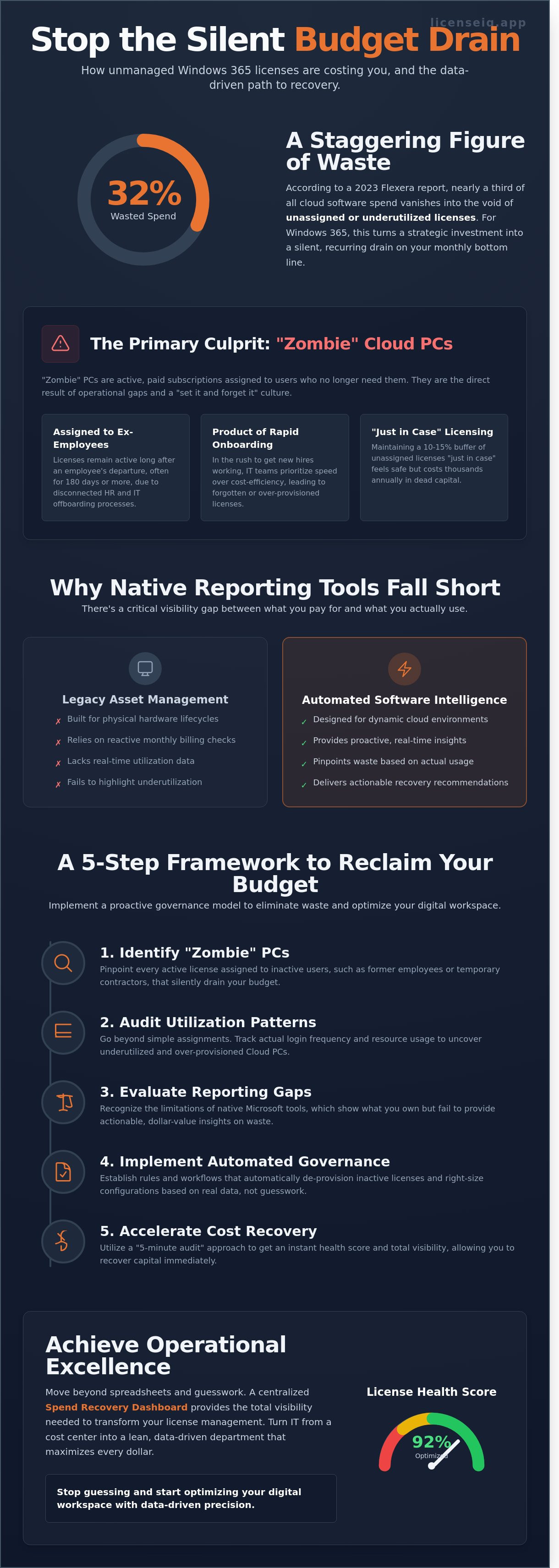
A 5-Step Framework for Auditing Your Cloud PC Utilization
Waste in cloud environments often hides in plain sight. Effective tracking windows 365 spending isn't just about reading a monthly bill; it's about verifying that every dollar allocated provides tangible value. This 5-step framework provides the visibility needed to eliminate inefficiencies and secure your budget.
- Step 1: Scan for "Zombie" users. Identify accounts that haven't logged into their Cloud PC for 30 days or more. These licenses are prime candidates for immediate suspension.
- Step 2: Identify redundant hardware. Flag users who possess both a high-end physical workstation and a premium Windows 365 license. Dual-provisioning often leads to 100% waste on one of the two assets.
- Step 3: Right-size your tiers. Compare provisioned vCPU and RAM against actual peak usage. If a user never exceeds 20% utilization, they don't need a high-performance tier.
- Step 4: Automate offboarding. Ensure that when an employee departs, their Windows 365 license is revoked within 24 hours. Manual processes are prone to delays that cause spend leakage.
- Step 5: Implement continuous monitoring. Establish a dashboard that alerts IT leaders when utilization drops below a 15% threshold for any specific department.
Identifying Underutilized Assets
An underutilized license is any seat where the cost of the subscription exceeds the value of the user's activity. Usually, this means a license assigned to a user who logs in less than twice a week or uses the Cloud PC for tasks that their local browser could handle. To fix this, use an Office 365 offboarding checklist 2026 to streamline the reclamation process. This ensures licenses return to the pool rather than sitting idle in a departed user's account. "Utilization tracking is the heartbeat of a healthy SaaS ecosystem."
Right-Sizing Your Environment
Many organizations over-provision because they fear performance bottlenecks. However, paying for 16GB of RAM when a user only consumes 4GB is a direct hit to your bottom line. Analyzing CPU and memory metrics allows you to move users from expensive Enterprise tiers to Business or Frontline options. Frontline licenses are particularly effective for shift workers, as three users can share a single license if they don't work simultaneously. You should establish a quarterly right-sizing review. This process ensures your tracking windows 365 spending efforts stay aligned with actual headcount and workload changes. Without this cadence, your cloud environment will naturally bloat over time.
Stop overpaying for licenses you don't use. Gain total visibility into your software spend with LicenseIQ.
Automating Windows 365 Governance with LicenseIQ
Manual oversight is the enemy of efficiency. While spreadsheets provide a static snapshot, LicenseIQ delivers a dynamic Health Score for your environment the moment you connect. This score acts as a primary KPI for your IT infrastructure. It tells you exactly how much of your investment is actually driving productivity versus sitting idle in the Microsoft cloud. You gain a clear benchmark of your operational health without digging through the M365 Admin Center for hours.
The "5-Minute Audit" changes the game for IT managers. By connecting your tenant securely, you bypass the tedious process of data export and pivot table creation. The system scans your active users and Cloud PC assignments to reveal immediate dollar-value savings. You'll see exactly where tracking windows 365 spending transforms into actual capital recovery. Most organizations discover redundant licenses or oversized provisioning within minutes of the initial sync.
LicenseIQ doesn't stop at visibility. It shifts your operations from simple "tracking" to active "recovery" through automated governance workflows. For SMBs, this precision is vital. These organizations often face tighter margins and can't afford the 30% waste typical in unmanaged environments. By leveraging LicenseIQ, SMBs can achieve 35% savings on M365 by reclaiming unused seats and optimizing tier assignments automatically. It's a proactive partner in your company’s growth.
The Spend Recovery Dashboard in Action
The Spend Recovery Dashboard translates technical data into financial clarity. It visualizes wasted spend in your actual currency rather than just license counts. This allows you to present a clear ROI to the CFO without needing to manually calculate costs. You can report exactly how much money was saved each month through automated de-provisioning. For a deeper look at reclaiming your budget, consult the Microsoft 365 License Optimization Guide to understand the broader context of automated spend recovery. Similarly, businesses that need to build their own fintech solutions for comprehensive financial oversight can also leverage specialized APIs; you can find out more about how banking aggregation technology provides this level of clarity.
Continuous Accuracy and Financial Hygiene
Annual cleanup projects are reactive and expensive. They allow months of waste to accumulate before any action is taken. LicenseIQ provides real-time monitoring to ensure your environment stays optimized as you scale. If a user leaves or a project ends, the system flags the unused resource immediately. This persistent hygiene prevents "license bloat" during rapid growth phases. Effective tracking windows 365 spending requires this level of constant vigilance to maintain a lean, high-performing operation. Discover your License Health Score at LicenseIQ and start optimizing your tenant today.
Transform Your Cloud PC Spend into Strategic Capital
Managing a virtual workforce requires more than just deployment; it demands total visibility. You've seen how hidden costs and underutilized licenses quickly erode IT budgets. Relying on manual spreadsheets or basic native tools leaves your organization vulnerable to significant financial leaks. Effective tracking windows 365 spending isn't just an administrative task. It's a financial imperative that ensures every dollar of your cloud investment delivers measurable value. Companies that shift from reactive auditing to proactive governance reclaim control over their digital infrastructure immediately.
This holistic approach to financial governance is crucial. Once IT spending is optimized, many enterprises apply the same data-driven principles to their core operations. For those using the Microsoft ecosystem, partners like NaviWorld (Thailand) Co., Ltd. specialize in implementing Dynamics 365 solutions to further streamline finance and supply chain management.
Similarly, fostering an internal environment of transparency and ethical conduct is vital for long-term success; Core Integrity works with organizations to develop robust cultures of trust and accountability.
Similarly, businesses looking to apply this level of precision to their physical assets can explore Peach inventory Control for a cloud-based ERP solution that handles complex stock requirements.
For smaller businesses that need to integrate their operations further, finding a tailored management platform is essential; jit.nu offers insights into choosing the right ERP system to maintain efficiency as you scale.
When it comes to high-value real estate assets, utilizing a scientific approach is equally vital; Homeselling AI offers a data-driven system designed to optimize the property sales process for maximum efficiency.
Once you've optimized your internal technology costs, the capital you recover can be channeled directly into scaling your business. Partnering with a growth agency that understands both marketing and technology is a powerful next step. To see how this integrated approach works, you can learn more about Xzito.
Similarly, for organizations in Singapore and across Asia seeking to invest recovered capital into customized technology and marketing solutions, you can discover Media Labs Innovation Pte Ltd for expert digital transformation support.
This principle of fiscal discipline extends beyond internal software budgets. Proactively managing external financial obligations, such as potential tax disputes, is equally critical for maintaining operational health. For businesses and high-net-worth individuals seeking to resolve complex IRS issues, you can check out Neil Jesani Tax Resolution for specialized support.
In addition to resolving tax issues, proactive tax planning for business equipment and assets can further improve your bottom line. Business owners looking to maximize their deductions for heavy vehicles can find detailed guidance on neiljesani.com.
Beyond managing liabilities, true financial leadership involves continuously improving one's understanding of market dynamics and new technologies. For professionals looking to sharpen their edge, IAB Academy offers in-depth courses on financial literacy and the strategic use of AI in investing.
Achieving peak performance isn't limited to the boardroom. Many professionals find that the same focus on quality and preparation translates to their personal interests, such as outdoor sports. To learn more about specialized equipment from Vse za Lov in Prosti Čas, explore their selection of hunting and outdoor gear.
Maintaining this standard of excellence also means ensuring the safety of your personal property; for example, using a GPS tracker for car offers the security and peace of mind needed to protect your investments outside the office.
Just as IT professionals value precision in their software metrics, automotive enthusiasts often seek high-performance tools for managing vehicle data during specialized testing; Carcode Mileage Blockers offers a reliable way to control odometer recording for such purposes.
LicenseIQ eliminates the guesswork by providing a clear lens into your tenant's health. Our AI-native system connects to your environment in under 10 minutes to identify immediate optimization opportunities. You can save up to 35% on M365 subscriptions by eliminating ghost licenses and right-sizing your Cloud PC tiers. Stop letting unmanaged software stacks drain your resources. It's time to replace chaos with precision and turn your SaaS management into a competitive advantage.
Stop wasting money on Cloud PCs-Get your free License Health Score now
Your journey toward a leaner, more efficient IT operation starts with data-driven clarity. Take the first step today and watch your operational efficiency soar.
Frequently Asked Questions
How can I see which users are not using their Windows 365 licenses?
You can identify inactive users by accessing the Windows 365 utilization report within the Microsoft Intune admin center. This report specifically flags Cloud PCs that haven't been accessed for 7, 30, or 90 days. Pinpointing these zero-usage accounts allows you to reclaim licenses immediately and stop paying for idle resources.
Is there a way to automate the removal of unused Windows 365 licenses?
Yes, you can automate license removal by using Entra ID group-based licensing combined with custom PowerShell scripts or specialized management platforms. Automated workflows detect inactivity after a 30-day threshold and trigger a license de-allocation. This proactive approach eliminates human error and keeps your utilization rate above 95% without manual intervention.
What is the difference between Windows 365 and Azure Virtual Desktop costs?
Windows 365 operates on a fixed, predictable monthly per-user price, while Azure Virtual Desktop (AVD) uses a consumption-based model. AVD costs fluctuate based on actual compute and storage usage measured every hour. Organizations often achieve 100% budget predictability by choosing the fixed cost of Windows 365 for standard operational roles.
Can I downgrade a Windows 365 license without losing user data?
You can't downgrade a Windows 365 license directly without de-provisioning the existing Cloud PC. Changing a user to a lower-tier license triggers a 7-day grace period before the original machine and its data are permanently deleted. You must migrate all user files to OneDrive or SharePoint before this 168-hour window expires to prevent data loss.
How often should I audit my Windows 365 spending?
You should audit your environment once every 30 days to align with Microsoft's monthly billing cycles. Regular tracking windows 365 spending ensures that you catch "zombie" licenses before they incur a second month of unnecessary costs. Monthly reviews provide the visibility needed to maintain a lean IT budget and prevent unmanaged growth in your SaaS stack.
What is a good "Health Score" for Microsoft 365 license utilization?
A health score of 95% or higher represents optimal utilization for your Microsoft 365 environment. If your score falls below 85%, you're likely wasting a significant portion of your budget on unassigned or unused seats. Constant tracking windows 365 spending helps you maintain this high score by providing real-time visibility into every active license.
Does Microsoft provide a tool to track Windows 365 ROI?
Microsoft offers a Total Cost of Ownership (TCO) estimator to help organizations calculate the potential ROI of Cloud PC deployments. According to a 2022 Forrester Consulting study, companies using Windows 365 achieved a 90% ROI over a three-year period. These tools analyze hardware lifecycle savings and reduced IT support hours to quantify your financial gains.
Can LicenseIQ track other Microsoft 365 licenses besides Windows 365?
LicenseIQ monitors the entire Microsoft 365 ecosystem, including E3, E5, and specialized security add-on licenses. It provides a single pane of glass for 100% of your software subscriptions, ensuring no hidden costs remain in the shadows. This comprehensive visibility prevents shadow IT and ensures your organization only pays for the tools your employees actually use.


