

Your organization is likely losing 30% of its cloud budget to underutilized licenses right now. Following the July 2026 price hikes, where Office 365 E3 rose to $26.00 per user, effective microsoft 365 spend optimization is no longer optional; it's a financial necessity. You're probably tired of opaque billing and the spreadsheet hell of manual license tracking. The fear of accidentally deleting an active user often leads to expensive over-provisioning that quietly drains your resources month after month.
It's time to replace guesswork with digital auditing. This guide shows you how to reclaim up to 35% of your wasted spend using AI-native automation and continuous governance. You'll learn to identify the exact dollar-value of recovered capital, deploy automated workflows to harvest licenses, and maintain a high License Health Score. We'll outline a 2026 strategy that turns your M365 environment into a transparent, high-efficiency operation.
Key Takeaways
- Identify how "zombie" licenses and redundant subscriptions drain up to 35% of your software budget.
- Implement a proactive microsoft 365 spend optimization strategy to right-size license allocation based on actual user activity.
- Reduce operational costs by leveraging the financial gap between E3 and E5 plans and utilizing F-series licenses for frontline staff.
- Replace manual spreadsheet tracking with AI-native software intelligence to gain real-time visibility into your tenant's financial health.
- Use the LicenseIQ Spend Recovery Dashboard and License Health Score to automate governance and reclaim capital in minutes.
The Hidden Cost of Microsoft 365 Sprawl in 2026
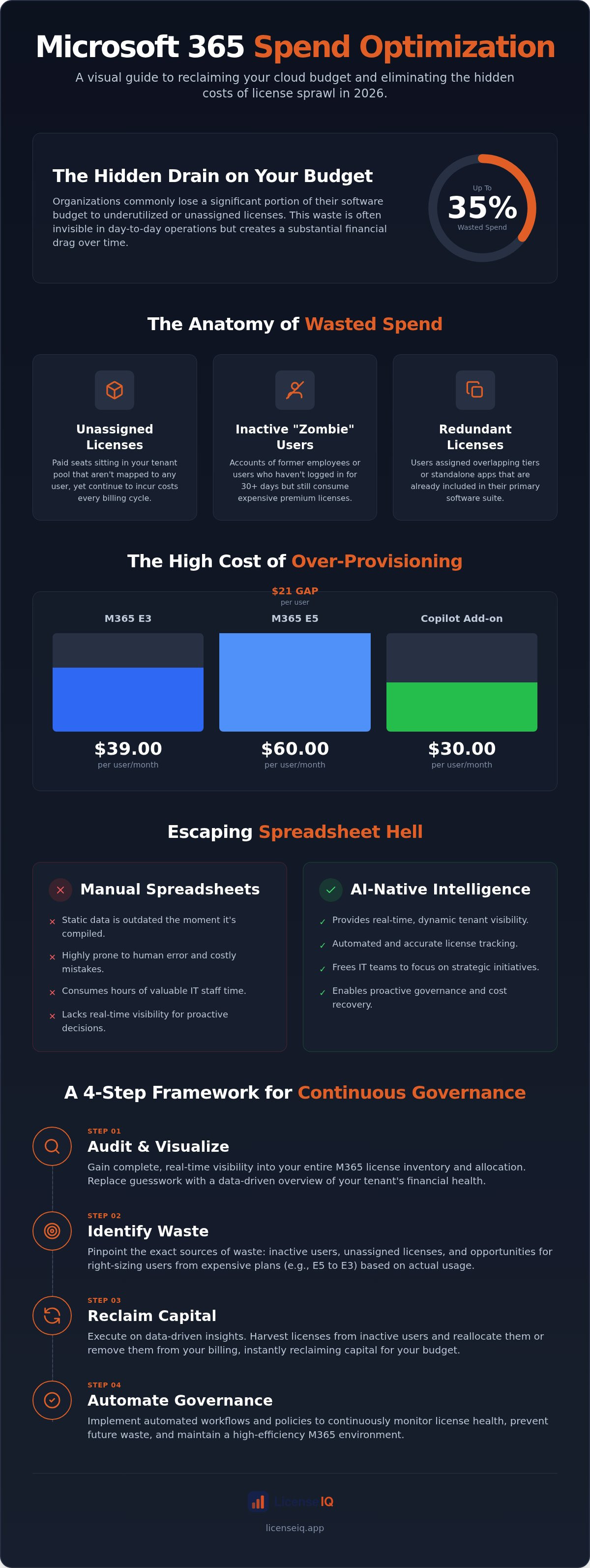
Your Microsoft 365 tenant is likely leaking capital. In 2026, microsoft 365 spend optimization is the proactive discipline of aligning license allocation with actual usage to eliminate financial waste. It isn't just a back-office IT task; it's a critical financial strategy. SMBs frequently lose up to 35% of their software budget to "zombie" licenses that sit idle while billing cycles continue uninterrupted.
The July 2026 price increases have intensified this problem. With Microsoft 365 E3 now priced at $39.00 per user and E5 at $60.00, over-provisioning even a small team creates a significant financial burden. Organizations can mitigate these costs by utilizing LicentiePromo to secure one-time purchase licenses for users who don't require full subscription features. Complexity breeds waste. The introduction of "no-Teams" versions and varied mailbox storage limits makes it difficult to track what you're paying for without specialized tools. Neglecting this oversight also creates security vulnerabilities. Orphaned accounts with active licenses are prime targets for unauthorized access during poor offboarding processes.
The Anatomy of Wasted SaaS Spend
Waste isn't always obvious. It hides in the obscured corners of your admin portal. Effective microsoft 365 spend optimization requires identifying three primary types of waste:
- Unassigned Licenses: Paid seats sitting in your tenant pool that aren't mapped to any user.
- Inactive Users: Accounts that haven't logged in for 30 or more days but still consume premium licenses.
- Redundant Licenses: Scenarios where a single user is assigned overlapping tiers or standalone apps already included in their suite.
These inefficiencies are central to Software Asset Management (SAM). By applying SAM principles specifically to the M365 ecosystem, organizations can reclaim underutilized resources and redirect that capital toward growth initiatives.
Why Manual Spreadsheets Fail SMBs
Relying on manual spreadsheets to track licenses is a failed strategy. Static data cannot keep pace with the dynamic reality of modern employee turnover. A spreadsheet is a snapshot of the past, not a reflection of the present. Human error is inevitable when tracking complex "mix and match" license scenarios, leading to costly mistakes and missed recovery opportunities.
The opportunity cost is equally damaging. High-value IT staff often spend hours performing manual audits that an automated system could finish in minutes. This distracts your best talent from strategic projects. Using a platform like LicenseIQ provides the real-time visibility necessary to stop the bleed and ensure every dollar spent on M365 delivers maximum value.
Identifying the Key Levers of M365 Spend Recovery
Recovery begins with identifying the "usage vs. entitlement" gap. You're often paying for premium features that your staff never touches. This is particularly evident in the $21 gap between Microsoft 365 E3 ($39.00) and Microsoft 365 E5 ($60.00). While E5 offers robust security and analytics, many SMBs find these features remain unconfigured or underutilized. Strategic microsoft 365 spend optimization involves auditing these specific tiers to ensure you aren't over-investing in dormant capabilities.
The difficulty of this task is well-documented across all sectors. Even large-scale entities struggle with visibility, as seen in reports regarding federal government challenges in managing cloud costs. If organizations with massive resources face these hurdles, SMBs require even more precision to avoid budget erosion. You must treat every license as a dynamic asset rather than a fixed cost.
Right-Sizing: Matching Licenses to Actual Usage
Right-sizing is the most effective lever for immediate spend recovery. It requires a granular look at how employees interact with the suite. For instance, many frontline or administrative staff only require web-based applications. Moving these users from a $14.00 Business Standard plan to an "F-series" license or Business Basic can save significant capital over a fiscal year.
This logic extends to modern AI add-ons. Copilot for Microsoft 365 costs $30 per user, per month for enterprise plans. If an assigned user hasn't engaged with the tool in 30 days, that's $360 in annual waste per seat. Use data to justify downgrading users from E5 to E3 or Business Premium whenever their security and compliance needs don't mandate the higher tier. You can check your current License Health Score to see where these mismatches exist in your tenant.
The Inactive User Problem
Inactive users represent "zombie" spend that serves no operational purpose. Establish a strict 30-60-90 day threshold for license reclamation. If a user hasn't logged in within 60 days, their license should be harvested and returned to the pool. This prevents the financial drain of orphaned accounts from former employees who were never properly offboarded in the admin portal.
Automating this detection is vital. Manual checks are prone to oversight and leave your organization vulnerable to security risks. By implementing automated governance, you ensure that licenses are reclaimed the moment a user becomes inactive, maintaining a lean and cost-effective environment. This proactive oversight is the cornerstone of a mature microsoft 365 spend optimization strategy.
Manual Audits vs. AI-Native Software Intelligence
Manual scripting is a drain on your most expensive resources. While many IT teams still rely on free scripts to pull usage reports, this approach is fundamentally flawed. Scripting requires technical expertise, hours of execution, and results in a static snapshot that is outdated the moment it's generated. In contrast, AI-native intelligence provides a continuous stream of actionable data. This shift from manual to automated processes is the defining characteristic of modern microsoft 365 spend optimization.
The primary weakness of manual audits is their "point-in-time" nature. You might identify a few inactive users today, but you'll miss the dozens who stop using their licenses tomorrow. Real-time monitoring ensures that waste is identified and flagged the moment it occurs. Security remains a top priority during this transition. Platforms like LicenseIQ utilize read-only permissions via secure Microsoft APIs. This means the system can audit your environment without the power to modify sensitive data or disrupt operations. It's a vigilant guardian that observes and reports without introducing risk.
The 5-Minute Audit: Speed as a Competitive Advantage
Efficiency is the cornerstone of effective management. An AI-native platform connects to your tenant in minutes. It bypasses the need for complex PowerShell scripts or an "IT degree" to interpret raw logs. Instead, it translates millions of data points into a clear, dollar-value Spend Recovery Dashboard. This immediate clarity allows leadership to make data-driven decisions without waiting for a quarterly review. You see exactly where capital is trapped and how to release it instantly.
The Value of a License Health Score
This commitment to operational efficiency is just as vital for physical retail and hospitality; companies like Invent Next empower businesses in the UAE with advanced POS software and hardware to ensure every transaction is as optimized as their cloud environment.
A License Health Score transforms abstract usage data into a concrete KPI. This metric aggregates factors such as unassigned seats, inactive accounts, and tier mismatches into a single, digestible number. It bridges the gap between IT and Finance departments. Finance uses the score to track the financial health of the organization, while IT teams use it as a benchmark for operational efficiency. By tracking this score over time, you can quantify the success of your microsoft 365 spend optimization efforts and provide indisputable proof of ROI to stakeholders. High scores correlate directly with minimized waste and maximized resource utility.
A 5-Step Framework for Continuous License Governance
One-time audits are inadequate for dynamic cloud environments. A sustainable microsoft 365 spend optimization strategy requires a continuous loop of discovery and remediation. This framework provides a structured approach to maintaining financial health without overwhelming your administrative team. Precision in these five areas ensures that your tenant remains lean and responsive to organizational changes.
- Step 1: Connect and Discover. Establish total visibility by mapping every license to a specific user. You must understand not just who has a seat, but their specific activity level across the suite.
- Step 2: Analyze and Score. Use the License Health Score to prioritize targets. This metric highlights immediate waste, such as unassigned licenses or users on premium tiers who only use basic features.
- Step 3: Reclaim and Right-Size. Execute workflows to harvest inactive licenses and downgrade users to more appropriate tiers. This is where the actual capital recovery occurs.
- Step 4: Automate Offboarding. Seal the leak at the source by linking HR exits directly to license reclamation. This prevents "zombie" spend from accumulating.
- Step 5: Monitor and Repeat. Implement persistent oversight. Set alerts for new unassigned licenses to ensure waste doesn't creep back into the budget.
Automating the Offboarding Workflow
Offboarding is the primary source of license waste in SMBs. When an employee leaves, their license often remains active simply because it was forgotten in a manual checklist. This oversight is both a financial drain and a security risk. You need a rigorous process that ensures licenses are reclaimed the same day an employee departs. Integrating your microsoft 365 spend optimization with a comprehensive Office 365 offboarding checklist secures your data while simultaneously recovering your budget. You can deploy Automated Governance Workflows to handle this transition without manual intervention.
Setting Up Spend Recovery Alerts
Continuous financial accuracy requires proactive notifications. You shouldn't have to hunt for waste; the system should find you. Configure notifications for when wasted spend exceeds a specific dollar threshold or when unassigned licenses sit idle for more than 48 hours. This empowers finance teams to maintain oversight without needing full Admin Center access. Automated governance turns your M365 environment into a self-correcting system, ensuring that your License Health Score remains high and your software budget remains optimized. This level of transparency is the cornerstone of corporate resource guardianship.
Reclaiming Your Budget with LicenseIQ
LicenseIQ acts as the vigilant guardian of your corporate resources. It eliminates the organizational disorder that characterizes unmanaged cloud environments. The Spend Recovery Dashboard serves as your primary interface for financial transparency, offering immediate clarity in a complex operational landscape. By deploying AI-native microsoft 365 spend optimization, you replace obscured billing details with total oversight. This isn't a passive tool. It's an active participant in your company's financial health, designed to identify and eliminate waste with surgical precision.
Managing a tenant without automated oversight is a high-risk strategy. With Microsoft 365 E5 costs reaching $60.00 per user in 2026, the margin for error has disappeared. LicenseIQ provides the security and confidence leadership needs to know that every dollar is accounted for. It acts as a meticulous digital auditor, uncovering the "zombie" licenses and redundant tiers that manual reviews consistently miss. You gain a results-first approach to license management that prioritizes your bottom line.
The LicenseIQ Advantage for SMBs
Small and mid-sized businesses often lack the specialized IT bandwidth required for deep-tier licensing audits. LicenseIQ bridges this gap by removing all technical barriers. You move from tenant connection to actionable insights in minutes. There's no need for complex scripting or manual data entry. The platform analyzes your actual usage patterns and provides recommendations that translate into immediate, permanent savings.
- Rapid ROI: Identify up to 35% in wasted spend during your first session.
- Precision Auditing: Automatically detect inactive users who haven't engaged with the suite in 30, 60, or 90 days.
- Resource Protection: Prevent "SaaS sprawl" from recurring through continuous, real-time monitoring.
This proactive stance ensures that your organization remains lean. By automating the identification of underutilized premium features, you can right-size your environment without disrupting productivity. It turns a complex administrative burden into a streamlined, automated workflow.
Next Steps: From Insight to Action
The path to recovery starts with data-driven transparency. Your initial Spend Recovery report provides the concrete dollar values needed to justify a move toward automated license governance. It transforms the conversation from technical "usage reports" into a strategic financial discussion. You see exactly where capital is trapped and how to release it back into your operational budget.
Don't wait for your next Microsoft renewal to discover how much you've overpaid. Take control of your tenant today. Start your 5-minute audit with LicenseIQ today to uncover your License Health Score and reclaim your wasted budget. The process is secure, efficient, and provides the immediate clarity your leadership demands.
Secure Your Financial Future in the M365 Ecosystem
The transition from manual oversight to automated intelligence is the only viable path for SMBs facing the 2026 pricing landscape. You've seen how "zombie" licenses and unconfigured premium tiers quietly erode your operational budget. By adopting a continuous governance framework, you shift from reactive troubleshooting to proactive resource guardianship. This ensures that every seat you pay for is matched to a specific, active user requirement. Precision in licensing is no longer a luxury; it is a core financial requirement.
Effective microsoft 365 spend optimization requires more than a one-time audit. It demands a vigilant system that monitors your tenant in real-time. You can now replace organizational disorder with total financial transparency. Reclaiming your capital allows you to reinvest in strategic growth rather than subsidizing underutilized software. The technology exists to protect your bottom line with surgical accuracy. It's time to take control of your cloud subscriptions with confidence and precision.
Stop the budget leak today. Discover Your Wasted M365 Spend in 5 Minutes. You will get your License Health Score instantly and see how automated governance workflows can save you up to 35% on your M365 bill. Your organization deserves the clarity and security of a fully optimized environment.
Frequently Asked Questions
How much can I realistically save on Microsoft 365 licenses?
Most SMBs can realistically recover up to 35% of their total subscription costs by eliminating inactive accounts and redundant tiers. This figure aligns with industry benchmarks indicating that roughly 30% of cloud budgets are wasted on underutilized resources. By using automated tools to scan your tenant, you can identify these specific dollar-value savings in minutes. This reclaimed capital can then be redirected toward strategic growth or necessary security upgrades.
Is it safe to give an optimization tool access to my Microsoft 365 tenant?
Yes, provided the platform uses read-only permissions through secure Microsoft APIs. LicenseIQ acts as a vigilant guardian, meaning it only observes and reports on usage data without the ability to modify sensitive files or disrupt operational workflows. This approach ensures total transparency while maintaining the integrity of your tenant. You retain full control over the connection, and the system never accesses the actual content of your emails or documents.
What is the difference between an unassigned license and an inactive user?
An unassigned license is a seat you've purchased but haven't assigned to any specific individual. It sits idle in your tenant pool while generating monthly charges. An inactive user is an account that has a license assigned but hasn't logged in or interacted with the suite for a set period, typically 30 to 90 days. Both scenarios represent significant waste that a robust microsoft 365 spend optimization strategy must address to ensure financial hygiene.
Can I downgrade a license without losing my users data?
You can downgrade licenses without data loss if you manage the storage limits correctly. For example, moving from E5 to E3 involves a change in advanced security features but doesn't delete user mailboxes. However, you must verify that the user's data volume doesn't exceed the lower tier's capacity. Using automated workflows helps you identify which users are safe to downgrade based on their actual feature consumption and storage requirements before you make any changes.
How often should I perform a Microsoft 365 license audit?
You should move away from annual audits in favor of continuous monitoring. Monthly reviews are the absolute minimum to catch waste before the next billing cycle. Because the New Commerce Experience (NCE) favors annual commitments, you need real-time visibility to make informed decisions before your renewal dates. Continuous oversight ensures that your License Health Score remains high and that you don't accumulate "zombie" licenses as your workforce naturally fluctuates throughout the fiscal year.
Does Microsoft provide their own spend optimization tools?
Microsoft provides basic usage reports through the Admin Center, but these tools lack specific financial recovery logic. They show you who logged in, but they don't calculate the dollar value of wasted tiers or provide automated governance workflows for reclamation. Third-party platforms like LicenseIQ are designed to bridge this gap. They translate raw technical logs into actionable financial insights, allowing you to manage your software budget with the precision of a digital auditor.
What is a "License Health Score" and why does it matter?
A License Health Score is a proprietary metric that quantifies the efficiency of your tenant. It aggregates data points like unassigned seats, inactive users, and tier mismatches into a single, digestible KPI. This score matters because it provides immediate clarity to both IT and Finance leadership. It allows you to track the success of your microsoft 365 spend optimization efforts over time and proves the ROI of your management strategies to stakeholders.
Can I mix different types of licenses (e.g., E3 and Business Premium) in one tenant?
Yes, mixing license types is a standard practice for right-sizing an organization. You can assign E3 licenses to power users while giving Business Premium or F-series licenses to staff with lighter requirements. This "mix and match" approach is a primary lever for spend recovery, as it prevents you from over-paying for premium features that only a subset of your team needs. Automated tools help you manage this complexity by identifying which users fit each tier perfectly.


