

What if your most expensive AI investment is currently sitting idle on a third of your employees' desktops? At $30 per user every month, Microsoft Copilot is a high-stakes line item that demands immediate transparency. Tracking microsoft copilot adoption and usage shouldn't feel like a manual auditing nightmare, yet many leaders struggle with the lag and complexity of native reporting tools. You likely recognize that spreadsheets are outdated the moment they're saved, leaving your organization vulnerable to significant SaaS waste.
This guide provides a blueprint for reclaiming your budget and maximizing ROI. You'll learn how to accurately measure engagement and implement a repeatable process for license recovery. We'll examine the limitations of the Microsoft 365 Admin Center and introduce automated governance workflows that handle reclamation without manual IT intervention. It's time to stop guessing and start auditing with precision, ensuring your AI strategy is backed by hard data and total operational clarity. By the end of this guide, you'll have the tools to transform obscured metrics into a clear report of active versus inactive users.
Key Takeaways
- Define the "Copilot Usage Gap" to prevent financial waste from licenses that are assigned but never used.
- Optimize your organizational oversight by tracking microsoft copilot adoption and usage through native M365 reports and Adoption Score benchmarks.
- Replace error-prone manual spreadsheets with automated governance to secure a higher ROI on your AI investment.
- Implement a structured reclamation workflow that identifies low-value engagement and strictly enforces inactivity thresholds.
- Leverage LicenseIQ to instantly convert raw usage metrics into actionable, dollar-value spend recovery recommendations.
The High Cost of Inaction: Why Tracking Copilot Usage is a 2026 Priority
2026 is the year of AI rationalization. Corporate finance teams no longer accept "innovation" as a justification for unchecked SaaS spending. Every subscription must prove its value through measurable output. At the center of this scrutiny is Microsoft Copilot. Organizations that fail to implement tracking microsoft copilot adoption and usage are essentially writing blank checks for tools their employees might never open. This lack of oversight creates a "Copilot Usage Gap," where the number of assigned licenses far exceeds the volume of meaningful interaction.
For SMBs with limited IT budgets, AI sprawl is a significant threat to financial health. Unmanaged licenses don't just sit idle; they actively drain resources that could be allocated to high-growth projects. This is why the concept of a License Health Score has become a vital KPI. It provides a clear metric for environment efficiency, allowing leaders to see exactly where capital is being wasted on inactive AI seats. Without this level of transparency, your AI investment is a liability, not an asset.
Defining Meaningful Copilot Engagement
Opening an application is not the same as generating value. To accurately measure success, you must look beyond basic login data. Meticulous tracking focuses on specific metrics: the number of prompts generated, the depth of feature usage, and the actual time saved per workflow. Copilot adoption is the specific point where a paid license transforms into a measurable financial ROI through increased operational efficiency.
The Hidden Costs of Unmanaged AI Licenses
Unused seats and "shadow AI" are silent margin killers. They hide in the corners of your tenant, quietly renewing every month without contributing to the bottom line. High-tier M365 subscriptions are particularly prone to this waste because their high per-user costs compound quickly. Vigilant oversight is the only way to stop this erosion. You must understand how to reduce M365 subscription costs by identifying and reclaiming these ghost licenses before the next billing cycle. Automated governance is the solution to this organizational disorder.
Native Microsoft 365 Tools for Tracking Adoption
Microsoft provides several entry points for organizational oversight. The primary hub is the Microsoft 365 Admin Center. Here, administrators can access "Usage" reports to begin tracking microsoft copilot adoption and usage across the entire tenant. This data is foundational for validating the Forrester Total Economic Impact study findings, which emphasize that ROI is tied directly to actual tool utilization. You can also utilize the Microsoft Adoption Score to benchmark your organization against industry peers. This score provides a weighted percentage based on how frequently your team leverages AI capabilities within core applications like Word, Excel, and Teams.
Using the Microsoft 365 Usage Reports
Navigation is straightforward but requires consistent attention. In the Admin Center, go to Reports, then Usage, and select the Copilot for Microsoft 365 activity report. Focus on the "Last Activity Date" column. This field is your primary weapon against waste. It distinguishes between "Assigned Users," who simply hold a license, and "Active Users," who are actually interacting with the AI. This "Active Users" metric is strict; it only counts individuals who have performed an intentional AI action, such as summarizing a Teams meeting or drafting a document in Word. If a user hasn't generated a prompt in 30 days, they're a prime candidate for spend recovery.
Advanced Insights via Microsoft Viva
For deeper behavioral analysis, the Microsoft Copilot Dashboard in Viva Insights offers team-level metrics. It tracks how AI impacts meeting habits and email efficiency. While these reports provide a granular look at productivity trends, they rely on aggregated data to protect individual privacy. This creates a hurdle for leadership. You can see that a department is underutilizing the tool, but the native interface makes it difficult to identify the specific individuals dragging down your License Health Score. Additionally, Viva Insights provides "Time Saved" estimates. While these figures are helpful for internal advocacy, they're often based on generalized models rather than your specific business outcomes.
Despite these features, native reporting has significant friction points that hinder rapid decision-making. Reports often suffer from a 48 to 72-hour latency, meaning your data is always a few steps behind reality. The Admin Center also lacks financial context. It won't calculate the exact dollar amount you're losing to inactivity. You're forced into a cycle of manual exports and spreadsheet reconciliation that is prone to human error. To eliminate this administrative burden, you can view your Spend Recovery Dashboard to turn raw metrics into immediate savings.
Native Reporting vs. Automated License Intelligence
Native tools provide raw data, but automated intelligence provides a strategy. There is a fundamental difference between simply observing activity and enforcing financial discipline. While Microsoft offers several tools to track Copilot adoption, these platforms are passive. They require an administrator to pull reports, interpret the numbers, and manually execute license changes. In contrast, automated governance creates a vigilant system that monitors your tenant 24/7. It identifies waste the moment it occurs and triggers workflows to reclaim high-cost licenses without human intervention.
LicenseIQ bridges the gap between obscured usage data and immediate financial recovery. It doesn't just list active users; it calculates a License Health Score for your entire M365 environment. This score gives leadership instant clarity on the efficiency of their AI spend. By moving from manual tracking microsoft copilot adoption and usage to an automated model, you eliminate the latency and administrative friction that typically lead to budget overruns.
The Manual Audit Trap
Manual audits are the primary cause of SaaS waste in 2026. IT departments often rely on monthly spreadsheet reconciliations that are labor-intensive and prone to error. This process is inherently reactive. By the time a manager identifies an inactive user, the organization has already paid for weeks of unused service. This inefficiency is most dangerous during employee transitions. Without a strict Office 365 offboarding checklist 2026, licenses for departed staff often remain active for months, quietly eroding your IT margins.
Automated Governance: The New Standard
Modern license management requires speed and precision. AI-native platforms like LicenseIQ scan your M365 tenant in minutes to uncover hidden costs. Unlike point-in-time audits, this continuous monitoring ensures that your License Health Score remains high. The system analyzes the entire E3 and E5 spectrum to find redundancies. It can detect when a user has the appropriate base plan but zero meaningful interaction with the AI add-on. This proactive approach allows you to reallocate resources to departments that demonstrate high engagement, ensuring every dollar spent on AI contributes to organizational growth.
How to Implement a Copilot License Reclamation Workflow
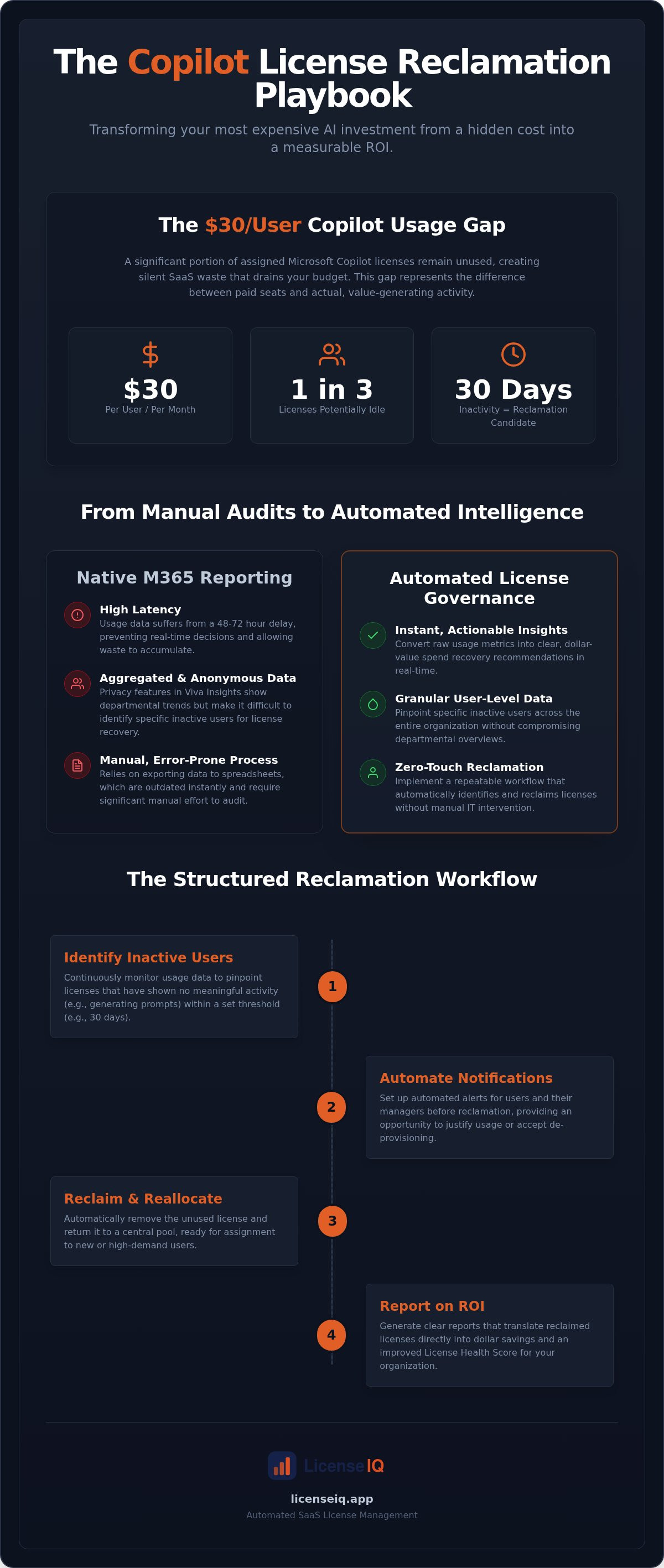
Observation without action is a waste of administrative resources. Once you establish a baseline for tracking microsoft copilot adoption and usage, you must execute a structured reclamation workflow. This process transforms raw data into direct spend recovery. A disciplined approach ensures that your AI budget is always directed toward high-impact users while eliminating the financial drag of inactive seats. Follow these five steps to secure your environment:
- Step 1: Define your Inactivity Threshold. Establish a clear window, typically 30 days, where zero meaningful activity triggers a review.
- Step 2: Audit engagement quality. Identify users with low-value interaction, such as those only using Copilot in the Edge browser for basic web searches rather than deep integration in Excel or Teams.
- Step 3: Consult department stakeholders. Notify managers of underutilized assets to ensure no critical workflows are interrupted by a license change.
- Step 4: Execute the reclamation. Reassign the license to a user on the waiting list or terminate the seat to stop the billing cycle immediately.
- Step 5: Automate the loop. Use a system that performs these steps continuously to prevent the "Usage Gap" from widening again.
Setting Inactivity Thresholds
The 30-day mark is the industry standard for premium AI seats. It provides enough time to account for standard vacations while remaining aggressive enough to catch waste early. You should account for specific exceptions, such as medical leave or seasonal roles, to avoid unnecessary friction. An Inactivity Threshold is a policy anchor that determines the specific duration of non-usage required to trigger an automated license review or reclamation. This setting ensures your governance remains objective and data-driven.
The Reclamation Communication Plan
Removing a high-tier license can sometimes trigger "AI resentment" among staff. To mitigate this, frame the change as a resource optimization effort rather than a performance critique. You can offer a "Standard" tier for basic needs while reserving premium seats for power users. Consult our Microsoft 365 License Types Guide to understand which alternatives best fit your team's actual usage patterns. Clear communication prevents organizational friction and maintains a focus on efficiency.
Manual workflows are too slow for the fast-paced AI market. To eliminate human error and secure your budget, you should deploy Automated Governance Workflows to handle license reclamation instantly.
Recovering Your AI Spend with LicenseIQ
Passive monitoring is a financial liability in a high-cost AI environment. While native tools provide a rear-view mirror perspective, LicenseIQ offers a real-time command center for your entire M365 tenant. The platform automates the complex process of tracking microsoft copilot adoption and usage, removing the administrative burden from your IT team. It doesn't just display engagement metrics; it translates raw data into immediate dollar-value recommendations. By identifying exactly where your capital is underutilized, you can transition from speculative spending to data-driven investment.
Organizations leveraging the LicenseIQ Platform frequently achieve a 35% reduction in M365 spend through continuous hygiene. This isn't a one-time audit result but the outcome of a vigilant system that never stops auditing. Our Spend Recovery Dashboard highlights obscured details that native reports miss, such as licenses assigned to offboarded employees or users who have never moved beyond basic web searches. This level of transparency is the cornerstone of effective corporate resource management.
Instant Spend Discovery
Clarity shouldn't take weeks of manual data entry. LicenseIQ scans your tenant in under five minutes to provide an immediate License Health Score. This score is a vital KPI for CIOs and financial leaders who must justify IT budgets to the board. It offers a precise measurement of environment efficiency, distinguishing between productive assets and pure waste. You can check your M365 Health Score today at LicenseIQ.app to uncover hidden savings instantly. This rapid discovery phase is the first step toward total operational transparency.
Continuous Financial Accuracy
The greatest risk to your IT margin is the gap between point-in-time audits. Reactive governance allows waste to accumulate for months before it's detected. LicenseIQ solves this by integrating Automated Governance Workflows directly into the employee lifecycle. When a user hits your predefined inactivity threshold, the system triggers a reclamation sequence without manual intervention. This proactive approach ensures that your license count always mirrors your actual needs. The ROI of automated license intelligence is clear: you eliminate the "Manual Audit Trap" and secure a leaner, more agile AI infrastructure. By making spend recovery an automated habit, you protect your organization's financial health while maximizing the impact of your AI investment.
Secure Your AI ROI with Automated Governance
The transition from manual oversight to automated license intelligence is no longer optional for organizations prioritizing financial health. Relying solely on native tools for tracking microsoft copilot adoption and usage leaves your budget vulnerable to latency and obscured waste. By establishing strict inactivity thresholds and implementing automated governance workflows, you transform your M365 tenant from a cost center into a lean, high-performing asset. Meticulous hygiene ensures that your AI strategy is powered by active users, not ghost licenses.
Achieving total operational transparency is the only way to eliminate the financial drag of unused seats. With the LicenseIQ Platform, you can generate a License Health Score for instant clarity and identify opportunities to save up to 35% on your M365 subscriptions. Replace outdated spreadsheets with a vigilant system that protects your resources 24/7. Stop wasting money on unused Copilot licenses; audit your tenant in 5 minutes with LicenseIQ. Take control of your AI investment today and build a more efficient digital future.
Frequently Asked Questions
How do I check my Microsoft Copilot usage in the Admin Center?
In the Microsoft 365 Admin Center, navigate to the Reports section and select Usage. From the dropdown menu, choose Copilot for Microsoft 365 to view specific activity metrics. This report allows for tracking microsoft copilot adoption and usage by highlighting active users versus those with assigned licenses. You should specifically monitor the "Last Activity Date" to identify seats that haven't been utilized in over 30 days, signaling a prime opportunity for spend recovery.
Can I see exactly what prompts my employees are typing in Copilot?
No, Microsoft does not allow administrators to view the specific text of prompts entered by individual users. The reporting interface focus is on activity volume and frequency rather than content. This design maintains employee privacy while ensuring corporate data security protocols remain intact. Administrators can see which applications are being used with Copilot, such as Word or Teams, but the actual inputs and outputs remain obscured from the management dashboard.
What is the difference between Copilot adoption and Copilot usage?
Usage refers to the technical act of opening the application or performing a basic action. Adoption represents the strategic integration of the tool into daily business workflows to generate measurable value. While usage data tells you a license is active, adoption metrics reveal if the user is truly leveraging the AI to save time or improve output. Understanding this distinction is vital for maintaining a high License Health Score across your environment.
How often does Microsoft update the Copilot usage reports?
Native Microsoft 365 usage reports typically experience a latency of 48 to 72 hours. This delay means the data you see today reflects activity from two or three days ago. For organizations requiring real-time financial accuracy, this lag can result in missed opportunities for immediate license reclamation. LicenseIQ overcomes this limitation by providing more frequent scans of your tenant, ensuring your Spend Recovery Dashboard always reflects the most current environment state.
What happens to a user's data if I reclaim their Copilot license?
Reclaiming a Copilot license only removes the user's access to the AI features within their Microsoft 365 apps. Their core data, including emails, OneDrive files, and SharePoint documents, remains completely unaffected because it's tied to their base E3 or E5 subscription. The user simply loses the ability to generate prompts or summarize content. If their role changes, you can reassign the license instantly through your management portal or an automated workflow.
Is there a way to automate the removal of unused Copilot licenses?
Yes, you can use LicenseIQ to implement Automated Governance Workflows that handle license removal without manual IT intervention. The system identifies users who fall below your predefined inactivity threshold and automatically triggers the reclamation process. This eliminates the "Manual Audit Trap" and ensures your license count stays aligned with actual engagement. Automation is the most efficient way to maintain continuous financial hygiene and stop the accumulation of unused subscription costs.
Can LicenseIQ track usage for other Microsoft 365 apps besides Copilot?
Yes, the LicenseIQ Platform is designed to provide oversight for the entire Microsoft 365 ecosystem. While tracking microsoft copilot adoption and usage is a priority for many in 2026, the tool also identifies waste across standard E3 and E5 licenses. It scans for redundant seats, inactive accounts, and unassigned licenses across all M365 applications. This holistic approach allows you to secure a comprehensive Health Score for your entire software investment.
How do I justify the cost of Copilot to my CFO?
Justifying the investment requires moving from qualitative "innovation" claims to quantitative financial data. Use the LicenseIQ Spend Recovery Dashboard to present a clear report of active versus inactive users. By showing a direct path to a 35% reduction in wasted spend, you demonstrate that the AI budget is being managed with fiscal discipline. Highlighting a high License Health Score proves that every dollar spent is tied to a verified, high-impact user.


