

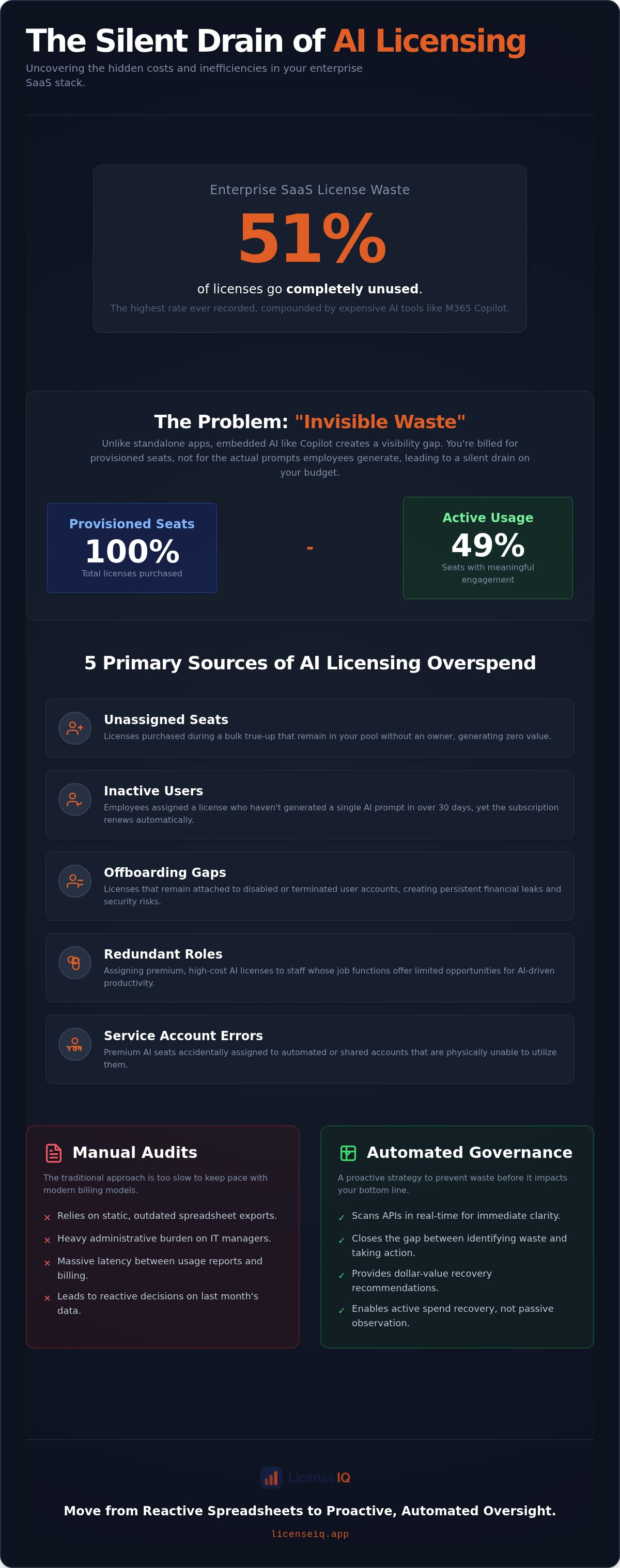
Fifty-one percent of all enterprise SaaS licenses go unused, marking the highest waste rate ever recorded in 2026. This inefficiency hits hardest with high-cost AI tools like Microsoft 365 Copilot, where invisible waste on monthly invoices can quickly reach tens of thousands of dollars. If you're feeling the pressure from leadership to show a clear ROI on your AI investments, you aren't alone. Manual license audits are too slow to keep pace with the new usage-based billing models that charge for overages by default. Focus your efforts on preventing copilot license waste by moving from reactive spreadsheets to proactive, automated oversight.
You deserve total clarity regarding where your budget goes. This guide reveals how to identify inactive seats and underutilized credits using a data-driven approach. We'll show you how to implement automated governance workflows that recover wasted spend in minutes. You'll learn to use a License Health Score to provide the dollar-value recovery recommendations your finance team demands. By the end of this article, you'll have a roadmap to eliminate organizational disorder and ensure every Copilot seat delivers measurable value.
Key Takeaways
- Uncover the hidden sources of AI overspend, ranging from unassigned seats to critical gaps in your offboarding process.
- Replace time-consuming manual audits with real-time API scanning to close the gap between identifying waste and taking action.
- Implement a proactive strategy for preventing copilot license waste by deploying automated governance workflows.
- Utilize a License Health Score as a core KPI to provide executive leadership with clear dollar-value recovery recommendations.
- Leverage a Spend Recovery Dashboard to maintain continuous oversight and ensure the financial health of your AI investments.
The Premium Per-User Leak: Why Copilot Waste Compounds Quickly
Tracking Copilot utilization is significantly more complex than monitoring standalone SaaS applications. Traditional software exists as a discrete entity; you either log in or you don't. Copilot is different. It's an embedded layer within the Microsoft 365 ecosystem. This integration creates a visibility gap known as "Invisible Waste." This is the delta between the seats you've provisioned and the actual daily prompts your employees generate. If a user opens Word but never engages the AI, that license is effectively dormant.
The financial stakes are high for specialized leadership. While standard E3 or E5 licenses cover core productivity, premium AI add-ons represent a substantial percentage increase in your per-user spend. Without a vigilant system, you're paying a premium for capabilities that sit idle. Copilot license waste is a measurement problem, not a billing error.
The Reality of 'Shelfware' in the AI Era
Organizations often fall into the psychological trap of bulk-purchasing licenses to ensure immediate availability for all departments. This "just in case" provisioning creates modern shelfware. Enthusiastic bulk-buying leads to a surplus of licenses that never reach the hands of power users. Traditional Software Asset Management (SAM) frameworks often fail here. They focus on whether software is installed, but they can't capture the nuance of AI interaction. You need to see the prompts, not just the presence of the app, to ensure your resources are working for you. Proactive oversight is the only way to stop this silent drain on your budget.
Why Manual Audits Can't Keep Up
Manual audits rely on Entra ID exports and static reports that are often outdated before the analysis is complete. There's a massive latency between usage reports and billing cycles. Tracking usage across Word, Teams, and Excel simultaneously is a heavy administrative burden for any IT manager. Manual tracking leads to "stale data" decision-making, where you're reacting to last month's habits rather than today's needs. By the time you identify an inactive user through a spreadsheet, you've likely paid for another billing cycle of underutilization. Relying on slow, human-led processes is the primary hurdle in preventing copilot license waste. To maintain financial health, you need a system that scans APIs in real-time and provides immediate clarity. Only then can you move from passive observation to active spend recovery.
Identifying the 5 Primary Sources of AI Licensing Overspend
Stopping financial drain requires a granular view of your tenant. While many IT managers focus on total seat count, the real leaks are often obscured within operational silos. Identifying these sources is the first step toward preventing copilot license waste and reclaiming your budget. Five primary areas consistently drive overspend:
- Unassigned seats: Licenses purchased during a bulk true-up that remain in the pool without an owner.
- Inactive users: Employees who have the license assigned but haven't generated a prompt in 30 days.
- Redundant roles: Staff members whose job functions offer limited opportunities for AI-driven productivity.
- Offboarding gaps: Licenses that remain attached to disabled or terminated user accounts.
- Service account errors: Premium AI seats accidentally assigned to automated or shared accounts that cannot utilize them.
Licenses tied to disabled accounts are particularly damaging. These "zombie licenses" continue to draw from your monthly budget while providing zero operational return. Furthermore, a significant gap exists between "Power Users" and "Passive Users." A Power User transforms their workflow with daily prompting, whereas a Passive User may only use the tool once a month. Assigning the same premium license to both roles is an inefficient use of resources. We use the License Health Score as the definitive metric to quantify these leaks and prioritize recovery efforts.
Onboarding and Offboarding Gaps
Misalignment between HR and IT departments is a primary cause of licensing disorder. When an employee leaves, their account is often disabled in Entra ID, but the premium Copilot seat remains active and billed. This oversight creates a persistent financial leak. Leaving premium AI access active for former employees also introduces unnecessary security risks. To secure your data and stop the drain, follow a structured Office 365 Offboarding Checklist 2026 to ensure every seat is reclaimed the moment it's no longer needed.
Redundant Roles and Marginal AI Benefit
Not every job function benefits equally from generative AI. Effective monitoring and reducing software licensing waste involves identifying roles where the AI benefit is marginal. You must distinguish between "occasional" usage, which might be handled by standard tools, and "transformative" usage that justifies a premium seat. Right-sizing your environment based on actual functional requirements ensures that your high-cost licenses are reserved for those who drive the most value. If you want to see exactly where your budget is being underutilized, you can connect your tenant to LicenseIQ for an immediate scan.
Manual Spreadsheet Audits vs. Automated Governance Workflows
Traditional IT management relies on Entra ID exports and cross-referencing massive CSV files. This manual approach is inherently reactive and labor-intensive. In contrast, real-time API scanning provides immediate transparency into usage patterns across your entire tenant. The fundamental problem isn't just seeing the waste; it's the "Actionability Gap." Seeing a dormant license is useless if you don't have the workflows to recover the spend instantly. While manual audits might identify a problem after the billing cycle ends, automated systems allow for immediate remediation. This proactive stance is the cornerstone of effective financial management in 2026.
The Labor Cost of Manual License Management
IT departments often lose dozens of hours every month to license reconciliation. In complex M365 environments with thousands of users, the risk of human error is exceptionally high. A single misread row in a spreadsheet can lead to thousands in overspend. Ineffective Software License Management has been shown to cost organizations billions, as documented in GAO findings. Spreadsheets are the silent killer of SaaS FinOps efficiency. They provide a snapshot of the past, not a control panel for the present. Relying on them ensures your data is stale before the audit even finishes. To maintain financial health, you must move beyond these fragmented, manual processes.
AI-Native Intelligence: The New Standard
Modern governance requires a shift from simple data collection to automated spend recovery. By leveraging the Model Context Protocol (MCP), the LicenseIQ platform enables deeper integration with your productivity stack. This allows for a level of oversight that human auditors simply can't match. We position LicenseIQ as the proactive guardian of your corporate resources, connecting in minutes to provide actionable insights. This level of precision ensures that every dollar spent on AI is tied to a specific operational outcome.
Our Microsoft 365 License Optimization: The 2026 Guide details how automated systems bridge the gap between insight and execution. LicenseIQ recovers up to 35% of spend by identifying and neutralizing waste through Automated Governance Workflows. This isn't just about reporting; it's about reclaiming capital. By preventing copilot license waste through automation, you ensure your AI investments scale without bloating your budget. When you move away from manual spreadsheets, you remove the latency that allows waste to compound. Automated governance transforms license management from a monthly chore into a continuous, value-driven process.
The 4-Step Playbook for Continuous Copilot License Recovery
Operational efficiency requires a repeatable process. Theoretical knowledge of license waste doesn't save money; execution does. IT leadership needs a tactical framework to move from observation to spend recovery. This 4-step playbook provides the structure necessary for preventing copilot license waste at scale. By following these steps, you transform your tenant from a source of financial drain into a model of optimized resource allocation.
Step 1: Establishing a Baseline with the Health Score
You can't optimize what you haven't measured. The first priority is to establish a clear, data-driven baseline of your current environment. Connect the LicenseIQ platform to your M365 tenant in under five minutes to initiate a deep-scan audit. The system immediately calculates your License Health Score, a single KPI that reflects the financial health of your AI investments. This score is accompanied by specific dollar-value recommendations, providing the immediate clarity required by finance leads. You move from guessing at waste to seeing exactly where every dollar is leaking.
Step two involves identifying inactive and redundant seats through AI-driven insights. The platform analyzes interaction patterns, not just login timestamps. It distinguishes between power users and those who have never generated a prompt. This granular visibility allows you to target recovery efforts where they will have the most impact without affecting organizational productivity.
Step 3: Executing Automated Recovery Workflows
Insights only deliver value when they are followed by action. Executing recovery workflows allows you to reclaim unused licenses immediately. Understanding the difference between unassigning a license and reclaiming it is vital for long-term recovery. Reclaiming involves moving the license back into a managed pool for future use, ensuring you don't over-purchase during the next true-up. Automation ensures this process is frictionless and does not disrupt active users. For a deeper look at these processes, consider Mastering the Microsoft 365 License Management Lifecycle to ensure long-term compliance and savings.
The final step is to establish automated governance policies. These policies act as a vigilant digital auditor, monitoring usage in real-time. If a user remains inactive for a defined period, the system automatically triggers a reclamation workflow. This proactive approach ensures that shelfware never accumulates in your tenant again. You maintain a lean, efficient environment that scales only when necessary. Connect your tenant to LicenseIQ now to see your Health Score and begin the recovery process immediately.
Scaling Efficiency: How LicenseIQ Automates Spend Discovery
The Spend Recovery Dashboard serves as your organization's single source of truth. It consolidates fragmented data into a clear, unified view of your M365 environment. By providing real-time visibility, the dashboard eliminates the guesswork associated with preventing copilot license waste. You see exactly which seats are active, which are dormant, and where your credits are being consumed inefficiently. This level of oversight is essential for maintaining a lean operational footprint in a usage-based billing era.
The License Health Score acts as a recurring financial hygiene metric. It provides a standardized KPI that specialized leadership can use to measure license efficiency across departments. This isn't a passive report; it's a call to action. By monitoring this score monthly, you ensure your organization remains one step ahead of SaaS inflation. Transitioning from passive monitoring to automated governance ensures that waste is neutralized before it compounds into a significant financial deficit.
Total Clarity in Complex Environments
LicenseIQ uncovers the obscured details that manual audits inevitably miss. In complex tenant structures, licenses often hide behind service accounts or forgotten department allocations. We resolve this organizational disorder by providing total clarity through our AI-native software intelligence platform. The platform doesn't just sit on the sidelines; it acts as an active participant in your company's growth. By reclaiming capital from underutilized seats, you free up resources for strategic initiatives. This shift from disorder to transparency distinguishes our platform as a vital guardian of corporate resources.
Next Steps: Reclaiming Your AI Budget
The path to optimization is fast and direct. You can begin preventing copilot license waste immediately by leveraging our SMB-specific design that prioritizes precision over technical complexity. A 5-minute license scan provides the immediate ROI needed to justify your software intelligence strategy. These recovery insights are designed for rapid comprehension by CFOs and financial leads. When presenting to leadership, focus on the clear dollar-value recommendations provided by the Spend Recovery Dashboard. You're not just asking for a tool; you're presenting a solution for sustained financial health. Start your automated license audit with LicenseIQ today to stop the drain on your AI budget and ensure your resources are working with maximum precision.
Eliminate AI Spend Disorder Today
Relying on manual audits in a usage-based billing environment is a recipe for financial leakage. You need a vigilant system that moves as fast as your AI adoption. By shifting from reactive spreadsheets to real-time API oversight, you close the visibility gap that allows dormant seats and credit overages to drain your budget. The License Health Score provides the transparency you need to satisfy leadership and ensure every seat delivers measurable ROI.
Effective management isn't about cutting tools; it's about optimizing resource allocation. Focus your strategy on preventing copilot license waste through automated governance. LicenseIQ provides an AI-native software intelligence platform that connects to your tenant in just five minutes. You can identify underutilized assets immediately and implement workflows to recover up to 35% of your spend. Don't let organizational disorder compromise your growth. Discover and recover your wasted M365 spend with LicenseIQ. Take control of your digital resources and build a more resilient, data-driven organization today.
Frequently Asked Questions
How do I know if a Copilot license is actually being used?
Usage is verified by analyzing prompt activity rather than just login events. Standard Microsoft 365 reports often show active logins, but they fail to capture the "Invisible Waste" of users who never engage the AI features. An AI-native software intelligence platform scans APIs to identify these dormant seats. This level of oversight ensures you only pay for licenses that actively contribute to your organization's productivity.
What is the most common cause of Microsoft 365 Copilot license waste?
The primary cause is "zombie licenses" tied to disabled or terminated accounts. Misalignment between HR and IT departments often results in premium seats remaining active after an employee leaves the company. These seats continue to draw from your budget without providing any operational return. Identifying these offboarding gaps is a critical first step in maintaining the financial health of your AI investments.
Can I automate the removal of inactive Copilot licenses?
Yes, you can utilize Automated Governance Workflows to streamline the reclamation process. These workflows monitor real-time usage patterns and automatically trigger protocols when a seat remains dormant for a defined period. This proactive approach is the most efficient method for preventing copilot license waste. It removes the burden of manual reconciliation from your IT team while ensuring your tenant remains lean and cost-effective.
How often should I conduct a Copilot license audit?
You should transition from periodic manual audits to continuous, real-time monitoring. Because usage-based billing models can trigger overage charges instantly, a monthly or quarterly check is no longer sufficient to stop financial leaks. A Spend Recovery Dashboard provides a constant stream of actionable insights. This allows you to catch and neutralize waste before it compounds into a significant deficit on your next invoice.
Is it possible to track Copilot usage across Word, Excel, and Teams in one view?
Yes, a specialized intelligence platform consolidates usage data from across the entire Microsoft 365 ecosystem into a single source of truth. This provides total clarity on how employees interact with AI in different applications. You can see which departments are driving value and which roles are underutilizing their seats. This unified view is essential for making data-driven decisions about role-based license assignments.
What happens to user data if I reclaim their Copilot license?
Reclaiming a Copilot license does not delete the user's primary files, emails, or chat history. It simply removes the generative AI capabilities from their productivity suite. The user's core data remains secure and accessible within the standard Microsoft 365 environment. This ensures that you can optimize your software spend without risking the loss of vital corporate information or interrupting standard business operations.
Does removing a license impact the user's standard M365 E3 or E5 access?
No, Copilot is a premium add-on license that functions independently of the foundational seat. Reclaiming the AI license only affects generative features like drafting assistance or meeting summarization. The user's access to Outlook, SharePoint, and other core E3 or E5 services remains unchanged. This allows you to right-size your environment by removing high-cost AI features from users who don't utilize them while maintaining their basic productivity tools.


