

Your Microsoft 365 environment is likely leaking 35% of its budget into a void of inactive accounts. Manual license management isn't just tedious; it's a financial liability that grows every month. You know the frustration of working from outdated spreadsheets and the constant struggle to identify which users are truly active versus those who haven't logged in for weeks. There's always that lingering fear of accidentally deprovisioning a critical executive license during a routine cleanup.
Manual audits are simply too slow for modern technical operations. This article provides a clear path forward by detailing the process of setting up an automated license harvesting workflow. You'll learn how to build a continuous, AI-driven system that identifies waste and reclaims licenses automatically. We'll show you how to utilize a License Health Score for total visibility and deploy automated governance workflows that turn organizational disorder into a streamlined, cost-effective engine.
Key Takeaways
- Stop relying on manual "audit-and-delete" cycles and adopt a continuous, AI-native process that reclaims unused seats in real-time.
- Protect critical executive accounts by segmenting users and establishing precise inactivity triggers tailored to each department's specific needs.
- Learn the exact technical steps for setting up an automated license harvesting workflow to gain total visibility into your tenant within minutes.
- Use the License Health Score to establish a clear baseline of organizational waste and track your progress toward a 35% reduction in M365 spend.
- Centralize your financial recovery efforts with a Spend Recovery Dashboard that eliminates the "leakage" costs typical of traditional monthly audits.
What is an Automated License Harvesting Workflow?
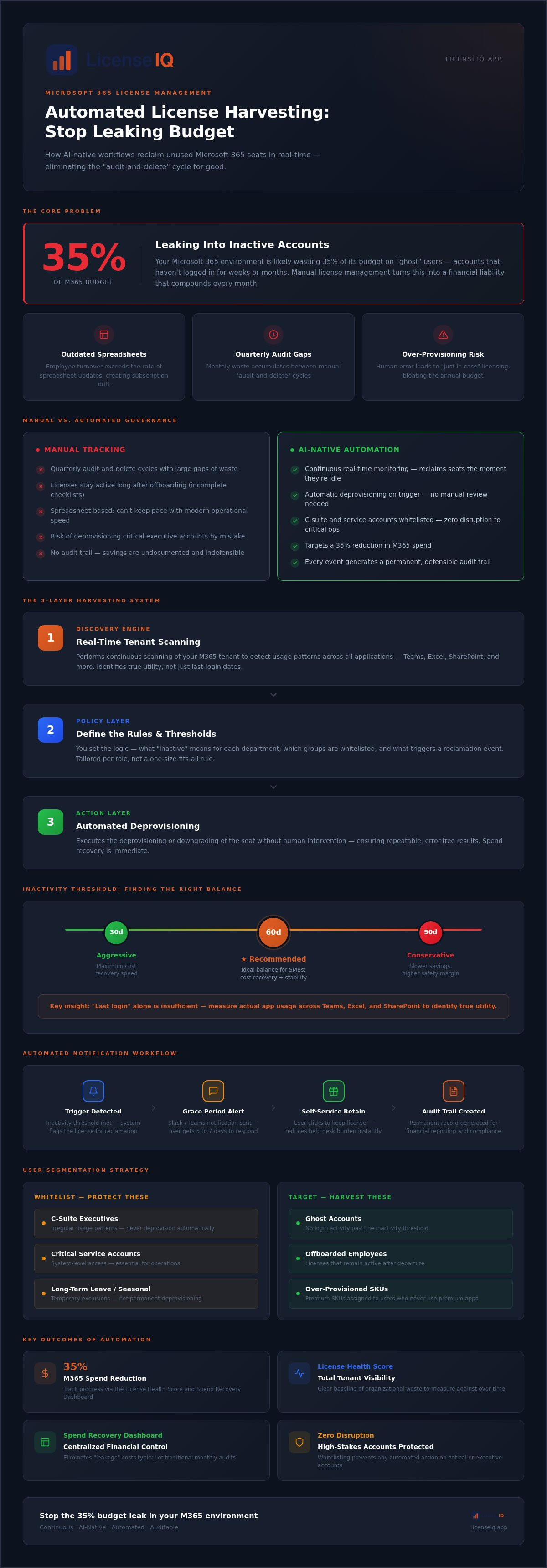
License harvesting is the proactive process of identifying unused software seats and returning them to the available pool. In a Microsoft 365 environment, this means detecting users who no longer require their assigned SKU and reclaiming that capital immediately. Setting up an automated license harvesting workflow transforms a reactive chore into a continuous feedback loop. It ensures your organization doesn't pay for "ghost" users who haven't logged in for weeks or months.
Legacy management relies on "audit-and-delete" cycles. These are typically quarterly events where IT admins manually scan spreadsheets to find inactive accounts. This approach is fundamentally flawed. It creates massive windows of financial waste between audits. AI-native workflows change this dynamic by monitoring tenant health in real-time. By integrating the core principles of software asset management, these systems provide a vigilant layer of oversight that maintains operational leaness.
The system functions through inactivity triggers. These are specific thresholds, such as 30 or 60 days without a login, that initiate a harvesting event. Once a trigger is met, the workflow automatically deprovisions the license. This creates immediate spend recovery. Instead of waiting for a manual review, the business stops losing money the moment a license is deemed unnecessary. Transitioning to this model turns unassigned or underutilized seats into recovered budget.
The Core Components of a Harvesting System
A robust harvesting system requires three distinct layers to function effectively. First, the discovery engine performs real-time scanning of your M365 tenant to detect usage patterns across all applications. Second, the policy layer allows you to define the logic, such as what constitutes "inactive" for a specific department. Finally, the action layer executes the deprovisioning or downgrading of the seat without human intervention. This structure ensures that setting up an automated license harvesting workflow leads to repeatable, error-free results.
Why Manual Tracking Fails in 2026
Manual tracking cannot keep pace with modern operational speed. Employee turnover often exceeds the rate of spreadsheet updates, leading to significant subscription drift. Licenses frequently remain active long after an employee has offboarded because the manual checklist was incomplete. Additionally, human error often leads to over-provisioning "just in case," which bloats the annual budget. Relying on the LicenseIQ platform removes this guesswork, replacing organizational disorder with total clarity and a 35% reduction in waste.
Establishing Your Reclamation Policies and Triggers
Automation is only as effective as the logic driving it. Without precise policies, you risk deprovisioning essential users or missing significant savings. Setting up an automated license harvesting workflow requires a tiered approach to risk that accounts for different user roles and departmental needs. It’s not a one-size-fits-all solution; it's a surgical strike against waste.
Effective segmentation is your first line of defense. You must separate standard users from critical service accounts and C-suite executives who may have irregular usage patterns. By whitelisting these groups, you ensure that your automated governance workflows never disrupt high-stakes operations. Additionally, you should set threshold alerts for your unassigned license pool. If your inventory of available seats exceeds a specific number, the system should flag it before you authorize new purchases.
Defining Inactivity Thresholds
Determining what constitutes "inactivity" is a strategic decision. A simple "last login" date is often insufficient because a user might log in to check email but never touch the expensive desktop applications in their SKU. You need to analyze specific app usage across Teams, Excel, and SharePoint to identify true utility. For employees on long-term leave or seasonal workers, your policy should allow for temporary exclusions rather than permanent deprovisioning. For most SMBs, a 60-day inactivity threshold provides the ideal balance between aggressive cost recovery and operational stability.
Automated Notification Workflows
Transparency prevents friction between IT and the rest of the organization. Before a license is reclaimed, the system should trigger a grace period notification via Slack or Teams. This gives the user a window, typically five to seven days, to justify their need for the software. Providing a self-service option where users can click a button to retain their license reduces the administrative burden on your help desk. Every reclamation event must generate a permanent audit trail. This documentation is vital for financial reporting and ensures that every dollar saved is backed by clear, defensible data.
5 Steps to Setting Up Your Harvesting Logic
Moving from a static policy to a functional system requires a disciplined technical approach. Setting up an automated license harvesting workflow isn't just about deleting users; it's about building a precise engine for capital recovery. Follow these five steps to transition from organizational disorder to total clarity.
- Connect the API: Securely link your M365 tenant to your governance platform. This provides the raw data needed for analysis.
- Establish the Baseline: Run an initial scan to generate your License Health Score. This metric identifies your immediate savings potential.
- Map License Tiers: Categorize users by their assigned SKU, such as E3, E5, or F3. This step uncovers opportunities to downgrade over-licensed users to more cost-effective tiers.
- Configure Reclaim Actions: Set the automated triggers that deprovision licenses once inactivity thresholds are met. This is the core of the harvesting engine.
- Enable Persistence: Activate continuous monitoring. This prevents subscription drift by ensuring that new waste is identified the moment it occurs.
Connecting the Discovery Engine
Integration is the most critical technical hurdle. You must grant the system specific permissions to scan and modify your tenant environment. For initial discovery, read-only permissions allow the engine to map usage patterns without making changes. Once you're ready to automate recovery, you'll need to enable write permissions for deprovisioning. Modern authentication protocols ensure this connection remains secure. The LicenseIQ platform simplifies this entire process, allowing for a complete setup in under five minutes.
Activating the AI-Native Governor
Traditional filters often miss subtle usage patterns that indicate a redundant license. By leveraging the Model Context Protocol, the system makes intelligent decisions based on cross-application data. Before going live, utilize "Dry Run" modes to simulate how your policies will impact the environment. This allows you to verify that your logic is sound before the system executes a single deprovisioning event. AI-native oversight identifies obscured waste that manual audits simply cannot see, ensuring your resources are always optimized.
Manual vs. Automated Governance: A Financial Comparison
Manual audits are inherently reactive. You spend hours every month cross-referencing HR records with M365 admin centers, only to produce a report that's outdated by the time it's finished. Setting up an automated license harvesting workflow replaces this friction with a proactive digital auditor. Instead of a monthly snapshot, you get real-time oversight that scales as your organization grows. SMBs often struggle with this transition because they lack the administrative bandwidth to perform deep usage analysis. Automation removes this dependency, allowing your team to focus on strategic growth rather than spreadsheet maintenance.
The financial delta between manual and automated systems is most visible in the "leakage" period. This is the time between an employee's departure and the moment their license is finally reclaimed. In a manual environment, this gap often spans weeks or even a full billing cycle. Automation closes this window instantly. It ensures that you never pay for a seat that isn't driving value, turning organizational disorder into a streamlined financial engine. This transition provides immediate clarity in complex operational environments, reassuring leadership that resources are being monitored by a vigilant system.
The Real Cost of Subscription Drift
Subscription drift is a silent budget killer that compounds over time. Consider a single unused Microsoft 365 E5 license sitting idle. While the individual cost might seem manageable, the cumulative effect across a growing SMB is devastating. When you account for the average 35% waste found in unmonitored tenants, the need for a spend recovery playbook becomes clear. Because the system identifies waste immediately, an automated harvesting setup typically pays for itself within the first 30 days of operation. It provides the total visibility required to make data-driven decisions about your software spend.
Security Benefits of Automated Reclamation
Financial waste isn't the only risk of manual oversight. Traditional audits frequently overlook "zombie accounts"; these are active identities that are no longer monitored by a human user but still possess full access to corporate data. These accounts represent significant security vulnerabilities. By implementing an Office 365 offboarding checklist that triggers automated reclamation, you close these gaps before they can be exploited. This ensures your environment adheres to "least privilege" access models by removing licenses the moment they're no longer required.
Stop letting manual processes drain your resources. Use LicenseIQ to automate your governance and secure your tenant today.
Optimizing the Lifecycle with LicenseIQ
Setting up an automated license harvesting workflow shouldn't be a complex engineering project that drains your technical resources. LicenseIQ provides a streamlined command center designed specifically to eliminate organizational disorder. The Spend Recovery Dashboard serves as your primary interface for monitoring license utility. It replaces vague estimates with precise, data-driven insights. By centralizing your governance, you gain the authority to reclaim capital without the risk of breaking critical user workflows.
The License Health Score provides immediate clarity on organizational waste. It identifies unassigned seats, underutilized SKUs, and redundant accounts that contribute to budget bloat. Unlike generic tools, LicenseIQ delivers actionable dollar-value recommendations. You see exactly how much capital can be recovered by deprovisioning specific licenses or downgrading users to more appropriate tiers. This results-first approach ensures that your core value proposition is always visible to leadership.
Continuous Spend Recovery
A one-time audit is a temporary fix for a recurring problem. True financial health requires moving beyond periodic cleanups to a permanent state of operational hygiene. By mastering the Microsoft 365 license management lifecycle, you prevent subscription drift from re-entering your environment. LicenseIQ enables up to 35% average savings on M365 subscriptions by acting as a proactive digital auditor. It doesn't just find waste; it prevents it from accumulating in the first place.
Getting Started in Under 5 Minutes
Busy IT leaders require immediate clarity without the burden of enterprise bloat. The simplicity of the connection process is a cornerstone of the LicenseIQ platform. You can link your M365 tenant in minutes using secure, modern authentication protocols. Once connected, the AI-native engine generates your first Spend Recovery report almost instantly. This report provides a comprehensive roadmap for setting up an automated license harvesting workflow that aligns with your specific business logic. You get total visibility before you commit to any automated actions. Start your 5-minute audit with LicenseIQ to secure your resources and stop the financial leak today.
Reclaim Your M365 Budget Today
Manual license management is a consistent drain on your technical and financial resources. By setting up an automated license harvesting workflow, you replace organizational disorder with a vigilant, AI-native system that monitors your tenant in real-time. This proactive approach eliminates the "leakage" that typically costs organizations up to 35% of their annual subscription spend. You've learned how clear inactivity triggers and automated deprovisioning ensure your resources are always aligned with actual usage.
The transition from manual spreadsheets to total clarity doesn't require a complex implementation. You can deploy an Instant Spend Recovery Dashboard and start identifying obscured waste within minutes. Don't let inactive accounts continue to deplete your capital. It's time to secure your environment and optimize your software lifecycle with a precise, data-driven engine. Take the first step toward a leaner, more secure operation today.
Stop wasting spend; connect LicenseIQ in 5 minutes.
Frequently Asked Questions
What is automated license harvesting?
Automated license harvesting is a continuous governance process that identifies inactive software seats and reclaims them for reuse. Unlike manual audits, this system uses AI-native software intelligence to monitor usage patterns in real-time. It ensures your organization only pays for active users, converting underutilized licenses into immediate budget recovery. This method eliminates the lag time and errors associated with traditional spreadsheet-based tracking.
Is it safe to automate M365 license reclamation?
Yes, it's safe when you implement precise whitelisting and inactivity triggers. Setting up an automated license harvesting workflow allows you to exclude critical executive accounts and service identities from deprovisioning. By using a "Dry Run" mode, you can test your policies before they go live. This ensures that only truly redundant licenses are reclaimed while maintaining the integrity of your core business operations.
How much can I save with an automated workflow?
Organizations typically save up to 35% on their Microsoft 365 subscription costs. These savings come from identifying unassigned licenses, downgrading over-licensed users, and reclaiming seats from inactive accounts. The Spend Recovery Dashboard provides specific dollar-value recommendations, allowing you to see the exact financial impact of your optimization efforts. This continuous monitoring prevents the gradual budget bloat common in unmanaged environments.
Does license harvesting delete user data?
No, license harvesting focuses on the seat assignment, not the deletion of underlying user data. When a license is reclaimed, the user's mailbox and OneDrive content enter a standard grace period defined by your Microsoft 365 retention policy. You can reassign a license at any time to regain access. This process is designed to optimize spend without compromising your organization's data retention or compliance requirements.
Can I exclude certain users from the harvesting workflow?
Yes, you can easily exclude specific users, departments, or roles from the automation logic. Your policy layer should whitelist critical accounts such as the C-suite, legal teams, or essential service accounts that require constant access regardless of login frequency. This granular control ensures that your automated governance workflows focus exclusively on low-risk areas where waste is most prevalent, providing both efficiency and operational security.
How often should the harvesting scan run?
The harvesting engine should run continuously to provide real-time oversight. While manual audits might happen quarterly, an AI-native platform like LicenseIQ monitors your tenant daily. This frequency ensures that you identify subscription drift the moment it occurs. Continuous scanning allows the system to generate an accurate, up-to-date License Health Score, giving you total visibility into your financial hygiene at any given moment.
What happens if a user needs their license back after it is harvested?
If a user requires access after their seat has been reclaimed, you simply reassign an available license from your pool. The automated workflow is designed to manage the inventory, not permanently ban users. Many organizations integrate a self-service option where users can request license restoration through automated notifications. This ensures that while you eliminate waste, you don't create permanent roadblocks for employees who occasionally need specific tools.
Do I need a technical degree to set this up?
No, you don't need a technical degree or specialized engineering skills to deploy this system. LicenseIQ is designed for SMB managers and IT leads, connecting to your M365 tenant in minutes via a secure API. Setting up an automated license harvesting workflow is simplified through a user-friendly Spend Recovery Dashboard that provides clear, actionable insights. This approach makes professional-grade license governance accessible to any business manager focused on efficiency.


