

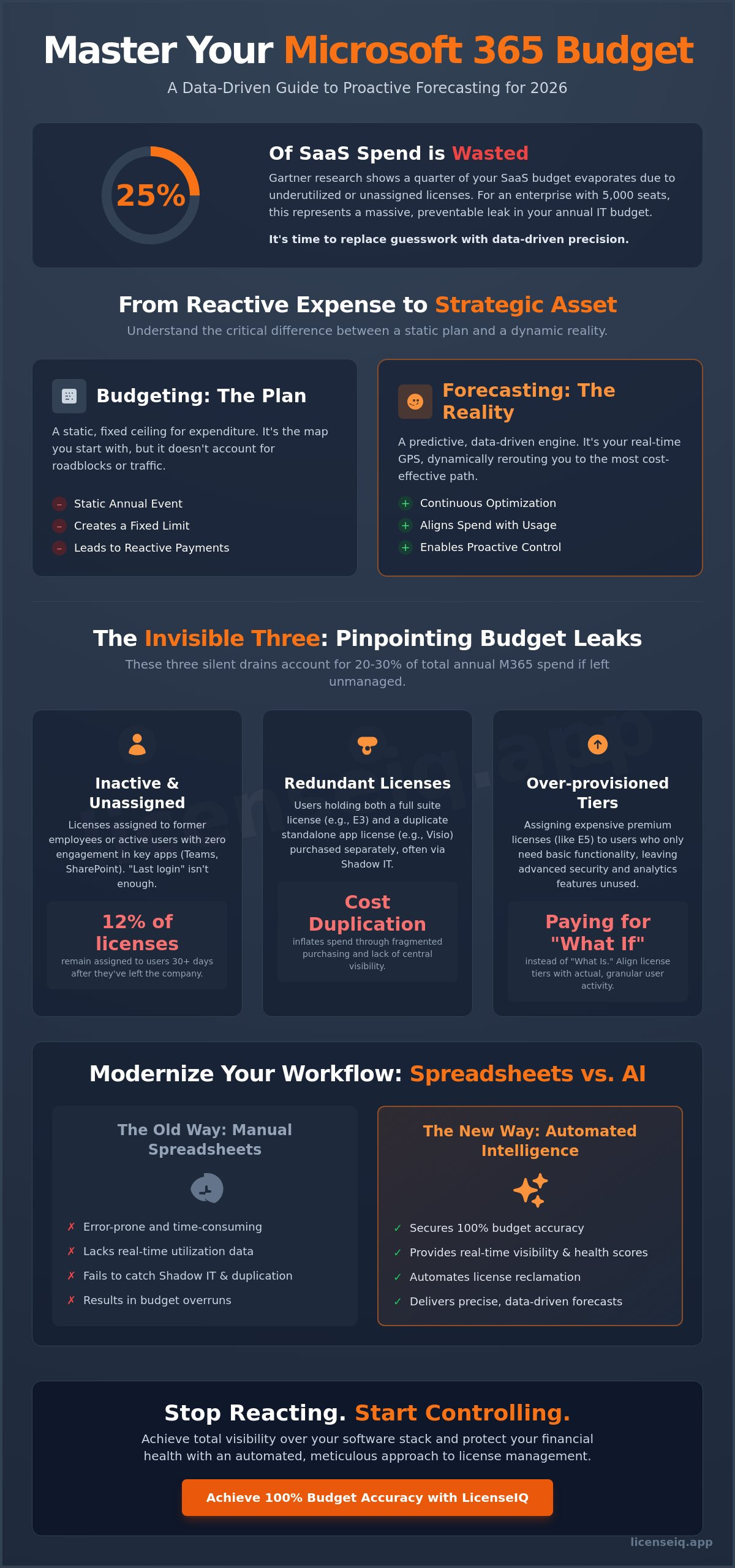
According to Gartner research, 25% of SaaS spend is wasted on underutilized or unassigned licenses. For an enterprise with 5,000 seats, this inefficiency represents a massive leak in the annual IT budget that often goes unnoticed until the renewal date. You've likely felt the frustration of unpredictable billing fluctuations and the limitations of manual spreadsheets that fail to track license utilization across departments. It's time to replace guesswork with precision through proactive microsoft 365 budget forecasting. Managing complex licensing tiers shouldn't feel like a shot in the dark.
We promise to provide a data-driven framework that identifies waste before it hits next year's bottom line. You'll master your SaaS spend by implementing a repeatable template that aligns IT headcount directly with software utilization. This article breaks down the exact steps to reduce unassigned license costs and gain total visibility over your digital environment for 2026. Stop reacting to invoices and start controlling your financial health with an automated, meticulous approach to license management.
Key Takeaways
- Distinguish between static budget limits and proactive forecasting to transform your IT spend from a reactive expense into a strategic asset.
- Identify and eliminate the "Invisible Three"—inactive users, redundant licenses, and over-provisioned tiers—to stop waste before it impacts your bottom line.
- Implement a 5-step data-driven framework for microsoft 365 budget forecasting to ensure your license counts align perfectly with actual utilization.
- Modernize your workflow by replacing error-prone manual spreadsheets with automated intelligence that secures 100% budget accuracy.
- Gain total visibility into your software stack with a real-time Health Score that uncovers hidden costs and protects your organization's financial health.
The Fundamentals of Microsoft 365 Budget Forecasting in 2026
Microsoft 365 budget forecasting is the proactive calculation of future license needs based on granular utilization data. It isn't a passive administrative task. It's a strategic operation that ensures your IT spend aligns with actual consumption. In the 2026 landscape, a simple 5% year-over-year increase is a recipe for financial waste. The complexity of modern SaaS ecosystems requires a shift toward FinOps principles. This methodology treats license management as a continuous optimization loop rather than a static annual event.
Understanding the distinction between financial structures is vital. The budget of a business typically acts as a fixed ceiling or a limit on total expenditure. Forecasting, however, is the predictive engine that tells you where you're actually headed. It's the difference between having a map and having a real-time GPS. By adopting microsoft 365 budget forecasting, IT leaders move from reactive payment cycles to proactive resource allocation. This visibility is the only way to protect corporate resources from the "death by a thousand cuts" caused by unmanaged seat counts.
Why Traditional "Guess-and-Check" Budgeting Fails
Relying on headcount-based projections is no longer effective. This method ignores the hidden cost of unassigned licenses that leak through the cracks during employee offboarding. The problem is compounded by what is saas sprawl, where redundant tools and shadow IT accounts create a fragmented environment. When you don't have a single source of truth for utilization, you're paying for features your team doesn't use. Microsoft’s history of annual price adjustments, which saw increases between 9% and 15% in previous cycles, means that even small errors in your seat count can lead to six-figure budget overruns.
Forecasting vs. Budgeting: Knowing the Difference
Budgeting is your plan; forecasting is your reality. To manage costs effectively, you must treat forecasting as a monthly health check. It relies on historical utilization data to inform every purchasing decision. This approach identifies surplus licenses before they become a permanent line item on your invoice. M365 budget forecasting is a dynamic alignment of license inventory with actual user activity. By using precise data, organizations can often reduce license waste by 25% or more within the first 90 days. Stop treating your M365 subscription as a fixed utility and start managing it as a flexible, optimized asset.
Key Variables That Disrupt Your M365 Budget Accuracy
Precision in microsoft 365 budget forecasting fails when IT leaders overlook the "Invisible Three": inactive users, redundant licenses, and over-provisioned tiers. These leakages often represent 20% to 30% of total annual spend. Budgeting based on headcount alone ignores the reality of how software is actually consumed. Shadow IT remains a persistent threat to accuracy. When departments purchase individual Visio or Project licenses on corporate cards, they bypass central procurement and inflate hidden costs. Effective microsoft 365 cost management requires granular visibility into app-level usage to catch these discrepancies.
Accurate forecasting also depends on understanding your Total Cost of Ownership (TCO). This includes the direct subscription fees and the indirect costs of managing a bloated environment. To maintain a lean budget, you must account for these four variables:
- Unassigned licenses sitting in the portal "just in case."
- Duplicate licenses where a user has both a standalone app and a suite license.
- Offboarding delays that leave licenses active for departed employees.
- Underutilized premium features in E5 tiers.
The Inactive User Drain
In 2026, defining inactivity goes beyond a simple "last login" date. A user might log in to Outlook but never touch Teams, SharePoint, or the advanced security tools included in their package. Lingering licenses for former employees create a permanent budget deficit. Data shows that 12% of licenses typically remain assigned to users who have left the organization for over 30 days. Automated reclamation is the only way to keep your microsoft 365 budget forecasting accurate. Systems must detect zero engagement and immediately return those licenses to the available pool, preventing unnecessary purchases during the next growth phase.
Tier Mismatch: E3 vs. E5 Forecasting
Defaulting every new hire to an E5 license is a high-risk financial strategy that ignores actual job requirements. While the E5 tier offers critical security and compliance tools, not every role requires them. Forecasting should rely on persona-based licensing. For example, frontline workers often only need F3 capabilities, while knowledge workers might fluctuate between E3 and E5. You can compare the specific feature sets in our guide to Microsoft 365 license types to align roles with the right spend. Using a proactive license auditor helps you identify these mismatches before they trigger an expensive true-up at the end of the fiscal year.
The 2026 Microsoft 365 Budget Forecasting Template
Precision is the only way to manage M365 costs in 2026. Financial leaders no longer accept "estimated" figures. You need a data-backed framework that accounts for every seat and every dollar. Follow this five-step process to build a reliable microsoft 365 budget forecasting model.
- Step 1: Baseline Audit. Determine what you own versus what you've assigned. Effective software asset management practices eliminate the gap between procurement and reality by surfacing ghost licenses immediately.
- Step 2: Utilization Mapping. Audit feature usage. Don't pay for E5 security features if a user only opens Outlook and Word.
- Step 3: Growth Projections. Calculate your planned headcount for 2026. Add a 10% buffer to handle unexpected projects or mid-year hires without emergency budget requests.
- Step 4: Spend Recovery Factor. This is your secret weapon. Subtract the dollar value of identified waste from your total projected spend.
- Step 5: Compliance and Buffer. Account for Microsoft's annual price adjustments and potential true-up costs. This ensures your budget remains resilient against vendor-driven changes.
Step-by-Step Data Collection
Start with the M365 Admin Center. Pull the "Unassigned Licenses" report to see capital sitting idle. Next, identify your "Zombies." These are accounts with zero activity in 30, 60, or 90 days. In a typical 500-seat environment, removing 40 dormant accounts can reclaim over $18,000 in annual spend. Use LicenseIQ to automate this visibility. Quantify these savings before you present your final 2026 numbers to the CFO.
Applying the Spend Recovery Factor
Stop budgeting for 100% of your current stack. Your formula should always be "Total Projected Need minus Recoverable Waste." This approach turns IT from a cost center into an efficiency driver. Implement a "Health Score" to benchmark your microsoft 365 budget forecasting accuracy over time. A high score means your projected spend closely matches actual consumption. A successful forecast identifies at least 15% in recoverable spend to offset growth costs. This strategy allows you to fund new initiatives using money you've already "found" within your existing agreement. It creates a self-funding cycle for IT innovation.
Spreadsheets vs. AI: Modernizing Your Forecasting Workflow
Spreadsheets are static. Your organization is dynamic. Relying on manual Excel tracking for microsoft 365 budget forecasting is a recipe for fiscal inaccuracy. By the time an IT manager aggregates data from multiple global tenants, the information is often 30 days old. This lag makes precision impossible. You're navigating by looking in the rearview mirror. Modern workflows require automated software intelligence that operates in real-time, providing immediate clarity where manual processes offer only confusion.
The High Cost of Manual Forecasting
Manual tracking is slow and error-prone. Research indicates that organizations using manual methods face license error rates as high as 20% due to stale data and human oversight. When you compare licenseiq vs manual tracking, the cost of the latter includes more than just wasted hours. It includes the financial weight of "zombie" accounts and unused E5 features that continue to bill month after month.
- Time-to-insight: Manual reports take weeks to compile. In a fast-moving enterprise, month-old data is useless for proactive decision-making.
- License Complexity: Tracking "mix-and-match" licenses across global regions is a logistical nightmare in a grid. Spreadsheets can't easily account for the nuances of local currency fluctuations or regional tax implications.
- Security Vulnerabilities: Poor visibility during the forecasting process leads to shadow IT. If you can't see the license, you can't secure the user.
Leveraging AI for Predictive Spend
Machine learning changes the math of microsoft 365 budget forecasting. Instead of guessing next year's needs based on last year's growth, AI identifies specific usage patterns humans naturally miss. If a department's utilization of premium security features drops by 15%, the system alerts you immediately. It doesn't wait for a quarterly review.
Automated Governance Workflows maintain budget integrity by managing the "reclaim and reassign" cycle. When an employee leaves or changes roles, the system automatically harvests the license. It reallocates that seat to a new hire within minutes. This automation keeps your total spend flat even as your operations expand. For small IT teams, these tools serve as a vital force multiplier. You gain the capabilities of a dedicated procurement department without the additional headcount. Precision becomes the default state. Visibility becomes your greatest asset.
Achieving 100% Budget Accuracy with LicenseIQ
Precision in microsoft 365 budget forecasting demands a shift from reactive spreadsheets to proactive intelligence. LicenseIQ serves as the AI-native engine for this transition. It connects to your tenant in under 300 seconds to establish a baseline of truth. This rapid integration provides an immediate Health Score, which quantifies your efficiency in real terms. You no longer have to guess about license utilization. The platform identifies every underused seat and redundant add-on across your entire organization.
The Spend Recovery Dashboard functions as the primary source of truth for both IT and finance leaders. It bridges the gap between technical operations and fiscal responsibility. By centralizing all cost-saving opportunities, it allows teams to reclaim budget that would otherwise be lost to inactivity. Automated workflows ensure that these savings are realized instantly. This prevents budget leakage before it can derail your 2026 projections.
Real-Time Visibility and Health Scoring
Vague usage statistics are useless for financial planning. LicenseIQ translates raw telemetry into specific dollar-value recommendations. It benchmarks your tenant against 2026 industry standards to ensure you aren't overpaying for features your staff doesn't use. If your efficiency drops below a 90 percent threshold, the system flags the exact licenses responsible. Use the Health Score to justify your IT spend to the CFO with data that is impossible to dispute. It turns your department from a cost center into a model of operational excellence.
Automating Governance to Protect Your Budget
Manual license management is prone to human error. LicenseIQ implements digital guardrails that alert your team the moment waste exceeds a 5 percent threshold. This proactive monitoring stops financial bleed in its tracks. A vital component of this governance is the office 365 offboarding checklist. By automating this process, you ensure that licenses are recovered and reallocated the moment an employee leaves. This eliminates the "ghost licenses" that often haunt enterprise budgets for months.
Reliable microsoft 365 budget forecasting is finally achievable through total visibility and automated control. Stop relying on outdated estimates and start managing your software spend with surgical precision. It's time to reclaim your budget and reinvest those funds into strategic growth initiatives.
Secure Your Financial Edge for 2026
Precision in microsoft 365 budget forecasting isn't a luxury for 2026; it's a requirement for operational excellence. Manual spreadsheets can't keep pace with the dynamic nature of SaaS utilization and fluctuating seat requirements. You need a system that uncovers hidden costs and provides total visibility into your entire software stack. By implementing AI-driven workflows, you replace reactive guesswork with data-driven certainty. This transition ensures your financial health remains intact as your organization scales through the next fiscal year.
LicenseIQ acts as the vigilant guardian of your corporate resources. Our platform identifies up to 35% in wasted M365 spend and connects to your tenant in under 5 minutes. You'll benefit from AI-native automated governance workflows that streamline compliance and eliminate the chaos of unmanaged licenses. Don't let invisible inefficiencies drain your IT budget. It's time to transform your software spend into a clear strategic advantage.
Stop guessing and start saving; get your M365 Health Score now.
Take control of your digital infrastructure and build a more efficient, transparent future today.
Frequently Asked Questions
How often should I update my Microsoft 365 budget forecast?
Update your Microsoft 365 budget forecast every 90 days to maintain financial accuracy. While an annual plan sets your baseline, quarterly reviews catch 15% more license drift on average. This frequency ensures your projections align with actual hiring cycles and project completions. Frequent adjustments turn your budget from a static document into a dynamic financial roadmap that reflects your current operational reality.
What is the most common mistake in M365 budgeting?
The most frequent error is budgeting based on total headcount instead of active license utilization. Gartner research indicates that 25% of SaaS licenses remain underutilized or completely dormant. IT leaders often buy E5 licenses for the entire workforce when only 40% of staff require those specific security features. This oversight results in thousands of dollars in avoidable annual spend that could be better allocated elsewhere.
Can I forecast spend for a mix of E3 and E5 licenses?
You can and should forecast for a tiered license structure to optimize your microsoft 365 budget forecasting. Most efficient organizations utilize a 60/40 split between E3 and E5 tiers based on specific department needs. Segmenting your users ensures you don't pay for premium features like Power BI Pro or advanced eDiscovery for employees who only use basic productivity tools. This targeted approach maximizes your return on investment.
How do I account for Microsoft price increases in my 2026 budget?
Include a 15% contingency buffer to account for potential vendor price adjustments in your long-term planning. Microsoft implemented price hikes of up to 25% on specific SKUs in March 2022, signaling a trend toward higher costs for premium services. Monitoring official roadmap updates 6 months in advance allows you to adjust your 2026 projections before they impact your quarterly bottom line or cause unexpected deficits.
What is a "Spend Recovery Factor" in forecasting?
A Spend Recovery Factor represents the percentage of your total budget reclaimed through automated license harvesting and optimization. For most mid-sized enterprises, this factor ranges from 12% to 18% of the total annual contract value. Including this metric in your forecast demonstrates proactive financial management. It shifts the focus from simple spending to active resource reclamation, providing a clearer picture of your actual net expenditure.
How does LicenseIQ differ from the standard M365 Admin Center reports?
LicenseIQ delivers real-time visibility and automated cost-saving recommendations that the standard M365 Admin Center lacks. While the native portal provides raw usage logs with a 72-hour delay, LicenseIQ identifies specific licenses for reclamation instantly. It uncovers hidden costs and shadow IT across your entire stack. You get a clear, executive-ready dashboard instead of complex spreadsheets that require hours of manual analysis to become useful.
Is it possible to automate the reclamation of unused licenses?
You can automate the entire reclamation process by setting triggers for users who haven't logged in for 30 consecutive days. Automated workflows remove the license and move the user to a lower-cost tier or a shared mailbox. This eliminates the manual effort usually required by IT teams. It ensures your environment stays lean without constant human intervention or the risk of missing inactive accounts during busy periods.
How much can the average SMB save through better M365 forecasting?
The average SMB reduces their annual software spend by 22% through precise microsoft 365 budget forecasting and license right-sizing. For a company with 200 users, this often equates to saving more than $15,000 per year. These savings come from identifying redundant subscriptions and eliminating "zombie" accounts. Professional forecasting provides the transparency needed to stop overpaying for unused digital assets and reclaim your IT budget immediately.


