

35% of your Microsoft 365 budget is likely vanishing into a black hole of inactive accounts and redundant license tiers. For most organizations, this isn't just a minor oversight. It's a systemic drain on resources that complicates your financial health. You've likely experienced the exhaustion of manual audit fatigue. Your IT team spends hours cross-referencing spreadsheets, yet the data is often obsolete before the meeting even begins. It's a reactive cycle that leaves your organization in the dark.
By implementing automated saas spend recovery, you can stop guessing and start reclaiming your budget. We'll show you how automated governance workflows identify underutilized E5 licenses and ghost accounts in minutes, providing the real-time visibility you need. This guide outlines the exact roadmap to transition from manual offboarding to a proactive, data-driven system that delivers clear ROI for 2026. You'll gain total control over your license health while eliminating the complexity of unmanaged software stacks.
Key Takeaways
- Stop relying on outdated manual audits and identify the immediate gap between your purchased licenses and actual employee utilization.
- Move from passive monitoring to active governance by implementing automated saas spend recovery workflows that identify and reclaim waste in real-time.
- Recover up to 35% of your Microsoft 365 budget by systematically right-sizing licenses and eliminating redundant or unassigned seats.
- Maintain total operational security with built-in approval layers that prevent friction while automating the reclamation process.
- Deploy a 5-minute "connect-and-scan" setup to gain total visibility into your software stack and generate an actionable Health Score.
The Anatomy of SaaS Leakage: Why Manual Audits Fail in 2026
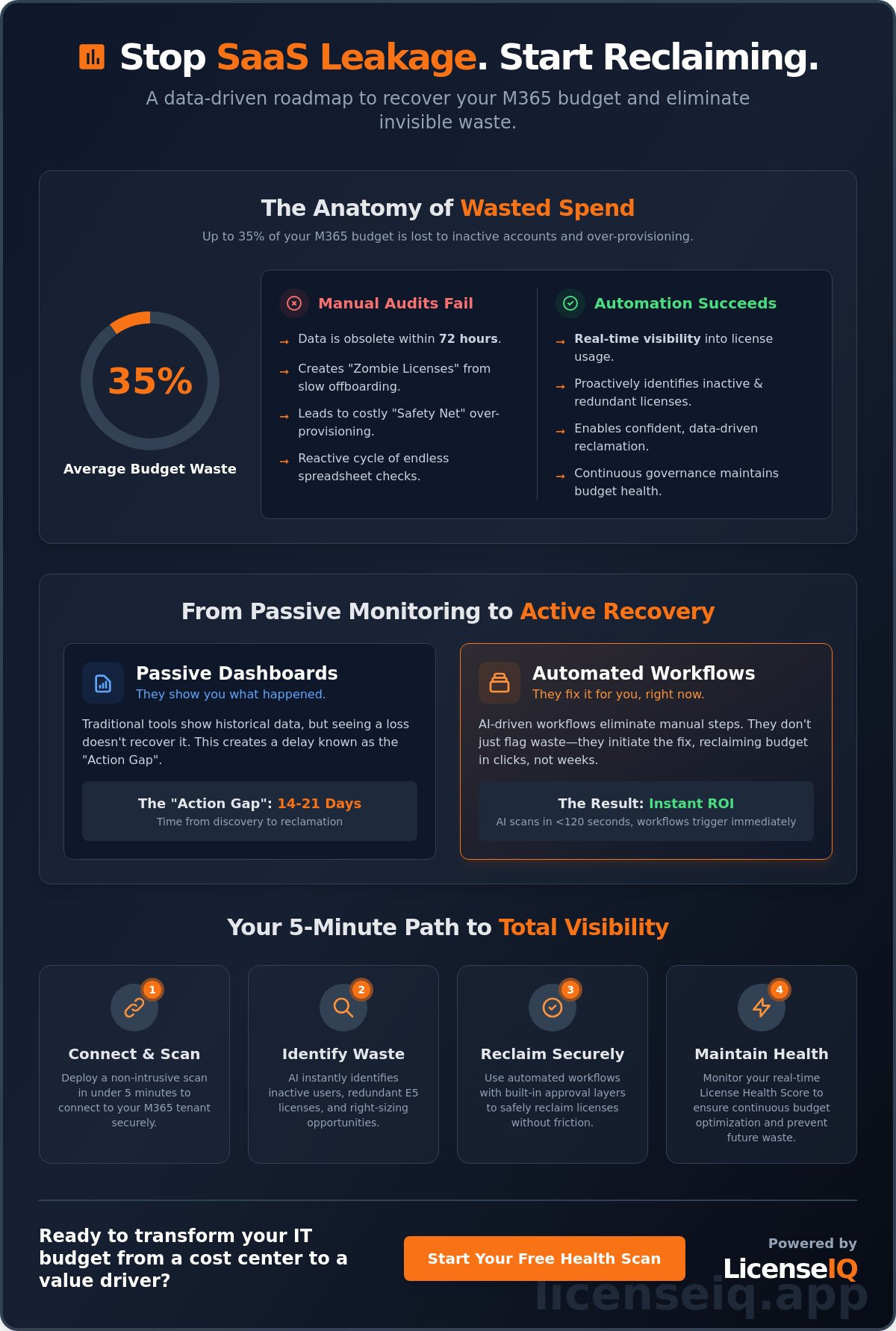
SaaS leakage is the silent drain on your bottom line. It represents the widening gap between the licenses your organization pays for and the actual utilization of those tools. In 2026, relying on manual spreadsheets for Software asset management (SAM) is a liability. Static data is obsolete within 72 hours of collection. While your team reconciles a CSV, new hires join, contractors leave, and license tiers fluctuate. This lag creates "Invisible Waste," where inactive accounts and redundant high-tier subscriptions sit idle. To combat this, forward-thinking leaders now implement a License Health Score. This metric quantifies organizational waste by comparing provisioned features against active user telemetry. It provides the immediate clarity needed for automated saas spend recovery.
The Velocity of M365 Sprawl
Rapid scaling often outpaces administrative oversight. When a company experiences a 15% headcount increase, offboarding protocols frequently lag behind. This creates "zombie licenses," which are accounts that remain active and billable long after an employee departs. These unmanaged E3 and E5 upgrades represent a massive financial leak. According to the 5 signs you are wasting money on M365, most enterprises overpay by at least 30% because they lack real-time visibility. Without a proactive system, your M365 environment becomes a collection of unused premium features that serve no one. The financial impact of these unmanaged upgrades compounds monthly, eroding the ROI of your digital transformation efforts.
The Hidden Costs of "Safety Net" Licensing
IT managers often over-provision licenses as a "safety net" to avoid service interruptions. This "just in case" mentality kills profit margins. It stems from a psychological barrier: the fear of operational friction during license reclamation. Managers worry that removing a license might accidentally disrupt a critical workflow. However, this cautious approach leads to an average of 25% of SaaS budgets being wasted on idle seats. Moving from manual tracking to automated saas spend recovery eliminates this guesswork. Precise data replaces fear, allowing IT to reclaim licenses with total confidence. High-performance organizations use LicenseIQ to bridge this gap, ensuring every dollar spent correlates with a used feature. This shift transforms IT from a cost center into a lean, value-driven department that prioritizes fiscal health alongside technical uptime.
Defining Automated SaaS Spend Recovery: Dashboards vs. Workflows
Automated SaaS spend recovery moves beyond simple visualization. It uses AI-driven workflows to identify and reclaim waste instantly. Most platforms stop at showing you a pie chart of unused M365 licenses. This is passive monitoring. Active recovery, however, treats every dollar as a mission-critical asset. It doesn't just flag a problem; it initiates the fix.
The core difference lies in execution. Passive tools require an IT manager to export a CSV, validate the data, and manually de-provision users. Automated saas spend recovery eliminates these manual hurdles. AI-native intelligence scans complex M365 tenants in under 120 seconds. It uncovers hidden overlaps that human auditors miss during quarterly reviews. This ensures continuous financial accuracy. You aren't fixing the budget once a year. You're maintaining a lean operation every hour of every day.
- Passive Monitoring: Provides historical data that is often 30 days old by the time it's reviewed.
- Active Recovery: Triggers immediate workflows based on real-time usage triggers.
- Visibility: Shows what happened in the past.
- Governance: Dictates what happens right now to protect the bottom line.
The Limits of Traditional SaaS Management
Seeing a $50,000 loss on a dashboard doesn't put money back in your bank account. Traditional tools suffer from the "Action Gap." This is the 14 to 21-day delay between discovering an inactive user and actually unassigning their license. Manual intervention is slow and prone to error. Gartner estimates that 30% of SaaS spend is wasted on underutilized licenses. LicenseIQ closes this gap by providing actionable, dollar-value recommendations that execute in clicks, not weeks. It transforms data from a static report into a recovered budget.
How AI-Native Governance Changes the Game
Modern recovery leverages the Model Context Protocol for deep tenant integration. This allows the system to understand the specific context of every user account across the entire M365 stack. Monthly reporting cycles are obsolete in a high-growth environment. Real-time scanning identifies a departed employee or a redundant E5 license immediately. Automated Governance is the self-healing mechanism for SaaS budgets. It functions as a digital auditor that never sleeps, ensuring 100% license utilization. By shifting to automated saas spend recovery, organizations move from reactive damage control to proactive financial precision.
The ROI of Automation: Reclaiming Up to 35% of M365 Spend
Microsoft 365 spend often spirals because of a lack of visibility. Gartner research indicates that organizations can save up to 35% on SaaS costs through disciplined management. This recovery happens by targeting three specific areas: inactive accounts, unassigned licenses, and redundant subscriptions. Organizations that fail to monitor these metrics essentially leave their budgets open to constant, silent leaks.
The foundation of automated saas spend recovery starts with data. You cannot fix what you cannot see. By generating an inactive Office 365 users report, you gain a clear view of seats that have not been accessed for 90 days or more. This transparency allows IT leaders to move from guesswork to precision auditing.
Targeting Inactive and Unassigned Licenses
It's vital to distinguish between two types of waste. An inactive user has a license assigned but hasn't logged in. An unassigned license is a seat you've already purchased that sits empty in your tenant. Both drain your budget every month. Automated workflows flag these anomalies for immediate reclamation, ensuring you aren't paying for "ghost" users. This process also provides a significant security benefit. By removing unused accounts, you reduce your attack surface and eliminate potential entry points for unauthorized access.
Tier Optimization: The E3 vs. E5 Debate
Many organizations default to the E5 tier for all employees, yet feature utilization data often tells a different story. If your frontline workers aren't using Power BI Pro or advanced eDiscovery, they don't need a premium license. Moving these users to an F3 or E3 tier can save substantial capital without compromising compliance or data integrity. For a detailed strategy, refer to our 2026 guide to M365 license optimization. This "right-sizing" ensures you only pay for the features your team actually uses.
A Framework for Calculating Recovery ROI
To measure the success of an automated saas spend recovery tool, use this three-part framework:
- Direct Reclamation: (Total Monthly M365 Spend) x (Percentage of Inactive/Unassigned Seats) = Immediate Monthly Savings.
- Tier Optimization: (Number of Over-provisioned E5 Licenses) x (Cost Difference of E3/F3) = Annual Budget Recovery.
- Operational Efficiency: (Hours spent on manual auditing) x (Hourly IT labor rate) = Administrative Cost Savings.
Automation transforms these calculations from a one-time exercise into a continuous cycle of efficiency. It replaces manual spreadsheets with a vigilant system that protects your bottom line 24/7.
Safe Reclamation: Managing Automation Without Operational Friction
The biggest hurdle to automated saas spend recovery isn't the technology. It's the fear of a "rogue" script. IT leaders often ask: "What if the tool deletes my CEO’s license right before a board meeting?" This concern is valid. Total automation without guardrails leads to operational chaos. Effective recovery systems must provide 100% visibility while maintaining a safety valve for critical accounts.
LicenseIQ eliminates this risk through a multi-layered governance approach. Instead of blind deletions, the system uses usage-based triggers and grace periods. If a user hasn't logged into M365 for 45 days, the system flags the license. It doesn't act instantly. It places the account in a cooling off period. This prevents the recurrence of Shadow IT, where users bypass official channels because they fear losing access. By 2026, 75% of enterprises will use some form of automated license management to combat the 30% average waste found in SaaS portfolios.
The "Human-in-the-Loop" Automation Model
LicenseIQ doesn't operate as a black box. It provides recommendations that require a single-click approval. You set the thresholds. Whether it's 30, 60, or 90 days of inactivity, the platform surfaces the data first. This model ensures compliance and data retention. You can exclude specific VIP groups or departments from automated sweeps entirely. This precision transforms automated saas spend recovery from a risky experiment into a standard operating procedure.
- Custom Triggers: Define inactivity based on specific app usage, not just login timestamps.
- Data Integrity: Ensure mailboxes are converted to shared mailboxes before license removal.
- Audit Trails: Every reclamation action is logged, providing a clear history for compliance reviews.
Automating the Offboarding Lifecycle
Manual offboarding is a primary source of revenue leakage. Research shows that 20% of former employees still have access to corporate SaaS accounts. Integrating recovery into your Office 365 offboarding checklist ensures no license stays active longer than the employee's tenure. It stops "license hoarding" by departing managers who try to keep seats just in case for future hires.
The system identifies these orphaned seats in real-time. Within 24 hours of an HR status change, the license is reclaimed and returned to the pool. This immediate action prevents unnecessary true-up costs and keeps your M365 environment lean. Stop guessing which licenses are active and start seeing the truth.
Ready to eliminate manual license tracking? Get a free SaaS spend audit from LicenseIQ today.
Implementing LicenseIQ: Launching Your Spend Recovery in 5 Minutes
Manual license tracking is a relic of the past. It's slow, error-prone, and costs your organization more in labor than it saves in software. LicenseIQ replaces spreadsheets with immediate, data-driven action. You don't need a complex integration project or a team of consultants. You only need five minutes to gain total visibility into your Microsoft 365 environment.
The 5-Minute Audit Workflow
Speed is the foundation of automated saas spend recovery. The process begins by connecting your M365 tenant securely via OAuth. This standard protocol ensures LicenseIQ never sees or stores your credentials; it simply gains read-only access to your utilization data. There's no software to install and no configuration required. Once connected, the system initiates a deep scan of your entire user base.
Within minutes, the platform identifies your first "Quick Win" savings. These are high-impact, low-effort opportunities that provide an immediate return on investment. Typical wins include:
- Unassigned Licenses: Paid seats sitting in your inventory with no user attached.
- Inactive Accounts: Users who haven't logged into a specific app in 90 days.
- Redundant Subscriptions: Overlapping licenses where a lower-tier plan covers all active requirements.
Stop guessing where your budget goes. You can visit LicenseIQ right now to run your first scan and uncover these hidden costs.
Continuous Governance for Long-Term Savings
One-time audits provide a temporary fix, but spend creep is inevitable without a "hygiene" mindset. Your first Spend Recovery Dashboard provides a Health Score, which acts as a benchmark for your financial efficiency. If your score is 70%, it means 30% of your budget is currently leaking. The goal isn't just to reach 100% once; it's to stay there through automated saas spend recovery protocols.
Recurring scans ensure that new waste is caught before it compounds. When an employee leaves or a department changes its toolset, LicenseIQ flags the change instantly. This continuous monitoring transforms your IT department from a cost center into a lean, value-driven operation.
We offer tiered subscription models to match your organizational scale. While monthly plans offer maximum flexibility, our annual subscription planning provides the budget stability finance leaders crave. Locking in an annual strategy prevents unexpected overages and ensures your license count stays aligned with your actual headcount. It's time to move from the darkness of unknown spend into the light of total visibility. Start your journey toward zero waste today.
Take Control of Your M365 Ecosystem Today
Manual audits are a relic of the past that leave your budget vulnerable to invisible leakage. In 2026, the speed of SaaS adoption requires a proactive stance on license utilization and shadow IT. Transitioning to automated saas spend recovery ensures your organization no longer pays for dormant accounts or redundant tiers. You can stop guessing and start governing with precision. The path to optimization is immediate and data-driven.
LicenseIQ provides the visibility you need to eliminate waste without disrupting your team's workflow. With our AI-native automated governance workflows, you'll secure your environment while maximizing every dollar spent on Microsoft 365. Most organizations identify an average savings of 35% on M365 subscriptions almost instantly. It's the most efficient way to protect your financial health and maintain operational excellence. Don't let unmanaged licenses drain your resources for another quarter.
Reclaim your wasted M365 spend with LicenseIQ by scanning your entire tenant in under 5 minutes. It's time to turn the lights on and see exactly where your budget goes.
Frequently Asked Questions
What is automated SaaS spend recovery?
Automated SaaS spend recovery is the use of intelligent algorithms to identify, reclaim, and reallocate unused software licenses without manual intervention. By scanning usage data in real time, the system detects inactive accounts and redundant subscriptions. This ensures you only pay for what your team actually uses. It eliminates the 30 percent of SaaS spend typically wasted on underutilized seats according to Gartner’s 2023 research.
How much can a company typically save with M365 license optimization?
Organizations typically reduce their Microsoft 365 expenditure by 15 to 30 percent within the first year of implementation. LicenseIQ targets specific areas like unassigned licenses, over-provisioned users, and inactive accounts. For a company with 1,000 employees, this often translates to reclaiming thousands of dollars monthly. These savings directly improve your bottom line by converting hidden waste into available capital for other strategic projects.
Is it safe to let an AI tool manage my Microsoft 365 licenses?
It's completely safe because the platform operates via secure API integrations and follows your predefined governance rules. You maintain total control over the automation thresholds and approval workflows. Our system provides full visibility into every action taken, ensuring compliance with ISO 27001 standards. This proactive monitoring protects your environment while removing the risk of human error that often occurs during manual license management tasks.
How long does it take to see results from a spend recovery audit?
You'll see actionable insights within 24 to 48 hours of connecting your environment to the platform. The initial scan identifies immediate waste such as licenses assigned to offboarded employees or duplicate accounts. By the 30 day mark, the system establishes a baseline for long term automated saas spend recovery and optimization. This rapid turnaround provides the transparency needed to make fast, data driven financial decisions.
Does LicenseIQ replace my existing IT Asset Management (ITAM) tool?
LicenseIQ doesn't replace your ITAM tool; it enhances it by providing specialized, deep dive optimization for SaaS environments. While traditional ITAM focuses on hardware and lifecycle tracking, our platform targets high velocity cloud spend. It fills the visibility gaps that standard tools often miss. Think of it as a precision instrument designed specifically to stop revenue leakage in your M365 stack and other cloud applications.
Can I recover spend on licenses other than Microsoft 365?
Yes, you can recover spend across various enterprise platforms including Salesforce, Zoom, and Adobe Creative Cloud. The automated saas spend recovery engine applies the same rigorous utilization analysis to any integrated application. This centralized approach ensures your entire software stack remains lean and cost effective. You get a single pane of glass to view and manage waste across your entire organization, regardless of the vendor.
What happens to user data when a license is reclaimed automatically?
User data remains protected according to your organization's specific Microsoft 365 retention policies and legal hold settings. Reclaiming a license simply stops the recurring cost; it doesn't automatically delete the underlying mailbox or OneDrive files if you've configured your settings correctly. We ensure your cleanup processes align with GDPR and CCPA requirements. This balance of efficiency and security keeps your data intact while reducing unnecessary costs.
Do I need an IT degree to use an automated spend recovery platform?
You don't need a technical degree to navigate the platform or understand the reporting. We designed the interface to be intuitive for finance leaders and procurement managers who need clear, high level data. Detailed dashboards translate complex usage metrics into simple, dollar based savings opportunities. It empowers every stakeholder to take charge of software costs without getting bogged down in technical jargon or complex backend configurations.


