

Every month, your organization likely bleeds 30% of its SaaS budget on licenses assigned to departed employees. With a Microsoft 365 E5 license now costing $60 per user, leaving an account active for even one extra billing cycle is an expensive oversight. You need a rigorous m365 offboarding checklist for cost savings to stop these financial leaks. Manual spreadsheets fail to track unassigned seats, leaving your budget vulnerable to orphaned Copilot and E5 subscriptions.
It's frustrating to watch your License Health Score drop because of administrative delays and manual errors. You deserve a system that provides immediate clarity and total oversight. This guide delivers a precise, 2026 spend recovery workflow designed to guarantee 0% license waste. We'll show you how to automate deprovisioning, recover high-value licenses, and secure your environment in minutes rather than days. You'll gain a repeatable process that transforms offboarding from a technical chore into a strategic financial win.
Key Takeaways
- Secure your environment immediately by revoking active session tokens and blocking sign-ins to prevent unauthorized access while preserving critical user data.
- Implement a precise m365 offboarding checklist for cost savings to identify and reclaim high-value E5 and Copilot licenses the moment an employee departs.
- Eliminate unnecessary Exchange Online expenses by converting user mailboxes to shared mailboxes, maintaining access to emails without the subscription cost.
- Audit Power Automate flows and AI agents during offboarding to prevent "orphaned flows" and ensure business-critical automations continue to run under new ownership.
- Replace failed manual spreadsheets with automated governance workflows to achieve real-time visibility into your License Health Score and stop financial leaks.
Why Inefficient Offboarding is Your Biggest M365 Financial Leak
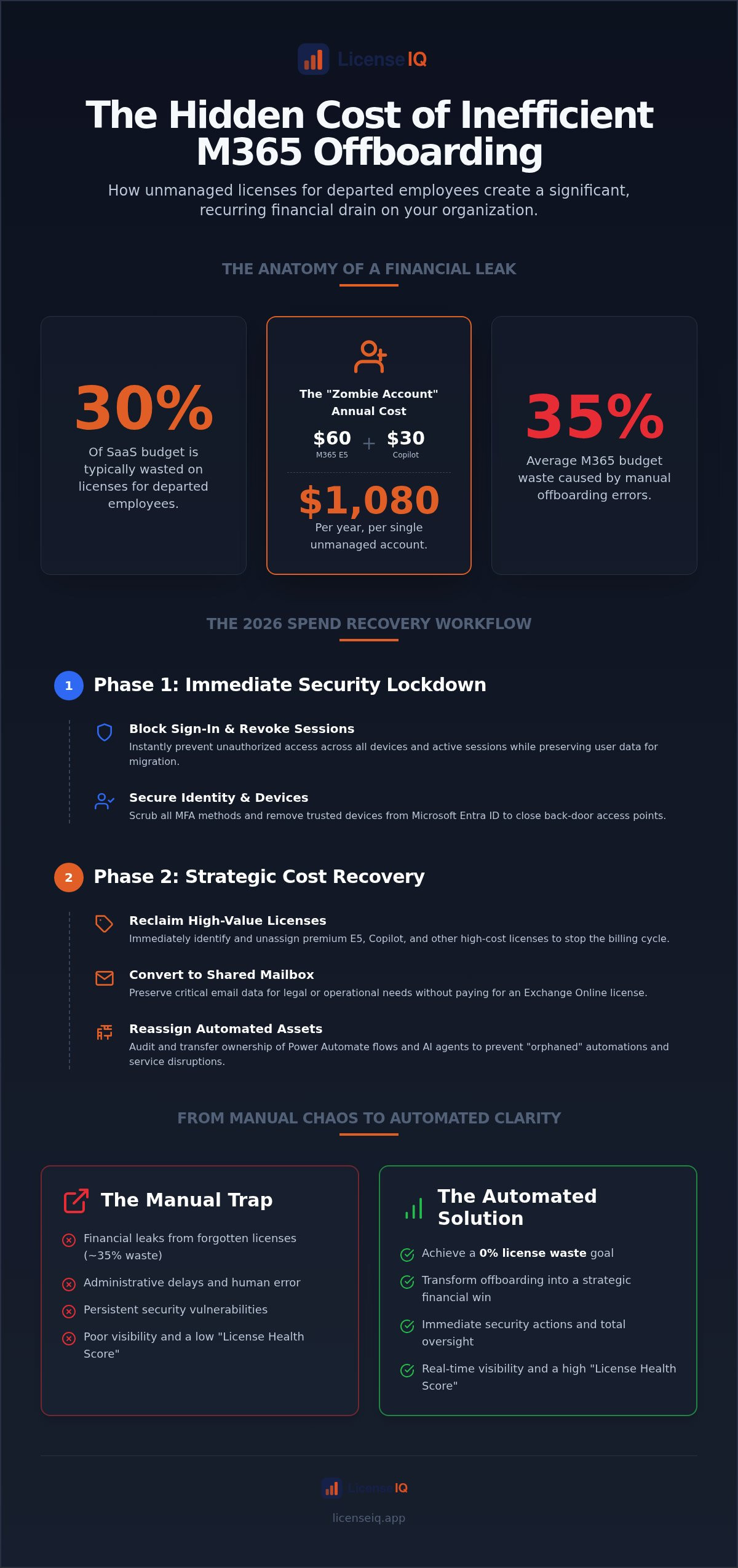
Inefficient offboarding isn't just an IT oversight. It's a direct drain on your company's bottom line. In 2026, the financial stakes are higher than ever. A single Microsoft 365 E5 license now costs $60 per user. When you add a $30 Copilot subscription, a single "zombie" account costs your organization $1,080 annually. These unassigned seats often persist for months because manual processes lack the oversight to catch them. Industry data indicates that manual offboarding leads to a 35% average waste in M365 budgets. Every day an orphaned account remains active, your License Health Score drops and your margins shrink.
Orphaned admin roles and unmanaged subscriptions create a cycle of waste. If a departed employee was the sole owner of a business-critical Power Automate flow or a Copilot Studio agent, the system may block license removal to prevent service disruption. This creates a "financial hostage" situation where you're forced to pay for a premium license just to keep an automation running. Without a rigorous m365 offboarding checklist for cost savings, these obscured details stay hidden until your annual renewal, where the true scale of the sprawl finally becomes visible.
As you look for ways to optimize your budget beyond internal licenses, you might also explore SaaS Subscription Fees for career-development platforms like NeonCV, which help departing employees create high-quality CVs to support their transition.
The Anatomy of a Financial Leak
License sprawl begins with a single missed step in the Microsoft 365 Admin Center. There's a critical distinction between an inactive user and an unassigned license that many admins overlook. An inactive user account may still have a premium license attached, accruing charges every billing cycle. This occurs when IT teams focus solely on disabling access rather than reclaiming the asset. These redundant licenses accumulate quietly, leading to massive overages. A precise m365 offboarding checklist for cost savings ensures that every seat is immediately returned to the pool or canceled, preventing unnecessary spend on annual renewals.
Security vs. Finance: A Dual Mandate
Traditional IT strategies often prioritize the perimeter while ignoring the ledger. While blocking sign-ins and revoking active tokens is vital for security, it only completes 50% of the mission. A comprehensive employee_offboarding process must integrate security with financial oversight. Many administrators believe that deleting a user account is the final step, but data retention policies often complicate this. If you must retain a mailbox for 30 days, you shouldn't pay for a premium license to do it. Transitioning to a "FinOps-Integrated" approach allows you to convert mailboxes to shared status and revoke licenses immediately while maintaining data integrity.
LicenseIQ eliminates the guesswork of manual tracking. Our Spend Recovery Dashboard provides the immediate clarity required to manage 2026's complex license tiers. By automating governance, you ensure that every departure is treated as a spend recovery event. This proactive stance protects your corporate resources and ensures that your M365 environment remains lean, secure, and financially optimized.
Immediate Security Steps: Protecting Data While Preparing for Savings
Speed is your primary defense. When an employee departs, the immediate priority is access revocation, not license deletion. Blocking sign-in prevents unauthorized entry while keeping the account object intact for critical data migration. This stage of your m365 offboarding checklist for cost savings ensures that no "ghost" access persists through cached credentials or forgotten mobile devices. By separating access control from license reclamation, you protect your perimeter without risking the loss of unbacked-up files.
Securing the Perimeter
Revoking active sessions in the M365 Admin Center is a mandatory first step. A simple password reset is insufficient because active OAuth tokens can allow access for hours or days after a credential change. You must initiate a "Sign out of all sessions" command to force immediate re-authentication across all devices. Microsoft Entra ID serves as the central hub for identity security. Within Entra, you must scrub Multi-Factor Authentication (MFA) methods and remove all trusted devices associated with the user. This level of oversight follows established IT asset management best practices, ensuring every digital footprint is accounted for before you move to the spend recovery phase.
Audit third-party application permissions during this window. Departed users often leave behind authorized integrations that retain access to your corporate data. Removing these permissions prevents "shadow access" from external tools. If you want to eliminate the risk of manual oversights, LicenseIQ's automated governance workflows can trigger these security protocols the moment a departure is logged in your HR system.
Data Preservation Strategy
Data preservation shouldn't inflate your monthly bill. Converting a departed user's mailbox to a Shared Mailbox is a high-impact move for spend recovery. This process allows a successor or manager to retain access to historical emails without consuming a dedicated Exchange Online license. It's an immediate win for your budget that maintains operational continuity. However, you must act quickly on file storage. Microsoft retains OneDrive data for only 30 days after a license is removed by default. You must extend this retention period or transfer ownership of business-critical SharePoint folders and OneDrive files to an active manager to avoid permanent data loss.
Finally, audit all distribution groups and shared mailbox memberships. Leaving a departed user in a high-priority distribution list creates clutter and potential security gaps. Removing them ensures that internal communications remain streamlined and that sensitive information is only accessible to active, authorized personnel. This meticulous approach to data and identity prepares the ground for total license reclamation in the next phase of the workflow.
The 2026 M365 Offboarding Checklist for Maximum Cost Savings
Execution determines the success of your spend recovery. Most IT teams stop after blocking access, leaving expensive subscriptions attached to dormant accounts. To reclaim your budget, you must follow a meticulous m365 offboarding checklist for cost savings that treats every license as a recoverable asset. This workflow ensures that no high-value seat remains unassigned while still appearing on your monthly invoice.
- Step 1: Identify and revoke all assigned premium licenses. Prioritize the reclamation of E5 ($60/month), Visio, and Project licenses. These high-cost items should return to your available pool the moment an employee departs.
- Step 2: Convert to Shared Mailbox. This process eliminates the Exchange Online license requirement. You maintain access to historical data without the $39 or $60 monthly overhead of an active E3 or E5 seat.
- Step 3: Audit and remove "Add-on" licenses. Check for specialized subscriptions like Teams Premium or Power BI Pro. These often hide in sub-menus and continue to accrue costs if not explicitly revoked.
- Step 4: Downgrade unassigned licenses. If you must retain an active account for specific compliance reasons beyond the standard 30-day window, move the user to the lowest viable tier, such as Business Basic ($7/month), to minimize financial impact.
- Step 5: Verify license reclamation. Conduct a SaaS license health check to ensure your tenant reflects these changes. This final audit confirms that your "unassigned" count hasn't triggered unnecessary auto-renewals.
Tier-Specific Reclamation Tactics
Managing a "Mix and Match" license environment requires strategic oversight. When a new hire joins, your system should automatically assign a reclaimed E5 seat before purchasing a new one. Prioritizing the reuse of E5 over E3 seats maximizes the value of your existing inventory. By maintaining an unassigned license pool of zero, you prevent the "license sprawl" that typically inflates annual renewals. This proactive management keeps your software spend predictable and lean.
Email and Collaboration Savings
The "Shared Mailbox Hack" is your most effective tool for data retention without the premium price tag. Converting to a shared status preserves the user's digital history while freeing up their license for immediate reuse. Additionally, you must audit high-cost collaboration tools. Ensure you remove users from Teams Premium or specialized AI add-ons immediately to stop the billing cycle. For a deeper dive into securing your environment during this transition, review our Office 365 Offboarding Checklist 2026.
Advanced License Reclamation: Handling Copilot and AI Agents
AI licenses represent the most expensive financial leak in your 2026 budget. While a standard seat might cost under $10, a Microsoft 365 Copilot for enterprise license costs $30 per user every month. If your m365 offboarding checklist for cost savings ignores these high-value add-ons, you're essentially burning $360 per year for every departed employee. Immediate revocation is mandatory. Unlike standard productivity apps, AI licenses require a faster reclamation cycle to ensure these premium seats return to your available pool before the next billing trigger.
Beyond the license itself, you must address the "shadow agents" left behind. Custom AI agents created in Copilot Studio can continue to run without an owner, potentially accessing sensitive data or consuming external credits. For external agents, this costs $200 for 25,000 credits per month. You must identify and deactivate these agents or reassign them to a service account. Additionally, revoking a license does not automatically scrub interaction history. To clear this data for compliance, you must submit a data subject request (DSR) through Microsoft Purview. Automated governance workflows manage AI license lifecycles by triggering these deep-cleaning steps the moment a user is offboarded.
The High Cost of AI Waste
Calculating the monthly ROI lost on unused Copilot seats reveals the true impact of administrative delays. If an organization with 500 users fails to reclaim just 5% of its AI licenses, it wastes $750 monthly. This financial friction compounds across the fiscal year. Because Copilot for Business now costs $21 per user, even smaller teams face significant overages. You need total oversight to ensure these assets aren't sitting idle. You can connect to your tenant in minutes with LicenseIQ to identify every underutilized AI seat instantly.
Automation and Power Platform
Orphaned flows are a silent operational risk. When a user departs, any Power Automate flows they owned may fail, disrupting business-critical processes. Your m365 offboarding checklist for cost savings must include a step to transfer flow ownership to a service account rather than another individual. This prevents the automation from breaking when the next owner eventually leaves. Pay close attention to premium connectors. These incur extra costs and should be audited to ensure you aren't paying for high-tier access that no longer serves a business purpose. For more details on reclaiming these obscured costs, consult our Microsoft 365 License Optimization Guide. This proactive approach ensures your Power Platform remains lean and functional without the burden of ghost subscriptions.
Transitioning from Manual Checklists to Automated Governance
Manual spreadsheets are static and unreliable. They fail to reflect the dynamic nature of M365 tenants in real time. When an administrator forgets to update a single row, a $60 E5 license becomes a "zombie" asset that drains your budget for months. This organizational disorder is exactly where the 35% average waste in software spend originates. While a manual m365 offboarding checklist for cost savings provides a baseline, it cannot scale with a modern workforce. You need a proactive system that provides total clarity and eliminates the cognitive load of tracking unassigned seats across complex admin panels.
The LicenseIQ Spend Recovery Dashboard replaces these failed manual processes with a vigilant, precise system. It uncovers obscured details that manual audits frequently miss, such as forgotten Visio add-ons or dormant Copilot subscriptions. Your License Health Score quantifies your offboarding efficiency, providing a data-driven benchmark for specialized leadership. A high score indicates a lean, secure environment; a low score highlights immediate financial risks. By implementing Automated Governance Workflows, you achieve zero-touch reclamation. These workflows trigger automatically when an employee departs, ensuring that deprovisioning occurs in minutes rather than the industry average of three days.
Building a Continuous Optimization Engine
Reactive offboarding is a defensive maneuver. Proactive license management is a strategic financial advantage. AI-native platforms like LicenseIQ discover waste that IT admins often overlook by cross-referencing actual usage patterns with subscription costs. This continuous oversight ensures your budget is optimized every day, not just during annual renewals. Transitioning to an automated model moves your organization from a state of lack of insight to total clarity. For a comprehensive strategy on managing these recurring expenses, review our guide on How to Reduce M365 Subscription Costs.
Next Steps for SMB Leaders
Efficiency begins with visibility. Conduct a 5-minute audit today to uncover immediate savings hidden within your tenant. Many SMB leaders discover thousands of dollars in potential recovery during their first connection to the LicenseIQ platform. Integrating offboarding into your broader FinOps strategy transforms technical operations into a high-impact financial tool. Stop the leak of orphaned licenses and secure your corporate resources with precision. Start your free M365 spend recovery scan today and take the first step toward total license health.
Secure Your Future Margins with Automated Offboarding
Manual administrative errors shouldn't dictate your annual software budget. By integrating security protocols with financial oversight, you transform a routine IT task into a high-impact spend recovery event. Reclaiming premium E5 and Copilot seats immediately ensures your resources remain lean and focused on growth. A rigorous m365 offboarding checklist for cost savings is the first step toward total organizational clarity, but automation is the final solution for 2026's complex license environment.
Don't let unassigned licenses erode your profitability. You can scan your tenant in minutes to uncover actionable dollar-value recommendations that manual audits miss. Transitioning to a system of proactive oversight protects your data while maximizing your software investment. It's time to replace organizational disorder with a vigilant, data-driven strategy that guarantees efficiency.
Recover up to 35% of your M365 spend with LicenseIQ. Our platform provides the Automated Governance Workflows you need to maintain a perfect License Health Score. Take control of your corporate resources today and build a more resilient, cost-effective digital environment.
Frequently Asked Questions
How long does Microsoft keep data after I remove a license?
Microsoft retains OneDrive data for 30 days and mailbox data for 30 days after account deletion by default. You must transfer ownership of critical files or back up data within this window to avoid permanent loss. While data persists for a month, you should revoke the license immediately to stop the billing cycle. This speed is essential for maintaining an effective m365 offboarding checklist for cost savings.
Can I reuse a license immediately after offboarding an employee?
Yes, licenses return to your available pool the moment you revoke them from a user account. You can assign these reclaimed seats to new hires or cancel them to reduce your next monthly invoice. Reusing existing licenses prevents the "license sprawl" that often occurs when IT teams purchase new seats instead of checking for unassigned inventory. Immediate reclamation is a cornerstone of financial health.
What is the most expensive mistake in M365 offboarding?
Leaving premium E5 or Copilot licenses attached to inactive accounts is the costliest oversight. With E5 costing $60 and Copilot costing $30 per month, a single missed account drains $1,080 annually. Manual spreadsheets often fail to track these high-value add-ons, leading to significant financial leaks. This is why specialized leadership relies on automated oversight to uncover obscured details in the billing ledger.
Do shared mailboxes require a paid Microsoft 365 license?
No, shared mailboxes do not require a paid license as long as they remain under 50GB in size. Converting a departed user's mailbox to a shared status allows you to retain historical data and provide access to a successor without the $39 or $60 monthly overhead. This tactic is one of the most effective ways to reduce waste while ensuring operational continuity across your organization.
How do I find all unassigned licenses in my M365 tenant?
You can view unassigned licenses in the Microsoft 365 Admin Center under the Billing section. However, the native dashboard doesn't quantify the dollar value of your waste or identify "zombie" accounts that are active but unused. A Spend Recovery Dashboard provides the immediate clarity required to manage 2026's complex license tiers. It transforms raw data into actionable insights for better decision-making.
What happens to Power Automate flows when a user is offboarded?
Flows owned by a departed user will fail once their license is revoked or their account is deleted. You must transfer ownership of these automations to a service account or an active manager before deprovisioning the user. This step prevents business process disruption and ensures that your m365 offboarding checklist for cost savings doesn't inadvertently break critical workflows or premium AI agents.
Is it better to delete a user or just block their sign-in for cost savings?
Blocking sign-in is the superior security move, but revoking the license is what generates cost savings. You should block access immediately to secure the perimeter, then convert the mailbox to shared and reclaim the license. Deleting the user account too early can lead to permanent data loss. A meticulous, step-by-step approach ensures you protect your data while maximizing your spend recovery.
How can automation help with M365 cost recovery during offboarding?
Automation guarantees 0% license waste by deprovisioning users in minutes rather than days. Automated Governance Workflows eliminate the human error inherent in manual spreadsheets and ensure every departure is a spend recovery event. This proactive approach maintains a high License Health Score and provides total oversight of your digital resources. It allows your IT team to focus on growth instead of administrative cleanup.


