

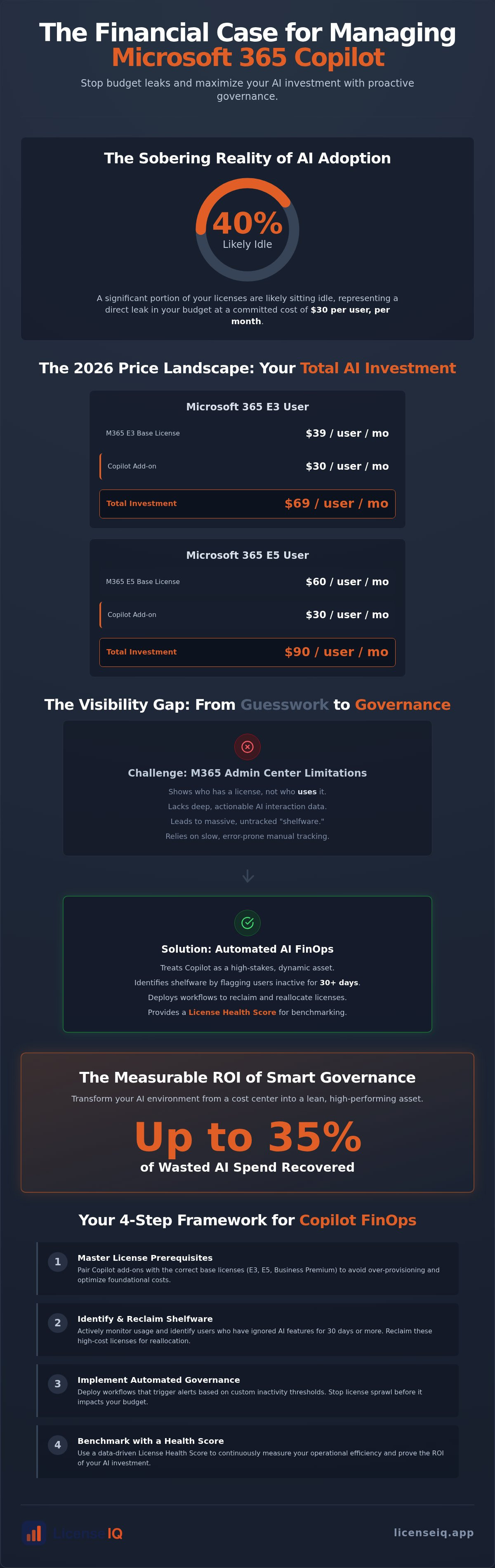
Forty percent of your Microsoft 365 Copilot licenses are likely sitting idle right now. At $30 per user every month, this inactivity represents a direct leak in your operational budget. You've likely realized that manual microsoft 365 copilot license management is impossible when you can't see who's actually using AI features versus who's just holding a seat. With the recent 2026 price increases for base E3 and E5 licenses, the financial stakes for your department have never been higher.
It's frustrating to watch license spend surge without clear proof of productivity gains. We're here to help you stop the bleed. This guide provides a definitive framework to eliminate waste and secure a measurable ROI on your AI investment through automated governance. We'll explore how to deploy spend recovery dashboards to reclaim underutilized seats and implement workflows that prevent license sprawl before it starts. You'll learn to use a License Health Score to transform your AI environment into a lean, high-performing asset.
Key Takeaways
- Treat Copilot as a high-stakes SaaS asset and apply FinOps principles to manage the $30 per user monthly cost.
- Master microsoft 365 copilot license management by identifying shelfware and users who ignore AI features for 30 days or more.
- Navigate the 2026 pricing landscape by pairing Copilot add-ons with the correct prerequisite base licenses like E3, E5, or Business Premium.
- Deploy automated governance workflows that trigger alerts based on custom inactivity thresholds to stop license sprawl.
- Use a License Health Score to benchmark operational efficiency and recover up to 35% of wasted AI spend.
The Financial Challenge of Microsoft 365 Copilot License Management
Effective microsoft 365 copilot license management isn't just an IT task. It's a specialized branch of SaaS FinOps that requires constant oversight. Most organizations treat license assignment as a one-time event. With Microsoft Copilot costing $30 per user every month, this "set and forget" approach is a financial liability. Unlike a standard Excel license that provides value through basic availability, an AI license is a high-risk asset. Its value is entirely usage-dependent. If a user isn't actively prompting the system, that $30 investment yields a zero percent return. Your primary goal is to ensure every assigned license generates measurable productivity.
Why 2026 Requires a New Approach to AI Governance
The era of small-scale AI pilots has ended. In 2026, leadership teams are demanding enterprise-wide deployment results. This shift creates intense pressure on IT budgets. Recent price increases for base licenses like M365 E3 and E5 have already tightened margins. When you add a $30 Copilot surcharge on top of a $60 E5 license, the total cost per seat becomes significant. SMBs are particularly vulnerable to a high "AI Waste Ratio." This happens when licenses are distributed based on job titles rather than actual workflow requirements. You need a strategy that ensures every assigned seat generates measurable output instead of just adding to the monthly bill.
The Limitations of the Microsoft 365 Admin Center
Standard reporting tools often fall short in high-stakes environments. The Microsoft 365 Admin Center shows you who has a license, but it struggles to provide deep, actionable insights into daily AI interactions. You can see that a user is "active," but you can't easily tell if they're actually leveraging the $30 add-on or just using basic Office features. This visibility gap leads to massive shelfware. Manual tracking via spreadsheets is too slow and prone to error for 2026 operations. To solve this, technical leaders are turning to the LicenseIQ platform. It bridges the gap between raw assignment data and financial reality. Without this level of oversight, your organization remains blind to the obscured details of its own spending.
Precision is the only way to protect your ROI. By treating Copilot as a dynamic resource rather than a fixed cost, you can reclaim wasted funds. Vigilant monitoring allows you to shift licenses from inactive users to those who will actually drive growth. This proactive stance transforms microsoft 365 copilot license management from a cost center into a driver of efficiency. For IT leaders looking to extend this level of oversight to their website's security, visit cside to learn about detecting AI agent traffic.
Prerequisites and Tiers: Navigating the Copilot Licensing Landscape
Mastering microsoft 365 copilot license management begins with a clear understanding of the prerequisite environment. Copilot is not a standalone purchase. It operates as an add-on to specific base licenses. As of July 2026, your organization must maintain active subscriptions for Microsoft 365 Business Standard, Business Premium, E3, or E5 to qualify. The "Add-on" structure carries significant billing implications. Most enterprise agreements require an annual commitment for the $30 per user monthly fee. This means an incorrect assignment today creates a twelve-month financial anchor. You cannot simply "turn off" a seat mid-cycle without losing the invested capital.
The July 1, 2026, price updates have changed the total cost of ownership (TCO) calculations. Microsoft 365 E3 now costs $39 per user, while E5 has reached $60. When you add the $30 Copilot fee, an E5 user represents a $90 monthly investment. For smaller teams, the new bundled plans offer some relief. Business Standard with Copilot is now available at $23.50 per user, and Business Premium with Copilot sits at $32. These bundles simplify billing but still require vigilant oversight to prevent over-provisioning.
Base License Optimization: The Foundation of Copilot ROI
You must scrutinize your base license strategy to protect your margins. Many organizations default to E5 for all users, but this is often unnecessary. If a user only requires core productivity tools and basic security, an E3 license plus the Copilot add-on is the more efficient choice. For frontline workers who do not interact with complex data sets, F-series licenses remain a cost-effective way to maintain a presence in the tenant without the high cost of AI tools. For a complete breakdown of which users belong on which tier, consult our Microsoft 365 License Types: The Comprehensive 2026 Reference Guide. Aligning the base license to the user's actual role is the first step in spend recovery.
Copilot Studio vs. M365 Copilot: Avoiding Redundancy
Redundancy is a silent profit killer in 2026. Microsoft 365 Copilot focuses on personal productivity within standard Office applications. In contrast, Copilot Studio is designed for building custom agents and autonomous workflows. It's common to find users who are double-licensed for both tools without a specific technical requirement. This overlap creates immediate waste. You should implement a tiered AI access model. Reserve Copilot Studio for your developers and power users. Standard employees should stick to the base M365 Copilot license. To identify these overlapping costs in your own tenant, you can check your Spend Recovery Dashboard for an immediate audit of your AI environment.
Identifying Copilot Waste: A Data-Driven Audit Framework
Efficiency starts with visibility. You cannot manage what you do not measure. In 2026, microsoft 365 copilot license management requires a strict 30, 60, and 90-day interaction window to define user status. An "Inactive AI User" is any seat that has not triggered a prompt or generated an output within these periods. Identifying these users allows you to stop the financial leak immediately. Shelfware is another silent budget killer. These are licenses assigned during the initial hype of rollout that have never been activated. In multi-tenant environments, redundancy often hides in plain sight where users hold duplicate seats across different business units.
Your License Health Score serves as the ultimate benchmark for this audit. It provides a single metric to evaluate how well your organization utilizes its AI investment. A low score indicates high waste and poor adoption. A high score confirms that your resources are concentrated where they generate the most value. This score allows leadership to move beyond guesswork and rely on a vigilant, data-driven system of oversight.
Key Adoption Metrics vs. Financial Reality
Don't confuse a simple log-in with actual productivity. "Logged in" is a vanity metric that obscures the truth of your spend. Real value comes from specific Copilot actions. You must track high-value interactions, such as Excel data analysis, Outlook drafting, and PowerPoint deck generation. These are the true markers of a productive seat. When a user only uses basic search, they don't justify a $30 monthly surcharge. By connecting usage frequency to the cost-per-seat, you can pinpoint exactly where your ROI is failing. This level of detail ensures your budget supports active contributors rather than passive observers.
The Hidden Cost of Improper Offboarding
Former employees holding active licenses are "zombies" that haunt your balance sheet. When an employee exits, their Copilot seat must be reclaimed instantly. Many organizations forget this step, leaving $30 seats active for months after a departure. This oversight creates a massive, unnecessary expense. To secure your perimeter and your budget, follow the Office 365 Offboarding Checklist 2026: Secure Data and Reclaim Spend. Automating this reclamation process is the only way to ensure 100% spend recovery during staff transitions. Manual offboarding is too slow. A precise, automated workflow captures these licenses the moment an account is disabled, keeping your AI environment lean and secure.
Implementing Automated Governance for Copilot Licenses
Manual oversight is a failure state in 2026. If you rely on humans to review usage reports, you've already lost the battle against waste. High-velocity microsoft 365 copilot license management requires a shift from reactive checking to proactive, automated governance. You must build a system that identifies inactivity and acts on it without manual intervention. This ensures your AI environment remains lean while protecting your total cost of ownership. Follow these five steps to establish a self-healing license ecosystem:
- Step 1: Connect your tenant to an AI-native intelligence platform like LicenseIQ to scan for waste in minutes.
- Step 2: Establish "Inactivity Thresholds" that trigger automated alerts when a user fails to engage with AI tools for 30 consecutive days.
- Step 3: Deploy a "Harvesting Workflow" to de-provision seats automatically once a threshold is crossed.
- Step 4: Reallocate reclaimed licenses to waitlisted users immediately, avoiding the need to purchase additional seats.
- Step 5: Generate monthly ROI reports for executive stakeholders to demonstrate the exact dollar value of recovered spend.
Automating the License Reclamation Lifecycle
IT departments are often buried under a mountain of access requests. You can eliminate this friction by using automated workflows to handle the "request-approval-assignment" loop. When a new user needs Copilot, the system should check for available reclaimed licenses before suggesting a purchase. This closed-loop process reduces IT tickets and ensures that no license sits idle while another employee waits for access. To master the broader strategy of seat rotation, read our guide on Mastering the Microsoft 365 License Management Lifecycle in 2026. Automation transforms a complex administrative burden into a background process that runs with surgical precision.
Governance Policies for Dynamic AI Scaling
License sprawl happens when seats are handed out without a clear expiration date. You should implement "Just-in-Time" licensing for project-based AI needs. This policy-based approach ensures that users only hold a $30 license for the duration of a specific task or project phase. Once the project concludes, the system automatically harvests the license for the next priority user. Effective SaaS governance is the systematic elimination of software waste through real-time usage monitoring and policy-enforced financial discipline. By enforcing these dynamic scaling rules, you protect your budget from the "set and forget" mentality that leads to massive overspending. You can deploy automated governance workflows today to start reclaiming your wasted AI budget.
Maximizing Copilot ROI with LicenseIQ
Visibility is the cornerstone of corporate resource protection. You've established the prerequisites and defined your audit framework. Now, you need a system that executes your strategy without increasing your team's workload. Modern microsoft 365 copilot license management requires more than just a spreadsheet. It demands an active participant in your company’s growth. The LicenseIQ platform serves as your vigilant auditor. It transforms organizational disorder into total clarity by surfacing the obscured details of your AI spend.
By using Automated Governance Workflows, you can maintain a 0% waste target. The platform doesn't just monitor. It acts. It identifies redundant licenses and inactive seats in real time, allowing you to scale your AI adoption without scaling your administrative burden. This proactive approach ensures your resources are always allocated to the users who drive the most value.
The 5-Minute Audit: From Mystery to Clarity
Manual audits are a relic of a slower era. They're time-prohibitive and prone to human error. LicenseIQ connects to your M365 tenant in minutes. It immediately scans every license and user to uncover hidden waste. You don't get a pile of raw data. You get actionable, dollar-value recommendations for Copilot optimization. This speed is essential for SMB FinOps leaders who need immediate results. The platform provides a License Health Score that acts as a definitive benchmark for your IT efficiency. You'll see exactly which seats are productive and which are simply draining your budget. It's the difference between guessing your ROI and proving it with hard data.
Achieving 35% Spend Recovery on M365
Continuous monitoring is the only way to secure long-term financial health. Annual or quarterly audits leave too much room for "zombie" licenses to accumulate. LicenseIQ enables a persistent state of spend recovery. By identifying inactive users and reclaiming their $30 monthly seats, organizations can achieve up to a 35% reduction in wasted spend. This isn't a one-time fix. It's a permanent shift toward operational transparency. For a deeper look at how to sustain these gains across your entire tenant, consult The Ultimate Guide to M365 License Optimization. When you automate your microsoft 365 copilot license management, you turn a complex administrative task into a streamlined engine for ROI. You stop paying for potential and start paying for performance.
Secure Your AI Investment Through Continuous Oversight
Manual oversight is a financial liability. As we've explored, the $30 monthly surcharge for Copilot effectively doubles your license spend, making precision non-negotiable. Effective microsoft 365 copilot license management requires a shift from "set and forget" assignments to dynamic, usage-based governance. By establishing 30-day inactivity thresholds and harvesting unused seats, you protect your budget from shelfware and zombie accounts. You don't have to manage this burden alone. AI-native tools provide the transparency needed to turn organizational disorder into financial clarity.
The path to a 35% reduction in wasted spend starts with total visibility. Our platform connects to your tenant in minutes to scan for inactivity and redundant licenses. This proactive approach ensures that every dollar spent on AI generates a measurable return. It's time to stop the bleed and start optimizing your resources with surgical precision. Discover how much you can save on Copilot—Get your License Health Score now at LicenseIQ. You're now equipped to lead your organization toward a leaner, more productive digital future.
Frequently Asked Questions
Do I need a separate license for Copilot in Teams vs. Copilot in Word?
No. A single Microsoft 365 Copilot license covers the entire suite of integrated applications. Once assigned, the user gains AI capabilities across Word, Excel, PowerPoint, Outlook, and Teams simultaneously. You don't need to manage separate entitlements for different apps within the M365 ecosystem.
What happens to the data if I reclaim a Copilot license from a user?
The user's underlying data remains intact and secure. Reclaiming the license only removes the AI interface and processing capabilities from their applications. They can still access their files, chats, and emails through standard M365 features without any risk of data loss or corruption.
Can I mix and match Copilot licenses across different user groups?
Yes. You have full control over which specific users or departments receive an AI add-on. This flexibility is vital for microsoft 365 copilot license management as it allows you to prioritize high-impact roles while maintaining standard licenses for users who don't require advanced AI assistance. You aren't forced to buy a seat for every person in your tenant.
How much can I realistically save by managing Copilot licenses actively?
Organizations can recover up to 35% of their M365 spend by actively monitoring usage. By identifying "shelfware" and reclaiming seats from inactive users, you stop paying for $30 monthly subscriptions that provide no value. Continuous oversight ensures your budget only supports productive AI interactions rather than idle accounts.
Does Microsoft 365 Copilot require an E5 license for all users?
No. Copilot is available as an add-on for Microsoft 365 E3, E5, Business Standard, and Business Premium. You can optimize your base costs by keeping most users on E3 or Business Premium while still giving them full access to Copilot features. This prevents the unnecessary expense of an E5 upgrade for users who don't need advanced security or analytics.
How do I identify which users are actually using Copilot features?
You must track specific interaction markers rather than simple login data. Effective microsoft 365 copilot license management involves scanning for active prompts, document summaries, and AI-generated drafts. Platforms like LicenseIQ provide this visibility by connecting to your tenant to distinguish between passive seat-holders and active AI power users in minutes.
Is there a way to automate the assignment of Copilot licenses?
Yes. You can implement automated governance workflows to handle seat distribution. These systems automatically assign licenses based on department requests or reclaim them when inactivity thresholds are met. This automation removes the administrative burden from IT while preventing license sprawl and budget overruns.
What is a "License Health Score" and why does it matter for Copilot?
A License Health Score is a metric that benchmarks your organization's AI efficiency. It measures the ratio of active usage against total license spend. A high score confirms that your resources are being used effectively; a low score highlights immediate opportunities for spend recovery and waste elimination.


