
Your Microsoft 365 bill went up again this month, and you're not entirely sure why. If you're responsible for microsoft 365 cost optimization for smbs, that feeling is familiar: a growing subscription cost, a sprawling Admin Center you don't have time to decode, and a quiet suspicion that a chunk of that spend is going nowhere useful.
You're right to be suspicious. Licenses assigned to employees who left months ago. E5 features that nobody on your team has ever clicked. Redundant plans stacked on top of each other because no one had the time to audit them. This waste doesn't announce itself. It just compounds, quietly, every billing cycle.
This guide cuts through it. You'll discover exactly where that hidden spend lives in your tenant, how to calculate a real dollar value for what's being lost, and how automated governance workflows can recover up to 35% of your M365 budget while preventing the same waste from rebuilding itself. We'll walk through the key waste signals to look for, how a License Health Score gives you instant visibility, and why the future of M365 cost control isn't a manual audit; it's an automated financial governance workflow.
Key Takeaways
- Effective microsoft 365 cost optimization for smbs starts with locating three specific waste sources — ghost users, inactive accounts, and redundant license stacking — that silently drain your budget every billing cycle.
- A License Health Score gives you an instant, prioritized view of exactly where your M365 spend is misaligned, replacing guesswork with a clear financial baseline.
- Manual audits only capture a snapshot in time; automated governance workflows monitor your tenant continuously, catching new waste the moment it appears rather than months later.
- A structured 5-step recovery framework can reclaim up to 35% of your M365 subscription costs — without requiring complex IT integrations or dedicated technical resources.
- LicenseIQ connects to your tenant in minutes, not hours, turning what was once a time-consuming administrative burden into an always-on, AI-driven spend recovery engine.
The Hidden Crisis of M365 Spend: Why SMBs Overpay
Microsoft 365 cost optimization for SMBs isn't about finding a cheaper plan. It's about aligning what you're paying for with what your team actually uses. That gap, between licensed capacity and real-world activity, is where SMB budgets quietly hemorrhage every single month.
The mechanism is straightforward. An employee leaves. IT disables their Active Directory account. But the M365 license? It stays assigned. Nobody flags it. Finance sees the same line item on the invoice they saw last quarter, and the quarter before that. One ghost user costs relatively little in isolation. Multiply that across a typical SMB headcount, factor in annual price increases, and the cumulative drain becomes significant. This is the "Ghost User" phenomenon, and it's far more common than most SMB leaders realize.
The M365 Admin Center won't save you here. It's built for deployment and provisioning, not financial forensics. It tells you who has a license. It doesn't tell you who hasn't logged in for 90 days, who has E5 features assigned that they've never accessed, or where your plan structure has drifted into costly redundancy. Optimization requires a different lens entirely.
The Financial Impact of SaaS Sprawl
SaaS sprawl compounds fast. During rapid hiring cycles or organizational restructuring, licenses get assigned in bulk and rarely get reviewed when circumstances change. The result is a tenant full of redundant plans stacked on top of each other, with overlapping capabilities nobody asked for and nobody's using.
Consider a concrete example: ten unassigned E5 licenses sitting idle. At current Microsoft pricing, that's a meaningful recurring monthly cost with zero return. Annualized, it represents a budget line that delivers nothing. Scale that across a 50-person SMB with typical offboarding gaps, and the waste figure climbs quickly toward the industry-cited benchmark of up to 35% of total M365 spend.
The secondary cost is less visible but equally serious. "Zombie" accounts, active licenses tied to departed users, represent live attack surfaces. Credentials that haven't been rotated, mailboxes that remain accessible, shared resources that haven't been revoked. The financial waste and the security risk are two sides of the same governance failure.
Why Manual Audits Fail in 2026
Microsoft now offers more than 400 distinct license combinations across its commercial portfolio. Mapping those SKUs against actual user activity, across departments, roles, and usage patterns, isn't a spreadsheet task. It's a continuous data problem.
Static audits are obsolete the moment they're saved. A new hire gets provisioned the next day. A redundant license gets stacked during a software rollout. The spreadsheet is already wrong. Effective microsoft 365 cost optimization for SMBs requires live visibility, not a quarterly snapshot.
The friction between IT and Finance makes this worse. IT tracks provisioning. Finance tracks invoices. Neither team has a unified view of license utilization versus spend. That organizational gap is exactly where waste hides, and exactly why manual processes consistently fail to close it.
Identifying the 3 Primary Sources of M365 Waste
Waste in your M365 tenant doesn't come from one place. It accumulates across three distinct failure points, each invisible to standard Admin Center reporting, each compounding quietly with every billing cycle. Pinpointing them is the foundation of any serious microsoft 365 cost optimization for smbs effort.
The three sources are inactive users, redundant license stacking, and oversized tier assignments. They're not edge cases. They're structural patterns that appear in nearly every SMB tenant that hasn't been actively governed. Here's how to find them.
The Inactive User Report
Inactivity isn't just about the last login date. A user could authenticate to Microsoft once a month to check email and still never touch Teams, SharePoint, or any of the advanced workloads their license covers. True inactivity means zero meaningful engagement across the services included in the assigned plan.
The practical threshold: any account with no recorded activity across core M365 workloads in the past 30 days warrants review; at 90 days, reclamation becomes a clear financial decision.
A single E5 user inactive for 90 days represents a recurring monthly cost with zero productive return, paid three times over with nothing to show for it.
Safe reclamation follows a specific sequence. Don't delete. Convert the account to a shared mailbox, which preserves email history and data access without consuming a paid license. Then remove the license assignment. This protects compliance requirements while immediately stopping the spend.
Right-Sizing: E3 vs. E5 and Business Premium
The step-down strategy is where significant budget recovery lives. E5 includes Power BI Pro, Microsoft Defender for Endpoint, and advanced compliance tooling. For most SMB users, those capabilities sit permanently unused. The question isn't whether the features are valuable in theory; it's whether your specific users have ever activated them.
Pull your usage telemetry. Look for E5 or Business Premium assignees with zero activity in Defender, Purview, or Power BI over the past 60 days. Those users are strong candidates for a step-down to E3 or Business Standard, depending on their actual workload needs. Productivity stays intact. The cost delta goes back into your budget.
For a detailed breakdown of what each tier actually includes, the Microsoft 365 License Types guide maps every SKU against its feature set, making tier comparisons straightforward.
One more pool that's easy to overlook: unassigned licenses sitting in the "Available" column of your tenant. These are fully paid seats with no user attached. They're not a buffer. They're waste. Every unassigned license in that pool is a line item that delivers nothing until it's either assigned to a real user or removed from your subscription at the next renewal window.
Identifying these three sources manually is possible. Keeping them identified continuously is where the process breaks down without the right tooling. LicenseIQ's automated governance workflows surface all three in a single dashboard, updated in real time, so the waste you find today doesn't quietly rebuild itself by next quarter.
Effective microsoft 365 cost optimization for smbs depends on treating these categories not as a one-time audit checklist, but as ongoing signals that require continuous monitoring.
Manual Audit vs. Automated Governance Workflows
You've identified the waste sources. Now comes the harder question: how do you actually govern them over time? Most SMBs default to the same answer: a manual audit. A spreadsheet, a few hours with the Admin Center, maybe a PowerShell script pulled from a Microsoft support article. It feels productive. It isn't sustainable.
The Hidden Cost of "Free" Manual Audits
Manual audits aren't free. They borrow time from IT staff who have competing priorities, and that time carries a real dollar cost. A thorough license review for a 50-person tenant can consume several hours of skilled IT labor per month. Multiply that across twelve months, factor in the loaded hourly rate of the person doing it, and the "free" audit starts looking expensive before you've reclaimed a single license.
Human error compounds the problem. License de-provisioning done manually is a multi-step process: identify the account, verify inactivity, confirm data retention requirements, remove the assignment, update the record. Miss one step and you've either left a paid license active or created a compliance gap. Neither outcome is acceptable. The cognitive load of managing 400-plus SKU combinations against real user activity isn't a spreadsheet problem. It's a data infrastructure problem.
The deeper issue is timing. A manual audit captures a snapshot. Your tenant doesn't stay still. New hires get provisioned the day after you finish the review. A role change triggers a license stack that nobody flags. By the time the next scheduled audit arrives, the waste has already rebuilt itself. For effective microsoft 365 cost optimization for smbs in 2026, "set and forget" governance isn't a luxury. It's the only approach that actually works.
Introducing Automated Spend Recovery
Automated governance flips the model entirely. Instead of periodic reviews, your tenant is monitored continuously. Inactive accounts surface the moment they cross the activity threshold. Redundant stacks are flagged before the next billing cycle. Reclamation actions are queued, reviewed, and executed without requiring a manual trigger.
The enabling technology here is the Model Context Protocol (MCP), which allows AI-native platforms to query Microsoft's licensing and activity APIs with far greater depth than standard Admin Center reporting. Where Microsoft's built-in reports show fragmented usage data with no financial context, MCP-powered platforms correlate activity signals directly against license cost, producing actionable intelligence rather than raw numbers.
The shift this enables is critical: from insight to action. Knowing a user is inactive is step one. Automatically queuing the reclamation workflow, with appropriate approvals built in, is what actually recovers the budget.
LicenseIQ is built precisely for this. It connects to your tenant via secure APIs in minutes, not hours, and immediately begins calculating your License Health Score, a single metric that quantifies license efficiency across your entire tenant. Finance gets a clear spend picture. IT gets prioritized reclamation actions. The organizational gap that lets waste hide disappears.
That's the core shift driving microsoft 365 cost optimization for smbs forward: replacing the quarterly audit with an always-on, AI-driven recovery engine that works while your team focuses on everything else.
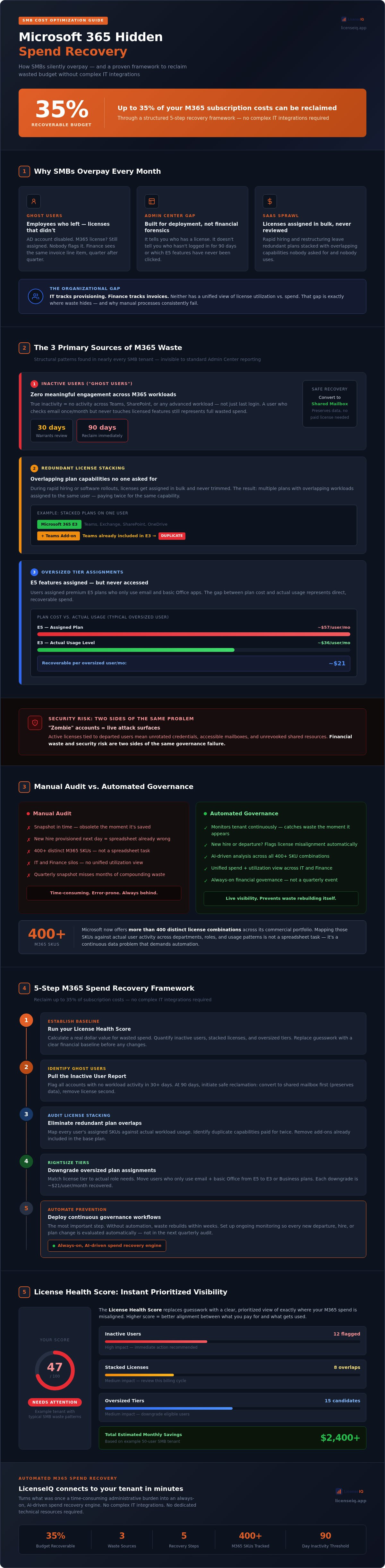
A 5-Step Framework for M365 Spend Recovery
Knowing where waste hides is step one. Recovering it systematically is what actually moves the budget needle. This five-step framework gives you a repeatable, structured process for microsoft 365 cost optimization for smbs that goes well beyond a one-time cleanup.
Step 1: Discover. Connect your tenant to an intelligence platform for a complete scan. This isn't a manual export from the Admin Center. It's a full API-level read of every license assignment, activity signal, and SKU combination in your environment. LicenseIQ connects to your tenant in minutes and immediately begins building a complete picture of your license landscape.
Step 2: Analyze. Your License Health Score surfaces once the scan completes. This single metric translates raw license data into a prioritized action list. High-cost, zero-activity accounts rise to the top. Redundant stacks get flagged. The score tells you where to act first, so you're not guessing.
Step 3: Reclaim. Target inactive users and unassigned license pools. Remove assignments. Convert accounts where data retention requires it. Stop paying for seats that deliver nothing.
Step 4: Right-Size. Move over-licensed users to tiers that match their actual workload. E5 features sitting unused aren't a benefit; they're a cost. Downgrade those accounts to E3 or Business Standard and capture the cost delta immediately.
Step 5: Govern. Set automated alerts for new waste patterns. Every new hire, every role change, every departure is a potential governance gap. Continuous monitoring closes it before the next billing cycle.
Executing the "Quick Wins"
Unassigned licenses are your fastest recovery target. These are fully paid seats sitting in the available pool with no user attached, no productivity generated, and no justification. Pull that number first. Then move to inactive accounts. A 30-day inactivity window flags accounts worth reviewing; 60 days signals strong reclamation candidates; at 90 days, the financial case is clear-cut. For a complete sequence covering data preservation, access revocation, and license removal, the Office 365 Offboarding Checklist walks through every required step without leaving compliance gaps.
Long-Term Right-Sizing Strategies
Sustainable cost control requires matching license tiers to actual user roles, not job titles. Frontline workers processing tasks in a single app don't need the same plan as knowledge workers running complex workflows across Teams, SharePoint, and Purview. Map your roles explicitly. Mixed tenant environments, where Business and Enterprise plans coexist, need particular attention; overlapping capabilities in those configurations are a common source of redundant spend that compounds quickly.
The highest-leverage structural change is automating the request-to-license workflow. When new licenses require a documented business justification before provisioning, over-purchasing stops being a default. The right tier gets assigned from day one, and the reclamation cycle never has to start.
This is where microsoft 365 cost optimization for smbs shifts from reactive cleanup to proactive financial governance. See how LicenseIQ's automated governance workflows enforce this process continuously, so the savings you recover today don't quietly rebuild into waste by next quarter.
Achieving Continuous ROI with LicenseIQ
Every framework in this guide requires one thing to actually work: visibility you can trust, updated continuously, without consuming your team's time. That's the gap LicenseIQ closes. It's not a consulting engagement that delivers a report and disappears. It's an always-on, AI-driven governance engine that turns your M365 tenant into a financially managed asset rather than a recurring expense you can't fully explain.
The shift from reactive cleanup to proactive financial hygiene is the difference between recovering waste once and preventing it permanently. LicenseIQ is built for that second outcome.
The 5-Minute Audit
Connection is straightforward. LicenseIQ uses read-only API access to your Microsoft tenant, meaning no write permissions, no configuration risk, and no IT project required to get started. Your data stays where it is. LicenseIQ reads activity signals, license assignments, and SKU configurations, then calculates your License Health Score immediately.
What you see on the Spend Recovery Dashboard is designed for decision-makers, not IT administrators. Inactive accounts are ranked by cost impact, not alphabetically. Redundant license stacks are flagged with the specific dollar value tied to each one. Unassigned seats appear as a recoverable pool with a clear reclamation path. You're not looking at raw data. You're looking at prioritized actions with dollar values attached.
That's how insights become actual savings. You see the number. You approve the action. The spend stops.
Why SMBs Choose LicenseIQ over Manual Tracking
Consulting-based optimization has a fundamental flaw: it ends. An engineer reviews your tenant, delivers recommendations, and moves on. Your tenant keeps changing. New hires get provisioned. Departures go unprocessed. The waste rebuilds quietly, and nobody notices until the next engagement, months later.
LicenseIQ doesn't work that way. It's built specifically for SMB scale, which means no enterprise-grade implementation burden, no dedicated IT resource requirement, and no per-hour consulting fees that erode the savings you're trying to recover. Continuous monitoring runs in the background, flagging new waste patterns the moment they appear rather than waiting for a scheduled review.
For effective microsoft 365 cost optimization for smbs, that continuity is what makes the difference between a one-time win and a permanent improvement to your cost structure. The savings you recover this quarter don't silently rebuild themselves next quarter.
The competitive advantage here is simple. Manual tracking captures a moment. LicenseIQ governs the ongoing reality of your tenant, every assignment, every inactivity signal, every redundant stack, monitored continuously so your budget stays aligned with actual usage.
Stop auditing. Start governing. Get your M365 Health Score now at LicenseIQ and see exactly how much you can recover, in minutes, not months.
Your M365 Budget Deserves Better Than a Spreadsheet
The waste in your Microsoft 365 tenant isn't a mystery. It's ghost users compounding quietly, licenses stacked on roles that don't need them, and unassigned seats sitting idle through every billing cycle. The problem isn't complexity. It's the absence of continuous visibility.
Effective microsoft 365 cost optimization for smbs doesn't require a dedicated IT team or a lengthy consulting engagement. It requires the right governance engine running in the background, flagging waste the moment it appears rather than months later when the damage is already done.
The path forward is clear: stop auditing reactively and start governing continuously. AI-native automation, a Health Score that surfaces priorities instantly, and automated workflows that recover up to 35% of your M365 spend. That's not a future-state aspiration. It's available right now.
Your next billing cycle doesn't have to look like the last one. Discover how much you can save by getting your M365 Health Score in 5 minutes.
Frequently Asked Questions About Microsoft 365 Cost Optimization for SMBs
How much can the average SMB save on Microsoft 365 licenses?
Industry benchmarks consistently point to up to 35% of total M365 subscription spend as recoverable waste. The actual figure depends on how long your tenant has gone without active governance. SMBs that have never run a structured license audit tend to sit at the higher end of that range, with ghost users, unassigned seats, and over-licensed accounts all contributing simultaneously.
The fastest way to get a number specific to your environment is a License Health Score. It calculates your recoverable spend based on your actual tenant data, not industry averages, giving you a real baseline rather than an estimate.
Is it safe to connect an optimization tool like LicenseIQ to my M365 tenant?
Yes. LicenseIQ connects via read-only API access, meaning it can read license assignments and activity signals but cannot modify your tenant configuration, delete users, or change any settings. No write permissions are granted during the connection process. Your data stays within your Microsoft environment throughout.
This architecture is specifically designed for SMBs that don't have dedicated security teams reviewing every third-party integration. The connection takes minutes to establish, and there's no configuration risk involved in getting started.
What is the difference between an unassigned license and an inactive user?
An unassigned license is a fully paid seat sitting in your tenant's available pool with no user attached at all. It generates zero productivity and zero value from the moment it's unassigned. An inactive user, by contrast, has a license assigned to a real account, but that account shows no meaningful activity across M365 workloads within a defined period.
Both represent waste, but they require different remediation. Unassigned licenses can be removed from your subscription at the next renewal window. Inactive user accounts typically need a data preservation step first, converting to a shared mailbox before the license is reclaimed, to protect compliance requirements.
Can I downgrade a Microsoft 365 license without losing user data?
Yes, with the right sequence. Downgrading a user from E5 to E3, for example, removes access to advanced features like Microsoft Defender for Endpoint and Power BI Pro, but it doesn't delete emails, files, or SharePoint content. The user's core productivity data remains intact because it's tied to the account, not the license tier.
The critical step is verifying which features the user actually relies on before executing the change. If they've never accessed Defender or Purview in 60 days of usage telemetry, the downgrade carries no operational risk. Always confirm activity data before reassigning tiers.
How often should an SMB perform a Microsoft 365 license audit?
A quarterly manual audit is the minimum viable frequency, but it's not sufficient for effective microsoft 365 cost optimization for smbs in a dynamic environment. Your tenant changes daily. New hires get provisioned, roles shift, and departures create gaps between offboarding completion and license reclamation. A quarterly snapshot misses all of it in between.
Continuous automated monitoring is the practical answer. When your tenant is governed in real time, "how often should I audit" stops being a relevant question. Waste gets flagged the moment it appears, not three months later when the cost has already compounded.
Does Microsoft provide built-in tools for cost optimization?
Microsoft's Admin Center provides license assignment data and some basic usage reports, but it's built for provisioning and deployment, not financial governance. It shows you who has a license. It doesn't correlate that assignment against actual workload activity, calculate the dollar value of idle seats, or prioritize which accounts to reclaim first.
The built-in reporting also lacks cross-functional context. IT sees provisioning data. Finance sees invoices. Neither view connects spend to utilization in a way that drives action. Dedicated governance platforms fill that gap by translating raw activity signals into prioritized, cost-weighted decisions.
What is a good "Health Score" for a Microsoft 365 tenant?
A License Health Score reflects how closely your license spend aligns with actual user activity across your tenant. A high score means most assigned licenses are actively used and appropriately tiered. A low score signals significant misalignment, typically a combination of inactive accounts, unassigned seats, and over-licensed users that haven't been reviewed.
There's no universal benchmark that applies to every SMB, because tenant composition varies by industry, growth stage, and offboarding discipline. What matters is your score relative to your own baseline and how it trends over time. A score that improves consistently after governance workflows are applied is the real indicator of a healthy optimization program.
Can I mix different license types (like Business and Enterprise) to save money?
Yes, Microsoft allows mixed license environments within a single tenant. Assigning Business Standard to frontline workers while reserving E3 or E5 for knowledge workers who need advanced compliance or security features is a legitimate and commonly used cost control strategy. You pay for capability where it's genuinely needed and avoid it where it isn't.
The risk in mixed environments is redundant feature overlap. Business Premium and E3 share several capabilities, and stacking both on the same user creates waste without adding functionality. Any mixed-tenant configuration benefits from regular auditing to confirm that each tier assignment still matches the user's actual workload, not just their job title.


