

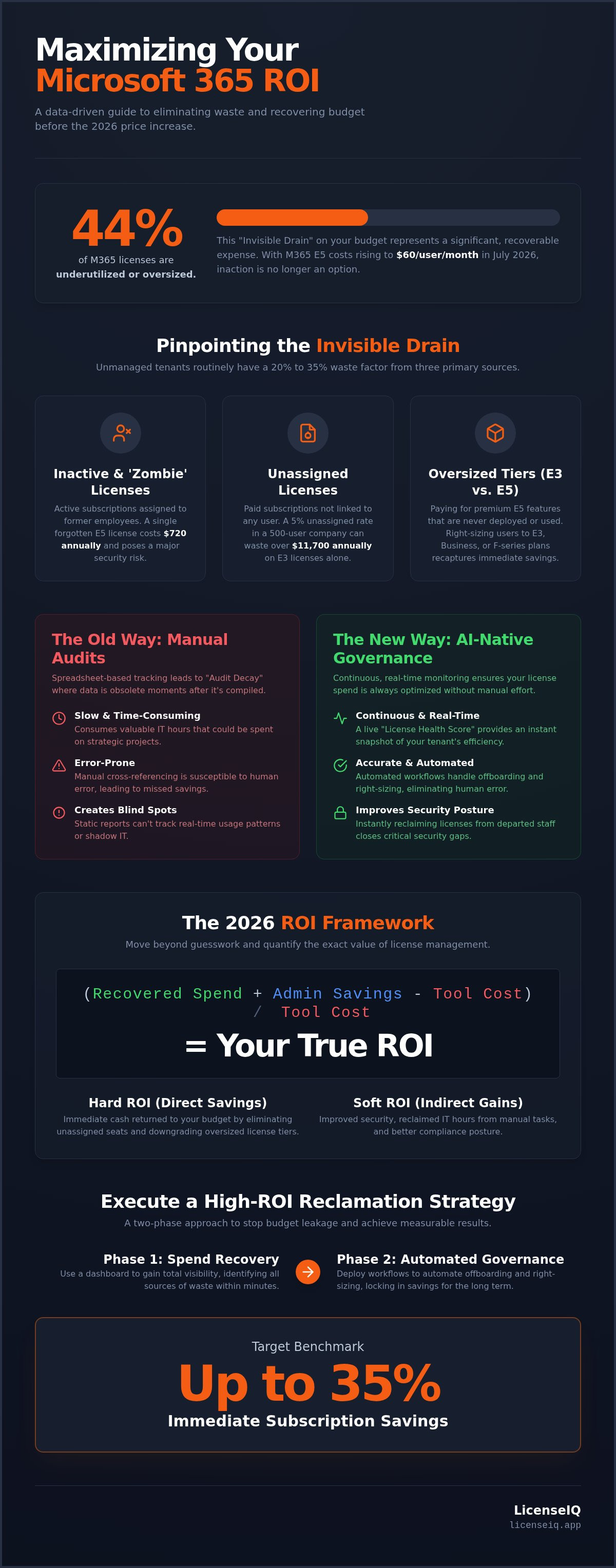
Nearly 44% of Microsoft 365 licenses are currently underutilized or oversized. With the July 2026 price increases pushing M365 E5 costs to $60 per user, maximizing the roi of microsoft 365 license management is now a financial necessity. You already know that manual spreadsheet tracking is slow and error-prone. It's frustrating to face surprise renewal costs or pay for premium features that your team never touches. Zombie licenses from former employees shouldn't be your biggest hidden expense.
This guide shows you how to stop budget leakage and achieve up to 35% savings by automating your oversight. You'll learn how to replace manual guesswork with a Spend Recovery Dashboard and Automated Governance Workflows. We'll provide a clear roadmap to gain total visibility into your License Health Score and generate a precise dollar-value ROI report. By the end, you'll have the data-driven insights needed to protect your organization's resources with total confidence.
Key Takeaways
- Quantify the true roi of microsoft 365 license management by applying a specific formula that balances recovered spend and administrative time against total ownership costs.
- Eliminate "Audit Decay" by replacing static manual spreadsheets with continuous, AI-native governance that monitors license health in real-time.
- Identify the "Invisible Drain" on your budget by pinpointing unassigned seats, inactive users, and redundant feature tiers within minutes of connection.
- Execute a two-phase reclamation strategy to stop budget leakage, targeting a benchmark of up to 35% in immediate subscription savings.
- Deploy automated workflows to handle offboarding and license right-sizing, ensuring your spend remains optimized without manual oversight.
The Invisible Drain: Why Your M365 ROI is Leaking in 2026
M365 spending often operates in a financial black box. Organizations frequently mistake a growing subscription bill for increased digital maturity, but the reality is often less efficient. The true roi of microsoft 365 license management represents the measurable value your organization extracts compared to the total cost of ownership. When you pay for features that remain unconfigured or licenses that sit idle, your ROI doesn't just stagnate; it actively decays.
Unmanaged tenants routinely carry a 20% to 35% waste factor. This "Invisible Drain" stems from three primary sources: inactive users, unassigned licenses, and redundant feature tiers. Beyond these internal inefficiencies, shadow IT and overlapping third-party tools erode your investment. If your team pays for Slack or Zoom while also funding a full Teams deployment, you're effectively paying twice for the same capability. Adopting rigorous Software Asset Management (SAM) principles is the only way to plug these leaks and reclaim your budget.
The Problem of Inactive and Zombie Licenses
Zombie licenses are the ghosts of former employees. These are active subscriptions still assigned to departed staff or obsolete service accounts that no longer perform a function. Because offboarding is often a manual, fragmented process, these licenses can remain active for months. The financial impact of delayed offboarding is cumulative. A single forgotten E5 license costs $720 annually at 2026 pricing. Multiply that by dozens of former employees, and the waste becomes substantial. These accounts also represent a massive security gap, as orphaned, active credentials are primary targets for credential harvesting and lateral movement within your network.
Over-Provisioning: The E3 vs. E5 Trap
Microsoft 365 E5 now costs $60 per user monthly. Many SMBs jump to this tier for advanced security and compliance features but fail to actually deploy them. Paying for Security Copilot or advanced Purview capabilities that nobody uses is a direct hit to your roi of microsoft 365 license management. You don't need to over-provision every user to the highest tier to maintain security. Right-sizing to F-series or Business plans can slash costs without sacrificing productivity for frontline or part-time staff. For a detailed breakdown of which seats actually require premium features, consult our Microsoft 365 License Types guide to align your spend with actual usage patterns.
The 2026 ROI Framework: Quantifying Direct and Indirect Gains
ROI isn't a vague concept; it's a mathematical certainty. The formula for the roi of microsoft 365 license management is straightforward: (Recovered Spend + Admin Savings - Tool Cost) / Tool Cost. This equation allows leadership to move beyond guesswork and justify the investment in governance platforms. By quantifying these metrics, you transform IT from a cost center into a driver of fiscal efficiency. You gain the ability to prove exactly how much capital is being returned to the bottom line each month.
Hard ROI delivers direct cash savings by stripping out unassigned seats and downgrading oversized tiers. Soft ROI focuses on the benefits of SAM, such as improved security posture and reclaimed IT hours. We use the License Health Score as a lead indicator for these gains. This metric provides a real-time snapshot of your tenant's optimization level. A high score signifies that your tenant is lean, secure, and fully optimized. While usage adoption programs take months to influence the bottom line, "Spend Recovery" provides an immediate fiscal win. It's the difference between teaching a team to use a tool and stopping payment for a tool they don't need.
Calculating Direct Spend Recovery
Start by auditing unassigned licenses. These are paid subscriptions not linked to a user profile. In a tenant of 500 users, a 5% unassigned rate on E3 licenses ($39/month) results in $11,700 of wasted capital annually. Next, identify E5 users who haven't accessed advanced security features in 90 days. Downgrading them to E3 recaptures the price delta immediately. Spend Recovery is the immediate reclamation of capital from unused software assets.
Factoring in Administrative Overhead
Manual audits consume IT resources and are prone to oversight. To find your true ROI, calculate your "IT Hour Cost" by tracking time spent on manual license cross-referencing. Automated Governance Workflows eliminate this burden, ensuring offboarding happens instantly rather than sitting in a ticket queue. This automation reduces human error and prevents zombie licenses. Use an Office 365 Offboarding Checklist to standardize your process and monitor gains via a Spend Recovery Dashboard.
Manual Audits vs. AI-Native Governance: The Efficiency Gap
Manual audits are static snapshots. They capture a moment in time that vanishes almost immediately. In contrast, AI-native governance provides continuous oversight. This persistent monitoring is essential for maintaining the roi of microsoft 365 license management. When you rely on a manual check, you're looking at the past. AI-native tools look at the present. This distinction is critical because modern tenants are fluid; users join, move, and leave every week.
"Audit Decay" is a silent budget killer. A manual audit often becomes outdated within 24 hours of completion. Role changes and departmental shifts happen constantly, leaving your spreadsheet as a relic of yesterday's needs. While many IT teams rely on PowerShell scripts, these tools are often reactive. They struggle to uncover obscured details, such as specific app usage within a complex E5 bundle. LicenseIQ acts as a proactive digital auditor. It identifies these discrepancies automatically, ensuring your license pool remains lean and responsive without manual intervention.
The Hidden Cost of the Spreadsheet Method
Spreadsheets rely on stale data. This inaccuracy leads to defensive over-ordering of licenses to avoid provisioning delays. For SMB IT teams, this creates "Admin Friction." High-value engineers spend hours cross-referencing CSV files instead of focusing on strategic security projects. This labor cost is a significant part of your total cost of ownership. You can find a deeper breakdown of these hidden labor costs in our guide on mastering the Microsoft 365 license management lifecycle.
The ROI of Automated Governance Workflows
Automated Governance Workflows deliver 100% accuracy in license reclamation. They remove the human element from the offboarding process. Real-time alerts notify you of spend anomalies or sudden cost spikes before they impact your monthly bill. Instead of manually preparing reports for leadership, use the License Health Score. This provides instant, executive-level visibility into your tenant's financial health. It transforms complex technical data into a single, actionable metric. This shift from reactive tracking to proactive management is what secures the long-term roi of microsoft 365 license management.
How to Execute a High-ROI License Optimization Strategy
Executing an optimization strategy requires more than a one-time cleanup. It demands a structured, repeatable process that moves at the speed of your business. This four-phase approach ensures your organization maintains a peak roi of microsoft 365 license management throughout the fiscal year. By following these steps, you transform your tenant from a source of budget leakage into a model of operational efficiency.
Phase 1: Discovery. Stop guessing about your current state. Use an AI-native scan to map your entire tenant in minutes. This provides an immediate, transparent inventory of every assigned and unassigned license across all departments. You can't manage what you can't see; total visibility is the foundation of recovery.
Phase 2: Reclamation. Target the low-hanging fruit first. Identify inactive users and unassigned seats for immediate cancellation. This phase turns wasted spend into instant capital recovery. It's the fastest way to prove the value of your management strategy to financial leadership.
Phase 3: Right-Sizing. Right-sizing isn't about cutting tools; it's about alignment. Align license tiers with actual feature usage data rather than job titles. Many employees are over-licensed simply because they belong to a specific department. By auditing usage at the app level, you can identify where F-series or Business Standard licenses provide sufficient capability. Stop paying for premium security or compliance features that remain unconfigured in the tenant.
Phase 4: Automation. Manual cleanup is temporary. Implement Automated Governance Workflows to handle offboarding and license harvesting. These workflows should trigger the moment a user becomes inactive for more than 30 days. This proactive approach ensures that your roi of microsoft 365 license management remains high without requiring a manual monthly audit. Automation prevents waste from accumulating as your workforce scales.
Setting Your Spend Recovery Benchmarks
A high-performance IT department needs measurable targets. Use a Spend Recovery Dashboard to set monthly savings goals based on your initial discovery scan. Aim for a License Health Score above 90% as your operational standard. A high Health Score correlates directly with lower per-user licensing costs. Keeping this score high ensures you aren't carrying financial debt in your M365 tenant. It provides a clear, defensible metric for your next budget review.
Negotiating Your Next Renewal with Data
Renewal periods are often reactive. Most organizations simply renew based on historical precedent or headcount projections. Instead, use usage intensity reports to challenge standard license counts. If data shows 20% of your E5 users haven't touched a premium feature in six months, you have the leverage to reduce your commitment. Data-driven negotiation is far superior to following outdated patterns. For a step-by-step guide on this process, see our 2026 spend recovery playbook.
To start reclaiming your budget today, connect your tenant to LicenseIQ for an instant ROI discovery scan.
LicenseIQ: The AI-Native Engine for Continuous ROI
LicenseIQ acts as the proactive guardian of your M365 budget. It eliminates the complexity of enterprise-grade FinOps tools by focusing specifically on the needs of SMB leadership. You don't need days of manual configuration or specialized technical training. Our platform connects to your tenant in minutes. It immediately initiates a deep scan to uncover hidden waste and security vulnerabilities. This rapid deployment ensures that the roi of microsoft 365 license management is quantifiable almost instantly.
The platform avoids vague suggestions in favor of specific, dollar-value recommendations. It analyzes usage patterns at the application level to identify exactly where you can reclaim capital. Whether it's an unassigned E3 seat or an E5 user who never touches advanced security features, LicenseIQ finds the leak. By delivering actionable insights, the platform transforms your licensing strategy into a lean, data-driven operation. It functions as an always-on digital auditor that monitors your resources with relentless precision.
This shift from manual oversight to specialized digital platforms is happening across every business function. In operations, for example, FleetIQ provides a cloud-based solution for managing vehicle defects and workshop repairs, bringing the same level of precision to fleet maintenance that LicenseIQ brings to software governance.
Similarly, in the renewable energy sector, you can discover SolarOps360, an all-in-one SaaS platform designed to help solar EPC companies in India achieve the same level of operational clarity and efficiency.
Your Spend Recovery Dashboard
The Spend Recovery Dashboard visualizes your budget leakage in real-time. It translates complex technical license data into absolute financial clarity. You can see your total potential savings and current optimization level at a glance. Reporting to C-level executives is no longer a manual burden. With one click, you can generate executive-level summaries that prove the direct fiscal impact of your management efforts. It's the ultimate tool for demonstrating the roi of microsoft 365 license management to your board. Calculate your potential savings with LicenseIQ to see the impact on your bottom line.
Automated Governance for Long-Term Hygiene
Initial cleanups provide immediate wins, but long-term hygiene requires automation. LicenseIQ uses Automated Governance Workflows to ensure your ROI doesn't slip after the first month. The AI monitors user activity patterns and flags redundancy automatically. If a user stops accessing premium features, the system identifies the opportunity for a downgrade. This level of oversight maintains your License Health Score at peak levels indefinitely. It prevents the slow accumulation of zombie licenses and oversized tiers that typically erode IT budgets. Most organizations target up to 35% in total subscription savings by maintaining this level of digital discipline. It's the most direct path to financial accuracy and sustained operational health.
Take Control of Your M365 Spend Recovery
Your M365 tenant shouldn't be a source of financial leakage. By replacing manual spreadsheets with AI-native automation, you eliminate the risk of audit decay and ensure every seat provides maximum value. Reclaiming your budget starts with identifying zombie licenses and right-sizing underutilized E5 tiers. This proactive approach is the only sustainable way to maximize the roi of microsoft 365 license management in an era of rising subscription costs. You've seen how spend recovery delivers faster fiscal wins than slow adoption programs.
Stop guessing about your license health. You can scan your tenant in minutes to uncover specific dollar-value recommendations and actionable recovery insights. Transitioning to a continuous governance model protects your resources while providing total transparency for executive leadership. Discover your wasted M365 spend in minutes with LicenseIQ. You'll identify up to 35% in wasted spend and receive your License Health Score instantly. Take control of your digital resources and build a leaner, more secure environment today.
Frequently Asked Questions
How do you calculate the ROI of Microsoft 365 license management?
ROI is calculated by subtracting the cost of your management platform from the sum of reclaimed subscription spend and administrative labor savings, then dividing by the platform cost. This formula provides a precise view of the roi of microsoft 365 license management. It ensures that every dollar invested in governance generates a measurable return through the elimination of inactive seats and redundant features.
What is a typical ROI for a SaaS spend management tool?
Organizations using specialized management platforms often see an ROI of 123% with a payback period of approximately 10 months, according to a Forrester Consulting study. For SMBs, the primary driver is the 35% reduction in subscription costs achieved through active governance. These figures reflect the immediate impact of reclaiming capital from the 44% of licenses that typically go underutilized.
Can I achieve ROI using only Microsoft native admin tools?
Native admin tools provide raw data but lack the automation required for high ROI. You can manually identify unassigned licenses, but the labor cost of constant auditing often exceeds the savings. AI-native governance replaces these manual snapshots with continuous oversight. This prevents "Audit Decay" and ensures your roi of microsoft 365 license management doesn't slip between manual checks.
How much can an SMB expect to save on M365 licenses?
SMBs typically identify up to 35% in potential subscription savings during their initial scan. This is achieved by targeting the "Invisible Drain" of zombie licenses and oversized tiers. With M365 E5 prices reaching $60 per user in 2026, even small-scale reclamation results in significant capital recovery. Most unmanaged tenants carry a waste factor between 20% and 35%.
Does license optimization affect end-user productivity?
Optimization enhances productivity by aligning tools with actual job requirements. It doesn't mean removing necessary features; it means stopping payment for unused ones. Automated workflows ensure that new employees receive the correct licenses instantly, while departing staff are offboarded securely. This precision eliminates administrative friction and keeps your team focused on high-value tasks.
How long does it take to see ROI after implementing LicenseIQ?
Discovery happens in minutes, while financial ROI is often realized within the first billing cycle. The moment you identify and cancel unassigned licenses, your monthly burn rate drops. LicenseIQ connects to your tenant rapidly to provide immediate dollar-value recommendations. This speed allows for instant reclamation of capital that would otherwise be lost to the next renewal cycle.
Is it worth managing licenses if we only have 50 employees?
Managing licenses is vital even for smaller teams of 50 employees. A handful of forgotten E5 or Copilot licenses can waste thousands of dollars annually. For a small business, this reclaimed capital can be reinvested into growth or security projects. Automation ensures that license management doesn't become a full-time job for your IT lead.
What is a Microsoft 365 License Health Score?
The License Health Score is a real-time metric that quantifies your tenant's optimization level. It acts as a lead indicator for ROI by measuring spend efficiency, user activity, and license assignment accuracy. A score above 90% indicates a lean, well-governed tenant. This score provides executive-level visibility without the need for manual reporting or complex data analysis.


