

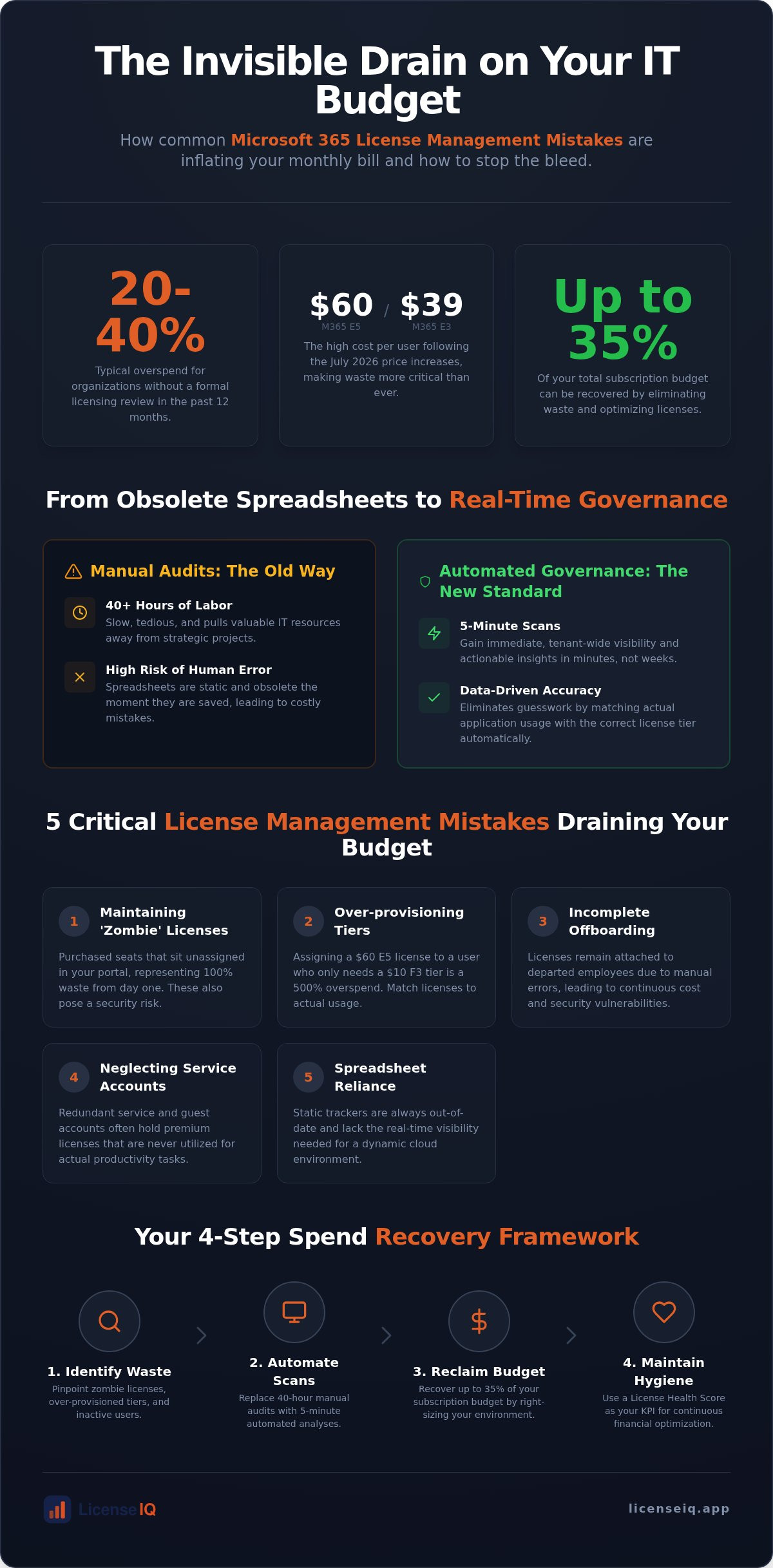
Organizations that haven't conducted a formal licensing review in the last 12 months are typically overspending by 20% to 40%. You likely feel the strain of unpredictable monthly subscription spikes, particularly since the July 2026 price increases pushed Microsoft 365 E5 costs to $60 per user. It's difficult to reconcile your budget when you're battling common microsoft 365 license management mistakes such as ghost accounts or misaligned "no Teams" plans. Manual audits are too slow and fail to provide the visibility required to match actual app usage with the correct license tier.
You don't have to accept this financial drain as an inevitable cost of doing business. We'll identify the hidden strategic errors inflating your bill and show you how to recover up to 35% of your subscription spend. You'll learn exactly which pitfalls to avoid and how to use automation to secure a higher License Health Score. This is your roadmap to total operational transparency and immediate waste elimination.
Key Takeaways
- Identify the common microsoft 365 license management mistakes that allow unassigned "zombie" licenses to inflate your monthly bill.
- Replace 40-hour manual audits with 5-minute automated scans to eliminate human error and gain immediate visibility.
- Use the License Health Score as your primary KPI for maintaining continuous financial hygiene across your organization.
- Follow a four-step spend recovery framework to identify waste and reclaim up to 35% of your subscription budget.
The Invisible Drain: Why M365 License Management Fails in 2026
License sprawl is the silent killer of modern IT budgets. It represents the unchecked accumulation of high-tier subscriptions that provide features your staff never actually touches. In the current fiscal environment, many organizations treat their tenant as a static asset. This is a critical error. Following the July 2026 price increases, which saw Microsoft 365 E5 climb to $60 per user and E3 reach $39, the financial stakes have never been higher. Most SMBs are currently wasting between 20% and 35% of their total M365 spend due to common microsoft 365 license management mistakes that go unnoticed for months.
The era of manual seat-counting is over. Licensing complexity has officially outpaced the capacity of human-led administration. Modern Software Asset Management (SAM) demands a shift from static oversight to dynamic, usage-based optimization. If you aren't monitoring active application engagement daily, you're likely paying for capabilities that remain dormant. This invisible drain erodes your bottom line and obscures the true ROI of your digital ecosystem.
The Complexity Trap of M365 Tiers
There's significant overlap between Business Premium, E3, and E5 tiers. IT leaders often fall into the trap of "defaulting to the highest tier" to avoid service gaps. This "just in case" mentality creates immediate financial waste. For example, paying the $21 premium for E5's advanced security features is pointless if your users only require basic productivity tools. Furthermore, shadow IT within the M365 ecosystem often leads to redundant add-on purchases by individual departments. These common microsoft 365 license management mistakes result in a fragmented tenant that is impossible to audit without specialized tools.
Why 'Setting and Forgetting' is a Sunk Cost
Auto-renewals are the primary driver of subscription waste. Without usage validation, you're essentially writing a blank check to Microsoft every month. True license hygiene is not an annual event; it's a continuous, proactive process. You must verify that every assigned seat corresponds to an active, necessary function within the company. Adopting a rigorous Microsoft 365 License Management Lifecycle ensures that you reclaim costs the moment a user's requirements change or they leave the organization. Total transparency is the only antidote to organizational disorder and rising subscription fees.
5 Critical Microsoft 365 License Management Mistakes
Identifying waste requires a shift from passive observation to active digital auditing. Many IT leaders believe they have a handle on their tenant, yet they continue to fall victim to common microsoft 365 license management mistakes that compound over the fiscal year. These errors aren't just administrative oversights. They're direct drains on your capital. To stop the bleed, you must address these five specific failures:
- Maintaining 'Zombie' Licenses: These are purchased seats that sit unassigned in your portal. They represent 100% waste from the moment of purchase.
- Over-provisioning Tiers: Assigning a $60 E5 license to a frontline worker who only needs the $10 F3 tier is a 500% overspend per user.
- Incomplete Offboarding: Licenses often remain attached to departed employees because the de-provisioning process is manual and prone to human error.
- Neglecting Service Accounts: Redundant service and guest accounts frequently hold premium licenses that are never utilized for actual productivity.
- Spreadsheet Reliance: Static trackers are obsolete the moment you hit 'save'. They lack the real-time visibility needed to manage a dynamic 2026 cloud environment.
The High Cost of Inactive Users
IT teams frequently define 'inactive' too narrowly. A user who hasn't logged in for 30 days is still costing you full price. Beyond the financial loss, these accounts represent a massive security vulnerability. Orphaned licenses are prime targets for credential harvesting and unauthorized access. Implementing a rigorous Office 365 Offboarding Checklist ensures you secure your data while simultaneously reclaiming your spend. You can instantly improve your financial posture by connecting your tenant to a Spend Recovery Dashboard to identify these ghosts in minutes.
Tier Inflation and Feature Underutilization
The 'E5 Premium' mistake is rampant in 2026. Organizations pay for high-tier security and AI features, such as Security Copilot, without actually configuring or deploying them. This is tier inflation. Right-sizing your environment means matching the license cost to actual user behavior. If a department only uses web-based apps and basic mail, moving them to a lower tier is a logical move. Review the available M365 License Types to find the exact match for your team's needs. Eliminating these common microsoft 365 license management mistakes starts with knowing exactly what you are paying for versus what you are using.
Manual Audits vs. Automated Governance Workflows
Relying on manual oversight is one of the most persistent common microsoft 365 license management mistakes. A thorough manual audit typically requires over 40 hours of high-value IT labor. This process involves export after export of CSV files, which staff must then cross-reference against payroll and department lists. In contrast, AI-native scanning completes a full tenant analysis in 5 minutes. This isn't just about speed. It's about precision. Humans naturally struggle to track the granular details of redundant add-on licenses, such as Teams Phone, calling plans, or advanced compliance tools, which can account for up to 40% of your total spend.
Automated Governance Workflows transform your license management from a reactive chore into a proactive, vigilant system. These workflows act as a digital auditor that never sleeps. They identify waste the moment it occurs, rather than letting it sit for months until the next scheduled review. This prevents the "rebirth" of waste that typically happens immediately after a manual audit is completed. Without a persistent system, new hires are often over-provisioned by default, and departing staff accounts linger in the system, restarting the cycle of financial drain.
The ROI of Eliminating Manual Tracking
The labor cost of manual tracking is a significant, hidden expense. When senior IT engineers spend a full work week every quarter manually auditing licenses, you're losing their expertise on high-impact infrastructure projects. This is a massive opportunity cost. By deploying the LicenseIQ platform, you achieve immediate spend recovery without the manual burden. You shift your team's focus from counting seats to strategic growth. Recovering 35% of your subscription budget through automation provides a clear, measurable ROI that manual spreadsheets simply cannot match.
Real-Time Monitoring vs. Point-in-Time Audits
A manual license audit is stale the moment it's finished. In a dynamic 2026 business environment, staff roles and software needs change daily. A "point-in-time" snapshot taken in January is useless by March. Continuous monitoring provides the financial accuracy required for modern budgeting. Automated workflows serve as a safety net for corporate resources, ensuring that every dollar spent on Microsoft 365 is backed by actual user engagement. This level of oversight moves your organization from disorder to total clarity, securing your financial health against the rising costs of cloud services.
How to Audit and Recover Wasted Spend in 4 Steps
Recovering capital from your M365 tenant doesn't require weeks of manual investigation. By following a structured recovery framework, you can eliminate common microsoft 365 license management mistakes and stabilize your IT budget. This four-step process moves your organization from financial leakage to total resource clarity.
- Step 1: Connect for Deep Scanning. Link your tenant to a software intelligence platform. This bypasses the limitations of the Microsoft Admin Center by analyzing actual user engagement patterns rather than just assignment status.
- Step 2: Benchmark Your Efficiency. Use a License Health Score to quantify your current waste. This metric provides an immediate baseline for your optimization efforts.
- Step 3: Execute Recovery Recommendations. Target unassigned "zombie" licenses and inactive accounts first. These represent the most immediate opportunities for spend recovery.
- Step 4: Establish Automated Governance. Deploy workflows that monitor for new waste daily. This ensures that the savings you achieve today aren't lost to sprawl tomorrow.
Understanding Your License Health Score
The License Health Score is a critical KPI for modern IT teams. It represents the ratio of utilized license features to total subscription spend. A low score indicates high financial and operational risk, suggesting that your budget is being consumed by unused capabilities. For a mid-market organization in 2026, an optimal health score is 95% or higher. Presenting this metric to leadership or your CFO provides a clear, quantitative measure of IT efficiency. It transforms vague concerns about "high bills" into a data-driven strategy for fiscal responsibility.
Actionable Insights: From Data to Dollars
Raw data is only valuable if it translates into capital. Effective auditing tools provide specific dollar-value recommendations for license downgrades. For instance, identifying 50 users who can move from E5 to E3 results in immediate, recurring monthly savings. Unassigned licenses are the low-hanging fruit of this process. Reclaiming these seats is the fastest way to stop the drain. For a deeper dive into these tactics, consult our Microsoft 365 License Optimization Guide. To stop the cycle of common microsoft 365 license management mistakes today, you can start your 5-minute audit and visualize your potential recovery in real time.
Achieving Continuous Financial Hygiene with LicenseIQ
LicenseIQ functions as your proactive digital auditor. It eliminates organizational disorder by providing total clarity into your Microsoft 365 ecosystem. While manual methods fail to keep up with the 2026 pricing tiers, our platform identifies waste with surgical precision. You can recover up to 35% of your subscription spend by automating the oversight that humans simply cannot maintain. It's a shift from being a passive payer to an active guardian of corporate resources. Our system allows you to connect in minutes and begin recovering capital in seconds.
AI-Native Intelligence for SMBs
SMB IT leaders often lack the bandwidth for deep-dive forensics. LicenseIQ bridges this gap with AI-native intelligence specifically designed for lean teams. By leveraging the Model Context Protocol, the platform drives automated governance that scales with your company's growth. This vigilant monitoring system provides the confidence and security you need to know your budget is protected. You no longer have to worry about common microsoft 365 license management mistakes creeping back into your tenant after a successful audit. We provide the permanent "safety net" that modern technical operations require.
Get Your Free 5-Minute License Audit
Stop the drain on your resources today. You can start your free 5-minute license audit by connecting your tenant to the LicenseIQ platform. This deep scan reveals the obscured waste and redundant add-ons that traditional spreadsheets miss. You'll receive a clear picture of your current License Health Score and a specific dollar-value recommendation for immediate recovery. Eliminating common microsoft 365 license management mistakes is the first step toward achieving total operational transparency. Data-driven decision-making is no longer optional; it's the standard for financial health in 2026. Secure your resources now.
Take Control of Your 2026 IT Budget
The transition from manual seat-counting to automated governance is no longer optional. You've identified how "zombie" accounts and tier inflation create a silent drain on your capital. These common microsoft 365 license management mistakes thrive in the shadows of complex spreadsheets and monthly auto-renewals. By implementing a continuous monitoring system, you replace organizational disorder with total financial clarity. You shift your team's focus from forensic audits to strategic growth initiatives that move the needle.
Don't let another billing cycle pass without total visibility. Our AI-native Spend Recovery Dashboard allows you to connect in minutes and see exactly where your budget is leaking. You can recover up to 35% of your M365 subscription spend by matching license tiers to actual user behavior. It's time to stop guessing and start measuring with a precise, vigilant system that protects your bottom line.
Start your 5-minute M365 audit with LicenseIQ and uncover obscured waste. You'll receive your License Health Score almost instantly, providing the data-driven insights needed to protect your corporate resources. Your path to total operational transparency and immediate spend recovery starts here.
Frequently Asked Questions
What is the most common mistake in Microsoft 365 license management?
Maintaining unassigned or "zombie" licenses is the most frequent error. These are paid seats that sit in the tenant without a user attached. They represent immediate capital loss. Another prevalent issue is over-provisioning users with E5 licenses for basic tasks. These common microsoft 365 license management mistakes occur because manual tracking cannot keep pace with staff turnover.
How much money do companies typically waste on M365 licenses?
Organizations typically overspend by 20% to 40% when they lack a formal licensing review process. Research from May 2026 confirms this range for businesses that haven't audited their environment in 12 months. This waste stems from unused add-ons, redundant service accounts, and misaligned license tiers. For an enterprise with 500 users, this equates to thousands of dollars in monthly leakage.
Is a manual license audit sufficient for a small business?
Manual audits are rarely sufficient because they only provide a point-in-time snapshot. Even in a small business, staff roles and software needs change weekly. A manual review takes hours of labor to complete and is often obsolete before the report is filed. Small teams need real-time visibility to ensure their limited budgets aren't consumed by inactive accounts.
What is a License Health Score and why does it matter?
A License Health Score is a quantitative metric that measures the efficiency of your subscription spend. It compares your total costs against actual feature utilization across the tenant. This score matters because it provides IT leaders with a clear KPI to report to the CFO. A high score indicates that your resources are optimized and aligned with actual business requirements.
How can I identify inactive Microsoft 365 users quickly?
Connecting your tenant to an AI-native platform is the fastest way to identify inactive users. While the Microsoft Admin Center shows last login dates, it doesn't analyze specific app engagement patterns. Automated tools scan your entire environment in minutes to find accounts with zero activity. This allows you to reclaim licenses immediately rather than waiting for a quarterly manual review.
What is the difference between license optimization and license management?
License management is the administrative act of assigning and tracking seats; license optimization is the strategic process of maximizing value. Management ensures everyone has a login. Optimization ensures everyone has the most cost-effective license that meets their specific needs. Optimization focuses on spend recovery and the elimination of common microsoft 365 license management mistakes to improve the bottom line.
Can automated workflows really replace manual license tracking?
Automated workflows don't just replace manual tracking; they significantly outperform it. These systems monitor your tenant 24/7 and trigger actions based on real-time usage data. They handle the repetitive tasks of identifying departures and unassigning seats. This precision eliminates the human error factor that often leads to accidental overspending or security gaps during the offboarding process.
How often should a company audit its Microsoft 365 subscriptions?
You should audit your subscriptions continuously rather than on a fixed schedule. The dynamic nature of SaaS means that a monthly or quarterly check is too slow to stop financial leakage. Real-time monitoring ensures that you catch waste the moment it occurs. This proactive approach maintains financial hygiene and prevents the accumulation of unnecessary costs over the fiscal year.


