

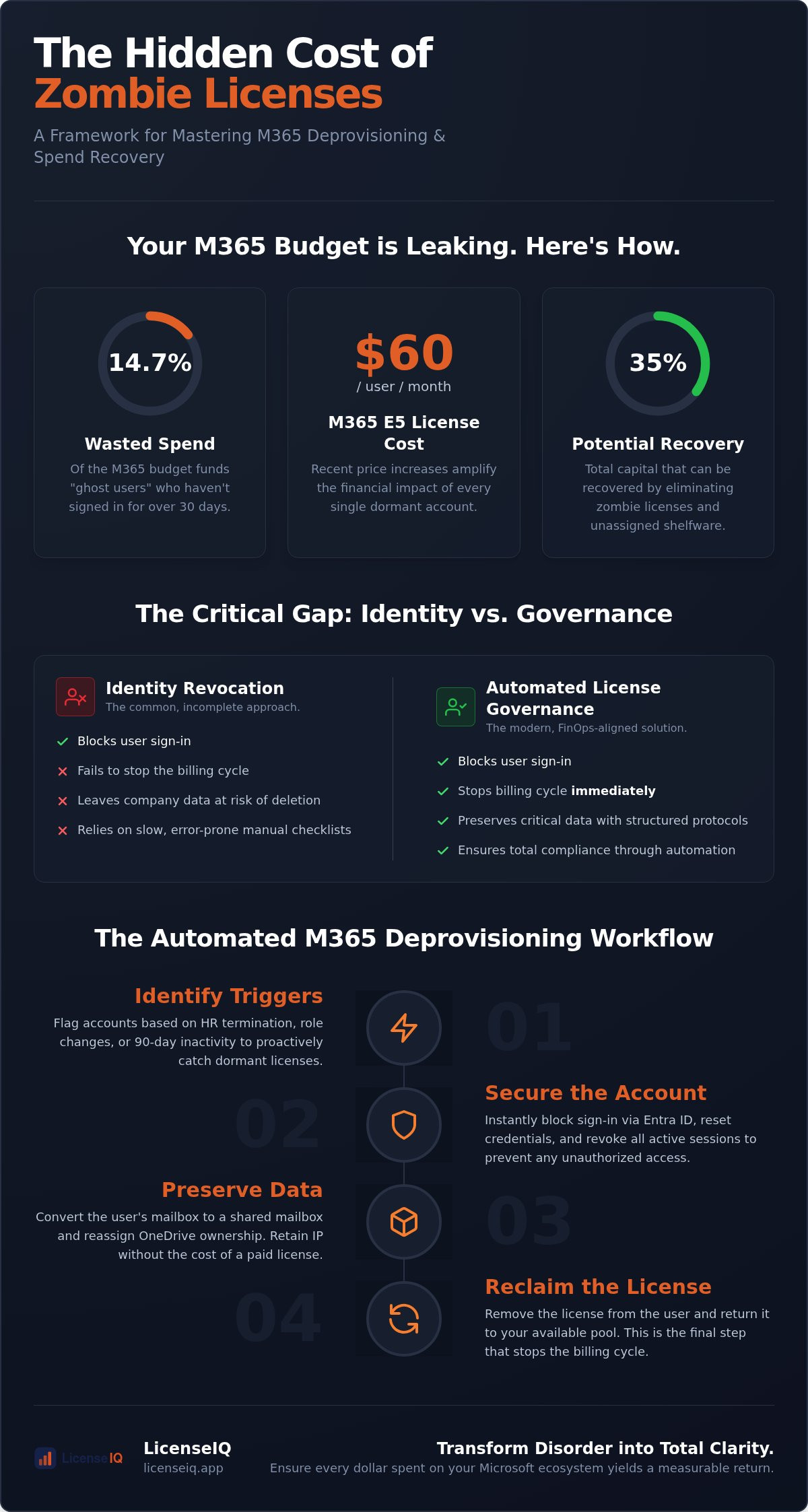
Did you know that 14.7% of your Microsoft 365 budget is likely funding "ghost users" who haven't signed in for over 30 days? With recent price increases pushing E5 licenses to $60 per user, these dormant accounts represent a significant, unmonitored financial leak. You've probably felt the frustration of paying for former employees or feared that deleting an account might purge data critical for legal discovery. Manual offboarding is slow, prone to human error, and fundamentally incompatible with modern governance.
It's time to replace manual checklists with a precise M365 license deprovisioning workflow. This guide provides the technical and financial framework to eliminate zombie licenses and recover up to 35% of your M365 spend. We'll examine how to automate reclamation, convert mailboxes to preserve data, and use your license health score to maintain a lean, high-performance tenant. You'll move from organizational disorder to total clarity, ensuring every dollar spent on your Microsoft ecosystem yields a measurable return. By mastering these automated steps, you'll transform your IT operations into a vigilant guardian of corporate resources.
Key Takeaways
- Stop funding "zombie licenses" and recover up to 35% of your subscription budget by identifying dormant accounts.
- Deploy an automated M365 license deprovisioning workflow to eliminate manual errors and stop financial leaks.
- Understand the critical gap between identity revocation and true spend recovery to ensure billing stops immediately.
- Protect critical company data with structured handover protocols for OneDrive and SharePoint assets during offboarding.
- Monitor your License Health Score to maintain a lean tenant and provide leadership with total spend transparency.
The Financial Impact of M365 License Deprovisioning
M365 license deprovisioning is the systematic process of removing access and reclaiming subscription costs from inactive or departed users. It is a mandatory discipline for any organization aiming for financial transparency. Most IT departments treat offboarding as a security checkbox: they disable the account in Entra ID and move on. However, disabling an account does not stop the billing cycle. This creates the "Zombie License" problem, where paid seats remain assigned to users who have long since left the company. For mid-sized enterprises, these forgotten seats can drain thousands of dollars from the bottom line every month.
Implementing a dedicated M365 license deprovisioning workflow transforms this reactive task into a proactive recovery engine. This workflow directly impacts your License Health Score, providing leadership with a clear metric for operational efficiency. When you move beyond simple access revocation, you ensure that every dollar in your Microsoft budget is tied to an active, value-producing employee. This strategic alignment is no longer optional; it is the foundation of modern cloud governance.
Quantifying Wasted Spend in 2026
The financial stakes have never been higher. Following the July 2026 price increases, an M365 E5 license now costs $60 per user monthly. Industry data from Gitbit indicates that 14.7% of total M365 expenditure is wasted on dormant accounts with zero interactive sign-ins for over 30 days. Some estimates from LicenseIQ place total capital waste as high as 35% when including unassigned shelfware. A common pitfall is the "premium trap," where high-tier licenses are left assigned to users who only utilize basic features. Organizations should audit their tenants against the 5 Signs You Are Wasting Money on M365 Licenses to identify these hidden costs before they compound.
Deprovisioning as a FinOps Pillar
IT leaders are now being measured on SaaS efficiency metrics rather than just uptime. Deprovisioning has transitioned from a back-office chore to a central function of Software Asset Management (SAM). By utilizing an automated M365 license deprovisioning workflow, companies can eliminate SaaS sprawl at the source. Automated governance tools act as a vigilant auditor, ensuring that license reclamation triggers the moment an employee departs. This level of precision allows for a lean software budget that scales dynamically with your workforce, providing the total clarity needed to defend IT spending during annual reviews.
Anatomy of an Effective M365 Deprovisioning Workflow
A high-performing M365 license deprovisioning workflow must balance three critical pillars: security, data integrity, and cost recovery. Relying on manual Admin Center clicks is a recipe for oversight. You need a structured, repeatable sequence that ensures no license remains active longer than necessary while protecting your intellectual property. This process moves beyond simple account deletion to ensure total fiscal and operational health.
- Step 1: Identify Triggers. While HR termination is the obvious start, a vigilant system also flags 90-day inactivity or role changes that render premium licenses redundant.
- Step 2: Secure the Account. Immediately block sign-in via Microsoft Entra ID. Reset credentials and revoke all active sessions to prevent unauthorized access during the transition.
- Step 3: Preserve Data. Convert the user's mailbox to a shared mailbox and reassign OneDrive ownership. This retains critical business data without the overhead of a paid license.
- Step 4: Reclaim the License. Remove the license from the user and return it to your available pool. This stops the billing cycle immediately.
The Inactivity Trigger: The Most Overlooked Step
Waiting for an employee to leave is a reactive strategy that costs money. In 2026, with E5 licenses costing $60 per month, every dormant account is a drain on your budget. Use AI-native scanning to identify users with 0% adoption scores across the M365 suite. Define clear thresholds; for example, if a user hasn't accessed Teams or Outlook in 30 days, they are "inactive" and ripe for reclamation. This proactive stance ensures you aren't paying for tools your team isn't using. To gain this level of oversight without manual effort, you can deploy Automated Governance Workflows to handle these triggers for you.
Converting to Shared Mailboxes
Converting a mailbox to a shared resource is the most efficient way to maintain data integrity. Shared mailboxes do not require a license as long as they are under 50GB. This allows you to move user data to a secure, accessible repository before removing the license. It's a vital step for legal discovery and business continuity. Ensure you manage permissions correctly, granting the departed user’s manager or successor access to ensure no critical communications are missed. This technical pivot saves money without risking your data history.
Identity Management vs. License Governance
Most IT leaders mistake identity management for license governance. Tools like Microsoft Entra ID and Okta are designed for access revocation; they excel at securing your perimeter. When an employee leaves, these systems disable the account and block sign-in immediately. This satisfies your security requirements, but it does nothing for your balance sheet. A disabled user account still holds its assigned seat, meaning you continue to pay for a license that no one is using. This "License Hoarding" is a silent drain on corporate resources that identity tools simply aren't built to solve.
True spend recovery requires a specialized M365 license deprovisioning workflow that operates beyond the identity layer. While IT security focuses on "Who has access?", license governance asks "What are we paying for?" Bridging this gap is essential for financial health. Without a dedicated process to reclaim these seats, your organization will continue to carry the cost of "ghost users" long after their access has been revoked. You need a system that translates security actions into financial optimizations in real time.
Security-First vs. Savings-First Workflows
A security-first approach often creates financial blind spots. Simply selecting "Block Sign-in" in the Microsoft 365 Admin Center is a temporary fix that costs you money every day it remains unaddressed. To maintain total clarity, you must integrate license audits into your M365 offboarding checklist. This ensures that the moment an account is secured, the associated license is evaluated for reclamation or downgrade. Moving from a purely defensive posture to a savings-first workflow eliminates waste without compromising your security integrity.
The Role of Automated Governance Workflows
LicenseIQ eliminates the manual labor associated with license tracking. Instead of managing complex spreadsheets, you gain access to a real-time Spend Recovery Dashboard that highlights every redundant license in your tenant. Our M365 license deprovisioning workflow utilizes the Model Context Protocol to automate the detection of inactive seats. This advanced intelligence identifies when a user is hoarding a premium E5 license but only utilizing basic features. By automating these governance tasks, you transform IT from a cost center into a driver of SaaS efficiency. You stop reacting to bills and start proactively managing your software capital with total precision.
Best Practices for Secure and Cost-Effective Offboarding
Executing a precise M365 license deprovisioning workflow requires more than just technical proficiency; it demands strategic foresight. You must protect the organization from data loss while ensuring that no dollar is wasted on idle subscriptions. Managing this transition effectively prevents the accumulation of "shelfware," which occurs when reclaimed licenses sit unused in your tenant while new ones are purchased. By following a structured approach, you turn offboarding into a high-performance financial governance tool.
- Audit the Unassigned Pool. Check your "Unassigned Licenses" list weekly to prevent over-purchasing during hiring surges.
- Document Asset Handover. Ensure managers confirm receipt of OneDrive and SharePoint files before the account is purged.
- Notify Finance Automatically. Trigger an alert to the finance department the moment a license is reclaimed to ensure budget tracking remains accurate.
- Use Standardized Naming. Rename shared mailboxes with a "Terminated_" prefix to maintain an organized, searchable archive.
Navigating Microsoft’s 30-Day Deletion Rule
Microsoft’s data retention policy is strict. When you remove a license, a 30-day clock begins. During this grace period, the data is held in a "deleted" state and can be recovered if the license is reassigned. For high-risk or executive departures, you should apply a "Litigation Hold" before starting the M365 license deprovisioning workflow. This preserves the mailbox content indefinitely, regardless of the license status. Once the 30-day window closes, the user's data is permanently purged from the tenant and cannot be recovered through standard administrative tools.
Rightsizing Before Reclamation
Total deprovisioning isn't always the most efficient path. Some users may transition to part-time or frontline roles that don't require a premium E5 seat. In these cases, a "Downgrade Path" is more effective. Identifying users who only need an F3 license allows you to reclaim high-value seats for the available pool while maintaining the necessary level of access. This granular approach is a core part of Mastering the Microsoft 365 License Management Lifecycle. It ensures your licensing footprint matches actual usage patterns rather than outdated job titles.
To eliminate manual audits and secure your tenant today, connect LicenseIQ to your M365 tenant for a comprehensive spend recovery scan.
Automating Governance with LicenseIQ’s Workflows
Achieving a 35% reduction in M365 spend is not a one-time event; it requires continuous monitoring. LicenseIQ acts as your vigilant auditor, triggering alerts the moment a user becomes inactive or a license becomes redundant. This ensures that your M365 license deprovisioning workflow is always active, preventing waste from accumulating between quarterly reviews. You gain total clarity into your software capital, transforming a complex administrative burden into a streamlined financial asset. This level of automated integration is a hallmark of ZukunftsWelle, which specializes in connecting processes, software, and data into intelligent systems.
The LicenseIQ Spend Recovery Dashboard
The Spend Recovery Dashboard provides immediate oversight of your tenant’s financial health. At its core is the License Health Score, a vital KPI for IT managers that quantifies operational efficiency. You don't need to navigate complex PowerShell scripts or manual CSV exports to reclaim value. With a single click, you can execute reclamation workflows that stop billing for "ghost users" instantly. The platform tracks the ROI of these efforts over time, giving you the data-driven proof needed to demonstrate IT’s direct impact on the company’s bottom line.
Getting Started: Your 5-Minute Audit
The transition from audit stress to automated governance begins with a simple tenant scan. There's no longer a need to guess where your budget is leaking or which departments are over-provisioned. LicenseIQ provides specific dollar-value recommendations based on real-time usage data and the latest July 2026 pricing tiers. You see exactly which premium seats should be downgraded and which licenses should be returned to the pool. Stop paying for resources your team isn't using. Start your M365 health check today and secure your resources with total precision.
Secure Your Tenant and Reclaim Your Budget
Modern IT governance requires a shift from reactive checklists to proactive financial oversight. You've seen how "zombie licenses" and dormant accounts drain corporate resources without adding value. By bridging the gap between identity management and license governance, you ensure every subscription dollar is accounted for. Implementing a robust M365 license deprovisioning workflow is the only way to maintain this balance at scale, especially as Microsoft’s pricing tiers continue to evolve.
Don't let manual errors or obscured details inflate your SaaS budget. LicenseIQ provides the total clarity you need to eliminate waste and protect your resources. Our platform uses AI-native scanning to identify savings of up to 35% in just minutes. It's time to replace organizational disorder with a vigilant, automated system that works for you. Our Automated Governance Workflows are ready to transform your tenant into a lean, high-performance environment today.
Recover your wasted M365 spend with LicenseIQ’s automated workflows
Frequently Asked Questions
What is the difference between disabling a user and deprovisioning a license?
Disabling an account blocks sign-in via Microsoft Entra ID to secure the perimeter. However, Microsoft continues to bill you for any licenses assigned to that disabled account. Deprovisioning is the financial step of explicitly unassigning the license to stop recurring costs and return the seat to your available pool.
Will I lose user data immediately after removing an M365 license?
No, your data is not lost instantly. Microsoft provides a 30-day grace period after a license is removed. During this window, you can still reassign the license to recover the data or move it to a secure archive. Once this period expires, the data is permanently purged from the tenant.
How long does Microsoft retain OneDrive data after a user is deleted?
By default, Microsoft retains OneDrive for Business data for 30 days after a user account is deleted. Administrators can extend this retention period up to 3,650 days within the OneDrive admin center. This ensures you have ample time to reassign file ownership to a manager or successor.
Can I automate M365 deprovisioning without using PowerShell?
Yes, you can eliminate manual scripts entirely. LicenseIQ’s Automated Governance Workflows handle the complex logic of identifying departures and reclaiming seats. This allows you to manage your tenant through a visual interface rather than maintaining fragile PowerShell scripts that require constant updates.
How do I identify inactive users who are still using a license?
You can pull usage reports from the Microsoft 365 Admin Center, but this requires manual filtering. A more efficient M365 license deprovisioning workflow uses AI-native scanning to flag accounts with zero sign-ins over 30, 60, or 90 days. This provides immediate clarity on which licenses are ripe for reclamation.
What is a shared mailbox, and how does it help with offboarding?
A shared mailbox is a free resource that doesn't require a license as long as it stays under 50GB. Converting a departed user's mailbox to a shared one is a vital offboarding step. It allows you to stop paying for their license while keeping their email history searchable for legal or business continuity purposes.
What is a good License Health Score for an SMB?
A License Health Score above 90% represents a high-performance tenant with minimal waste. If your score drops below 75%, you likely have significant "license sprawl" and "ghost users" draining your budget. Aim for a score of 95% to ensure your IT operations remain lean and financially transparent.
How much can I realistically save by automating my M365 deprovisioning?
Most organizations recover up to 35% of their total Microsoft 365 spend. By deploying a standardized M365 license deprovisioning workflow, you eliminate the 14.7% of capital typically wasted on dormant accounts. Automation ensures these savings are captured immediately, preventing "SaaS debt" from accumulating over time.


