

Up to 35% of your Microsoft 365 licenses are currently draining your budget without providing a single cent of value. Following the July 2026 price increases and the removal of Enterprise Agreement volume discounts, this waste is no longer just an administrative oversight. It's a direct hit to your bottom line. You likely feel the pressure of managing a complex environment where manual spreadsheets are always a step behind the reality of your tenant.
Adopting modern license governance best practices is the only way to regain control and stop the financial bleed. This guide provides the essential frameworks to eliminate M365 waste and protect your software budget through precise automation. You'll learn how to establish total visibility of your license health and deploy automated workflows for seat reclamation. We'll also cover how to use data-driven insights to justify E5 upgrades to leadership and lower your total M365 spend by 30% or more.
Key Takeaways
- Shift from manual asset management to a proactive SaaS FinOps framework to align your M365 spending with actual business value.
- Establish a License Health Score to gain immediate, data-driven clarity on your tenant’s efficiency rather than relying on static reports.
- Deploy automated workflows to identify and reclaim seats from inactive users, eliminating the financial drain of unused subscriptions.
- Master license governance best practices to end the "E5 Trap" by matching specific user roles to the correct license tiers.
- Discover how to connect your tenant in minutes to uncover obscured details and recover up to 35% of your annual software budget.
Why License Governance is the Foundation of FinOps in 2026
License governance is the structured oversight of your software’s entire lifecycle. It covers acquisition, deployment, and daily utilization. In the past, organizations relied on traditional Software Asset Management to track physical keys. Today, that model is obsolete. The shift toward SaaS FinOps reflects a new reality where financial accountability must match technical operations. You aren't just managing assets; you're managing continuous cash flow. SaaS FinOps represents the marriage of financial accountability and cloud agility. It moves away from the old "set it and forget it" mentality of annual renewals. In 2026, the goal is real-time optimization. You need to know exactly how your licenses are performing every day. This level of oversight requires a proactive stance that manual processes simply cannot provide.
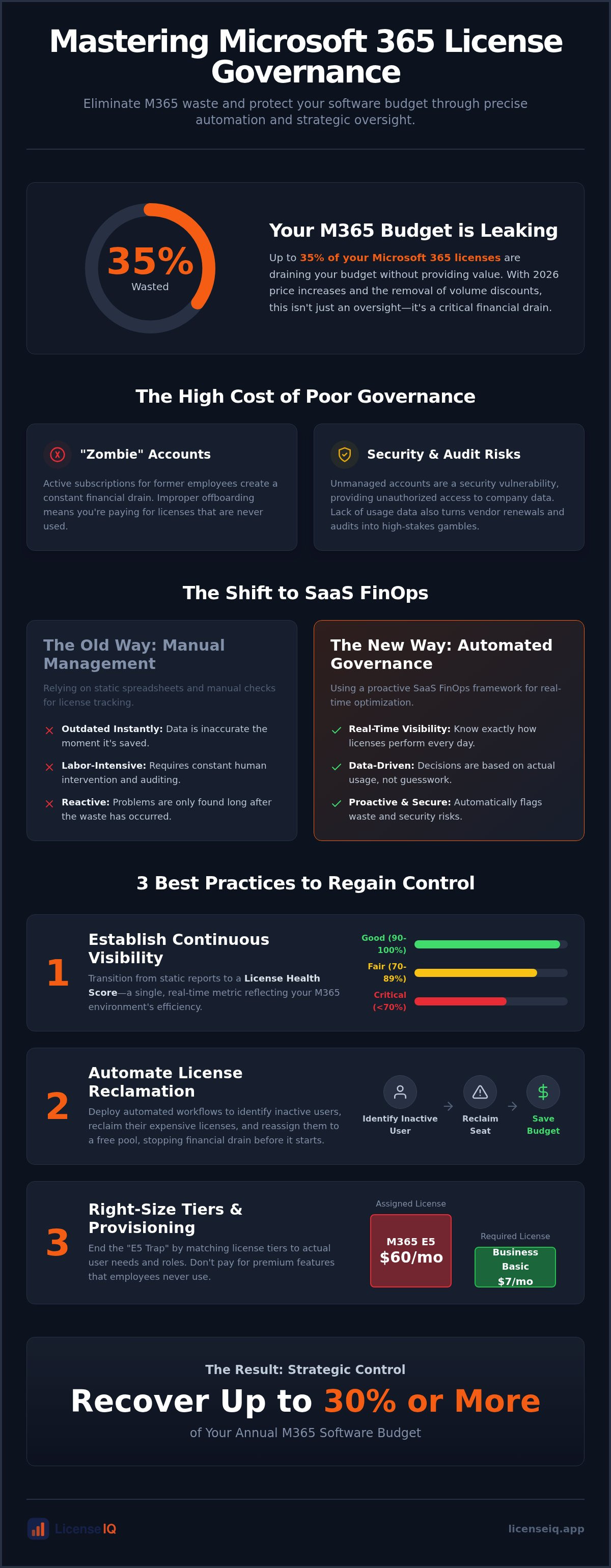
Manual governance fails because the speed of Microsoft 365 seat changes exceeds human auditing capacity. Employees join, switch roles, or leave every day. A static spreadsheet is out of date the moment you save it. This lag creates a high cost of negligence. Unmanaged tenants typically carry 35% waste. With the 2026 price increases pushing Microsoft 365 E5 to $60 per user and Business Basic to $7, that waste represents a massive financial drain. Adopting license governance best practices is no longer optional for maintaining a lean budget. It is the only way to ensure every dollar spent translates into active productivity. You cannot afford to let obscured details dictate your department's financial health.
The Hidden Risks of Poor Governance
Financial leakage often stems from "zombie" accounts. These are active subscriptions for employees who left months ago. Beyond the budget hit, these accounts represent severe security vulnerabilities. Improper offboarding leaves doors open for unauthorized access to sensitive company data. You also face significant audit risks. Vendor renewals become high-stakes gambles when you lack accurate usage data. Without total clarity, you're forced to guess your requirements. This usually results in over-provisioning simply to avoid compliance gaps, further inflating your monthly spend. Establishing license governance best practices eliminates this guesswork and replaces it with data-driven certainty.
Governance vs. Management: Knowing the Difference
It's vital to distinguish between these two functions. Management is tactical. It involves the routine task of assigning a seat to a new hire. Governance is strategic. It ensures that the seat is actually necessary and cost-optimized for that specific role. You need both to maintain a healthy M365 environment. Management keeps the lights on, but governance ensures you aren't paying for a lighthouse when a desk lamp suffices. Effective oversight transforms your software from an uncontrollable expense into a disciplined strategic resource. It creates a culture of transparency where every license assignment is justified by actual usage patterns and business needs.
Best Practice #1: Establishing Continuous Visibility with Health Scores
Visibility is the cornerstone of control. Most IT leaders rely on the Microsoft Admin Center to track their subscriptions. This is a mistake. The Admin Center provides a list of assignments, but it lacks actionable intelligence. It won't tell you if an E5 user only uses basic Outlook features. It doesn't flag redundant licenses across multiple tenants in a parent-subsidiary structure. To master license governance best practices, you must transition to continuous, real-time oversight. This requires moving toward advanced software asset management (SAM) principles that prioritize utility over simple ownership. You need a system that doesn't just list what you own, but evaluates how well it serves your organization.
Defining Your License Health Score
A License Health Score acts as a real-time audit of M365 utility, providing a single number that reflects your environment's efficiency. You shouldn't have to dig through menus to find waste. Your governance framework needs to track three critical metrics: the percentage of active users, the volume of redundant licenses, and the average cost per user. Implementing license governance best practices through a Health Score provides the clarity needed for rapid decision-making.
- Good (90-100%): Licenses are tightly aligned with active usage and role requirements.
- Fair (70-89%): Minor over-provisioning exists; some inactive users need reclamation.
- Critical (Below 70%): Immediate action is required to stop significant financial leakage.
This scoring system allows leadership to see the status of their software budget at a glance. It simplifies the complex task of Mastering the Microsoft 365 License Management Lifecycle in 2026. By quantifying efficiency, you transform technical data into a strategic business asset.
Eliminating the Spreadsheet Trap
Manual spreadsheet tracking is a liability for any growing organization. Industry data shows that manual records suffer from 15-20% data inaccuracy within just 30 days of an audit. The M365 ecosystem moves too fast for static documents. New seats are added, roles change, and employees depart, leaving your spreadsheet obsolete before you finish the update. AI-native scanning replaces manual data entry with precise, automated discovery. It uncovers obscured details that human eyes often miss, such as overlapping service plans or forgotten trial licenses. This level of transparency is essential for complex business structures with multi-tenant environments. You can easily calculate your current health score by connecting your tenant to an automated discovery platform. This shift ensures your data is always current, reliable, and ready for executive review at a moment's notice.
Best Practice #2: Automating the License Reclamation Lifecycle
Every robust governance framework requires a "return" policy for software assets. You cannot manage what you do not reclaim. Inactive users represent a silent, persistent drain on your M365 budget. If a user hasn't accessed their account in 30, 60, or 90 days, they are holding a paid asset that should be harvested and redeployed. Setting strict thresholds for automatic license stripping prevents cost creep from becoming a permanent fixture in your financial reports. Standardizing these license governance best practices across all departments ensures that no single team becomes a pocket of inefficiency. Without a centralized reclamation logic, your organization will continue to pay for "shelfware" that provides zero business value.
Manual reclamation is a losing game. It relies on IT staff remembering to check usage logs, which rarely happens during busy cycles. Automation turns this reactive chore into a proactive system. By defining clear inactivity triggers, you ensure that your tenant remains lean without constant human intervention. This shift in strategy moves your team away from administrative drudgery and toward high-level financial oversight. It creates a self-healing environment where waste is identified and removed as soon as it appears.
The 3-Step Reclamation Workflow
Establishing a repeatable, automated workflow is essential for scalability. A structured approach turns a complex administrative burden into a streamlined operational task that runs in the background. Follow these three steps to maintain hygiene:
- Step 1: Identify. Use automated scanning to flag underutilized or inactive accounts instantly based on your 30, 60, or 90-day thresholds.
- Step 2: Notify. Alert department heads or specific users of the pending reclamation. This provides a brief window for justification before any access is changed.
- Step 3: Execute. Perform the downgrade or removal automatically. Immediately update your Spend Recovery Dashboard to reflect the reclaimed budget and current license availability.
Governance During Employee Offboarding
Offboarding is the most common point of failure in license management. License governance best practices dictate that reclamation must be a mandatory, automated step in the HR-to-IT handoff. When an employee leaves, their license often remains active, creating "ghost licenses" that continue to bill your organization for months. This negligence creates unnecessary security risks alongside financial waste. You can find tactical steps for securing your tenant and recovering costs in our Office 365 Offboarding Checklist 2026. Following a strict protocol ensures that every departure results in immediate cost recovery and total resource transparency.
Best Practice #3: Right-Sizing Tiers and Role-Based Provisioning
The "E5 Trap" is a common financial pitfall in 2026. Many organizations default to the highest tier for all employees, assuming it's the safest route for compliance and security. This choice often leads to massive over-provisioning. Effective license governance best practices require a more granular approach. You must match the license tier to the specific functional requirements of each role. Implementing Role-Based Access Control (RBAC) allows you to standardize these assignments. It ensures that a front-line worker receives a basic F3 license while a data analyst gets the E5 they actually need. This proactive strategy prevents waste before it enters your tenant.
Regular "right-sizing" audits are the second half of this equation. Business needs evolve, and a user who required premium features last year might not need them today. Governance isn't a one-time setup; it's a continuous cycle of evaluation. Validating the ROI of premium features before any enterprise-wide rollout protects your budget from unnecessary inflation. By treating every high-tier license as a specific investment rather than a default entitlement, you maintain a leaner, more agile organization.
E3 vs. E5 Governance Logic
High-tier licenses are only valuable if their premium features are utilized. Your governance framework should include regular audits of specific app usage. Are your E5 users actually opening Power BI Pro or leveraging Advanced Security features? If the answer is no, they are prime candidates for a downgrade. Moving a user from an E5 to an E3 tier reflects an immediate and measurable return on your optimization efforts. Downgrading a single unoptimized E5 seat to an E3 plan saves your organization $252 annually in direct subscription costs. This logic applies across your entire portfolio, allowing you to reclaim significant portions of your IT budget without impacting user productivity.
Managing Mix-and-Match Licensing
Modern licensing isn't binary. You don't have to choose one plan for the entire company. A hybrid licensing model is often the most efficient path for scaling SMBs. This involves mixing Business Premium for standard office roles with Enterprise tiers for specialized staff. Governance ensures you maintain the right balance as your headcount fluctuates. It provides the oversight needed to manage these complex combinations without losing track of your total spend. For a detailed breakdown of these options, consult our Microsoft 365 License Types: 2026 Guide. Establishing these tiers correctly is the foundation of long-term financial health.
Stop guessing which tiers your team needs and start using data to drive your decisions. You can automate your right-sizing audits and identify immediate downgrade opportunities across your entire Microsoft 365 tenant today.
Implementing Automated Governance Workflows with LicenseIQ
Manual oversight is a relic of the past. To truly master license governance best practices, you must shift to AI-native Software Intelligence. LicenseIQ replaces the exhausting cycle of manual audits with continuous, precise monitoring. The platform connects to your Microsoft 365 tenants in minutes. It delivers an instant License Health Score that quantifies your current efficiency. This isn't a static report. It's a dynamic foundation for 24/7 financial hygiene. You gain immediate clarity on where every dollar is going across your entire digital estate.
Automated Governance Workflows take the logic of reclamation and right-sizing and execute it without human intervention. This proactive approach uncovers obscured details that human auditors often miss. It leads to a documented 35% spend recovery on software subscriptions. By transforming complex technical data into actionable dollar-value recommendations, LicenseIQ ensures your software budget remains lean. You stop paying for what you don't use and start investing in the tools that actually drive your growth.
The LicenseIQ Spend Recovery Dashboard
Transparency is the cornerstone of effective governance. The Spend Recovery Dashboard provides real-time tracking of wasted spend and immediate optimization opportunities. You can visualize license health across your entire organization, including subsidiaries and separate departments, in a single pane of glass. This centralized oversight is vital for complex business structures that struggle with fragmented data. Customize your alerts to trigger the moment governance thresholds are breached. If your unassigned license count spikes or an expensive E5 seat remains inactive for 30 days, you'll know instantly. This vigilant system keeps your resources secure and your budget optimized. It eliminates the disorder that typically plagues manual license management processes.
Future-Proofing with Model Context Protocol
The complexity of the Microsoft ecosystem requires more than simple scripts or manual spreadsheets. LicenseIQ utilizes the Model Context Protocol to automate the intricate logic of M365 governance. This AI-native technology understands the nuances of role-based provisioning and tier-specific utility. It reduces IT overhead by handling the repetitive tasks of seat reclamation and downgrade execution. Your team gains financial accuracy while losing the administrative burden of traditional audits. This shift allows your specialized leadership to focus on strategic growth rather than license maintenance. You can start your 5-minute M365 audit with LicenseIQ today to see exactly where your budget is leaking and how to stop it.
Take Command of Your M365 Financial Health
The era of passive license management is over. In 2026, organizational growth depends on total transparency and the elimination of software waste. By shifting to a proactive FinOps model, you move beyond static spreadsheets and into the era of real-time software intelligence. Adopting license governance best practices allows your team to reclaim inactive seats, right-size user tiers, and maintain a vigilant watch over your digital resources. This level of oversight isn't just about cutting costs; it's about maximizing the value of every tool in your stack.
Precision is your greatest asset in a complex operational environment. Automated discovery uncovers the obscured details that manual audits miss, ensuring your budget remains lean and secure. You don't have to wait for the next renewal cycle to start saving. With AI-native discovery that connects to your tenant in minutes, you can achieve up to 35% savings on M365 through Automated Governance Workflows designed specifically for SMBs.
Discover your M365 Health Score and recover wasted spend with LicenseIQ.
Frequently Asked Questions
What is the difference between license management and license governance?
License management is a tactical process focused on the technical assignment of seats to users. License governance is a strategic framework that provides oversight of software acquisition, deployment, and utilization. While management handles the daily task of provisioning, governance ensures those assignments align with license governance best practices to maintain financial hygiene and eliminate waste.
How often should an SMB conduct a license governance audit?
SMBs should move away from periodic manual audits in favor of continuous, real-time monitoring. Quarterly or annual reviews are too slow to keep pace with the rapid seat changes in a modern tenant. Modern automation provides 24/7 oversight, ensuring your environment remains optimized every day and preventing the 15-20% data inaccuracy typically found in monthly spreadsheets.
What are the most common signs of poor license governance in M365?
Common indicators include a high volume of unassigned licenses and the presence of "zombie" accounts belonging to former employees. You may also notice a lack of clarity regarding which users actually utilize premium E5 features like Power BI Pro. If your team relies on manual tracking that never matches your monthly billing statement, your organization is likely suffering from significant financial leakage.
Can automated governance workflows replace a full-time IT asset manager?
How does license governance improve cybersecurity?
What is a License Health Score and how is it calculated?
The License Health Score is a metric that quantifies the total efficiency of your Microsoft 365 environment. It is calculated by analyzing the percentage of active users, the number of redundant licenses, and the average cost per user. This score provides immediate clarity, allowing leadership to see at a glance whether their software resources are being used effectively or if the tenant is in a "Critical" state.
How much can a company save by implementing governance best practices?
Organizations typically save up to 35% on their annual software subscriptions by implementing license governance best practices. These savings are achieved by reclaiming seats from inactive users and downgrading over-provisioned accounts to tiers that match actual usage. By eliminating this avoidable waste, you secure your software budget and redirect capital toward high-impact business initiatives.
Does governance interfere with user productivity or access?
Effective governance does not interfere with productivity because it focuses on right-sizing rather than restricting necessary access. The goal is to ensure every employee has the exact tools required for their specific role. Automated workflows include notification steps that allow users or department heads to justify their requirements before any changes occur, maintaining a perfect balance between fiscal discipline and operational agility.


