

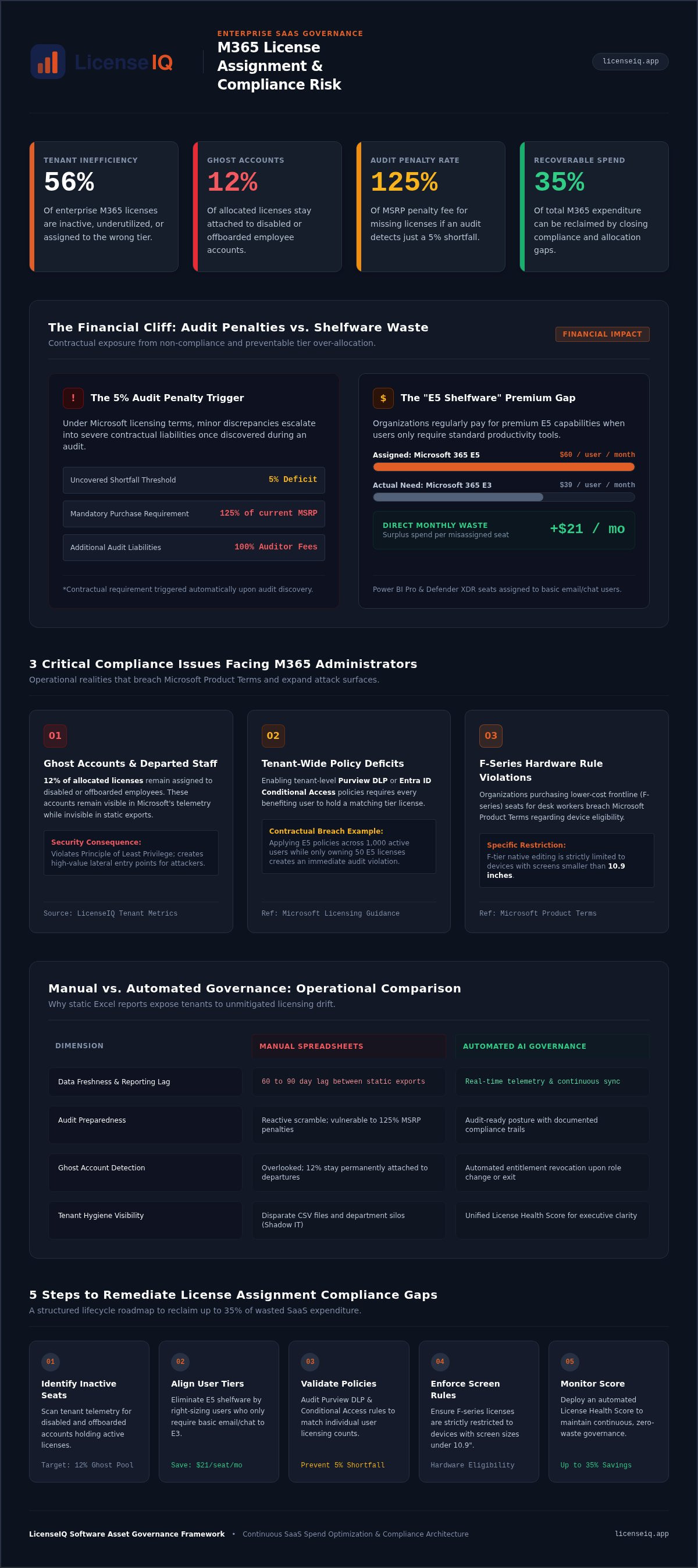
Over 56% of enterprise Microsoft 365 licenses are currently inactive, underutilized, or assigned to the wrong tier. This inefficiency isn't just a budget leak; it's a governance failure that compromises your security and audit integrity. Compliance issues with incorrect license assignment can trigger devastating financial consequences, including a requirement to pay 125% of the current MSRP for missing licenses if an audit uncovers a 5% shortfall. You likely recognize the frustration of paying $60 a month for E5 seats when users only require the $39 E3 tier. It's a common pain point for specialized leadership who value operational transparency but lack the time for manual audits.
Beyond the wasted budget, over-privileged accounts and ghost users from offboarded employees create significant security vulnerabilities that put your entire infrastructure at risk. This article identifies the precise financial and security risks of mismanaged Microsoft 365 licenses. You'll learn how to implement automated governance workflows to achieve a zero-waste licensing strategy. We'll show you how to move from reactive manual spreadsheets to a proactive system that delivers audit-ready compliance reports and total resource clarity. By the end of this guide, you'll have a clear roadmap to secure your tenant and recover your wasted spend.
Key Takeaways
- Identify the hidden financial and security liabilities created by compliance issues with incorrect license assignment, including 125% MSRP audit penalties.
- Discover how to eliminate "E5 shelfware" by aligning high-tier subscription capabilities with actual user activity and job requirements.
- Evaluate the advantages of AI-native governance over manual spreadsheet audits to maintain a real-time, audit-ready posture.
- Implement a five-step remediation strategy to reclaim up to 35% of wasted SaaS spend while securing over-privileged accounts.
- Leverage a License Health Score to provide immediate clarity on your tenant’s hygiene and automate lifecycle management for every user.
The Core Compliance Risks of Incorrect License Assignment
License assignment compliance is the precise alignment of user operational needs with their specific subscription capabilities. It's not a suggestion; it's a contractual requirement. Organizations often overlook how compliance issues with incorrect license assignment erode their bottom line and compromise security. When you fail to maintain this balance, you face two dangerous extremes. Over-licensing leads to massive budgetary waste. Under-licensing creates productivity bottlenecks and severe contractual breaches.
Ghost users represent one of the most common gaps in modern tenants. LicenseIQ platform metrics show that 12% of allocated licenses stay attached to disabled or offboarded employee accounts. These orphaned seats are invisible to manual audits but visible to Microsoft’s telemetry. Organizations that rely on static Excel exports often operate with a 60 to 90 day lag. This delay makes it impossible to capture real time assignment shifts, leaving the organization exposed to audit penalties. Adhering to software asset management best practices requires a transition from reactive spreadsheets to continuous, automated oversight.
Financial Non-Compliance and Budget Waste
Fiscal hygiene in SaaS management is about eliminating the "shelfware" that drains your capital. Many SMBs unknowingly pay for premium E5 licenses for users who only utilize basic email and chat. This mismatch creates immediate compliance issues with incorrect license assignment. If an audit uncovers a 5% shortfall, you're contractually obligated to pay the full auditor fees and remedy the gap at 125% of the current MSRP. Recovering this wasted capital is the fastest way to improve your SaaS spend management ROI, potentially reclaiming up to 35% of your total M365 expenditure.
Security Vulnerabilities of Over-Privileged Users
Compliance isn't just about the bill; it's about the attack surface. Assigning advanced security features to users who don't require them violates the "Least Privilege" principle. Over-privileged accounts are prime targets for exploitation. If a user has E5 capabilities but no business need for them, their account becomes a high-value entry point for lateral movement. These misassigned licenses also complicate the exit process, leading to specific M365 offboarding security risks. Vigilant license governance ensures that entitlements are revoked the moment a role changes or an employee departs.
3 Critical Compliance Issues Facing M365 Administrators
Administrators face a constant struggle against tenant entropy. Without precise oversight, compliance issues with incorrect license assignment become inevitable. One major catalyst is the mismatch between active usage and license tier requirements. You might pay for Microsoft 365 E5 features like Power BI Pro or Defender XDR for users who only need basic Outlook access. This isn't just a budget leak. It's a breach of Microsoft 365 security and compliance licensing guidance. If you enable tenant-wide Purview DLP or Entra ID Conditional Access policies, every user benefiting from those policies must hold a corresponding license. Deploying these across 1,000 users while only holding 50 E5 licenses creates an immediate contractual shortfall.
Shadow IT further complicates this landscape. Departments often purchase licenses independently to bypass IT bottlenecks. This creates fragmented silos and unmanaged license sprawl. Mixing license types without centralized oversight leads to eligibility breaches. For instance, assigning cheaper F-series licenses to desk-bound staff violates Microsoft Product Terms. F-tier native editing is strictly restricted to devices with screens smaller than 10.9 inches. Using these for knowledge workers on standard laptops is a direct violation. You can scan your tenant in minutes to identify these misclassifications before an auditor does.
The Inactive User Compliance Gap
Licenses assigned to departed employees represent a significant security risk. LicenseIQ platform metrics show that 12% of allocated licenses remain assigned to offboarded accounts. This creates a "ghost user" problem that manual audits rarely catch. Approximately 27% of active commercial licenses have zero activity for 30 days or more. Implementing a rigorous Office 365 offboarding checklist is essential. For a typical SMB, each inactive E5 seat wastes $60 per month. Scaling this across a growing organization results in thousands of dollars in monthly losses.
Feature Redundancy and License Sprawl
Organizations often double-pay for overlapping features across different tiers. This redundancy occurs when administrators don't understand the granular differences between Business, Enterprise, and Frontline plans. Consult a Microsoft 365 license types guide to benchmark your entitlements. SaaS sprawl happens when you lose track of these assignments, leading to redundant spend. Continuous monitoring prevents this by right-sizing users based on actual telemetry rather than assumptions.
Manual vs. Automated Governance: A Compliance Comparison
Manual governance is a gamble. Relying on human memory and static exports creates compliance issues with incorrect license assignment that often go undetected for months. Most administrators perform periodic check-ins every 90 days. In that window, employees change roles, leave the company, or adopt new tools. The result is a fragmented view of your environment. This reactive approach fails to meet the standards set by NIST SP 800-53 software usage and licensing controls, which require precise tracking and adherence to software usage restrictions.
AI-native scanning eliminates this lag. It replaces the spreadsheet with a real-time stream of telemetry. While a human might take weeks to audit 1,000 users, an automated system completes the task in under five minutes. This speed isn't just about efficiency; it's about accuracy. Human error in manual assignments leads to over-privileged accounts and redundant spend. Automated workflows ensure every user holds exactly what they need, maintaining continuous financial health without the administrative overhead.
The Failure of the "Spreadsheet Audit"
Spreadsheets are static. They provide a snapshot of a moment that has already passed. This "stale data" problem is the primary reason organizations fail Microsoft audits. Manual tracking lacks the depth to identify feature-level underutilization. You might see a user is active in Outlook, but you won't see they haven't touched the advanced analytics or security features included in their E5 seat. This complexity makes Microsoft 365 license optimization nearly impossible to execute at scale. Without deep telemetry, you miss the granular downgrade opportunities that drive significant savings.
AI-Native Automation: The New Standard
The LicenseIQ platform leverages AI-native protocols to bridge the gap between technical operations and financial oversight. By utilizing the Model Context Protocol, the system understands the context of user activity across the entire tenant. This prevents compliance drift by flagging anomalies the moment they occur. Instead of digging through CSV files, leadership gains immediate clarity through a centralized Spend Recovery Dashboard. This tool categorizes unassigned licenses and dormant accounts into actionable dollar values. It transforms governance from an administrative burden into a proactive strategy for organizational growth.
5 Steps to Remediate License Assignment Compliance Gaps
Remediation is the bridge between organizational disorder and total clarity. Solving compliance issues with incorrect license assignment requires a structured, data-driven approach. You can't fix what you can't see. Follow these five steps to secure your tenant and recover lost capital:
- Step 1: Discover all active and inactive users through a comprehensive tenant scan.
- Step 2: Analyze usage patterns against current license tiers to identify underutilization.
- Step 3: Right-size assignments based on actual feature requirements.
- Step 4: Reclaim licenses from inactive or redundant accounts immediately.
- Step 5: Implement continuous monitoring to maintain your License Health Score.
Discovery and Usage Analysis
Discovery starts with a deep scan to identify unassigned seats and accounts belonging to departed users. This process relies on tracking M365 adoption metrics to see which features users actually touch. License right-sizing is the alignment of cost to value. If a user only interacts with basic Office apps, they don't need a premium security suite. By benchmarking 30, 60, and 90-day inactivity thresholds, you uncover immediate downgrade opportunities. This visibility ensures you aren't paying for "shelfware" that provides zero organizational benefit.
Actionable Remediation Tactics
Remediation must be surgical to prevent service disruption. When downgrading licenses, verify mailbox and storage limits first to ensure no data is lost. For offboarded staff, convert their mailboxes to unlicensed shared mailboxes if they're under 50 GB. This releases the license while preserving data for legal or administrative needs. Automated alerts prevent future compliance issues with incorrect license assignment by flagging new drift the moment it occurs. You can connect your tenant now to generate a full remediation report in under five minutes.
Achieving Continuous Compliance with LicenseIQ
LicenseIQ is the proactive digital auditor your organization needs to eliminate compliance issues with incorrect license assignment. It replaces administrative guesswork with granular telemetry. By connecting via read-only Microsoft Graph APIs, the platform evaluates your tenant in under five minutes. You receive an immediate License Health Score. This single metric provides a transparent rating of your license hygiene, highlighting exactly where your resources are misallocated. It transforms your tenant from a source of disorder into a model of operational transparency.
This platform serves as an essential component of a modern M365 cost optimization strategy. It doesn't just identify errors; it provides a comprehensive roadmap for remediation. You gain total oversight without altering your production environment or writing data to your tenant. This results-first approach ensures that your core value proposition is never lost in technical complexity, allowing you to focus on strategic growth rather than administrative maintenance.
Automated Governance Workflows
LicenseIQ automates the discovery of wasted spend by cross-referencing Entra ID data with actual application usage. The Spend Recovery Dashboard categorizes findings into specific dollar-value recommendations. You see exactly how much capital is trapped in unassigned seats, dormant accounts, or over-provisioned E5 licenses. This level of detail empowers specialized leadership to make data-driven decisions that impact the bottom line immediately. Automated workflows then alert you to new drift, ensuring that your savings are permanent. You can start your 5-minute audit to uncover these obscured details and recover up to 35% of your wasted spend now.
Scaling Financial Hygiene
Manual governance is unsustainable for growing SMBs. As your headcount increases, the probability of compliance issues with incorrect license assignment rises exponentially. LicenseIQ supports your organization as it scales by shifting operations from reactive fire-drill audits to continuous, real-time accuracy. It acts as a vigilant guardian of your corporate resources, ensuring every user holds the precise license required for their role. This proactive stance eliminates the risk of 125% MSRP audit penalties while maintaining a lean, efficient infrastructure. Reclaim your M365 budget today and reinvest those recovered funds into your company's future.
Secure Your Tenant and Reclaim Your Budget
Manual license management is no longer a viable strategy for specialized leadership. Static spreadsheets leave your organization exposed to severe audit penalties and unmanaged security vulnerabilities. By transitioning to AI-native automated governance, you replace administrative disorder with total operational transparency. This shift ensures that every seat in your tenant aligns perfectly with actual user requirements.
Eliminating compliance issues with incorrect license assignment is the fastest way to stabilize your financial health. You can recover up to 35% of your wasted M365 spend while maintaining an audit-ready posture through a real-time Health Score. This proactive approach transforms your licensing from a recurring liability into a lean, optimized resource. Don't let obscured details compromise your growth.
Take control of your environment and stop the budget leak immediately. Run a 5-Minute License Audit with LicenseIQ to receive your actionable remediation report. Achieving total clarity and continuous compliance is now a straightforward operational task.
Frequently Asked Questions
What is the most common compliance issue with M365 licenses?
The most common gap is enabling tenant-wide features like Purview DLP or Entra ID Conditional Access without individual user licenses. Many administrators assume a single license covers the entire tenant. Under Microsoft terms, every user who benefits from a policy must hold a corresponding license. This creates immediate compliance issues with incorrect license assignment. It results in large, unbudgeted liabilities that organizations only discover during a formal audit review.
How does incorrect license assignment affect my security posture?
Incorrect assignments create a bloated attack surface through over-privileged accounts. When users hold premium E5 licenses they don't need, they gain access to advanced capabilities that malicious actors can exploit. Ghost accounts from departed employees are particularly dangerous. LicenseIQ data shows 12% of licenses stay attached to offboarded users. These orphaned accounts provide unmonitored entry points into your infrastructure. Removing these redundant assignments is a critical step in maintaining a secure environment.
Can I get fined for incorrect Microsoft 365 license assignment?
Yes, Microsoft enforces strict financial penalties for non-compliance. If a licensing audit uncovers a shortfall of 5% or more, you're contractually required to pay the full auditor fees, which typically range from $30,000 to $50,000. Additionally, you must purchase the missing licenses at 125% of the current list price. This penalty wipes out any negotiated discounts and creates a significant financial burden for the organization. It's a costly consequence for avoidable administrative oversight.
What is the difference between a redundant license and an unassigned license?
An unassigned license sits in your tenant pool without being linked to a user. It's paid for but completely idle. A redundant license is assigned to a user who doesn't utilize its features or has a lower-tier requirement. For example, paying for an E5 seat for a user who only uses basic Outlook is redundant. Both represent wasted spend, but redundant licenses are harder to track without automated telemetry and usage analysis.
How often should I conduct a license assignment audit?
Manual audits are typically conducted quarterly, but this frequency is insufficient for dynamic environments. Employee turnover and role changes happen daily, leading to rapid license drift. Continuous monitoring is the new standard for financial hygiene. Automated platforms like LicenseIQ provide a real-time Health Score so you don't have to wait for a fire-drill audit. This proactive approach ensures you never pay for inactive accounts or over-provisioned seats for more than a few days.
Does LicenseIQ help with Microsoft 365 E3 to E5 transitions?
LicenseIQ provides the data needed to justify or roll back E5 transitions. The platform identifies which users actually utilize advanced E5 components like Power BI Pro or Defender XDR. If you've moved a group to E5 but telemetry shows zero activity in premium features, the platform flags them for a downgrade. This prevents compliance issues with incorrect license assignment by ensuring your subscription tiers match actual operational requirements across the enterprise.
How long does it take to fix license compliance issues with automation?
You can identify your compliance gaps in under five minutes. The LicenseIQ platform connects via read-only APIs to provide immediate insights through a Spend Recovery Dashboard. While the initial scan is nearly instant, remediating the issues depends on your internal approval workflows. Automated governance workflows allow you to reclaim licenses and right-size users much faster than manual spreadsheets. Most organizations see significant spend recovery within their first billing cycle.
Is manual license tracking sufficient for a company with 50+ employees?
Manual tracking is rarely sufficient for organizations with more than 50 employees. The complexity of Microsoft's 2026 product terms, such as the 10.9 inch screen size limit for F-tier users, makes spreadsheets unreliable. Human error leads to stale data and missed savings. Organizations at this scale often lose a significant portion of their budget to inactivity. Automated governance is necessary to maintain accuracy and protect your resources from expensive audit fees.


