

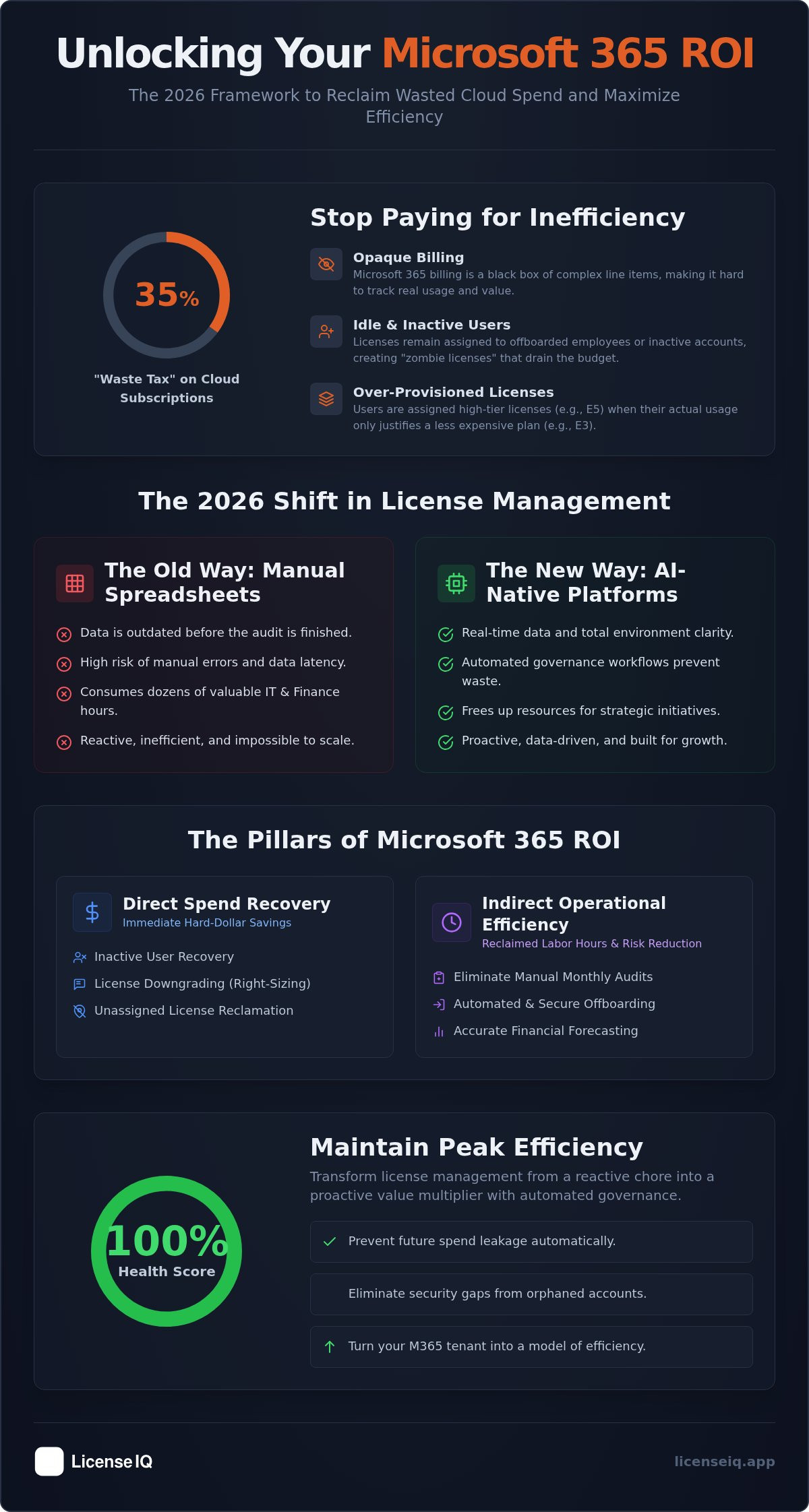
Up to 35% of your cloud subscription spend is currently wasted on idle resources and over-provisioned licenses. For most IT leaders, Microsoft 365 billing remains a black box of opaque line items and inactive users scattered across various departments. You've likely tried to solve this with manual spreadsheets, only to find the data is outdated before the audit even finishes. It's a constant drain on your budget and your technical resources.
A precision microsoft 365 roi calculator is no longer a luxury; it's a strategic necessity for 2026. This article provides the exact framework to quantify your spend recovery and reclaim up to 35% of your subscription budget. You'll gain the precise dollar-value estimates required to secure leadership approval and eliminate organizational waste for good. We're moving past high-level estimates to focus on defensible, data-driven results.
We'll break down how to use a Spend Recovery Dashboard and a License Health Score to gain total clarity over your environment. You'll discover how to replace manual audits with automated governance workflows that protect your corporate resources in real time. It's time to transform your Microsoft 365 environment from a growing cost center into a model of operational efficiency.
Key Takeaways
- Stop paying the "waste tax" by reclaiming up to 35% of your subscription budget through precise license optimization.
- Learn how a professional microsoft 365 roi calculator quantifies both hard dollar recovery and labor efficiency gains for leadership approval.
- Replace static spreadsheets with AI-native platforms to eliminate data latency and manual audit errors.
- Follow a structured framework to inventory license commitments and identify inactive users across all tiers in minutes.
- Maintain peak efficiency with a 100% Health Score and automated governance workflows that prevent future spend leakage.
What is a Microsoft 365 ROI Calculator and Why Does It Matter?
A microsoft 365 roi calculator is a precise financial instrument. It measures the ratio of recovered subscription spend and labor efficiency gains against the total cost of your optimization efforts. In the context of Return on Investment (ROI), this calculation determines whether your IT governance strategy is a profit driver or a silent drain on resources. You aren't just looking at a tool; you're establishing a benchmark for financial accountability.
Most organizations currently pay a "waste tax" of up to 35% on their cloud subscriptions. This occurs when licenses are purchased but never assigned, or assigned to users who don't utilize the specific features of their tier. In 2026, the urgency to optimize has never been higher. With Microsoft increasing prices for Business Basic to $7 and Business Standard to $14 as of July 2026, every unmanaged license represents a direct hit to your bottom line.
True ROI stands on three distinct pillars:
- Spend Recovery: The immediate retrieval of hard dollars from unassigned or inactive licenses.
- Risk Mitigation: The elimination of security gaps caused by orphaned accounts and unmonitored access points.
- Operational Efficiency: The labor hours reclaimed by replacing manual spreadsheet audits with automated systems.
The Problem of SaaS Sprawl in 2026
Shadow licenses and "zombie accounts" are the primary drivers of budget leakage. Zombie licenses belong to offboarded employees whose accounts were never properly decommissioned. These accounts continue to draw monthly fees while providing zero value to the organization. Without continuous oversight, SaaS sprawl creates a fragmented environment that is impossible to manage manually. For a deeper dive into reclaiming these funds, consult our Microsoft 365 License Optimization Guide.
Moving Beyond Simple Cost-Cutting
Optimization isn't just about spending less; it's about spending correctly. A sophisticated microsoft 365 roi calculator accounts for "right-sizing." Many users are provisioned with E5 licenses when their actual usage patterns only justify an E3 or Business Premium tier. Right-sizing ensures you invest in the features your team actually uses. By implementing Automated Governance Workflows, you transform license management from a reactive chore into a proactive value multiplier. This shift ensures your financial health remains protected as your organization scales.
Decoding the ROI Equation: Direct vs. Indirect Savings
A comprehensive microsoft 365 roi calculator does not just count seats. It evaluates the total fiscal impact of your SaaS environment. To build a defensible business case, you must apply a rigorous ROI Methodology that separates immediate cash recovery from long-term operational gains. This distinction is the difference between a one-time cleanup and a sustainable financial strategy. You need to account for every dollar leaking through the cracks of your tenant.
Direct Spend Recovery: The Low-Hanging Fruit
Direct savings are hard dollar recoveries that impact your P&L immediately. Inactive user recovery is the primary driver of this recovery. If an employee hasn't logged in for 90 days, that license is a liability. License downgrading is another critical lever. Many organizations pay for E5 features that users never touch. Right-sizing these individuals to E3 or F3 tiers based on actual telemetry data stops the bleed. Finally, unassigned licenses sitting in your tenant are pure waste. Reclaiming these assets ensures you only pay for what you deploy. This is the fastest way to see a return on your optimization efforts.
Indirect Operational Efficiency: The Hidden ROI
Indirect ROI focuses on labor cost reduction. Manual monthly audits consume dozens of IT and Finance hours. Automation eliminates this burden. By using automated offboarding checklists, you ensure licenses are revoked the moment an employee leaves. This prevents human error and stops "zombie licenses" before they start. Real-time reporting also improves financial forecasting accuracy. You can see your potential spend recovery in a single view rather than hunting through fragmented logs. This transparency allows your team to focus on high-value projects instead of administrative cleanup.
Beyond the balance sheet, consider avoided costs and productivity. Orphaned accounts are security backdoors. Closing them mitigates the risk of expensive data breaches and potential compliance penalties. Additionally, you must evaluate productivity. Paying for AI tools like Microsoft 365 Copilot only yields ROI if they are actually used. Analyzing feature-level engagement ensures your high-value investments are reaching the right people. If you want to see these metrics in action, you can audit your tenant's health score to find immediate savings and secure your environment.
Manual Spreadsheets vs. AI-Native Calculators: The 2026 Comparison
Legacy processes fail because they rely on stale data. A manual microsoft 365 roi calculator built in a spreadsheet is obsolete the moment you save the file. These point-in-time snapshots ignore the fluid nature of SaaS environments where license counts and user statuses shift daily. If your data is thirty days old, your ROI calculation is a guess rather than a strategy. In the high-stakes environment of 2026, guessing leads to significant budget leakage.
Why Static Calculators Underestimate Waste
Static inputs can't keep pace with mid-month license changes, rapid hiring cycles, or sudden offboarding events. This latency creates a massive gap between your perceived spend and your actual financial liability. IT managers in large tenants often suffer from audit fatigue. This occurs when the sheer volume of manual data entry leads to oversight and errors in tracking inactive users. To solve this, the Model Context Protocol serves as a bridge between AI and live tenant data, allowing for deeper insights into feature-level usage. Without this real-time connection, you're looking at a ghost of your tenant's past rather than its current state.
The Advantage of Automated Spend Recovery
Continuous monitoring platforms offer a definitive edge over quarterly manual reviews. Instead of discovering waste months after it occurs, you identify it in real time. Automated governance workflows then execute the ROI by removing inactive licenses or downgrading underutilized seats automatically. This shift from simple reporting to active execution is the core of a modern M365 Cost Optimization Strategy. You aren't just seeing the waste; you're stopping it before the next billing cycle begins. Your Spend Recovery Dashboard becomes a live scoreboard of your financial efficiency.
The "Cost of Inaction" (COI) is the hidden penalty of manual processes. Every day you wait to automate your oversight, you lose a fraction of your budget to zombie licenses and unassigned seats. Relying on a manual microsoft 365 roi calculator in 2026 is essentially accepting a 35% premium on your Microsoft bill. Precise, AI-native oversight is the only way to eliminate this operational disorder and secure your financial health. You need a system that acts as a vigilant guardian, ensuring every dollar spent translates into actual user value.
Step-by-Step: How to Calculate Your M365 ROI
Calculating your return requires more than a cursory glance at your monthly bill. You need a structured approach to uncover the precise dollar value of your inefficiencies. Using a microsoft 365 roi calculator framework helps you define your recovery potential through five specific steps. It transforms vague suspicions of waste into a defensible financial report for your leadership team.
First, inventory your total license commitment across all tiers including Business, E3, E5, and F3. Second, identify inactive users who haven't logged in for 30, 60, or 90 days. Third, analyze feature utilization. Look specifically at high-cost licenses like E5 or Copilot add-ons. If a user isn't using Power BI, Advanced Security, or AI prompting, they are a candidate for a downgrade. Fourth, calculate the monthly cost of this waste and project it over 12 months. Finally, subtract the cost of your optimization platform to find your Net ROI. This final figure represents the pure profit your organization reclaims.
Identifying Your "Waste Profile"
Effective recovery requires categorizing waste into three distinct buckets: Unassigned, Inactive, and Over-provisioned. Understanding different License Types is critical here. Unassigned licenses are purchased but sitting idle in your tenant. Inactive licenses belong to users who no longer access the system. Over-provisioned users are the most common form of waste. You can calculate your "Downgrade Potential" by identifying E5 users with zero usage of premium features and multiplying that count by the price delta between E5 and E3 tiers. This granular view prevents you from over-cutting and impacting actual productivity.
Projecting Long-Term Savings
Your ROI model must account for the July 1, 2026, price increases. With Business Basic rising to $7 and Business Standard to $14, the cost of inaction grows every month. You aren't just saving on today's prices; you're protecting against future inflation. A typical 500-user SMB with a 35% waste profile could recover significant capital. If 175 licenses are optimized at an average of $20 per month, the organization recovers $42,000 in the first year. Over three years, this equates to over $126,000 in reclaimed budget. This projection doesn't even factor in the labor hours saved by removing manual spreadsheet audits from your IT team's plate.
To stop the manual guesswork and see your actual recovery potential, you can run a 5-minute audit of your M365 tenant now.
Beyond the Calculator: Achieving a 100% Health Score with LicenseIQ
Traditional tools stop at the estimate. A standard microsoft 365 roi calculator provides a target, but LicenseIQ provides the execution. You need a system that transforms theoretical savings into actual liquid capital. The platform replaces the need for a static microsoft 365 roi calculator by offering a live, continuous audit of your tenant’s financial health. This shift from manual estimation to automated oversight is the only way to sustain peak efficiency in 2026.
The "5-Minute Audit" eliminates the labor-intensive steps of manual data mining. It connects to your M365 environment in minutes to discover wasted spend that spreadsheets consistently miss. Once connected, your Spend Recovery Dashboard serves as the central command center for your subscription budget. It visualizes immediate dollar-value gains and provides a clear roadmap for reclamation. You gain total clarity over your environment without the administrative burden of traditional reporting.
The LicenseIQ Health Score Explained
The LicenseIQ Health Score is the definitive metric for license hygiene. It calculates a single percentage based on real-time utilization patterns and associated security risks. This score allows you to transition from the exhausting cycle of "calculating ROI" to the streamlined process of "maintaining health." AI-native algorithms monitor your environment 24/7, providing proactive optimization alerts before waste accumulates. A high Health Score confirms that your resources are being monitored by a vigilant and precise system, ensuring you only pay for the value you receive.
Automating the Governance Lifecycle
Automated Governance Workflows turn ROI from a theory into a permanent reality. They ensure your reclaimed budget stays reclaimed by preventing "zombie licenses" and unassigned seats from returning to your tenant. By mastering the License Management Lifecycle, you automate the complex tasks of offboarding and right-sizing. This removes the risk of human error and ensures your organization remains lean and secure. You aren't just cleaning up a mess; you are installing a proactive digital auditor that scales with your growth.
Stop guessing about your potential savings and start seeing them in real time. Get your free Health Score and start your 5-minute audit today to secure your environment and reclaim your subscription spend.
Reclaim Your Subscription Budget Today
Manual tracking is a liability that costs your organization up to 35% in wasted subscription fees. Relying on a static microsoft 365 roi calculator is no longer enough to manage the complexity of modern technical operations. You need a system that offers immediate clarity and proactive oversight. By replacing spreadsheets with AI-native automation, you eliminate the data latency that leads to budget leakage. This shift moves your team from reactive cleanup to continuous financial optimization.
The LicenseIQ platform connects to your tenant in minutes to uncover hidden waste and provide a definitive Health Score. Our system uses automated governance workflows to ensure your resources are always right-sized and secure. You don't have to settle for opaque billing or manual audits that are finished before they're even useful. Take control of your digital environment and transform your IT department into a model of operational efficiency.
Stop wasting money on M365: Get your free Health Score now. You can scan your tenant in just five minutes and start recovering your spend today. It's time to ensure every dollar works for your growth.
Frequently Asked Questions
How do I calculate the ROI of Microsoft 365 optimization?
You calculate ROI by dividing recovered spend and labor savings by the platform cost. A professional microsoft 365 roi calculator accounts for hard dollar recovery and reclaimed IT hours. Subtract the subscription fees to find your net profit. This formula provides a defensible estimate for leadership approval. It transforms technical data into a clear financial business case.
What is the average percentage of wasted Microsoft 365 licenses?
Research indicates organizations lose up to 35% of cloud spend to over-provisioning. Waste occurs when licenses stay assigned to offboarded staff or underutilized premium tiers. You don't want these zombie licenses draining your quarterly budget. Identifying these gaps is the first step toward financial hygiene. Continuous monitoring keeps this percentage near zero over the long term.
Can an ROI calculator help justify an E5 to E3 downgrade?
Yes, a microsoft 365 roi calculator justifies downgrades by highlighting feature utilization gaps. Telemetry data shows if users engage with Power BI or Advanced Security features. If they don't, the price delta between E5 and E3 is pure waste. Presenting this data demonstrates that right-sizing maintains productivity while reducing overhead. It turns a perceived budget cut into a strategic efficiency gain.
How often should I run a Microsoft 365 license audit?
You should move away from manual audits in favor of continuous oversight. Static spreadsheets are outdated the moment you finish them. This leads to data latency and missed savings opportunities. Automated governance workflows scan your environment in real time to identify inactive licenses immediately. It's a proactive approach that ensures you never pay a waste tax between traditional audit cycles.
Does Microsoft provide a built-in ROI calculator for licenses?
Microsoft offers high-level usage reports but lacks a dedicated ROI calculator for spend recovery. Built-in tools focus on adoption metrics rather than financial optimization or dollar-denominated waste. To quantify exact recovery, you need a specialized platform that connects to your tenant. This allows for a granular analysis of license tiers against actual user behavior. It provides the clarity Microsoft's generic reports miss.
What is a good License Health Score for an SMB?
A healthy SMB should target a License Health Score of 95% or higher. This score reflects a tenant where licenses are actively used and assigned to the correct tiers. Scores below 80% indicate significant budget leakage and security risks from orphaned accounts. Maintaining this score requires automated workflows that decommission inactive users immediately. It ensures your resources are always monitored by a precise system.
How does automation improve the ROI of SaaS management?
Automation improves ROI by eliminating labor costs associated with manual tracking. IT managers no longer spend hours on spreadsheet audits because automated systems handle discovery. These workflows execute the recovery by removing waste the moment it appears. This speed prevents monthly billing cycles from charging for unused resources. It maximizes the hard-dollar return on your management investment while freeing your team for high-value tasks.
Is the cost of LicenseIQ offset by the savings found?
The platform is designed to be self-funding through recovered spend. Most organizations discover enough unassigned licenses or over-provisioned seats in the first scan to cover the annual cost. By reclaiming up to 35% of your budget, the system provides a clear net positive return. It acts as a digital auditor that pays for itself by enforcing continuous financial hygiene. Your savings outweigh the subscription fee.


