

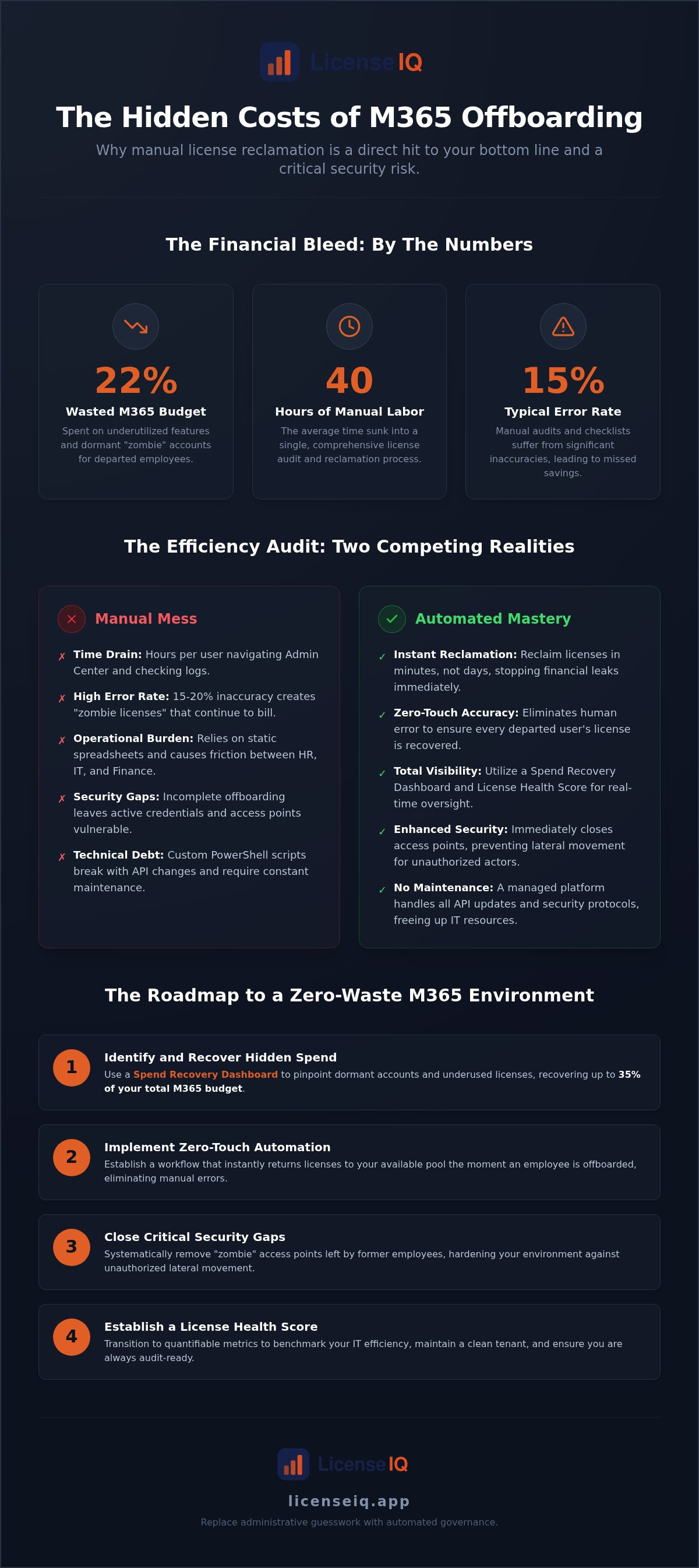
Organizations waste up to 22% of their Microsoft 365 budget on underutilized features and dormant accounts. With the July 2026 price hikes pushing Business Basic to $7 and E3 to $39 per user, every day an inactive account remains active is a direct hit to your bottom line. Traditional manual checklists are no longer sufficient to stop the financial bleed. You need a precise strategy for m365 offboarding license reclamation that moves at the speed of your business. Manual audits can take up to 40 hours of technical labor, yet they still suffer from a 15% error rate. It's time to replace administrative guesswork with automated governance.
You likely agree that managing seat counts across a dynamic workforce feels like a losing game of digital whack-a-mole. It's frustrating to pay for licenses months after an employee departs simply because a manual task was overlooked. This guide provides the solution. You'll learn how to implement zero-touch automation to reclaim licenses in minutes, not days. We'll show you how to use a Spend Recovery Dashboard and a License Health Score to gain total visibility into your tenant. By the end of this article, you'll have a roadmap to eliminate wasted spend and secure your environment with an audit-ready, automated workflow.
Key Takeaways
- Identify hidden financial leaks using the Spend Recovery Dashboard to recover up to 35% of your total M365 budget.
- Implement a zero-touch m365 offboarding license reclamation workflow to eliminate manual errors and ensure licenses return to the pool instantly.
- Close critical security gaps by removing "zombie" access points that provide lateral movement opportunities for unauthorized actors.
- Establish a quantifiable License Health Score to benchmark your IT efficiency and maintain a clean, audit-ready environment.
- Transition from labor-intensive manual audits to a continuous governance model that connects to your tenant in minutes for real-time oversight.
The Hidden Cost of Incomplete M365 Offboarding
Every employee exit creates a financial vulnerability. When an account is disabled in Entra ID, the license often remains attached. This "departed user tax" quietly drains IT budgets. Organizations typically waste 22% of their M365 spend on dormant accounts and underutilized features. In the wake of the 2026 Microsoft price increases, where an E5 seat now costs $60 per month and Business Basic has risen to $7, these oversights are no longer negligible. Unassigned licenses hide in plain sight because the native Admin Center doesn't prioritize reclamation alerts. SaaS sprawl compounds this issue as organizations grow. Each new application adds another layer of complexity that manual checklists can't handle.
Defining the Financial Leakage
High-tier licenses like E3 and E5 frequently stay bound to disabled users. These are "Orphaned Accounts." They don't just sit there; they actively lower your License Health Score. The "Set and Forget" approach to licensing costs many firms 30% or more in unnecessary subscription fees. Without a proactive strategy for m365 offboarding license reclamation, you're essentially paying for digital ghosts. This compounding effect becomes severe during rapid hiring cycles. The sheer volume of exits and entries quickly overwhelms manual capacity, leading to significant financial leakage that remains undetected for months.
The Operational Burden of Manual Tracking
Many IT teams still rely on static spreadsheets to track seat counts. This is a fundamental failure in Software Asset Management. Manual audits can take up to 40 hours of focused labor. This time sink creates friction between HR, Finance, and IT departments. When communication breaks down, Finance continues paying for seats that IT hasn't actually reclaimed. This often leads to redundant license purchasing. You buy new seats because you lack visibility into the ones you already own but aren't using. It's a cycle of waste that erodes the financial health of the organization.
The LicenseIQ platform solves this by providing total transparency. Its Spend Recovery Dashboard uncovers obscured details that manual checks miss. You gain a proactive, meticulous system that acts as a digital auditor. It ensures your resources are monitored by a vigilant and precise system. This moves your organization from disorder to total clarity, ensuring every dollar spent on software is justified by active use.
Manual vs. Automated License Reclamation: An Efficiency Audit
Manual m365 offboarding license reclamation is a resource drain. IT admins often spend hours per user navigating the Microsoft 365 Admin Center. Native tools allow for basic license removal, but they lack the logic to handle complex reclamation workflows. You must manually check sign-in logs, verify mailbox status, and confirm secondary subscriptions. This manual approach has a documented error rate of 15-20% in license counts. These errors lead to "zombie" licenses that continue billing long after the employee departs. Relying on human memory is a high-risk strategy in a high-cost environment.
Establishing a secure offboarding process requires more than just disabling an account. It demands a systematic approach to resource management. In 2026, the "Zero-Touch" ideal is an operational necessity. Automated governance ensures that every step of the reclamation happens instantly. This eliminates the gap between an employee's last day and the cessation of their subscription costs. It replaces administrative disorder with total clarity and oversight.
The PowerShell Pitfall
Many teams try to bridge the automation gap with custom PowerShell scripts. This creates significant technical debt. Maintaining these scripts is a constant burden because the Microsoft Graph API evolves rapidly. When an API endpoint changes, your custom reclamation logic breaks without warning. Hard-coded scripts also represent a security vulnerability. If credentials or logic are exposed, your entire tenant is at risk. Automated platforms remove this burden by handling all API updates and security protocols internally. You get the benefit of automation without the maintenance headache.
The ROI of Automation for SMBs
The financial argument for automation is direct and quantifiable. While manual audits are notoriously slow, automated systems identify waste in minutes. This speed prevents "phantom" subscription renewals that occur when offboarding lags behind billing cycles. For a growing SMB, this translates to recovered productivity and the elimination of seat-count errors. You can calculate your potential savings to see the immediate impact on your monthly M365 spend. This shift provides a proactive, meticulous solution for financial health and operational transparency.
5 Steps to a Bulletproof M365 Reclamation Workflow
Modern governance requires a structured, repeatable framework. You cannot rely on ad-hoc checks or memory to manage a 2026 IT budget. Effective m365 offboarding license reclamation moves beyond simple detection. It creates an active system of oversight that protects your capital and your data. Follow these five steps to transition from manual disorder to automated clarity.
- Step 1: Establish a Baseline. Connect your tenant to LicenseIQ in minutes. This generates your initial License Health Score, revealing exactly where waste currently resides.
- Step 2: Set Data-Driven Thresholds. Define what "inactive" means for your organization. Use real sign-in data to identify users who haven't accessed services in 30, 60, or 90 days.
- Step 3: Link Triggers to Identity. Connect your reclamation logic to user status changes in Entra ID. When a user is disabled, the workflow should initiate immediately.
- Step 4: Execute Targeted Actions. Automate the removal of licenses or execute safe downgrades. This ensures expensive E5 seats don't sit idle.
- Step 5: Maintain Continuous Oversight. Use the Spend Recovery Dashboard to monitor ongoing hygiene. This prevents the "snapshot trap" where audits become outdated the moment they are finished.
Establishing Your Inactivity Policy
Precision is vital when defining inactivity. You must distinguish between a "departed" user and an "inactive" one who may be on extended leave. Set specific parameters based on your operational needs. Include exceptions for legal holds and service accounts to prevent accidental disruption. For a granular look at these requirements, refer to the Office 365 Offboarding Checklist 2026. This ensures your policy is both thorough and compliant.
Executing the Reclamation
The transition from an active E5 license to an unassigned status must be seamless. Automated Governance Workflows handle this shift without manual intervention. Before removal, the system ensures that data retention policies are fully met. This protects corporate knowledge while stopping the billing cycle. AI-native tools also identify redundant add-on licenses that often hide within complex user profiles. This level of detail is critical for security. An official government report on a breach demonstrates how failing to properly de-provision accounts leads to catastrophic unauthorized access. Automated reclamation closes these gaps instantly.
Solving the Security Gap: Why Reclamation is a Safety Priority
Security vulnerabilities often hide in the gap between an employee's departure and the final reclamation of their digital identity. Zombie licenses represent more than just wasted capital. They provide a silent entry point for lateral movement within your tenant. When a license remains active on a dormant account, it maintains persistent entitlements that attackers can exploit. Rapid m365 offboarding license reclamation is a mandatory safety protocol that reduces your attack surface. It ensures that no "ghost" entitlements remain for unauthorized actors to find. A proactive stance on license hygiene is the first line of defense against modern credential-based threats.
Closing the Access Loop
Disabling a user in Entra ID (formerly Azure AD) is a security half-measure. While it prevents immediate sign-ins, it does not purge the user's presence from the licensing register. This creates significant compliance friction. Automated Governance Workflows integrate directly with your directory status to trigger immediate reclamation. This level of precision is vital for maintaining SOC2 and ISO 27001 compliance. Auditors require a clean, real-time register of license assignments. Any delay in removing entitlements after a status change is a red flag. By automating this loop, you ensure that access and cost disappear simultaneously, leaving no room for administrative oversight.
The "Ghost User" Threat
Dormant accounts are rarely monitored for security health. These "ghost users" often have outdated multi-factor authentication (MFA) configurations or legacy access permissions. Attackers target these accounts because they are low-visibility targets. Effective offboarding must remove the financial incentive for attackers to target dormant accounts. Automated reclamation forces a "Clean Slate" policy across your entire environment. It identifies accounts with MFA gaps and ensures their licenses are returned to the pool before they can be compromised. This meticulous approach transforms your IT environment from a cluttered liability into a lean, secure operation.
Audit readiness depends on total transparency. You cannot secure what you cannot see. The LicenseIQ platform provides the visibility needed to close these security gaps in minutes. It acts as a vigilant digital auditor, ensuring your tenant remains clean and compliant. You can secure your tenant and reclaim your spend today by connecting your environment to a system built for 2026 governance standards. This transition replaces organizational disorder with the confidence that your resources are protected and your budget is optimized.
LicenseIQ: The AI-Native Path to Zero-Waste M365
LicenseIQ is the definitive solution for organizations seeking total clarity in their M365 environment. It provides instant visibility by connecting to your tenant in minutes. The platform uses AI to uncover obscured details that manual audits inevitably miss. This proactive approach identifies every dollar of potential savings, allowing you to act with confidence. You no longer need to wait for monthly billing cycles to discover waste. Continuous monitoring prevents license sprawl before it starts, ensuring your financial health remains a priority.
Central to this oversight is the License Health Score. It acts as a single, quantifiable metric for your optimization success. A high score indicates a lean, secure environment, while a low score highlights immediate areas for spend recovery. LicenseIQ provides specific, dollar-value recommendations for every inactive seat. You'll know exactly how much you can save before you even click a button. This transforms m365 offboarding license reclamation from a tedious administrative task into a strategic financial advantage.
Automated Governance in Action
Manual reports are static and prone to error. LicenseIQ replaces them with Automated Governance Workflows that detect inactive users without human intervention. You can configure the Spend Recovery Dashboard to track your organization's efficiency in real-time. This level of transparency is essential for Mastering the Microsoft 365 License Management Lifecycle. It ensures that your governance policies are always active and your resources are always optimized.
Getting Started in Under 10 Minutes
SMB tenants don't have time for complex enterprise deployments. LicenseIQ is built for speed. The connection process is straightforward and takes only a few minutes. Once connected, the system performs an immediate scan of your entire environment. Your first Spend Recovery report will highlight dormant accounts, oversized licenses, and redundant add-ons. You can Start your 5-minute audit with LicenseIQ today to see the immediate impact. This meticulous, data-driven approach ensures you never pay for a license you don't need.
Secure Your Tenant and Recover Your Budget
Manual offboarding is a liability your budget doesn't need to carry. By transitioning to an automated framework, you eliminate the "departed user tax" and close critical security gaps instantly. You've learned that m365 offboarding license reclamation is more than a financial exercise; it's a mandatory security protocol. Organizations that abandon static spreadsheets for real-time monitoring gain total clarity over their digital resources. This shift ensures every dollar spent on software is justified by active use.
AI-native automated governance provides a level of oversight that manual labor cannot match. You can connect to your tenant in minutes to uncover hidden waste and recover up to 35% of your M365 subscriptions. This proactive approach ensures your resources are monitored by a vigilant system that acts as an active participant in your company's growth. Stop guessing at your seat counts and start leading with data-driven precision.
Stop wasting your M365 budget: get your Health Score now. You're ready to transform your IT environment into a lean, secure, and highly efficient operation.
Frequently Asked Questions
What is the difference between disabling a user and reclaiming a license?
Disabling an account in Entra ID only prevents the user from signing in. It does not stop the billing cycle for the associated subscription. True m365 offboarding license reclamation involves explicitly unassigning the license so it returns to your available pool. Without this second step, your organization continues to pay for a seat that no one can use. Automation ensures this financial link is severed the moment the user status changes.
How long does it take for a reclaimed M365 license to become available for reuse?
A license becomes available for reuse immediately after it is unassigned from a user. There is no cooling-off period required by Microsoft. You can assign that same license to a new employee or a service account within seconds. This agility allows organizations to maintain a lean inventory of seats without manual intervention. Automated tools facilitate this by monitoring your pool in real-time and preventing the purchase of unnecessary new licenses during hiring cycles.
Can I automate license reclamation without using PowerShell scripts?
Yes, you can automate this process without writing or maintaining a single line of code. While PowerShell was once the standard, modern platforms like LicenseIQ use Automated Governance Workflows to handle these tasks. This removes the risk of broken scripts due to API updates. You simply define your business rules and inactivity thresholds. The system then executes the reclamation tasks automatically, ensuring your tenant remains optimized and secure without technical debt.
What happens to user data when a license is reclaimed during offboarding?
Reclaiming a license typically triggers a 30-day grace period where data is retained by Microsoft. After this window, data in OneDrive and Exchange is permanently deleted unless specific retention policies or legal holds are active. Professional offboarding workflows ensure that critical data is backed up or transferred before the license is removed. This prevents the loss of corporate knowledge while allowing you to stop unnecessary subscription spend immediately through a proactive and meticulous process.
How does LicenseIQ identify inactive users for reclamation?
LicenseIQ uses an AI-native scan to analyze real-time sign-in data and application usage patterns across your tenant. It looks beyond simple login events to see if a user is actually interacting with the assigned software. By comparing this data against your defined inactivity thresholds, the platform identifies orphaned accounts and underutilized seats. This provides a precise License Health Score that benchmarks your IT efficiency and provides total clarity without the need for manual reports.
Is it possible to reclaim licenses for specific M365 apps like Visio or Project?
Yes, you can reclaim licenses for standalone applications like Visio, Project, or Power BI Pro. These high-cost add-ons are often overlooked during standard offboarding because they aren't part of the core E3 or E5 bundle. Automated systems scan for these specific entitlements and flag them for removal if they are inactive. This granular approach to m365 offboarding license reclamation ensures that specialized software costs don't accumulate on dormant accounts or orphaned identities.
How much can the average SMB save through automated license reclamation?
The average SMB can reduce their total Microsoft 365 spend by up to 35% through automated reclamation and optimization. This figure accounts for the elimination of dormant accounts, the removal of redundant add-ons, and the downgrading of oversized licenses. Because manual audits often have a 15-20% error rate, automation captures savings that human oversight misses. These recovered funds can then be reallocated to more strategic IT initiatives or growth projects that drive organizational value.
Does license reclamation affect shared mailboxes or service accounts?
Reclamation does not negatively affect shared mailboxes or service accounts if your governance rules are configured correctly. Shared mailboxes typically don't require a license if they stay under 50GB, so they shouldn't be targeted for spend recovery. Meticulous systems allow you to whitelist specific account types to prevent accidental disruption. This ensures that only human-assigned, paid licenses are reclaimed while essential background services continue to function without interruption, maintaining a secure and efficient environment.


