

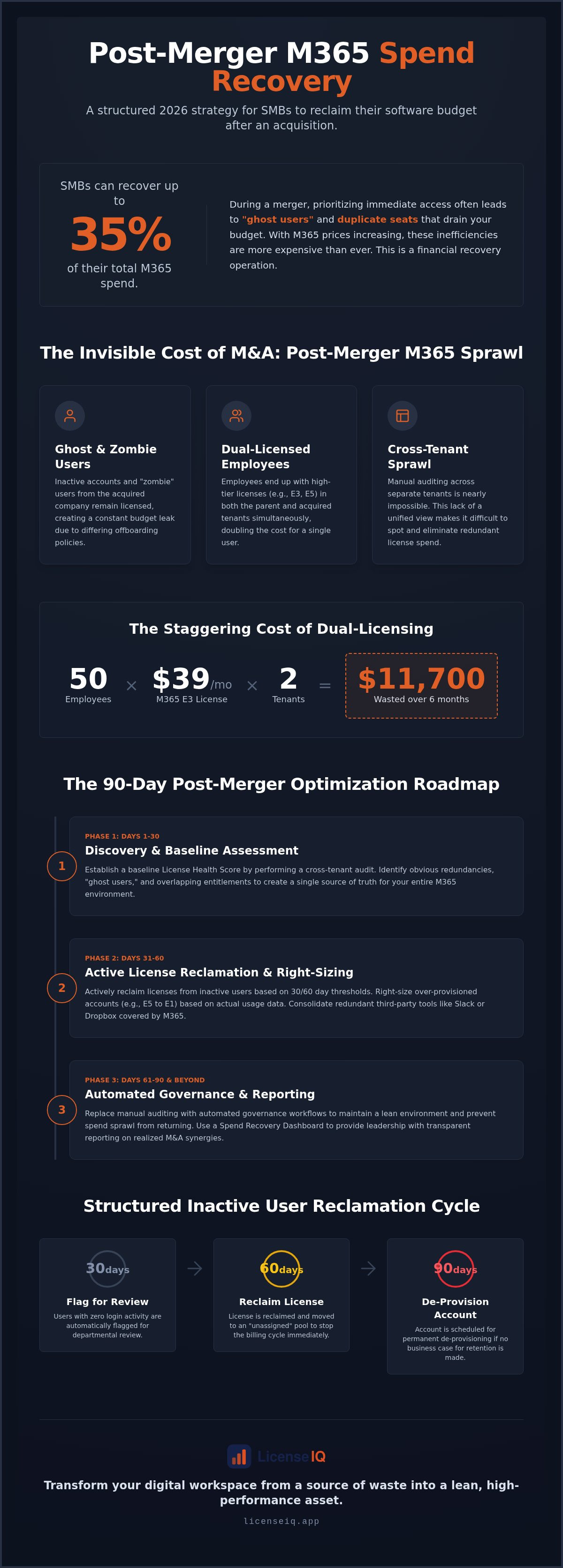
SMBs can recover up to 35% of their total Microsoft 365 spend after a merger through diligent license optimization. You likely prioritize immediate access during an acquisition, but this often leads to "ghost users" and duplicate seats that drain your budget. With the July 2026 price increases now in effect, including Microsoft 365 Business Standard rising to $14 per user, these inefficiencies are more expensive than ever. Precise microsoft 365 license management for smbs is no longer a back-office task; it's a financial recovery operation.
You know that visibility is the only path to control, yet cross-tenant sprawl makes manual auditing nearly impossible. We promise to show you how to eliminate redundant license spend and consolidate your environment to reclaim your software budget immediately. This article details a structured 2026 strategy for spend recovery. We'll explore how to identify double-licensed employees, prune inactive accounts, and implement automated governance. It's time to transform your digital workspace from a source of waste into a lean, high-performance asset.
Key Takeaways
- Stop paying for duplicate licenses by identifying "ghost users" and redundant seats created during rapid M&A integrations.
- Master microsoft 365 license management for smbs by auditing cross-tenant usage to uncover and resolve overlapping entitlements.
- Deploy a 90-day optimization roadmap that transitions from a baseline Health Score assessment to active license reclamation.
- Replace manual auditing with automated governance workflows to maintain a lean environment and prevent spend sprawl from returning.
- Leverage a Spend Recovery Dashboard to provide leadership with transparent reporting on realized M&A synergies.
The Invisible Cost of M&A: Why Post-Merger M365 Sprawl Happens
Post-merger M365 sprawl is the silent accumulation of redundant licenses during rapid corporate integration. It happens when you inherit a legacy tenant without consolidating it immediately. IT teams often fall into the speed vs. cost trap. To ensure zero downtime on Day 1, they over-provision licenses across both environments. This keeps the lights on but creates a massive financial leak that erodes the projected EBITDA synergies of the deal. Implementing proactive microsoft 365 license management for smbs ensures your cloud environment remains lean from the start.
Unoptimized SaaS spend is a direct threat to the financial health of the new entity. Following the July 2026 price increases, where Microsoft 365 Business Standard rose to $14 per user, the cost of legacy baggage is higher than ever. Proper Software Asset Management is essential to identify service accounts and ghost users left active in the acquired company's infrastructure. Without a unified view, you're essentially paying a merger tax every single month.
The Dual-Licensing Dilemma
Employees often end up with high-tier licenses, such as E3 or E5, in both the parent and acquired tenants simultaneously. The financial math is staggering. If you double-pay for an E3 license at $39 per month for 50 employees, you waste $11,700 over a six-month integration period. Manual Entra ID checks rarely catch these overlaps. Differing UPN formats, such as [email protected] versus [email protected], make it hard to see that one person is consuming two expensive seats. This complexity highlights why dedicated microsoft 365 license management for smbs is a requirement for modern M&A.
Cultural Governance Clashes
Mergers often collide different offboarding policies, which creates zombie accounts. One firm might deactivate users instantly, while the other waits 90 days. This lack of standardization leads to licenses being assigned to people who no longer work for the organization. Additionally, department heads may engage in license hoarding during times of structural uncertainty to ensure their teams aren't locked out of tools. You need a centralized License Health Score to establish a single source of truth. Platforms like LicenseIQ provide this oversight by aggregating data across all tenants to reveal obscured waste.
Identifying Redundancy: How to Spot Overlapping Entitlements
Cross-tenant auditing is the first step in identifying who is active where. You can't manage what you can't see across fragmented environments. In a post-merger scenario, visibility is often your biggest hurdle because standard Microsoft admin tools don't provide a unified view of two separate tenants. Robust microsoft 365 license management for smbs requires a single pane of glass to detect when the same employee is consuming resources in both the parent and acquired company systems.
Look for redundant third-party tools where M365 entitlements overlap with the acquired company's existing SaaS stack. If the new entity has E3 or E5 licenses, you likely already pay for advanced security, cloud storage, and communication tools that make legacy subscriptions to Slack, Dropbox, or third-party antivirus redundant. Consolidating these overlaps isn't just about Microsoft; it's about pruning your entire software ecosystem to maximize the value of your existing enterprise agreement.
Establish a strict inactive user audit based on a 30/60/90 day activity threshold.
- 30 Days: Flag users with zero login activity for departmental review.
- 60 Days: Reclaim the license and move the user to a "unassigned" status to stop the billing cycle.
- 90 Days: Proceed with permanent de-provisioning of the account if no business case for retention exists.
Analyzing License Tier Utilization
You'll often find users on E5 licenses who only require E1 or F3 functionality for their daily tasks. If a user hasn't accessed Power BI, advanced analytics, or premium security features in the last quarter, they are over-provisioned. Right-sizing is the alignment of license cost to actual feature consumption. Use granular usage data to justify downgrading premium legacy seats inherited from the acquired company. This data-driven approach removes the emotion from budget adjustments and focuses purely on operational efficiency. To see where your current environment stands, you can view your real-time License Health Score today.
Unassigned vs. Inactive: The $10,000 Distinction
There's a critical financial difference between licenses sitting in your unassigned pool and licenses assigned to people who don't log in. Unassigned licenses are visible, but inactive assigned licenses are a hidden drain on your EBITDA. For a mid-sized team with 50 inactive Business Standard seats, the waste totals $700 per month. Over a year, that's $8,400 in lost capital that could have been reinvested into growth. Quantifying this dollar-value waste is the only way to help the C-suite prioritize cleanup efforts. You can find more detailed frameworks in our guide on Microsoft 365 License Optimization: The 2026 Guide to Automated Spend Recovery.
Strategic Consolidation: Mapping Usage to the New Corporate Identity
Successful M&A integration requires more than just moving mailboxes. You must establish a new standard license profile that reflects the combined entity's operational needs. Fragmented licensing tiers inherited from an acquired company often lead to inconsistent access and unnecessary costs. Effective microsoft 365 license management for smbs focuses on consolidating these mismatched entitlements into a unified framework. This process ensures every user has exactly what they need, and nothing they don't.
Last Sign-In is a dangerous metric for M&A cleanup. It's often triggered by background system processes or automated mobile syncs, giving you a false sense of user activity. Instead, track granular engagement data like Teams messages sent or documents edited in OneDrive. You must also hunt for add-on sprawl. Redundant seats for Visio, Project, or Copilot often hide in legacy tenants, costing hundreds per user annually. Pruning these high-cost extras is a quick win for your Spend Recovery Dashboard.
Role-Based Licensing Frameworks
Create distinct personas to simplify your environment. Frontline workers might only need F3 licenses, while your standard Knowledge Workers thrive on Business Standard or E3. Reserved Power User tiers should be limited to those requiring advanced analytics or premium security features. Manually mapping hundreds of employees to these roles is a recipe for error. The LicenseIQ Platform automates this mapping in minutes, using AI to match actual usage patterns to the most cost-effective license tier. This ensures your Automated Governance Workflows can enforce these standards as your organization grows.
The Danger of Premature Tenant Consolidation
Don't rush into a technical tenant migration before you optimize your licenses. Migration tools typically charge on a per-seat basis. Moving "ghost users" or redundant accounts directly increases your migration bill. Pruning inactive accounts first reduces your data payload and speeds up the entire transition timeline. This proactive approach also simplifies compliance. By reclaiming licenses before the move, you ensure that only active, authorized data enters your new consolidated environment. This meticulous preparation turns a complex administrative task into a streamlined financial recovery operation.
The 90-Day Post-Merger Optimization Roadmap
A structured roadmap transforms post-merger chaos into a disciplined financial recovery operation. You can't fix everything on Day 1, so prioritize actions that yield the highest immediate return. Effective microsoft 365 license management for smbs requires a phased approach that balances operational stability with aggressive spend reclamation. By following a 90-day cycle, you ensure that temporary over-provisioning doesn't become a permanent budget drain. This timeline moves your team from a state of reactive firefighting to proactive digital auditing.
Month 1: The Inventory Blast
The first 30 days focus entirely on visibility. Connect all legacy tenants to a single Spend Recovery Dashboard to establish your baseline. You'll likely discover that a small fraction of your user base, often the top 10%, is responsible for over 50% of your total waste. This is where you identify the highest-tier licenses assigned to inactive accounts. For a detailed breakdown of these early wins, consult our guide on How to Reduce M365 Subscription Costs: The 2026 Spend Recovery Playbook. Establishing this Health Score immediately provides the transparency needed to justify subsequent reclamation efforts.
Month 2: Surgical Reclamation
Days 31 through 60 are for execution. Start by purging ghost users from the acquired tenant who haven't logged in since the merger began. You must also right-size double-licensed users, ensuring they hold only one optimized seat instead of two redundant ones. This is the stage where you downgrade E5 users who aren't utilizing premium features to more appropriate tiers. To ensure these gaps don't reappear, implement the Office 365 Offboarding Checklist 2026. This surgical approach eliminates the heaviest costs without disrupting the workforce's productivity.
Month 3: Continuous Governance
The final phase transitions your organization from cleanup mode to continuous efficiency. Set up automated alerts for unassigned license thresholds to prevent future over-purchasing. You should also establish a recurring monthly Health Score review with your FinOps team to align IT spend with actual business growth. This is where microsoft 365 license management for smbs becomes a permanent part of your operational DNA. Automated Governance Workflows now handle the heavy lifting, ensuring your environment remains lean and secure. Report your total recovered spend as a key IT success metric to the board to prove the ROI of your M&A integration. You can start your recovery journey by connecting your tenants to LicenseIQ for an instant assessment.
Automating Post-Merger Governance with LicenseIQ
Manual scripts are a significant liability during the high-pressure environment of a merger. They are error-prone, time-consuming, and fail to provide the real-time visibility required for high-stakes financial decisions. LicenseIQ replaces these fragile workflows with an AI-native platform designed for immediate impact. It connects to multiple M365 tenants in minutes, providing a unified view that reveals exactly where your resources are being drained. This is the new standard for microsoft 365 license management for smbs.
The Spend Recovery Dashboard provides actionable insights that tell you exactly which licenses to cut. It doesn't just show raw data; it provides specific dollar-value recovery recommendations. You can see the immediate impact of removing ghost users and right-sizing over-provisioned seats in real-time. While enterprise-heavy SaaS Management Platforms (SMPs) require months of configuration and specialized training, LicenseIQ is built for SMBs who need results today. The License Health Score serves as an instant benchmark, allowing you to report the success of your M&A integration to leadership with total transparency and confidence.
AI-Native Intelligence for Fast-Paced Mergers
Speed is your most critical asset in a post-merger environment. LicenseIQ leverages the Model Context Protocol to automate the tedious manual audits that used to take IT teams weeks to complete. Our 5-Minute Audit promise ensures you gain total visibility into your license estate before your first post-merger board meeting. This drastically reduces the burden on overstretched IT staff who are already balancing complex security and user migration tasks. You don't need a team of external consultants to find waste; you need a precise digital auditor that works at the speed of your integration.
Securing the Future of the New Entity
Optimization isn't a one-time event. As the new company begins to scale, the risk of SaaS sprawl naturally returns. LicenseIQ moves your organization beyond a simple cleanup into a permanent state of financial hygiene. Continuous monitoring ensures that unassigned licenses never sit idle and that new hires are provisioned with the correct, role-based tiers from their first day. This vigilant oversight protects your EBITDA and ensures that the financial synergies of the merger are realized and maintained over the long term. By integrating automated microsoft 365 license management for smbs into your daily operations, you transform IT from a cost center into a driver of efficiency. See how LicenseIQ can recover your post-merger spend in minutes.
Secure Your Post-Merger Financial Synergies
Post-merger success depends on your ability to convert operational complexity into financial clarity. You've identified how "ghost users" and double-licensing erode your acquisition's value. Transitioning to a lean environment requires more than manual spreadsheets. It demands a proactive digital auditor that monitors your resources with precision. Implementing robust microsoft 365 license management for smbs ensures that every dollar spent aligns with actual workforce activity.
You can eliminate redundant spend and prevent waste from returning through automated governance. A unified view across legacy tenants is the only way to protect your EBITDA during integration. The path to a consolidated, efficient workspace is shorter than you think. Our AI-native platform provides a License Health Score for instant financial clarity. You can recover up to 35% of wasted SaaS spend with a no-code setup that takes only minutes. Take control of your cloud budget today.
Start your 5-minute M365 audit with LicenseIQ. Your organization is ready for its next phase of growth.
Frequently Asked Questions
How do I find redundant M365 licenses across two different tenants?
You must use a unified dashboard that aggregates data from both environments simultaneously. Manual checks often fail because standard admin centers don't offer cross-tenant visibility. You need to compare User Principal Names (UPNs) and usage patterns to see if one employee holds active seats in both the parent and acquired company. Automating this process with a digital auditor provides the clarity needed to stop double-paying for your workforce immediately.
Is it better to optimize licenses before or after a tenant migration?
You should always optimize licenses before the technical migration begins. Migration tools often charge on a per-seat basis, so moving inactive or redundant accounts directly increases your project costs. Pruning ghost users and right-sizing tiers beforehand reduces the data payload and simplifies the transition. This proactive approach ensures your new consolidated environment starts lean and remains cost-effective from the very first day of the new entity.
What is the most common source of M365 waste after a merger?
Double-licensing of employees is the primary driver of post-merger waste. During rapid integration, IT teams frequently provision new seats in the parent tenant before deactivating the acquired company's legacy licenses. This overlap leads to organizations paying for two high-tier subscriptions for a single user. Redundant third-party SaaS tools that duplicate M365 features, such as cloud storage or chat apps, also contribute significantly to monthly spend sprawl.
How can I identify ghost users in an acquired company tenant?
Look beyond the "Last Sign-In" date, as automated background syncs can make abandoned accounts appear active. Instead, analyze granular activity metrics like Teams messages sent, files edited in OneDrive, or emails sent within the last 30 days. Accounts with zero engagement across these core services are likely ghost users. Effective microsoft 365 license management for smbs requires these deep audits to distinguish between vital service accounts and expensive, abandoned seats.
Can I downgrade M365 licenses without losing user data during a merger?
Yes, you can downgrade licenses safely if you understand the feature limitations of each tier. Moving from E5 to E3 might remove advanced analytics but keeps core mailbox and document data intact. However, you must verify that the user doesn't exceed the storage limits of the lower tier, such as the 50GB cap on Business Basic. Always perform a health check to ensure compliance and data retention policies remain active during the transition.
How much can a typical SMB save on M365 licenses after an M&A event?
Most SMBs recover up to 35% of their total M365 spend through diligent optimization. This savings comes from reclaiming inactive seats, right-sizing over-provisioned users, and consolidating redundant third-party subscriptions. With the July 2026 price increases, these savings represent a significant boost to your organization's EBITDA. Using a Spend Recovery Dashboard allows you to report these synergies to leadership as clear IT success metrics that prove the value of the integration.
What are the security risks of leaving legacy licenses active after a merger?
Active legacy licenses create unmonitored entry points for potential breaches. If a ghost user account remains provisioned, it lacks the oversight of your new centralized security policies. These zombie accounts are prime targets for credential harvesting and unauthorized access. Closing these gaps isn't just a financial priority; it's a critical step in securing the new entity’s digital perimeter and ensuring total operational transparency across all inherited tenants.
How does LicenseIQ differ from manual M365 license auditing?
Manual auditing relies on static spreadsheets and error-prone scripts that take weeks to execute. LicenseIQ is an AI-native platform that connects to your tenants in minutes to provide instant financial clarity. It offers a License Health Score and specific dollar-value recommendations that manual checks miss. While spreadsheets are reactive, our platform provides automated microsoft 365 license management for smbs through workflows that prevent waste from returning as your organization continues to grow.


