

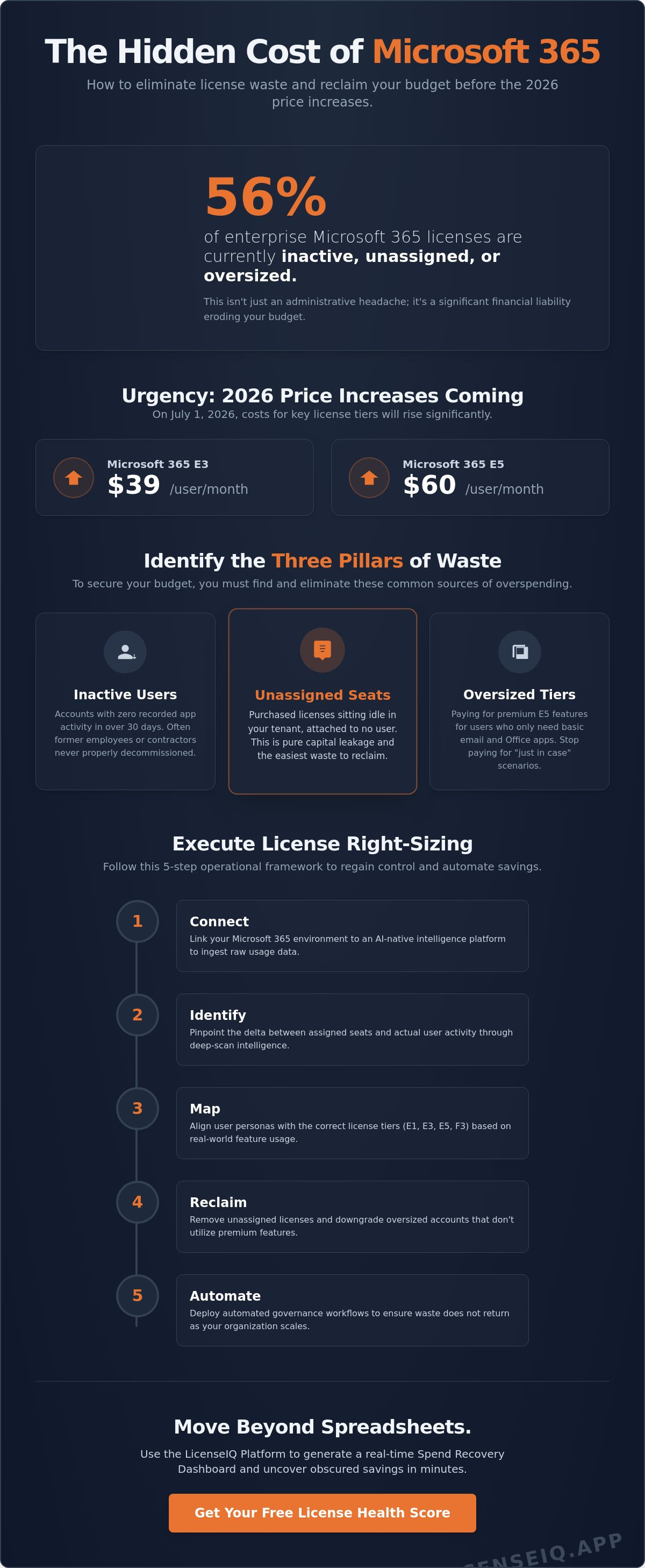
56% of enterprise Microsoft 365 licenses are currently inactive, unassigned, or oversized. With Microsoft 365 E3 costs rising to $39 and E5 hitting $60 on July 1, 2026, these inefficiencies are no longer just administrative headaches; they're aggressive financial liabilities. You likely suspect your environment is overprovisioned, but manual spreadsheets are outdated the moment you hit save. To maintain fiscal health, your organization requires modern microsoft 365 license optimization tools that provide immediate oversight and total clarity.
We understand the frustration of managing complex E3, E5, and F3 tiers while invisible waste erodes your budget. This guide provides a strategic blueprint to eliminate that disorder and execute precise license right-sizing using AI-native technology. You'll learn how to establish a clear License Health Score, deploy Automated Governance Workflows, and use the LicenseIQ Platform to reclaim lost spend. We're moving beyond passive monitoring to active, data-driven resource protection and a significant reduction in your monthly SaaS costs.
Key Takeaways
- Identify the three pillars of Microsoft 365 waste to eliminate inactive users, unassigned seats, and oversized license tiers.
- Master a 5-step operational framework to bridge the gap between assigned licenses and actual user activity through deep-scan intelligence.
- Evaluate modern microsoft 365 license optimization tools based on their ability to deliver a real-time Health Score and actionable dollar-value recommendations.
- Implement automated governance workflows to move beyond one-time audits and maintain continuous spend recovery as your organization scales.
- Leverage the LicenseIQ Platform to generate a comprehensive Spend Recovery Dashboard and uncover obscured savings in minutes.
Beyond the Spreadsheet: The Reality of Microsoft 365 License Waste
Spreadsheets are static. Your Microsoft 365 environment is not. Relying on manual logs to track license assignments creates a dangerous visibility gap where costs hide in plain sight. This lack of oversight fuels SaaS sprawl, leaving IT leaders blind to their actual consumption patterns. In 2026, efficient organizations have moved away from annual reviews. They now prioritize real-time financial hygiene. By utilizing microsoft 365 license optimization tools, you can establish a License Health Score. This KPI serves as a primary metric for operational efficiency, ensuring every dollar spent translates to active utility. Data doesn't lie; if you aren't monitoring usage daily, you're overspending.
To secure your budget, you must identify the three pillars of waste:
- Inactive Users: Accounts that haven't touched an app in weeks.
- Unassigned Seats: Purchased licenses sitting idle in your tenant.
- Oversized Tiers: Users on E5 plans who only need basic email access.
The High Cost of Inactive and Unassigned Licenses
An inactive license is any seat with zero recorded activity in the last 30 days. These often belong to former employees, contractors, or service accounts that were never properly decommissioned. Unassigned licenses are even more egregious. They sit in your tenant, fully paid for, but attached to no one. This is pure capital leakage. Effective Software Asset Management requires a proactive system to flag these dormant resources before they compound over several billing cycles. Don't let "ghost users" haunt your balance sheet. Precision in offboarding is the only way to stop this bleed.
License Overlap and Oversizing in M365
Oversizing occurs when you pay for premium features that users never open. Many IT managers fall into the "safety margin" trap, intentionally purchasing 20% more licenses than necessary to avoid provisioning delays. This buffer is expensive and unnecessary with modern automation. Redundancy is another silent budget killer. For instance, an E5 license often includes security add-ons that your organization already pays for through third-party vendors. Without deploying microsoft 365 license optimization tools, identifying these overlaps is nearly impossible. License oversizing is simply the act of paying for enterprise-grade capabilities to support basic-level workflows. You don't need a sledgehammer to drive a nail. Stop paying for the "just in case" scenarios and start paying for actual requirements.
How to Execute License Right-Sizing: A 5-Step Operational Framework
Right-sizing is not a one-time event. It's a rigorous operational process. To secure your budget against the 2026 price increases, you must move beyond guesswork and rely on precision data. Manual oversight is no longer viable for complex tenants. Instead, follow this structured framework to regain control of your resources. This is where microsoft 365 license optimization tools provide the most value, surfacing hidden waste that manual audits miss. You can begin this process by connecting your tenant to the LicenseIQ Platform for an immediate deep scan.
Execute these five steps to achieve total clarity:
- Step 1: Connect. Link your Microsoft 365 environment to an AI-native intelligence platform to ingest raw usage data.
- Step 2: Identify. Pinpoint the delta between assigned seats and actual activity.
- Step 3: Map. Align user personas with the correct license tiers, such as E1, E3, E5, or F3.
- Step 4: Reclaim. Remove unassigned licenses and downgrade accounts that don't utilize premium features.
- Step 5: Automate. Deploy Automated Governance Workflows to ensure waste does not return as your headcount fluctuates.
Analyzing Usage Data vs. License Assignment
Finding unassigned licenses is the easiest win for any IT leader. However, true optimization requires deeper analysis. You must contrast "last login" dates with "active feature usage." A user might log in daily but never touch the advanced security or analytics tools included in an E5 plan. Organizations that leverage intelligence to reduce waste and costs often find that a significant portion of their spend is recoverable through simple tier adjustments. This granular visibility is essential for accurate microsoft 365 budget forecasting. Data-driven decisions prevent you from paying for potential rather than performance.
Mapping Tiers to Actual Employee Needs
Not every employee requires a top-tier suite. Many users currently on E3 plans could function perfectly with F3 or E1 licenses, especially if their roles are frontline or task-based. By deploying advanced microsoft 365 license optimization tools, you can apply department-level logic to right-sizing. For example, your sales team might require E5 for advanced telephony, while your warehouse staff only needs mobile access to Teams. You should still account for "VIP" users who require premium tiers for compliance or executive status, regardless of their daily activity. This balanced approach ensures high-level security without the burden of unnecessary overhead. Precision mapping transforms your tenant from a cost center into a streamlined asset.
Evaluating Microsoft 365 License Optimization Tools: Key Features for 2026
Selecting the right software is the difference between identifying a problem and solving it. In 2026, legacy monitoring is insufficient for complex enterprise environments. You need platforms that offer immediate clarity and automated execution. When evaluating microsoft 365 license optimization tools, prioritize speed and precision. A modern tool must deliver a comprehensive License Health Score in minutes, not days. If a platform requires weeks of configuration, it's already failing to protect your budget. Real-time oversight is the only way to counteract the rising costs of E3 and E5 tiers.
Look for these essential features to ensure maximum ROI:
- Speed of Discovery: Rapid ingestion of tenant data for instant visibility into your environment's health.
- Actionability: Clear, dollar-value recommendations that translate usage data into specific spend recovery opportunities.
- Automation: Governance workflows that can execute license reclamation and tier downgrades without manual intervention.
- MCP Integration: Leveraging the Model Context Protocol (MCP) to allow AI agents to share deeper intelligence across your technical stack.
Integration with the Model Context Protocol is no longer optional. This standard allows your optimization tools to communicate seamlessly with other AI agents in your ecosystem. It provides a holistic view of user activity that legacy APIs simply cannot match. Automated reclamation workflows are the final step in this optimization cycle. Once the tool identifies a dormant account, it should trigger a sequence to harvest that license for reuse. This eliminates the human bottleneck that often prevents organizations from realizing their full savings potential.
AI-Native Intelligence vs. Legacy Reporting
Static reports are historical artifacts. They tell you what happened last month, but they don't prevent next month's waste. AI-driven insights represent the transition from simple IT asset management to true software intelligence. This strategic discipline ensures your environment remains lean as you scale. By predicting future waste patterns based on historical usage, AI-native tools stop spend leaks before they occur. Review our analysis of licenseiq vs manual tracking to see how intelligence outperforms human oversight.
Spend Recovery Dashboards and Visibility
Executive leadership requires transparency, not technical jargon. A Spend Recovery Dashboard provides a single pane of glass view into your total M365 expenditure. It translates complex licensing data into real-time dollar-value savings. This clarity is vital for securing executive buy-in during budget cycles. When leadership sees exactly how much capital is being reclaimed, IT is viewed as a value driver rather than a cost center. This level of oversight is a cornerstone of effective microsoft 365 cost management. True visibility removes the guesswork from financial planning and establishes a vigilant system of fiscal control.
From Audits to Governance: Implementing Continuous Spend Recovery
Static audits are a financial trap. They provide a temporary reprieve but fail to stop the recurring "waste cycle" inherent in growing organizations. Hiring, promotions, and departures happen every week; a one-time scan is outdated before the report is even presented. To maintain fiscal discipline, you must shift from reactive cleanup to proactive resource management. True oversight requires microsoft 365 license optimization tools that function as perpetual digital auditors. This transition from "auditing" to "governance" ensures that your tenant remains lean, regardless of headcount fluctuations.
Effective governance relies on setting clear operational thresholds. You should establish "inactivity alerts" that trigger automatically. For instance, if a user has not logged into any Microsoft 365 service for 30 days, the system should flag that account for immediate review. Integrating these triggers into your standard IT procurement lifecycle prevents the accumulation of "ghost licenses." It forces accountability at the point of request rather than months later during a budget crisis. Stop treating license management as an annual event and start treating it as a core operational heartbeat.
Automating the Reclamation Lifecycle
Automated Governance Workflows are the most effective way to harvest licenses from departed employees. When HR offboards a staff member, the system should immediately reclaim their license for the available pool. This prevents unassigned seats from sitting idle and drawing from your budget. Automation also handles tier adjustments with precision. If an E5 user only utilizes basic email and Teams features over a 90-day period, the workflow can automatically suggest or execute a downgrade to E3 or F3. Beyond the financial recovery, clean governance provides significant security benefits. Reducing the number of active, unmonitored licenses shrinks your attack surface and ensures only active, authorized users have access to corporate data.
Strategic FinOps for Microsoft 365
Modern IT leadership exists at the intersection of technical operations and financial accountability. Adopting a FinOps approach to your tenant means every license assignment must be justified by usage data. Continuous optimization supports broader cloud cost optimization vs management goals by turning obscured data into actionable savings. Governance is the engine that keeps right-sizing sustainable. Without it, your environment will inevitably return to a state of disorder. Secure your tenant today by implementing Automated Governance Workflows to ensure total clarity and permanent spend recovery.
Recovering Spend in Minutes: The LicenseIQ Solution
Manual oversight is a liability. While legacy microsoft 365 license optimization tools focus on historical reporting, the LicenseIQ Platform provides immediate, actionable intelligence. We designed our AI-native engine to eliminate the delay between identifying waste and recovering capital. By connecting your tenant in minutes, you gain total clarity over your environment's financial health. There's no heavy software to install and no complex configuration required. You simply connect, scan, and save. This speed is essential for organizations looking to secure their budgets before the July 2026 price increases take effect.
Our platform leverages the Model Context Protocol (MCP) to integrate deeply with your technical stack. This allows for a more sophisticated analysis of user behavior than traditional APIs provide. It's the difference between seeing a login and understanding a workflow. When you use microsoft 365 license optimization tools built on AI-native architectures, you're investing in a system that learns and adapts to your specific organizational needs. The 5-minute scan is the catalyst for this transformation. It uncovers obscured details that have likely been draining your resources for months. Total clarity is finally within reach.
Your M365 Health Score and Recovery Roadmap
Your journey begins with a comprehensive License Health Score. This metric benchmarks your tenant against industry standards, instantly identifying where inactive users and oversized tiers are draining your budget. Unlike generic audits, LicenseIQ provides a specific recovery roadmap with dollar-value recommendations. It tells you exactly which E5 seats should be F3s and which unassigned licenses to harvest. You don't have to guess. The data is laid out in a single Spend Recovery Dashboard, giving you the transparency needed to justify every IT dollar. You can check your M365 Health Score right now to see your immediate savings potential.
Seamless Integration and Immediate ROI
The financial impact is immediate. Case study data shows that SMBs can save up to 35% on their Microsoft 365 subscriptions by implementing our automated hygiene protocols. This isn't just a one-time fix. By leveraging MCP-driven automation, LicenseIQ maintains continuous oversight, ensuring your License Health Score remains high as your team scales. Our tiered pricing model ensures the solution grows with you, making it accessible for organizations at any stage of maturity. Efficiency shouldn't be a luxury; it should be your standard operating procedure. Start your automated spend recovery with LicenseIQ today and turn your Microsoft 365 tenant into a model of fiscal precision.
Secure Your 2026 Microsoft 365 Budget Today
Manual tracking is a liability that costs your organization every month. Transitioning to a model of continuous governance ensures your resources are always aligned with actual usage. By deploying microsoft 365 license optimization tools, you replace guesswork with total clarity and technical precision. You've seen how a structured framework and automated workflows stop the bleed of inactive, unassigned, and oversized seats. In 2026, efficient leadership requires a proactive system that monitors every license in real time.
The LicenseIQ Platform provides the immediate oversight required to protect your company's financial health. Our AI-native 5-minute tenant scan delivers actionable dollar-value recovery insights without the need for complex installations. You can implement Automated Governance Workflows to maintain these efficiency gains as your organization scales. Don't wait for the next scheduled price increase to audit your environment; take control of your SaaS spend today. Recover up to 35% of your M365 spend in minutes with LicenseIQ. Your path to a lean and transparent tenant is just one scan away.
Frequently Asked Questions
How do Microsoft 365 license optimization tools find inactive users?
These tools connect to the Microsoft Graph API to analyze login timestamps and feature activity across apps like Teams, Outlook, and OneDrive. By comparing the current date to the last recorded activity, the system flags any user dormant for more than 30 days. This level of oversight removes the need for manual log reviews. It ensures your resources aren't wasted on accounts that no longer contribute to the organization.
What is the difference between unassigned and underutilized licenses?
Unassigned licenses are seats you've purchased that aren't attached to any user account. Underutilized licenses are assigned to active users who don't need the high-tier features they're paying for. For example, an E5 user who only uses basic email is underutilized. Both contribute to SaaS sprawl and financial waste. Identifying this delta is a core function of the LicenseIQ Platform.
Can I automate the reclamation of M365 licenses without an IT degree?
Yes, you can use Automated Governance Workflows to handle these tasks without writing complex scripts. The LicenseIQ Platform simplifies the process through a user-friendly interface that lets you set rules for license harvesting. Once thresholds are met, the system executes the reclamation automatically. This allows business managers to maintain fiscal control without deep technical intervention or manual spreadsheet updates.
What is a good M365 License Health Score for an SMB?
A License Health Score above 90% is the target for a well-optimized SMB tenant. Scores below 70% indicate significant waste from inactive accounts or oversized tiers. Most mid-sized environments initially score much lower before deploying microsoft 365 license optimization tools to identify and fix these obscured details. Total transparency is the goal for any vigilant IT leader who wants to eliminate resource disorder.
How much can a company typically save using license right-sizing tools?
Most mid-sized organizations overspend by 20% to 40% on their Microsoft 365 environments. Industry data suggests that companies often waste over 30% of their licensing spend due to oversized tiers and dormant accounts. By using the Spend Recovery Dashboard, you can visualize these specific dollar-value savings and reclaim capital in minutes. This proactive approach directly improves the financial health of your technical operations.
Does LicenseIQ support all Microsoft 365 license types, including E5 and Business Premium?
LicenseIQ supports the full spectrum of Microsoft commercial licenses, including E3, E5, F3, and Business Premium. The platform is specifically designed to analyze the complexity of these tiers to find right-sizing opportunities. Whether you're managing frontline workers or executive suites, the system provides total clarity across your entire tenant. It ensures every user is matched with the most efficient license for their actual job requirements.
What happens to user data when a license is reclaimed or downgraded?
Reclaiming a license for an inactive user typically triggers a 30-day grace period before permanent data deletion. Downgrading a license from E5 to E3 or F3 might restrict access to premium features like advanced analytics, but core data like emails and files remains intact. You should always verify your specific retention policies before executing automated workflows. This ensures security and compliance while you reduce unnecessary overhead.
How often should I run a Microsoft 365 license audit in 2026?
Annual or even quarterly audits are no longer sufficient in a fast-paced digital environment. You should move to continuous monitoring using microsoft 365 license optimization tools to catch waste as it occurs. Real-time oversight allows you to adjust to headcount changes and role shifts immediately. This proactive approach prevents the "waste cycle" from taking root and keeps your organization's resources under constant, vigilant protection.


