

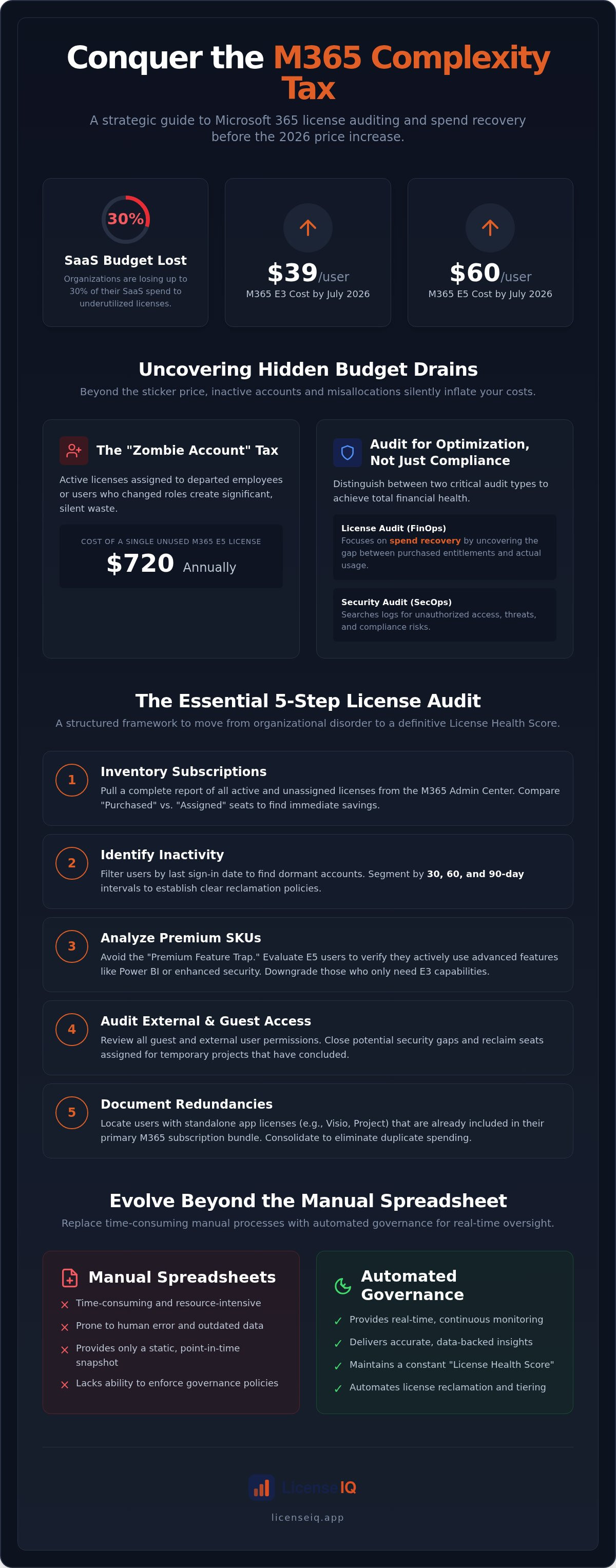
Organizations are currently losing up to 30% of their SaaS budget to the "M365 Complexity Tax." With Microsoft 365 E3 costs rising to $39 per user and E5 climbing to $60 as of July 2026, every underutilized seat is a direct leak in your operational budget. Learning how to track microsoft 365 license usage is no longer a routine IT chore; it's a high-stakes financial recovery mission.
You likely suspect your environment is cluttered with inactive accounts and mismatched tiers, yet gaining total clarity remains elusive. It's difficult to enter renewal negotiations without granular evidence of actual feature adoption. This guide delivers a precise framework to identify waste, reclaim dormant licenses, and master your SaaS spend before your 2026 renewal. We'll move through a structured audit process to transform organizational disorder into a definitive License Health Score. You'll gain the data-backed evidence needed for tough negotiations and the automated workflows required to eliminate future bloat. This is your roadmap to total oversight and a leaner, more efficient digital infrastructure.
Key Takeaways
- Establish a systematic review of entitlements versus actual utilization to combat rising 2026 subscription costs.
- Learn how to track microsoft 365 license usage by auditing sign-in activity and usage data across 30, 60, and 90-day intervals.
- Avoid the "Premium Feature trap" by identifying users who pay for E5 functionality but only require E3 capabilities.
- Prepare for your Microsoft renewal 90 days in advance with a data-backed Spend Recovery report to leverage in negotiations.
- Replace manual, time-consuming spreadsheets with automated governance to maintain a real-time License Health Score.
Why a Microsoft 365 License Audit is Non-Negotiable in 2026
A Microsoft 365 license audit is a systematic review of your purchased entitlements against actual user utilization. It's the only way to ensure your subscription spend aligns with your operational reality. In 2026, this process has shifted from a "nice-to-have" administrative task to a core requirement for financial health. As Microsoft 365 E3 and E5 costs reached $39 and $60 per user respectively in July 2026, the margin for error has vanished. Organizations that fail to understand how to track microsoft 365 license usage are essentially leaving their budgets unmonitored in a high-inflation environment.
Many leadership teams confuse a security audit with a license audit. While security teams search logs for unauthorized access or threats to Microsoft 365 environments, a license audit focuses strictly on spend recovery. It uncovers the gap between what you own and what you use. This distinction is vital for FinOps efficiency. Data shows that many SMBs are currently overpaying by up to 35% due to inefficient allocation. This "35% Waste Rule" suggests that more than one third of your monthly bill could likely be reclaimed through better oversight.
The Financial Impact of Zombie Accounts
Zombie accounts are active licenses assigned to users who have departed the company or changed roles. These accounts often persist because manual offboarding processes fail to trigger a license revocation. The cost is substantial. A single unused Microsoft 365 E5 license costs your organization $720 annually. In a large team, dozens of these "zombies" can drain thousands of dollars from your budget every month. Subscription creep happens silently; an audit provides the transparency needed to stop the leak.
Compliance vs. Optimization: Two Sides of the Audit
Auditing serves two masters: legal safety and fiscal growth. Improper licensing doesn't just waste money; it creates legal exposure during a Microsoft true-up. If you under-license, you face penalties. If you over-license, you face waste. Effective Microsoft 365 cost optimization balances these risks by ensuring every seat is correctly tiered and active.
A "set it and forget it" strategy is a dangerous approach for 2026 budgets. Without a clear view of how to track microsoft 365 license usage, your organization remains vulnerable to unforced financial errors. Moving from manual spreadsheets to a structured audit framework is the first step toward reclaiming your resources and securing your digital infrastructure.
The Essential Microsoft 365 License Audit Checklist
Executing a manual audit requires a meticulous approach to data collection. You cannot manage what you don't measure. The first step in understanding how to track microsoft 365 license usage is establishing a baseline of your current inventory. This prevents "subscription creep," where licenses are added for new projects but never removed once those projects conclude. Use the following five-step checklist to regain control over your tenant.
- Step 1: Inventory Subscriptions. Pull a report of all active subscriptions and unassigned licenses via the Microsoft 365 Admin Center.
- Step 2: Identify Inactivity. Filter users by their last-sign-in date to find accounts dormant for 30, 60, or 90 days.
- Step 3: Analyze Premium SKUs. Evaluate E5 users to determine if they're utilizing advanced security or Power BI features.
- Step 4: Audit External Access. Review guest licenses and external user permissions to close security gaps and reclaim wasted seats.
- Step 5: Document Redundancies. Locate standalone apps, like Visio or Project, that might already be covered by broader bundled plans.
Inventory and Entitlement Mapping
Start in the Billing section of your Admin Center to compare "Purchased" versus "Assigned" seats. Any gap here represents immediate, low-hanging fruit for spend recovery. You must also account for Shadow IT; these are licenses purchased by individual departments outside of central procurement. Entitlement Mapping is the process of matching paid SKUs to specific business needs. It ensures you aren't paying for enterprise-grade features for users who only require basic email access. If you find this manual mapping too complex, Automated Governance Workflows can handle the heavy lifting for you.
Activity-Based Usage Analysis
Setting the right inactivity threshold is critical. While a 30-day window is aggressive, a 90-day window is often too lenient for high-cost tiers like E5. You should use the Microsoft 365 license types guide to match specific user activity to the most cost-effective tier available. Don't just look at the last login. You need to verify if the user is actually engaging with the expensive components of their plan. While the standard Admin Center provides a surface-level view, Microsoft 365 usage analytics offers deeper insights through Power BI. This level of detail is necessary to determine how to track microsoft 365 license usage effectively at scale. It reveals if a user is truly utilizing Power BI Pro or if they can be moved to a standard E3 seat without losing productivity.
Usage Analysis: Identifying Inactive Users and Redundant SKUs
The Inactive User report is your most potent diagnostic tool for spend recovery. It provides the "last activity date," which serves as a definitive indicator of license utility. However, a single login doesn't justify a $60 monthly E5 seat. You must look deeper into specific application engagement. If a user hasn't opened Teams, Outlook, or OneDrive in 90 days, that license is a candidate for immediate reclamation. This granular oversight is a core component of how to track microsoft 365 license usage effectively at scale.
The "Premium Feature trap" is the primary source of hidden waste in modern tenants. Organizations often default to E5 for entire departments, yet only a fraction of those users utilize advanced Power BI analytics or Defender for Office 365. Downgrading these users to E3 can save $21 per user every month. Additionally, audit your tenant for duplicate licenses. It's common to find standalone Visio or Project subscriptions assigned to users who already have access through a broader bundle. For seasonal or part-time staff, calculate the ROI of a full seat versus a limited-access license. If the license cost exceeds the value of their sporadic access, you're subsidizing Microsoft's bottom line.
Right-Sizing: E3 vs. E5 vs. Business Premium
Choosing between tiers requires a cold analysis of feature requirements. E5 is built for advanced security and compliance needs. If your users aren't managing complex data sets or requiring automated sensitivity labels, Business Premium or E3 is often sufficient. Consider Frontline (F-series) licenses for staff who only need mobile access or light web-based editing. A "Mix and Match" strategy is the most efficient approach. Assign E5 only to high-risk or high-data roles, while placing the rest of the workforce on lower-cost tiers to maximize budget efficiency.
Reclaiming Spend from Departed Employees
Your HR offboarding process must be perfectly synchronized with your IT license management. When an employee leaves, the license should move to a "cool-down" period rather than remaining active indefinitely. This allows for data migration without incurring ongoing subscription costs. Following a structured Office 365 offboarding checklist 2026 ensures that data is secured while the seat is promptly returned to the available pool. Mastering how to track microsoft 365 license usage during these transitions prevents "orphan licenses" from inflating your monthly invoice and ensures total resource transparency.
Preparing for Renewal: Negotiating with Data
Entering a Microsoft renewal without usage data is a tactical error. Most organizations default to "True-Ups," simply adding more seats to cover growth. However, a data-driven approach allows for "True-Downs." By mastering how to track microsoft 365 license usage, you can identify exactly where to cut seats without impacting operations. This visibility transforms the renewal from a passive expense into a strategic negotiation. You aren't just paying a bill; you're verifying a service level.
You must build a Spend Recovery report to justify budget shifts to your executive team. This document should highlight the dollar value of reclaimed licenses and the percentage of your tenant currently optimized. Integrating Microsoft 365 license optimization into your multi-year contract planning ensures that your costs remain predictable. It prevents the sudden budget spikes often associated with unmonitored seat growth. A robust report proves to leadership that IT is an active participant in the company's financial health.
The 90-Day Renewal Countdown
Success requires a structured timeline to avoid last-minute pressure. Microsoft and resellers often push for early commitments; having your data ready prevents you from being rushed into a bad deal. Follow this three-month structure:
- Month 3: Conduct your full audit. Identify quick-win reclamation opportunities, such as zombie accounts or unassigned seats.
- Month 2: Execute right-sizing actions. Downgrade redundant premium SKUs for users who don't require E5 security or analytics.
- Month 1: Finalize your seat counts. This ensures your renewal quote reflects your actual needs, preventing over-provisioning for the coming year.
Leveraging Utilization Data in Negotiations
Presenting Zero-Usage data to your reseller or Microsoft account manager is your strongest leverage. If you can prove that a significant portion of your E5 licenses have seen zero activity in the last 90 days, you have a firm basis to push for better pricing or a lower commitment level. Use the reduce M365 subscription costs playbook to find these hidden savings and present them as non-negotiable facts. Proving that your organization is already right-sized prevents forced upsells during the negotiation process. To simplify this reporting and gain immediate clarity, you can view your real-time results on a Spend Recovery Dashboard.
Automating Governance: Beyond the Manual Spreadsheet
Manual audits are a relic of a less complex era. Spending 40 hours of specialized IT time to manually reconcile CSV files is not just inefficient; it's a net loss for the organization. By the time a spreadsheet is finished, the data is already stale. Real-time visibility is the only way to maintain a lean tenant in 2026. Transitioning to proactive SaaS license management allows your team to focus on high-value operations rather than administrative cleanup. It moves the needle from finding waste to preventing waste entirely.
The LicenseIQ Health Score
Implementing Automated Workflows
True oversight requires a system that works while you sleep. Automated Governance Workflows replace the need for annual audit headaches by enforcing rules in real-time. You can set specific triggers for unassigned licenses or accounts that have been inactive for more than 30 days. When these thresholds are met, the system alerts administrators or automatically reclaims the seat. This ensures you never pay for a zombie account again. By integrating these workflows into your continuous operational lifecycle, you transform license management from a reactive crisis into a streamlined, vigilant process.
You no longer need to wonder how to track microsoft 365 license usage; the LicenseIQ Platform handles the discovery, reporting, and reclamation automatically. This level of transparency is the cornerstone of a modern, financially resilient organization. It ensures that every dollar spent on Microsoft subscriptions is tied to a productive, active user. Moving beyond the manual spreadsheet isn't just about saving time; it's about securing your corporate resources with precision.
Secure Your Budget with Automated Visibility
The transition from manual spreadsheets to automated oversight is the only way to survive the 2026 SaaS price surge. A structured audit reveals the "35% Waste Rule" and provides the data needed for aggressive renewal negotiations. Knowing how to track microsoft 365 license usage is a financial necessity that protects your organization's bottom line. By identifying zombie accounts and right-sizing premium SKUs, you transform your tenant from a cost center into a lean, efficient asset. Real-time transparency ensures that your resources are always monitored by a vigilant system.
Stop guessing about your subscription utility. You can get your M365 Health Score and find wasted spend in minutes with LicenseIQ. Our AI-native platform scans your environment to identify up to 35% in potential savings while implementing automated governance workflows to prevent future bloat. It's time to replace organizational disorder with total clarity. Take the first step toward an optimized digital infrastructure and enter your next renewal with absolute confidence.
Frequently Asked Questions
How often should we perform a Microsoft 365 license audit?
Perform a comprehensive audit at least once per quarter to prevent subscription creep. However, organizations with high turnover or rapid growth should monitor usage monthly. Real-time tracking is the only way to ensure 100% accuracy. Waiting for an annual review often results in nine months of wasted spend on inactive accounts. Continuous oversight allows you to identify and reclaim seats immediately after an employee departs.
Can I reclaim a license without deleting the user’s data?
You can reclaim a license by unassigning it in the Admin Center without deleting the user account or their data. Microsoft typically retains mailbox and OneDrive data for a 30-day grace period after the license is removed. To preserve data long-term without costs, convert the user’s mailbox to a shared mailbox. This allows you to maintain access to historical emails while freeing up the paid seat for another team member.
What is the difference between a Microsoft True-Up and a renewal?
A True-Up is an annual reconciliation process where you report and pay for any additional seats added during the year. It's essentially a catch-up payment for growth. A renewal occurs at the end of your multi-year contract term. This is the critical window where you can renegotiate pricing, adjust your base seat counts, and change your license tiers based on actual utilization data gathered during your audit.
Is an E5 license always better than an E3 license?
An E5 license offers superior security and analytical features, but it's only "better" if your team actually utilizes those tools. Paying for E5 capabilities like Power BI Pro or advanced threat protection for users who only need basic office apps creates significant waste. Many organizations find that a mix of E3 and E5 tiers provides the best balance of functionality and cost efficiency for their specific workforce needs.
How much can a typical SMB save through a license audit?
Typical SMBs identify potential savings of up to 35% on their software subscriptions through a diligent audit. This recovery stems from identifying zombie accounts, reclaiming unassigned seats, and right-sizing users from premium tiers to more appropriate levels. Learning how to track microsoft 365 license usage effectively allows you to stop these financial leaks. These savings can often be reinvested into other critical IT infrastructure or security projects.
What happens to a license when a user is deleted from Entra ID?
When you delete a user from Entra ID, the license is not automatically canceled; it simply returns to your unassigned pool. You're still being charged for that license every month. To stop the billing, you must manually reduce your seat count with your reseller or within the billing portal. Failing to perform this step is a leading cause of subscription creep in growing organizations. It's vital to reconcile these counts monthly.
Do I need a third-party tool to perform a Microsoft 365 audit?
Inactive accounts with assigned licenses are prime targets for credential stuffing and unauthorized access. These ghost accounts often lack the same level of monitoring as active users, making them a weak point in your perimeter. Furthermore, unassigned licenses represent a failure in governance that often correlates with poor offboarding. Meticulous license tracking ensures that only authorized, active personnel have access to your corporate data and cloud resources.


