

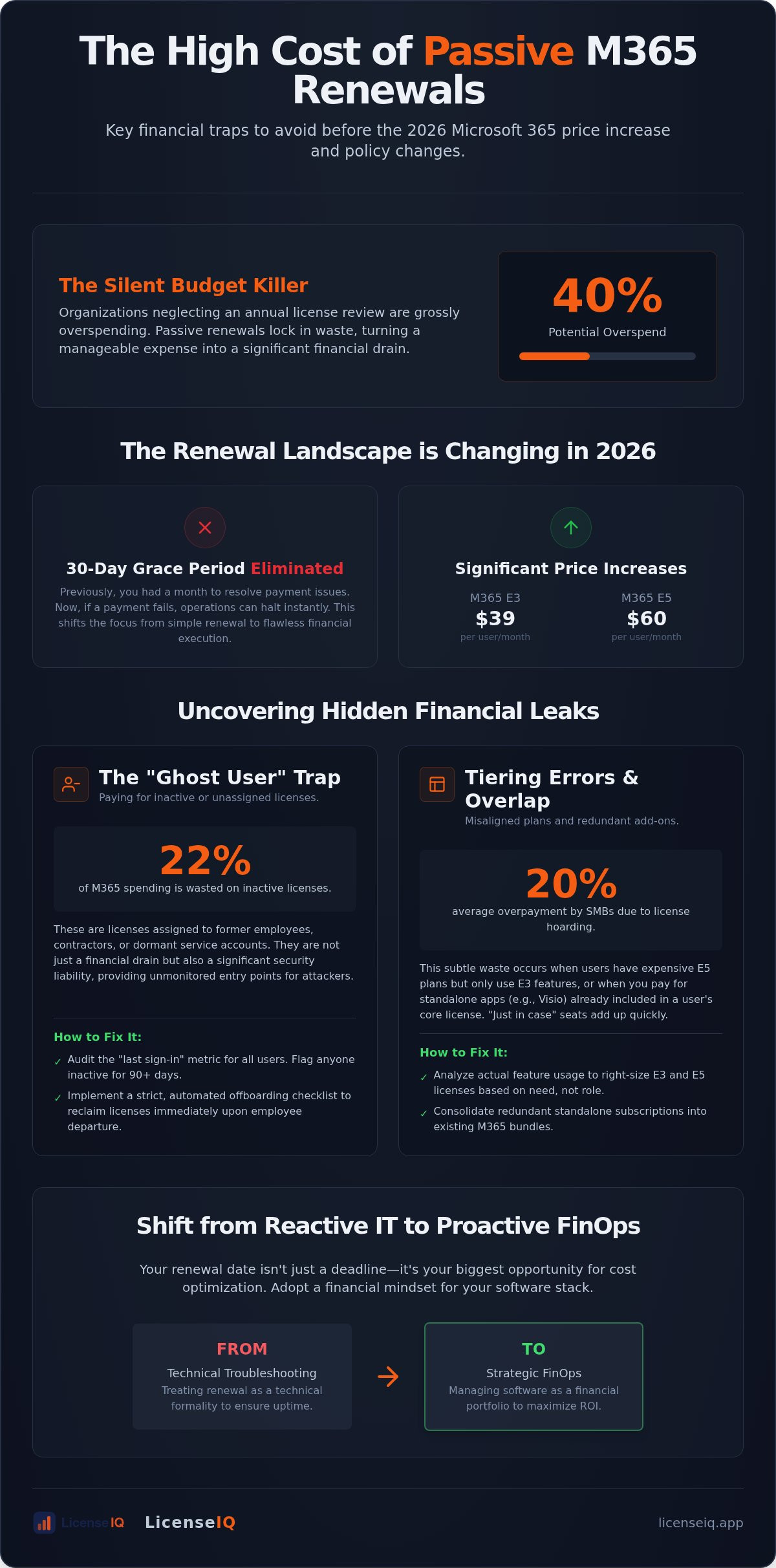
Did you know that organizations neglecting a licensing review in the last 12 months are currently overspending by as much as 40%? With the July 2026 price increases pushing Microsoft 365 E3 to $39 and E5 to $60 per user, passive renewals are no longer sustainable. Many IT leaders inadvertently fall into common microsoft 365 renewal mistakes by treating this deadline as a technical formality rather than a high-stakes financial audit. The stakes are even higher now that Microsoft has eliminated the 30-day grace period, meaning your operations could halt the moment a license expires.
It's frustrating to manage a complex tenant when you lack visibility into which users actually require E5 features versus a standard seat. You've likely felt the pressure of rising costs and the organizational disorder caused by unassigned add-on licenses. We'll show you how to uncover hidden financial traps and reclaim up to 35% of your software spend. This guide previews a strategic approach to license management, focusing on automated governance and precise oversight to ensure your 2026 renewal results in a lean, optimized budget instead of a bloated invoice.
Key Takeaways
- Distinguish between technical renewal and strategic optimization to secure your 2026 software budget.
- Identify "Ghost Users" and redundant overlaps to stop immediate financial leaks.
- Avoid common microsoft 365 renewal mistakes by aligning E3 and E5 tiers with actual user activity.
- Utilize a 30-day audit checklist to forecast seat requirements with precision.
- Deploy automated governance to turn renewal deadlines into spend recovery opportunities.
Technical Friction vs. Strategic Waste: The Renewal Landscape in 2026
In 2026, the stakes of your Microsoft subscription have shifted. Microsoft has eliminated the 30-day grace period for expired licenses. If your payment fails, your business stops. This is technical friction. However, the more dangerous threat to your bottom line is strategic waste. This happens when you successfully renew but fail to optimize. According to May 2026 data from Plow Networks, organizations that haven't conducted a licensing review in the last year are typically overspending by 20% to 40%. Avoiding common microsoft 365 renewal mistakes requires moving beyond simple uptime and mastering the Microsoft 365 license management lifecycle.
The current economic climate demands aggressive SaaS spend management. With Microsoft 365 E3 now priced at $39 and E5 at $60 per user, "auto-pilot" renewals are a luxury SMBs cannot afford. When your organization grows, the cost of these errors scales with you. A clean tenant is not just an IT preference; it's a financial necessity that directly impacts your company's agility and resource allocation.
The "Invisible" Costs of Default Renewals
Default renewals are silent budget killers. When you scale past 50 users, manual tracking via spreadsheets inevitably breaks down. It's easy to fall into the psychological trap of "we might need these seats later." This leads to paying for unassigned licenses month after month. Recurring billing masks these incremental costs, making them look like a fixed utility rather than a variable expense. A quick Microsoft 365 overview reveals a suite that has grown increasingly complex, with layers of security and AI features that many businesses pay for but never configure. Auto-pilot renewals ignore this complexity, locking in waste for another fiscal year.
Shifting from IT Troubleshooting to FinOps
Modern IT governance isn't just about troubleshooting; it's about financial hygiene. Transitioning to a FinOps mindset means treating your software stack as a portfolio to be managed for maximum ROI. The total cost of ownership (TCO) for your tenant is directly impacted by renewal accuracy. One of the most common microsoft 365 renewal mistakes is waiting until the invoice arrives to look at usage data. Your renewal date is actually your most critical window for Microsoft 365 cost optimization. By identifying underutilized E5 features or redundant add-ons before you commit to another term, you reclaim capital for growth rather than subsidizing unused cloud capacity.
The "Ghost User" Trap: Paying for Inactive and Redundant Licenses
"Ghost users" are the silent drain on your IT budget. These are licenses assigned to former employees, temporary contractors, or service accounts that no longer serve a purpose. During periods of rapid hiring or reorganization, these unassigned seats accumulate quickly. One of the most common microsoft 365 renewal mistakes is failing to purge these accounts before the contract locks. Beyond the financial waste, these accounts are a security liability. Inactive accounts are prime targets for credential harvesting because they often lack active monitoring. Leaving them active provides an unmonitored entry point for attackers.
Identifying Inactive Users Before the Deadline
To reclaim your budget, you must audit the "last sign-in" metric. This is your primary indicator of waste. A user may be "enabled" in your directory but hasn't accessed a single app in 90 days. July 2026 data from Gitbit indicates that 22% of Microsoft 365 spending is wasted on these inactive licenses. Implementing a robust office 365 offboarding checklist ensures that when a staff member leaves, their license returns to the pool immediately. This proactive oversight prevents ghost seats from bloating your next invoice. It moves your team from reactive cleanup to proactive governance.
Redundancy and License Overlap
License overlap is a more subtle form of waste. You might be paying for a standalone Visio or Project subscription for a user who already has an E5 plan covering similar needs. Department heads often engage in "license hoarding," requesting extra seats "just in case" a new hire joins. This habit causes SMBs to pay an average of 20% more annually than required. Following best practices for Microsoft licensing involves mixing annual and monthly commitments to handle workforce fluctuations without overpaying for unused capacity.
Redundancy also extends to unassigned add-ons. Gitbit reports an additional 6% of waste comes from unassigned licenses like Entra ID P2 or Defender for Endpoint. These common microsoft 365 renewal mistakes happen because visibility is obscured by the native admin center's complexity. If you want to see exactly where your money is going, you can scan your tenant with LicenseIQ to find every redundant seat in minutes. Total clarity is the only way to ensure your renewal reflects your actual needs rather than your historical errors.
Tiering Errors: Misaligned Microsoft 365 License Plans
Choosing the wrong tier is one of the most persistent common microsoft 365 renewal mistakes. Many SMBs default to a "one-size-fits-all" strategy, assigning every employee an E5 license to ensure they have the best tools available. However, at $60 per user, an E5 subscription is only cost-effective if your staff actively uses its advanced security, compliance, and analytics features. If your marketing team never touches Power BI Pro or Advanced eDiscovery, you are effectively subsidizing features that provide zero operational value. Strategic alignment requires a granular look at how different departments interact with the cloud environment.
A "Mix and Match" approach is the antidote to this waste. Knowledge workers in finance or legal might require the heavy compliance lifting of an E3 or E5 plan. Conversely, your warehouse staff or seasonal workers often only need basic communication tools. Moving these users to Business Basic at $7 or an F-series plan can slash your per-user cost by over 80% without impacting their daily output. Precision in tiering ensures your budget supports productivity rather than idle software capacity.
Over-Provisioning High-Tier Licenses
The "Premium Trap" often catches SMBs that believe enterprise-level tiers are the only way to secure their data. In reality, Microsoft 365 Business Premium often provides the ideal balance of security and productivity for organizations under 300 seats. Before you renew, analyze feature utilization logs. Do your users actually configure the advanced threat protection they pay for? Tiering misalignment is often the largest single source of M365 waste. Stop paying the "E5 tax" for users who only need Outlook and Word. This oversight accounts for a significant portion of the 29% of SaaS licenses that Medha Cloud reports as underutilized in 2026.
The Strategic Use of F-Series Licenses
Frontline workers represent a massive opportunity for spend recovery. When you move mobile or deskless staff to Microsoft 365 license types like F1 or F3, you align costs with actual usage patterns. An F3 license at $10 per month provides essential access to Teams and web-based apps; this is more than sufficient for many roles currently sitting on $39 E3 plans. Learning how to reduce M365 subscription costs through tier-shifting is a foundational skill for any modern IT leader. It transforms the renewal from a broad expense into a targeted investment in specific workforce needs.
The 30-Day Pre-Renewal Audit: A Strategic Checklist
A successful renewal requires a structured countdown. Relying on memory or outdated spreadsheets is one of the most common microsoft 365 renewal mistakes that leads to technical friction and financial waste. By implementing a 30-day audit framework, you shift from passive acceptance to active governance. This timeline provides enough oversight to catch errors before they become permanent line items on your budget for the next year.
- Day 30: Execute a Full Tenant Scan. Identify every assigned and unassigned license. Use this data as your baseline for optimization.
- Day 20: Conduct Departmental Forecasts. Interview leadership to determine actual headcount needs for the next quarter.
- Day 15: Perform a Right-Sizing Pass. Downgrade users who don't utilize high-tier features. Move frontline staff to F-series plans.
- Day 10: Purge Ghost Accounts. Reclaim licenses from offboarded employees and redundant service accounts.
- Day 5: Lock SKU Counts. Finalize your numbers and verify payment details in the Microsoft Admin Center.
Forecasting for the Next Term
Historical usage data is your most reliable predictor. Planned hiring often fluctuates, but your actual consumption logs show the truth. Avoid the trap of over-purchasing "just in case" seats. Maintain a slim buffer of 2-3% to accommodate immediate needs without bloating your annual commitment. For businesses with seasonal spikes, use the flexibility of the New Commerce Experience (NCE) to scale up monthly for temporary staff while keeping core licenses on annual terms. This prevents common microsoft 365 renewal mistakes associated with paying for idle seats during off-peak months.
Verification of Payment and Contract Terms
The July 2026 price increases have changed the financial landscape. Microsoft 365 E3 now costs $39 per user, making the 20% premium for monthly NCE flexibility even more significant. Evaluate your workforce stability to decide where to lock in annual discounts. Finally, verify that your account's Primary Contact is an active employee. If a legacy admin remains the contact point, you risk missing critical renewal alerts and facing immediate suspension under the new zero-grace-period policy. To ensure you don't miss a single optimization opportunity during this window, you can start your 30-day audit with LicenseIQ today.
Automating Renewal Hygiene with LicenseIQ
Manual oversight is the root cause of most common microsoft 365 renewal mistakes. In a landscape where E5 seats cost $60 monthly and technical grace periods have vanished, relying on human memory to track usage is a recipe for fiscal leakage. LicenseIQ replaces the fallibility of spreadsheets with an AI-native platform designed for total transparency. It connects to your tenant in minutes, providing an immediate License Health Score that benchmarks your current efficiency against industry standards.
The platform moves your organization toward Microsoft 365 license optimization by delivering actionable, dollar-value recommendations. It removes the guesswork from the "keep or cut" decision. Instead of wading through vague usage reports, you see exactly how much capital you reclaim by downgrading a specific seat or removing a redundant add-on. This level of oversight ensures that your 2026 renewal is based on verified data rather than historical assumptions or "just in case" seat hoarding.
The Five-Minute Audit Workflow
Scanning your entire user base doesn't require an IT degree or hours of manual data entry. The LicenseIQ Platform simplifies complex administration into a single, intuitive Spend Recovery Dashboard. You can visualize your entire licensing estate, identifying every "Ghost User" and redundant tier instantly. By automating these governance workflows, you eliminate the organizational disorder that leads to bloated invoices. It's a proactive approach to resource management that prioritizes your company's financial health by uncovering obscured details that native Microsoft tools often overlook.
Achieving Continuous Financial Accuracy
A once-a-year audit is insufficient for growing SMBs. Headcount changes and project shifts happen daily; this means waste accumulates the moment your audit concludes. Continuous monitoring is the only way to maintain a lean tenant and avoid common microsoft 365 renewal mistakes during mid-term adjustments. You can set up automated workflows that alert you to inactive users as they happen, allowing you to reclaim seats in real time. This vigilant system acts as a guardian of your corporate resources, ensuring you never pay for idle capacity again. To secure your budget and uncover up to 35% in hidden waste, you can visit the LicenseIQ homepage for a free tenant scan today.
Turn Your 2026 Renewal Into a Strategic Advantage
The 2026 licensing landscape demands total transparency and proactive governance. Passive renewals are a liability that your budget shouldn't carry. By identifying ghost users and aligning license tiers with actual employee activity, you transform a technical deadline into a significant financial opportunity. Avoiding common microsoft 365 renewal mistakes requires moving beyond manual spreadsheets and embracing automated oversight. You can now replace the anxiety of auto-pilot billing with the security of data-driven decision-making.
LicenseIQ provides the visibility you need to eliminate waste before the invoice arrives. Our AI-native platform connects to your tenant in five minutes to deliver actionable, dollar-value reports that simplify your optimization strategy. Don't let organizational disorder dictate your software spend for another year. Recover up to 35% of your M365 spend—get your License Health Score now.
Take control of your tenant today and ensure your resources support growth rather than redundancy.
Frequently Asked Questions
What is the most common mistake made during Microsoft 365 renewals?
The most frequent error is the passive renewal of unassigned or underutilized licenses. Many organizations simply click "renew" without auditing their tenant for "ghost users" or redundant seats. This oversight locks in financial waste for another full term. It's often driven by a lack of visibility into actual user activity. Avoiding these common microsoft 365 renewal mistakes requires a proactive audit of your license health score before the contract commitment date.
How far in advance should I start my M365 renewal audit?
You should initiate your renewal audit at least 30 days before your subscription expiration date. This timeframe allows for a full tenant scan, departmental interviews, and the execution of right-sizing downgrades. Given the 2026 elimination of the 30-day grace period, starting early is critical to avoid service disruptions. A month provides the necessary oversight to purge inactive accounts and finalize SKU counts without the pressure of an immediate deadline.
Can I change my license tiers during the renewal window?
Yes, the renewal window is the primary opportunity to adjust your license tiers without financial penalties. You can downgrade users from E5 to E3 or move frontline staff to F-series plans during this period. Strategic tiering ensures you only pay for the security and analytics features your team actually configures. Making these changes at renewal prevents you from being locked into high-cost plans for another annual commitment.
What happens if I forget to turn off auto-renew on unassigned licenses?
Forgetting to disable auto-renew results in immediate billing for every license currently in your tenant, regardless of whether it's assigned to a user. In 2026, this is particularly costly due to price increases for Business and Enterprise plans. You'll be committed to paying for that idle capacity for the duration of your next term. Automated governance workflows can prevent this by flagging unassigned seats before the renewal triggers.
Does Microsoft provide a report on inactive users for renewal planning?
Microsoft provides basic usage reports in the Admin Center, but they often lack the granular financial context needed for strategic planning. These reports show last sign-in dates but don't translate that data into specific dollar-value recommendations. They also don't easily identify redundant license overlaps. Relying solely on native tools often leads to common microsoft 365 renewal mistakes because the data is siloed and requires manual analysis to find waste.
Is it better to pay for Microsoft 365 monthly or annually for a 2026 budget?
An annual commitment is generally better for your core workforce because it avoids the 20% price premium associated with monthly flexibility. However, a hybrid approach is the most efficient strategy for 2026. Use annual terms for stable headcount to lock in lower rates and monthly terms for seasonal or temporary staff. This balance provides the necessary agility to scale down without being trapped in long-term costs for departing employees.
How much can a typical SMB save by optimizing their licenses before renewal?
A typical SMB can reclaim up to 35% of their total Microsoft 365 spend by conducting a thorough pre-renewal audit. This saving comes from identifying inactive accounts, purging redundant add-ons, and downgrading users to more appropriate tiers. In a climate of rising SaaS costs, these recoveries represent significant capital that can be reinvested into growth. Continuous monitoring ensures these savings persist throughout the year rather than disappearing after the renewal window closes.
Can I mix different license types within the same organization at renewal?
You can and should mix different license types to match specific departmental needs. There is no requirement to have a uniform tier across your entire company. Assigning E5 licenses to power users while giving F3 or Business Basic seats to frontline workers is a hallmark of strategic license management. This "Mix and Match" strategy eliminates the "one-size-fits-all" waste that frequently bloats IT budgets in growing organizations.


