

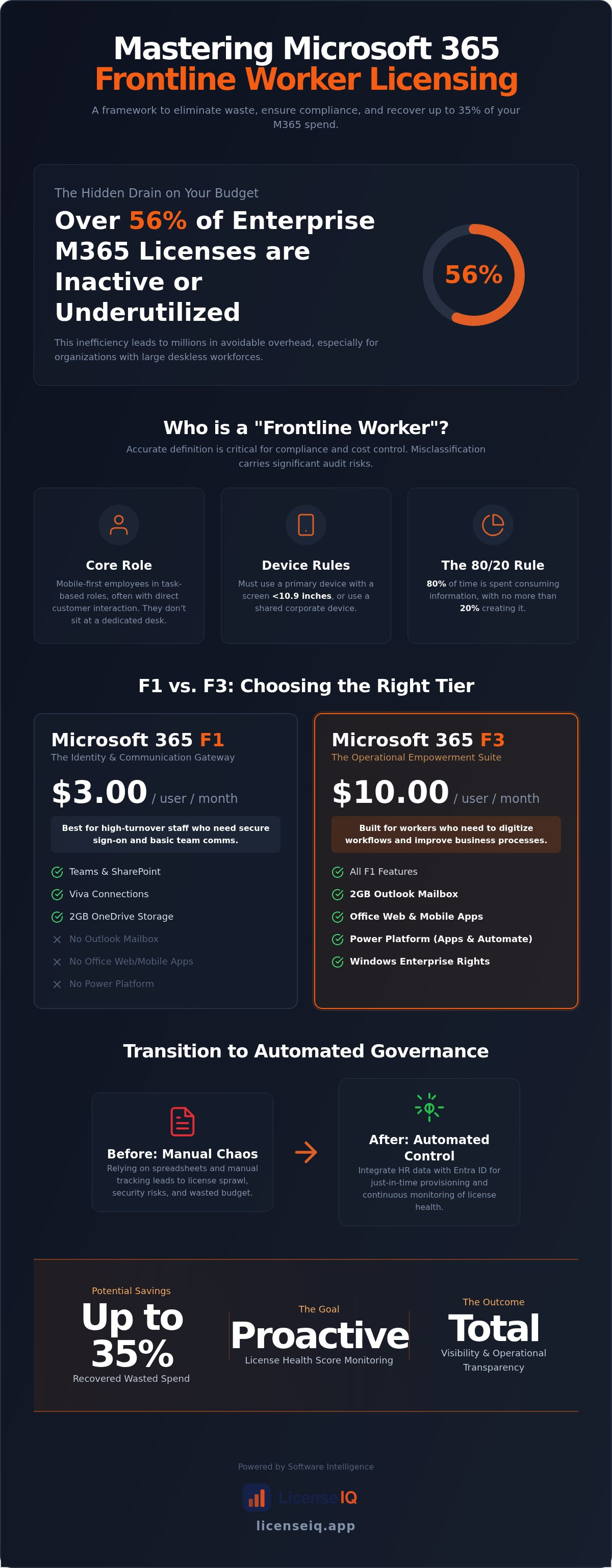
Over 56% of enterprise Microsoft 365 licenses are currently inactive, underutilized, or assigned to the wrong tier. For organizations managing thousands of deskless employees, this inefficiency translates into millions of dollars in avoidable overhead. You already understand that manual tracking is impossible at scale. The complexity of choosing between F1 and F3 often leads to "safe" over-provisioning, where expensive E-series licenses are wasted on workers who only need mobile access. This microsoft 365 frontline worker license guide provides a precise framework to regain control of your digital environment.
We promise to help you master the 2026 licensing shift and recover up to 35% of your wasted spend through automated governance. We'll start by clarifying the technical differences between the $3.00 F1 and $10.00 F3 tiers. You'll gain a clear decision matrix for right-sizing your workforce and a strategy to reclaim inactive licenses before your next renewal. This guide covers everything from eligibility compliance to the deployment of a License Health Score. We'll ensure your resources are monitored by a vigilant and precise system that prioritizes financial health over technical complexity.
Key Takeaways
- Define the "deskless" worker persona accurately to meet Microsoft’s strict eligibility rules and avoid costly misclassification errors.
- Distinguish between the foundational communication tools of the F1 license and the advanced automation and storage capabilities of the F3 tier.
- Utilize this microsoft 365 frontline worker license guide to recover up to 35% of wasted spend by identifying licenses that fall below the 30-day usage threshold.
- Transition from manual spreadsheets to automated governance workflows that integrate HR data with Entra ID for just-in-time provisioning.
- Establish a proactive License Health Score to maintain continuous visibility into your tenant’s efficiency and operational transparency.
Defining the Frontline Worker: F-Series vs. Enterprise Licenses
Success in license optimization starts with a precise definition of your workforce. Microsoft identifies frontline workers as employees whose primary role involves direct customer interaction or task-based operations. These individuals are mobile-first. They don't sit at a dedicated desk. They don't spend their day in deep-focus document creation. Instead, they rely on quick communication and real-time data access to perform their duties. This microsoft 365 frontline worker license guide highlights why misidentifying these users leads to immediate financial waste.
Many organizations default to E3 or E5 licenses for all staff to avoid administrative friction. This is a mistake. Assigning an enterprise-grade license to a task-oriented worker creates "license sprawl" that inflates costs without adding utility. In high-turnover environments, this lack of oversight compounds quickly. Using the LicenseIQ Platform allows you to see exactly where these misalignments occur before they impact your bottom line.
Frontline Worker Eligibility Rules
Microsoft enforces strict technical and behavioral boundaries for F-series eligibility. To qualify, an employee must use a primary work device with a screen smaller than 10.9 inches, or they must use a shared device. This rule ensures that F-licenses are reserved for truly mobile staff. The 80/20 rule also applies. Frontline workers should spend at least 80% of their time consuming information and no more than 20% creating it. If a user spends hours drafting complex reports, they're an "Information Worker" and require an E-series license. Misclassification carries significant audit risks. During a Microsoft audit, failing to prove eligibility can result in forced upgrades and retroactive penalties that erase any perceived savings.
F-Series vs. E-Series: The Cost Gap
The financial disparity between tiers is stark. While an E3 license provides 100GB of mailbox storage and full desktop application rights, the F3 tier limits these to 2GB and web/mobile access only. For a worker who only checks schedules or uses Teams, the extra 98GB of storage is an expensive, unused asset. Over-provisioning 10,000 workers with E3 licenses instead of F3 can cost an organization over $3.36 million annually in unnecessary spend. This ecosystem often intersects with Microsoft Windows 365 for specialized remote tasks, but for the majority of frontline staff, the F-series provides the exact tools needed at a fraction of the price. Eliminating this waste is the fastest way to improve your organization's digital health score.
F1 vs. F3 Comparison: Choosing the Right Tier for Your Workforce
Selecting the correct tier is a financial decision, not just a technical one. The gap between F1 and F3 is significant in both cost and capability. This microsoft 365 frontline worker license guide breaks down the logic behind the $7.00 price difference. Organizations must evaluate whether a worker needs to simply exist in the directory or actively participate in business process improvement. Misjudging this need leads to either operational bottlenecks or immediate SaaS waste.
When to Choose Microsoft 365 F1
F1 serves as the primary identity-only gateway for high-turnover staff. It provides the essential digital footprint required for secure sign-on and basic communication. Workers get access to Microsoft Teams, SharePoint, and Viva Connections. However, they're limited to 2GB of OneDrive storage and have no mailbox rights. It's the ideal choice for employees who only need to view schedules, read corporate announcements, or participate in group chats. If your staff doesn't need to send emails or create spreadsheets, F1 prevents over-spending on unused features.
The Business Case for Microsoft 365 F3
The F3 tier is designed for empowering frontline workers who drive operational efficiency. Unlike F1, F3 includes full web-app rights for Word, Excel, and PowerPoint. It also introduces the Power Platform. This allows your "Citizen Developers" to use Power Apps and Power Automate to digitize manual workflows directly from the shop floor. F3 users also benefit from a 2GB Outlook mailbox and Windows Enterprise rights, making it a more robust solution for supervisors or lead technicians who require higher levels of autonomy.
Choosing F3 also unlocks advanced security entitlements. While both tiers include basic protection, F3 provides a foundation for the F5 security add-on. This is critical for organizations handling sensitive data in the field. It allows for advanced identity protection and automated threat response. To ensure you aren't over-provisioning these high-tier licenses, use a Spend Recovery Dashboard to monitor actual feature usage. If a worker assigned to F3 hasn't touched a Power App in 90 days, they're a prime candidate for an F1 downgrade. Maintaining this level of oversight ensures your licensing strategy remains lean and results-oriented. Identifying these redundant costs is the first step toward a healthier License Health Score for your entire tenant.
The Hidden Cost of Mismanagement: Identifying Frontline License Waste
License sprawl is a silent drain on corporate resources. In frontline-heavy industries, high employee churn often outpaces IT's ability to de-provision access. This results in "Zombie" licenses, which are active seats assigned to former employees or users who haven't logged in for months. Every unmonitored seat represents a direct loss of capital. This microsoft 365 frontline worker license guide emphasizes that total visibility is the only cure for this organizational disorder.
The most common form of waste is redundant licensing. This occurs when a user is accidentally assigned both an F-series license and a higher-tier enterprise seat. Without a centralized Spend Recovery Dashboard, these overlaps remain obscured within the admin center. You're effectively paying twice for the same identity. Identifying these obscured details is vital to maintaining the financial health of your organization.
How to Detect Inactive Frontline Users
Standard M365 Usage Reports provide a starting point for identifying waste. Focus on the 30-day usage threshold for Teams and Outlook. If a worker hasn't accessed these core tools in a month, their license should be reclaimed immediately. Manual audits are often impossible for SMBs with lean IT teams. Tracking thousands of rotating staff members via spreadsheets leads to errors and data gaps. For a more efficient approach, learn how to reclaim M365 licenses using automated intelligence. This ensures your resources are monitored by a vigilant and precise system.
Common Over-Licensing Scenarios
Over-provisioning is equally damaging to your bottom line. Many administrators assign F3 licenses by default, even when the employee only requires the basic communication tools found in F1. This choice costs an extra $7.00 per user every month. Multiplied across a seasonal workforce of 500 people, the waste exceeds $3,500 monthly. Seasonal offboarding is another critical failure point. In unmonitored tenants, unassigned or inactive licenses account for an average of 35% of total SaaS spend. Proactive oversight ensures you only pay for the value you actually consume. Establishing a high License Health Score requires a relentless focus on data-driven decision-making and operational transparency.
Strategic Governance: Implementing a Lifecycle for Frontline Access
Strategic governance transforms license management from a reactive chore into a proactive asset. Most organizations fail because they treat license assignment as a one-time event. A "Just-in-Time" protocol ensures that workers only receive access at the moment they need it. This microsoft 365 frontline worker license guide advocates for a lifecycle approach that prioritizes operational transparency. By integrating your HR systems directly with Microsoft Entra ID, you automate the entire provisioning flow. This eliminates manual errors and ensures your financial resources aren't tied up in unassigned seats.
Automating the Offboarding Process
"Orphaned" accounts are a significant security liability. When a frontline worker leaves, an active license remains a target for unauthorized access. You must reclaim this spend immediately. A structured process ensures that data is secured while the seat is returned to the pool for reuse. Use this Office 365 offboarding checklist to standardize your exit procedures. Rapid de-provisioning is the most direct way to stop budget leaks during high-turnover periods.
Group-Based Licensing Best Practices
Dynamic groups are the foundation of efficient governance. By using job titles and department codes in Entra ID, you can automate license assignments based on actual roles. This prevents "License Overlap" where a user might accidentally hold multiple conflicting tiers. You must monitor group assignment errors closely. These blockers often prevent frontline staff from accessing vital communication tools, leading to downtime. A strict hierarchy ensures that an F1 license doesn't conflict with specialized add-ons or temporary E-series assignments.
Quarterly license health checks are mandatory for sustained efficiency. These audits uncover obscured details that automated systems might miss, such as changes in worker behavior that justify a tier downgrade. Additionally, leveraging shared device mode can significantly reduce your total license count in environments like retail or manufacturing. This mode allows multiple workers to use a single workstation securely without requiring individual, high-cost enterprise seats. Following this microsoft 365 frontline worker license guide ensures your governance remains airtight. Deploy Automated Governance Workflows to handle the heavy lifting of tenant maintenance and keep your organization lean and secure.
Automating Spend Recovery with LicenseIQ Software Intelligence
Manual spreadsheets are the enemy of operational efficiency. They cannot keep pace with the rapid turnover and shifting roles inherent in a deskless workforce. Relying on human auditing leads to data gaps and missed savings opportunities. This microsoft 365 frontline worker license guide concludes by highlighting the necessity of software intelligence. The LicenseIQ Platform connects to your tenant in minutes to provide total clarity where manual processes offer only confusion. It replaces guesswork with a vigilant, precise system that monitors every seat in real-time.
The centerpiece of this oversight is the License Health Score. This metric provides an immediate audit of your M365 efficiency. It identifies inactive users and redundant assignments that drain your budget. By using Automated Governance Workflows, you can prevent license sprawl before it starts. This proactive approach ensures your resources are always aligned with your actual operational needs. It transforms license management from a passive expense into an active participant in your company’s growth.
From Insights to Actionable Spend Recovery
Data without action is useless. The Spend Recovery Dashboard translates complex tenant data into specific dollar-value recommendations. It highlights exactly how much capital you can reclaim by right-sizing your frontline tiers. Integrating LicenseIQ into your monthly financial hygiene routine allows you to automate the downgrade of over-licensed workers. If a user only requires F1 capabilities but holds an F3 seat, the system flags the discrepancy for immediate resolution. This level of transparency is the cornerstone of a healthy digital environment.
The ROI of AI-Native License Governance
Modern license governance delivers a measurable return on investment. Case studies show that SMBs frequently recover up to 35% of their M365 subscription spend by eliminating "Zombie" licenses and tier misalignment. Automated systems handle the tedious work of administrative auditing. This allows your IT resources to focus on strategic growth and technical innovation rather than chasing inactive accounts. You don't have to settle for organizational disorder. Take the first step toward total clarity and get your free M365 License Health Score at LicenseIQ today. Secure your resources with a system designed for the complexities of the 2026 operational landscape.
Securing Your 2026 Licensing Strategy
Operational efficiency in a deskless environment requires more than just technical deployment; it demands relentless financial oversight. By distinguishing between the communication-focused F1 tier and the automation-heavy F3 tier, you'll eliminate the primary cause of license sprawl. This microsoft 365 frontline worker license guide has outlined the path from manual disorder to automated clarity. You've now gained the framework to identify inactive accounts and reclaim the 35% of spend typically lost to unmonitored tenants. Strategic governance is no longer a luxury; it's a necessity for SMBs managing high-turnover staff.
The LicenseIQ Platform provides the specialized tools needed to maintain this precision. Our AI-native Spend Recovery Dashboard and License Health Score are designed for SMB financial accuracy, ensuring every dollar spent translates into actual utility. You can transform your tenant from a source of waste into a model of transparency in minutes. Don't let redundant licenses drain your capital. Discover and recover your wasted M365 spend with LicenseIQ to ensure your organization remains lean, secure, and ready for growth. Take control of your digital resources today.
Frequently Asked Questions
What is the main difference between M365 F1 and F3?
The primary difference lies in content creation and communication rights. F1 is an identity-focused license providing access to Teams and SharePoint but excludes a mailbox. F3 empowers workers with a 2GB Outlook mailbox, full web-app rights for Office, and Power Platform access for automation. Choosing between them depends on whether your staff needs to send emails or build simple workflows. This microsoft 365 frontline worker license guide helps you avoid paying for F3 when F1 capabilities suffice.
Can I mix and match frontline licenses with E3 or E5 licenses?
You can absolutely mix and match F-series and E-series licenses within a single tenant. This flexibility allows you to assign high-cost E3 or E5 seats to information workers while using F1 or F3 for deskless staff. However, you must ensure each user meets the specific eligibility criteria for their assigned tier. Mixing licenses without a central Spend Recovery Dashboard often leads to license overlap, where users are accidentally assigned multiple redundant tiers.
Is there a limit to the number of frontline licenses I can buy?
There is no maximum seat limit for Microsoft 365 F1 or F3 licenses. Unlike the Microsoft 365 Business tiers, which are capped at 300 users, frontline licenses are designed for enterprise-scale deployment. This makes them ideal for large organizations in retail, manufacturing, or healthcare with thousands of mobile employees. You can scale your frontline workforce indefinitely without worrying about hitting a subscription ceiling, provided you maintain strict eligibility compliance for every user.
Do frontline workers get access to the Microsoft Teams desktop app?
Frontline workers can use the Microsoft Teams desktop app, but usage is governed by specific device restrictions. Microsoft allows F-license users to access Teams on shared devices or personal devices with screens smaller than 10.9 inches. This ensures that the license remains reserved for truly mobile, task-oriented staff. If a worker requires a dedicated PC with a large monitor for their primary work, they likely require an Enterprise-tier license instead of a frontline one.
How do I identify inactive frontline users in my tenant?
Identifying inactive users requires monitoring the 30-day usage threshold within the Microsoft 365 Admin Center. You should specifically audit Teams sign-ins and SharePoint activity to see who isn't utilizing their assigned seat. Manual auditing is often slow and prone to error in high-turnover industries. Using a specialized microsoft 365 frontline worker license guide strategy involves deploying a License Health Score to automatically flag users who haven't accessed core services within a set period.
What are the device screen size restrictions for frontline licenses?
Microsoft mandates that frontline workers must use a primary work device with a screen size smaller than 10.9 inches. This restriction applies to tablets and mobile devices used for task-based work. Alternatively, workers can use a shared workstation of any size, provided it isn't their dedicated, primary device. These rules prevent organizations from using lower-cost F-series licenses for traditional desk-bound information workers who typically require larger monitors and full desktop application rights.
Can LicenseIQ automate the reclamation of unused frontline licenses?
LicenseIQ automates the reclamation process through specialized Automated Governance Workflows. The platform identifies inactive users and redundant assignments, then provides actionable recommendations to de-provision or downgrade those seats. This removes the burden of manual oversight from your IT team. By integrating these workflows into your monthly routine, you can recover up to 35% of wasted spend. This proactive system ensures your financial resources are always aligned with actual employee activity and operational needs.
Does an F3 license include a Windows 11 Enterprise subscription?
Yes, the Microsoft 365 F3 license includes Windows 11 Enterprise E3 rights. This entitlement allows frontline workers to access secure, cloud-managed virtual desktops or local Windows Enterprise installations on qualified devices. It's a key differentiator from the F1 tier, which focuses solely on identity and basic communication. Including Windows Enterprise rights makes F3 a superior choice for workers who need to access specialized legacy applications or require enhanced security features during their daily tasks.


