

Mid-sized organizations currently overspend by up to 40% on Microsoft 365 licenses and add-ons. Following the July 2026 price increases, which saw Office 365 E3 costs jump by 13%, using a rigorous m365 license optimization checklist is no longer optional for financial health. You likely struggle with manual spreadsheets that are outdated the moment they're saved. The fear of accidentally deleting an active user's license often leads to expensive, safe over-provisioning that inflates your monthly bill.
We understand that opaque billing cycles and complex consumption models like Copilot Cowork make oversight difficult. This guide provides the precision required to reclaim your budget. By following these actionable steps, you'll identify hidden waste and recover up to 35% of your M365 spend. We'll show you how to establish a definitive Health Score for your tenant, utilize a Spend Recovery Dashboard, and implement automated workflows that handle offboarding with surgical accuracy. It's time to replace organizational disorder with total operational clarity.
Key Takeaways
- Identify the "set it and forget it" traps where unassigned licenses and redundant subscription tiers accumulate unnoticed.
- Establish a baseline License Health Score to shift your organization from reactive manual auditing to proactive financial hygiene.
- Follow the definitive m365 license optimization checklist to target inactive user reports and recover immediate capital.
- Compare the hidden labor costs of manual spreadsheet tracking against the precision of a dedicated Spend Recovery Dashboard.
- Deploy automated governance workflows to ensure offboarding and license reallocation happen in real-time without manual intervention.
Why M365 License Sprawl is Your Biggest Hidden Expense in 2026
The July 2026 price hikes have turned the Microsoft 365 suite into one of the most volatile line items in your IT budget. For most organizations, procurement follows a "set it and forget it" pattern. You buy licenses for projected growth, but those seats often remain unassigned for months. This inertia creates a financial leak that manual spreadsheets cannot plug. By the time a manual audit is completed, the data is already obsolete. Real-time oversight is the only way to achieve sustainable Microsoft 365 cost optimization.
License sprawl isn't just about extra seats; it's about over-provisioning. Paying for premium E5 features when your users only utilize E3 capabilities is a common, expensive oversight. Without a clear m365 license optimization checklist, these nuances are impossible to track at scale. You end up paying for advanced security or analytics tools that remain untouched, effectively donating a portion of your budget back to Microsoft every month.
The Anatomy of M365 Waste
Waste manifests in three primary forms within your tenant. Identifying these is the first step toward spend recovery.
- Unassigned licenses: These are purchased seats sitting in your pool with no user attached. They represent immediate, recoverable cash.
- Inactive users: These are "ghost" employees or former contractors who still hold a license despite not logging in for 30, 60, or 90 days.
- Duplicate assignments: This occurs when a user is assigned multiple overlapping license types, often through a mix of direct and group-based assignments.
Financial Impact: The Cost of Inaction
In 2026, mid-sized environments are estimated to overspend by 20% to 40% on licenses and add-ons. According to CloudNuro, approximately 29% of SaaS licenses are underutilized across the board. This inefficiency directly lowers your organization's License Health Score and drains capital that should be used for innovation. SaaS sprawl is the silent killer of IT budgets, characterized by the unmanaged proliferation of applications and licenses that lack centralized oversight. Ignoring these details is a deliberate choice to bleed capital every billing cycle. Using a m365 license optimization checklist ensures your resources remain lean, precise, and fully utilized.
The 2026 Framework for Microsoft 365 License Hygiene
Stop treating license management as a yearly task. Effective 2026 governance requires a shift from reactive auditing to a proactive framework. A healthy tenant maintains a high License Health Score by ensuring zero unassigned licenses and keeping inactive users below a 5% threshold. Integrating a continuous m365 license optimization checklist into your monthly workflow ensures no dollar is left on the table. You must understand the various microsoft 365 license types to align costs with actual user behavior. AI-native tools now scan entitlement against real-time telemetry, uncovering gaps that traditional manual methods miss.
Right-Sizing the E3 vs. E5 Debate
With M365 E5 priced at $60.00 per user and M365 E3 at $39.00, the gap is $21.00 every month. If your team doesn't utilize advanced Purview compliance or Defender for Endpoint Plan 2, you are overpaying by 35% per seat. A rigorous m365 license optimization checklist identifies these utilization gaps before they compound. Consider a "mix and match" strategy. Shift frontline workers to F1 ($3.00) or F3 ($10.00) plans, and move power users to Business Premium ($22.00) when they don't require enterprise-level scale. This precision saves thousands without impacting productivity.
M365 Copilot and Premium Add-on Optimization
Copilot costs $30.00 per user monthly, but adoption is rarely 100%. If a user hasn't engaged the AI in 30 days, that license should be reclaimed immediately. The introduction of Copilot Cowork and its usage-based credit model ($0.01 per credit) adds another layer of complexity to your spend recovery. You must also monitor standalone licenses like Power BI Pro, Project, and Visio. These high-cost add-ons often remain attached to offboarded contractors or users who no longer need the specialized tools. Automating this reclamation process prevents "license hoarding" across your departments.
Implementing these controls manually is a recipe for error. You can check your License Health Score in minutes to see exactly where your tenant stands. Continuous monitoring ensures your budget supports growth rather than subsidizing waste.
Manual Audits vs. Automated Governance: Choosing Your Strategy
Manual license management hides a significant labor cost that most organizations fail to quantify. IT administrators often spend dozens of hours every quarter cross-referencing CSV exports with Entra ID logs. This manual approach is inherently reactive, relying on stale data that fails to capture the dynamic nature of modern cloud environments. PowerShell scripts might seem like a solution, but they offer a temporary fix, not a governance strategy. These scripts require constant technical maintenance and provide only a static snapshot, whereas true oversight requires a continuous stream of data.
Transitioning to automated license governance eliminates the risk of human error. It ensures that your m365 license optimization checklist is executed with surgical precision. By monitoring user behavior continuously, you identify waste the moment it occurs rather than waiting for the next quarterly review. This proactive stance is essential for maintaining financial health in a landscape of rising subscription costs.
The Pitfalls of Manual Spreadsheet Tracking
Data latency is the primary enemy of manual auditing. Your audit is effectively obsolete the day it's finished because user status and license entitlements change in real-time. This delay creates significant security risks. Inactive accounts may retain access to sensitive corporate resources long after a contractor has left the firm. In multi-admin environments, version control issues lead to conflicting records and missed savings. Manual spreadsheets lack the integrity required for high-stakes financial management and often lead to "safety licensing," where extra seats are kept just to avoid potential disruption.
The AI-Native Advantage
LicenseIQ connects to your tenant in minutes to provide an immediate License Health Score. This score serves as the definitive starting point for any audit, offering total transparency into your current utilization rates. Unlike manual tracking, the platform provides predictive spend recovery, identifying waste before the next billing cycle begins. Automated workflows recover 35% more waste than manual audits by identifying obscured patterns in user telemetry that human auditors typically overlook. This level of oversight ensures your resources are always aligned with your actual operational needs. A robust m365 license optimization checklist powered by automation provides the clarity needed to scale without unnecessary overhead.
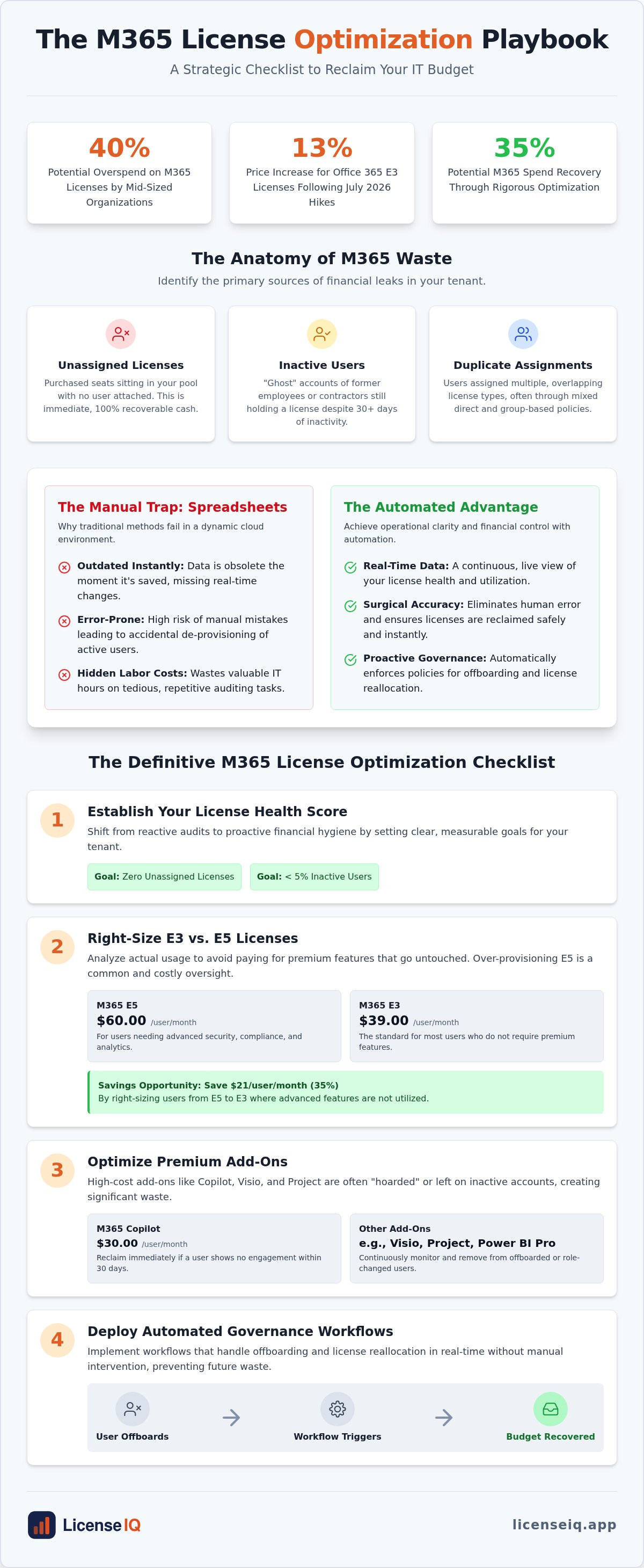
The Definitive M365 License Optimization Checklist
Executing a m365 license optimization checklist requires a systematic approach to identifying and eliminating fiscal waste. You must move beyond surface-level reviews to uncover the obscured costs embedded in your tenant. Follow these five steps to secure immediate spend recovery.
- Step 1: Identify and de-provision unassigned pools. Scan for licenses that have been purchased but never assigned to a user. These represent immediate "dead money" in your budget that can be terminated or reallocated.
- Step 2: Audit 30/60/90-day inactive user reports. Telemetry data reveals users who haven't accessed their applications in months. De-provisioning these accounts or downgrading them prevents "ghost" employee costs from compounding.
- Step 3: Map users to the lowest viable tier. Transition users who only require core productivity tools from E5 to E3. Move frontline staff to F3 or Business Premium where appropriate to align costs with actual job requirements.
- Step 4: Consolidate duplicate assignments. Audit your Entra ID groups to find users receiving the same license through multiple assignment paths. This redundancy is a frequent byproduct of messy group-based licensing.
- Step 5: Review high-cost add-on utilization. Reclaim $30/month Copilot seats from users who haven't adopted the tool. Audit standalone Project or Visio licenses to ensure they are still required for active projects.
Operationalizing the Checklist
Discipline is the cornerstone of license hygiene. Set a recurring monthly schedule for these reviews to prevent sprawl from returning. Accountability is equally vital; assign a specific stakeholder to own the Spend Recovery metric. This person should be responsible for reporting monthly savings to leadership. Integrating a standardized office 365 offboarding checklist ensures that when an employee leaves, their license is reclaimed instantly rather than sitting idle for months.
Advanced Optimization Tactics
Advanced governance looks at how users interact with the m365 license optimization checklist in real-world scenarios. Leverage "Shared" or Kiosk licenses for frontline workers who only need intermittent access to email or Teams. This prevents the over-allocation of full Enterprise seats for limited-use scenarios. Additionally, identify "Shadow IT" applications that overlap with existing M365 features, such as paying for third-party PDF editors when your license includes equivalent tools. Using the LicenseIQ Spend Recovery Dashboard allows you to transform these technical findings into executive-ready reports that highlight clear dollar-value savings.
Precision is power. You can access your Spend Recovery Dashboard today to automate these steps and eliminate manual tracking errors forever.
Automating Recovery with LicenseIQ Governance Workflows
Executing a m365 license optimization checklist manually provides a baseline, but human error remains a constant risk. LicenseIQ transforms the static checklist into a persistent, automated routine that monitors your tenant 24/7. The setup process is engineered for speed, connecting securely to your environment in under five minutes. Once integrated, the platform immediately generates your License Health Score, providing a transparent look at your current efficiency levels. This score serves as the definitive starting point for any recovery effort, offering immediate clarity in a complex operational environment.
The platform does more than just surface data; it provides specific dollar-value recommendations. It identifies exactly where your capital is trapped in underutilized seats or inactive accounts. Closing the loop from insight to recovery happens within the dashboard. You can see the financial impact of every recommended change before you execute it. This results-first approach ensures that your core value proposition is never lost in technical complexity. It replaces organizational disorder with a precise, data-driven system of oversight.
Continuous Governance for SMBs
Most mid-sized organizations don't have the luxury of a massive IT team dedicated solely to license management. LicenseIQ is built specifically for these environments, acting as a proactive digital auditor that stays one step ahead of your billing cycle. It automates the reclamation of wasted licenses via secure integrations, ensuring your tenant remains lean as your headcount fluctuates. Maintaining financial accuracy becomes effortless even as you scale. The platform flags redundant assignments and "ghost" users the moment they appear, preventing waste from compounding over time.
This continuous oversight is vital for managing the 2026 price increases and complex AI billing models. By automating the m365 license optimization checklist, you eliminate the labor costs associated with manual spreadsheet tracking. Your IT resources can then focus on growth-oriented tasks rather than administrative cleanup. The system provides the confidence and security that your resources are being monitored by a vigilant, precise system.
Next Steps: Get Your Health Score
The path to spend recovery begins with total transparency. You can start a free scan of your M365 environment to see exactly how your current utilization compares against industry benchmarks. This scan uncovers the obscured details of your tenant, from inactive Copilot seats to redundant Enterprise tiers. You will receive a comprehensive report detailing your potential savings and a clear roadmap for recovery. Don't let opaque billing cycles drain your IT budget. Discover and recover your wasted M365 spend with LicenseIQ and regain control over your corporate resources today.
Reclaim Financial Transparency in Your M365 Environment
The 2026 Microsoft price increases have made precise license management a financial necessity. Relying on outdated spreadsheets and reactive audits leaves your budget vulnerable to significant waste. By implementing a rigorous m365 license optimization checklist, you replace organizational disorder with total operational clarity. You now have the framework to identify inactive users, right-size redundant tiers, and reclaim high-cost AI add-ons before they inflate your next billing cycle.
Efficiency doesn't require a massive IT team or a specialized degree. AI-native automated governance provides the oversight needed to monitor your resources with surgical precision. You can stop the cycle of over-provisioning and start making data-driven decisions that protect your company's growth. It's time to transform your tenant into a lean, high-performing asset.
Take the first step toward total spend recovery today. Get your M365 License Health Score in 5 minutes and discover how to recover up to 35% of your software spend. Secure your budget and build a more resilient organization.
Frequently Asked Questions
What is the first step in an M365 license optimization checklist?
The first step in a m365 license optimization checklist is identifying unassigned licenses within your tenant. These are seats you pay for but haven't allocated to any user, representing immediate waste. You should also establish a baseline License Health Score to understand your current utilization rate. Starting with these obscured details allows you to reclaim capital before diving into more complex usage telemetry or feature-level right-sizing.
How many M365 licenses are typically wasted in an average company?
Mid-sized organizations typically overspend by 20% to 40% on their Microsoft 365 environment. Research from CloudNuro in August 2026 indicates that approximately 29% of all SaaS licenses are underutilized. This waste often stems from "safety licensing" and forgotten seats for former contractors. By using a precise m365 license optimization checklist, companies can recover up to 35% of their total software spend by eliminating these redundancies.
Can I downgrade an M365 E5 license to E3 without losing user data?
You can downgrade from E5 to E3 without losing core user data in Outlook, OneDrive, or SharePoint. However, you must first verify dependencies on E5-exclusive features like advanced Purview compliance or Defender for Endpoint Plan 2. If these services are active, the data remains, but the user loses access to the management tools. Always perform a feature-utilization audit before executing the downgrade to ensure operational continuity.
What is the difference between an unassigned license and an inactive user?
An unassigned license is a paid seat sitting in your pool with no user attached, while an inactive user is a seat assigned to someone who hasn't logged in for 30, 60, or 90 days. Unassigned licenses are the easiest to terminate for immediate spend recovery. Inactive users, often called "ghost users," require a more nuanced approach to ensure you don't accidentally delete an active employee who is simply on leave.
How does a License Health Score help with IT budgeting?
A License Health Score provides a definitive metric for financial transparency. It allows IT leaders to compare their current environment against industry benchmarks and identify specific dollar-value waste. This score simplifies the budgeting process by providing a clear roadmap for spend recovery. Instead of guessing your requirements, you can use these data-driven insights to forecast exact seat counts and tier requirements for the next billing cycle.
Is it possible to automate the removal of licenses during employee offboarding?
Yes, you can fully automate license removal during offboarding. Automated Governance Workflows allow you to set triggers that de-provision licenses the moment an employee's status changes in your identity provider. This eliminates the delay between a departure and a manual audit, preventing "ghost" costs from accumulating for months. It ensures that your organization maintains a lean, efficient tenant without requiring constant manual intervention from your IT team.
How often should I perform an M365 license audit in 2026?
In 2026, a quarterly audit is no longer sufficient due to rising costs and complex AI billing models. You should move to a continuous governance model or, at a minimum, perform a review every month. Frequent checks ensure that you catch unassigned seats and inactive Copilot licenses before they compound. Continuous monitoring provides the security that your resources are always aligned with your actual headcount and operational needs.
Do I need PowerShell knowledge to optimize my Microsoft 365 costs?
You don't need PowerShell knowledge if you utilize an AI-native platform. While scripts can provide static snapshots, they require technical expertise and constant maintenance to remain effective. Modern tools like LicenseIQ connect to your tenant in minutes to automate the heavy lifting. This allows business managers and IT leads to oversee their financial health through a Spend Recovery Dashboard without writing a single line of code.


