

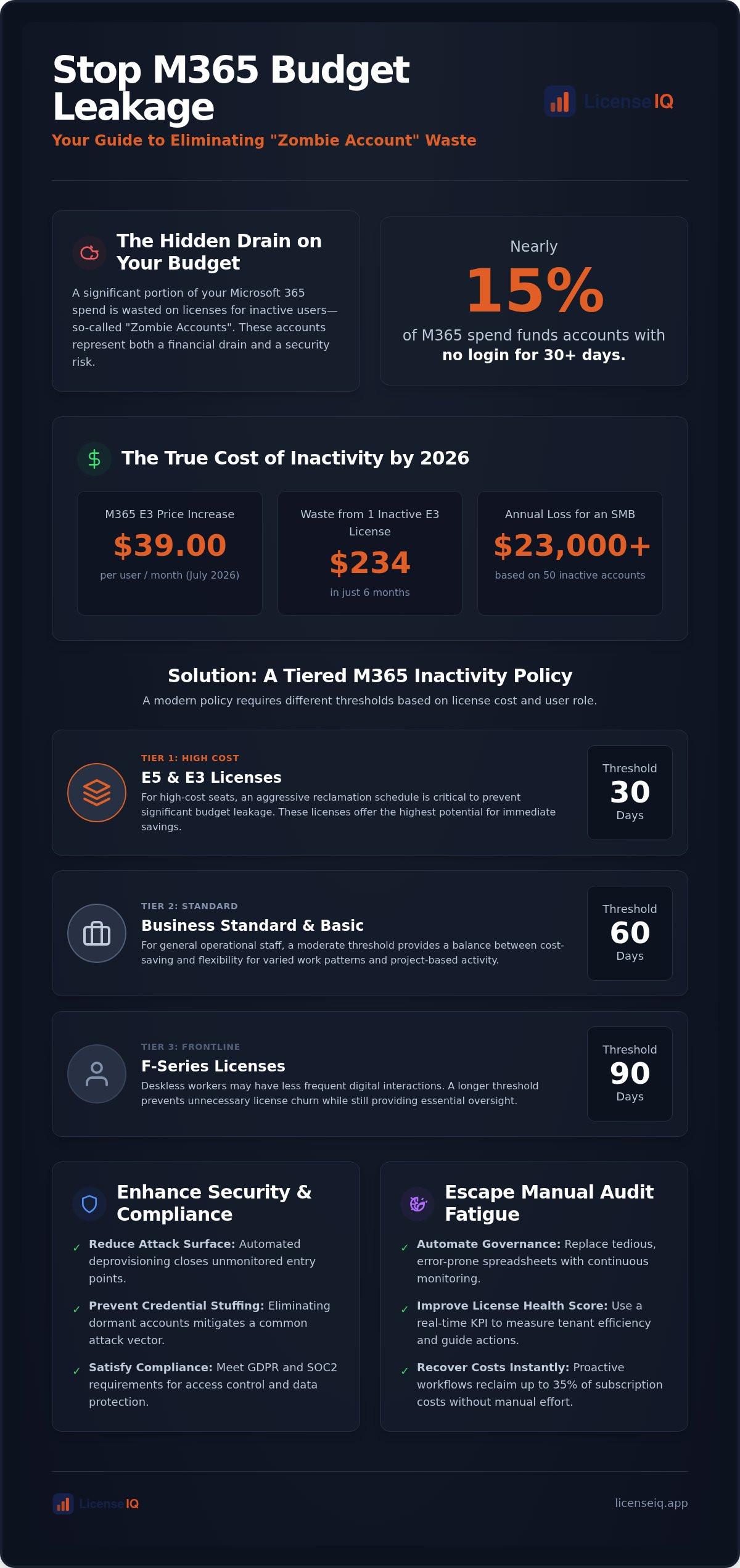
Nearly 15% of your Microsoft 365 spend is currently funding accounts that haven't seen a single login in over 30 days. With the July 2026 price increases pushing Microsoft 365 E3 to $39.00 per user, these ghost accounts represent a significant drain on your operational budget. Implementing a rigorous m365 inactive user policy is no longer optional for organizations focused on financial health. It's the difference between a lean, secure environment and one riddled with costly waste.
You likely find manual license audits tedious and prone to human error. It's frustrating to pay for premium licenses for employees who left the company months ago while security anxiety grows over unmonitored entry points. This guide will show you how to transform this chaos into a repeatable governance workflow. You'll learn to define precise inactivity thresholds and automate license reclamation to recover up to 35% of your subscription costs. We'll provide the blueprint for a high License Health Score and an immediate, measurable reduction in your monthly Microsoft invoices.
Key Takeaways
- Identify "Zombie Accounts" by flagging any user with zero activity for 30+ days to stop immediate budget leakage.
- Adopt a tiered m365 inactive user policy that sets aggressive 30-day reclamation thresholds for high-cost E5 and Premium seats.
- Secure your environment against credential stuffing by automating the deprovisioning of inactive accounts to satisfy GDPR and SOC2 compliance.
- Quantify the financial impact of inactivity by assigning specific dollar values to dormant accounts to prioritize recovery actions.
- Eliminate manual audit fatigue by using automated governance workflows to monitor your License Health Score in real time.
Why Inactive Users are the #1 Source of M365 Budget Leakage in 2026
Inactive users represent the largest avoidable expense in the modern enterprise. A "Zombie Account" is any user assigned a premium license who has failed to perform an interactive sign-in for 30 consecutive days. These accounts are not just administrative nuisances. They are significant financial leaks. SaaS sprawl occurs when departments provision licenses independently, leaving IT to manage a fragmented environment. Manual spreadsheets cannot keep pace with this complexity. They offer a static snapshot of a dynamic ecosystem. They fail to reflect real-time changes in user status or license requirements. A robust m365 inactive user policy replaces these outdated methods with a data-driven approach to organizational health.
The correlation between inactive users and decreased organizational Health Scores is direct. Every idle seat drags down your efficiency metrics. It signals a lack of oversight that often extends into other areas of technical operations. Maintaining a high Health Score requires constant vigilance and the elimination of these obscured costs. You need a system that uncovers these details automatically before they compound into thousands of dollars in monthly waste.
The True Cost of an E5 'Zombie' Account
The financial impact of a single idle license is substantial. Based on 2026 pricing, a Microsoft 365 E3 seat costs $39.00 per month. If an employee leaves and their license remains active for six months, you've wasted $234 on a single user. For an SMB with 50 such accounts, the annual loss exceeds $23,000. Interactive sign-in data is the baseline, but true optimization requires looking at specific application usage. A user might sign in to Entra ID but never open Excel, Teams, or OneDrive. Your m365 inactive user policy must identify these underutilized seats to maximize ROI. Delayed offboarding is a primary driver of this waste, often occurring because the manual audit process is too time-consuming for overstretched IT teams.
SaaS Spend Management vs. Simple Auditing
Effective resource management requires a shift from reactive auditing to proactive governance. Simple auditing is a periodic cleanup. It happens too late and lacks precision. SaaS spend management is a continuous lifecycle that integrates deeply with Identity and access management (IAM). This approach ensures that every license assignment is justified by actual usage data. It treats license management as an active participant in company growth rather than a passive back-office task.
By monitoring your License Health Score, you gain a real-time KPI that measures the efficiency of your tenant. This score provides the transparency needed to eliminate organizational disorder. It transforms your governance framework into a strategic financial tool. Proactive governance eliminates the offboarding lag that plagues manual systems. It ensures your budget is always allocated to active, productive users, securing your environment and your bottom line simultaneously.
Defining Your Inactivity Thresholds: A Tiered Framework
A one-size-fits-all 90-day threshold is a relic of low-cost cloud computing. In 2026, with Microsoft 365 E3 pricing reaching $39.00 per user, waiting three months to reclaim an idle license is a failure of fiscal governance. A modern m365 inactive user policy requires a tiered framework that balances aggressive cost recovery for high-tier seats with operational leniency for frontline staff. This approach ensures your resources are allocated where they generate the most value, rather than sitting dormant in a departmental silo.
Precision is the cornerstone of this framework. You must transition from viewing "inactivity" as a single binary state to a spectrum of risk and cost. By setting specific triggers based on license value, you create a system that prioritizes the most significant budget leaks first. This proactive oversight is supported by official Microsoft 365 guidance, which emphasizes the need to monitor user activity to maintain a secure and efficient environment.
Thresholds by License Tier
Your reclamation schedule should mirror the financial impact of the license. For E5 and E3 licenses, 30 days of inactivity should trigger an immediate review or automated notification. These high-cost seats represent your most significant potential for spend recovery. For Business Standard or Basic licenses, a 60-day threshold is often more appropriate for general operational staff who may have different usage patterns. Finally, F-series licenses for deskless workers can support longer 90 to 120-day cycles. These tiers prevent the accidental deprovisioning of seasonal workers while ensuring expensive enterprise licenses don't remain "zombified" for months.
Activity Metrics Beyond the Sign-In
A simple sign-in is a low bar for activity. It doesn't prove that a user is deriving value from their assigned tools. To build a truly effective policy, you must track "Meaningful Usage" across core applications. This includes checking the "Last Activity Date" for specific actions like sending an email in Exchange, editing a file in SharePoint, or participating in a Teams chat. If a user signs in but hasn't opened a document or sent a message in 30 days, they are a prime candidate for a license downgrade or reclamation.
Using detailed adoption reports allows you to refine these thresholds over time. You can see exactly which features are being ignored and adjust your license assignments accordingly. This is a critical step in Mastering the Microsoft 365 License Management Lifecycle. If your current audit process feels too manual to handle this level of detail, you can connect your tenant to LicenseIQ to see your Health Score and receive automated reclamation recommendations in minutes. This level of transparency transforms license management from a guessing game into a precise financial operation.
The Security Gap: Why Inactivity Policies are Critical for Compliance
Financial waste is only half the story. Every idle license represents an unmonitored entry point into your environment. Inactive accounts are the primary targets for credential stuffing and brute force attacks. Attackers prioritize these accounts because their activity is rarely scrutinized. A rigorous m365 inactive user policy acts as a vital security control, shrinking your organizational attack surface by eliminating these blind spots. You can't secure what you don't manage.
The risk of "ghost" access is particularly acute with former employees. If an account remains active, session tokens may persist, allowing unauthorized access to sensitive corporate data. Timely deprovisioning is not just a best practice; it's a requirement for regulatory compliance. Frameworks like GDPR and SOC2 mandate strict control over user access and data retention. Adhering to NIST and PCI DSS standards requires a proactive approach to account hygiene that manual audits can't reliably provide.
Entra ID (Active Directory) Hygiene
Maintaining a clean directory is essential for modern identity management. You should use Conditional Access policies to automatically flag and restrict sessions that meet your inactivity criteria. When a user is identified as inactive, disabling the account is often safer than immediate deletion for the first 30 days. This preservation period allows for data recovery or account reactivation if the inactivity was a false positive. Following a structured Office 365 Offboarding Checklist 2026 ensures that security protocols and financial recovery happen in lockstep.
Compliance and Audit Trails
External auditors demand proof of consistent policy enforcement. You must document every step of your reclamation process to demonstrate control over your environment. This includes maintaining logs of when users were flagged, who was notified, and when the license was reclaimed. Automating the notification loop to department managers before license removal prevents operational friction while maintaining an audit trail. Just-in-Time Access serves as a critical mitigation strategy by granting temporary, elevated permissions only when necessary, ensuring that inactive accounts don't retain standing access to critical systems. This level of transparency distinguishes a secure organization from one that is merely lucky.
Building Your 2026 Workflow: From Detection to Reclamation
Establishing an automated m365 inactive user policy is where strategic oversight transforms into measurable financial recovery. Manual intervention is too slow to combat the rapid accumulation of license waste. You need a structured, five step workflow that moves from initial detection to final reclamation without requiring constant IT supervision. This process ensures your tenant remains lean while maintaining the flexibility to respond to legitimate re-activation requests.
Your workflow must prioritize high value targets to maximize immediate ROI. Follow this repeatable governance sequence:
- Step 1: Scan. Execute a comprehensive audit of every license and user across the tenant to identify accounts with zero activity for 30 or more days.
- Step 2: Assign Value. Attach specific dollar values to these inactive accounts. Seeing a $39.00 monthly loss for an idle E5 seat creates the urgency needed for action.
- Step 3: Notify. Trigger an automated notification sequence to department heads, providing them with usage data and a deadline to justify the license.
- Step 4: Reclaim. Unassign the license and move it into the "unassigned pool" if no justification is provided within the set timeframe.
- Step 5: Monitor. Track re-activation requests to right-size future purchases and prevent the recurring cycle of over-provisioning.
The Discovery Phase: Scanning for Waste
Effective discovery goes beyond identifying users who haven't logged in. You must use AI to detect patterns of low usage versus total inactivity. Some users may perform a token sign-in but fail to use core productivity apps. Identifying these "low-value" users allows you to downgrade them to more appropriate tiers. This phase also uncovers unassigned licenses that are still being billed despite not being linked to any user. Eliminating these hidden costs is a core pillar of the 2026 spend recovery playbook. By uncovering obscured details, you ensure that every dollar in your Microsoft invoice is tied to active productivity.
Automating the Reclamation Workflow
Successful automation requires a "Soft Offboarding" approach. When you remove a license, the associated Exchange Online mailbox is retained for 30 days. This provides a safety net for data recovery while immediately stopping the billing cycle. In 2026, leading organizations are using the Model Context Protocol (MCP) to bridge the gap between audit data and administrative action. MCP allows AI-native tools to interact directly with your tenant APIs, executing reclamation tasks with surgical precision. This reduces the technical barrier and eliminates the human error inherent in manual PowerShell scripts. To see how these technologies work together to improve your environment, you can deploy LicenseIQ's automated governance workflows in minutes. This level of transparency makes complex administrative tasks feel straightforward and manageable.
Automating Governance: How LicenseIQ Eliminates Manual M365 Audits
Manual license audits are a drain on specialized leadership and technical resources. They provide only a snapshot in time, leaving your budget vulnerable to leakage between reporting cycles. LicenseIQ replaces this reactive approach with continuous, automated oversight. By connecting to your tenant in minutes, the platform establishes a persistent m365 inactive user policy that monitors your environment 24/7. This transition from manual spreadsheets to a vigilant system ensures your resources are always optimized and your environment remains secure.
The core value of automated governance lies in the speed of execution. You can turn complex inactivity reports into actionable spend recovery with one click. There is no need for manual data entry or technical scripting. The system identifies candidates for reclamation based on the tiered thresholds discussed earlier, allowing you to approve changes instantly. This level of operational transparency distinguishes a well-managed tenant from one riddled with organizational disorder. You gain the ability to reclaim up to 35% of your M365 spend without adding to your team's workload.
The LicenseIQ Spend Recovery Dashboard
The Spend Recovery Dashboard provides immediate clarity for specialized leadership. It visualizes every wasted dollar tied to inactive users, unassigned licenses, and redundant subscriptions in real-time. This financial transparency is anchored by the License Health Score, which serves as your primary KPI for M365 efficiency. LicenseIQ automates the discovery of redundant licenses by cross-referencing assignment data with real-time application usage across the entire tenant. This ensures that you aren't just finding inactive users, but uncovering every obscured detail that impacts your bottom line. Leadership can finally manage the Microsoft ecosystem with the same precision they apply to other financial operations.
AI-Native Governance for SMBs
SMBs often lack the dedicated IT headcount to manage complex license lifecycles. LicenseIQ is an AI-native platform designed to bridge this gap. You don't need a technical degree to run a comprehensive 5-minute audit. The system handles the technical complexity of Entra ID and application usage logs, delivering clear recommendations that any business manager can understand. As your company grows, the platform scales your governance automatically. It prevents license sprawl before it starts, ensuring that new departments don't introduce fresh waste into the environment. You can start your 5-minute M365 audit with LicenseIQ today to see your Health Score and begin recovering your budget immediately. Stop paying for idle seats and start reinvesting that capital into your company's growth.
The Future of M365 Governance is Automated
Manual license management is an unnecessary liability. You've seen how idle accounts drain your budget and expand your digital attack surface. A robust m365 inactive user policy is the solution to this organizational disorder. By implementing tiered thresholds and monitoring meaningful application usage, you ensure every dollar spent on Microsoft 365 generates actual productivity. This isn't just about cost cutting. It's about maintaining a secure, compliant, and highly efficient technical environment. Stop the waste now.
You don't need to struggle with manual spreadsheets or complex technical scripts. LicenseIQ provides immediate clarity in even the most fragmented operational environments. You can discover and recover your wasted M365 spend with LicenseIQ to access Health Score insights in minutes. Our Automated Governance Workflows allow you to save up to 35% on M365 licenses without adding to your administrative workload. Take control of your tenant today. Your organization's financial health and security depend on precise, data-driven decision-making. We're here to help you build a leaner, more resilient company.
Frequently Asked Questions
What is the Microsoft 365 inactive user policy default?
Microsoft doesn't have a single default policy that automatically reclaims licenses or deletes accounts. Instead, it provides administrative tools like Entra ID inactivity reports, which default to tracking 30 days of sign-in logs. Without a custom m365 inactive user policy, these accounts remain active and continue to incur charges indefinitely. Organizations must define their own thresholds and governance workflows to stop budget leakage and secure their environment.
How do I identify inactive users in the M365 Admin Center?
You can identify inactive users by navigating to the Reports section and selecting Usage. From there, view the Active Users report to see the last activity date for specific services like Exchange, OneDrive, or Teams. You can also use the Entra ID portal to run an Inactive Users report. This manual process requires filtering through CSV exports to determine which users haven't performed a sign-in or app action recently.
What is the difference between an inactive user and a disabled user?
An inactive user is an account that hasn't performed a sign-in or application action within a set timeframe, but still has an active license. A disabled user has been explicitly blocked from signing in by an administrator. Both states often continue to consume a paid license. A formal m365 inactive user policy ensures that once a user reaches an inactivity threshold, their license is reclaimed, regardless of the account status.
Can I automate the removal of licenses from inactive users?
Yes, you can automate this through PowerShell scripts or specialized governance platforms. While Microsoft provides the raw data, it doesn't offer a native "set and forget" automation for license reclamation. LicenseIQ uses Automated Governance Workflows to bridge this gap. The platform monitors your tenant 24/7 and executes reclamation tasks based on your predefined rules. This eliminates the need for manual monthly audits and significantly reduces human error.
How long should I wait before reclaiming a license from an inactive user?
Your waiting period should depend on the license cost and user role. For expensive E5 or Premium seats, a 30-day threshold is recommended to maximize spend recovery. For frontline or seasonal workers, a 90-day window provides more flexibility. This tiered approach prevents accidental deprovisioning while ensuring that high-cost "Zombie Accounts" don't drain your budget. Continuous monitoring allows you to adjust these thresholds based on real-time usage patterns.
Do inactive users still cost money if the license is assigned?
Yes, Microsoft bills you for every assigned license regardless of whether the user logs in. With 2026 price increases, an idle E3 seat costs $39.00 per month. If you have 50 inactive users, you're wasting nearly $2,000 every single month. Reclaiming these licenses moves them to your unassigned pool. From there, they can be used for new hires or removed from your subscription to lower your next monthly invoice.
What happens to user data when a license is reclaimed due to inactivity?
Reclaiming a license is different from deleting an account. When a license is removed, Exchange Online mailbox data is retained for 30 days by default. OneDrive content is typically preserved for 30 days but can be configured for longer retention periods. This "soft offboarding" allows you to recover the license cost immediately. It also keeps a safety net for data recovery if the user returns or a manager needs file access.
How does LicenseIQ calculate the 'Health Score' for M365?
The License Health Score is a proprietary metric that measures the overall efficiency of your tenant. LicenseIQ calculates this by analyzing the ratio of active versus inactive users, the volume of unassigned licenses, and the alignment of user roles with license tiers. It provides a real-time snapshot of your financial hygiene. A high score indicates a lean environment, while a low score highlights obscured waste that can be recovered through automation.


