

Your organization is likely throwing away 30% of its Microsoft 365 budget on users who haven't logged in for months. With E5 licenses now costing $60.00 per user, "shelfware" isn't just an IT nuisance. It's a financial leak that drains your margins. Implementing automated Microsoft 365 license management is no longer a luxury for large enterprises. It's a survival requirement for SMBs in 2026.
You know the frustration of managing "zombie" accounts from former employees. You're tired of fighting with manual spreadsheets that are outdated the moment you hit save. It's difficult to justify premium add-on costs when you lack real-time visibility into actual usage. This guide shows you how AI-native automation eliminates this waste and recovers up to 35% of your software spend in minutes. We will explore the LicenseIQ strategy for continuous oversight, automatic reclamation of inactive seats, and the specific workflows that lower your monthly bills without manual intervention.
Key Takeaways
- Stop the "hidden tax" of manual administration by replacing static spreadsheets with real-time visibility into your tenant's actual usage.
- Transition from fragile PowerShell scripts to automated Microsoft 365 license management that adapts to API changes and handles governance without manual maintenance.
- Execute a 5-minute audit to generate a License Health Score and instantly identify the exact dollar value of your organization's wasted spend.
- Secure your environment and reclaim costs by automating offboarding workflows that instantly identify and revoke licenses from inactive or departed users.
- Leverage AI-native platforms to recover up to 35% of your monthly subscription budget through continuous, proactive monitoring.
The High Cost of Manual Microsoft 365 Administration
Manual administration is a silent budget killer for the modern SMB. In 2026, Microsoft 365 pricing has reached new heights, with E5 licenses at $60.00 per user and Copilot add-ons at $30.00 per user. When you rely on manual tracking, you're paying a "Hidden Tax" of wasted capital and lost productivity. Every unassigned premium seat or forgotten "zombie" account from a former employee represents a direct hit to your bottom line. Research indicates that organizations are projected to waste an estimated 30% of their subscription spend on inactive accounts this year alone.
Spreadsheets are the primary culprit behind this waste. They are static, prone to human error, and obsolete the moment you save them. Microsoft 365 environments change daily as employees join, leave, or change roles. A manual tracker cannot keep pace with these shifts. This lag creates "shelfware," which are expensive licenses that sit idle while your monthly bill remains inflated. Beyond the financial drain, manual processes introduce significant security risks. Orphaned licenses often mean active credentials for departed staff, creating a massive vulnerability for your corporate data. Implementing automated Microsoft 365 license management is the only way to close these gaps and secure your environment.
The Rise of SaaS Sprawl in SMBs
Many small businesses now struggle with SaaS sprawl, where the number of applications and license tiers grows faster than IT can manage. Redundant modules and overlapping add-ons, like paying for both Business Premium and standalone Intune Suite features, inflate costs silently. This disorder doesn't just hurt the company's bank account; it leads to IT burnout. Highly skilled technicians spend hours on repetitive administrative tasks that a machine could handle in seconds. This manual burden prevents your team from focusing on strategic growth initiatives.
Why Traditional Audits Are Obsolete
Quarterly or annual audits are a "one-and-done" fallacy that leaves money on the table. If you find a wasted license during a quarterly review, you've already paid for three months of unused service. Data latency is the enemy of efficiency. Manual reports are inaccurate because they reflect a snapshot of the past, not the reality of today's usage. This lack of transparency makes automated Microsoft 365 license management essential for accurately calculating the ROI of a SaaS spend management tool. Without real-time data, you're simply guessing at your financial health while the waste continues to accumulate.
What is Automated Microsoft 365 License Management?
Automated Microsoft 365 license management is a system that leverages AI-native intelligence to monitor, assign, and reclaim software seats without human intervention. While Section 1 detailed the high cost of manual neglect, this technology offers the permanent solution. It replaces periodic, error-prone audits with a continuous digital auditor that works 24/7. In 2026, software governance has evolved. It's no longer about just keeping a list. It's about active oversight.
The integration of the Model Context Protocol (MCP) has revolutionized this space. MCP allows for deeper, faster tenant scanning by providing a standardized way for AI models to interact with your M365 data. This means your system doesn't just see that a license is assigned; it understands how that license is being used across different apps. This shift moves your organization from reactive management to proactive governance. You don't wait for a bill to spike. You prevent the spike from happening.
The Core Components of an Automated System
A truly automated system relies on real-time tenant connectors. Unlike periodic CSV uploads that are outdated instantly, these connectors provide a live feed of your license environment. This allows for the automated discovery of inactive users and redundant license tiers. For example, if an employee hasn't opened Teams or Outlook in 30 days, the system flags the seat for reclamation. This level of precision is impossible with manual methods.
A vital part of this process is the License Health Score. This single metric provides an immediate snapshot of your financial hygiene. It distills complex usage data into a clear number, showing how effectively you're utilizing your subscriptions. If your score is low, you have a direct roadmap for spend recovery. It turns obscured details into actionable intelligence.
Governance Workflows: Beyond Simple Scripting
Automated governance workflows go beyond simple task execution. They enforce company policy around the clock. By setting "guardrails" for license assignments, you prevent over-provisioning at the source. If a new hire only needs Business Basic, the system ensures they aren't accidentally assigned an E5 license. This meticulous approach ensures that your resources are always optimized for the actual needs of your workforce.
This creates a necessary bridge between IT operations and FinOps. IT ensures everyone has the tools they need, while the financial side ensures no dollar is wasted. It's a vigilant system that protects your corporate resources. You can see how your tenant measures up by connecting your environment to the LicenseIQ platform in minutes. This direct flow of information minimizes cognitive load and makes complex administrative tasks feel straightforward.
PowerShell Scripts vs. AI-Native Governance Platforms
Most IT professionals default to PowerShell for automation. It’s the "standard narrative" because the tools are technically free and deeply integrated into the Microsoft ecosystem. However, this approach creates massive maintenance debt. Microsoft frequently updates APIs and shifts license structures, such as the 2026 unbundling of Teams for new enterprise customers. These changes break custom code. Your team then wastes valuable hours debugging scripts rather than optimizing spend. You're trading subscription waste for high-cost labor waste.
Scripts also suffer from a significant visualization gap. A text output or a static CSV cannot provide the clarity of a Spend Recovery Dashboard. Leadership needs to see realized savings and dollar values, not lines of code. By implementing automated Microsoft 365 license management, you bridge the gap between technical execution and financial oversight. This transparency empowers Finance and HR teams to understand license waste without needing an IT degree. It turns obscured technical data into a shared business asset.
The Limits of Manual Scripting
Relying on manual scripting introduces several operational risks. Running unverified community scripts in your tenant is a major security hazard that can lead to misconfigurations or data exposure. There is also the "Bus Factor" to consider. If your primary script author leaves the company, the logic behind your license governance disappears with them. Furthermore, scripts are inherently narrow. They fail to provide a comprehensive 2026 reference guide for the hundreds of available license types. They can't easily distinguish between a necessary E5 security feature and an unused $30 Copilot add-on, leading to blunt-force cuts that disrupt user productivity.
The AI-Native Advantage
AI-native platforms offer a no-code setup that connects to your tenant in minutes. You don't have to write, test, or maintain a single line of code. Unlike scripts that run on a rigid schedule, these platforms provide continuous optimization. They monitor usage patterns in real time and deliver actionable dollar-value recommendations that management can understand instantly. This proactive automated Microsoft 365 license management ensures your organization stays lean. It eliminates the administrative overhead of legacy scripting while providing a vigilant system that is always one step ahead of your next billing cycle.
This shift toward intelligent automation is visible across industries; for instance, Terrah applies these AI-native principles to the real estate market, offering integrated CRM solutions that manage property data and agent workflows with similar precision.
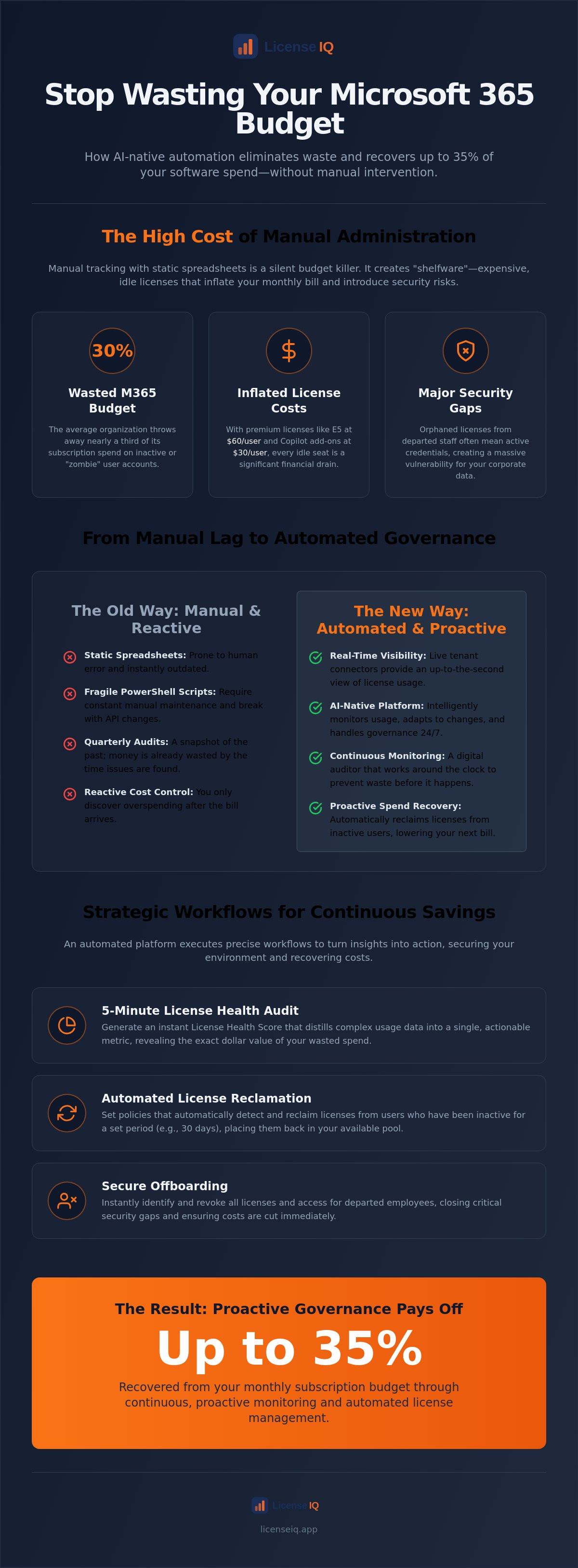
Strategic Workflows for Continuous Spend Recovery
Recovery begins with a baseline. You cannot manage what you do not measure. A 5-minute audit establishes your starting point by surfacing every unassigned license and inactive user. Once you have this visibility, you can transition from manual oversight to automated Microsoft 365 license management. This shift ensures that your financial hygiene is maintained daily rather than quarterly. It turns spend recovery into a continuous process rather than a one-time project.
One of the most critical workflows involves automating the office 365 offboarding checklist. When an employee departs, the system should immediately trigger a series of actions to secure data and revoke licenses. This prevents the accumulation of "zombie" accounts that drain resources for months after a user has left. By automating this logic, you eliminate human error and ensure that premium seats are instantly returned to the available pool for re-harvesting.
Automating License Reclamation
Identifying "Zombie" accounts is the first step toward significant savings. These are users who haven't logged in for 30, 60, or 90 days. A vigilant system flags these accounts and sends automated alerts for any unassigned premium licenses sitting in your tenant. This proactive approach allows IT to reclaim seats before the next billing cycle. When new hires join, the system pulls from this harvested pool first. You stop buying new licenses while perfectly good ones sit idle in your inventory.
Right-Sizing for Maximum ROI
Right-sizing is the surgical approach to cost control. It involves analyzing actual feature usage to determine if a user truly requires a $60.00 E5 license. If an employee never touches advanced security features or Power BI Pro, they are a candidate for a downgrade to E3 or F3. This process must be handled carefully to avoid data loss or productivity dips. You can follow the 2026 spend recovery playbook to execute these transitions safely.
By leveraging "Mix and Match" licensing, you can optimize specific departments based on their functional needs rather than applying a blanket, expensive tier across the whole company. This level of precision is the hallmark of modern automated Microsoft 365 license management. To start recovering your spend today, connect your tenant to the LicenseIQ Platform and see your recovery recommendations in minutes.
Achieving 35% Savings with LicenseIQ’s Automated Governance
LicenseIQ provides the immediate clarity required to manage a modern M365 tenant. The platform delivers a License Health Score in minutes, surfacing obscured details that manual audits miss. This isn't just a report. It's a roadmap for financial health. Our Spend Recovery Dashboard identifies the exact dollar value of waste currently sitting in your environment. By identifying inactive accounts and redundant premium add-ons, SMBs are successfully reducing M365 subscription costs by up to 35% within the first month of deployment. This results-first approach ensures that your core value proposition is never lost in technical complexity.
The 5-Minute Setup for SMBs
Efficiency is the cornerstone of our platform. You connect your tenant securely using AI-native software intelligence. There are no complex configurations or weeks of onboarding. Once connected, you can interpret your first Health Score report instantly. The system leverages the Model Context Protocol to scan usage data across your entire environment. It highlights your most urgent action items, such as unassigned $60.00 E5 seats or $30.00 Copilot add-ons that haven't been touched in 30 days. You execute these improvements through our automated Microsoft 365 license management interface, ensuring your resources are always monitored by a precise system.
Continuous Financial Accuracy
Maintaining a lean tenant requires constant vigilance. LicenseIQ is recognized as the best M365 license optimization tool for 2026 because it provides Automated Governance Workflows that enforce your policies 24/7. You set the guardrails once and forget the waste. The platform provides a vigilant oversight that human administrators cannot match. It continuously monitors for "zombie" accounts and license sprawl. It also helps you navigate the financial trade-offs between tiered monthly and discounted annual SaaS subscriptions. This allows you to lock in lower rates for core staff while maintaining monthly flexibility for seasonal contractors. You stop being a passive observer and become an active participant in your company’s financial health.
Every day you wait is a day of unrecovered spend. The transition from organizational disorder to total clarity takes less time than a coffee break. You don't need a technical degree to reclaim your budget. You just need the right data at the right time. Our platform acts as a meticulous digital auditor that is always one step ahead of your billing cycle. It ensures every dollar spent on software delivers maximum value. Get your free M365 Health Score today and see how automated Microsoft 365 license management secures your corporate resources.
Secure Your Financial Health with AI-Driven Governance
In 2026, the margin for error in software procurement has vanished. Static spreadsheets and fragile scripts are no longer just inefficient; they're financial liabilities. Transitioning to automated Microsoft 365 license management is the only way to ensure your organization isn't leaking capital on "zombie" accounts or unassigned premium seats. By replacing reactive manual audits with proactive AI-native oversight, you turn technical debt into a measurable business asset.
Total transparency is now a competitive necessity for every SMB. You can secure your environment and optimize your monthly spend by deploying a system that monitors your tenant 24/7. Our AI-native Spend Recovery Dashboard provides the precise oversight needed to reclaim up to 35% of your subscription costs. The transition from organizational disorder to total clarity takes only a few minutes. Take control of your resources and ensure every license delivers maximum value.
The budget recovered from these optimizations can be reinvested into unique brand-building initiatives, such as hiring Manjachen Studio to provide high-quality live watercolor illustrations for your next corporate event or team milestone.
Start your 5-minute M365 audit and recover wasted spend now.
Frequently Asked Questions
How do I automate Microsoft 365 license assignment safely?
Safe automation relies on group-based licensing and policy-driven guardrails. This approach ensures that users receive exactly what they need based on their Active Directory attributes. By removing the manual component, you eliminate the risk of human error and accidental over-provisioning. It's a vigilant system that maintains total clarity across your entire tenant, ensuring that your resources are always monitored by a precise and secure framework.
Can I reclaim M365 licenses from inactive users automatically?
You can reclaim seats from inactive users by setting specific activity-based triggers within your tenant. Automated Microsoft 365 license management identifies accounts that haven't logged in for a defined period, such as 30, 60, or 90 days. The system then revokes the license and returns it to your available inventory. This ensures you never pay for "shelfware" or "zombie" accounts that don't contribute to your company's growth.
What is a Microsoft 365 License Health Score?
A License Health Score is a metric that quantifies your organization's financial hygiene and operational efficiency. It distills complex usage data into a single number, showing how well you're utilizing your current subscriptions. A lower score serves as a direct roadmap for spend recovery, highlighting exactly where your resources are being underutilized or wasted. It acts as a metric for IT success, providing immediate clarity in complex environments.
Is automated license management secure for SMBs?
Automation actually enhances security by ensuring immediate and precise offboarding of departed employees. When a staff member leaves, the system instantly revokes their access and reclaims their license, closing potential security vulnerabilities. AI-native platforms use secure, read-only connectors to monitor your environment without compromising data integrity. This provides a level of oversight that manual spreadsheets simply cannot achieve, keeping your corporate resources safe and your environment secure.
How much can I save with automated M365 governance?
Most organizations can recover up to 35% of their Microsoft 365 spend by eliminating inactive accounts and right-sizing license tiers. With E5 licenses priced at $60.00 per user, the savings accumulate rapidly for SMBs. Automation ensures these financial gains are permanent and continuous. It turns obscured details into a clear Spend Recovery Dashboard that allows management to make data-driven decisions while focusing heavily on the financial health of the organization.
Do I need PowerShell skills to use an automated governance platform?
No PowerShell skills are required to use a modern, AI-native governance platform. These systems offer a no-code setup that connects to your tenant in minutes. They replace brittle, custom scripts that require constant maintenance with a user-friendly interface accessible to both IT and Finance teams. This democratizes your data and allows specialized leadership to monitor resources and eliminate waste without any technical complexity or administrative burden.
How often should I run a Microsoft 365 license audit in 2026?
Periodic audits are obsolete in 2026; you need continuous, real-time oversight to stop waste as it happens. Relying on quarterly reviews means you're always looking at snapshots of the past, allowing financial leaks to persist for months. Automated Microsoft 365 license management monitors your environment every second. It provides immediate clarity and ensures your monthly bills reflect actual usage rather than outdated assumptions, making complex administrative tasks feel manageable.
What is the difference between license management and license governance?
Management is the reactive act of assigning seats, while governance is the proactive enforcement of strategic policies. Governance involves setting guardrails that prevent waste and security risks before they happen. It uses automated workflows to ensure every license is utilized effectively and securely. This approach turns IT administration into an active participant in the company's financial health, focusing on data-driven transparency and the elimination of organizational disorder.


