

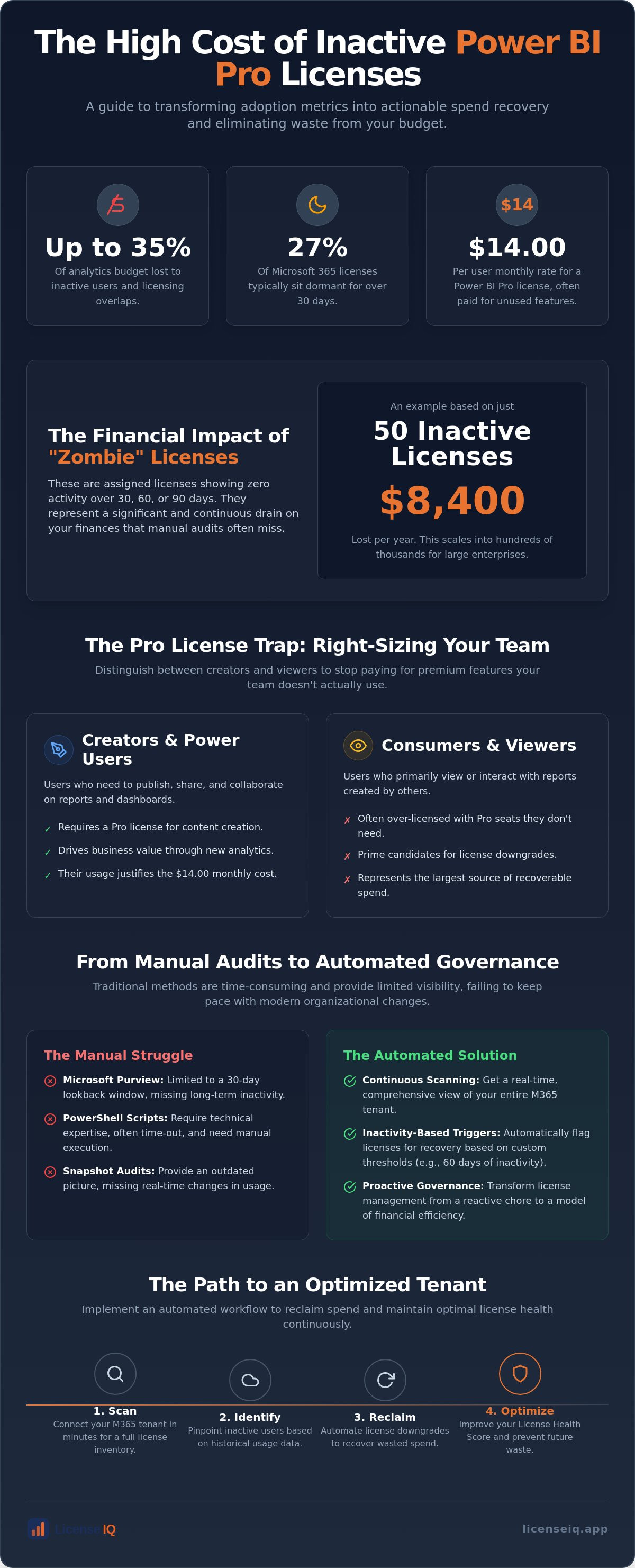
Organizations lose up to 35% of their analytics budget to inactive users and licensing overlaps, while 27% of Microsoft 365 licenses typically sit dormant for over 30 days. At the current $14.00 per user monthly rate, tracking power bi pro license usage and adoption is no longer a minor IT task. It's a critical financial audit. You shouldn't have to struggle with opaque M365 portals or manual PowerShell scripts that time out before they provide answers.
You deserve total clarity regarding which users are actually driving value. This guide will show you how to transform adoption metrics into actionable spend recovery by identifying and reclaiming underutilized Pro licenses. We will detail the path to automating license downgrades, improving your License Health Score, and establishing a proactive system that eliminates waste from your 2026 budget.
Key Takeaways
- Identify the "Pro License Trap" by distinguishing between creators and viewers to stop paying for features your team doesn't use.
- Master technical methods for tracking power bi pro license usage and adoption to overcome the 30-day visibility limits of standard Microsoft logs.
- Apply a right-sizing framework that identifies consumption-only users who are currently over-licensed for their actual needs.
- Replace manual, time-consuming PowerShell audits with Automated Governance Workflows that trigger license recovery based on inactivity thresholds.
- Deploy the LicenseIQ Platform to scan your M365 tenant in minutes and reclaim up to 35% of wasted subscription spend.
Why Tracking Power BI Pro Usage is Essential for 2026 FinOps
In 2026, efficient Business intelligence operations require more than just data accuracy; they demand financial precision. Systematic tracking power bi pro license usage and adoption ensures that every dollar spent on a $14.00 monthly subscription correlates to actual productivity. Many organizations fall into the "Pro License Trap." They assign creation-level licenses to users who only need to view reports. This mismatch creates a silent drain on resources. SaaS sprawl has accelerated, making continuous oversight a necessity rather than an occasional task. A proactive approach transforms your Power BI environment from a cost center into a model of operational efficiency.
A License Health Score provides the transparency needed to manage these complex environments. It measures the alignment between assigned features and actual user behavior. When your score drops, it indicates that licenses are being hoarded or underutilized. High-performing organizations use this metric to maintain a lean M365 tenant. They don't wait for annual renewals to find waste. They monitor it daily.
The Financial Impact of "Zombie" Licenses
Zombie licenses are the primary culprit of wasted spend. These are assigned seats showing zero activity over 30, 60, or 90 days. The financial leak is significant. For instance, maintaining 50 unused Pro licenses costs your organization $8,400 per year. In a large enterprise, this figure often scales into the hundreds of thousands. Manual audits cannot keep pace with 2026 employee turnover rates. IT departments often lack the time to cross-reference HR exits with license assignments. By the time a manual audit identifies an inactive user, months of subscription fees have already vanished. This is capital that should be reinvested into growth, not lost to administrative oversight.
Adoption vs. Usage: Distinguishing the Two
Adoption is about culture; usage is about cost. Adoption measures if the tool is being used at all. Usage tracking determines if the specific license tier is necessary. Sharing, publishing, and collaborating on reports require a Pro license. Merely viewing them does not always justify the $14.00 monthly fee, especially if the organization uses capacity-based licensing. Tracking power bi pro license usage and adoption allows you to see who is actually creating content versus who is just consuming it. This distinction is the cornerstone of effective microsoft 365 license optimization. If a user hasn't published a report in 60 days, they are a prime candidate for a license downgrade. You stop paying for "just in case" access and start paying for actual utility.
Technical Methods for Auditing Power BI Activity
Native auditing relies on three primary pillars: Microsoft Purview, PowerShell scripts, and Workspace Metrics. These tools are the standard for tracking power bi pro license usage and adoption within the Microsoft ecosystem. Effective auditing requires specific administrative privileges. You need either a Global Admin role or a Power BI Admin role to access tenant-level activity data. Snapshot audits provide a momentary view of your environment, but they often miss the nuances of long-term behavior. Real-time monitoring is superior for identifying immediate waste before it compounds over a fiscal quarter.
Mastering the technical methods for tracking power bi pro license usage and adoption is the only way to justify your 2026 SaaS spend. Without these logs, you're guessing at user intent rather than acting on hard data. Manual auditing is a high-effort, low-frequency task that often leads to outdated information. For a more efficient approach, consider how the LicenseIQ Platform automates this entire discovery phase, removing the technical burden from your IT team.
Using Microsoft Purview Audit Logs
Microsoft Purview Audit Logs serve as the foundation for granular oversight. Navigate to the Compliance Portal and filter your search by the "PowerBIAudit" record type. The PowerBIAudit record type is the primary source for user-level interaction data. It captures vital actions such as report views, data refreshes, and sharing events. The major hurdle is the 30-day lookback window. Microsoft only retains these logs for a limited time in standard subscriptions. To perform a comprehensive recovery, you must export these logs regularly. This allows you to build a historical trend analysis that identifies users who haven't engaged with the platform in months.
Leveraging PowerShell for Bulk Usage Data
PowerShell offers a scalable way to extract bulk usage data without clicking through multiple portals. The MicrosoftPowerBIMgmt module is your primary toolset for this task. Use the Get-PowerBIActivityEvents cmdlet to pull specific event logs for a defined date range. This cmdlet returns critical fields such as UserEmail, Activity, and CreationTime. However, this method has technical ceilings. Large datasets often trigger API rate limits, causing scripts to time out or return incomplete results. It requires constant maintenance to ensure your scripts remain compatible with Microsoft's evolving API architecture. If your environment has thousands of users, manual PowerShell scripts often become more of a bottleneck than a solution.
The License Right-Sizing Framework: Pro vs. Free
Effective license management requires a shift from tracking adoption to validating licensing logic. You must determine who actually needs the features they are assigned. In 2026, a Power BI Pro license is mandatory only for users who create, publish, or share content within standard workspaces. Many organizations over-license "Consumption-Only" users who only need to view reports. If your organization utilizes Premium or Fabric capacity, these viewers can operate on a Free license. Tracking power bi pro license usage and adoption reveals the gap between assigned permissions and actual behavior, allowing you to stop paying $14.00 per month for passive observers.
The most common objection to right-sizing is the "just in case" mentality. IT managers often fear that removing a Pro license will block a user from a critical report. This fear is expensive. If a user hasn't utilized creation features in three months, the probability of them needing them tomorrow is statistically low. You should not pay a premium for hypothetical usage. By implementing a strict right-sizing framework, you ensure that your budget supports active contributors while moving viewers to more cost-effective tiers.
Identifying Candidates for Downgrade
Data-driven downgrades start with a 90-day activity analysis. Any user who has not published a report or modified a dataset in the last 90 days is a prime candidate for a license reclaim. You must differentiate between workspace roles to find these opportunities. Workspace "Contributors" and "Admins" typically require Pro seats; however, many "Members" and "Viewers" do not. Usage metrics provide the evidence needed to justify these moves to department heads. When a user's only logged activity is "ViewReport," they no longer meet the criteria for a dedicated Pro seat. Moving these users to the Free tier immediately improves your License Health Score and recovers wasted capital.
The Role of Power BI Premium in License Optimization
Organizational scale dictates when you should move from individual seats to capacity-based models. Power BI Premium (P-SKUs) or the newer Fabric (F-SKUs) allow an unlimited number of Free users to consume content within designated workspaces. The "Break-even Point" occurs when the cost of individual Pro licenses exceeds the cost of a capacity subscription. For large organizations, this transition is the most effective way to eliminate per-user waste. This strategy is a core component of understanding various microsoft 365 license types and their impact on your bottom line. Tracking power bi pro license usage and adoption ensures you know exactly when your organization hits that financial tipping point, allowing for a seamless and profitable migration to capacity-based licensing.
Implementing Automated Governance Workflows for Power BI
Manual reporting is a passive dead end. Tracking power bi pro license usage and adoption must lead to immediate action to be effective. Automated Governance replaces the tedious cycle of manual audits with a persistent, vigilant system. It discovers waste, alerts stakeholders, and reclaims licenses without requiring constant IT intervention. This proactive oversight ensures your 2026 budget remains optimized in real-time. By removing the human bottleneck, you ensure that license hygiene becomes a background process rather than a quarterly crisis.
To see how these workflows function in practice, explore the Automated Governance Workflows available on the LicenseIQ Platform.
Setting Usage Thresholds
Precision starts with defining inactivity based on your specific operational needs. For most organizations, 45 days without a login indicates a license is no longer serving its purpose. A "Usage Threshold" is the specific inactivity period that triggers a license review. You must account for edge cases like parental leave or seasonal projects. A robust system allows for "exclusion lists" to prevent accidental reclamation for these specific users. This ensures the system remains a precision tool rather than a blunt instrument. It protects the user experience while ruthlessly eliminating financial waste.
The Reclamation Workflow
A structured workflow eliminates the friction of license recovery. It moves from discovery to resolution in three distinct steps:
- Step 1: Identify inactive Pro users via AI-native scanning of your M365 tenant.
- Step 2: Notify both the user and their manager through an automated notification to verify if the seat is still required.
- Step 3: Reclaim the license and reallocate it to the unassigned pool if no justification is provided.
The manager approval step is vital. It provides a final check to ensure the user doesn't have an upcoming project requiring Pro access. This balance of automation and human oversight builds trust within the organization while still driving significant spend recovery. These workflows should be a standard component of your office 365 offboarding checklist. When an employee leaves, the system should instantly flag and recover their Power BI seat. This prevents "license leaks" where seats remain assigned to disabled accounts for months, draining your budget without providing any return.
Optimising Power BI Spend with LicenseIQ
Manual tracking power bi pro license usage and adoption is a reactive strategy that leaves capital on the table. The LicenseIQ Platform provides a proactive alternative. As an AI-native solution, it scans your entire M365 tenant to identify hidden waste in minutes. You no longer have to wait for monthly reports to understand your licensing posture. The Spend Recovery Dashboard offers immediate visibility into your potential ROI. It translates complex usage data into clear financial opportunities. By maintaining a high License Health Score, you ensure your organization remains lean and operationally efficient throughout 2026.
Total transparency is the foundation of financial security. LicenseIQ doesn't just provide data; it provides a roadmap for reclamation. It monitors every user interaction, ensuring that your Power BI environment aligns with your actual business needs. This level of oversight protects your resources from the silent drain of over-licensing. You gain the confidence that every assigned seat is a productive seat.
Discover and Recover: The LicenseIQ Advantage
The "Discover and Recover" methodology replaces the fragility of manual PowerShell scripts with robust, automated scanning. LicenseIQ connects to your tenant in minutes, providing an instant audit of your Power BI environment. It identifies precise candidates for Pro-to-Free downgrades and provides specific dollar-value recommendations for each recovery action. You don't have to interpret logs or guess at user intent. The platform handles the technical complexity, allowing you to focus on high-level resource allocation. This speed and accuracy are essential for managing the fast-paced changes of a modern technical operation. It eliminates the administrative burden while maximizing your financial health.
Continuous Monitoring for 2026 and Beyond
Static, one-time audits are insufficient for the dynamic nature of 2026 SaaS environments. Users join, leave, and change roles daily. LicenseIQ ensures your oversight is persistent. By leveraging the Model Context Protocol, the platform automates complex governance tasks that previously required hours of manual labor. This continuous monitoring prevents waste from accumulating after your initial cleanup. It transforms license management from a recurring headache into a streamlined, background process. You stay one step ahead of SaaS sprawl. Take control of your analytics budget today. Visit LicenseIQ to start your 5-minute license audit.
Secure Your 2026 Analytics Budget
Mastering the process of tracking power bi pro license usage and adoption is the first step toward total financial transparency. You stop paying for idle seats and start investing in actual growth. To further capitalize on these efficiencies, businesses can explore AI-Powered Digital Marketing Training to drive more sophisticated growth strategies. Your organization deserves a lean, high-performing environment where every license is justified by measurable activity.
The LicenseIQ Platform provides the precision needed to reclaim your resources. With a 5-minute setup, you receive an immediate Health Score and access to AI-native Automated Governance Workflows. Our system helps organizations save up to 35% on M365 subscriptions by identifying every inactive user across your tenant. You gain a Spend Recovery Dashboard that highlights exactly where your budget is leaking and how to fix it instantly. This proactive oversight ensures that your technical operations remain efficient and scalable.
Recover your wasted Power BI spend with LicenseIQ today. Total clarity is just minutes away.
Frequently Asked Questions
How do I see who is using Power BI Pro licenses in my tenant?
You can identify assigned users through the Microsoft 365 Admin Center under the Active Users tab by filtering for the Power BI Pro license. For deeper activity insights, use the Power BI Admin Portal's usage reports. Effective tracking power bi pro license usage and adoption requires cross-referencing these assignments with actual login data found in the Admin Monitoring workspace to see who's truly active.
Can I track Power BI usage without being a Global Admin?
Yes, you don't need Global Admin privileges to monitor activity. Users assigned the Power BI Administrator or Fabric Administrator roles can access the Power BI Admin Portal and tenant-level settings. Additionally, those with specific compliance or security roles can access audit logs through the Microsoft Purview portal. This allows for specialized oversight without compromising broad tenant security.
What is the difference between Power BI usage metrics and audit logs?
Usage metrics provide report-level performance data, showing views and interactions within a 30-day window. Audit logs, found in Microsoft Purview, offer a broader history of tenant-wide events, including publishing and sharing actions. Audit logs are the superior tool for tracking power bi pro license usage and adoption because they provide a comprehensive trail of administrative and user-level events across the entire year.
How often should I audit my Power BI Pro licenses for waste?
You should audit your licenses at least once a month to prevent costs from compounding. Monthly reviews help you catch "zombie" licenses from departed employees or role changes before the next billing cycle. Organizations focused on financial hygiene often move toward continuous monitoring. This maintains a high License Health Score and ensures you aren't paying for dormant accounts during rapid growth phases.
Does Power BI usage tracking include reports embedded in SharePoint?
Can I automate the removal of Power BI Pro licenses for inactive users?
Native Microsoft tools don't offer direct automated reclamation, but you can achieve this through the LicenseIQ Platform. While you can write custom PowerShell scripts, they often require constant maintenance and high-level technical expertise. Implementing Automated Governance Workflows allows you to set inactivity thresholds, such as 45 days, and automatically trigger license recovery once that limit is reached.
What happens to a user’s reports if I reclaim their Pro license?
The reports stay in the workspace, but the user loses the ability to edit, share, or publish updates. If the workspace isn't hosted on Premium capacity, the user will also lose viewing access. It's a best practice to reassign ownership of critical datasets and reports to an active creator before reclaiming the license to ensure your business intelligence operations continue without interruption.
How much can I save by tracking Power BI Pro usage?
Organizations often save up to 35% on their subscription costs by identifying inactive users and redundant assignments. At the current $14.00 monthly rate, reclaiming just 50 dormant Pro seats saves your organization $8,400 per year. These savings scale significantly in larger tenants. Continuous tracking ensures these recovered funds are reinvested into active projects rather than lost to administrative oversight.


