

Your organization is likely losing up to 35% of its software budget to underutilized subscriptions. Many leadership teams struggle to pinpoint exactly when to use power bi premium vs pro for a team, often defaulting to expensive PPU or Fabric F-SKU licenses before they're actually necessary. You want clarity, not a bloated invoice. You're likely tired of the confusion between per-user costs and dedicated capacity, especially when "Premium" features remain untouched by your actual analysts.
We understand that managing M365 governance feels like chasing a moving target. This 2026 guide eliminates the guesswork by identifying the precise technical and financial tipping points for an upgrade. You'll learn how to stop license waste and align your spend with the current Microsoft Fabric ecosystem. We'll examine the $14 Pro versus $24 PPU gap, the 250-user break-even rule, and the specific governance workflows required to maintain a high License Health Score. This is your roadmap to a leaner, more efficient BI environment.
Key Takeaways
- Identify the financial break-even point and technical triggers, such as the 1GB dataset limit, to determine exactly when to use power bi premium vs pro for a team.
- Maximize operational efficiency by upgrading only when performance requirements, like the need for 48 daily data refreshes, exceed the Pro tier's capabilities.
- Detect and eliminate "Zombie Licenses" and redundant E5 coverage to recover significant portions of your wasted software subscription spend.
- Utilize the LicenseIQ Platform for a rapid 5-minute tenant audit that provides a real-time License Health Score for all Power BI assets.
- Future-proof your licensing strategy by aligning with the 2026 Microsoft Fabric F-SKU ecosystem to ensure capacity matches actual workload demand.
Power BI Pro vs. Premium: The Core Differences in 2026
The choice between licensing tiers often determines whether your data strategy scales or stalls. By 2026, Microsoft has fully integrated these options into the Fabric ecosystem, making the decision more about architectural fit than just a feature list. Understanding when to use power bi premium vs pro for a team requires looking past the per-user price tag and focusing on your specific data volume and sharing requirements. While Microsoft Power BI offers a consistent interface across both tiers, the backend capabilities differ significantly.
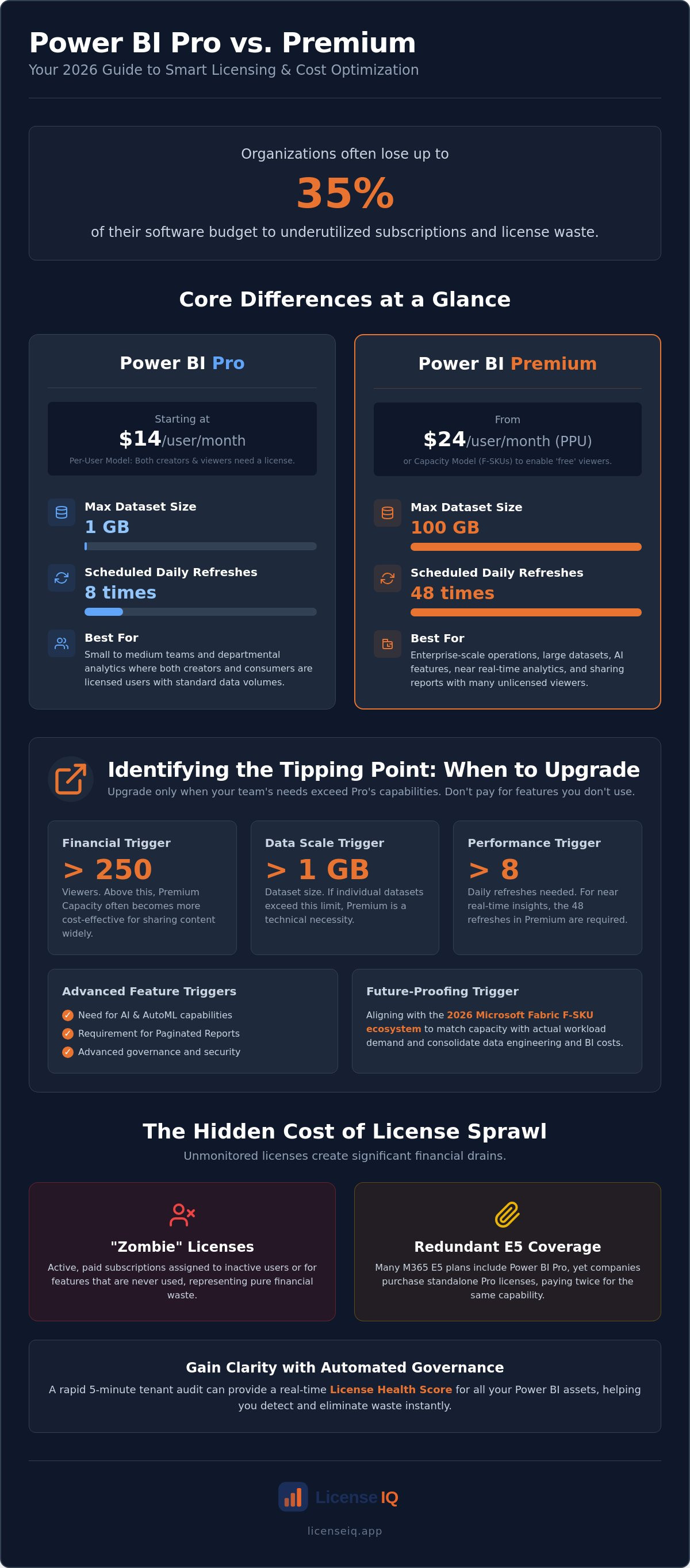
The primary driver for most team-based decisions is how content is consumed. Pro licenses follow a "user-pays" model, where both creators and viewers must have a license. Premium introduces the concept of capacity, where you pay for the compute power rather than the individual viewer. This shift in 2026 has seen many organizations move toward Fabric F-SKUs to consolidate their data engineering and reporting costs into a single stream.
What is Power BI Pro?
Power BI Pro remains the baseline for departmental analytics. It's designed for creators who need to build reports and share them with other licensed users. However, it comes with rigid technical guardrails. You're limited to a 1GB limit per dataset and only 8 scheduled refreshes every 24 hours. For many organizations, these licenses are already active through Microsoft 365 E5 subscriptions. If your team's needs stay within these boundaries, Pro is the most cost-effective path. Problems only arise when teams pay for higher tiers without hitting these limits first.
What is Power BI Premium?
Premium is the engine for enterprise-scale operations. It removes the 1GB bottleneck, allowing for datasets up to 100GB. It also increases refresh frequency to 48 times daily, providing near real-time insights for fast-moving operations. Beyond scale, Premium introduces advanced AI tools like AutoML, sentiment analysis, and image recognition. You can deploy this via Power BI Premium Per User (PPU) at $24 or through dedicated Capacity (F-SKUs) for larger audiences. The F-SKU structure is now the standard, tying your BI power directly to Azure's compute resources.
Effective governance is the only way to prevent these high-performance tiers from becoming a financial drain. Many teams purchase Premium for the "prestige" of the features but continue to operate within Pro-level constraints. Using the LicenseIQ Platform allows you to scan your tenant and identify exactly where these expensive resources sit idle. If your team isn't utilizing the 100GB capacity or the enhanced refresh rates, you're likely maintaining a low License Health Score and wasting thousands in monthly spend.
Comparing Feature Sets for Team Collaboration
Collaboration efficiency depends on how your team consumes data. Pro users can only share with other Pro users. This creates a licensing wall that often slows down departmental reporting. Premium Capacity removes this barrier by allowing anyone in the organization to view reports without an individual paid license. Deciding when to use power bi premium vs pro for a team often comes down to this viewer-to-creator ratio. If your viewer count is high, the per-user model becomes a significant financial liability.
Performance benchmarks provide another clear signal for leadership. Pro limits you to 8 refreshes daily. For teams requiring near-real-time data, the 48 refreshes available in Premium are non-negotiable. Check the official Power BI pricing and feature comparison for the full technical breakdown. Beyond speed, Premium enables paginated reports. These are essential for finance teams needing high-fidelity, printable documents that Pro simply cannot generate. Security also scales in this tier. You gain advanced sensitivity labels and automated governance controls that ensure sensitive data doesn't leave the tenant unauthorized.
The 'Free User' Paradox
Capacity-based licensing is the only way to enable "free" viewers. If you host content on a Fabric F-SKU (F64 or higher), users with a free license can consume that content. The break-even point typically sits between 250 and 500 users. Below this threshold, individual Pro or Premium Per User (PPU) seats are usually cheaper. It's a common mistake to assume PPU allows for free viewers. It doesn't. Every PPU content consumer must also hold a PPU license. This specific misunderstanding leads to significant "zombie license" waste where companies pay for capacity they don't actually utilize.
Advanced Analytics and AI Integration
To ensure you aren't paying for these high-tier features without using them, you can calculate your License Health Score to see if your team's activity justifies the Premium cost. This oversight prevents the common trap of buying expensive capacity for features that stay dormant in your tenant.
Identifying the Tipping Point: When to Upgrade Your Team
Decision-making in the Microsoft ecosystem is a financial exercise as much as a technical one. Identifying the exact moment when to use power bi premium vs pro for a team prevents your organization from falling into the trap of "license sprawl." Microsoft continues to dominate the sector, a position solidified by the Gartner® Magic Quadrant™ for Analytics and Business Intelligence Platforms. This market leadership means the platform is robust, but it also means the licensing structures are complex and require vigilant oversight.
The "Fabric factor" has shifted the math for 2026. If your organization already invests in Microsoft Fabric capacity for data engineering, you may already have the "Premium" power you need. In this scenario, your team can leverage that existing capacity to host Power BI reports, potentially making the jump from Pro to Premium nearly cost-neutral at the departmental level. You must evaluate your total Azure spend to see if you are already paying for the compute resources that Premium requires.
The Cost Efficiency Threshold
The 500-user rule remains a reliable benchmark for dedicated capacity. If you have 500 viewers, individual Pro licenses at $14 each total $7,000 monthly. Since an F64 Fabric capacity (the equivalent of P1) starts significantly lower, the move to capacity is a financial necessity. However, high-growth teams often encounter the "Shared Capacity" bottleneck long before hitting 500 users. Shared capacity in the Pro tier often leads to inconsistent report performance during peak business hours. If your analysts report lag with only 100 users, the upgrade to PPU or Capacity becomes a performance requirement rather than just a seat-count decision.
Comparing 100 Pro licenses to 100 PPU seats reveals a $1,000 monthly gap. This expense is only justifiable if your team actively utilizes the 100GB model size or advanced AI features. For a broader look at how these licenses integrate with your existing seats, consult our Microsoft 365 License Types: The Comprehensive 2026 Reference Guide. Understanding these relationships is the first step toward total spend recovery.
Operational Triggers for Premium
Hard technical limits often force an upgrade before the budget does. If a data model grows beyond 1GB, Power BI Pro will simply fail to load it. This is a non-negotiable trigger for moving to Premium. Similarly, if your operational rhythm requires data refreshes every 30 minutes, the 8-refresh daily limit on Pro is a functional dealbreaker. Premium's 48 daily refreshes provide the near real-time visibility required for modern supply chain or financial monitoring. For instance, specialized systems like 3LINX provide the complex logistics data that requires the high-performance refresh rates found only in the Premium tier.
Compliance and advanced connectivity also serve as critical triggers. You require Premium for XMLA endpoint connectivity, allowing third-party tools to interact directly with your datasets for advanced modeling. Global organizations often need Multi-geo deployment to store data in specific regions for legal compliance. If your team still utilizes an on-premises Power BI Report Server, Premium Capacity is your only licensing path. These triggers represent the "tipping point" where the Pro tier is no longer a viable option for a professional BI team.
The Hidden Cost of Power BI: Managing License Sprawl
Software waste isn't just a budget line item; it's an operational failure. Organizations often lose track of when to use power bi premium vs pro for a team, leading to "Zombie Licenses" that drain resources without adding value. A zombie license occurs when you pay for a Premium seat for a user who only views static PDF exports or hasn't logged in for weeks. This lack of oversight turns your BI deployment into a financial liability. Reliance on manual spreadsheets to track these permissions is a recipe for disorder. Static tracking fails to capture the dynamic nature of user activity and license assignment.
Redundant coverage is another silent budget killer. Many enterprises provide users with Microsoft 365 E5 licenses, which already include Power BI Pro. If your administrators then assign a separate Premium Per User (PPU) license to that same person, you're double-paying for the same core access. In small teams, PPU sprawl happens fast. Managers often approve individual upgrade requests based on perceived needs rather than actual data model requirements. This creates a fragmented environment where you pay for high-tier features that remain dormant across the majority of your user base.
Auditing Your BI Utilization
Visibility is the first step toward spend recovery. You must identify users who haven't engaged with the Power BI service in 30 days. These inactive seats represent immediate savings. You should also spot "over-licensed" users who hold Premium credentials but never touch advanced AI features or large datasets. Identifying these gaps allows you to downgrade users to Pro without impacting their daily workflows. For a deeper dive into these tactics, read our How to Reduce M365 Subscription Costs guide.
FinOps for Power BI
Modern financial operations require a "just-in-time" licensing model. You shouldn't assign high-tier seats in anticipation of future work. Instead, grant them only when technical triggers, like the 1GB dataset limit discussed earlier, are actually hit. Automated reclamation workflows are equally vital. When an employee leaves or changes roles, their license must return to the pool immediately. This prevents the accumulation of unassigned yet active subscriptions. Follow our Office 365 Offboarding Checklist 2026 to ensure no spend is left behind.
Stop guessing and start auditing. Connect your tenant to the LicenseIQ Platform to see exactly where your Power BI budget is leaking in real-time.
Automated Governance: How LicenseIQ Optimizes Power BI Spend
Manual oversight of a Microsoft tenant is no longer a viable strategy for modern leadership. As your organization scales, the complexity of your licensing environment grows exponentially. The LicenseIQ Platform replaces slow, error-prone manual audits with an AI-native system designed for immediate clarity. By connecting to your tenant in minutes, the platform provides a comprehensive view of your current deployment. It answers the critical question of when to use power bi premium vs pro for a team by analyzing actual usage patterns rather than theoretical needs.
The centerpiece of this oversight is the License Health Score. This metric visualizes your BI waste in real-time, highlighting the gap between your paid capacity and your team's actual activity. If you've invested in a Fabric F-SKU but your users are only accessing Pro-level features, your score will reflect that inefficiency. Continuous monitoring ensures that you catch these discrepancies before the next billing cycle. This proactive approach allows you to maintain a lean, high-performance environment that prioritizes financial health alongside technical capability.
From Discovery to Recovery
The transition from identifying waste to reclaiming capital is seamless. LicenseIQ scans your environment for redundant M365 and Power BI tiers, uncovering instances where users are double-licensed or over-provisioned. You receive actionable, dollar-value recommendations for downgrading Pro seats to Free where user activity is non-existent. LicenseIQ identifies inactive Power BI users by cross-referencing login timestamps with specific workspace activity and report consumption data. This level of detail allows you to execute Automated Governance Workflows that reclaim expensive PPU licenses from users who no longer require them. These recovered funds can then be redirected to more strategic initiatives, such as expanding your actual data engineering capacity.
Building a Sustainable BI Budget
Justifying a 2026 BI budget requires more than just a list of features; it requires proof of efficiency. Using the Spend Recovery Dashboard, you can demonstrate exactly how much waste has been eliminated and how the current license mix aligns with operational reality. This data-driven approach allows you to scale your team without scaling your waste. You can confidently approve a move to Premium Capacity when the License Health Score indicates your team has hit the technical tipping points discussed earlier. This ensures that every dollar spent on high-tier Microsoft subscriptions translates directly into business value.
Efficiency is the ultimate competitive advantage. Discover and recover your wasted M365 spend with LicenseIQ to ensure your Power BI environment is as lean as it is powerful.
Future-Proof Your BI Governance Strategy
Effective BI leadership in 2026 requires a shift from reactive purchasing to proactive financial oversight. You've identified that the decision of when to use power bi premium vs pro for a team rests on specific technical triggers like the 1GB dataset limit and the 500-user cost efficiency threshold. Relying on manual audits leads to license sprawl and "Zombie" subscriptions that drain your operational budget. You need a vigilant system that monitors utilization in real-time to maintain total transparency.
LicenseIQ provides this clarity by scanning your M365 tenant in under 5 minutes. Our AI-native platform identifies redundant tiers and inactive users; this helps organizations save up to 35% on software subscriptions. It's time to stop settling for opaque billing or underutilized capacity. Take control of your organization's financial health and ensure every license drives measurable business value.
Stop wasting money on Power BI licenses—Get your Free License Health Score today. Your roadmap to total spend recovery starts with a single audit. Build a leaner, more efficient team today.
Frequently Asked Questions
Can a Power BI Pro user view a report created by a Premium user?
Yes, but only if that report is hosted in a workspace backed by Premium Capacity, such as a P-SKU or a Fabric F64 SKU. If the content is stored in a Pro workspace or a Premium Per User (PPU) workspace, the viewer must also possess a corresponding paid license. This technical barrier is a primary reason organizations struggle with when to use power bi premium vs pro for a team during rapid scaling phases.
Is Power BI Pro included in Microsoft 365 E5?
Yes, Power BI Pro is a standard component of the Microsoft 365 E5 subscription. Many organizations unknowingly double-pay by purchasing standalone Pro or PPU licenses for users who are already covered by their E5 seat. Identifying these overlaps is a critical step in spend recovery. You should audit your tenant to ensure you aren't wasting budget on redundant credentials for your existing E5 user base.
What is the main difference between Power BI Premium Per User (PPU) and Capacity?
PPU is an individual license that unlocks premium features for a single person, while Capacity is a dedicated pool of compute resources. The most vital distinction is viewer access. Content in a PPU workspace requires every viewer to have a PPU license. In contrast, Capacity allows an unlimited number of users with "Free" licenses to consume reports. This makes Capacity the only scalable choice for large-scale distribution.
When is Power BI Premium Capacity more cost-effective than Pro?
The financial break-even point typically occurs between 250 and 500 users. If your team consists of a small group of creators and hundreds of passive viewers, dedicated capacity is significantly cheaper than paying $14 per month for every viewer seat. Calculating the exact moment for this transition requires a clear view of your viewer-to-creator ratio. Dedicated capacity also provides more consistent performance for high-traffic executive dashboards.
Do I need a Premium license to use Power BI Copilot in 2026?
Yes, Copilot for Power BI requires Premium or Fabric capacity to function. Specifically, you need a minimum of an F64 SKU to utilize generative AI features natively within the service. Pro and PPU licenses do not include the dedicated compute power necessary to run these AI models. If your 2026 strategy relies on AI-driven insights, you must factor the cost of capacity into your departmental budget.
What happens to my data if I downgrade from Premium to Pro?
Your data remains secure in the Microsoft tenant, but your reports may stop functioning. Any dataset exceeding the 1GB Pro limit will fail to refresh immediately after the downgrade. Additionally, advanced features like paginated reports or AI-driven visuals will become inaccessible. You must optimize and shrink your data models to fit within Pro constraints before processing a downgrade to avoid operational downtime.
How can I track which users are actually using their Power BI licenses?
You can track usage by connecting to the LicenseIQ Platform for a rapid tenant audit. This system identifies "Zombie Licenses" by cross-referencing assigned credentials with actual login and report consumption logs. If a user hasn't engaged with the service in 30 days, the platform flags them for license reclamation. This automated oversight ensures your BI spend matches actual employee activity rather than theoretical seat counts.
Can I mix Pro and Premium licenses within the same team?
Yes, you can mix license types, but you must manage workspace assignments with precision. Pro users can create and collaborate in standard workspaces, while PPU users can utilize advanced features in restricted areas. However, if a Pro user needs to share content with an unlicensed viewer, that content must reside in a workspace backed by Premium Capacity. Mixing licenses without a clear governance workflow often leads to accidental and expensive PPU sprawl.


