

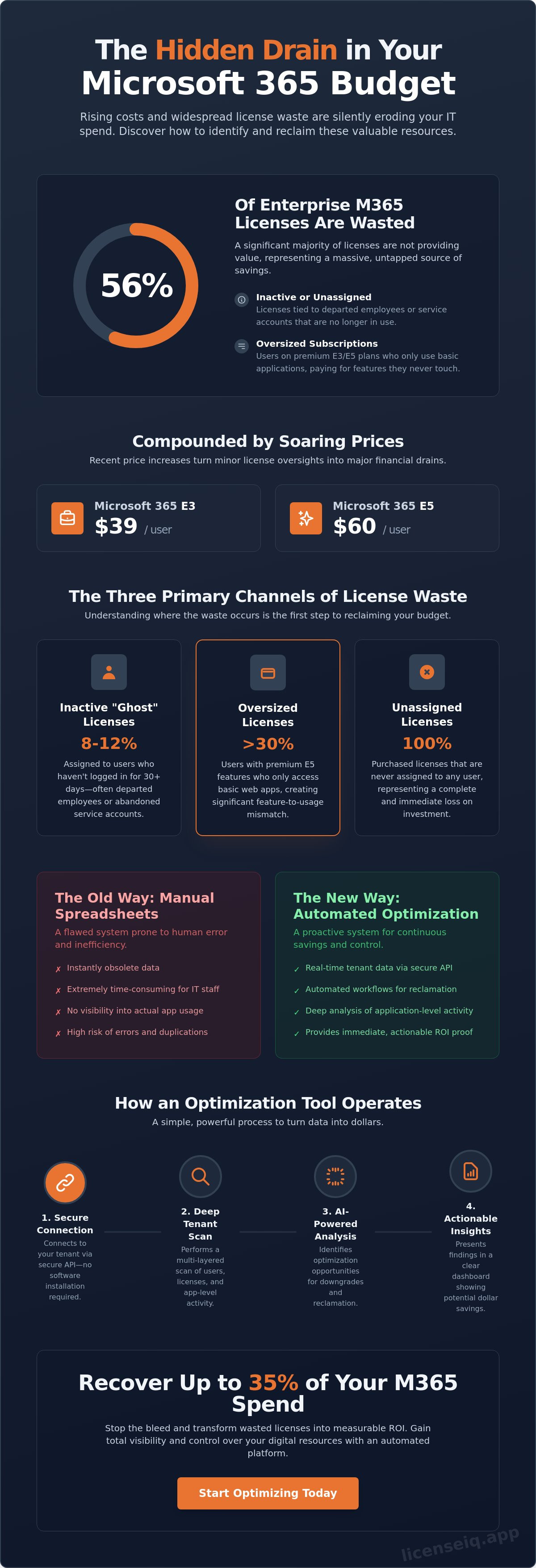
Did you know that 56% of enterprise Microsoft 365 licenses are currently inactive, oversized, or unassigned? With Microsoft 365 E5 costs rising to $60 per user and E3 plans jumping to $39 this July, your organization cannot afford to ignore the ghost licenses assigned to departed employees. Implementing a professional microsoft 365 license optimization tool is the only way to gain total oversight of your digital resources. You've likely seen the impact of overpaying for high-tier features that your team never touches; it's a common drain on technical budgets that often goes unnoticed.
It's frustrating to watch your budget vanish into a black hole of unused subscriptions and unmonitored app usage. This guide reveals how to stop the bleed and recover up to 35% of your Microsoft 365 spend through automated intelligence. We will examine how the LicenseIQ platform provides a definitive Health Score for your tenant and uses automated governance workflows to reclaim waste in real-time. You'll learn to move beyond manual spreadsheets and establish a vigilant system that delivers immediate ROI proof for your leadership team.
Key Takeaways
- Identify hidden waste by uncovering unassigned, inactive, and oversized subscriptions within your tenant.
- Deploy a professional microsoft 365 license optimization tool to analyze application-level activity through secure API integrations.
- Replace manual audits with automated governance workflows that reclaim licenses instantly during employee offboarding.
- Monitor financial health in real-time with a Spend Recovery Dashboard that provides immediate ROI proof for leadership.
- Establish a clear License Health Score to maintain continuous oversight and prevent the risks of SaaS sprawl.
The Invisible Drain: Why Your M365 Spend is Rising in 2026
Efficiency is your only defense against rising operational costs. On July 1, 2026, Microsoft implemented significant price increases across its commercial plans. Business Basic rose to $7.00 per user, while the premium Microsoft 365 E5 plan climbed to $60.00 per user. These adjustments transform minor administrative oversights into significant financial liabilities. Most organizations lose capital through three specific channels: unassigned seats, inactive users, and oversized subscriptions. This "SaaS Sprawl" is aggressive in growing SMB environments where rapid hiring and departmental shifts outpace central oversight. Without a dedicated microsoft 365 license optimization tool, your budget is essentially unmonitored.
License hoarding is a silent profit killer. It occurs when department heads retain high-tier licenses for vacant roles or "just in case" scenarios. This creates a fragmented environment where the IT department lacks visibility into actual resource requirements. Research indicates that approximately 29% of SaaS licenses in an average organization are underutilized. In the Microsoft 365 ecosystem, this waste often exceeds 30%. Every unassigned license represents a 100% loss on investment every single month. To maintain financial health, you must transition from passive observation to active, data-driven management.
Inactive vs. Underutilised Licenses
There's a critical distinction between a "ghost" license and an oversized one. A ghost license belongs to a user who hasn't logged in for 30, 60, or 90 days; often these are departed employees or abandoned service accounts. These account for 8-12% of licenses in a typical enterprise. Conversely, underutilization happens when a user with an E5 license only accesses basic web apps. You're paying for advanced security and analytics features that remain untouched. Leaving these accounts active isn't just expensive; it's a security risk. Inactive accounts are prime targets for unauthorized access, making reclamation a dual priority for finance and security teams.
The Failure of Manual Spreadsheet Tracking
Spreadsheets are static; your tenant is dynamic. By the time an IT manager extracts data from the M365 Admin Center and formats a report, the information is already obsolete. The human cost is another factor. High-value engineers shouldn't spend hours performing manual audits that a microsoft 365 license optimization tool can complete in seconds. Manual tracking is also prone to error, frequently leading to duplicate license assignments where one user consumes multiple paid seats. You need a system that identifies these discrepancies automatically, providing a clear License Health Score rather than a pile of stale data.
How a Microsoft 365 License Optimization Tool Operates
Efficiency requires precision. A modern microsoft 365 license optimization tool operates with surgical accuracy, connecting to your tenant via secure API protocols. This removes the need for invasive software installations or slow, manual data exports. Once connected, the tool initiates a multi-layered scan of your environment. It examines more than just the last login date. It dives into application-level activity, identifying whether a user is actually utilizing the premium features included in an E5 license or merely using basic web apps. This granular insight ensures you aren't paying for advanced capabilities that remain dormant.
This deep-scan culminates in a License Health Score. This proprietary metric serves as your primary diagnostic tool, exposing the delta between your subscription costs and actual user engagement. It provides a baseline for every optimization effort. The system automatically maps this usage data against the latest Microsoft pricing tiers, including the July 2026 price hikes. It identifies specific accounts that qualify for a downgrade, such as moving a deskless worker from an E3 to an F3 plan. It provides immediate clarity in an otherwise complex operational environment.
The Discovery Phase: Scanning Your Tenant
AI-native intelligence acts as a proactive guardian. These tools identify patterns that humans often overlook, such as licenses assigned to service accounts that haven't been accessed in years. Complete visibility is non-negotiable. The tool scans for "Shadow IT" and redundant third-party subscriptions that overlap with your existing Microsoft 365 capabilities. This level of oversight ensures that no resource remains obscured or underutilized. By uncovering these details, the system prepares your organization for a leaner, more efficient software footprint.
Translating Data into Dollars
Financial clarity is the ultimate objective. A high-ROI tool translates complex technical metrics into concrete dollar-value recommendations. By following a Gartner guide on user profiling, the system ensures that every employee has exactly what they need to be productive without over-licensing. You can view these savings through a Spend Recovery Dashboard, which calculates the exact monthly and annual savings for each proposed action. This data allows you to present a clear business case to your CFO with verified ROI proof. You can connect your tenant now to see your specific recovery potential.
Key Features of a High-ROI Optimization Tool
Modern technical operations demand real-time visibility. Static monthly reports are historical artifacts; they don't help you manage a dynamic cloud environment. A professional microsoft 365 license optimization tool replaces these snapshots with a live Spend Recovery Dashboard. This interface provides immediate clarity on license distribution across your entire organization. It allows you to see exactly where capital is being deployed and where it is being wasted. You can act on data as it happens, rather than waiting for a month-end audit to uncover overspending.
Granular analytics are a core requirement for any high-performance system. You must be able to drill down into specific application usage, such as Teams, SharePoint, and OneDrive. If a user has a premium license but only uses basic email, the system should flag them for a downgrade. For businesses with complex structures, multi-tenant support is essential. It provides a unified view of various business units or subsidiaries, ensuring that governance standards remain consistent across the board. This consolidated oversight is vital for maintaining a lean operational footprint.
Automated Governance Workflows
Automation is the only way to prevent license waste from recurring. Manual cleanup is a temporary fix; automated governance workflows are a permanent solution. You can set specific triggers for inactive license alerts based on your organization's policy. For example, if an account remains inactive for 30 days, the system can automatically initiate a reclamation process. Integrating these workflows with your HR systems ensures that offboarding is seamless. When an employee leaves, their license is recovered instantly, preventing "ghost" subscriptions from draining your budget. This proactive approach eliminates the human error associated with manual admin tasks.
License Health Scores and Benchmarking
Managing complex tenants requires a simplified way to measure success. A License Health Score provides this by condensing thousands of data points into a single, actionable metric. This score allows leadership to track optimization progress over time and identify trends that inform future budget needs. Benchmarking your performance against industry averages for SMBs adds another layer of context. It highlights whether your spend is lean or if you are over-indexed compared to your peers. This data-driven approach transforms license management from a reactive task into a proactive financial strategy, ensuring your resources are always monitored by a vigilant system.
Establishing Continuous Governance in 2026
Annual audits are a relic of the past. If you only review your subscriptions during your Enterprise Agreement renewal, you've already lost thousands in monthly waste. Effective management requires mastering the lifecycle of every seat from procurement to reclamation. This shift toward continuous governance ensures that your microsoft 365 license optimization tool isn't just a reporting engine but an active part of your financial strategy. It requires a relentless focus on data-driven decision-making and operational transparency.
Standardization is your best defense against SaaS sprawl. Every departure must trigger a standardized offboarding checklist to ensure immediate spend recovery. You shouldn't wait for IT to notice an inactive account; the process must be automated. Department heads also play a critical role. They must be trained to request resources based on actual needs rather than default "top-tier" settings. Regularly reviewing the various M365 license types allows you to match specific roles to the most cost-effective plans.
Right-Sizing the Modern Workforce
Precision licensing means matching employee personas to specific tiers. Not every user requires the full security stack of an E5. Many deskless or frontline workers operate efficiently on F-series plans, which cost significantly less than the $39.00 E3 rate. Implementing a "just-in-time" strategy allows you to assign licenses only when they're truly needed. This prevents the common habit of over-provisioning during the hiring phase. It's about providing exactly what's necessary for productivity, no more and no less.
Preventing Waste Before it Starts
Proactive oversight stops financial leaks at the source. Set automated alerts for unassigned license thresholds to ensure you aren't sitting on "spare" inventory that costs money every month. Establish a clear approval process for high-cost add-ons like Microsoft 365 Copilot, which adds $30.00 per user to your bill. By maintaining this level of visibility through a microsoft 365 license optimization tool, you gain the leverage needed to negotiate better terms during your next renewal. Use the LicenseIQ platform to start your free scan and establish your governance baseline today.
Recover Your Spend with LicenseIQ
Efficiency is a choice, not a byproduct of chance. Most enterprise tools are built for massive corporations with dedicated auditing departments, leaving SMBs to struggle with complex PowerShell scripts or manual oversight. LicenseIQ changes this dynamic. It's an AI-native microsoft 365 license optimization tool designed specifically for the resource constraints of growing businesses. It provides the authority of an expert auditor without the overhead of a consulting firm. By automating the discovery of obscured waste, it ensures your financial health is always monitored by a precise and vigilant system.
The platform identifies up to 35% in wasted subscription spend by uncovering the "ghost" accounts and oversized tiers discussed earlier. It doesn't just flag issues; it provides the automated governance workflows needed to fix them. These workflows operate in the background, reclaiming licenses and right-sizing subscriptions while you focus on scaling your operations. This proactive approach transforms your tenant from a source of financial disorder into a lean, high-performance environment. Total transparency is no longer a goal; it's your new baseline.
The 5-Minute Audit
Speed is a core component of operational clarity. LicenseIQ features a 5-minute setup that connects your tenant and generates a License Health Score immediately. This is a comprehensive guide to your potential savings that requires no technical degree to interpret. The architecture uses the Model Context Protocol to ensure security-first data handling. Business leaders get intuitive dashboards that translate technical complexity into clear, actionable metrics. It's a meticulous digital auditor that stays one step ahead of SaaS sprawl.
Actionable Insights, Not Just Data
Data is only valuable when it leads to recovery. The Spend Recovery Dashboard provides specific recommendations for reducing subscription costs by mapping actual usage against current pricing. You can see exactly how many dollars you can save today with a single click. This isn't a passive report; it's a direct link to spend recovery that delivers immediate ROI proof for your leadership team. Don't let unused features drain your technical budget. Start your free M365 Health Check with LicenseIQ and reclaim your resources now.
Secure Your Technical Budget for 2026
The 2026 price increases have made passive license management a high-risk strategy. You've seen how unassigned seats and oversized tiers drain your capital every month. Transitioning to a continuous governance model is the only way to maintain a lean operational footprint. A professional microsoft 365 license optimization tool provides the oversight you need to stop these financial leaks immediately. It replaces manual guesswork with automated intelligence; ensuring every dollar in your technical budget is accounted for. This vigilant system acts as an active participant in your company's growth.
You can recover up to 35% of your spend by identifying waste that human auditors miss. AI-native automated governance works in the background to reclaim licenses while you focus on scaling your operations. It's time to move from organizational disorder to total clarity. Get Your M365 License Health Score in 5 Minutes. Our platform connects to your tenant in minutes to provide an instant diagnostic of your environment's health. Take control of your resources and start your journey toward a waste-free tenant today.
Frequently Asked Questions
How does an M365 license optimization tool actually save money?
A microsoft 365 license optimization tool saves money by uncovering unassigned seats and identifying users on premium plans who only utilize basic features. It provides a clear path to downgrade or reclaim these resources. This process prevents you from paying for dormant capabilities that offer no operational value to your organization.
Is it safe to connect an optimization tool to my Microsoft 365 tenant?
Professional tools use secure, read-only API integrations to connect with your Microsoft 365 tenant. This architecture ensures that the system can analyze usage data without altering your core configuration or compromising user privacy. It provides total oversight while maintaining a high security posture through industry-standard encryption protocols.
What is the difference between an unassigned and an inactive license?
Unassigned licenses are seats you've purchased but haven't linked to any specific user account. Inactive licenses are assigned to users who haven't accessed the platform within a defined period, such as 30 or 60 days. Both represent a total loss on investment and require immediate reclamation to protect your technical budget.
Can I automate the offboarding process to reclaim licenses?
You can fully automate the offboarding process by setting up automated governance workflows. These triggers detect when a user is removed from your directory and instantly reclaim their assigned license for the available pool. This ensures that ghost licenses don't continue to drain your resources after an employee departs.
How often should I run a license optimization audit?
Continuous monitoring is far more effective than periodic audits. A microsoft 365 license optimization tool should run in the background to catch waste as it occurs. This real-time visibility allows you to make adjustments monthly rather than waiting for an annual renewal event when the waste has already accumulated.
Will a tool help me decide between Microsoft 365 E3 and E5 licenses?
The tool analyzes specific application-level activity to determine if a user truly requires the advanced security and analytics of an E5 license. If their behavior only matches E3 or F3 requirements, the system flags them for a downgrade. This data-driven approach removes the guesswork and bias from your tier selection process.
Can I use these tools if I have a mix of different license types?
These platforms are designed to handle complex environments with a mix of Enterprise, Business, and Frontline licenses. They provide a unified view of your entire subscription footprint across all tiers. This consolidated oversight is essential for organizations with diverse workforce needs and multiple business units.
What is a typical ROI for a SaaS spend management tool?
Organizations using a Spend Recovery Dashboard typically identify savings of up to 35% on their annual Microsoft spend. The ROI is usually immediate because the tool uncovers existing waste that can be reclaimed within the first billing cycle. It transforms administrative license management into a measurable financial victory.


